Switches TOYOTA CAMRY 2023 User Guide
[x] Cancel search | Manufacturer: TOYOTA, Model Year: 2023, Model line: CAMRY, Model: TOYOTA CAMRY 2023Pages: 664, PDF Size: 11.28 MB
Page 113 of 664
1132. Instrument cluster
2
Instrument cluster
CAMRY_U
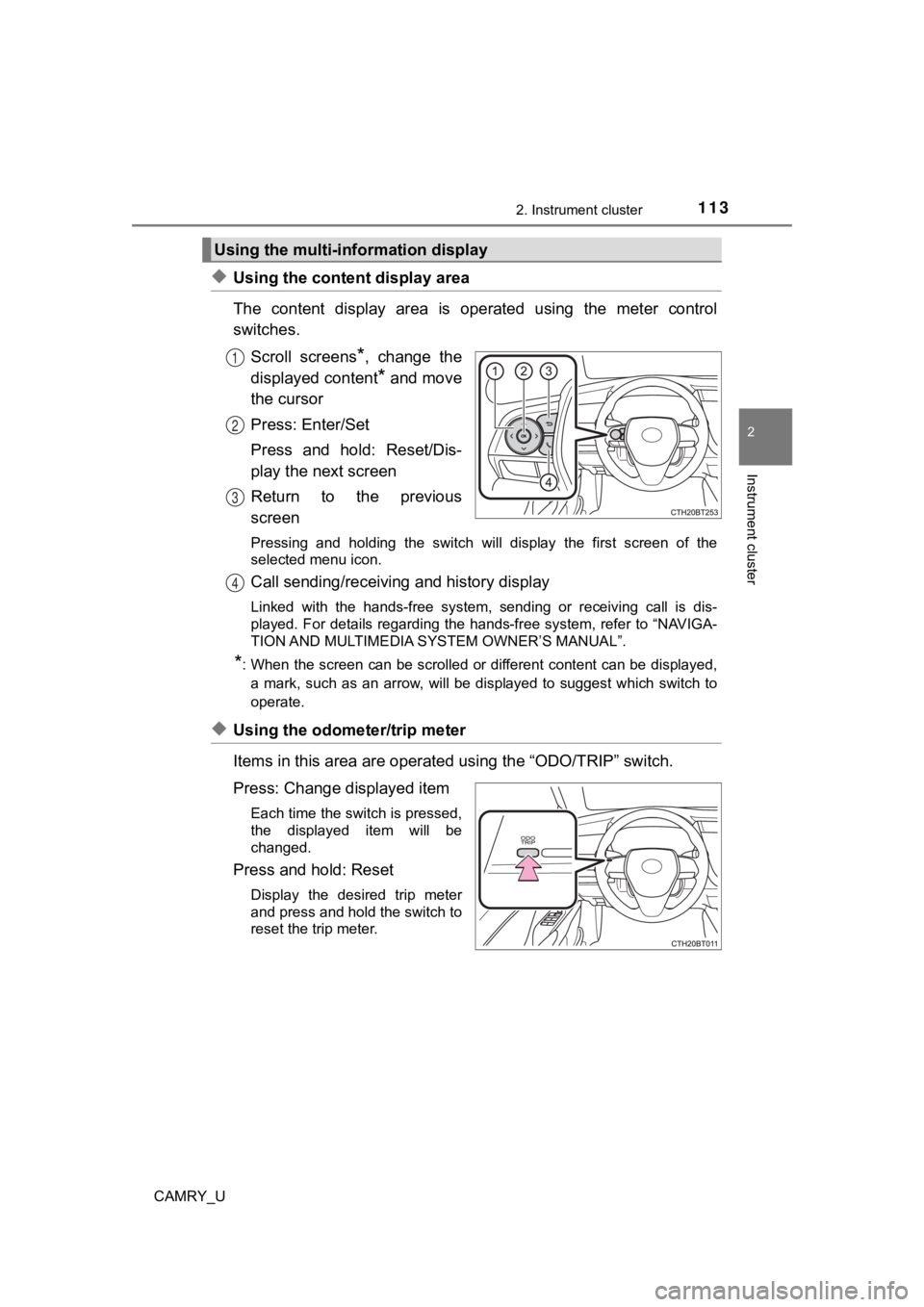
◆Using the content display area
The content display area is operated using the meter control
switches.Scroll screens
*, change the
displayed content
* and move
the cursor
Press: Enter/Set
Press and hold: Reset/Dis-
play the next screen
Return to the previous
screen
Pressing and holding the switch will display the first screen o f the
selected menu icon.
Call sending/receiving and history display
Linked with the hands-free system, sending or receiving call is dis-
played. For details regarding the hands-free system, refer to “ NAVIGA-
TION AND MULTIMEDIA SYS TEM OWNER’S MANUAL”.
*: When the screen can be scrolled or different content can be di splayed,
a mark, such as an arrow, will be displayed to suggest which sw itch to
operate.
◆Using the odometer/trip meter
Items in this area are operated using the “ODO/TRIP” switch.
Press: Change displayed item
Each time the switch is pressed,
the displayed item will be
changed.
Press and hold: Reset
Display the desired trip meter
and press and hold the switch to
reset the trip meter.
Using the multi-information display
1
2
3
4
Page 114 of 664
1142. Instrument cluster
CAMRY_U
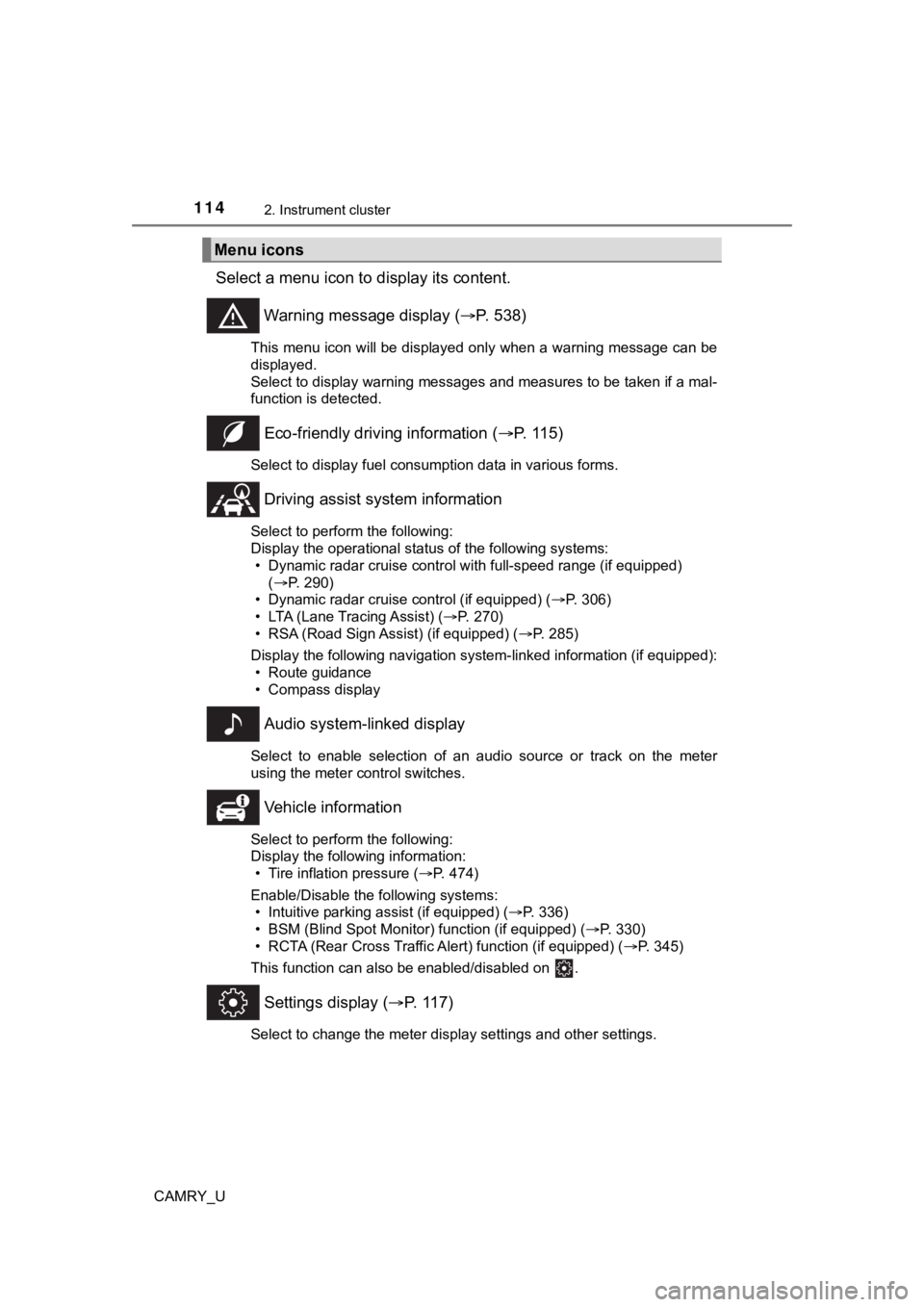
Select a menu icon to display its content.
Warning message display ( P. 538)
This menu icon will be displayed only when a warning message ca n be
displayed.
Select to display warning messages and measures to be taken if a mal-
function is detected.
Eco-friendly drivin g information (P. 115)
Select to display fuel consumption data in various forms.
Driving assist sys tem information
Select to perform the following:
Display the operational status of the following systems:
• Dynamic radar cruise control with full-speed range (if equippe d)
( P. 290)
• Dynamic radar cruise control (if equipped) ( P. 306)
• LTA (Lane Tracing Assist) ( P. 270)
• RSA (Road Sign Assist) (if equipped) ( P. 285)
Display the following navigation system-linked information (if equipped):
• Route guidance
• Compass display
Audio system-linked display
Select to enable selection of an audio source or track on the m eter
using the meter control switches.
Vehicle information
Select to perform the following:
Display the following information: • Tire inflation pressure ( P. 474)
Enable/Disable the following systems: • Intuitive parking assist (if equipped) ( P. 336)
• BSM (Blind Spot Monitor) function (if equipped) ( P. 330)
• RCTA (Rear Cross Traffic Al ert) function (if equipped) (P. 345)
This function can also be enabled/disabled on .
Settings display ( P. 117)
Select to change the meter display settings and other settings.
Menu icons
Page 117 of 664
1172. Instrument cluster
2
Instrument cluster
CAMRY_U■
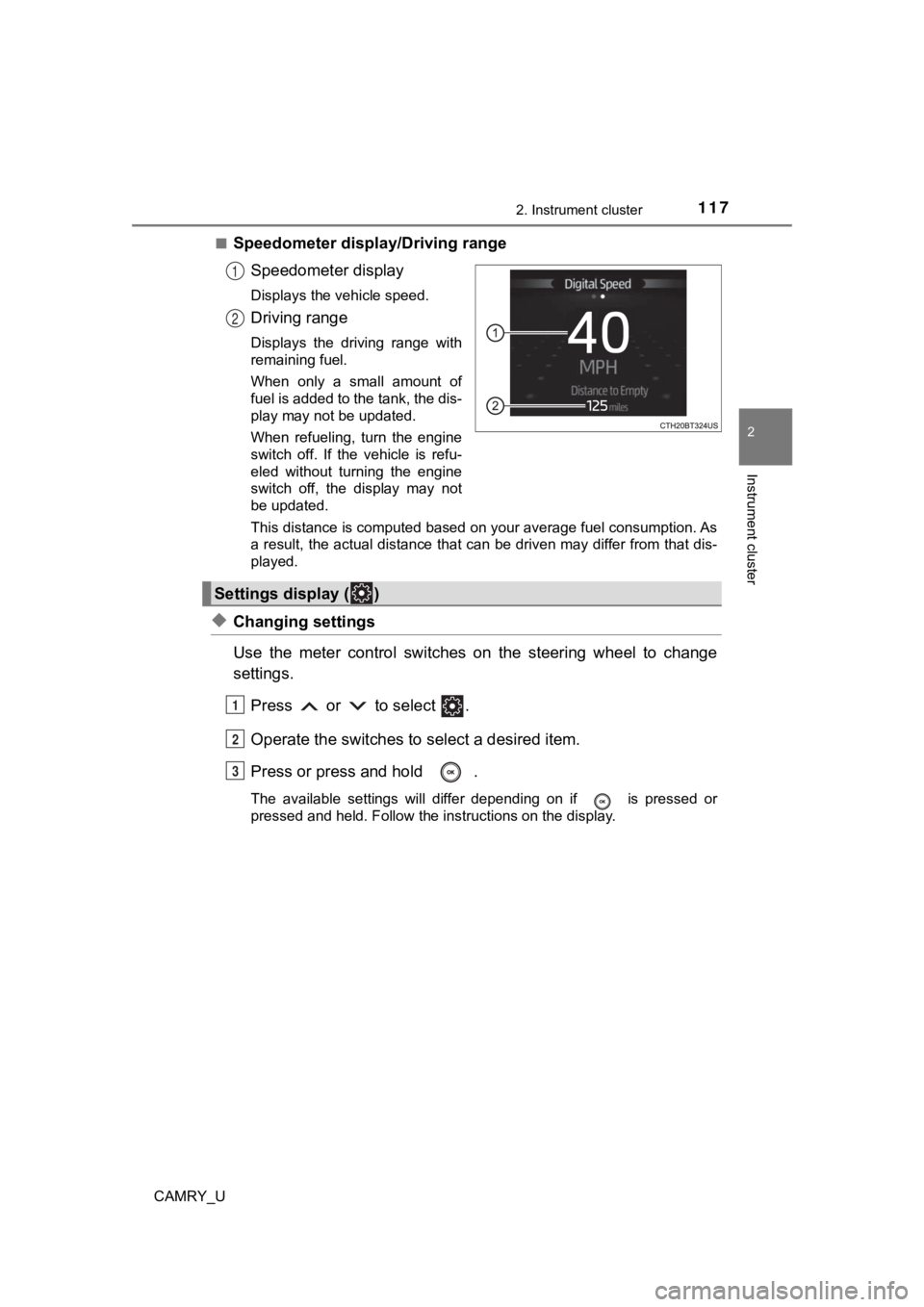
Speedometer display/Driving range
Speedometer display
Displays the vehicle speed.
Driving range
Displays the driving range with
remaining fuel.
When only a small amount of
fuel is added to the tank, the dis-
play may not be updated.
When refueling, turn the engine
switch off. If the vehicle is refu-
eled without turning the engine
switch off, the display may not
be updated.
This distance is computed based on your average fuel consumption. As
a result, the actual distance that can be driven may differ fro m that dis-
played.
◆Changing settings
Use the meter control switches on the steering wheel to change
settings.
Press or to select .
Operate the switches to select a desired item.
Press or press and hold .
The available settings will differ depending on if is pressed or
pressed and held. Follow the instructions on the display.
1
2
Settings display ( )
1
2
3
Page 151 of 664
1513-2. Opening, closing and locking the doors
3
Operation of each component
CAMRY_U
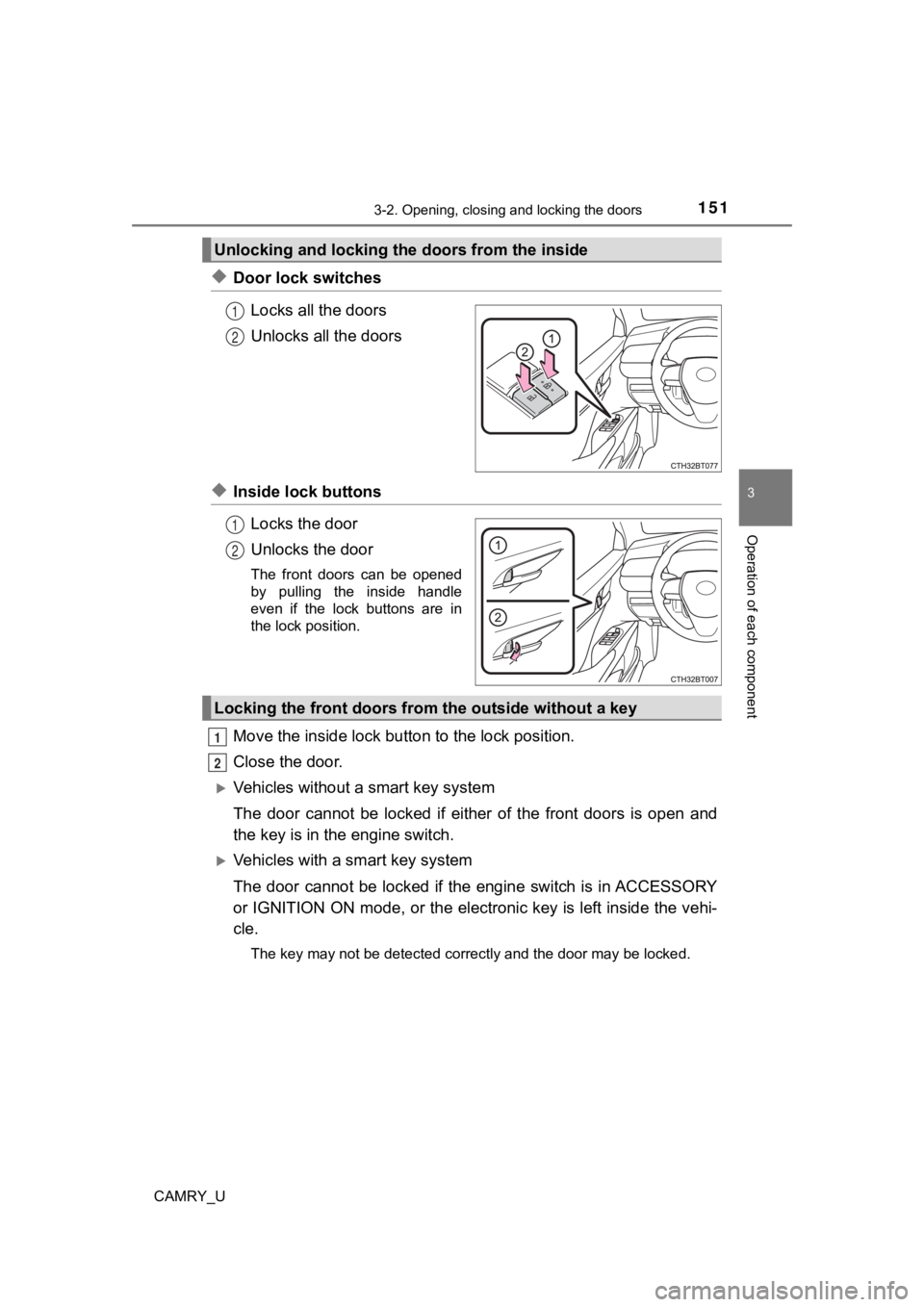
◆Door lock switchesLocks all the doors
Unlocks all the doors
◆Inside lock buttonsLocks the door
Unlocks the door
The front doors can be opened
by pulling the inside handle
even if the lock buttons are in
the lock position.
Move the inside lock bu tton to the lock position.
Close the door.
Vehicles without a smart key system
The door cannot be locked if either of the front doors is open and
the key is in th e engine switch.
Vehicles with a smart key system
The door cannot be locked if the engine switch is in ACCESSORY
or IGNITION ON mode, or the electronic key is left inside the v ehi-
cle.
The key may not be detected correctly and the door may be locke d.
Unlocking and locking the doors from the inside
1
2
1
2
Locking the front doors from the outside without a key
1
2
Page 156 of 664
1563-2. Opening, closing and locking the doors
CAMRY_U
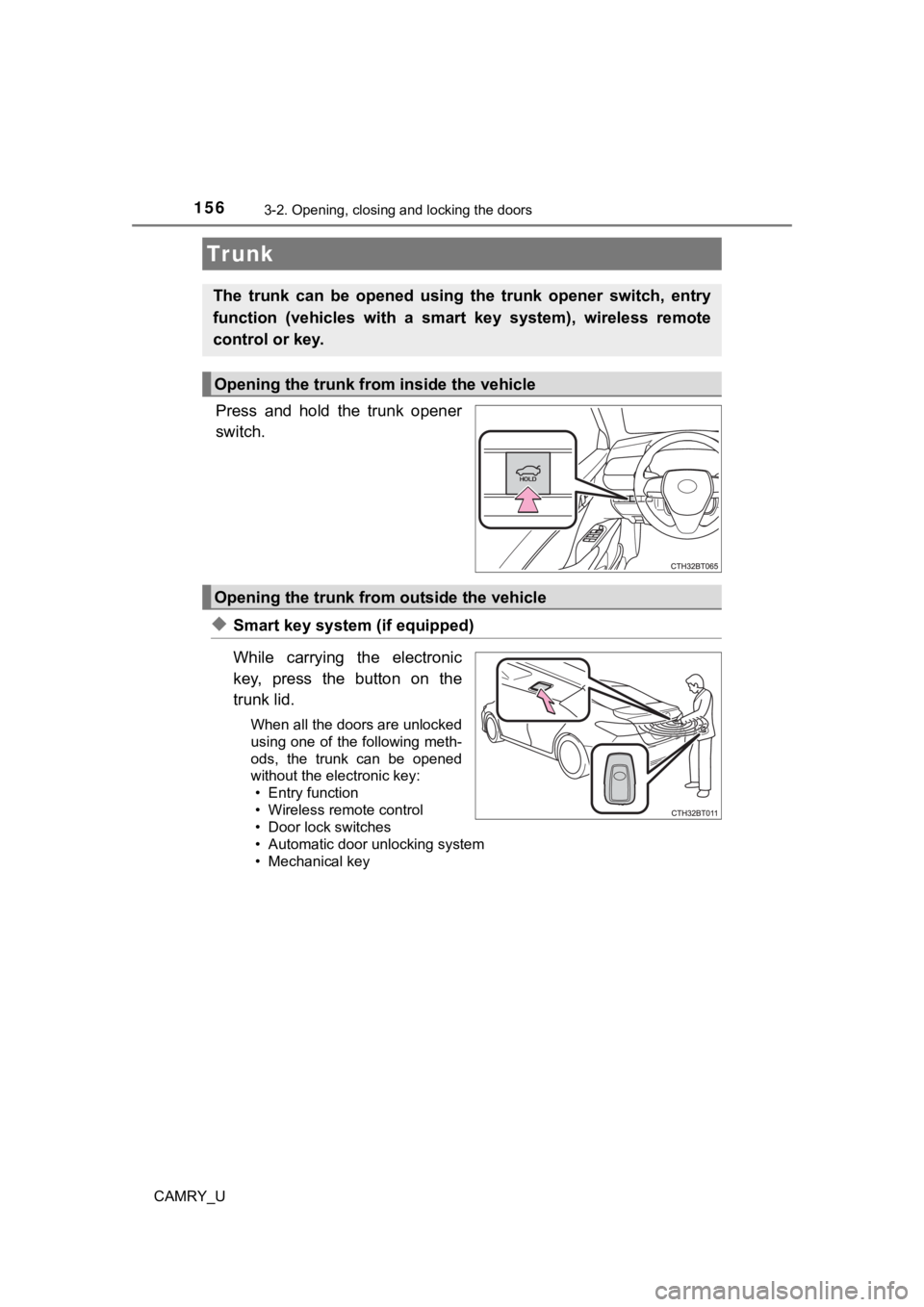
Press and hold the trunk opener
switch.
◆Smart key system (if equipped)
While carrying the electronic
key, press the button on the
trunk lid.
When all the doors are unlocked
using one of the following meth-
ods, the trunk can be opened
without the electronic key:• Entry function
• Wireless remote control
• Door lock switches
• Automatic door unlocking system
• Mechanical key
Tr unk
The trunk can be opened using the trunk opener switch, entry
function (vehicles with a smart key system), wireless remote
control or key.
Opening the trunk from inside the vehicle
Opening the trunk from outside the vehicle
Page 179 of 664
179
3
Operation of each component
CAMRY_U
3-5. Opening and closing the windows
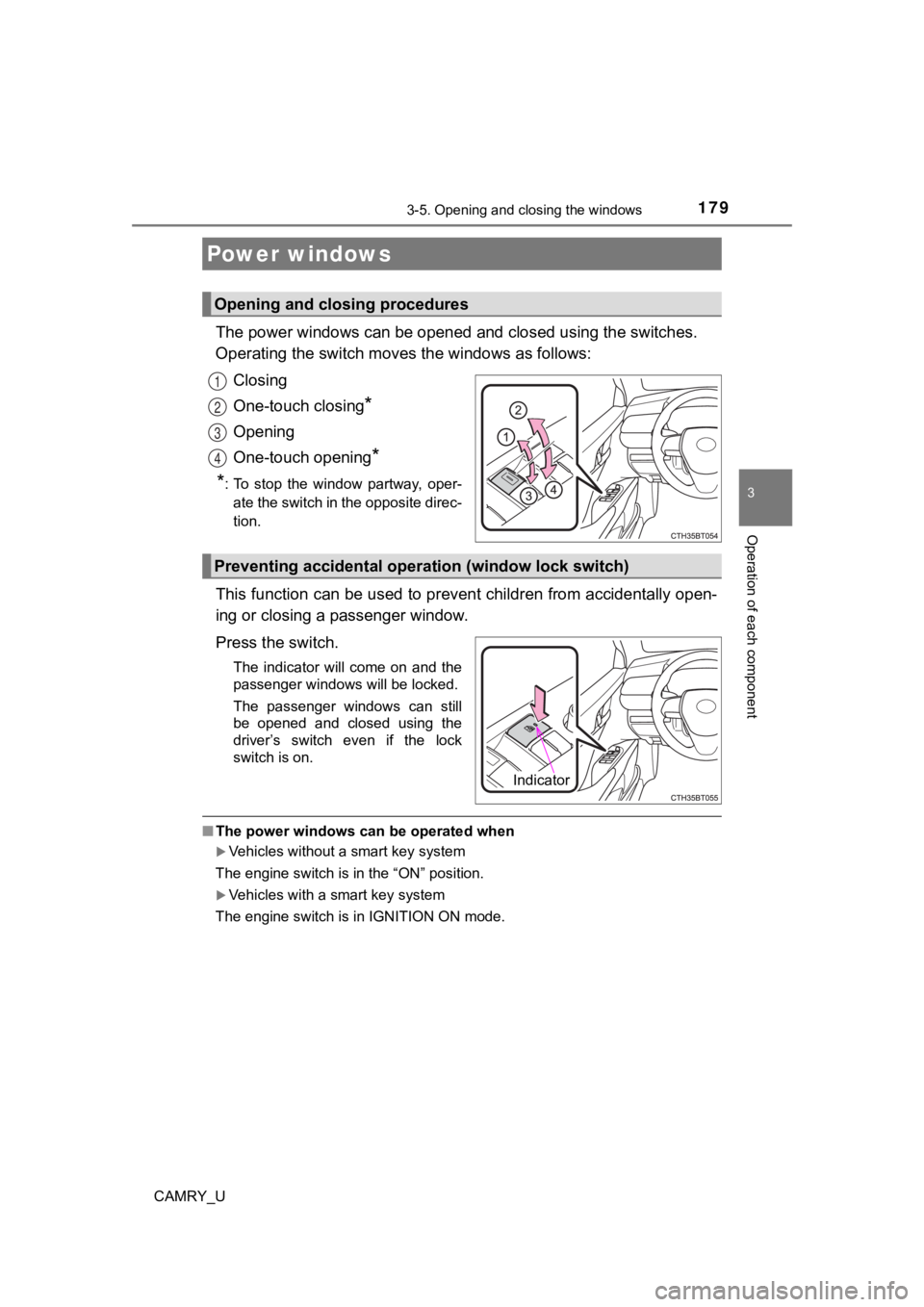
The power windows can be opened and closed using the switches.
Operating the switch moves the windows as follows:
Closing
One-touch closing
*
Opening
One-touch opening
*
*
: To stop the window partway, oper- ate the switch in the opposite direc-
tion.
This function can be used to prev ent children from accidentally open-
ing or closing a passenger window.
Press the switch.
The indicator will come on and the
passenger windows will be locked.
The passenger windows can still
be opened and closed using the
driver’s switch even if the lock
switch is on.
■ The power windows can be operated when
Vehicles without a smart key system
The engine switch is in the “ON” position.
Vehicles with a smart key system
The engine switch is in IGNITION ON mode.
Power windows
Opening and closing procedures
1
2
3
4
Preventing accidental operation (window lock switch)
Indicator
Page 183 of 664
1833-5. Opening and closing the windows
3
Operation of each component
CAMRY_U
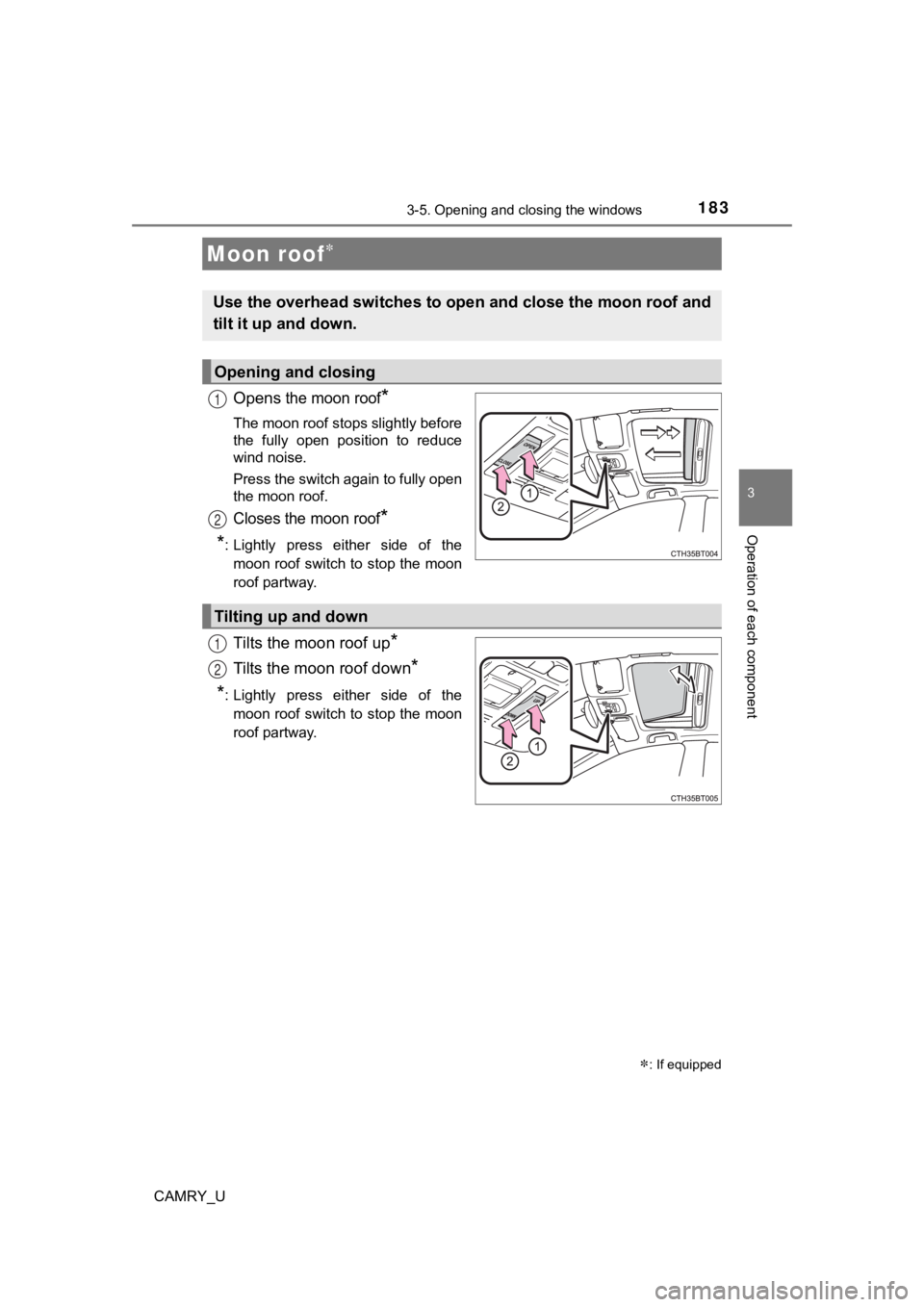
Opens the moon roof*
The moon roof stops slightly before
the fully open position to reduce
wind noise.
Press the switch again to fully open
the moon roof.
Closes the moon roof*
*
: Lightly press either side of the moon roof switch to stop the moon
roof partway.
Tilts the moon roof up*
Tilts the moon roof down*
*: Lightly press either side of themoon roof switch to stop the moon
roof partway.
Moon roof
: If equipped
Use the overhead switches to open and close the moon roof and
tilt it up and down.
Opening and closing
1
2
Tilting up and down
1
2
Page 187 of 664
1873-5. Opening and closing the windows
3
Operation of each component
CAMRY_U
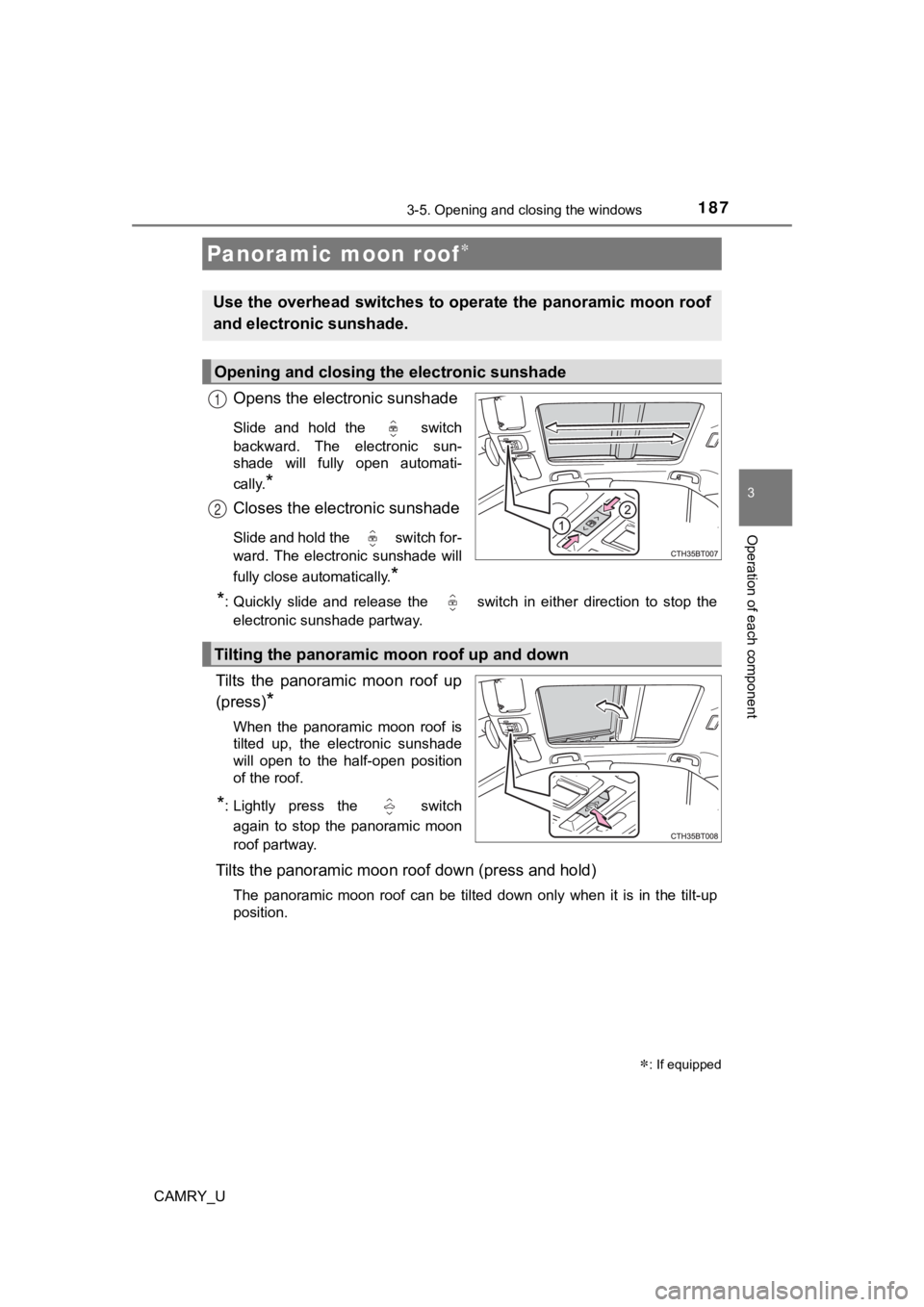
Opens the electronic sunshade
Slide and hold the switch
backward. The electronic sun-
shade will fully open automati-
cally.
*
Closes the electronic sunshade
Slide and hold the switch for-
ward. The electronic sunshade will
fully close automatically.
*
*
: Quickly slide and release the switch in either direction to s top the
electronic sunshade partway.
Tilts the panoramic moon roof up
(press)
*
When the panoramic moon roof is
tilted up, the electronic sunshade
will open to the half-open position
of the roof.
*: Lightly press the switch
again to stop the panoramic moon
roof partway.
Tilts the panoramic moon roof down (press and hold)
The panoramic moon roof can be tilted down only when it is in t he tilt-up
position.
Panoramic moon roof
: If equipped
Use the overhead switches to operate the panoramic moon roof
and electronic sunshade.
Opening and closing th e electronic sunshade
1
2
Tilting the panoramic moon roof up and down
Page 193 of 664

193
4Driving
CAMRY_U4-1. Before driving
Driving the vehicle ............. 194
Cargo and luggage ........... 203
Vehicle load limits ............. 206
Trailer towing..................... 207
Dinghy towing ................... 208
4-2. Driving procedures Engine (ignition) switch (vehicles without a
smart key system) ........... 209
Engine (ignition) switch (vehicles with a
smart key system) ........... 211
Automatic transmission ..... 217
Turn signal lever................ 223
Parking brake .................... 224
Electric parking brake........ 225
Brake Hold ........................ 229
4-3. Operating the lights and wipers
Headlight switch ................ 231
AHB (Automatic High Beam) ............................. 236
Windshield wipers and washer ............................ 240
4-4. Refueling Opening the fuel tank cap .................................. 244 4-5. Using the driving
support systems
Toyota Safety Sense 2.5+...................... 248
PCS (Pre-Collision System)........................... 254
LTA (Lane Tracing Assist) ............................. 270
RSA (Road Sign Assist) .... 285
Dynamic radar cruise control with full-speed
range............................... 290
Dynamic radar cruise control ............................. 306
Driving assist systems ...... 322
BSM (Blind Spot Monitor)........................... 330
Intuitive parking assist....... 336
RCTA (Rear Cross Traffic Alert) ............................... 345
RCD (Rear Camera Detection) ....................... 354
PKSB (Parking Support Brake) ............................. 360
Parking Support Brake function (static
objects) ........................... 368
Parking Support Brake function (rear-crossing
vehicles).......................... 372
Driving mode select switches .......................... 375
4-6. Driving tips Winter driving tips ............. 377
Page 218 of 664
2184-2. Driving procedures
CAMRY_U
*1: Shifting to the D position allows the system to select a gear suitable for the
driving conditions. Setting the shift lever to the D position is recommended
for normal driving.
*2: Selecting shift ranges using S mode restricts the upper limit of the possible
gear ranges, controls engine braking force, and prevents unnece ssary
upshifting.
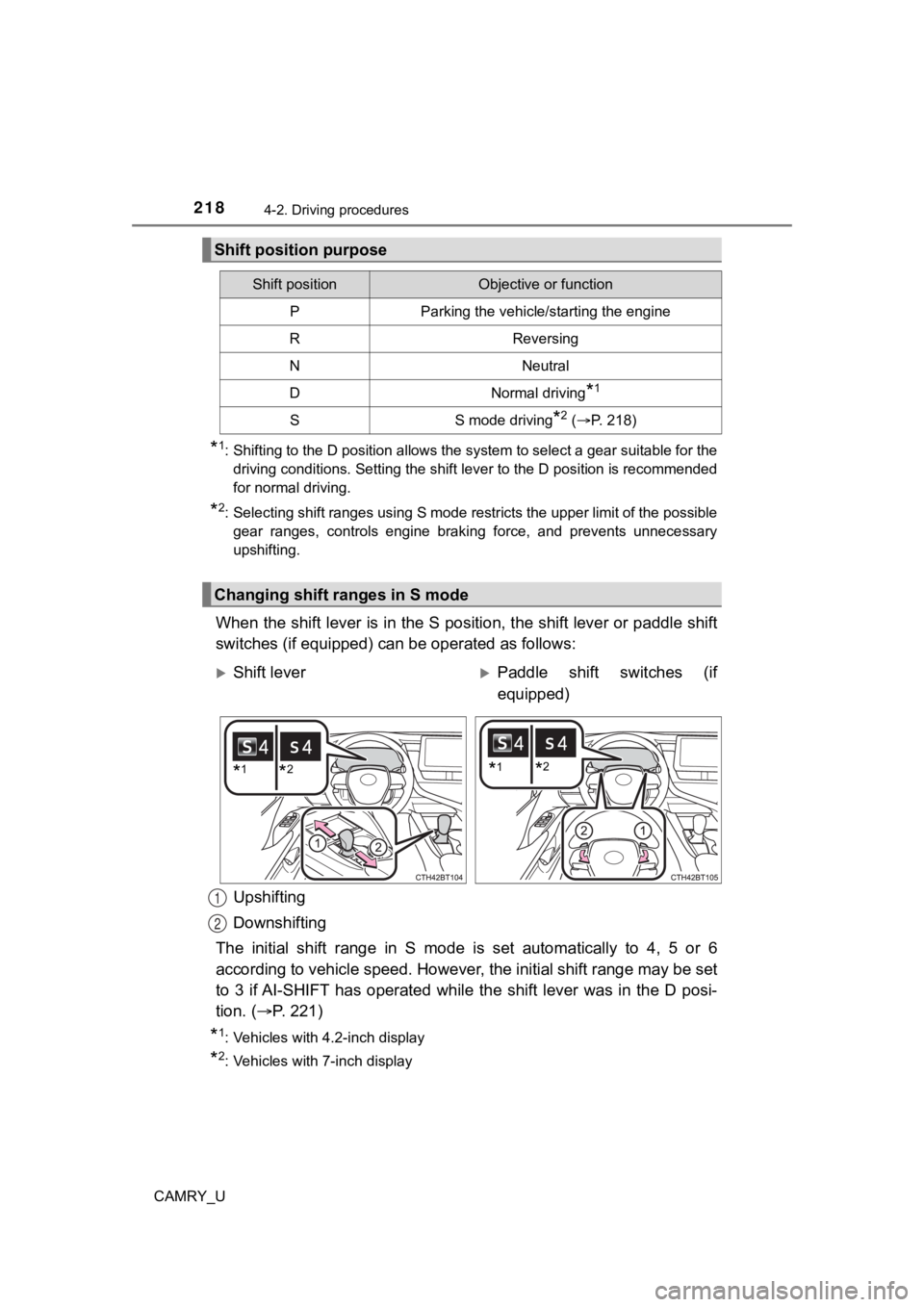
When the shift lever is in the S position, the shift lever or p addle shift
switches (if equipped) can be operated as follows:
Upshifting
Downshifting
The initial shift range in S mode is set automatically to 4, 5 or 6
according to vehicle speed. However, the initial shift range may be set
to 3 if AI-SHIFT has operated while the shift lever was in the D posi-
tion. ( P. 221)
*1: Vehicles with 4.2-inch display
*2: Vehicles with 7-inch display
Shift position purpose
Shift positionObjective or function
PParking the vehicle/starting the engine
RReversing
NNeutral
DNormal driving*1
SS mode driving*2 (P. 218)
Changing shift ranges in S mode
Shift leverPaddle shift switches (if
equipped)
*1*2*1*2
1
2