gas TOYOTA CAMRY 2023 Owners Manual
[x] Cancel search | Manufacturer: TOYOTA, Model Year: 2023, Model line: CAMRY, Model: TOYOTA CAMRY 2023Pages: 664, PDF Size: 11.28 MB
Page 2 of 664

TABLE OF CONTENTS2
CAMRY_UFor your information....................... 8
Reading this manual .................... 14
How to search .............................. 15
Pictorial index .............................. 16
1-1. For safe use
Before driving ...................... 26
For safe driving ................... 28
Seat belts ............................ 30
SRS airbags ........................ 36
Front passenger occupant classification system ......... 49
Exhaust gas precautions ..... 54
1-2. Child safety Riding with children ............. 55
Child restraint systems ........ 56
1-3. Emergency assistance Safety Connect.................... 75
1-4. Theft deterrent system Engine immobilizer system............................... 80
Alarm ................................... 82 2. Instrument cluster
Warning lights and indicators ........................... 88
Gauges and meters ............. 94
Multi-information display (4.2-inch display) ............... 98
Multi-information display (7-inch display) ................ 111
Head-up display................. 128
Fuel consumption information....................... 134
1For safety and security
2Instrument cluster
Page 25 of 664

25
For safety and security1
CAMRY_U1-1. For safe use
Before driving ...................... 26
For safe driving ................... 28
Seat belts ............................ 30
SRS airbags ........................ 36
Front passenger occupant classification system ......... 49
Exhaust gas precautions..... 54
1-2. Child safety Riding with children ............. 55
Child restraint systems........ 56
1-3. Emergency assistance Safety Connect ................... 75
1-4. Theft deterrent system Engine immobilizer system .............................. 80
Alarm................................... 82
Page 38 of 664
381-1. For safe use
CAMRY_U
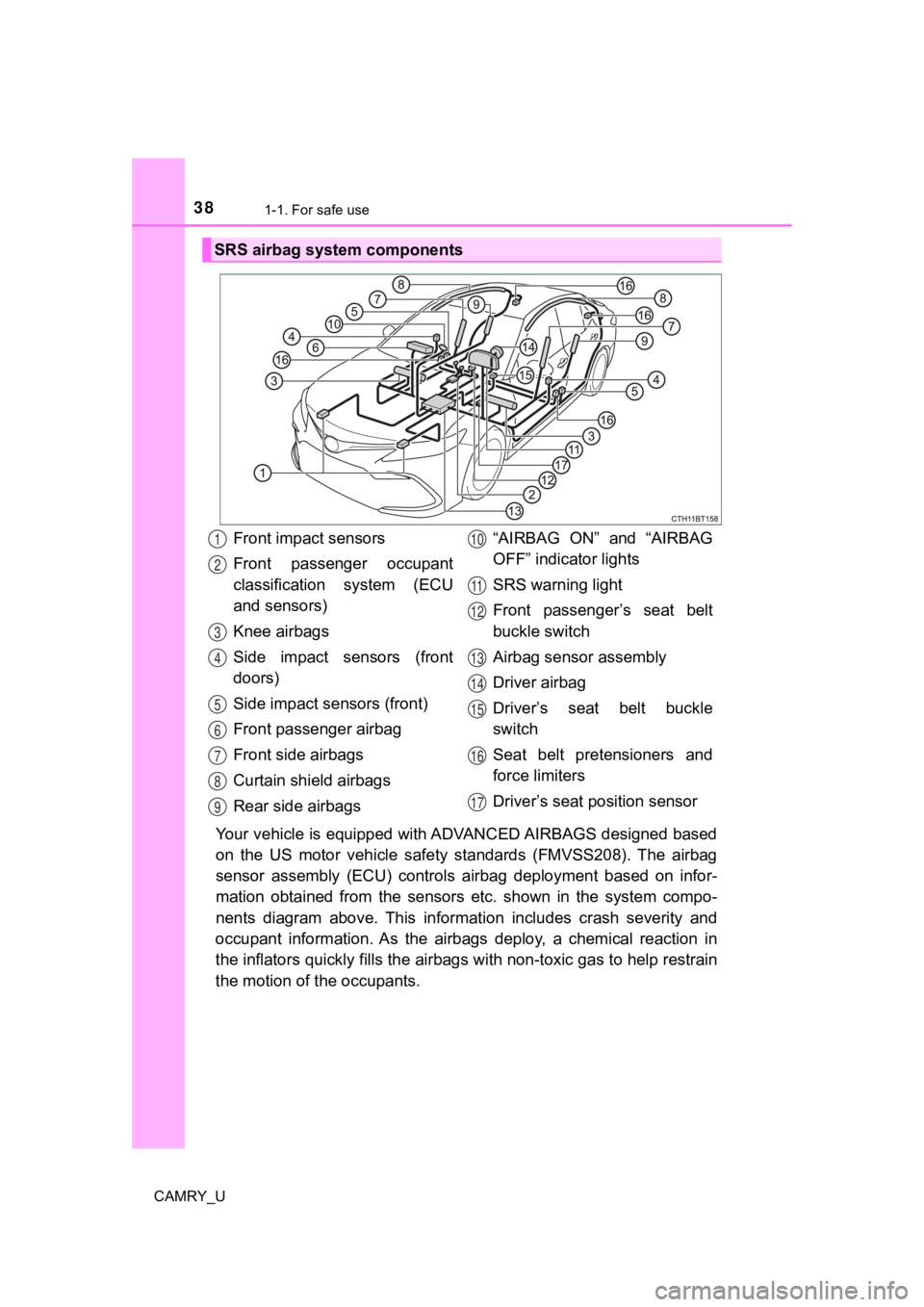
Your vehicle is equipped with ADVANCED AIRBAGS designed based
on the US motor vehicle safety standards (FMVSS208). The airbag
sensor assembly (ECU) controls airbag deployment based on infor-
mation obtained from the sensors etc. shown in the system compo -
nents diagram above. This informat ion includes crash severity and
occupant information. As the airbags deploy, a chemical reactio n in
the inflators quickly fills the airbags with non-toxic gas to h elp restrain
the motion of t he occupants.
SRS airbag system components
Front impact sensors
Front passenger occupant
classification system (ECU
and sensors)
Knee airbags
Side impact sensors (front
doors)
Side impact sensors (front)
Front passenger airbag
Front side airbags
Curtain shield airbags
Rear side airbags “AIRBAG ON” and “AIRBAG
OFF” indicator lights
SRS warning light
Front passenger’s seat belt
buckle switch
Airbag sensor assembly
Driver airbag
Driver’s seat belt buckle
switch
Seat belt pretensioners and
force limiters
Driver’s seat p
osition sensor1
2
3
4
5
6
7
8
9
10
11
12
13
14
15
16
17
Page 44 of 664

441-1. For safe use
CAMRY_U
■If the SRS airbags deploy (inflate)
●Slight abrasions, burns, bruising etc., may be sustained from S RS airbags,
due to the extremely high speed deployment (inflation) by hot gases.
● A loud noise and white powder will be emitted.
● Parts of the airbag module (steering wheel hub, airbag cover and inflator) as
well as the front seats, parts of the front and rear pillars, and roof side rails,
may be hot for several minutes. The airbag itself may also be h ot.
● The windshield may crack.
● All of the doors will be unlocked. ( P. 154)
● The brakes and stop lights will be controlled automatically. ( P. 322)
● The interior lights will turn on automatically. ( P. 408)
● The emergency flashers will turn on automatically. ( P. 516)
● Fuel supply to the engine will be stopped. ( P. 527)
WARNING
■Modification and disposal of SRS airbag system components
Do not dispose of your vehicle or perform any of the following modifications
without consulting your Toyota dealer. The SRS airbags may malfunction or
deploy (inflate) accidentally, causing death or serious injury.
● Installation, removal, disassembly and repair of the SRS airbags
● Repairs, modifications, removal or replacement of the steering wheel,
instrument panel, dashboard, seats or seat upholstery, front, side and rear
pillars, roof side rails, front door panels, front door trims or front door
speakers
● Modifications to the front door panel (such as making a hole in it)
● Repairs or modifications of the front fender, front bumper, or side of the
occupant compartment
● Installation of a grille guard (bull bars, kangaroo bar, etc.), snow plows,
winches or roof luggage carrier
● Modifications to the vehicle’s suspension system
● Installation of electronic devices such as mobile two-way radio s and CD
players
● Modifications to your vehicle for a person with a physical disability
Page 54 of 664
541-1. For safe use
CAMRY_U
Exhaust gas precautions
Harmful substance to the human body is included in exhaust
gases if inhaled.
WARNING
Exhaust gases include harmful carbon monoxide (CO), which is colorless and
odorless. Observe the following precautions.
Failure to do so may cause exhaust gases enter the vehicle and may lead to
an accident caused by light-headedness, or may lead to death or a serious
health hazard.
■ Important points while driving
● Keep the trunk lid closed.
● If you smell exhaust gases in the vehicle even when the trunk lid is closed,
open the windows and have the vehicle inspected at your Toyota dealer as
soon as possible.
■ When parking
● If the vehicle is in a poorly ventilated area or a closed area, such as a
garage, stop the engine.
● Do not leave the vehicle with the engine on for a long time.
If such a situation cannot be avoided, park the vehicle in an open space
and ensure that exhaust fumes do not enter the vehicle interior .
● Do not leave the engine running in an area with snow build-up, or where it
is snowing. If snowbanks build up around the vehicle while the engine is
running, exhaust gases may collect and enter the vehicle.
■ Exhaust pipe
The exhaust system needs to be checked periodically. If there is a hole or
crack caused by corrosion, damage to a joint or abnormal exhaust noise, be
sure to have the vehicle inspected and repaired by your Toyota dealer.
Page 110 of 664

1102. Instrument cluster
CAMRY_U
WARNING
■Caution for use while driving
● When operating the multi-information display while driving, pay extra
attention to the safety of the area around the vehicle.
● Do not look continuously at the multi-information display while driving as
you may fail to see pedestrians, objects on the road, etc. ahea d of the
vehicle.
■ The information display at low temperatures
Allow the interior of the vehicle to warm up before using the liquid crystal
information display. At extremely low temperatures, the information display
monitor may respond slowly, and display changes may be delayed.
For example, there is a lag between the driver’s shifting and the new gear
number appearing on the display. This lag could cause the drive r to down-
shift again, causing rapid and excessive engine braking and pos sibly an
accident resulting in death or injury.
■ Cautions during setting up the display
As the engine needs to be running during setting up the display , ensure that
the vehicle is parked in a place with adequate ventilation. In a closed area
such as a garage, exhaust gases including harmful carbon monoxi de (CO)
may collect and enter the vehicle. This may lead to death or a serious
health hazard.
NOTICE
■ While setting up the display
To prevent battery discharge, ensure that the engine is running while setting
up the display features.
Page 127 of 664
1272. Instrument cluster
2
Instrument cluster
CAMRY_U
WARNING
■Caution for use while driving
● When operating the multi-information display while driving, pay extra
attention to the safety of the area around the vehicle.
● Do not look continuously at the multi-information display while driving as
you may fail to see pedestrians, objects on the road, etc. ahea d of the
vehicle.
■ The information display at low temperatures
Allow the interior of the vehicle to warm up before using the liquid crystal
information display. At extremely low temperatures, the information display
monitor may respond slowly, and display changes may be delayed.
For example, there is a lag between the driver’s shifting and the new gear
number appearing on the display. This lag could cause the drive r to down-
shift again, causing rapid and excessive engine braking and pos sibly an
accident resulting in death or injury.
■ Cautions during setting up the display
As the engine needs to be running during setting up the display , ensure that
the vehicle is parked in a place with adequate ventilation. In a closed area
such as a garage, exhaust gases including harmful carbon monoxi de (CO)
may collect and enter the vehicle. This may lead to death or a serious
health hazard.
NOTICE
■ While setting up the display
To prevent battery discharge, ensure that the engine is running while setting
up the display features.
Page 132 of 664

1322. Instrument cluster
CAMRY_U
■Head-up display
The head-up display may seem dark or hard to see when viewed th rough
sunglasses, especially polarized sunglasses.
Adjust the brightness of the head-up display or remove your sunglasses.
■ Display brightness
The brightness of the head-up display can be adjusted on of the multi-
information display. Also, it is automatically adjusted accordi ng to the ambient
brightness.
■ Enabling/disabling of the head-up display
If the head-up display is disabled, it will remain disabled when the engine
switch is turned off then back to IGNITION ON mode.
■ Street name display (vehicles with a navigation system)
Only street names which are included in the map data will be displayed.
WARNING
■Before using the head-up display
● Check that the position and brightness of the head-up display i mage does
not interfere with safe driving. Incorrect adjustment of the image’s position
or brightness may obstruct the driver’s view and lead to an accident,
resulting in death or serious injury.
● Do not continuously look at the head-up display while driving a s you may
fail to see pedestrians, objects on the road, etc. ahead of the vehicle.
■ Caution for changing settings of the head-up display
As the engine needs to be running while changing the settings of the head-
up display, ensure that the vehicle is parked in a place with adequate venti-
lation. In a closed area such as a garage, exhaust gases includ ing harmful
carbon monoxide (CO) may collect and enter the vehicle. This may lead to
death or a serious health hazard.
Page 144 of 664

1443-1. Key information
CAMRY_U■
If you lose your keys
New genuine keys can be made by your Toyota dealer using the ot her key
(vehicles without a smart key system) or the other mechanical k ey (vehicles
with a smart key system) and the key number stamped on your key number
plate. Keep the plate in a safe place such as your wallet, not in the vehicle.
■ When riding in an aircraft
When bringing a key with wireless remote control function onto an aircraft,
make sure you do not press any button on the key while inside t he aircraft
cabin. If you are carrying the key in your bag etc., ensure tha t the buttons are
not likely to be pressed accidentally. Pressing a button may cause the key to
emit radio waves that could interfere with the operation of the aircraft.
■ Conditions affecting operation
Vehicles without a smart key system
The wireless remote control function may not operate normally i n the follow-
ing situations:
● When the wireless key battery is depleted
● Near a TV tower, electric power plant, gas station, radio stati on, large dis-
play, airport or other facility that generates strong radio wav es or electrical
noise
● When carrying a portable radio, cellular phone or other wireles s communi-
cation devices
● When the wireless key is in contact with, or is covered by a me tallic object
● When other wireless key (that emit radio waves) is being used n earby
● If window tint with a metallic content or metallic objects are attached to the
rear window
Vehicles with a smart key system
P. 163
Page 163 of 664
1633-2. Opening, closing and locking the doors
3
Operation of each component
CAMRY_U■
Battery-saving function
The battery-saving function will be activated in order to preve nt the electronic
key battery and the vehicle battery from being discharged while the vehicle is
not in operation for a long time.
● In the following situations, the smart key system may take some time to
unlock the doors.
• The electronic key has been left in an area of approximately 6 ft. (2 m) of
the outside of the vehicle for 10 minutes or longer.
• The smart key system has not been used for 5 days or longer.
● If the smart key system has not been used for 14 days or longer , the doors
cannot be unlocked at any doors except the driver’s door. In th is case, take
hold of the driver’s door handle, or use the wireless remote co ntrol or the
mechanical key, to unlock the doors.
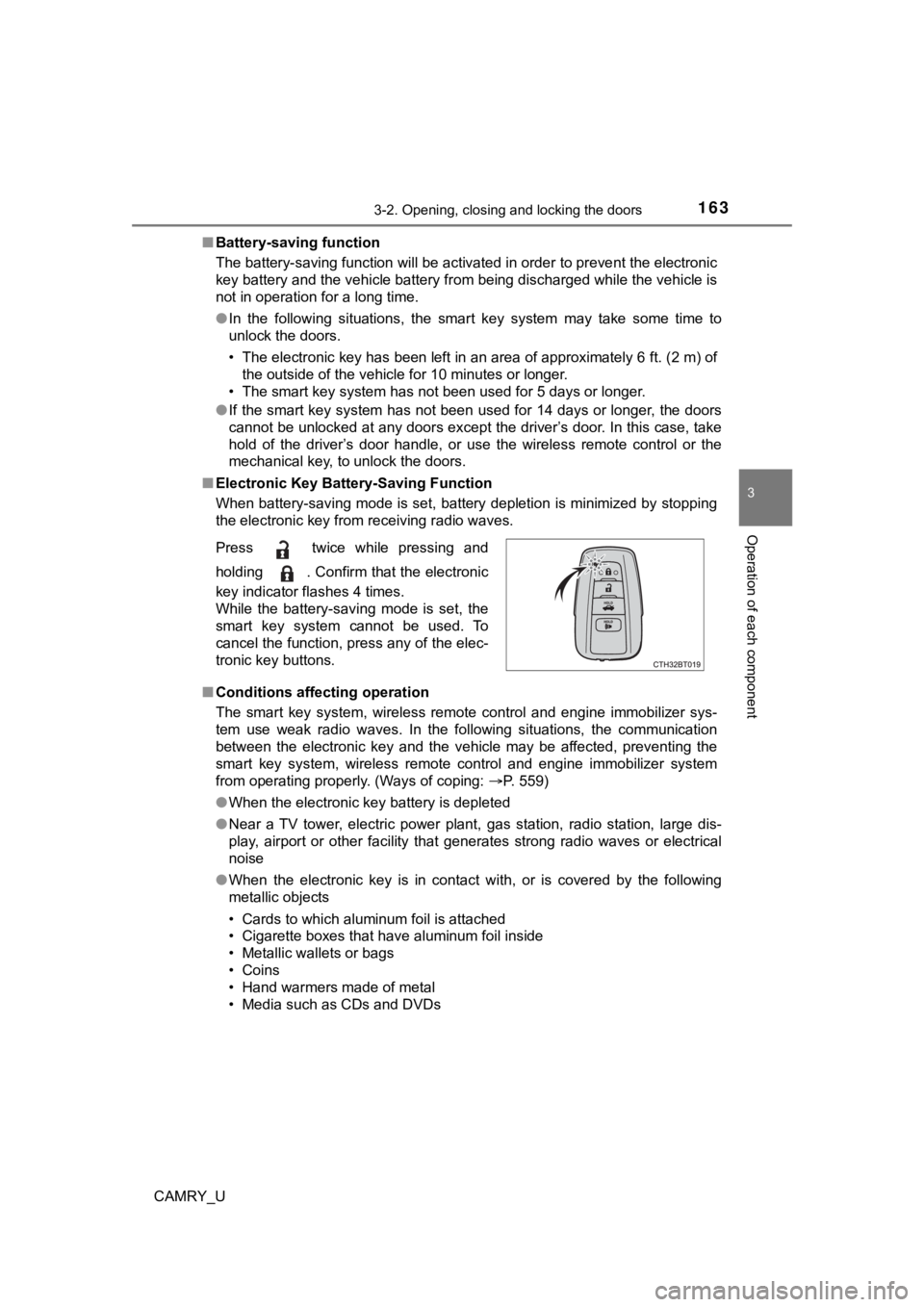
■ Electronic Key Battery-Saving Function
When battery-saving mode is set, battery depletion is minimized by stopping
the electronic key from receiving radio waves.
■ Conditions affecting operation
The smart key system, wireless remote control and engine immobi lizer sys-
tem use weak radio waves. In the following situations, the communication
between the electronic key and the vehicle may be affected, pre venting the
smart key system, wireless remote control and engine immobilizer system
from operating properly. (Ways of coping: P. 559)
● When the electronic key battery is depleted
● Near a TV tower, electric power plant, gas station, radio stati on, large dis-
play, airport or other facility that generates strong radio wav es or electrical
noise
● When the electronic key is in contact with, or is covered by the following
metallic objects
• Cards to which aluminum foil is attached
• Cigarette boxes that have aluminum foil inside
• Metallic wallets or bags
• Coins
• Hand warmers made of metal
• Media such as CDs and DVDs
Press twice while pressing and
holding . Confirm that the electronic
key indicator flashes 4 times.
While the battery-saving mode is set, the
smart key system cannot be used. To
cancel the function, press any of the elec-
tronic key buttons.