wheel TOYOTA CAMRY HYBRID 2019 (in English) User Guide
[x] Cancel search | Manufacturer: TOYOTA, Model Year: 2019, Model line: CAMRY HYBRID, Model: TOYOTA CAMRY HYBRID 2019Pages: 592, PDF Size: 10.78 MB
Page 87 of 592

871-4. Hybrid system
1
For safety and security
WARNING
■Road accident cautions
Observe the following precautions to reduce the risk of death o r serious
injury:
● Pull your vehicle off the road, apply the parking brake, shift the shift lever
to P, and turn the hybrid system off.
● Do not touch the high voltage parts, cables and connectors.
● If electric wires are exposed inside or outside your vehicle, a n electric
shock may occur. Never touch exposed electric wires.
● If a fire occurs in the hybrid vehicle, leave the vehicle as soon as possible.
Never use a fire extinguisher that is not meant for electric fires. Using even
a small amount of water may be dangerous.
● If your vehicle needs to be towed, do so with front wheels raised. If the
wheels connected to the electric motor (traction motor) are on the ground
when towing, the motor may continue to generate electricity. Th is may
cause a fire. ( P. 472)
● Carefully inspect the ground under the vehicle. If you find that liquid has
leaked onto the ground, the fuel system may have been damaged. Leave
the vehicle as soon as possible.
● If electrolyte is leaking from the hybrid battery (traction bat tery), do not
approach the vehicle.
Even in the unlikely event that the hybrid battery (traction ba ttery) is dam-
aged, the internal construction of the battery will prevent a l arge amount
of electrolyte from leaking out. However, any electrolyte that does leak out
will give off a vapor. This vapor is an irritant to skin and ey es and could
cause acute poisoning if inhaled.
AXVH70 model*
● Do not touch the hybrid battery (traction battery) if liquid is leaking from or
adhering to it. If electrolyte (carbonic-based organic electrol yte) from the
hybrid battery (traction battery) comes into contact with the e yes or skin, it
could cause blindness or skin wounds. In the unlikely event tha t it comes
into contact with the eyes or skin, wash it off immediately wit h a large
amount of water, and seek immediate medical attention.
● Do not bring burning or high-tem perature items close to the electrolyte.
The electrolyte may ignite and cause a fire.
*: The model code is indicated on the Certification Label. ( P. 523)
AXVH71 models*
●If a fluid leak occurs, do not touch the fluid as it may be str ong alkaline
electrolyte from the hybrid battery (traction battery). If it c omes into contact
with your skin or eyes, wash it off immediately with a large am ount of water
or, if possible, boric acid solution. Seek immediate medical at tention.
*: The model code is indicated on the Certification Label. (P. 523)
Page 111 of 592
1112. Instrument cluster
2
Instrument cluster
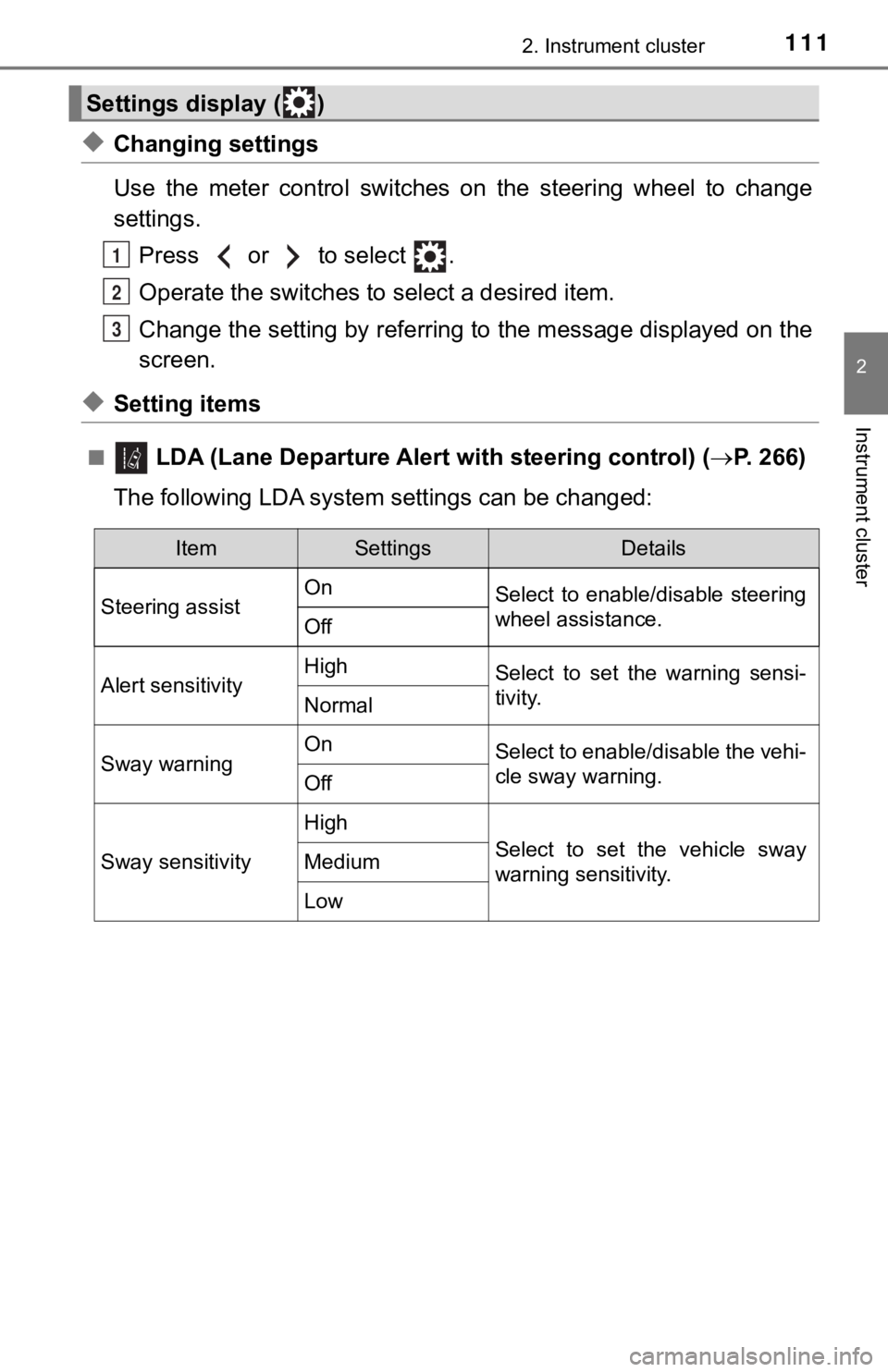
◆Changing settings
Use the meter control switches on the steering wheel to change
settings.Press or to select .
Operate the switches to select a desired item.
Change the setting by referring to the message displayed on the
screen.
◆Setting items
■ LDA (Lane Departure Alert with steering control) (P. 266)
The following LDA syste m settings can be changed:
Settings display ( )
1
2
3
ItemSettingsDetails
Steering assist On
Select to enable/disable steering
wheel assistance.
Off
Alert sensitivityHighSelect to set the warning sensi-
tivity.
Normal
Sway warningOnSelect to enable/disable the vehi-
cle sway warning.
Off
Sway sensitivity
High
Select to set the vehicle sway
warning sensitivity.Medium
Low
Page 113 of 592
1132. Instrument cluster
2
Instrument cluster
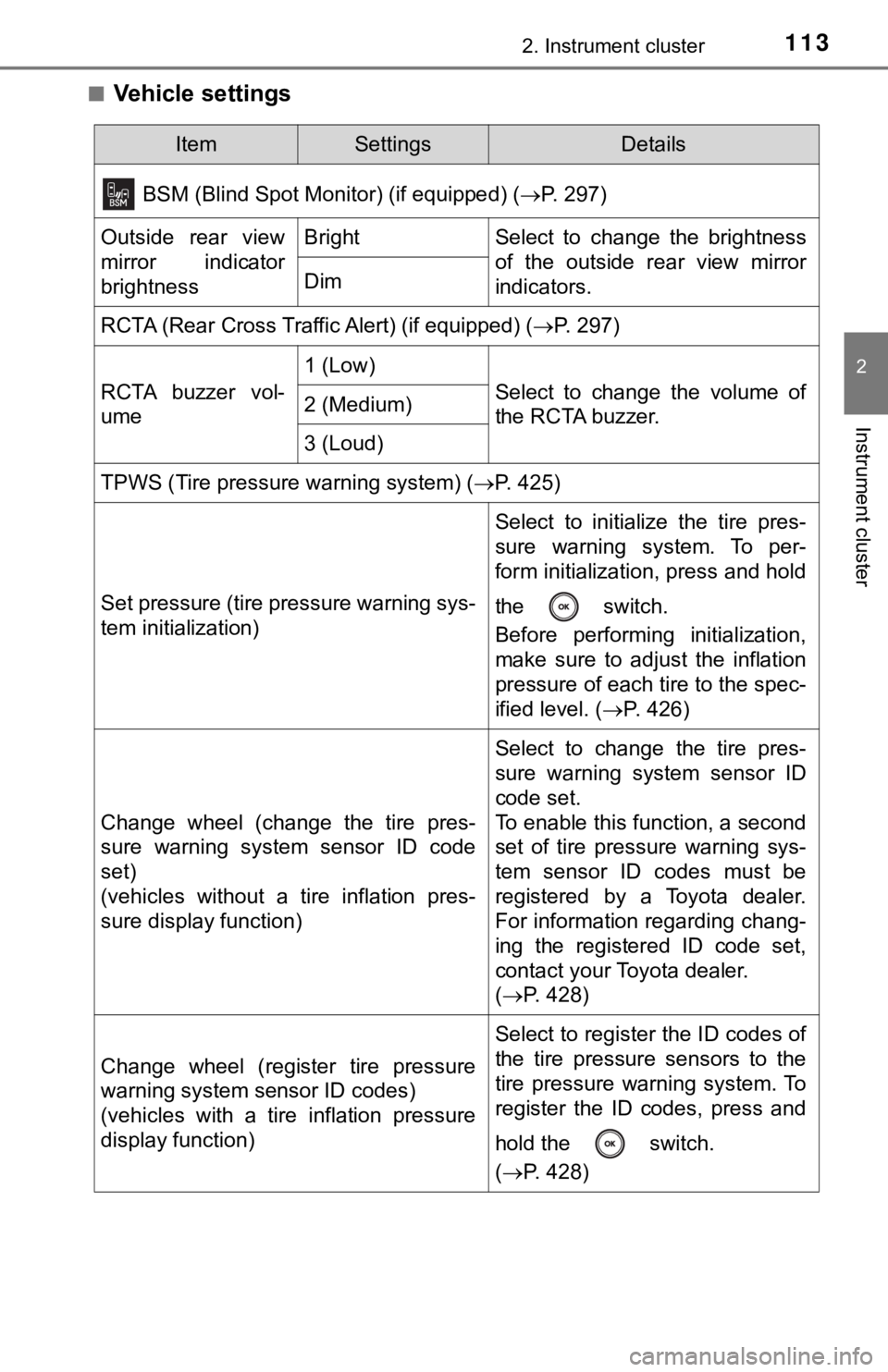
■Vehicle settings
ItemSettingsDetails
BSM (Blind Spot Monitor) (if equipped) (P. 297)
Outside rear view
mirror indicator
brightnessBrightSelect to change the brightness
of the outside rear view mirror
indicators.
Dim
RCTA (Rear Cross Traffic Alert) (if equipped) ( P. 297)
RCTA buzzer vol-
ume
1 (Low)
Select to change the volume of
the RCTA buzzer.2 (Medium)
3 (Loud)
TPWS (Tire pressure warning system) (P. 425)
Set pressure (tire pressure warning sys-
tem initialization)
Select to initialize the tire pres-
sure warning system. To per-
form initialization, press and hold
the switch.
Before performing initialization,
make sure to adjust the inflation
pressure of each tire to the spec-
ified level. (P. 426)
Change wheel (change the tire pres-
sure warning system sensor ID code
set)
(vehicles without a tire inflation pres-
sure display function)
Select to change the tire pres-
sure warning system sensor ID
code set.
To enable this function, a second
set of tire pressure warning sys-
tem sensor ID codes must be
registered by a Toyota dealer.
For information regarding chang-
ing the registered ID code set,
contact your Toyota dealer.
(P. 428)
Change wheel (register tire pressure
warning system sensor ID codes)
(vehicles with a tire inflation pressure
display function)
Select to register the ID codes of
the tire pressure sensors to the
tire pressure warning system. To
register the ID codes, press and
hold the switch.
(P. 428)
Page 125 of 592
1252. Instrument cluster
2
Instrument cluster
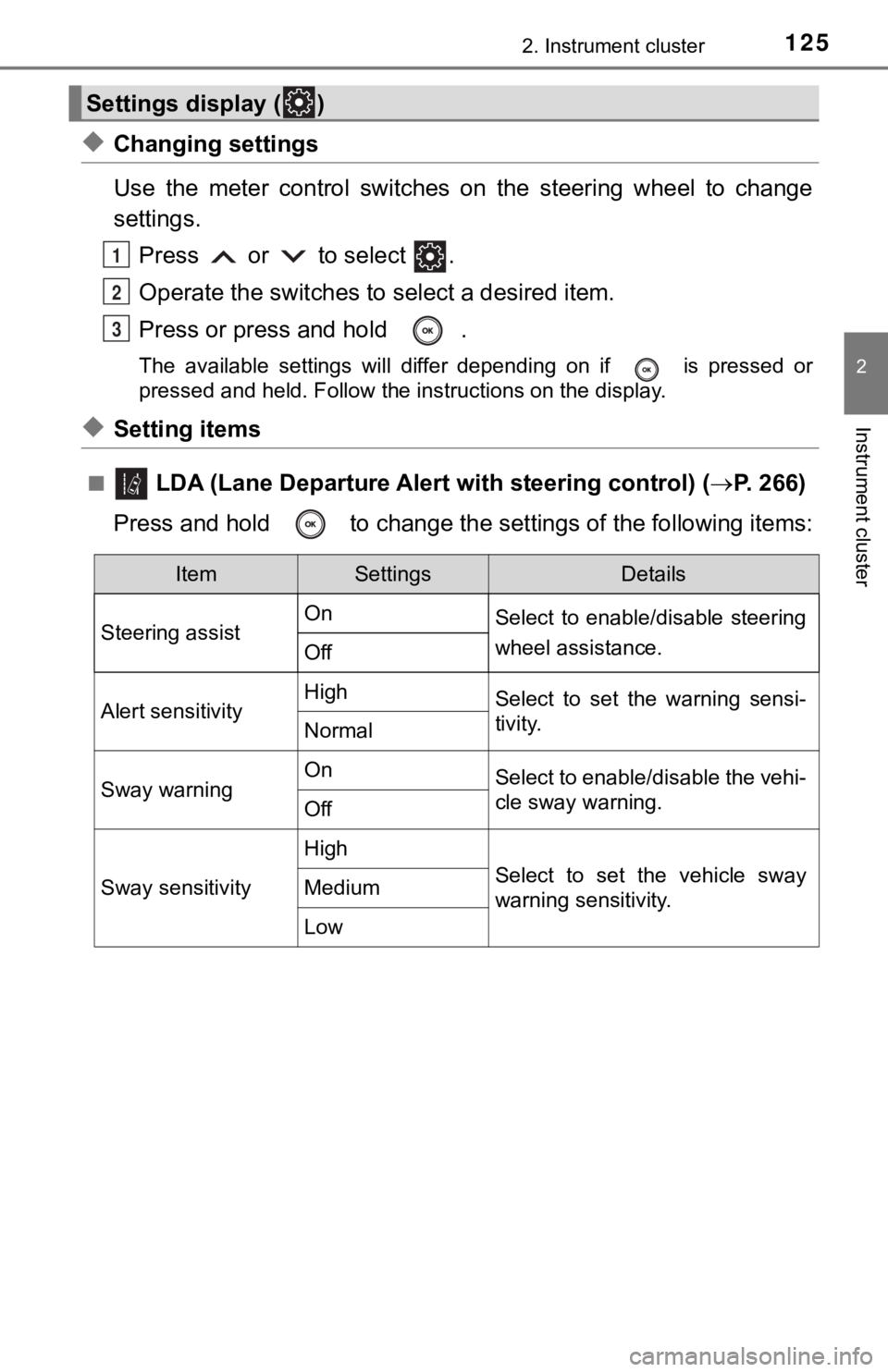
◆Changing settings
Use the meter control switches on the steering wheel to change
settings.Press or to select .
Operate the switches to select a desired item.
Press or press and hold .
The available settings will differ depending on if is pressed or
pressed and held. Follow the instructions on the display.
◆Setting items
■ LDA (Lane Departure Alert with steering control) (P. 266)
Press and hold to change the se ttings of the following items:
Settings display ( )
1
2
3
ItemSettingsDetails
Steering assist On
Select to enable/disable steering
wheel assistance.
Off
Alert sensitivityHighSelect to set the warning sensi-
tivity.
Normal
Sway warningOnSelect to enable/disable the vehi-
cle sway warning.
Off
Sway sensitivity
High
Select to set the vehicle sway
warning sensitivity.Medium
Low
Page 129 of 592
1292. Instrument cluster
2
Instrument cluster
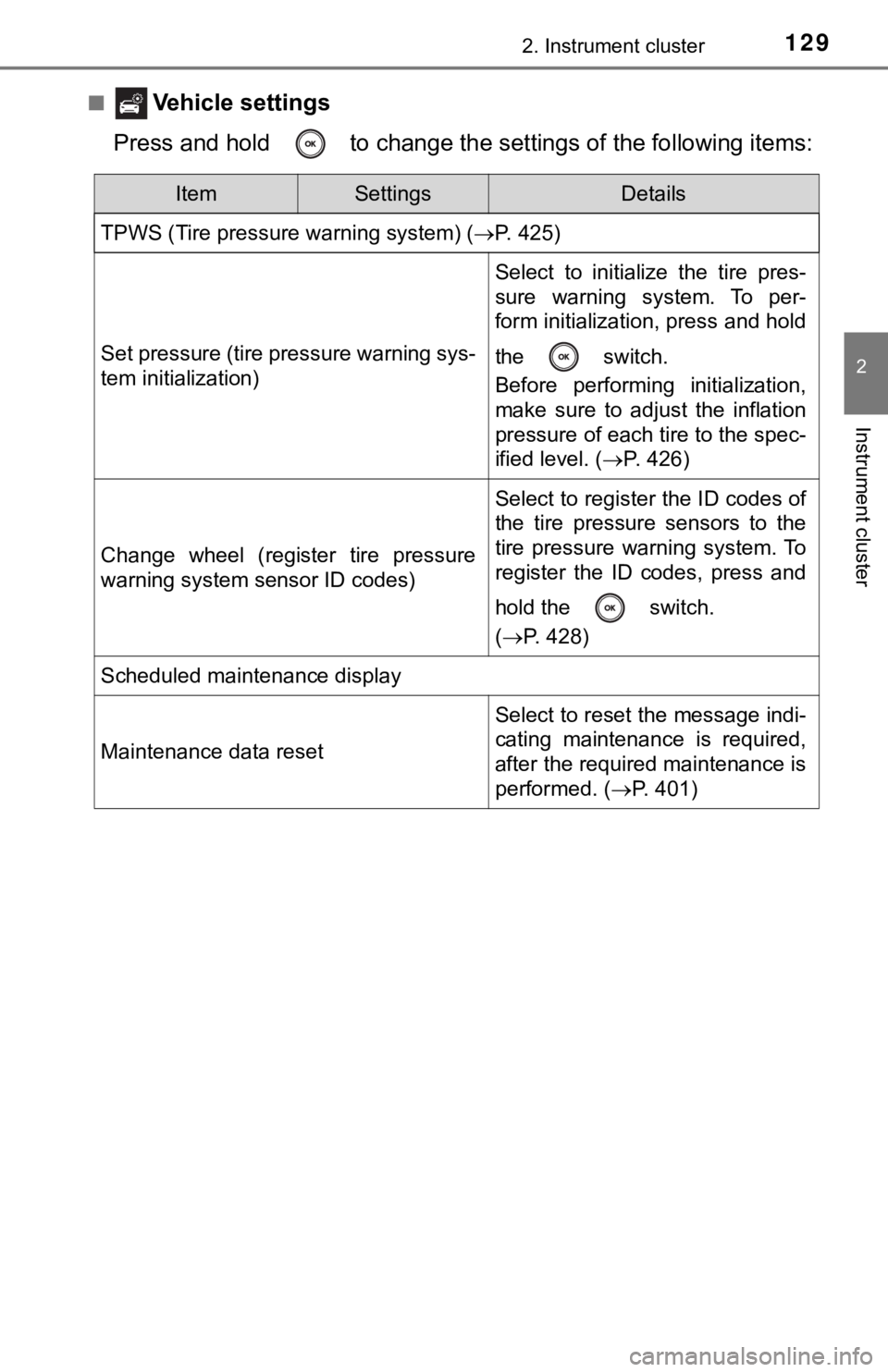
■ Vehicle settings
Press and hold to change the se ttings of the following items:
ItemSettingsDetails
TPWS (Tire pressure warning system) ( P. 425)
Set pressure (tire pressure warning sys-
tem initialization)
Select to initialize the tire pres-
sure warning system. To per-
form initialization, press and hold
the switch.
Before performing initialization,
make sure to adjust the inflation
pressure of each tire to the spec-
ified level. (P. 426)
Change wheel (register tire pressure
warning system sensor ID codes)
Select to register the ID codes of
the tire pressure sensors to the
tire pressure warning system. To
register the ID codes, press and
hold the switch.
(P. 428)
Scheduled maintenance display
Maintenance data reset
Select to reset the message indi-
cating maintenance is required,
after the required maintenance is
performed. ( P. 401)
Page 143 of 592
1432. Instrument cluster
2
Instrument cluster
■Multi-information display
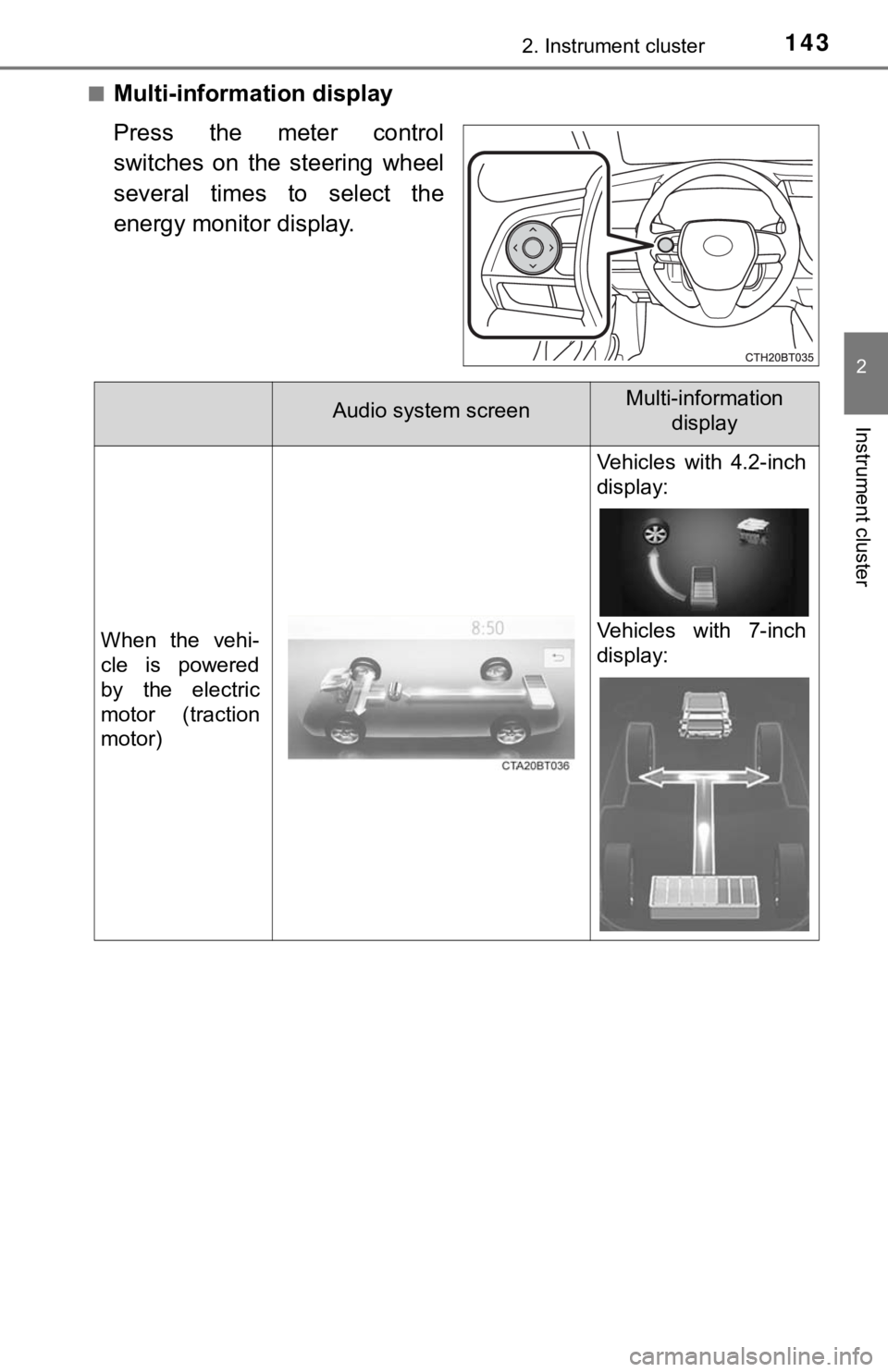
Press the meter control
switches on the steering wheel
several times to select the
energy monitor display.
Audio system screenMulti-information display
When the vehi-
cle is powered
by the electric
motor (traction
motor)
Vehicles with 4.2-inch
display:
Vehicles with 7-inch
display:
Page 151 of 592

151
3
Operation of
each component
3-1. Key information
Keys .................................. 152
3-2. Opening, closing and locking the doors
Doors ................................ 156
Trunk ................................. 162
Smart key system ............. 166
3-3. Adjusting the seats Front seats ........................ 175
Rear seats......................... 177
Head restraints.................. 179
3-4. Adjusting the steering wheel and mirrors
Steering wheel .................. 181
Inside rear view mirror ...... 183
Outside rear view mirrors ............................. 185
3-5. Opening and closing the windows
Power windows ................. 187
Moon roof .......................... 190
Page 181 of 592
181
3
Operation of each component
3-4. Adjusting the st eering wheel and mirrors
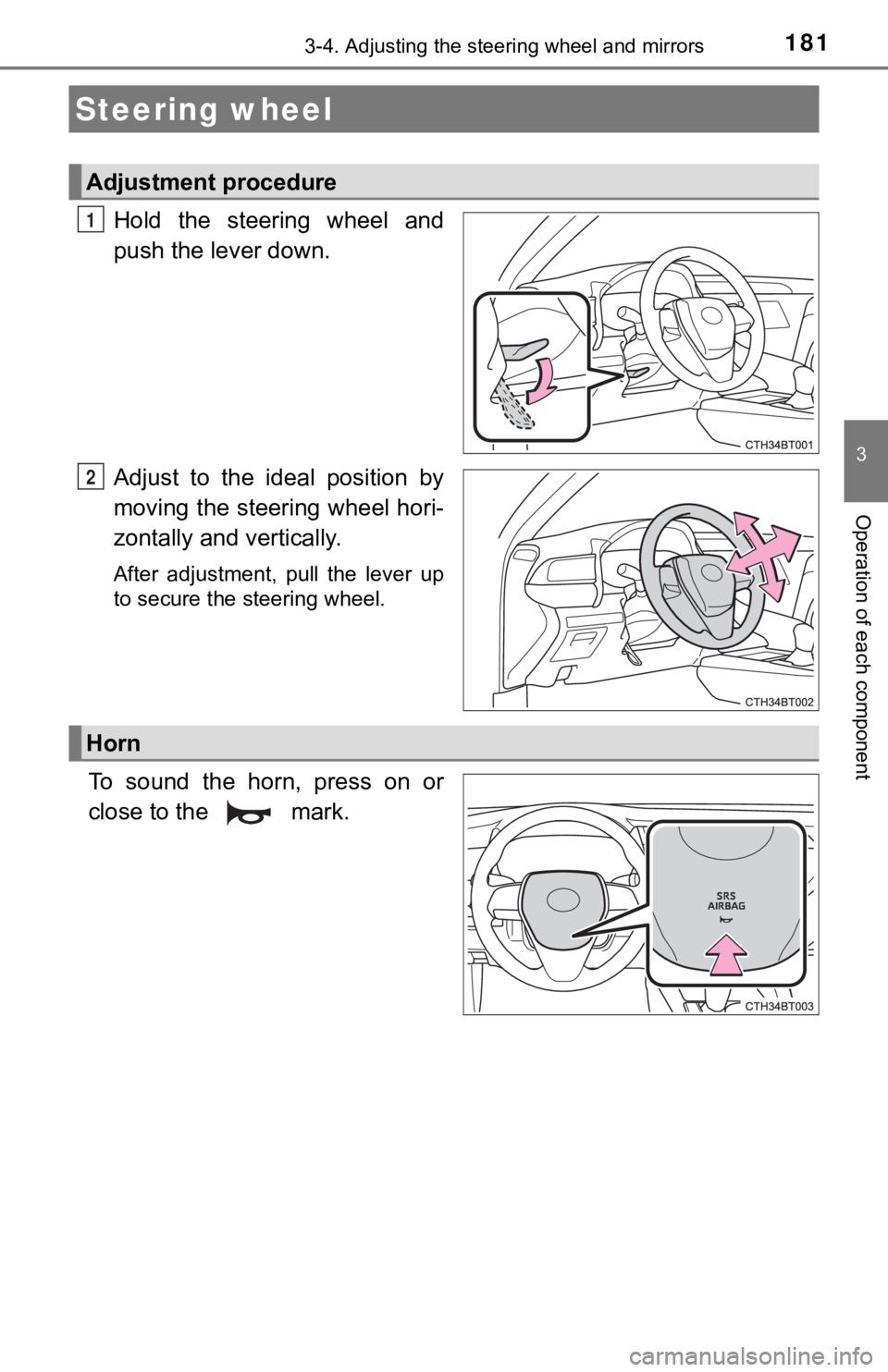
Hold the steering wheel and
push the lever down.
Adjust to the ideal position by
moving the steering wheel hori-
zontally and vertically.
After adjustment, pull the lever up
to secure the steering wheel.
To sound the horn, press on or
close to the mark.
Steering wheel
Adjustment procedure
1
2
Horn
Page 182 of 592

1823-4. Adjusting the steering wheel and mirrors
WARNING
■Caution while driving
Do not adjust the steering wheel while driving.
Doing so may cause the driver to mishandle the vehicle and caus e an acci-
dent, resulting in death or serious injury.
■ After adjusting the steering wheel
Make sure that the steering wheel is securely locked.
Otherwise, the steering wheel may move suddenly, possibly causi ng an
accident, and resulting in death or serious injury. Also, the h orn may not
sound if the steering wheel is not securely locked.
Page 183 of 592

1833-4. Adjusting the steering wheel and mirrors
3
Operation of each component
The height of the rear view mirror can be adjusted to suit your driving
posture.
Adjust the height of the rear view
mirror by moving it up and down.
Manual anti-glare inside rear view mirror
Reflected light from the headlights of vehicles behind can be r educed
by operating the lever.
Normal position
Anti-glare position
Inside rear view mirror
The rear view mirror’s position ca n be adjusted to enable suffi-
cient confirmation of the rear view.
Adjusting the height of rear view mirror
Anti-glare function
1
2