wheel TOYOTA CAMRY HYBRID 2019 (in English) Service Manual
[x] Cancel search | Manufacturer: TOYOTA, Model Year: 2019, Model line: CAMRY HYBRID, Model: TOYOTA CAMRY HYBRID 2019Pages: 592, PDF Size: 10.78 MB
Page 273 of 592
2734-5. Using the driving support systems
4
Driving
■Temporary cancellation of functions
When the operation conditions are no longer met, a function may be tempo-
rarily canceled. However, when the operation conditions are met again, oper-
ation of the function is automatically restored. ( P. 272)
■ Steering control function
Depending on the vehicle speed, lane departure situation, road conditions,
etc., the driver may not feel the function is operating or the function may not
operate at all.
■ Lane departure alert function
The warning buzzer may be difficult to hear due to external noi se, audio play-
back, etc.
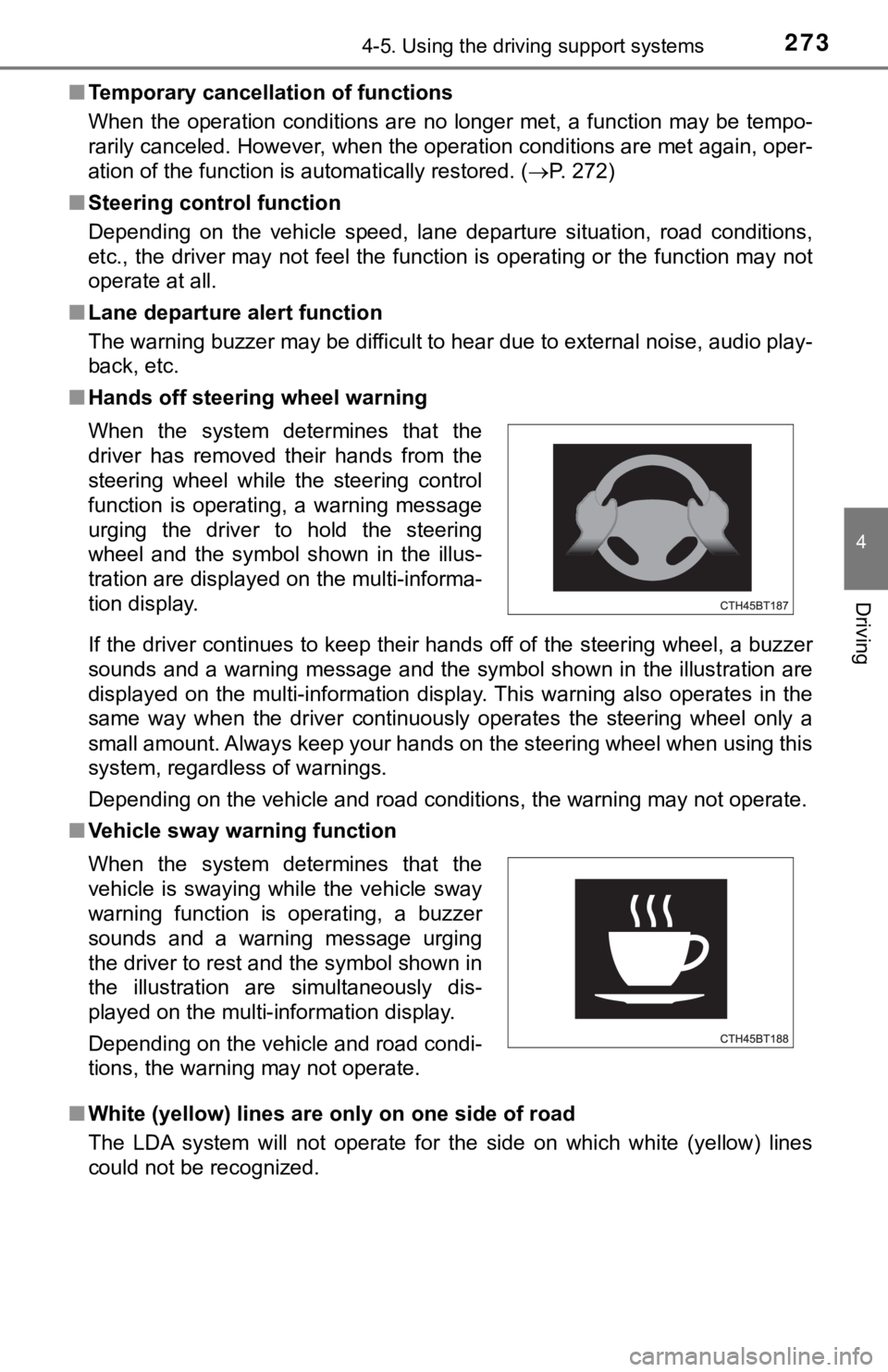
■ Hands off steering wheel warning
If the driver continues to keep their hands off of the steering wheel, a buzzer
sounds and a warning message and the symbol shown in the illust ration are
displayed on the multi-information display. This warning also o perates in the
same way when the driver continuously operates the steering whe el only a
small amount. Always keep your hands on the steering wheel when using this
system, regardless of warnings.
Depending on the vehicle and road conditions, the warning may n ot operate.
■ Vehicle sway warning function
■ White (yellow) lines are on ly on one side of road
The LDA system will not operate for the side on which white (ye llow) lines
could not be recognized. When the system determines that the
driver has removed their hands from the
steering wheel while the steering control
function is operating, a warning message
urging the driver to hold the steering
wheel and the symbol shown in the illus-
tration are displayed on the multi-informa-
tion display.
When the system determines that the
vehicle is swaying while the vehicle sway
warning function is operating, a buzzer
sounds and a warning message urging
the driver to rest and the symbol shown in
the illustration are simultaneously dis-
played on the multi-information display.
Depending on the vehicle and road condi-
tions, the warning may not operate.
Page 289 of 592
2894-5. Using the driving support systems
4
Driving
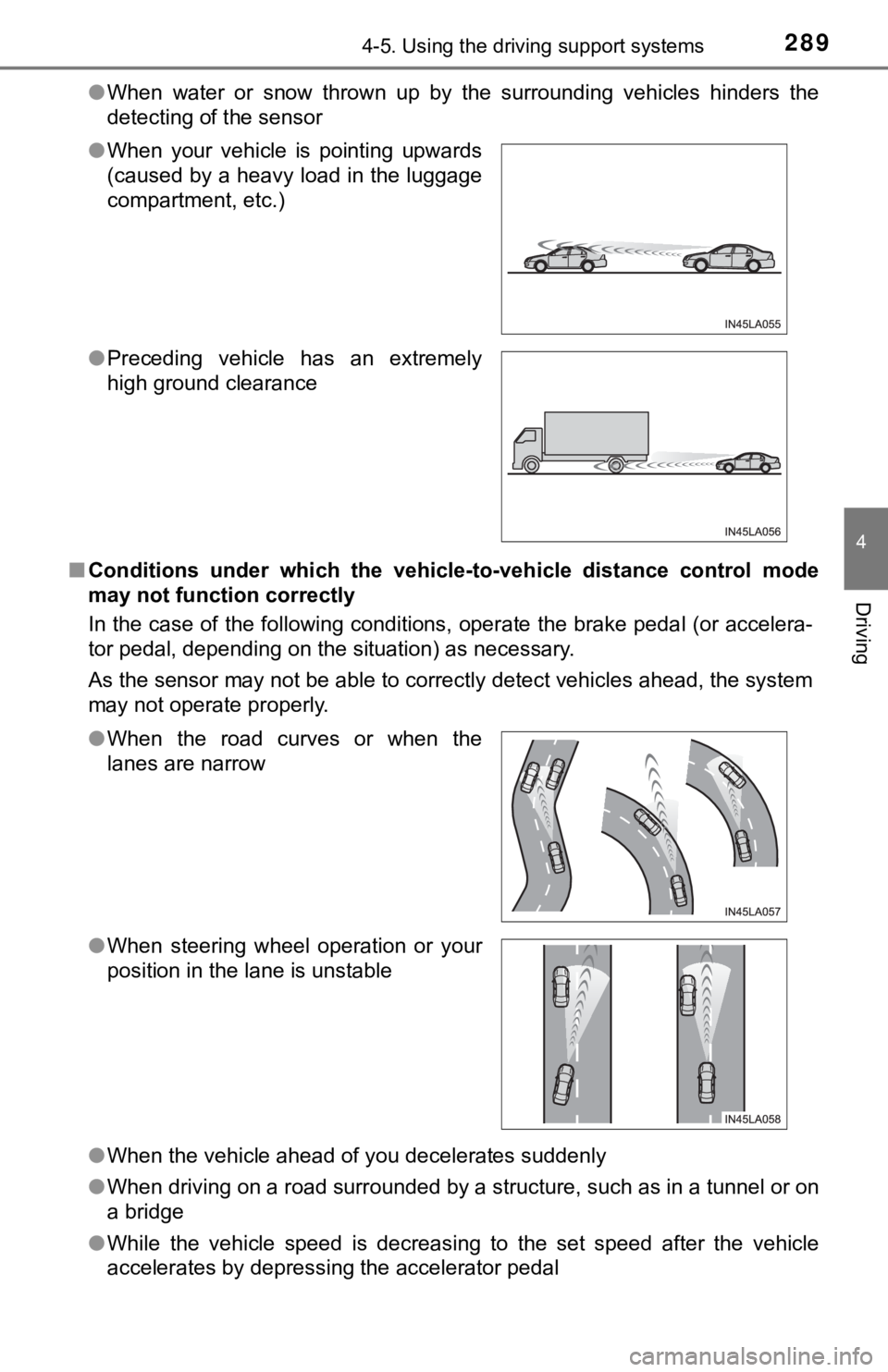
●When water or snow thrown up by the surrounding vehicles hinders the
detecting of the sensor
■ Conditions under which the vehic le-to-vehicle distance control mode
may not function correctly
In the case of the following conditions, operate the brake peda l (or accelera-
tor pedal, depending on the situation) as necessary.
As the sensor may not be able to correctly detect vehicles ahead, the system
may not operate properly.
● When the vehicle ahead of you decelerates suddenly
● When driving on a road surrounded by a structure, such as in a tunnel or on
a bridge
● While the vehicle speed is decreasing to the set speed after th e vehicle
accelerates by depressing the accelerator pedal
●
When your vehicle is pointing upwards
(caused by a heavy load in the luggage
compartment, etc.)
● Preceding vehicle has an extremely
high ground clearance
●When the road curves or when the
lanes are narrow
● When steering wheel operation or your
position in the lane is unstable
Page 290 of 592
2904-5. Using the driving support systems
◆ECB (Electronically Controlled Brake System)
The electronically controlled system generates braking force co rre-
sponding to the brake operation
◆ABS (Anti-lock Brake System)
Helps to prevent wheel lock when the brakes are applied suddenl y,
or if the brakes are applied while driving on a slippery road surface
◆Brake assist
Generates an increased level of braking force after the brake p edal
is depressed when the system de tects a panic stop situation
◆VSC (Vehicle Stability Control)
Helps the driver to control skidding when swerving suddenly or
turning on slippery road surfaces.
◆Enhanced VSC (Enhanced Vehicle Stability Control)
Provides cooperative control of the ABS, TRAC, VSC and EPS.
Helps to maintain directional stability when swerving on slippe ry
road surfaces by controlling steering performance.
◆Secondary Collision Brake
When the airbag sensor detects a collision, the brakes and stop
lights are automatically control led to reduce the vehicle speed and
that helps reduce the possibilit y of further damage due to a se cond-
ary collision
◆TRAC (Traction Control)
Helps to maintain drive power and prevent the drive wheels from
spinning when starting the vehicl e or accelerating on slippery roads
Driving assist systems
To keep driving safety and perf ormance, the following systems
operate automatically in respon se to various driving situations.
Be aware, however, that these systems are supplementary and
should not be relied upon too heav ily when operating the vehi-
cle.
Page 291 of 592
2914-5. Using the driving support systems
4
Driving
◆Hill-start assist control
Helps to reduce the backward movement of the vehicle when start-
ing on an uphill
◆EPS (Electric Power Steering)
Employs an electric motor to reduce the amount of effort needed to
turn the steering wheel
◆PCS (Pre-Collision System)
P. 2 5 5
◆BSM (Blind Spot Moni tor) (if equipped)
P. 2 9 7
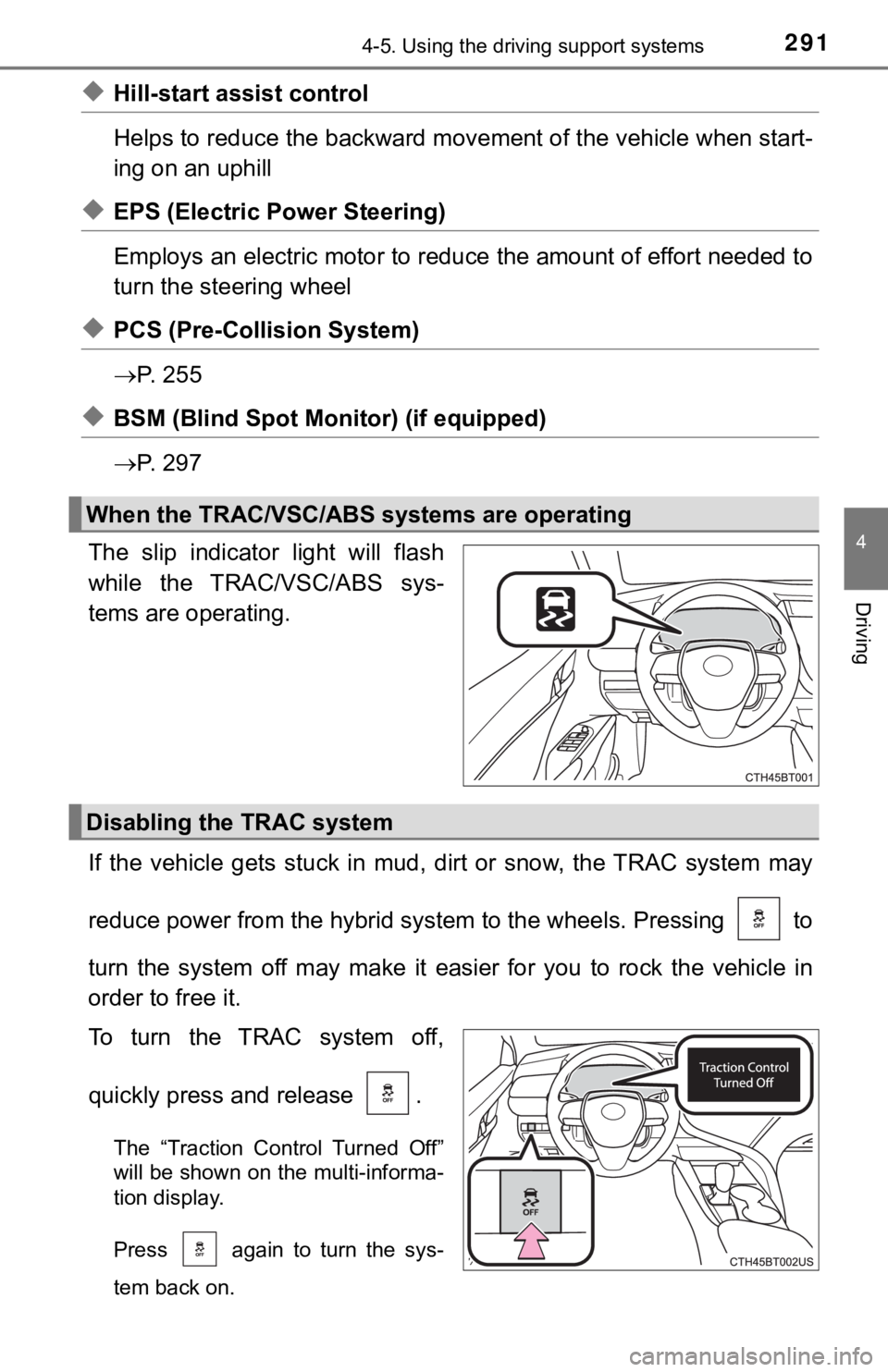
The slip indicator light will flash
while the TRAC/VSC/ABS sys-
tems are operating.
If the vehicle gets stuck in mud, dirt or snow, the TRAC system may
reduce power from the hybrid sys tem to the wheels. Pressing to
turn the system off may make it easier for you to rock the vehicle in
order to free it.
To turn the TRAC system off,
quickly press and release .
The “Traction Control Turned Off”
will be shown on the multi-informa-
tion display.
Press again to turn the sys-
tem back on.
When the TRAC/VSC/ABS systems are operating
Disabling the TRAC system
Page 293 of 592

2934-5. Using the driving support systems
4
Driving
■Sounds and vibrations caused by the ABS, brake assist, VSC, TRAC,
and hill-start assist control systems
● A sound may be heard from the engine compartment when the brake pedal
is depressed repeatedly, when the hybrid system is started or just after the
vehicle begins to move. This sound does not indicate that a mal function has
occurred in any of these systems.
● Any of the following conditions may occur when the above system s are
operating. None of these indicates that a malfunction has occur red.
• Vibrations may be felt through the vehicle body and steering.
• A motor sound may be heard also after the vehicle comes to a s top.
■ ECB operating sound
ECB operating sound may be heard in the following cases, but it does not
indicate that a malfunction has occurred.
● Operating sound heard from engine compartment when the brake pe dal is
operated.
● Motor sound of the brake system heard from the front part of th e vehicle
when the driver’s door is opened.
● Operating sound heard from the engine compartment when one or t wo min-
utes passed after the stop of the hybrid system.
■ EPS operation sound
When the steering wheel is operated, a motor sound (whirring so und) may be
heard. This does not indicate a malfunction.
Page 294 of 592

2944-5. Using the driving support systems
■Automatic reactivation of TRAC and VSC systems
After turning the TRAC and VSC systems off, the systems will be automati-
cally re-enabled in the following situations:
● When the power switch is turned off
● If only the TRAC system is turned off, the TRAC will turn on wh en vehicle
speed increases
If both the TRAC and VSC systems are turned off, automatic re-e nabling will
not occur when vehicle speed increases
■ Secondary Collision Brake operating conditions
The vehicle speed is approximately 6 mph (10 km/h) or more and the airbag
sensor detects a collision. (The Secondary Collision Brake will not operate
when the vehicle speed is below approximately 6 mph [10km/h].)
■ Secondary Collision Brake automatic cancellation
The Secondary Collision Brake is automatically canceled in the following situ-
ations:
●The vehicle speed drops below approximately 6 mph (10 km/h)
● A certain amount of time elapses during operation
● The accelerator pedal is depressed a large amount
■ Reduced effectiveness of the EPS system
The effectiveness of the EPS system is reduced to prevent the s ystem from
overheating when there is frequent steering input over an exten ded period of
time. The steering wheel may feel heavy as a result. Should thi s occur, refrain
from excessive steering input or stop the vehicle and turn the hybrid system
off. The EPS system should return to normal within 10 minutes.
Page 296 of 592

2964-5. Using the driving support systems
WARNING
■Replacing tires
Make sure that all tires are of the specified size, brand, trea d pattern and
total load capacity. In addition, make sure that the tires are inflated to the
recommended tire inflation pressure level.
The ABS, TRAC and VSC systems will not function correctly if di fferent tires
are installed on the vehicle.
Contact your Toyota dealer for further information when replaci ng tires or
wheels.
■ Handling of tires and the suspension
Using tires with any kind of problem or modifying the suspensio n will affect
the driving assist systems, and may cause a system to malfuncti on.
Page 346 of 592
3464-6. Driving tips
Accelerate the vehicle slowly, keep a safe distance between you and
the vehicle ahead, and drive at a reduced speed suitable to roa d con-
ditions.
● Park the vehicle and move the shift lever to P without setting the
parking brake. The parking brake may freeze up, preventing it from
being released. If the vehicle is parked without setting the pa rking
brake, make sure t o block the wheels.
Failure to do so may be dangerou s because it may cause the vehi-
cle to move unexpectedly, pos sibly leading to an accident.
● If the vehicle is parked without setting the parking brake, confirm
that the shift lever c annot be moved out of P
*.
*: The shift lever will be locked if it is attempted to be shifte d from P to any
other position without depressing the brake pedal. If the shift lever can be
shifted from P, there may be a problem with the shift lock syst em. Have the
vehicle inspected by your Toyota dealer immediately.
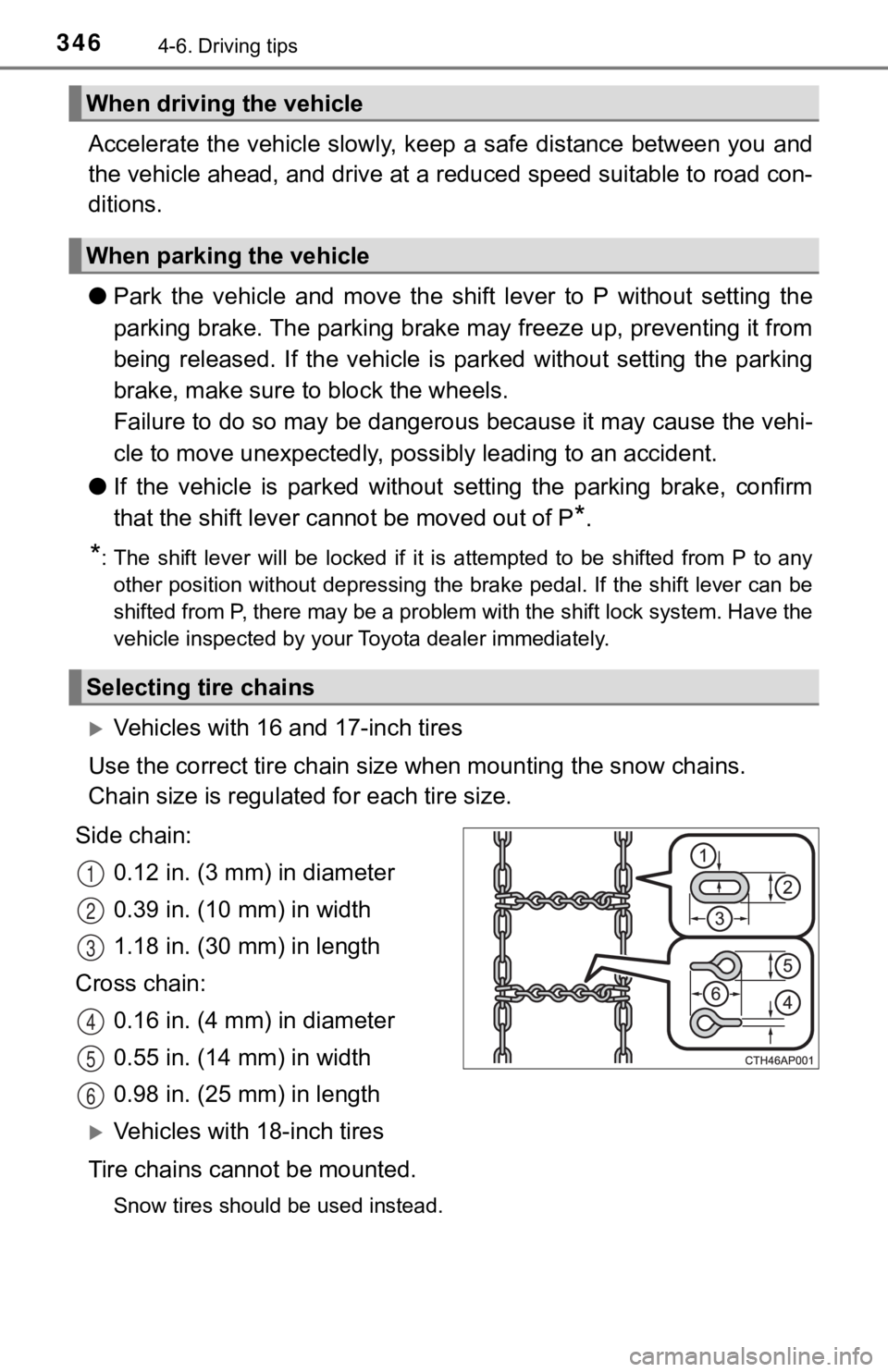
Vehicles with 16 and 17-inch tires
Use the correct tire ch ain size when mounting the snow chains.
Chain size is regulate d for each tire size.
Side chain: 0.12 in. (3 mm) in diameter
0.39 in. (10 mm) in width
1.18 in. (30 mm) in length
Cross chain: 0.16 in. (4 mm) in diameter
0.55 in. (14 mm) in width
0.98 in. (25 mm) in length
Vehicles with 18-inch tires
Tire chains cannot be mounted.
Snow tires should be used instead.
When driving the vehicle
When parking the vehicle
Selecting tire chains
1
2
3
4
5
6
Page 347 of 592
3474-6. Driving tips
4
Driving
Regulations regarding the use of tire chains vary depending on loca-
tion and type of road. Always chec k local regulations before installing
chains.
■ Tire chain installation
Observe the following precautions when installing and removing chains:
● Install and remove tire chains in a safe location.
● Install tire chains on the front tires. Do not install tire chains on the rear tires.
● Install tire chains on front tires as tightly as possible. Reti ghten chains after
driving 1/4 1/2 mile (0.5 1.0 km).
● Install tire chains following the instructions provided with th e tire chains.
Regulations on the use of tire chains
WARNING
■Driving with snow tires
Observe the following precautions to reduce the risk of acciden ts.
Failure to do so may result in a loss of vehicle control and ca use death or
serious injury.
● Use tires of the specified size.
● Maintain the recommended level of air pressure.
● Do not drive in excess of 75 mph (120 km/h), regardless of the type of
snow tires being used.
● Use snow tires on all, not just some wheels.
■ Driving with tire chains (vehicles with 16 and 17-inch tires)
Observe the following precautions to reduce the risk of acciden ts.
Failure to do so may result in the vehicle being unable to be d riven safely,
and may cause death or serious injury.
● Do not drive in excess of the speed limit specified for the tir e chains being
used, or 30 mph (50 km/h), whichever is lower.
● Avoid driving on bumpy road surfaces or over potholes.
● Avoid sudden acceleration, abrupt steering, sudden braking and shifting
operations that cause sudden engine braking.
● Slow down sufficiently before entering a curve to ensure that v ehicle con-
trol is maintained.
● Do not use LDA (Lane Departure Alert with steering control) sys tem.
Page 393 of 592

393
6Maintenance and care
6-1. Maintenance and careCleaning and protecting the vehicle exterior .......... 394
Cleaning and protecting the vehicle interior ........... 397
6-2. Maintenance Maintenance requirements ................... 400
General maintenance........ 403
Emission inspection and maintenance (I/M)
programs......................... 407
6-3. Do-it-yourself maintenance
Do-it-yourself service precautions ..................... 408
Hood ................................. 410
Positioning a floor jack ...... 411
Engine compartment ......... 412
12-volt battery ................... 420
Tires .................................. 424
Tire inflation pressure ....... 439
Wheels .............................. 442
Air conditioning filter.......... 444
Cleaning the hybrid battery (traction battery)
air intake vent and
filter ................................. 446
Electronic key battery........ 451
Checking and replacing fuses ............................... 453
Light bulbs......................... 456