ECU TOYOTA CAMRY HYBRID 2020 Owners Manual (in English)
[x] Cancel search | Manufacturer: TOYOTA, Model Year: 2020, Model line: CAMRY HYBRID, Model: TOYOTA CAMRY HYBRID 2020Pages: 52, PDF Size: 2.89 MB
Page 7 of 52
5
OVERVIEW
FEATURES & OPERATIONS
TOYOTA SAFETY SENSE
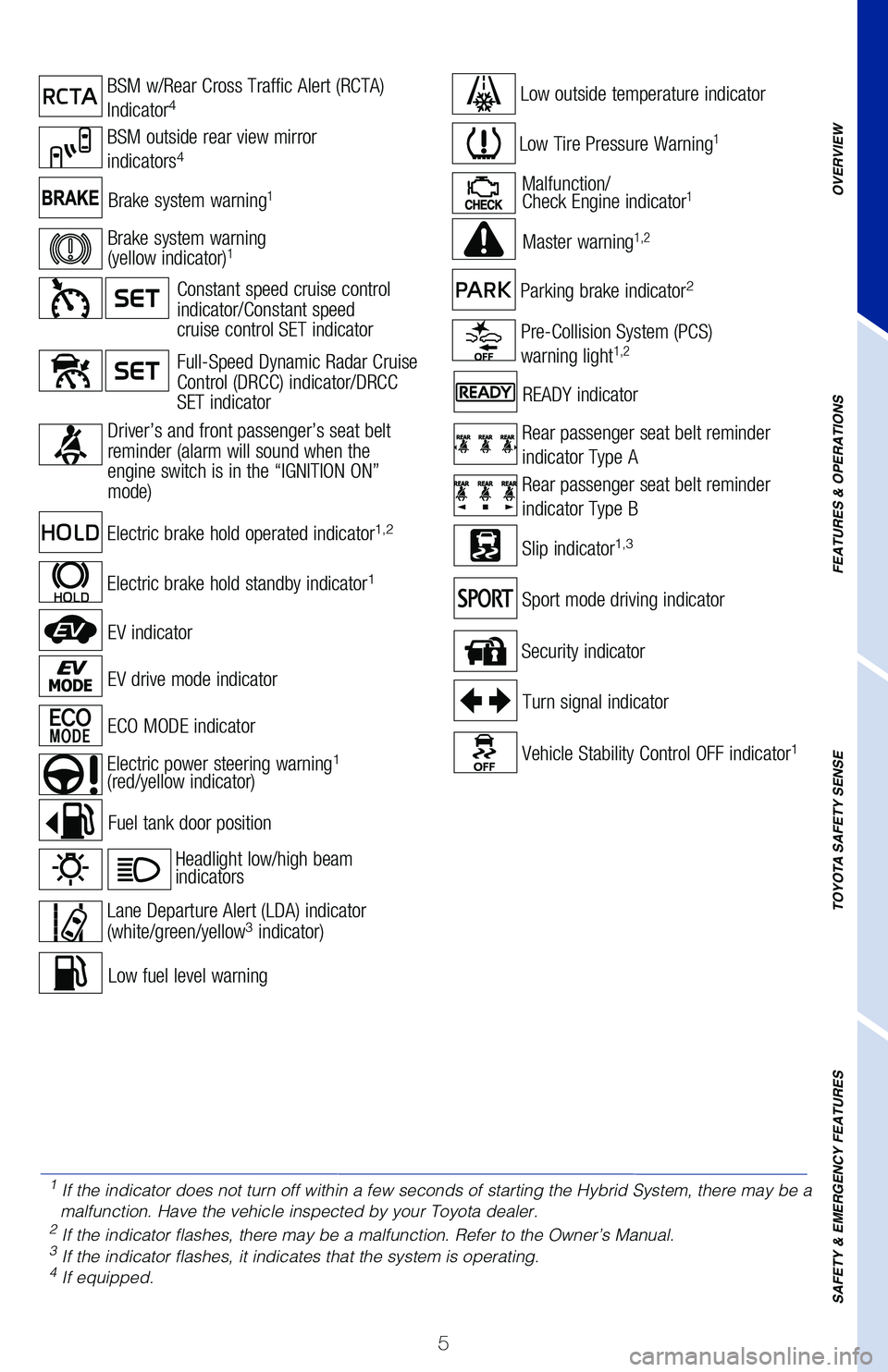
SAFETY & EMERGENCY FEATURESBrake system warning1Malfunction/
Check Engine indicator1
Low Tire Pressure Warning1
Low fuel level warning
Security indicator
Fuel tank door position
READY indicator
Master warning
1,2
Headlight low/high beam
indicators
Turn signal indicator
Pre-Collision System (PCS)
warning light1,2
Lane Departure Alert (LDA) indicator
(white/green/yellow3 indicator)
Slip indicator1,3
Vehicle Stability Control OFF indicator1
Parking brake indicator2
Electric power steering warning1
(red/yellow indicator)
Rear passenger seat belt reminder
indicator Type A
Rear passenger seat belt reminder
indicator Type B
Electric brake hold operated indicator1,2
Electric brake hold standby indicator1
BSM w/Rear Cross Traffic Alert (RCTA)
Indicator4
BSM outside rear view mirror
indicators4
Sport mode driving indicator
ECO MODE indicator
EV drive mode indicator
EV indicator
Low outside temperature indicator
Brake system warning
(yellow indicator)1
Full-Speed Dynamic Radar Cruise
Control (DRCC) indicator/DRCC
SET indicator
Constant speed cruise control
indicator/Constant speed
cruise control SET indicator
Driver’s and
front passenger’s seat belt
reminder (alarm will sound when the
engine switch is in the “IGNITION ON”
mode)
1 If the indicator does not turn off within a few seconds of starting the \
Hybrid System, there may be a
malfunction. Have the vehicle inspected by your Toyota dealer.
2 If the indicator flashes, there may be a malfunction. Refer to the Owner\
’s Manual.3 If the indicator flashes, it indicates that the system is operating.4 If equipped.
Page 29 of 52
27
OVERVIEW
FEATURES & OPERATIONS
TOYOTA SAFETY SENSE
SAFETY & EMERGENCY FEATURES
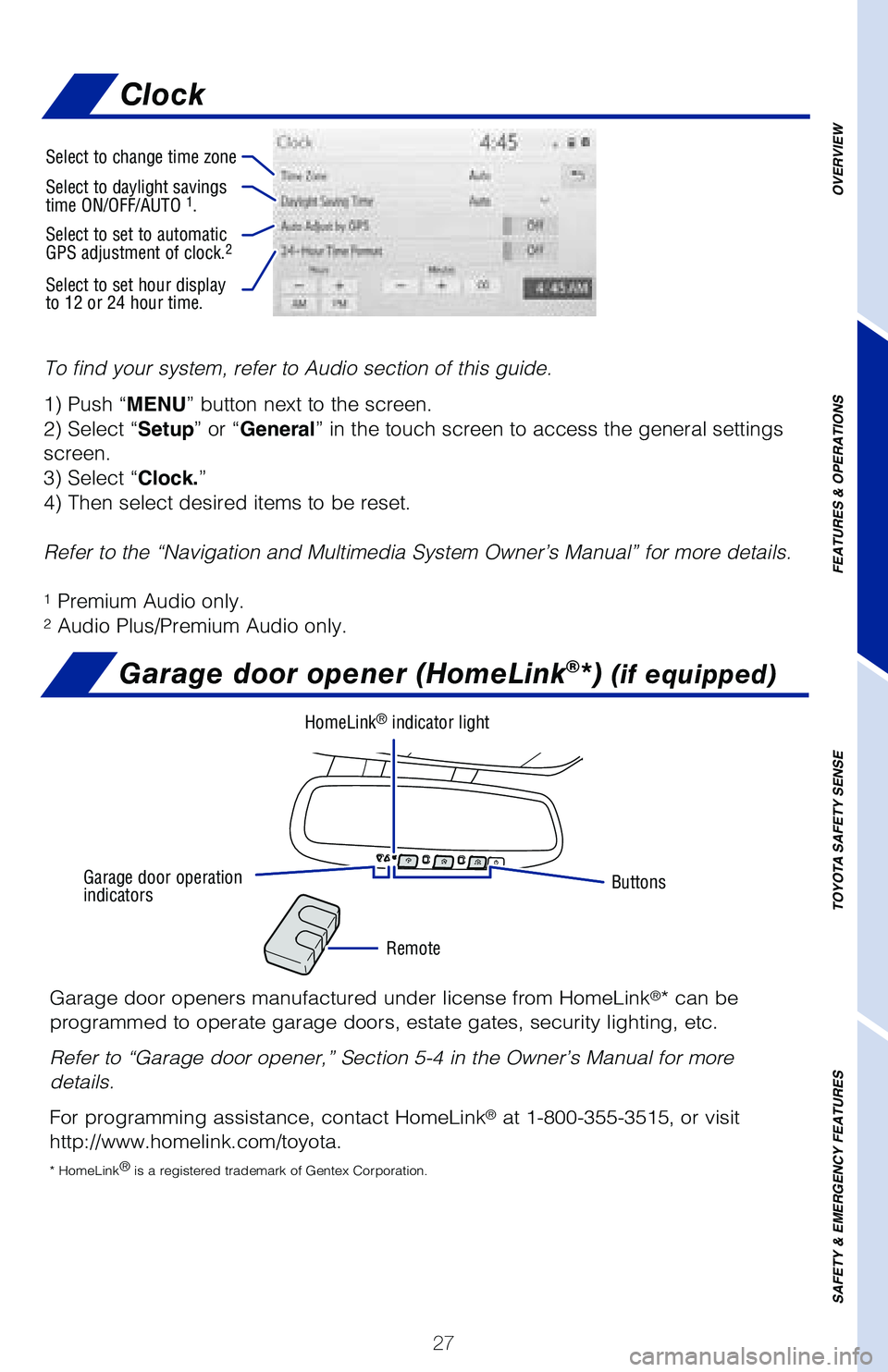
To find your system, refer to Audio section of this guide.
1) Push “MENU” button next to the screen.
2) Select “Setup” or “General” in the touch screen to access the general settings
screen.
3) Select “Clock.”
4) Then select desired items to be reset.
Refer to the “Navigation and Multimedia System Owner’s Manual” \
for more details.
1 Premium Audio only.2 Audio Plus/Premium Audio only.
Garage door opener (HomeLink®*) (if equipped)
Garage door openers manufactured under license from HomeLink®* can be
programmed to operate garage doors, estate gates, security lighting, etc\
.
Refer to “Garage door opener,” Section 5-4 in the Owner’s Manua\
l for more
details.
For programming assistance, contact HomeLink
® at 1-800-355-3515, or visit
http://www.homelink.com/toyota.
* HomeLink ®
is a registered trademark of Gentex Corporation.
Buttons
Remote
HomeLink® indicator light
Garage door operation
indicators
Select to change time zone
Select to daylight savings
time ON/OFF/AUTO 1.
Select to set to automatic
GPS adjustment of clock.2
Select to set hour display
to 12 or 24 hour time.
Clock
Page 41 of 52
39
OVERVIEW
FEATURES & OPERATIONS
TOYOTA SAFETY SENSE
SAFETY & EMERGENCY FEATURES
SAFETY & EMERGENCY FEATURES
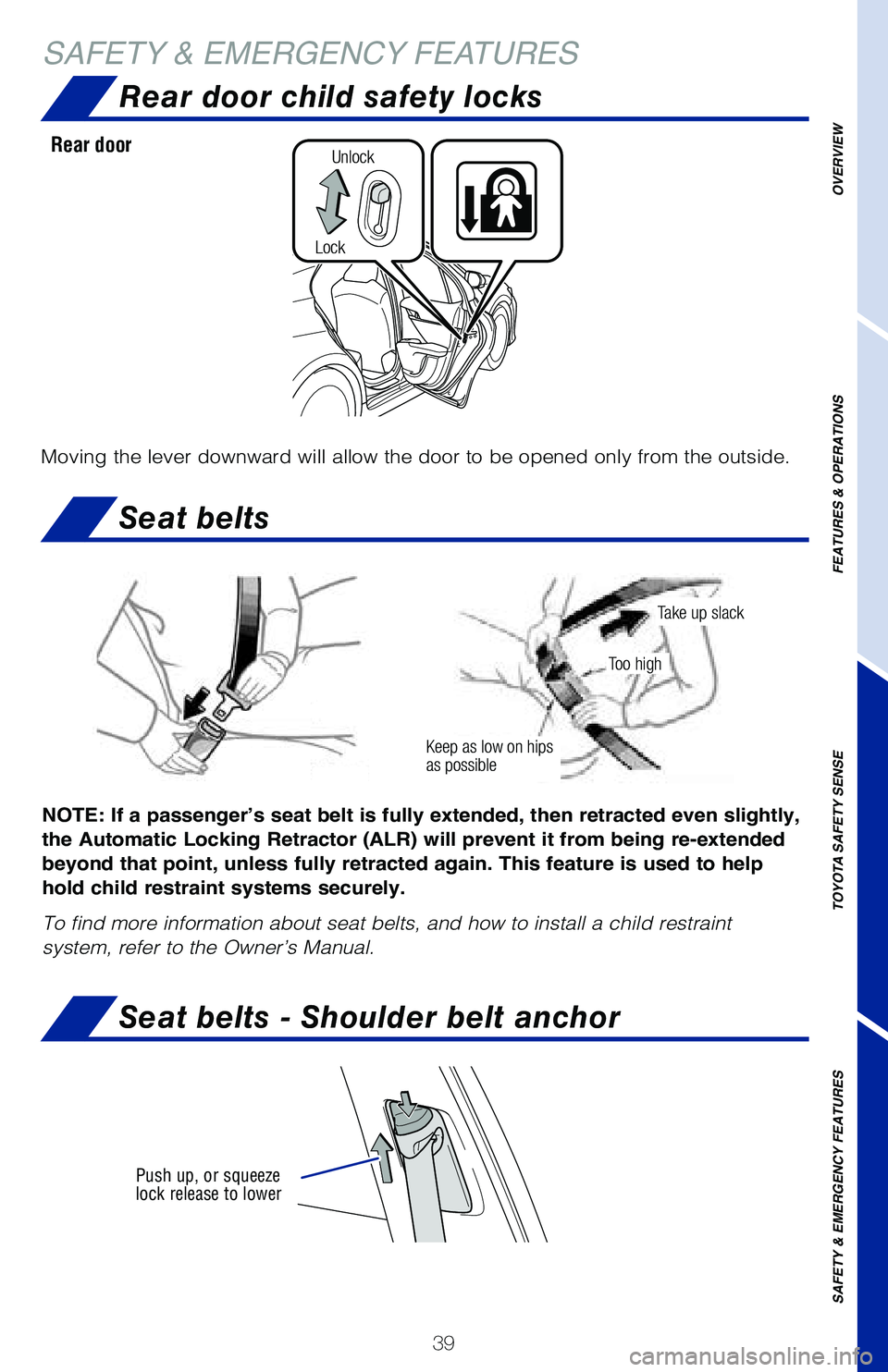
Seat belts
NOTE: If a passenger’s seat belt is fully extended, then retracted even slightly,
the Automatic Locking Retractor (ALR) will prevent it from being re-extended
beyond that point, unless fully retracted again. This feature is used to help
hold child restraint systems securely.
To find more information about seat belts, and how to install a child re\
straint
system, refer to the Owner’s Manual.
Keep as low on hips
as possible
Take up slack
Too high
Rear door child safety locks
Moving the lever downward will allow the door to be opened only from the\
outside.
Rear door
Lock
Unlock
Seat belts - Shoulder belt anchor
Push up, or squeeze
lock release to lower
Page 42 of 52
40
SAFETY & EMERGENCY FEATURESSafety Connect
® (if equipped)
Tire Pressure Monitoring (warning) System (TPMS)
The tire pressure detected by the tire pressure warning system can
be displayed on the multi-information display (MID).
Refer to the load label on the door jamb or the Owner’s Manual for ti\
re inflation
specifications.
If the tire pressure indicator flashes for more than 60 seconds and then\
remains on,
take the vehicle to your local Toyota dealer.
NOTE: The warning light may come on due to temperature changes or
changes in tire pressure from natural air leakage. If the system has not been
initialized recently, setting the tire pressures to factory specifications should
turn off the light.
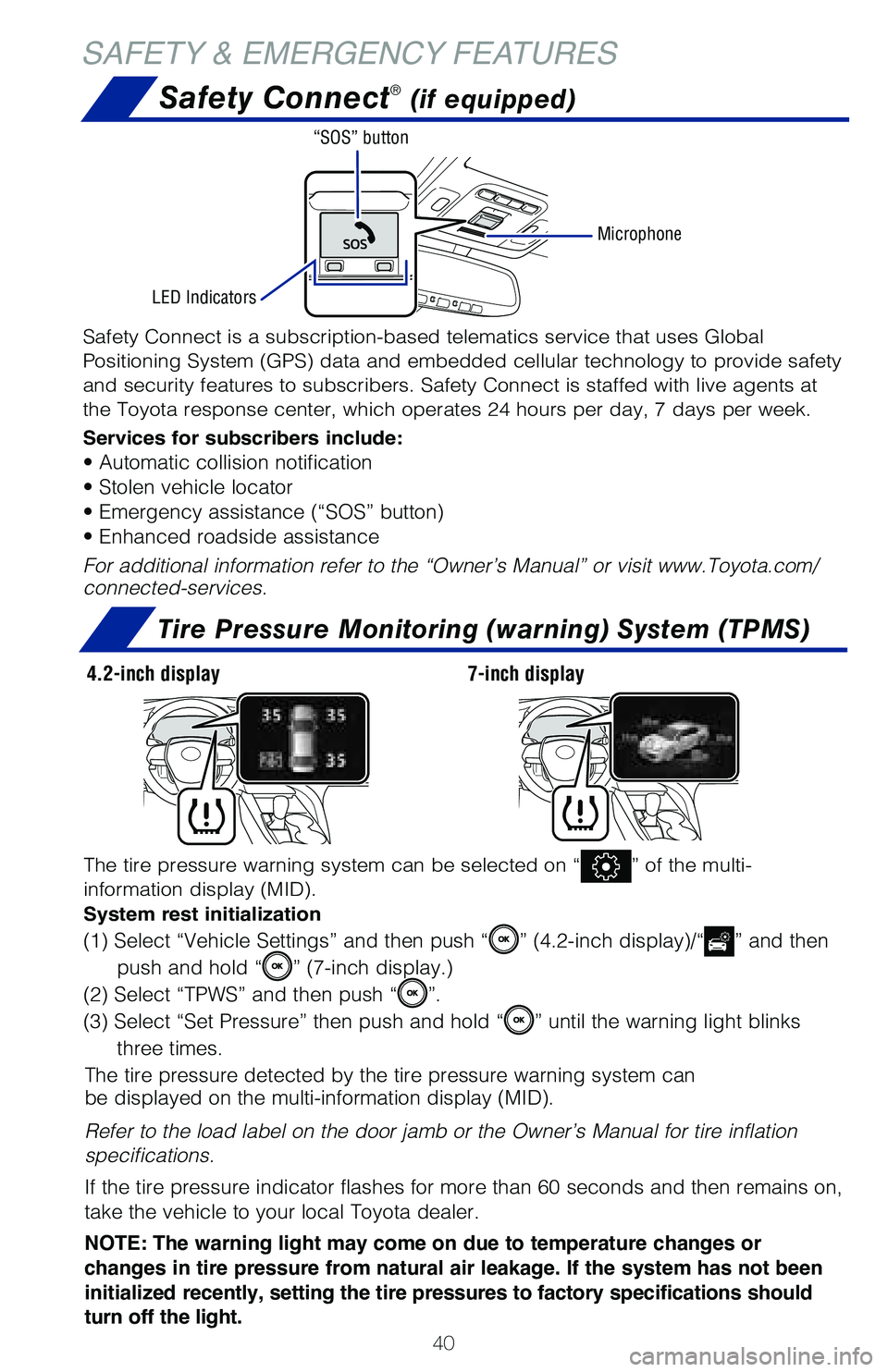
The tire pressure warning system can be selected on “” of the multi-
information display (MID).
System rest initialization
(1) Select “Vehicle Settings” and then push “” (4.2-inch display)/“” and then
push and hold “
” (7-inch display.)
(2) Select “TPWS” and then push “
”.
(3) Select “Set Pressure” then push and hold “
” until the warning light blinks
three times.
Safety Connect is a subscription-based telematics service that uses Glob\
al
Positioning System (GPS) data and embedded cellular technology to provide safety
and security features to subscribers. Safety Connect is staffed with liv\
e agents at
the Toyota response center, which operates 24 hours per day, 7 days per \
week.
Services for subscribers include:
• Automatic collision notification
• Stolen vehicle locator
• Emergency assistance (“SOS” button)
• Enhanced roadside assistance
For additional information refer to the “Owner’s Manual” or vis\
it www.Toyota.com/
connected-services.
Microphone
LED Indicators “SOS” button
4.2-inch display
7-inch display
Page 43 of 52
 41
TOOL LOCATION
REMOVING THE SPARE TIRE
Spare tire & tools
Trunk-Internal release
Refer to the Owner’s Manual for tire changing and jack positioning pr\
ocedures.
(1) Remove the tool tray.(2) Loose")
41
TOOL LOCATION
REMOVING THE SPARE TIRE
Spare tire & tools
Trunk-Internal release
Refer to the Owner’s Manual for tire changing and jack positioning pr\
ocedures.
(1) Remove the tool tray.(2) Loosen the center fastener that
secures the spare tire.
OVERVIEW
FEATURES & OPERATIONS
TOYOTA SAFETY SENSE
SAFETY & EMERGENCY FEATURES
Pull up
Luggage floor cover
Jack handle Jack Wheel nut wrench
Spare tire