phone TOYOTA CAMRY HYBRID 2020 Owners Manual (in English)
[x] Cancel search | Manufacturer: TOYOTA, Model Year: 2020, Model line: CAMRY HYBRID, Model: TOYOTA CAMRY HYBRID 2020Pages: 52, PDF Size: 2.89 MB
Page 3 of 52
1
OVERVIEW
FEATURES & OPERATIONS
TOYOTA SAFETY SENSE
SAFETY &
EMERGENCY FEATURES
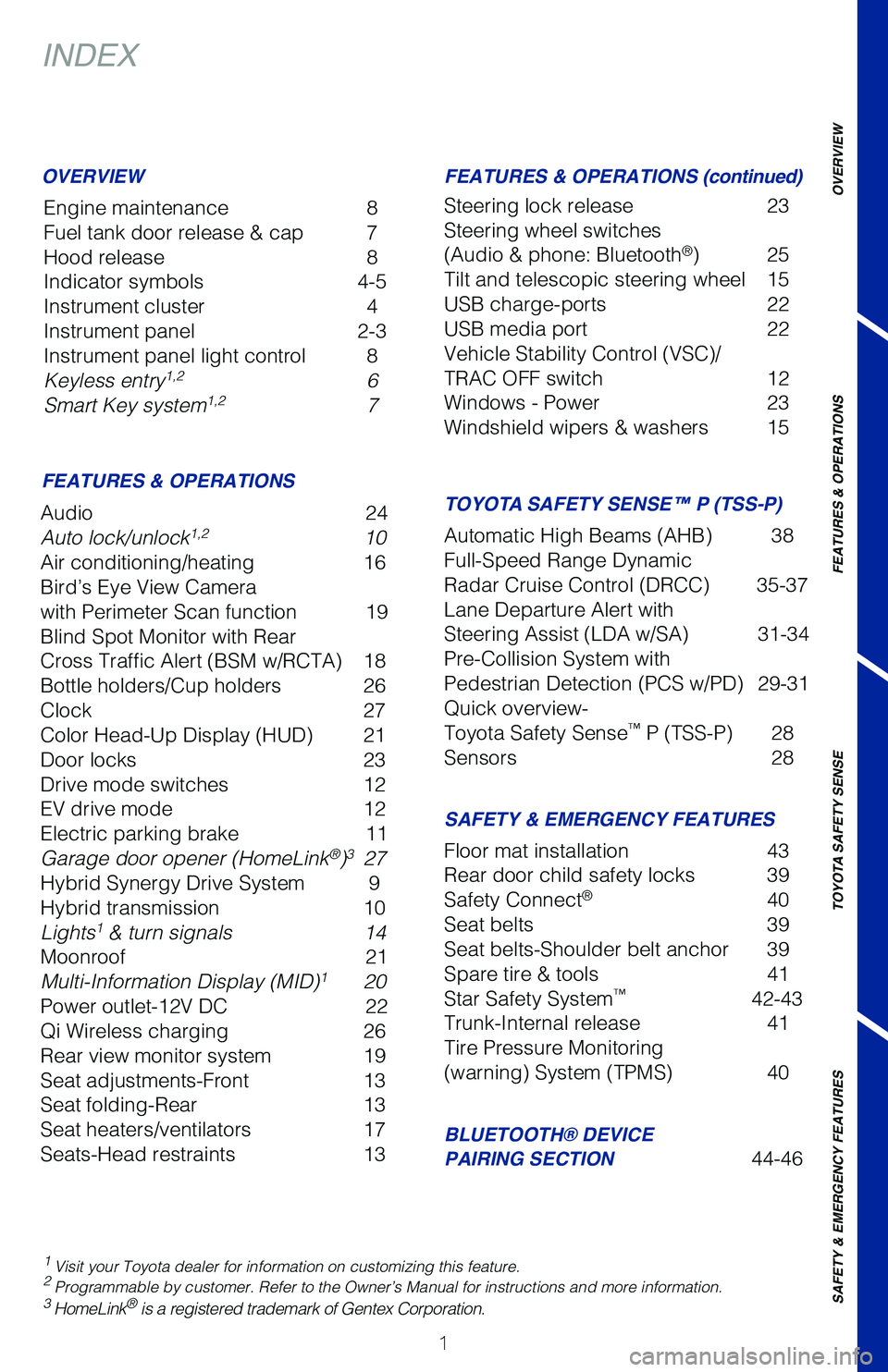
INDEX
Engine maintenance 8
Fuel tank door release & cap 7
Hood release 8
Indicator symbols 4-5
Instrument cluster 4
Instrument panel 2-3
Instrument panel light control 8
Keyless entry
1,2 6
Smart Key system1,2 7
1 Visit your Toyota dealer for information on customizing this feature.2 Programmable by customer. Refer to the Owner’s Manual for instruction\
s and more information.3 HomeLink® is a registered trademark of Gentex Corporation.
OVERVIEW
FEATURES & OPERATIONS
SAFETY & EMERGENCY FEATURES
BLUETOOTH® DEVICE
PAIRING SECTION
44-46
Audio
24
Auto lock/unlock
1,2 10
Air conditioning/heating 16
Bird’s Eye View Camera
with Perimeter Scan function 19
Blind Spot Monitor with Rear
Cross Traffic Alert (BSM w/RCTA) 18
Bottle holders/Cup holders 26
Clock 27
Color Head-Up Display (HUD) 21
Door locks 23
Drive mode switches 12
EV drive mode 12
Electric parking brake 11
Garage door opener (HomeLink
®)3 27
Hybrid Synergy Drive System 9
Hybrid transmission 10
Lights
1 & turn signals 14
Moonroof 21
Multi-Information Display (MID)
1 20
Power outlet-12V DC 22
Qi Wireless charging 26
Rear view monitor system 19
Seat adjustments-Front 13
Seat folding-Rear 13
Seat heaters/ventilators 17
Seats-Head restraints 13Floor mat installation
43
Rear door child safety locks 39
Safety Connect
® 40
Seat belts 39
Seat belts-Shoulder belt anchor 39
Spare tire & tools 41
Star Safety System
™ 42-43
Trunk-Internal release 41
Tire Pressure Monitoring
(warning) System (TPMS) 40
FEATURES & OPERATIONS (continued)
TOYOTA SAFETY SENSE™ P (TSS-P)
Steering lock release 23
Steering wheel switches
(Audio & phone: Bluetooth
®) 25
Tilt and telescopic steering wheel 15
USB charge-ports 22
USB media port 22
Vehicle Stability Control (VSC)/
TRAC OFF switch 12
Windows - Power 23
Windshield wipers & washers 15
Automatic High Beams (AHB) 38
Full-Speed Range Dynamic
Radar Cruise Control (DRCC) 35-37
Lane Departure Alert with
Steering Assist (LDA w/SA) 31-34
Pre-Collision System with
Pedestrian Detection (PCS w/PD) 29-31
Quick overview-
Toyota Safety Sense
™ P (TSS-P) 28
Sensors 28
Page 4 of 52
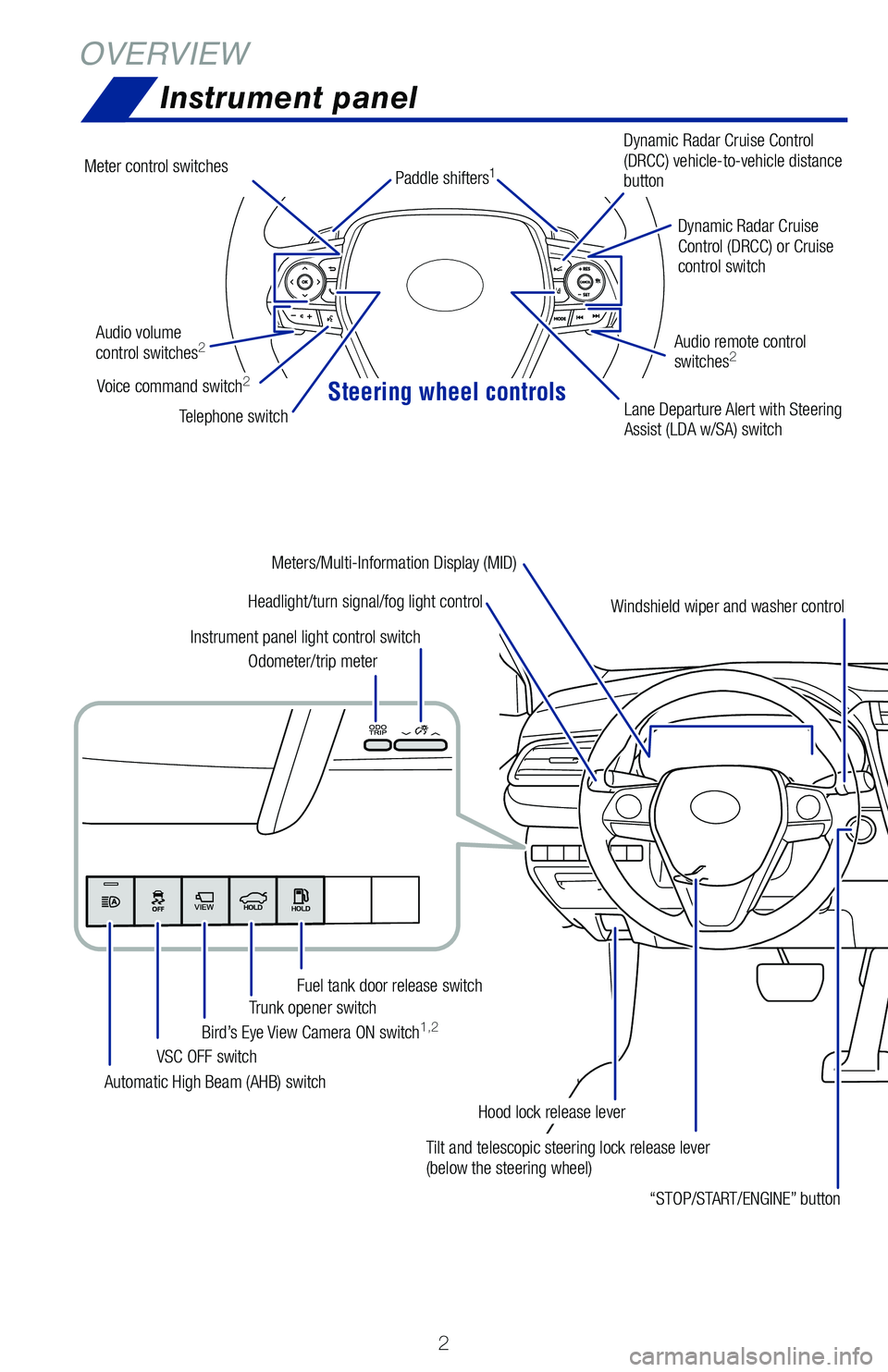
Steering wheel controls
2
OVERVIEWInstrument panel
Tilt and telescopic steering lock release lever
(below the steering wheel)
Headlight/turn signal/fog light control
Automatic High Beam (AHB) switch VSC OFF switch
Bird’s Eye View Camera ON switch
1,2Trunk opener switch
Fuel tank door release switch
Odometer/trip meter
Instrument panel light control switch
“STOP/START/ENGINE” button
Hood lock release leverDynamic Radar Cruise
Control (DRCC) or Cruise
control switch
Dynamic Radar Cruise Control
(DRCC) vehicle-to-vehicle distance
button
Lane Departure Alert with Steering
Assist (LDA w/SA) switch
Audio volume
control switches
2
Telephone switch
Audio remote control
switches
2
Windshield wiper and washer control
Meters/Multi-Information Display (MID)
Meter control switches
Voice command switch2
Paddle shifters1
Page 27 of 52
25
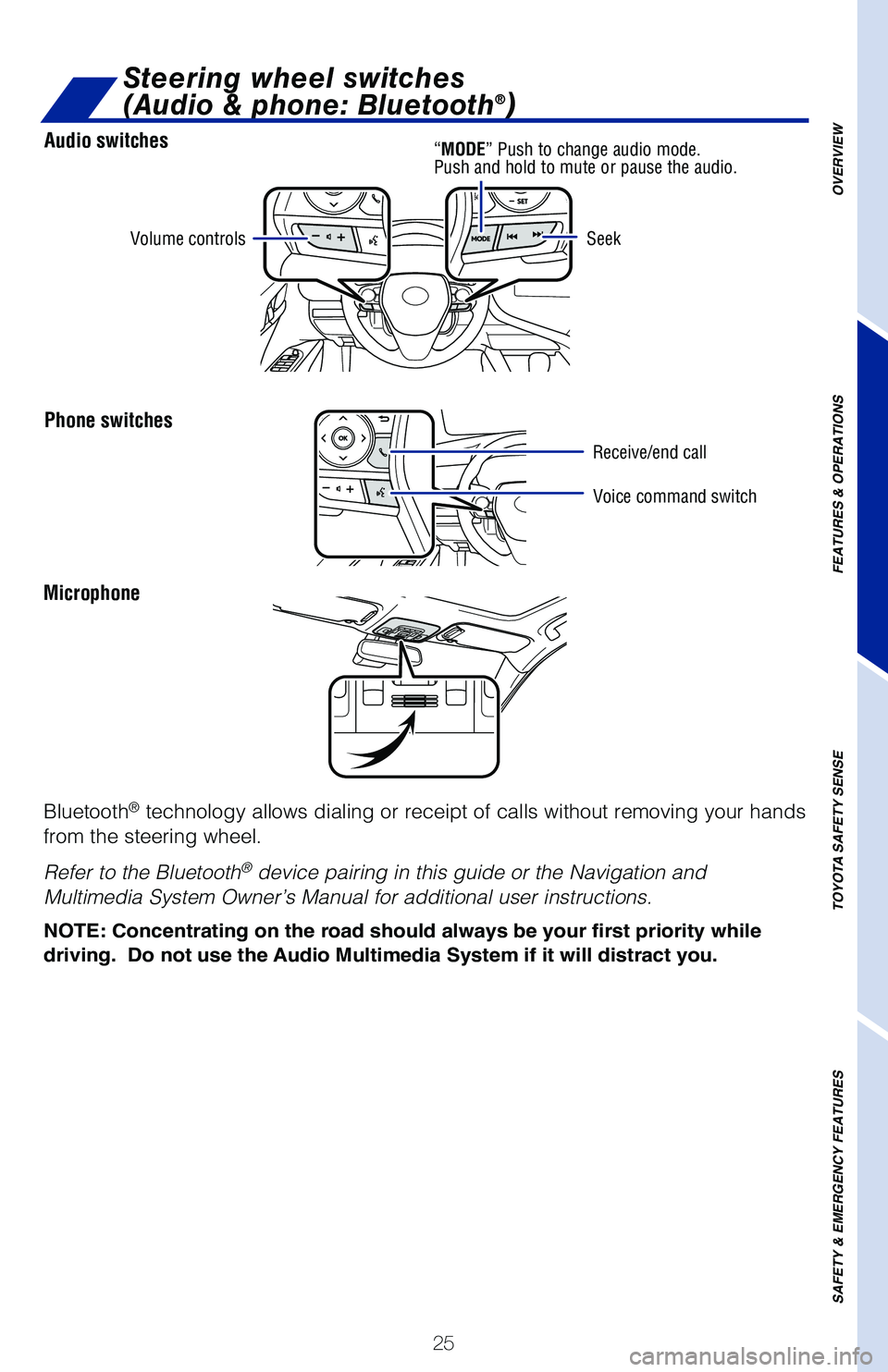
Audio switches
Phone switches
OVERVIEW
FEATURES & OPERATIONS
TOYOTA SAFETY SENSE
SAFETY & EMERGENCY FEATURES
Microphone
Bluetooth
® technology allows dialing or receipt of calls without removing your han\
ds
from the steering wheel.
Refer to the Bluetooth
® device pairing in this guide or the Navigation and
Multimedia System Owner’s Manual for additional user instructions.
NOTE: Concentrating on the road should always be your first priority whi\
le
driving. Do not use the Audio Multimedia System if it will distract you.
Volume controls
Voice command switch
Seek
Steering wheel switches
(Audio & phone: Bluetooth®)
“MODE”
Push to change audio mode.
Push and hold to mute or pause the audio.
Receive/end call
Page 28 of 52
26
FEATURES & OPERATIONS
CUP HOLDERS
FrontRear
Bottle holders/Cup holders
Front
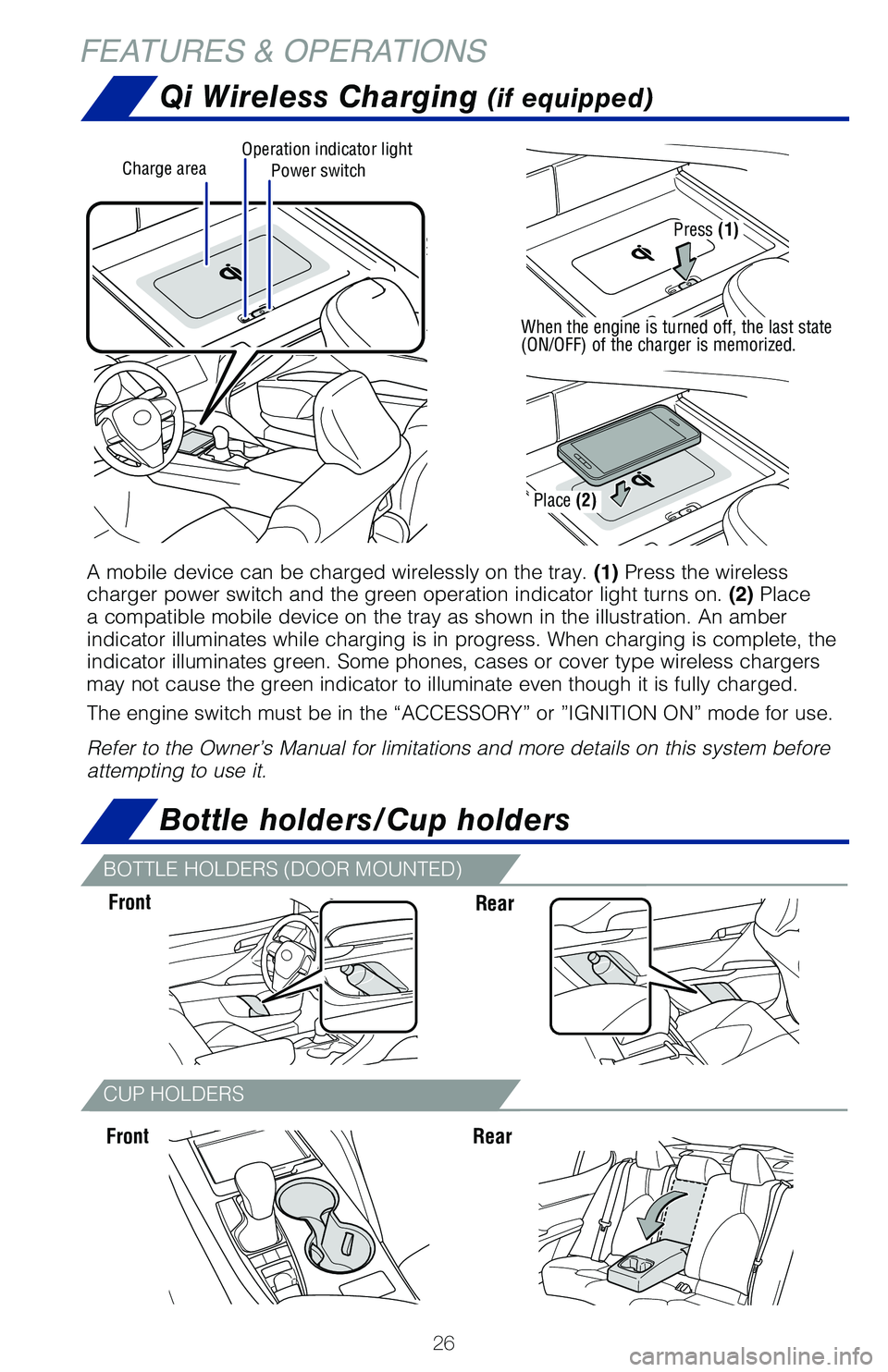
Qi Wireless Charging (if equipped)
Rear
Power switchCharge areaOperation indicator light
A mobile device can be charged wirelessly on the tray. (1) Press the wireless
charger power switch and the green operation indicator light turns on. (2) Place
a compatible mobile device on the tray as shown in the illustration. An \
amber
indicator illuminates while charging is in progress. When charging is co\
mplete, the
indicator illuminates green. Some phones, cases or cover type wireless c\
hargers
may not cause the green indicator to illuminate even though it is fully \
charged.
The engine switch must be in the “ACCESSORY” or ”IGNITION ON” mode for use.
Refer to the Owner’s Manual for limitations and more details on this \
system before
attempting to use it.
Press (1)
When the engine is turned off, the last state
(ON/OFF) of the charger is memorized.
Place (2)
BOTTLE HOLDERS (DOOR MOUNTED)
Page 42 of 52
40
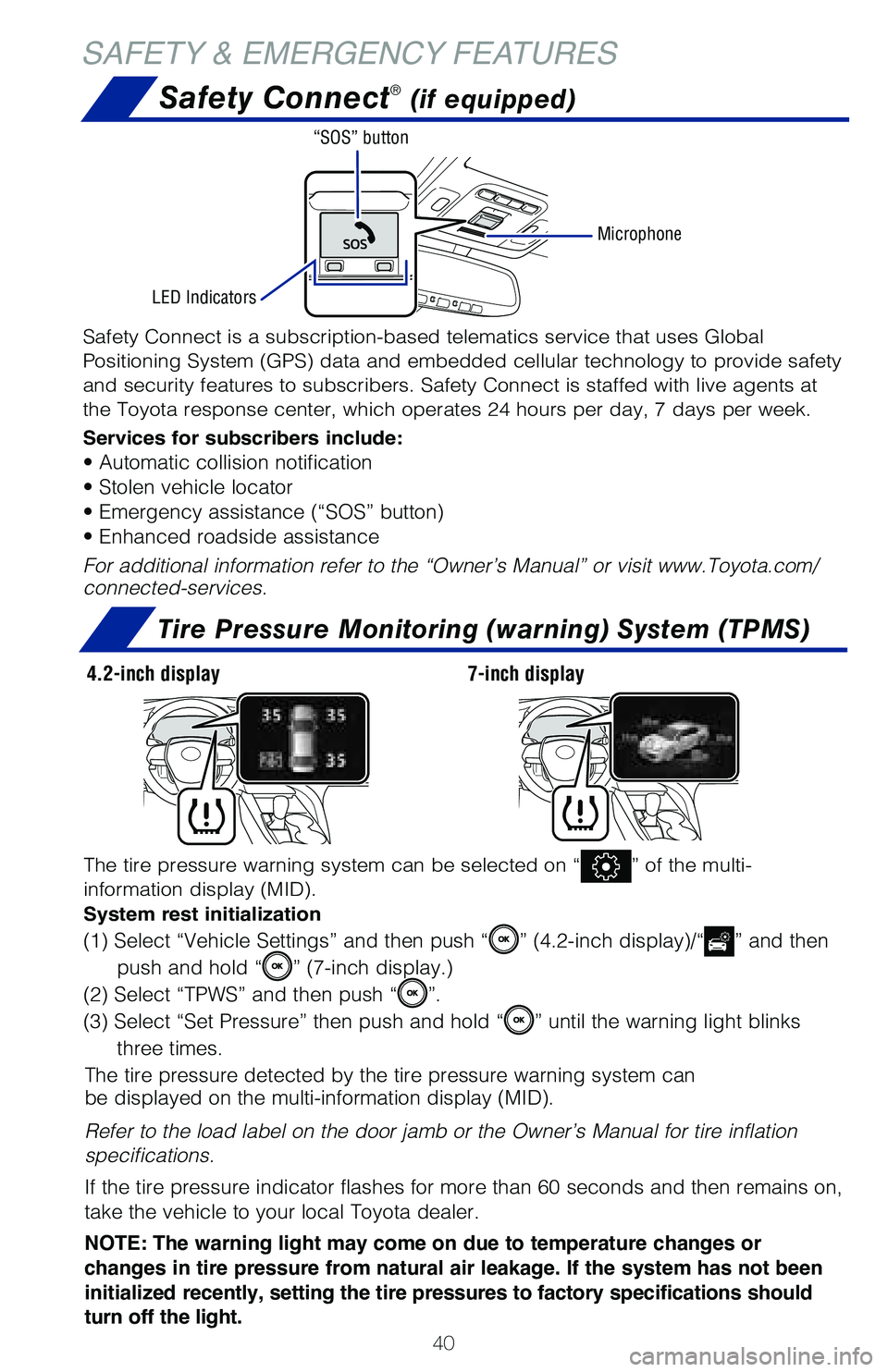
SAFETY & EMERGENCY FEATURESSafety Connect
® (if equipped)
Tire Pressure Monitoring (warning) System (TPMS)
The tire pressure detected by the tire pressure warning system can
be displayed on the multi-information display (MID).
Refer to the load label on the door jamb or the Owner’s Manual for ti\
re inflation
specifications.
If the tire pressure indicator flashes for more than 60 seconds and then\
remains on,
take the vehicle to your local Toyota dealer.
NOTE: The warning light may come on due to temperature changes or
changes in tire pressure from natural air leakage. If the system has not been
initialized recently, setting the tire pressures to factory specifications should
turn off the light.
The tire pressure warning system can be selected on “” of the multi-
information display (MID).
System rest initialization
(1) Select “Vehicle Settings” and then push “” (4.2-inch display)/“” and then
push and hold “
” (7-inch display.)
(2) Select “TPWS” and then push “
”.
(3) Select “Set Pressure” then push and hold “
” until the warning light blinks
three times.
Safety Connect is a subscription-based telematics service that uses Glob\
al
Positioning System (GPS) data and embedded cellular technology to provide safety
and security features to subscribers. Safety Connect is staffed with liv\
e agents at
the Toyota response center, which operates 24 hours per day, 7 days per \
week.
Services for subscribers include:
• Automatic collision notification
• Stolen vehicle locator
• Emergency assistance (“SOS” button)
• Enhanced roadside assistance
For additional information refer to the “Owner’s Manual” or vis\
it www.Toyota.com/
connected-services.
Microphone
LED Indicators “SOS” button
4.2-inch display
7-inch display
Page 47 of 52
45
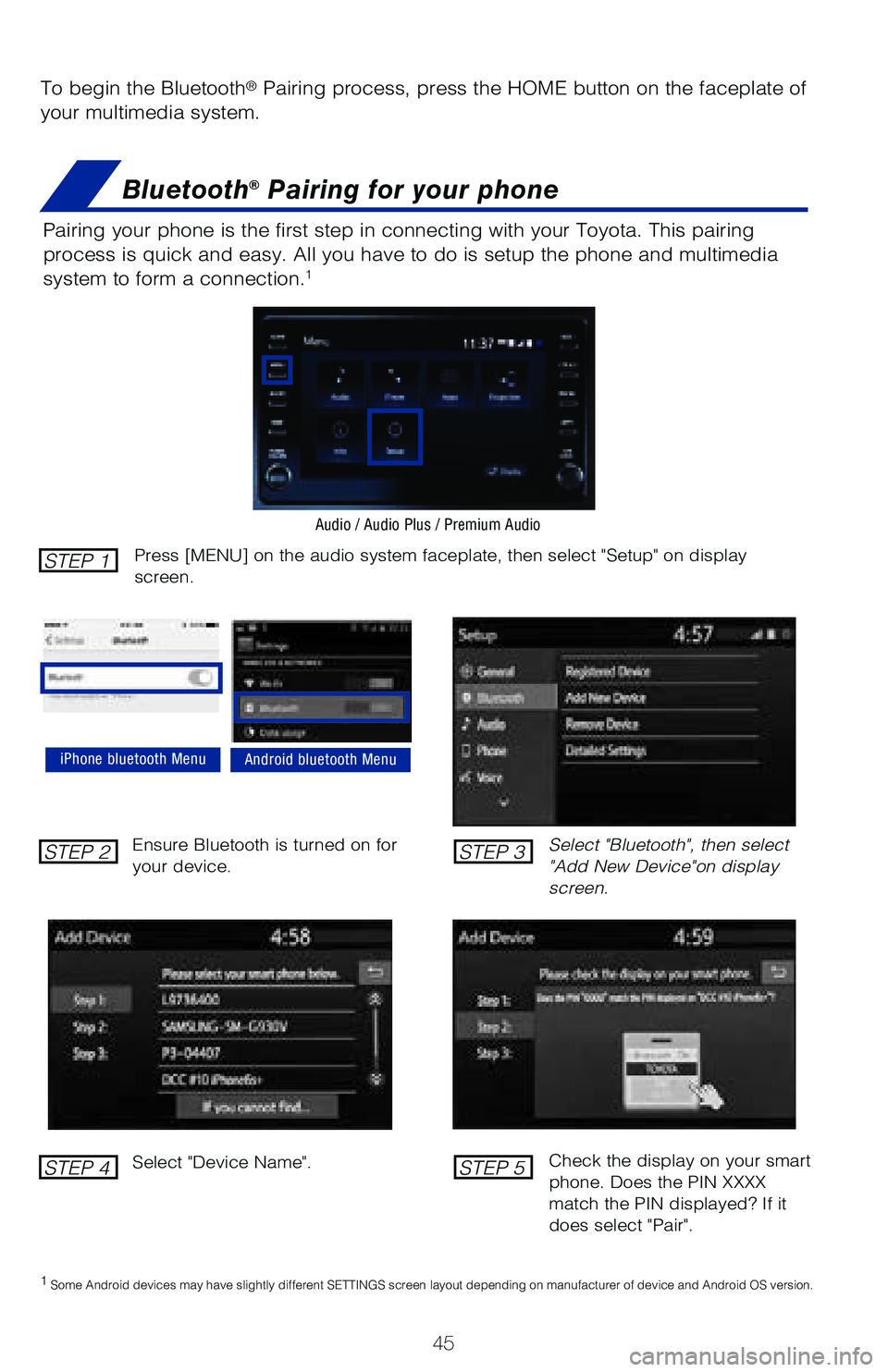
To begin the Bluetooth® Pairing process, press the HOME button on the faceplate of
your multimedia system.
Bluetooth® Pairing for your phone
Pairing your phone is the first step in connecting with your Toyota. Thi\
s pairing
process is quick and easy. All you have to do is setup the phone and mul\
timedia
system to form a connection.
1
Select "Bluetooth", then select
"Add New Device"on display
screen.
Ensure Bluetooth is turned on for
your device.
Select "Device Name".
iPhone bluetooth MenuAndroid bluetooth Menu
1
Some Android devices may have slightly different SETTINGS screen layout\
depending on manufacturer of device and Android OS version.
Check the display on your smart
phone. Does the PIN XXXX
match the PIN displayed? If it
does select "Pair".
Press [MENU] on the audio system faceplate, then select "Setup" on display
screen.STEP 1
STEP 2
STEP 4
STEP 3
STEP 5
Audio / Audio Plus / Premium Audio
Page 48 of 52
46
BLUETOOTH® DEVICE PAIRING
Bluetooth® Pairing for your phone (cont.)
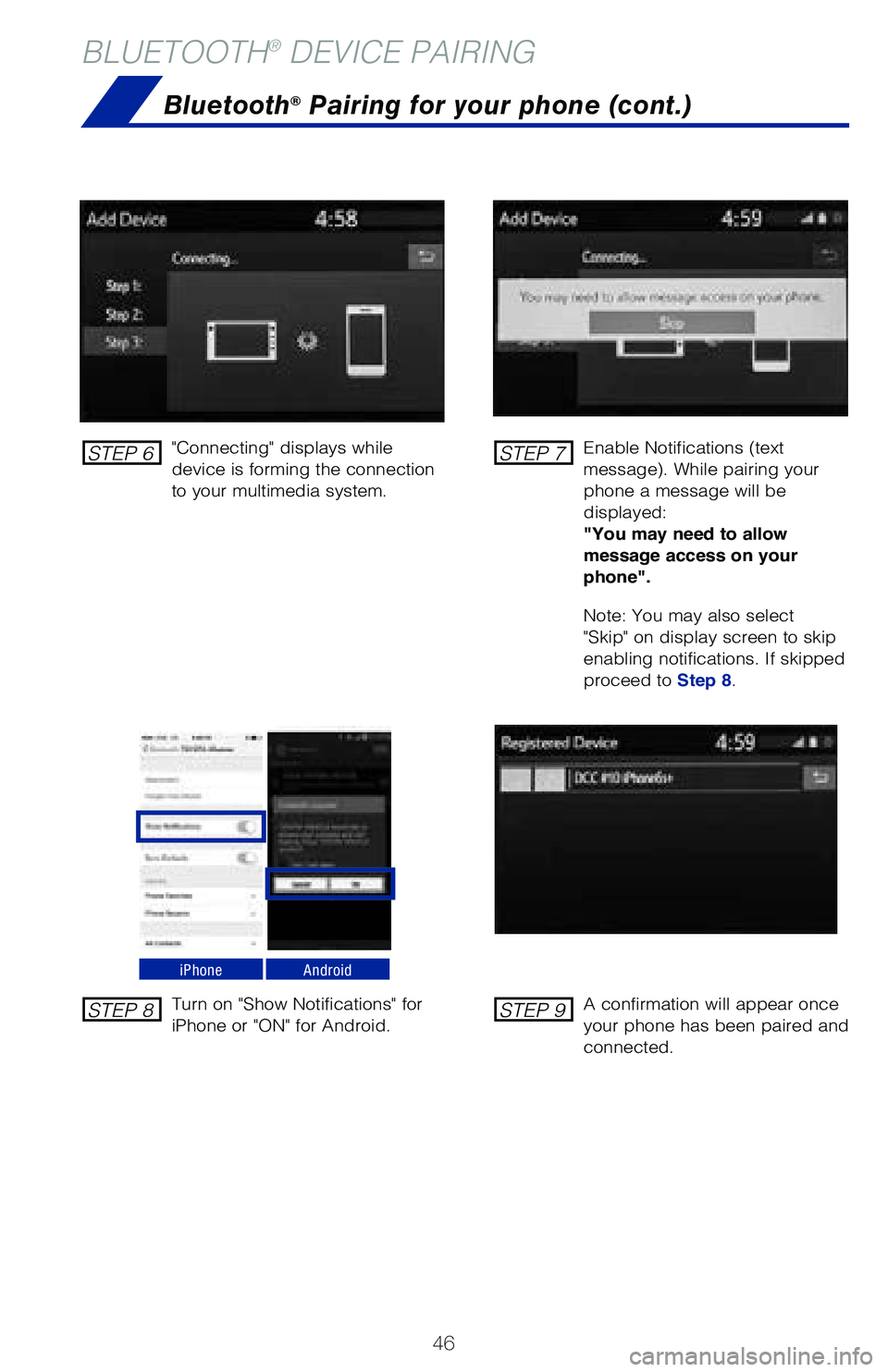
"Connecting" displays while
device is forming the connection
to your multimedia system.Enable Notifications (text
message). While pairing your
phone a message will be
displayed:
"You may need to allow
message access on your
phone".
Note: You may also select
"Skip" on display screen to skip
enabling notifications. If skipped
proceed to Step 8.
Turn on "Show Notifications" for
iPhone or "ON" for Android.
A confirmation will appear once
your phone has been paired and
connected.
iPhoneAndroid
STEP 6
STEP 8
STEP 7
STEP 9