audio TOYOTA CAMRY HYBRID 2020 Owners Manual (in English)
[x] Cancel search | Manufacturer: TOYOTA, Model Year: 2020, Model line: CAMRY HYBRID, Model: TOYOTA CAMRY HYBRID 2020Pages: 52, PDF Size: 2.89 MB
Page 3 of 52
1
OVERVIEW
FEATURES & OPERATIONS
TOYOTA SAFETY SENSE
SAFETY &
EMERGENCY FEATURES
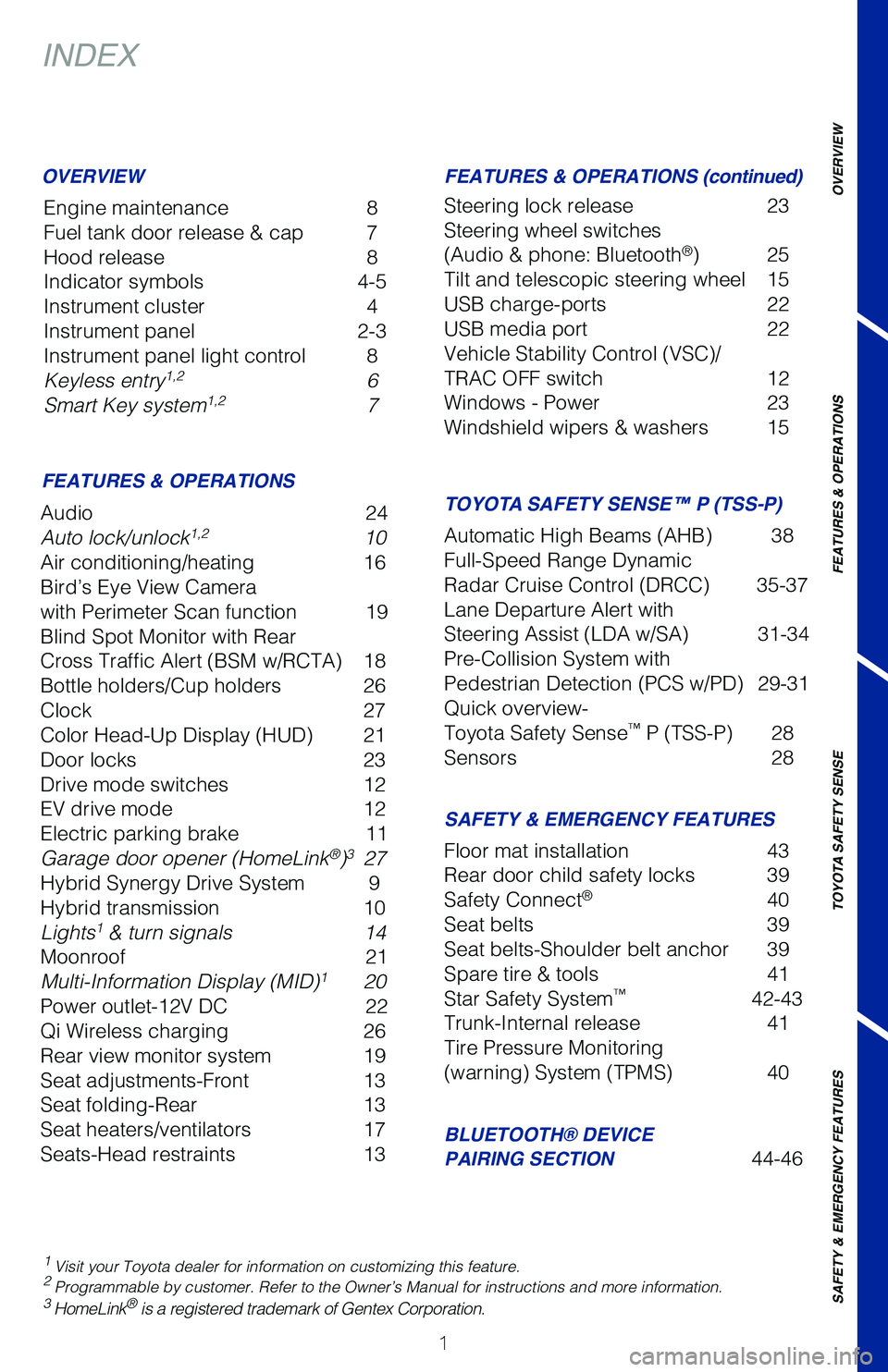
INDEX
Engine maintenance 8
Fuel tank door release & cap 7
Hood release 8
Indicator symbols 4-5
Instrument cluster 4
Instrument panel 2-3
Instrument panel light control 8
Keyless entry
1,2 6
Smart Key system1,2 7
1 Visit your Toyota dealer for information on customizing this feature.2 Programmable by customer. Refer to the Owner’s Manual for instruction\
s and more information.3 HomeLink® is a registered trademark of Gentex Corporation.
OVERVIEW
FEATURES & OPERATIONS
SAFETY & EMERGENCY FEATURES
BLUETOOTH® DEVICE
PAIRING SECTION
44-46
Audio
24
Auto lock/unlock
1,2 10
Air conditioning/heating 16
Bird’s Eye View Camera
with Perimeter Scan function 19
Blind Spot Monitor with Rear
Cross Traffic Alert (BSM w/RCTA) 18
Bottle holders/Cup holders 26
Clock 27
Color Head-Up Display (HUD) 21
Door locks 23
Drive mode switches 12
EV drive mode 12
Electric parking brake 11
Garage door opener (HomeLink
®)3 27
Hybrid Synergy Drive System 9
Hybrid transmission 10
Lights
1 & turn signals 14
Moonroof 21
Multi-Information Display (MID)
1 20
Power outlet-12V DC 22
Qi Wireless charging 26
Rear view monitor system 19
Seat adjustments-Front 13
Seat folding-Rear 13
Seat heaters/ventilators 17
Seats-Head restraints 13Floor mat installation
43
Rear door child safety locks 39
Safety Connect
® 40
Seat belts 39
Seat belts-Shoulder belt anchor 39
Spare tire & tools 41
Star Safety System
™ 42-43
Trunk-Internal release 41
Tire Pressure Monitoring
(warning) System (TPMS) 40
FEATURES & OPERATIONS (continued)
TOYOTA SAFETY SENSE™ P (TSS-P)
Steering lock release 23
Steering wheel switches
(Audio & phone: Bluetooth
®) 25
Tilt and telescopic steering wheel 15
USB charge-ports 22
USB media port 22
Vehicle Stability Control (VSC)/
TRAC OFF switch 12
Windows - Power 23
Windshield wipers & washers 15
Automatic High Beams (AHB) 38
Full-Speed Range Dynamic
Radar Cruise Control (DRCC) 35-37
Lane Departure Alert with
Steering Assist (LDA w/SA) 31-34
Pre-Collision System with
Pedestrian Detection (PCS w/PD) 29-31
Quick overview-
Toyota Safety Sense
™ P (TSS-P) 28
Sensors 28
Page 4 of 52
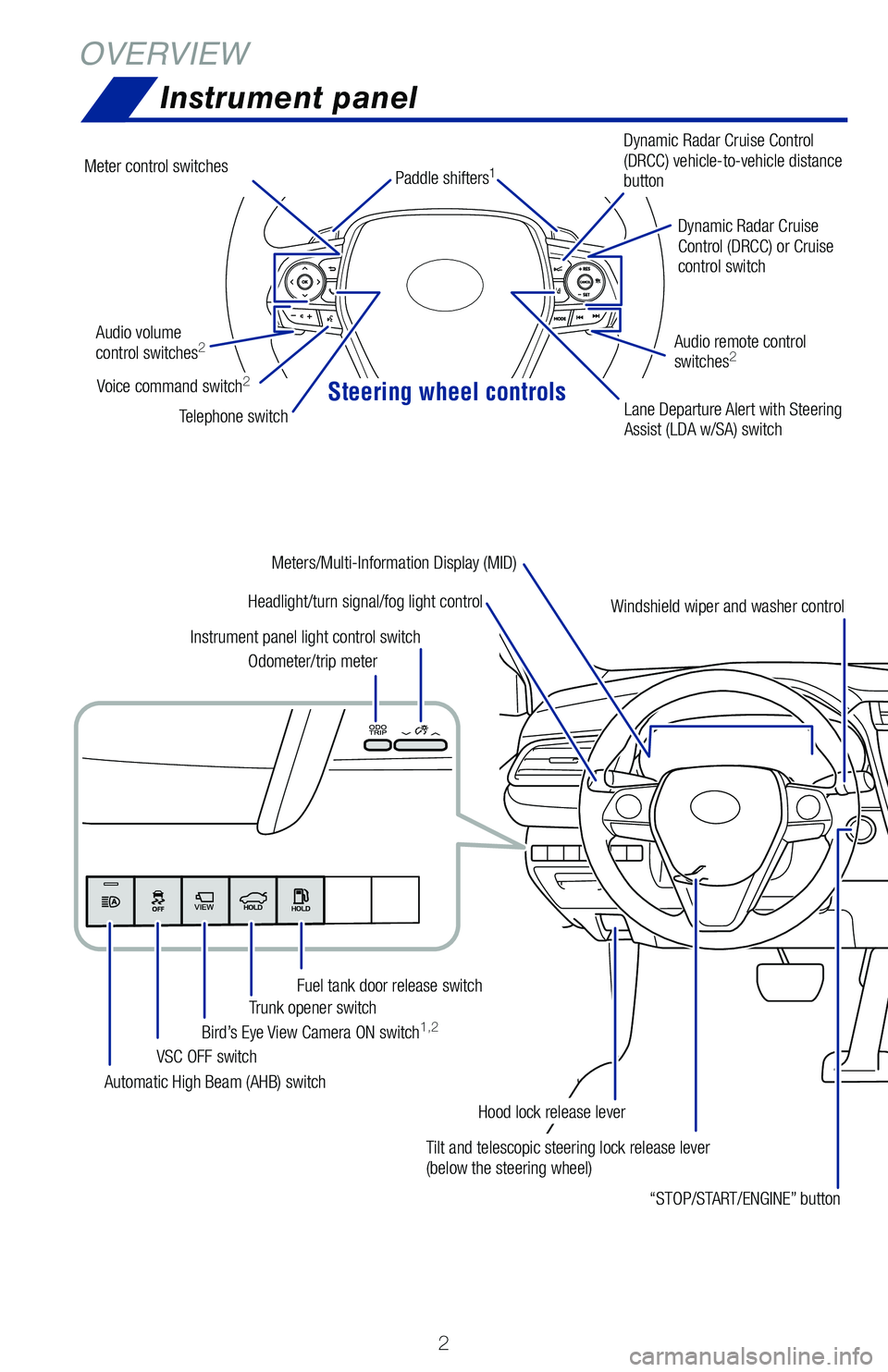
Steering wheel controls
2
OVERVIEWInstrument panel
Tilt and telescopic steering lock release lever
(below the steering wheel)
Headlight/turn signal/fog light control
Automatic High Beam (AHB) switch VSC OFF switch
Bird’s Eye View Camera ON switch
1,2Trunk opener switch
Fuel tank door release switch
Odometer/trip meter
Instrument panel light control switch
“STOP/START/ENGINE” button
Hood lock release leverDynamic Radar Cruise
Control (DRCC) or Cruise
control switch
Dynamic Radar Cruise Control
(DRCC) vehicle-to-vehicle distance
button
Lane Departure Alert with Steering
Assist (LDA w/SA) switch
Audio volume
control switches
2
Telephone switch
Audio remote control
switches
2
Windshield wiper and washer control
Meters/Multi-Information Display (MID)
Meter control switches
Voice command switch2
Paddle shifters1
Page 5 of 52
 3
OVERVIEW
FEATURES & OPERATIONS
TOYOTA SAFETY SENSE
SAFETY & EMERGENCY FEATURES
1
If equipped.2 For details, refer to the “Navigation and Multimedia System Owner’\
s Manual” or visit www.
toyo")
3
OVERVIEW
FEATURES & OPERATIONS
TOYOTA SAFETY SENSE
SAFETY & EMERGENCY FEATURES
1
If equipped.2 For details, refer to the “Navigation and Multimedia System Owner’\
s Manual” or visit www.
toyota.com/audio-multimedia for additional resources.
Emergency flasher switch
Air conditioning/heating controls
EV drive mode switchElectric parking brake switch
Driving mode select switches
Seat heaters1/ventilators1
switches
Audio/Navigation system
1,2
Qi Wireless charger switch1
Brake hold switch
Page 22 of 52
20
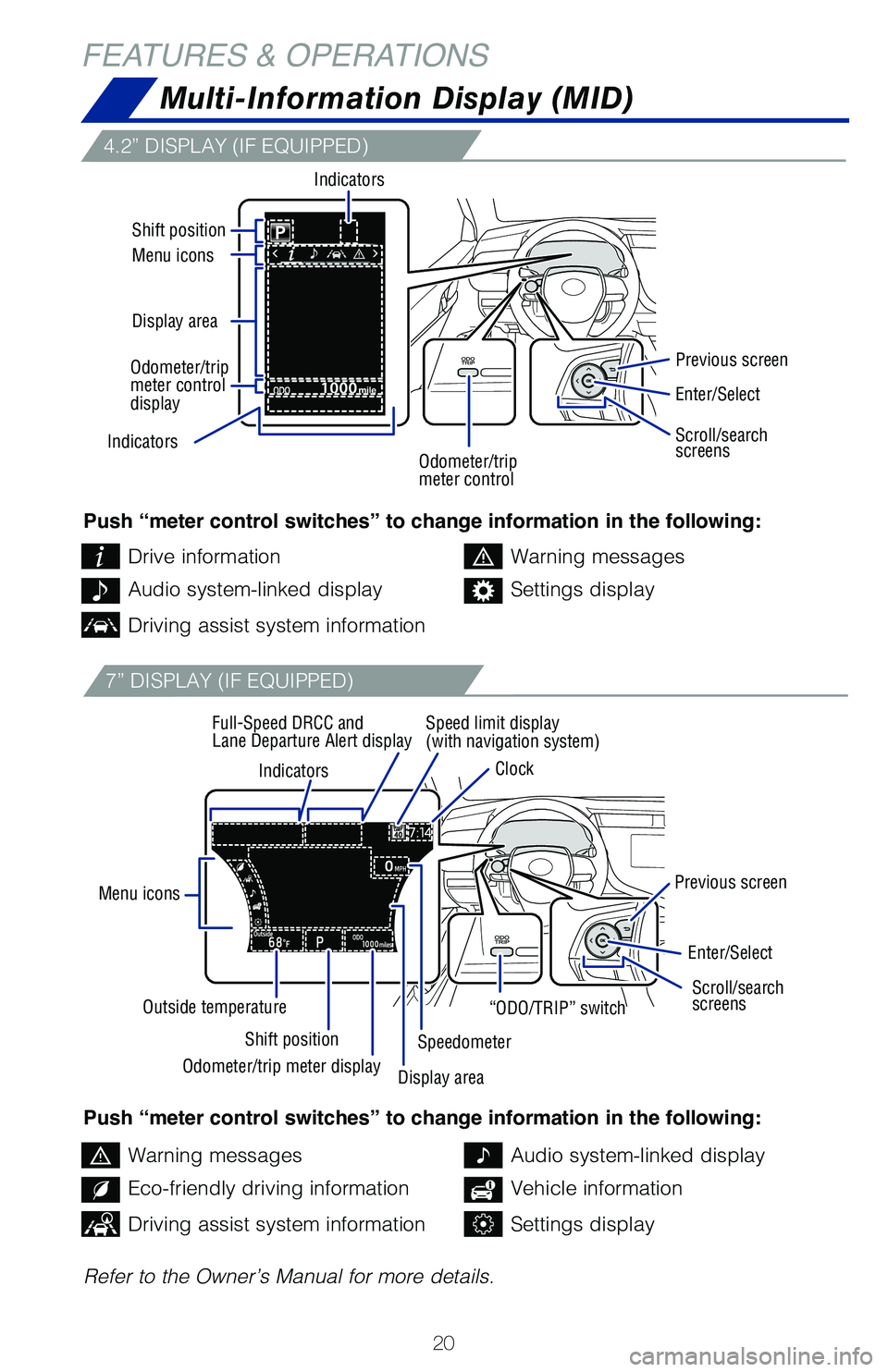
FEATURES & OPERATIONSMulti-Information Display (MID)
4.2” DISPLAY (IF EQUIPPED)
7” DISPLAY (IF EQUIPPED)
Push “meter control switches” to change information in the following:
Push “meter control switches” to change information in the following:
Refer to the Owner’s Manual for more details.Drive information
Warning messages
Warning messages
Audio system-linked display
Audio system-linked display
Eco-friendly driving information
Settings display
Vehicle information
Driving assist system information
Driving assist system informationSettings display
Indicators
Menu icons
Shift position
Outside temperature Speed limit display
(with navigation system)
Clock
Full-Speed DRCC and
Lane Departure Alert display
Previous screen
Previous screen
Speedometer
Indicators
Display area Menu icons Shift position
Indicators
Enter/Select
Enter/Select
Scroll/search
screens Scroll/search
screens
Odometer/trip
meter control “ODO/TRIP” switch
Odometer/trip meter display Display area
Odometer/trip
meter control
display
Page 24 of 52
22
FEATURES & OPERATIONS
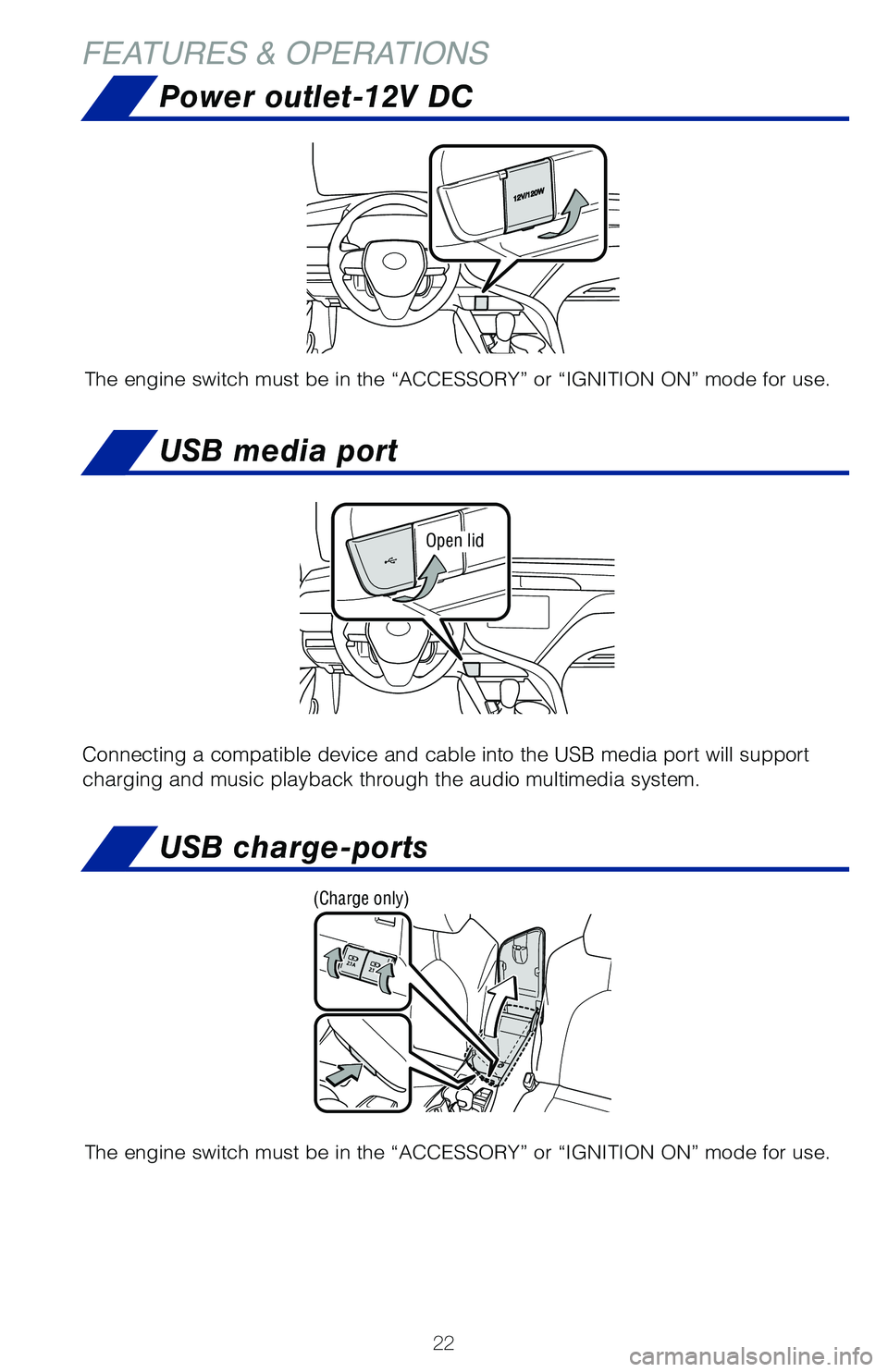
Power outlet-12V DC
The engine switch must be in the “ACCESSORY” or “IGNITION ON” mode for use.
USB media port
Open lid
Connecting a compatible device and cable into the USB media port will su\
pport
charging and music playback through the audio multimedia system.
USB charge-ports
The engine switch must be in the “ACCESSORY” or “IGNITION ON” mode for use.
(Charge only)
Page 26 of 52
24
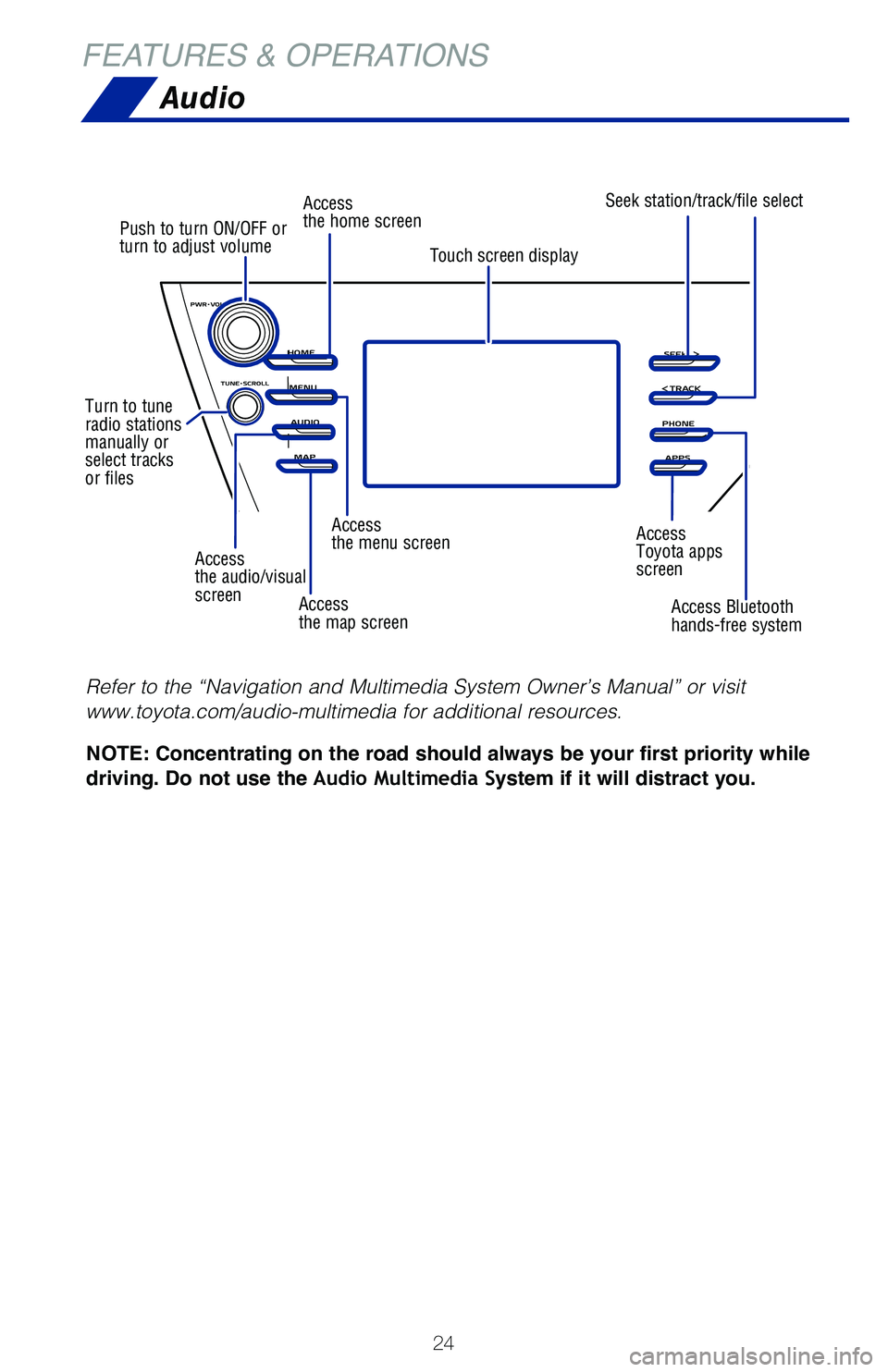
Audio
Access
the audio/visual
screen
Push to turn ON/OFF or
turn to adjust volume
Turn to tune
radio stations
manually or
select tracks
or files Access
the home screen
Access
the menu screen Access
Toyota apps
screen
Access
the map screen Access Bluetooth
hands-free system
Seek station/track/file select
Touch screen display
NOTE: Concentrating on the road should always be your first priority while
driving. Do not use the Audio Multimedia System if it will distract you.
Refer to the “Navigation and Multimedia System Owner’s Manual” \
or visit
www.toyota.com/audio-multimedia for additional resources.
FEATURES & OPERATIONS
Page 27 of 52
25
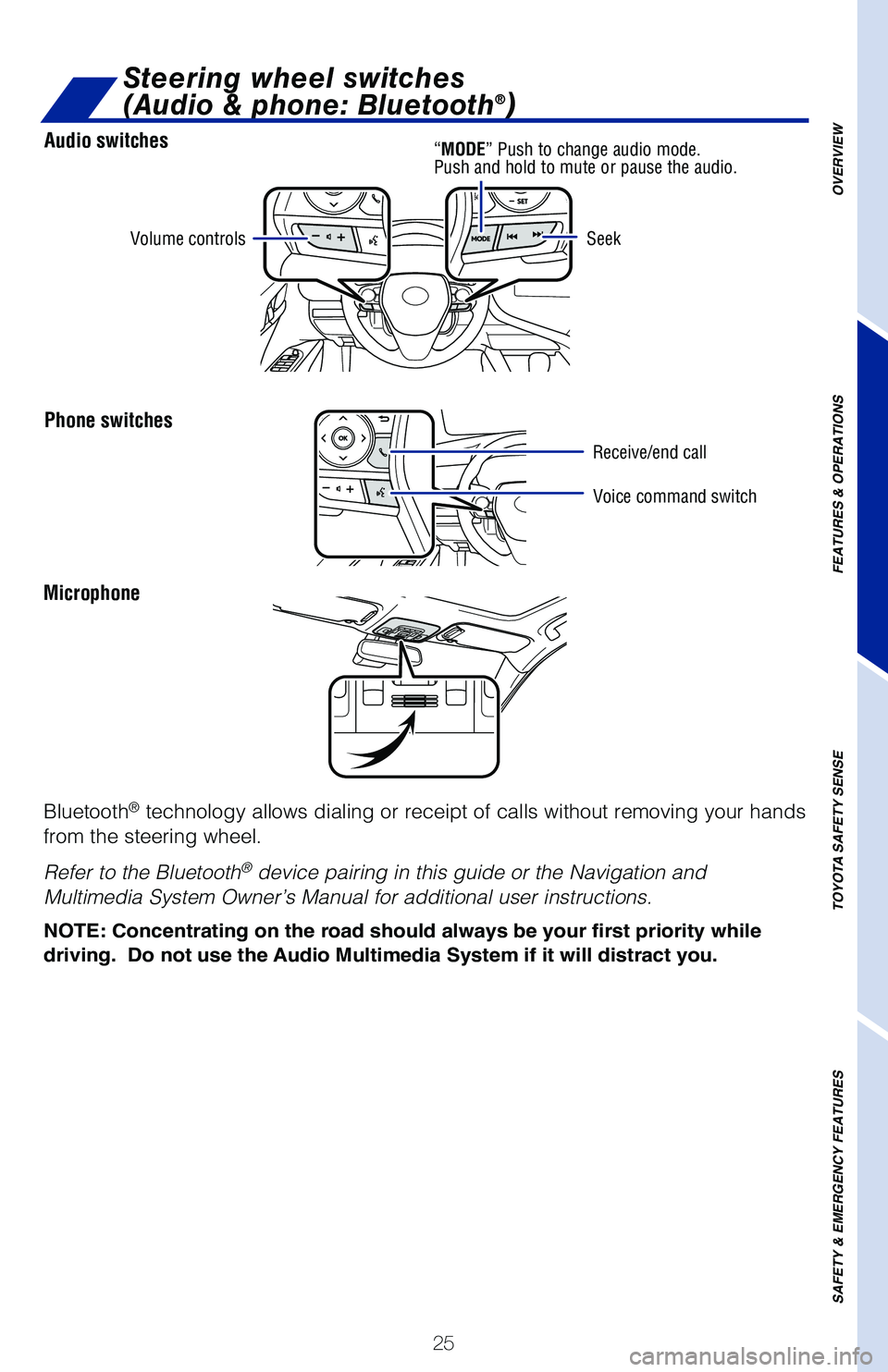
Audio switches
Phone switches
OVERVIEW
FEATURES & OPERATIONS
TOYOTA SAFETY SENSE
SAFETY & EMERGENCY FEATURES
Microphone
Bluetooth
® technology allows dialing or receipt of calls without removing your han\
ds
from the steering wheel.
Refer to the Bluetooth
® device pairing in this guide or the Navigation and
Multimedia System Owner’s Manual for additional user instructions.
NOTE: Concentrating on the road should always be your first priority whi\
le
driving. Do not use the Audio Multimedia System if it will distract you.
Volume controls
Voice command switch
Seek
Steering wheel switches
(Audio & phone: Bluetooth®)
“MODE”
Push to change audio mode.
Push and hold to mute or pause the audio.
Receive/end call
Page 29 of 52
27
OVERVIEW
FEATURES & OPERATIONS
TOYOTA SAFETY SENSE
SAFETY & EMERGENCY FEATURES
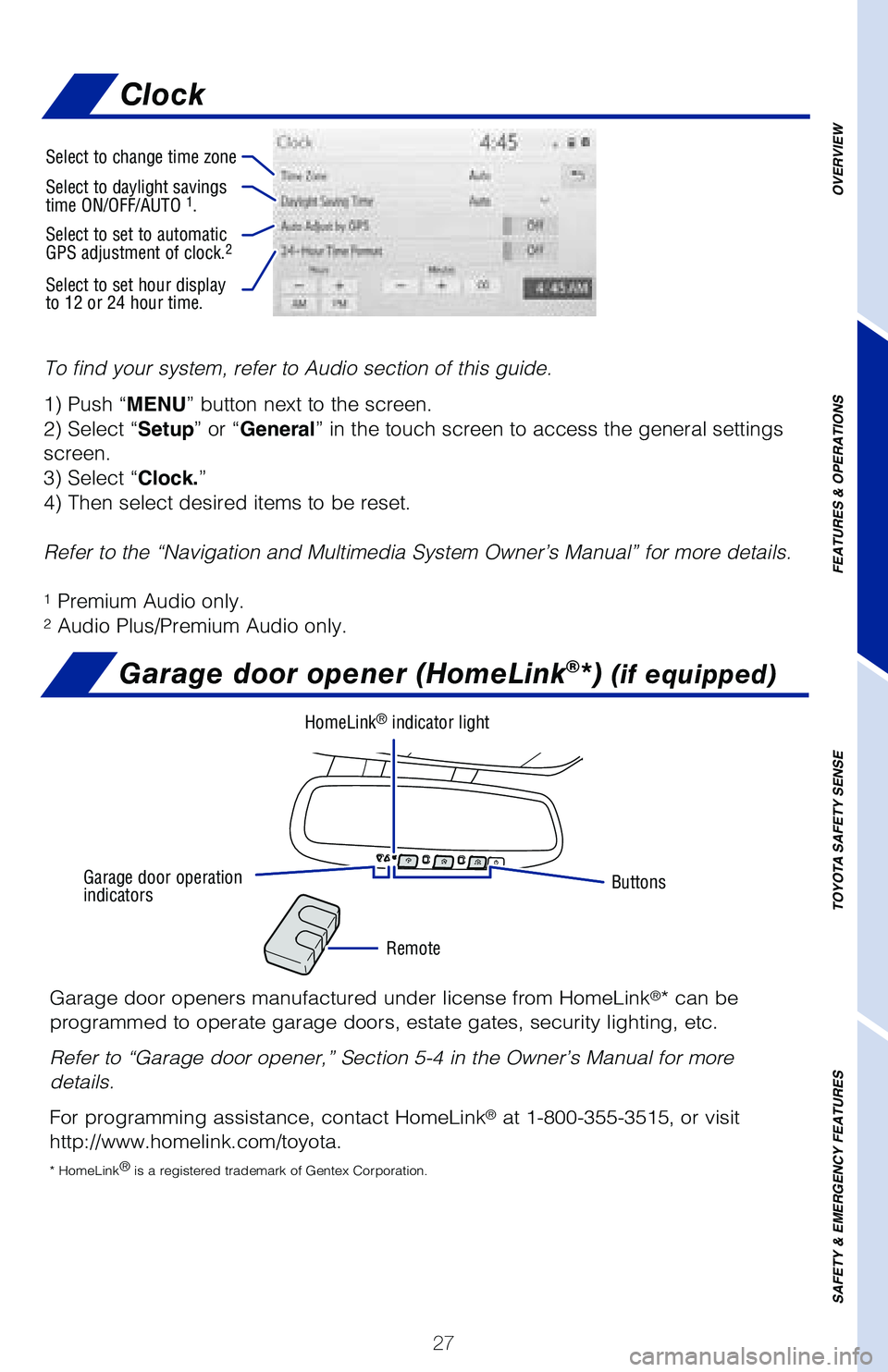
To find your system, refer to Audio section of this guide.
1) Push “MENU” button next to the screen.
2) Select “Setup” or “General” in the touch screen to access the general settings
screen.
3) Select “Clock.”
4) Then select desired items to be reset.
Refer to the “Navigation and Multimedia System Owner’s Manual” \
for more details.
1 Premium Audio only.2 Audio Plus/Premium Audio only.
Garage door opener (HomeLink®*) (if equipped)
Garage door openers manufactured under license from HomeLink®* can be
programmed to operate garage doors, estate gates, security lighting, etc\
.
Refer to “Garage door opener,” Section 5-4 in the Owner’s Manua\
l for more
details.
For programming assistance, contact HomeLink
® at 1-800-355-3515, or visit
http://www.homelink.com/toyota.
* HomeLink ®
is a registered trademark of Gentex Corporation.
Buttons
Remote
HomeLink® indicator light
Garage door operation
indicators
Select to change time zone
Select to daylight savings
time ON/OFF/AUTO 1.
Select to set to automatic
GPS adjustment of clock.2
Select to set hour display
to 12 or 24 hour time.
Clock
Page 33 of 52
 31
DISABLING PRE-COLLISION SYSTEM (PCS)
LDA in TSS-P uses an in-vehicle camera designed to detect visible white \
and yellow
lane markers in front of the vehicle and the vehicle’s position on th\
e")
31
DISABLING PRE-COLLISION SYSTEM (PCS)
LDA in TSS-P uses an in-vehicle camera designed to detect visible white \
and yellow
lane markers in front of the vehicle and the vehicle’s position on th\
e road. If the
system determines that the vehicle is starting to unintentionally deviat\
e from its lane,
the system alerts the driver with an audio and visual alert. When the al\
erts occur, the
driver must check the surrounding road situation and carefully operate t\
he steering
wheel to move the vehicle back to the center part of their lane.
LDA is designed to function at speeds of approximately 32 mph (50 km/h) or higher
on relatively straight roadways.
In addition to the alert function, LDA w/SA also features a steering ass\
ist
function. When enabled, if the system determines that the vehicle is on \
a path to
unintentionally depart from its lane, the system may provide small corrective steering
inputs to the steering wheel for a short period of time to help keep the\
vehicle in its
lane.
Lane Departure Alert with Steering Assist
(LDA w/SA)
OVERVIEW
FEATURES & OPERATIONS
TOYOTA SAFETY SENSE
SAFETY & EMERGENCY FEATURES
(1) Press “” switches and select or from the Multi-Information
Display (MID).
(2) Press “
” switches and select “PSC” from the MID and then press “”. The
setting screen is displayed.
(3) Press “
” to go back to the menu.
Note: The system is enabled each time the power switch is turned to ON
mode.
Refer to the Toyota Owner’s Manual for additional information on PCS \
operation,
settings adjustments, limitations, and precautions before attempting to \
use it.
Page 47 of 52
45
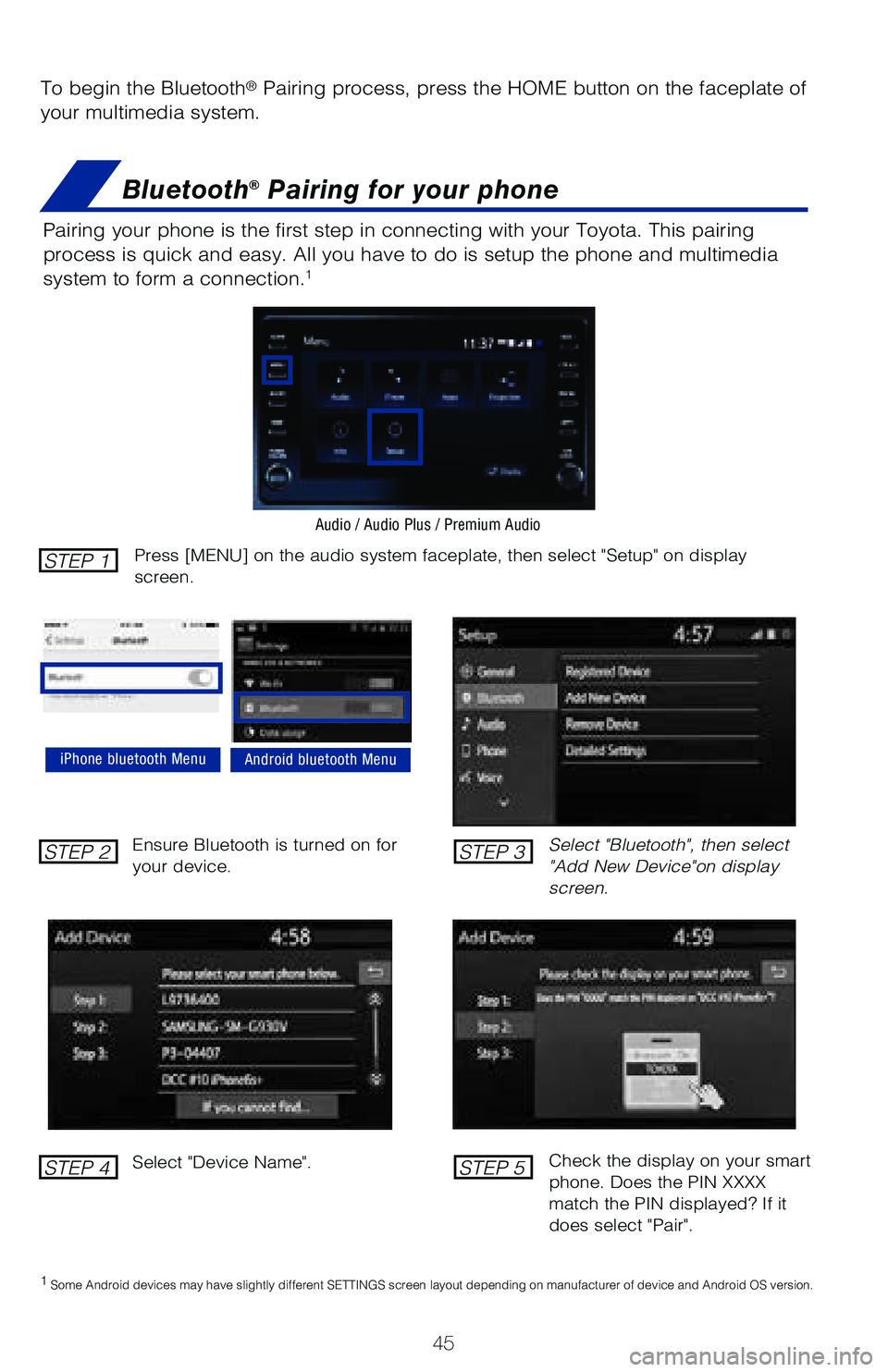
To begin the Bluetooth® Pairing process, press the HOME button on the faceplate of
your multimedia system.
Bluetooth® Pairing for your phone
Pairing your phone is the first step in connecting with your Toyota. Thi\
s pairing
process is quick and easy. All you have to do is setup the phone and mul\
timedia
system to form a connection.
1
Select "Bluetooth", then select
"Add New Device"on display
screen.
Ensure Bluetooth is turned on for
your device.
Select "Device Name".
iPhone bluetooth MenuAndroid bluetooth Menu
1
Some Android devices may have slightly different SETTINGS screen layout\
depending on manufacturer of device and Android OS version.
Check the display on your smart
phone. Does the PIN XXXX
match the PIN displayed? If it
does select "Pair".
Press [MENU] on the audio system faceplate, then select "Setup" on display
screen.STEP 1
STEP 2
STEP 4
STEP 3
STEP 5
Audio / Audio Plus / Premium Audio