automatic ac TOYOTA COROLLA 2012 10.G Owners Manual
[x] Cancel search | Manufacturer: TOYOTA, Model Year: 2012, Model line: COROLLA, Model: TOYOTA COROLLA 2012 10.GPages: 529, PDF Size: 8.07 MB
Page 2 of 529

TABLE OF CONTENTSIndex
2
1-1. Key informationKeys ..................................... 22
1-2. Opening, closing and locking the doors and
trunk
Smart key system................. 25
Wireless remote control ....... 36
Doors.................................... 41
Trunk .................................... 47
1-3. Adjustable components (seats, mirrors,
steering wheel)
Front seats ........................... 51
Rear seats ............................ 54
Head restraints ..................... 56
Seat belts ............................. 58
Steering wheel ..................... 66
Anti-glare inside rear view mirror .................................. 67
Outside rear view mirrors ..... 69
1-4. Opening and closing the windows
Power windows .................... 71
Moon roof ............................. 73
1-5. Refueling Opening the fuel tank cap .... 77
1-6. Theft deterrent system Engine immobilizer system ................................ 81 1-7. Safety information
Correct driving posture ......... 84
SRS airbags ......................... 86
Front passenger occupant classification system ........... 98
Child restraint systems ....... 103
Installing child restraints ..... 107
2-1. Driving procedures Driving the vehicle .............. 120
Engine (ignition) switch (vehicles with smart
key system) ...................... 131
Engine (ignition) switch (vehicles without smart
key system) ...................... 135
Automatic transmission ...... 139
Manual transmission........... 145
Turn signal lever ................. 146
Parking brake ..................... 147
Horn .................................... 148
2-2. Instrument cluster Gauges and meters ............ 149
Indicators and warning lights ................................. 152
Multi-information display ..... 156
2-3. Operating the lights and wipers
Headlight switch ................. 160
Fog light switch ................... 164
Windshield wipers and washer .............................. 166
1Before driving
2When driving
Page 3 of 529

1
2
3
4
5
6
7
3
2-4. Using other drivingsystems
Cruise control ...................... 169
Driving assist systems ........ 173
2-5. Driving information Cargo and luggage ............. 177
Vehicle load limits ............... 180
Winter driving tips ............... 181
Trailer towing (2.4 L 4-cylinder
[2AZ-FE] engine) .............. 185
Trailer towing (1.8 L 4-cylinder
[2ZR-FE] engine) .............. 200
Dinghy towing (automatic transmission) .................... 201
Dinghy towing (manual transmission) .................... 202
3-1. Using the air conditioning
system a nd defogger
Automatic air conditioning system .............................. 206
Manual air conditioning system .............................. 212
Rear window and outside rear view
mirror defoggers ............... 219 3-2. Using the audio system
Audio system types ............ 220
Using the radio ................... 232
Using the CD player ........... 236
Playing back MP3 and WMA discs ....................... 243
Operating an iPod .............. 252
Operating a USB memory ............................ 261
Optimal use of the audio system .............................. 269
Using the AUX port............. 273
Using the steering wheel audio switches.................. 275
3-3. Using the Bluetooth
®
audio s ystem
Bluetooth
® audio/phone ..... 279
Using the Bluetooth®
audio/phone ..................... 282
Operating a Bluetooth
®
enabled portable player.... 287
3-4. Using the ha nds-free
phone system
( for cellular phone)
Making a phone call ........... 290
Using the “SET UP” menu (“Bluetooth” menu) ........... 295
Using the “SET UP” menu (“Phone” menu) ................ 3013Interior features
Page 11 of 529
11
A
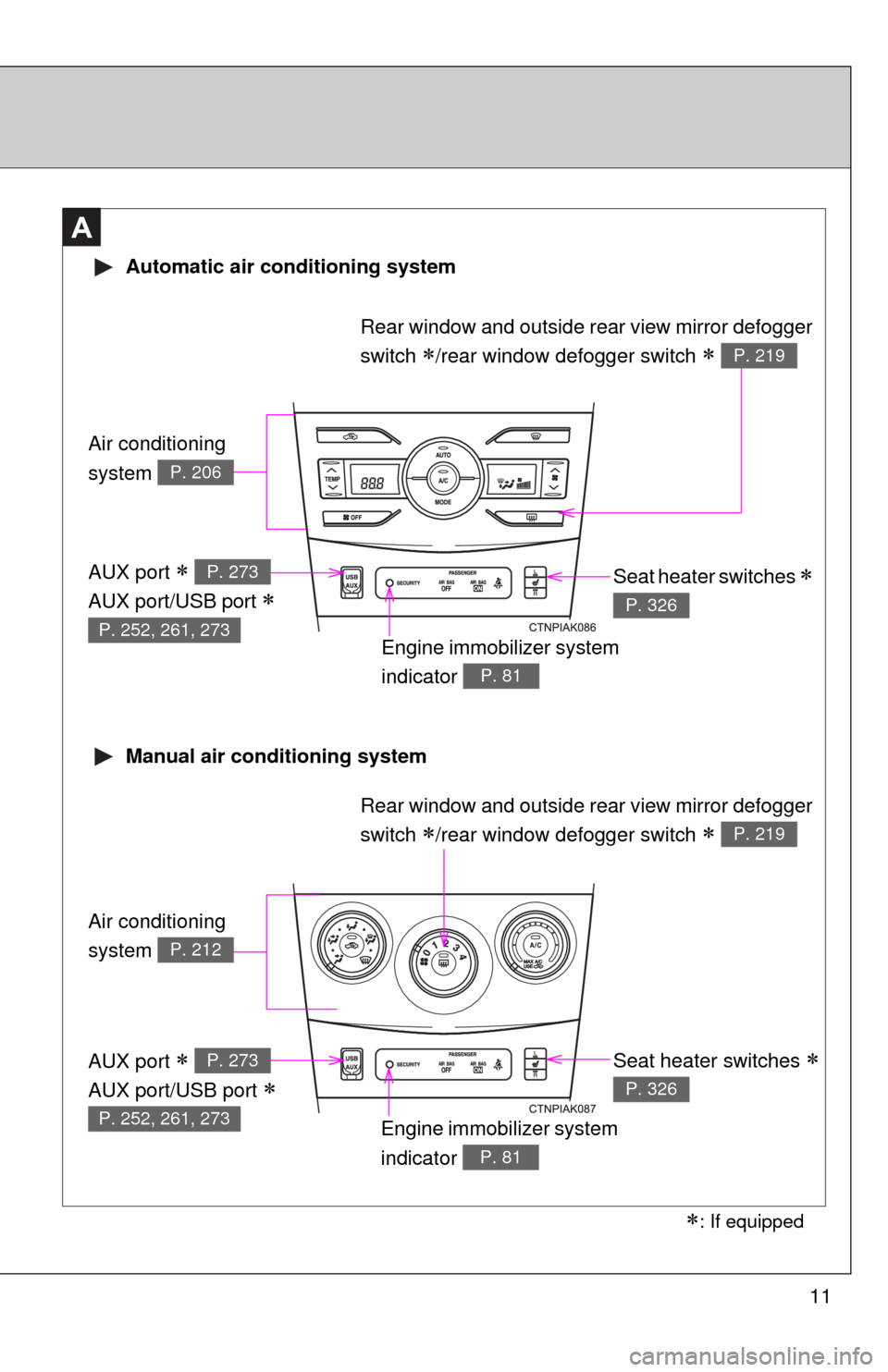
Air conditioning
system
P. 206
Air conditioning
system
P. 212
Automatic air conditioning system
Manual air conditioning system
Engine immobilizer system
indicator
P. 81
Seat heater switches
P. 326
Rear window and outside rear view mirror defogger
switch
/rear window defogger switch P. 219
Engine immobilizer system
indicator
P. 81
Seat heater switches
P. 326
AUX port
AUX port/USB port
P. 273
P. 252, 261, 273
AUX port
AUX port/USB port
P. 273
P. 252, 261, 273
: If equipped
Rear window and outside rear view mirror defogger
switch
/rear window defogger switch P. 219
Page 17 of 529

17
Vehicle control and operation data recording
Your Toyota is equipped with sophisticated computers that record certain
information about your vehicle’s operation, such as:
• Engine speed
• Accelerator status
• Brake status
• Vehicle speed
• Shift position (vehicles with an automatic transmission)
The data recorded varies according to the grade level and options the vehi-
cle is equipped with. The computers do not record conversations, sound or
pictures.
●Data usage
Toyota may use the data recorded in these computers to diagnose malfunc-
tions, conduct research and development, and improve quality.
Toyota will not disclose the recorded data to a third party except:
• With the consent of the vehicle owner or with the consent of the lessee if the vehicle is leased
• In response to an official request by the police, a court of law or a govern-
ment agency
• For research purposes where the data is not tied to a specific vehicle or vehicle owner
Page 32 of 529

32 1-2. Opening, closing and locking the doors and trunk
●Do not leave the electronic key on top of the instrument panel or near the
door pockets when exiting the vehicle. Depending on the radio wave
reception conditions, it may be detected by the antenna outside the cabin
and the door will become lockable from the outside, possibly trapping the
electronic key inside the vehicle.
● As long as the electronic key is within the effective range, the doors may
be locked or unlocked by anyone.
● Even if the electronic key is not inside the vehicle, it may be possible to
start the engine if the electronic key is near the window.
● The doors may unlock if a large amount of water splashes on the door
handle, such as in the rain or in a car wash. (The doors will automatically
be locked after approximately 60 seconds if the doors are not opened
and closed.)
● Gripping the door handle when wearing a glove may not unlock the door.
● If the wireless remote control is used to lock the doors when the elec-
tronic key is near the vehicle, there is a possibility that the door may not
be unlocked by the entry function. (Use the wireless remote control to
unlock the doors.)
● A sudden approach to the effective range or door handle may prevent the
doors from being unlocked. In this case, return the door handle to the
original position and check that the doors unlock before pulling the door
handle again.
■ When the vehicle is not driven for extended periods
To prevent theft of the vehicle, do not leave the electronic key within 6 ft. (2
m) of the vehicle.
■ Security feature
If a door is not opened within approximately 60 seconds after the vehicle is
unlocked, the security feature automatically locks the vehicle again.
■ Alarms and warning indicators
A combination of exterior and interior alarms as well as warning lights are
used to reduce the chance of vehicle theft and accidents resulting from erro-
neous operation.
●When any warning lights come on:
Take appropriate measures according to which warning light comes on.
( P. 420)
Page 38 of 529

38 1-2. Opening, closing and locking the doors and trunk
■Key battery depletion
Vehicles with smart key system
P. 3 1
Vehicles without smart key system
If the wireless remote control function does not operate, the battery may be
depleted. Replace the battery when necessary. ( P. 386)
■ Security feature
If a door is not opened within approximately 60 seconds after the vehicle is
unlocked, the security feature automatically locks the vehicle again.
■ When the electronic key battery is fully depleted (vehicles with smart
key system)
P. 385
■ Conditions affecting operation
Vehicles with smart key system
P. 2 9
Vehicles without smart key system
The wireless remote control function may not operate normally in the follow-
ing situations.
● Near a TV tower, radio station, electr ic power plant, airport or other facil-
ity that generates strong radio waves
● When carrying a portable radio, cell ular phone or other wireless commu-
nication devices
● When multiple wireless keys are in the vicinity
● When the wireless key has come into contact with, or is covered by, a
metallic object
● When a wireless key (that emits radio waves) is being used nearby
● When the wireless key has been left near an electrical appliance such as
a personal computer
● When the wireless key battery is depleted
● If window tint with a metallic content or metallic objects are attached to
the rear window
Page 43 of 529

43
1-2. Opening, closing and locking the doors and trunk
1
Before driving
Automatic door locking and unlo
cking systems (vehicles with
power door lock system)
The following functions can be set or cancelled:
*1: Vehicles with an automatic transmission only
*2: Vehicles with smart key system
FunctionOperation
Shift position linked
door locking function
*1Shifting the shift lever out of P locks all
doors.
Shift position linked
door unlocking func-
tion
*1Shifting the shift lever to P unlocks all doors.
Speed linked door lock-
ing function
*2All doors are locked when the vehicle speed is
approximately 12 mph (20 km/h) or higher.
Driver's door linked door
unlocking function
Vehicles with smart key system
All doors are unlocked when the driver's door
is opened within 10 seconds after turning the
“ENGINE START STOP” switch to ACCES-
SORY mode or OFF.
Vehicles without smart key system
All doors are unlocked when the driver's door
is opened within 10 seconds after turning the
engine switch to “ACC” or “LOCK”.
Page 45 of 529

45
1-2. Opening, closing and locking the doors and trunk
1
Before driving
*1: Vehicles with an automatic transmission only
*2: Vehicles with smart key system
When the setting or canceling operation is complete, all doors are
locked and then unlocked.
FunctionShift lever
positionDriver’s door lock switch position
Shift position linked door lock-
ing function
*1
P
Shift position linked door
unlocking function
*1
Speed linked door locking func-
tion
*2
N
Driver's door linked door unlock-
ing function
■ When all the doors are locked with the wireless remote control, entry
function or key
The doors cannot be unlocked with the door lock switch.
The door lock switch can be reset by unlocking all the doors with the wire-
less remote control, entry function or key.
■ The doors cannot be locked when
Vehicles with smart key system
The “ENGINE START STOP” switch is in ACCESSORY or IGNITION ON
mode, or the electronic key is left inside the vehicle.
Depending on the position of the electronic key, the key may not be detected
correctly and the door may be locked. Vehicles without smart key system
The key is in the engine switch and either of the front door is open.
■ Customization that can be co nfigured at Toyota dealer
Settings (e.g. unlocking function using a key) can be changed.
(Customizable features P. 491)
Page 61 of 529
61
1-3. Adjustable components (s
eats, mirrors, steering wheel)
1
Before driving
■Emergency locking retractor (ELR)
The retractor will lock the belt during a sudden stop or on impact. It may also
lock if you lean forward too quickly. A slow, easy motion will allow the belt to
extend so that you can move around fully.
■ Automatic locking retractor (ALR)
When a passenger's shoulder belt is completely extended and then
retracted even slightly, the belt is locked in that position and cannot be
extended. This feature is used to hold the child restraint system (CRS) firmly.
To free the belt again, fully retract the belt and then pull the belt out once
more. ( P. 107)
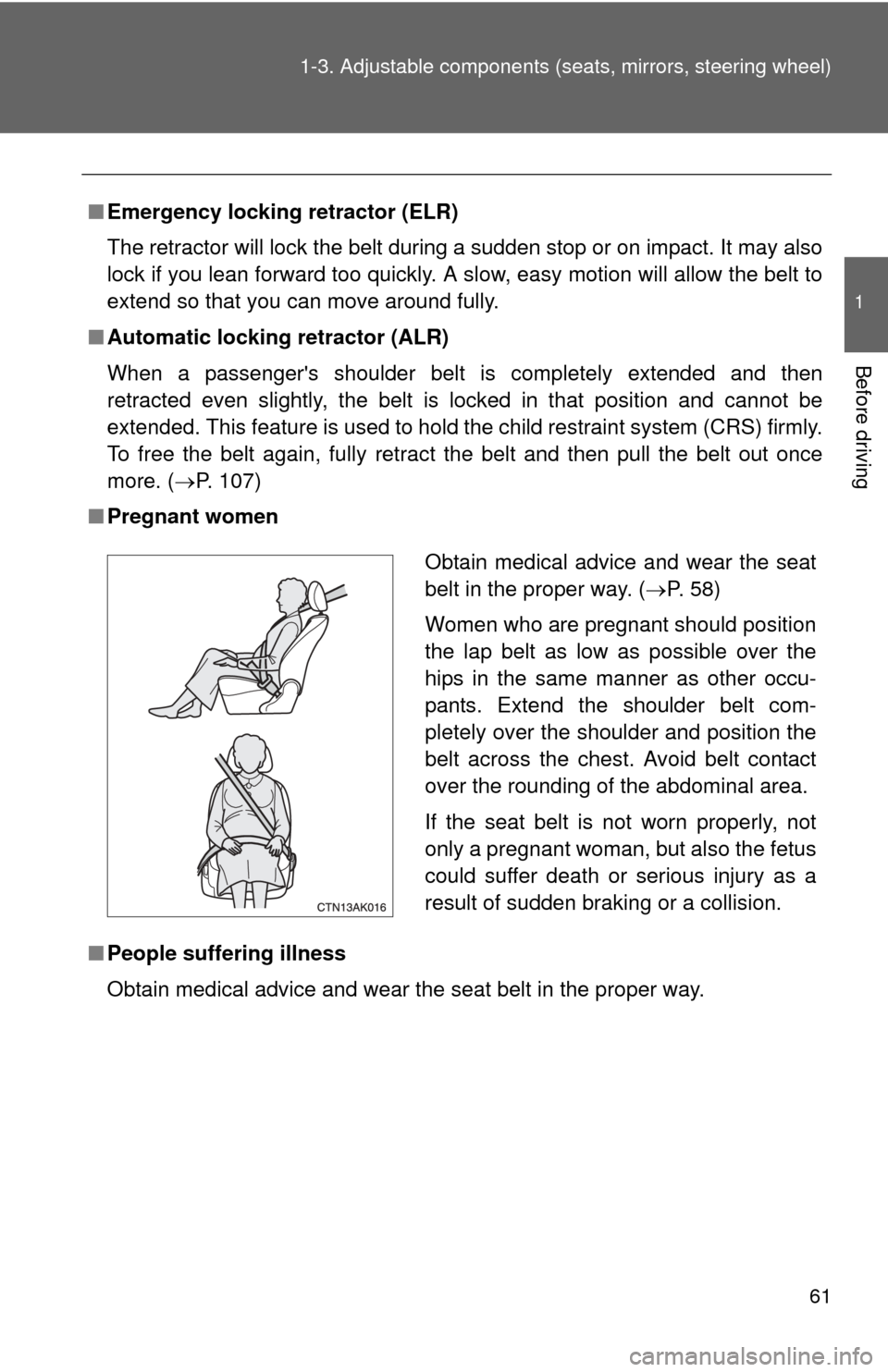
■ Pregnant women
■ People suffering illness
Obtain medical advice and wear the seat belt in the proper way.
Obtain medical advice and wear the seat
belt in the proper way. ( P. 58)
Women who are pregnant should position
the lap belt as low as possible over the
hips in the same manner as other occu-
pants. Extend the shoulder belt com-
pletely over the shoulder and position the
belt across the chest. Avoid belt contact
over the rounding of the abdominal area.
If the seat belt is not worn properly, not
only a pregnant woman, but also the fetus
could suffer death or serious injury as a
result of sudden braking or a collision.
Page 67 of 529
67
1
1-3. Adjustable components (seats, mirrors, steering wheel)
Before driving
Anti-glare inside rear view mirror
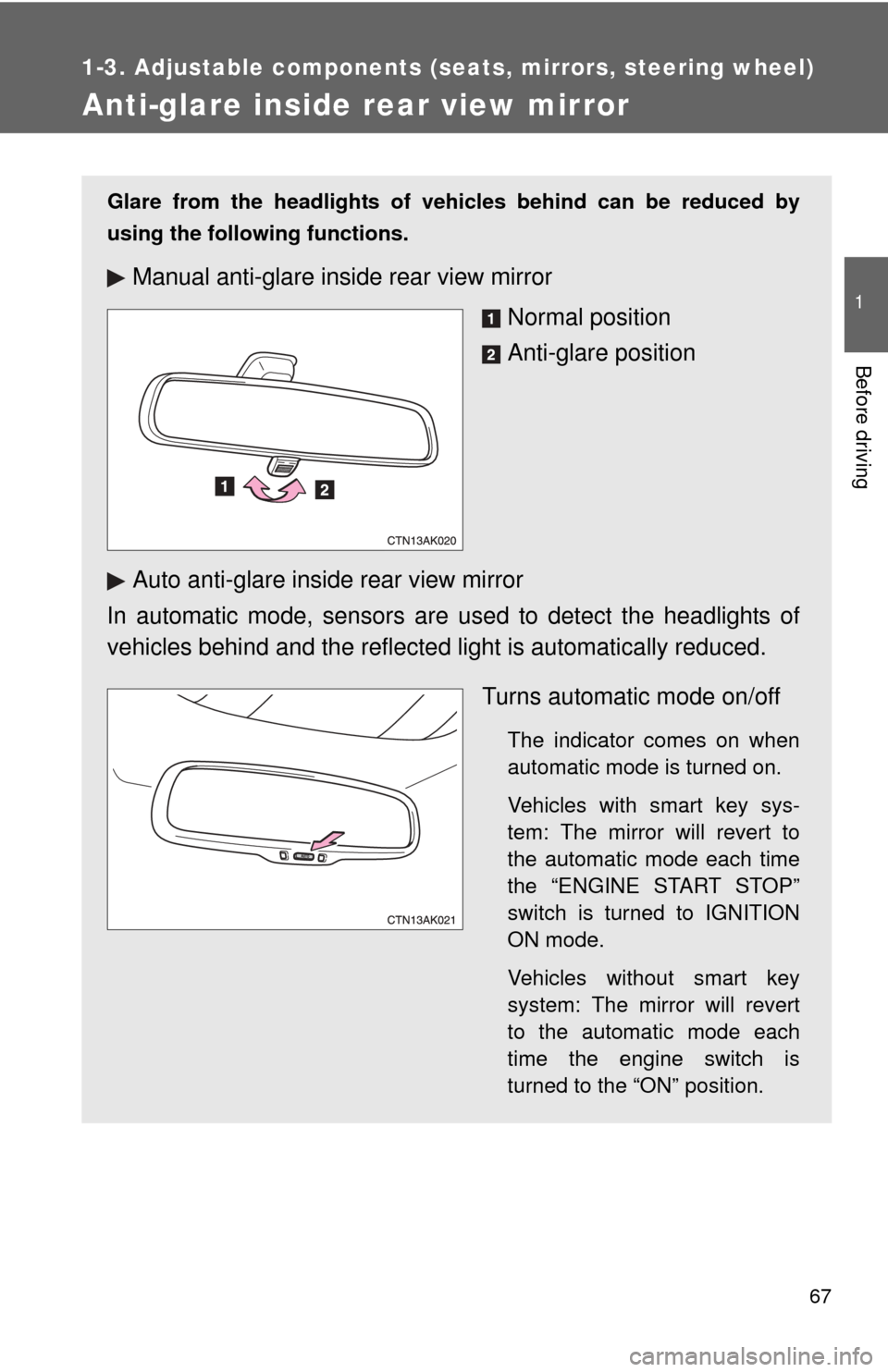
Glare from the headlights of vehicles behind can be reduced by
using the following functions.
Manual anti-glare inside rear view mirrorNormal position
Anti-glare position
Auto anti-glare inside rear view mirror
In automatic mode, sensors are used to detect the headlights of
vehicles behind and the reflecte d light is automatically reduced.
Turns automatic mode on/off
The indicator comes on when
automatic mode is turned on.
Vehicles with smart key sys-
tem: The mirror will revert to
the automatic mode each time
the “ENGINE START STOP”
switch is turned to IGNITION
ON mode.
Vehicles without smart key
system: The mirror will revert
to the automatic mode each
time the engine switch is
turned to the “ON” position.