ignition TOYOTA COROLLA 2018 (in English) Owner's Guide
[x] Cancel search | Manufacturer: TOYOTA, Model Year: 2018, Model line: COROLLA, Model: TOYOTA COROLLA 2018Pages: 608, PDF Size: 9.96 MB
Page 203 of 608
2034-3. Operating the lights and wipers
4
Driving
COROLLA_TMMMS_TMMC_U (01999-02509)
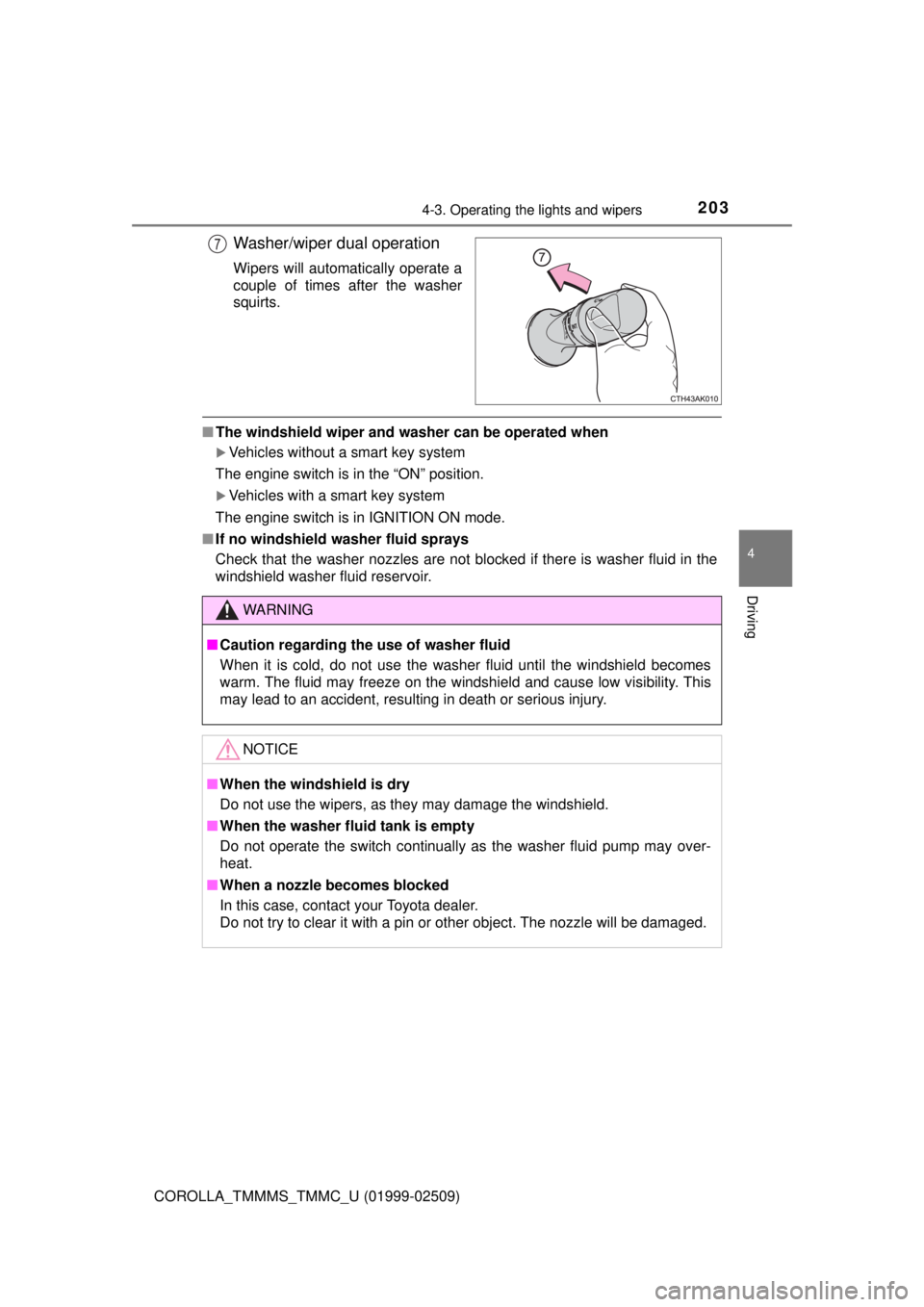
Washer/wiper dual operation
Wipers will automatically operate a
couple of times after the washer
squirts.
■The windshield wiper and washer can be operated when
Vehicles without a smart key system
The engine switch is in the “ON” position.
Vehicles with a smart key system
The engine switch is in IGNITION ON mode.
■ If no windshield washer fluid sprays
Check that the washer nozzles are not blocked if there is washer fluid in the
windshield washer fluid reservoir.
7
WARNING
■Caution regarding the use of washer fluid
When it is cold, do not use the washer fluid until the windshield becomes
warm. The fluid may freeze on the windshield and cause low visibility. This
may lead to an accident, resulting in death or serious injury.
NOTICE
■When the windshield is dry
Do not use the wipers, as they may damage the windshield.
■ When the washer fluid tank is empty
Do not operate the switch continually as the washer fluid pump may over-
heat.
■ When a nozzle becomes blocked
In this case, contact your Toyota dealer.
Do not try to clear it with a pin or other object. The nozzle will be damaged.
Page 204 of 608
204
COROLLA_TMMMS_TMMC_U (01999-02509)
4-4. Refueling
●Close all the doors and windows, and turn the engine switch off.
● Confirm the type of fuel. ( →P. 548)
■Fuel types
→P. 548
■ Fuel tank opening for unleaded gasoline
To help prevent incorrect fueling, your vehicle has a fuel tank opening that
only accommodates the special nozzle on unleaded fuel pumps.
Opening the fuel tank cap
Perform the following steps to open the fuel tank cap:
Before refueling the vehicle
WARNING
■When refueling the vehicle
Observe the following precautions while refueling the vehicle. Failure to do
so may result in death or serious injury.
● After exiting the vehicle and before opening the fuel door, touch an
unpainted metal surface to discharge any static electricity. It is important to
discharge static electricity before refueling because sparks resulting from
static electricity can cause fuel vapors to ignite while refueling.
● Always hold the grips on the fuel tank cap and turn it slowly to remove it.
A whooshing sound may be heard when the fuel tank cap is loosened.
Wait until the sound cannot be heard before fully removing the cap. In hot
weather, pressurized fuel may spray out the filler neck and cause injury.
● Do not allow anyone that has not discharged static electricity from their
body to come close to an open fuel tank.
● Do not inhale vaporized fuel.
Fuel contains substances that are harmful if inhaled.
● Do not smoke while refueling the vehicle.
Doing so may cause the fuel to ignite and cause a fire.
● Do not return to the vehicle or touch any person or object that is statically
charged.
This may cause static electricity to build up, resulting in a possible ignition
hazard.
Page 217 of 608
2174-5. Using the driving support systems
4
Driving
COROLLA_TMMMS_TMMC_U (01999-02509)■
Enabling/disabling th
e pre-collision system
The pre-collision system can be enabled/disabled on the settings
display ( →P. 93) of the multi- information display.
The system is automatically enabled each time the engine switch is
turned to the “ON” position (vehicles without a smart key system) or
IGNITION ON mode (vehicles with a smart key system).
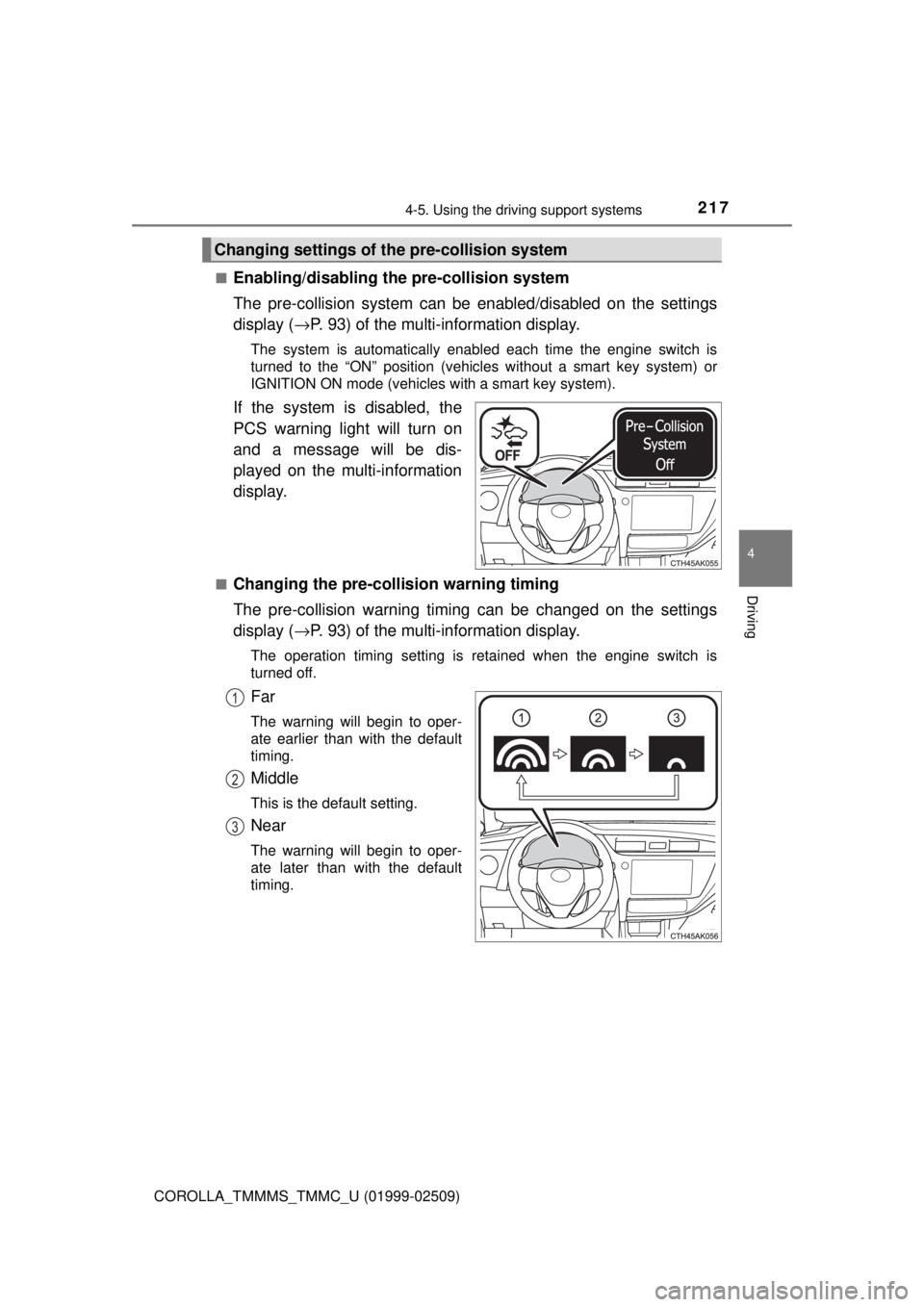
If the system is disabled, the
PCS warning light will turn on
and a message will be dis-
played on the multi-information
display.
■Changing the pre-colli sion warning timing
The pre-collision warning timing can be changed on the settings
display ( →P. 93) of the multi- information display.
The operation timing setting is retained when the engine switch is
turned off.
Far
The warning will begin to oper-
ate earlier than with the default
timing.
Middle
This is the default setting.
Near
The warning will begin to oper-
ate later than with the default
timing.
Changing settings of th e pre-collision system
1
2
3
Page 241 of 608
2414-5. Using the driving support systems
4
Driving
COROLLA_TMMMS_TMMC_U (01999-02509)
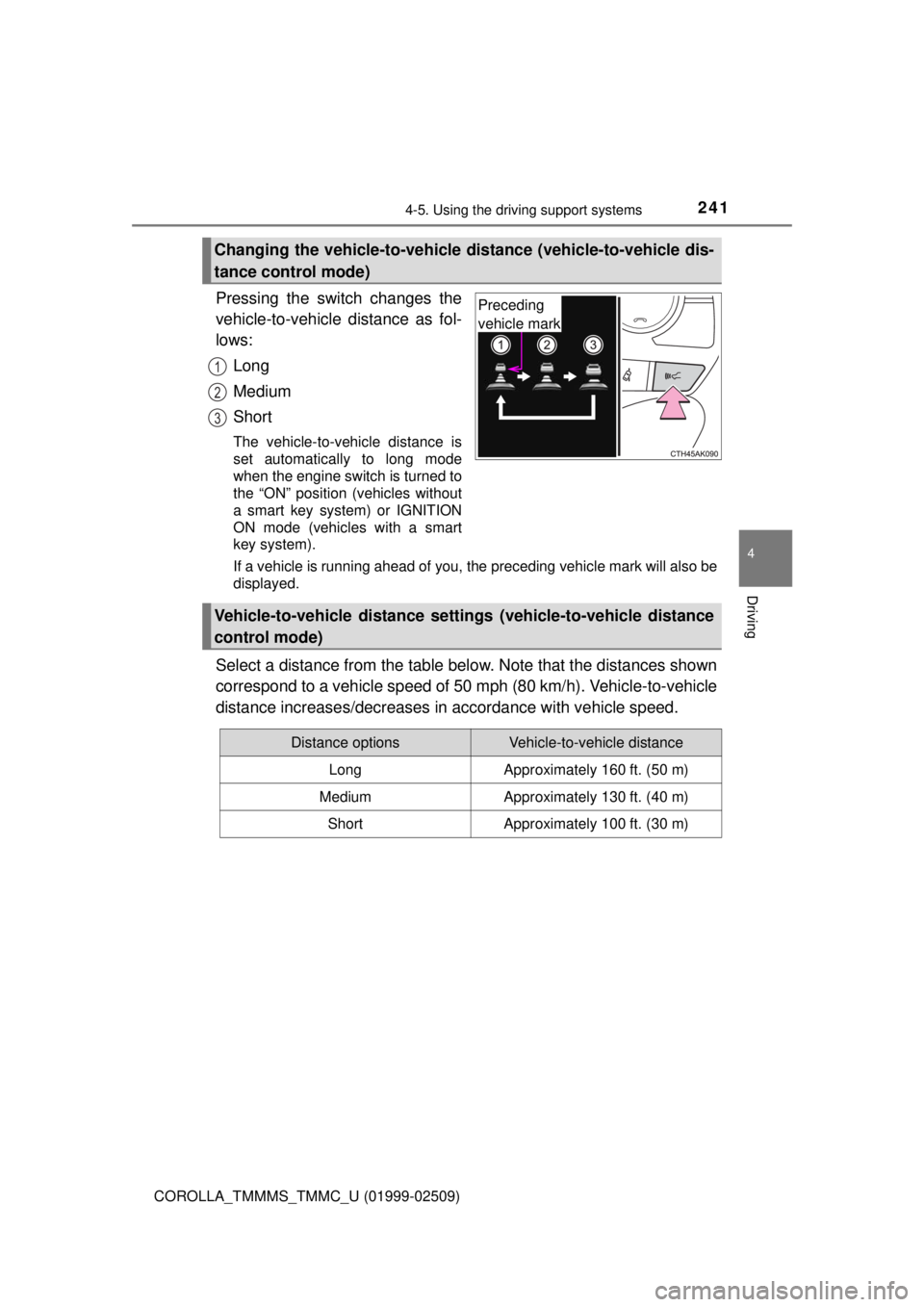
Pressing the switch changes the
vehicle-to-vehicle distance as fol-
lows:Long
Medium
Short
The vehicle-to-vehicle distance is
set automatically to long mode
when the engine switch is turned to
the “ON” position (vehicles without
a smart key system) or IGNITION
ON mode (vehicles with a smart
key system).
If a vehicle is running ahead of you, the preceding vehicle mark will also be
displayed.
Select a distance from the table bel ow. Note that the distances shown
correspond to a vehicle speed of 50 mph (80 km/h). Vehicle-to-vehicle
distance increases/decreases in accordance with vehicle speed.
Changing the vehicle-to-vehicle di stance (vehicle-to-vehicle dis-
tance control mode)
Preceding
vehicle mark
1
2
3
Vehicle-to-vehicle distance settings (vehicle-to-vehicle distance
control mode)
Distance optionsVehicle-to-vehicle distance
LongApproximately 160 ft. (50 m)
MediumApproximately 130 ft. (40 m)
ShortApproximately 100 ft. (30 m)
Page 247 of 608
2474-5. Using the driving support systems
4
Driving
COROLLA_TMMMS_TMMC_U (01999-02509)
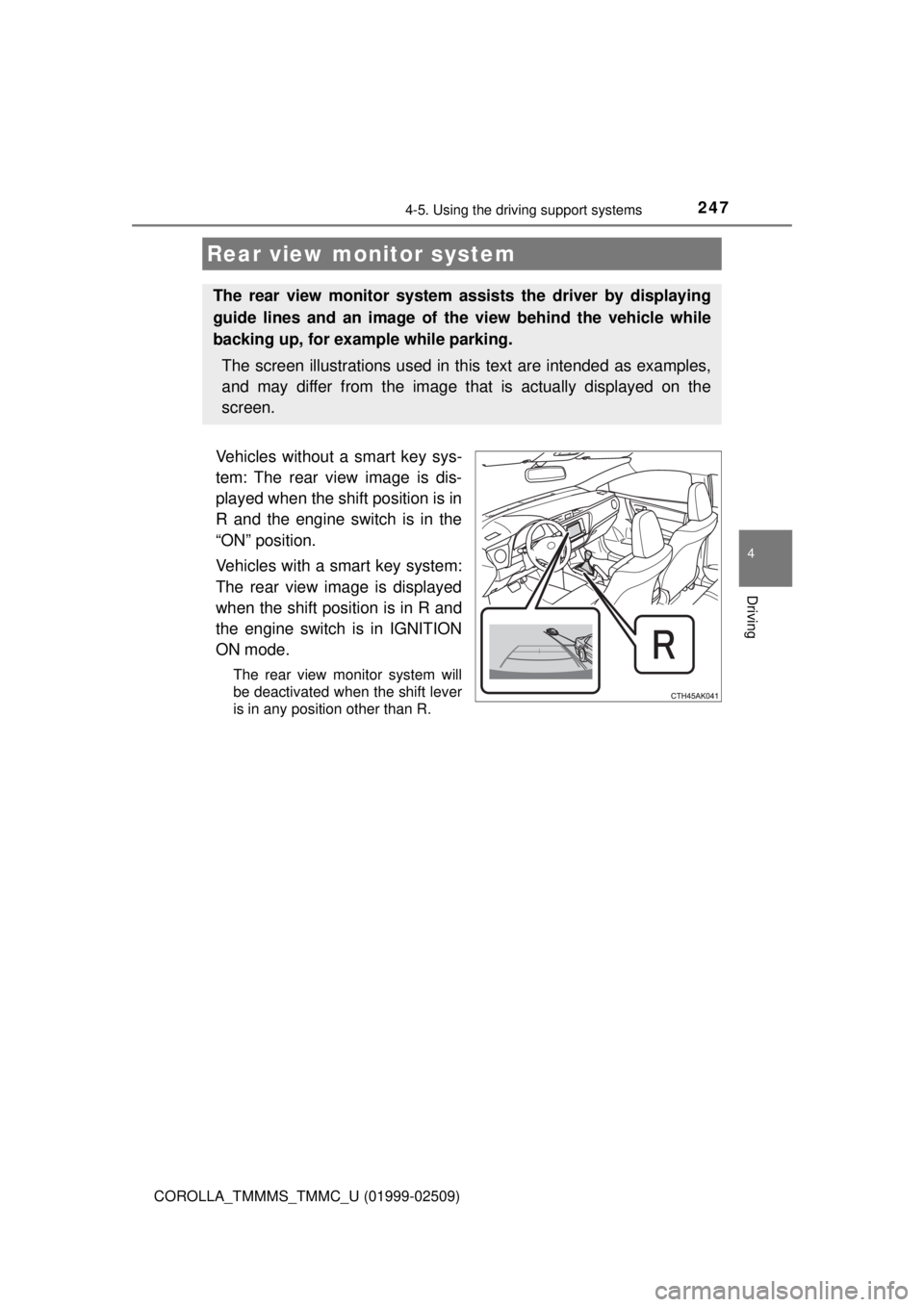
Vehicles without a smart key sys-
tem: The rear view image is dis-
played when the shift position is in
R and the engine switch is in the
“ON” position.
Vehicles with a smart key system:
The rear view image is displayed
when the shift position is in R and
the engine switch is in IGNITION
ON mode.
The rear view monitor system will
be deactivated when the shift lever
is in any position other than R.
Rear view monitor system
The rear view monitor system assists the driver by displaying
guide lines and an image of the view behind the vehicle while
backing up, for example while parking.
The screen illustrations used in this text are intended as examples,
and may differ from the image that is actually displayed on the
screen.
Page 316 of 608
3165-7. Connecting Bluetooth®
COROLLA_TMMMS_TMMC_U (01999-02509)
To turn auto connection mode on, set “Bluetooth* Power” to on.
( → P. 319)
When you register a phone, auto connection will be activated. Always
set it to this mode and leave the Bluetooth
® phone in a place where a
connection can be established.
When the engine switch is turned to the “ACC” or “ON” position (vehicles
without a smart key system) or ACCESSORY or IGNITION ON mode
(vehicles with a smart key system), the system will search for a nearby cel-
lular phone you have registered.
Next, the system automatically connects with the most recent of the
phones connected to in the past. Then, the connection result is displayed.
*: Bluetooth is a registered trademark of Bluetooth SIG, Inc.
When auto connection has failed or “Bluetooth* Power” is turned off,
you must connec t the Bluetooth® device manually.
Follow the steps in “Connecting a Bluetooth
® device” from step .
( → P. 315)
*: Bluetooth is a registered trademark of Bluetooth SIG, Inc.
Registering an additional device
Select “Select Device” on the Bluetooth
® audio control screen.
For more information: → P. 3 1 2
Selecting a registered device
Select “Select Device” on the Bluetooth
® audio control screen.
For more information: → P. 3 1 5
Auto connection
Manual connection
Connecting a Bluetooth® audio player
11
1
2
1
2
Page 317 of 608

3175-7. Connecting Bluetooth®
5
Audio system
COROLLA_TMMMS_TMMC_U (01999-02509)
■Reconnecting a Bluetooth® phone
If the system cannot connect due to poor signal strength with the engine
switch in the “ACC” or “ON” position (vehicles without a smart key system) or
ACCESSORY or IGNITION ON mode (vehicles with a smart key system), the
system will automatically attempt to reconnect.
If the system is attempting to connect to a Bluetooth
® phone and the
Bluetooth® phone is turned off and then back on, the system will attempt to
reconnect.
Page 358 of 608
3585-10. Bluetooth®
COROLLA_TMMMS_TMMC_U (01999-02509)■
Reconnecting the portable audio player
If the portable audio player is disconnected due to poor reception when the
engine switch is in the “ACC” or “ON” position (vehicles without a smart key
system) or ACCESSORY or IGNITION ON mode (vehicles with a smart key
system), the system automatically reconnects the portable audio player.
If you have switched off the portable audio player yourself, follow the instruc-
tions below to reconnect:
●Select the portable audio player again
● Enter the portable audio player
■ When you sell your car
Be sure to delete your personal data. ( →P. 280)
WARNING
■While driving
Do not use the portable audio player, cellular phone or connect a device to
the Bluetooth
® system.
■ Caution regarding interfer ence with electronic devices
● Your audio unit is fitted with Bluetooth
® antennas. People with implantable
cardiac pacemakers, cardiac resynchronization therapy-pacemakers or
implantable cardioverter defibrillators should maintain a reasonable dis-
tance between themselves and the Bluetooth
® antennas. The radio waves
may affect the operation of such devices.
● Before using Bluetooth
® devices, users of any electrical medical device
other than implantable cardiac pacemakers, cardiac resynchronization
therapy-pacemakers or implantable cardioverter defibrillators should con\
-
sult the manufacturer of the device for information about its operation
under the influence of radio waves. Radio waves could have unexpected
effects on the operation of such medical devices.
NOTICE
■ When leaving the vehicle
Do not leave your portable audio player or cellular phone in the vehicle. The
inside of the vehicle may become hot, causing damage to the portable
audio player or cellular phone.
Page 380 of 608
3806-1. Using the air conditioning system and defogger
COROLLA_TMMMS_TMMC_U (01999-02509)■
When the outside temperature exceeds 75°F (24°C) and the air condition-
ing system is on
● In order to reduce the air conditioning power consumption, the air condition-
ing system may switch to recirculated air mode automatically. This may also
reduce fuel consumption.
Vehicles without a smart key system
● Recirculated air mode is selected as a default mode when the engine switch
is turned to the “ON” position.
Vehicles with a smart key system
● Recirculated air mode is selected as a default mode when the engine switch
is turned to IGNITION ON mode.
● It is possible to switch to outside air mode at any time by pressing .
■ When the outside temperature is low
The dehumidification function may not operate even when is pressed.
■ Ventilation and air conditioning odors
●To let fresh air in, set the air conditioning system to the outside air m\
ode.
● During use, various odors from inside and outside the vehicle may enter into
and accumulate in the air conditioning system. This may then cause odor to
be emitted from the vents.
● To reduce potential odors from occurring:
• It is recommended that the air conditioning system be set to outside air
mode prior to turning the vehicle off.
• The start timing of the blower may be delayed for a short period of time immediately after the air conditioning system is started in automatic
mode.
■ Air conditioning filter
→P. 453
■ Customization that can be co nfigured at Toyota dealer
Settings (e.g. air conditioning setting) can be changed.
(Customizable features →P. 564)
Page 383 of 608
3836-1. Using the air conditioning system and defogger
6
Interior features
COROLLA_TMMMS_TMMC_U (01999-02509)
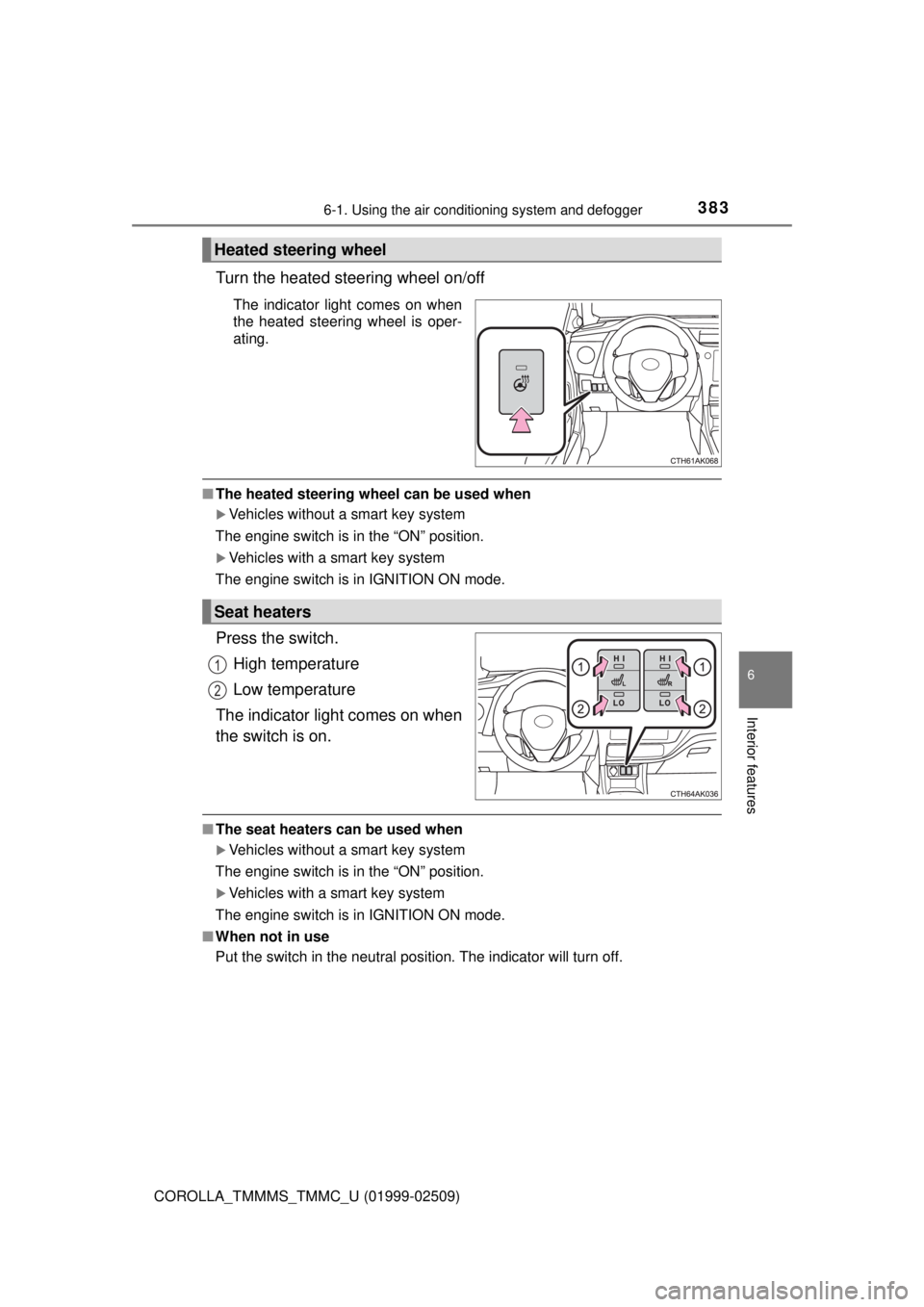
Turn the heated steering wheel on/off
The indicator light comes on when
the heated steering wheel is oper-
ating.
■The heated steering wheel can be used when
Vehicles without a smart key system
The engine switch is in the “ON” position.
Vehicles with a smart key system
The engine switch is in IGNITION ON mode.
Press the switch.
High temperature
Low temperature
The indicator light comes on when
the switch is on.
■ The seat heaters can be used when
Vehicles without a smart key system
The engine switch is in the “ON” position.
Vehicles with a smart key system
The engine switch is in IGNITION ON mode.
■ When not in use
Put the switch in the neutral position. The indicator will turn off.
Heated steering wheel
Seat heaters
1
2