change time TOYOTA COROLLA 2019 Owners Manual (in English)
[x] Cancel search | Manufacturer: TOYOTA, Model Year: 2019, Model line: COROLLA, Model: TOYOTA COROLLA 2019Pages: 608, PDF Size: 10.15 MB
Page 8 of 608
8
COROLLA_TMMMS_TMMC_UPlease note that this manual applies to all models and explains
all equipment,
including options. Therefore, you may find some explanations fo r equipment
not installed on your vehicle.
All specifications provided in this manual are current at the t ime of printing.
However, because of the Toyota policy of continual product impr ovement, we
reserve the right to make changes at any time without notice.
Depending on specifications, the vehicle shown in the illustrat ions may differ
from your vehicle in terms of color and equipment.
Approximately five hours after the engine is turned off, you ma y hear sound
coming from under the vehicle for several minutes. This is the sound of a fuel
evaporation leakage check and, it does not indicate a malfunction.
A wide variety of non-genuine spare parts and accessories for T oyota vehi-
cles are currently available in the market. You should know tha t Toyota does
not warrant these products and is not responsible for their per formance,
repair, or replacement, or for any damage they may cause to, or adverse
effect they may have on, your Toyota vehicle.
This vehicle should not be modified with non-genuine Toyota pro ducts. Modi-
fication with non-genuine Toyota products could affect its perf ormance, safety
or durability, and may even violate governmental regulations. In addition,
damage or performance problems resulting from the modification may not be
covered under warranty.
For your infor mation
Main Owner’s Manual
Noise from under vehicle afte r turning off the engine
Accessories, spare parts and m odification of your Toyota
Page 82 of 608

822. Instrument cluster
COROLLA_TMMMS_TMMC_U■
Driving range
Displays the estimated maximum distance that can be driven with
the quantity of fuel remaining.
• This distance is computed based on your average fuel consumpti
on. As
a result, the actual distance that can be driven may differ fro m that dis-
played.
• When only a small amount of fuel is added to the tank, the dis play may
not be updated.
When refueling, turn the engine switch off. If the vehicle is r efueled with-
out turning the engine switch off, the display may not be updat ed.
■
Average vehicle speed
Displays the average vehicle speed since the engine was last
started.
■Elapsed time
Displays the elapsed time sin ce the engine was started.
■Customization
Some settings can be changed . (Customizable features: P. 5 6 4 )
■Eco Driving Indicator Zone Disp lay (vehicles with a continu-
ously variable transmission)
P. 1 0 0
Page 84 of 608

842. Instrument cluster
COROLLA_TMMMS_TMMC_U■
Customization
Some settings can be changed
. (Customizable features: P. 5 6 4 )
■The meters and display illuminate when
Vehicles without a smart key system
The engine switch is in the “ON” position.
Vehicles with a smart key system
The engine switch is in IGNITION ON mode.
■ When disconnecting and reco nnecting battery terminals
The following information data will be reset:
● Driving range
● Average vehicle speed
● Elapsed time
● Average fuel consumption
■ Liquid crystal display
Small spots or light spots may appear on the display. This phen omenon is
characteristic of liquid crystal displays, and there is no prob lem continuing to
use the display.
■ Setting display automatic suspension
In the following situations, the setting display will be suspen ded.
● When a message appears.
● When the vehicle begins to move.
Page 115 of 608
1153-2. Opening, closing and locking the doors
3
Operation of each component
COROLLA_TMMMS_TMMC_U
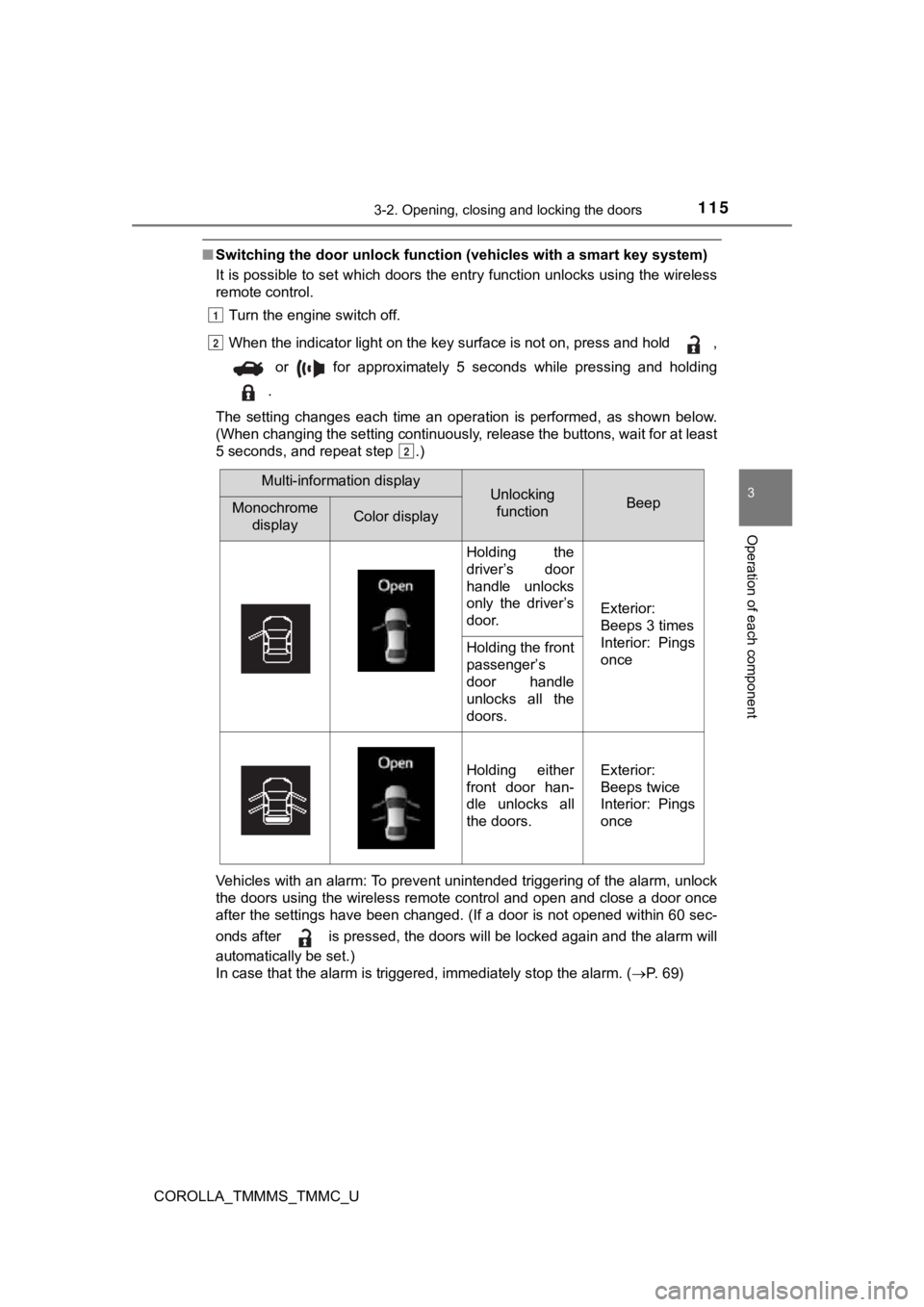
■Switching the door unlock func tion (vehicles with a smart key system)
It is possible to set which doors the entry function unlocks using the wireless
remote control.
Turn the engine switch off.
When the indicator light on the key surface is not on, press and hold ,
or for approximately 5 seconds while pressing and holding
.
The setting changes each time an operation is performed, as sho wn below.
(When changing the setting continuously, release the buttons, w ait for at least
5 seconds, and repeat step .)
Vehicles with an alarm: To prevent unintended triggering of the alarm, unlock
the doors using the wireless remote control and open and close a door once
after the settings have been changed. (If a door is not opened within 60 sec-
onds after is pressed, the doors will be locked again and the alarm will
automatically be set.)
In case that the alarm is triggered, immediately stop the alarm . ( P. 69)
1
2
2
Multi-information displayUnlocking
functionBeepMonochrome displayColor display
Holding the
driver’s door
handle unlocks
only the driver’s
door.
Exterior:
Beeps 3 times
Interior: Pings
once
Holding the front
passenger’s
door handle
unlocks all the
doors.
Holding either
front door han-
dle unlocks all
the doors.Exterior:
Beeps twice
Interior: Pings
once
Page 119 of 608
1193-2. Opening, closing and locking the doors
3
Operation of each component
COROLLA_TMMMS_TMMC_U
■Operation signal (with a wirel ess remote control function)
A buzzer sounds to indicate that the trunk has been opened.
■ Tr u n k l i g h t
The trunk light turns on when the trunk is opened.
■ Function to prevent th e trunk being locked with the electronic key inside
(vehicles with a smart key system)
● When all doors are being locked, closing the trunk lid with the electronic key
left inside the trunk will sound an alarm.
In this case, the trunk lid can be opened by pressing the trunk release but-
ton on the trunk lid.
● Even when the spare electronic key is put in the trunk with all the doors
locked, the key confinement prevention function can be activated so the
trunk can be opened. In order to prevent theft, take all electr onic keys with
you when leaving the vehicle.
● Even when the electronic key is put in the trunk with all the d oors are locked,
the key may not be detected depending on the places and the sur rounding
radio wave conditions. In this case, the key confinement preven tion function
cannot be activated, causing the doors to lock when the trunk i s closed.
Make sure to check where the key is before closing the trunk.
● The key confinement prevention function cannot be activated if any one of
the doors is unlocked. In this case, open the trunk using the t runk opener.
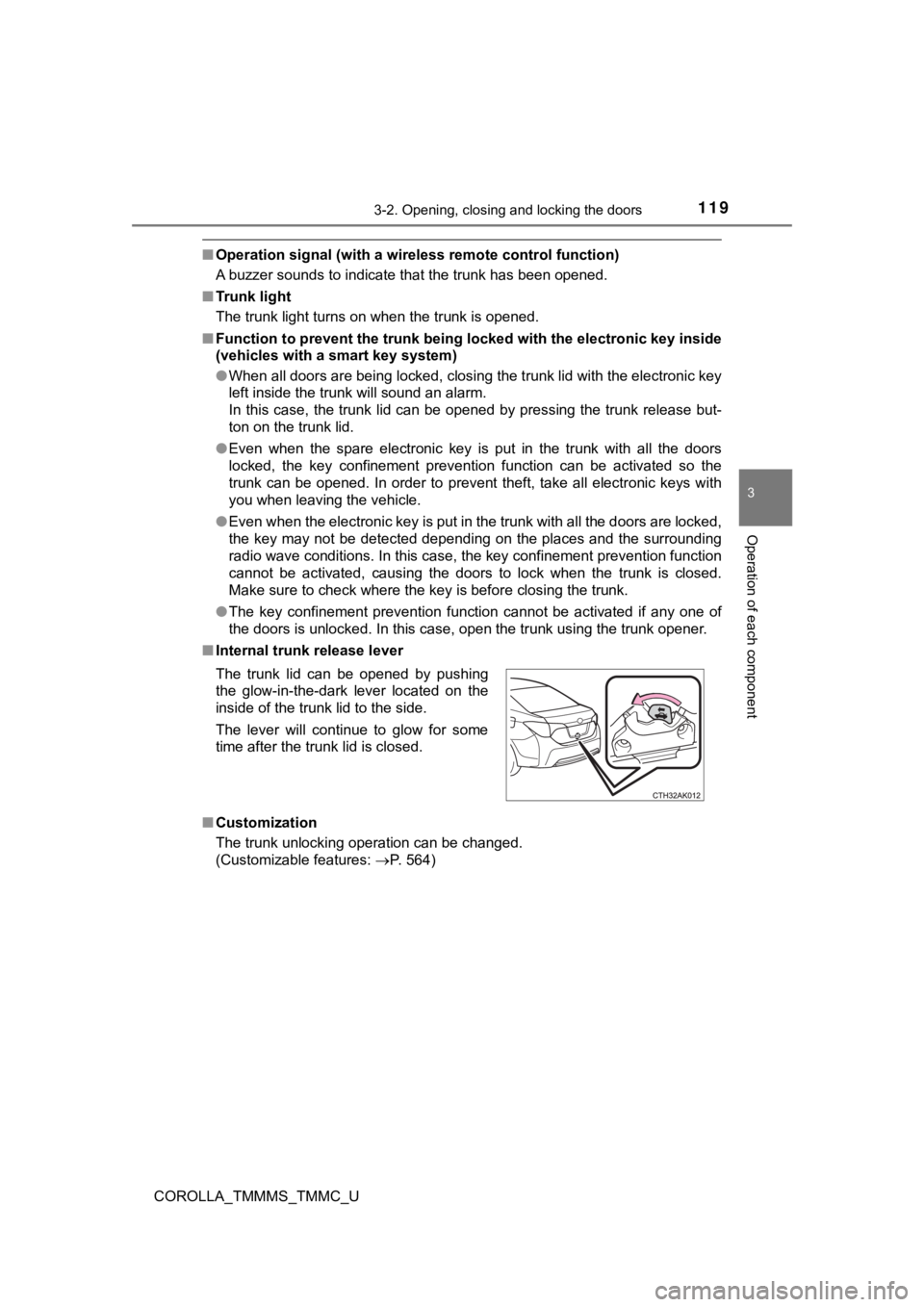
■ Internal trunk release lever
■ Customization
The trunk unlocking operation can be changed.
(Customizable features: P. 564)
The trunk lid can be opened by pushing
the glow-in-the-dark lever located on the
inside of the trunk lid to the side.
The lever will continue to glow for some
time after the trunk lid is closed.
Page 126 of 608

1263-2. Opening, closing and locking the doors
COROLLA_TMMMS_TMMC_U■
Note for the entry function
●Even when the electronic key is within the effective range (det ection areas),
the system may not operate properly in the following cases:
• The electronic key is too close to the window or outside door handle, near
the ground, or in a high place when the doors are locked or unl ocked.
• The electronic key is near the ground or in a high place, or t oo close to
the rear bumper center when the trunk is opened.
• The electronic key is on the instrument panel, rear package tr ay or floor,
or in the door pockets or glove box when the engine is started or engine
switch modes are changed.
● Do not leave the electronic key on top of the instrument panel or near the
door pockets when exiting the vehicle. Depending on the radio w ave recep-
tion conditions, it may be detected by the antenna outside the cabin and the
doors will become lockable from the outside, possibly trapping the electronic
key inside the vehicle.
● As long as the electronic key is within the effective range, th e doors may be
locked or unlocked by anyone. However, only the doors detecting the elec-
tronic key can be used to unlock the vehicle.
● Even if the electronic key is not inside the vehicle, it may be possible to start
the engine if the electronic key is near the window.
● The doors may unlock or lock if a large amount of water splashe s on the
door handle, such as in the rain or in a car wash, when the electronic key is
within the effective range. (The doors will automatically be lo cked after
approximately 60 seconds if the doors are not opened and closed.)
● If the wireless remote control is used to lock the doors when t he electronic
key is near the vehicle, there is a possibility that the door m ay not be
unlocked by the entry function. (Use the wireless remote contro l to unlock
the doors.)
● Touching the door lock or unlock sensor while wearing gloves ma y prevent
lock or unlock operation.
● When the lock operation is performed using the lock sensor, rec ognition sig-
nals will be shown up to two consecutive times. After this, no recognition
signals will be given.
● If the door handle becomes wet while the electronic key is with in the effec-
tive range, the door may lock and unlock repeatedly. In this ca se, follow the
following correction procedures to wash the vehicle:
• Place the electronic key in a location 6 ft. (2 m) or more awa y from the
vehicle. (Take care to ensure that the key is not stolen.)
• Set the electronic key to battery-saving mode to disable the s mart key
system. ( P. 124)
Page 127 of 608

1273-2. Opening, closing and locking the doors
3
Operation of each component
COROLLA_TMMMS_TMMC_U●
If the electronic key is inside the vehicle and a door handle b ecomes wet
during a car wash, a message may be shown on the multi-informat ion dis-
play and a buzzer will sound outside the vehicle. To turn off t he alarm, lock
all the doors.
● The lock sensor may not work properly if it comes into contact with ice,
snow, mud, etc. Clean the lock sensor and attempt to operate it again.
● If there is another electronic key in the detection area, it ma y take slightly
longer to unlock the doors after the door handle is gripped.
● Fingernails may scrape against the door during operation of the door han-
dle. Be careful not to injure fingernails or damage the surface of the door.
● A sudden handle operation or a handle operation immediately aft er entering
the effective range may prevent the doors from being unlocked. Touch the
door unlock sensor and check that the doors are unlocked before pulling the
door handle again.
● Unlocking the vehicle may take more time if another electronic key is within
the effective range.
■ When the vehicle is not driven for extended periods
●To prevent theft of the vehicle, do not leave the electronic ke y within 6 ft. (2
m) of the vehicle.
● The smart key system can be deactivated in advance. ( P. 564)
■ To operate the system properly
Make sure to carry the electronic key when operating the system. Do not get
the electronic key too close to the vehicle when operating the system from the
outside of the vehicle.
Depending on the position and holding condition of the electron ic key, the key
may not be detected correctly and the system may not operate pr operly. (The
alarm may go off accidentally, or the door lock prevention func tion may not
operate.)
■ If the smart key system does not operate properly
●Locking and unlocking the doors: Use the mechanical key. ( P. 523)
● Starting the engine: P. 524
■ Customization
Settings (e. g. smart key system) can be changed.
(Customizable features: P. 564)
■ If the smart key system has been d eactivated in a customized setting
● Locking and unlocking the doors and opening the trunk:
Use the wireless remote control or mechanical key. ( P. 118, 523)
● Starting the engine and changing engine switch modes: P. 524
● Stopping the engine: P. 175
Page 176 of 608

1764-2. Driving procedures
COROLLA_TMMMS_TMMC_U
Modes can be changed by pressing the engine switch with the brake
pedal (continuously variable tr ansmission) or clutch pedal (man ual
transmission) released. (The mode changes each time the switch is
pressed.)
Off
*
The emergency flashers can be
used.
The multi-information display will
not be displayed.
ACCESSORY mode
Some electrical components such
as the audio system can be used.
“Power On” will be displayed on
the multi-information display.
IGNITION ON mode
All electrical components can be
used.
“Power On” will be displayed on the multi-information display.
*: Vehicles with a continuously variable transmission: If the sh ift lever is in a
position other than P when turning off the engine, the engine s witch will be
turned to ACCESSORY mode, not to off.
Changing engine switch modes
Page 179 of 608

1794-2. Driving procedures
4
Driving
COROLLA_TMMMS_TMMC_U■
When “Smart Key System Malfunc tion See Owner's Manual”/“CHECK
SMART KEY SYSTEM” will be displ ayed on the multi-information display
The system may be malfunctioning. Have the vehicle inspected by your
Toyota dealer immediately.
■ If the electronic key battery is depleted
P. 455
■ Operation of the engine switch
●If the switch is not pressed shortly and firmly, the engine swi tch mode may
not change or the engine may not start.
● If attempting to restart the engine immediately after turning t he engine
switch off, the engine may not start in some cases. After turni ng the engine
switch off, please wait a few seconds before restarting the eng ine.
■ If the smart key system has been d eactivated in a customized setting
P. 523
WARNING
■ When starting the engine
Always start the engine while sitting in the driver’s seat. Do not depress the
accelerator pedal while starting the engine under any circumsta nces.
Doing so may cause an accident resulting in death or serious in jury.
■ Caution while driving
If engine failure occurs while the vehicle is moving, do not lo ck or open the
doors until the vehicle reaches a safe and complete stop. Activ ation of the
steering lock in this circumstance may lead to an accident, res ulting in
death or serious injury.
■ Stopping the engine in an emergency
If you want to stop the engine in an emergency while driving th e vehicle,
press and hold the engine switch for more than 2 seconds, or pr ess it briefly
3 times or more in succession. ( P. 471)
However, do not touch the engine switch while driving except in an emer-
gency. Turning the engine off while driving will not cause loss of steering or
braking control, but the power assist to these systems will be lost. This will
make it more difficult to steer and brake, so you should pull o ver and stop
the vehicle as soon as it is safe to do so.
Page 186 of 608
1864-2. Driving procedures
COROLLA_TMMMS_TMMC_U
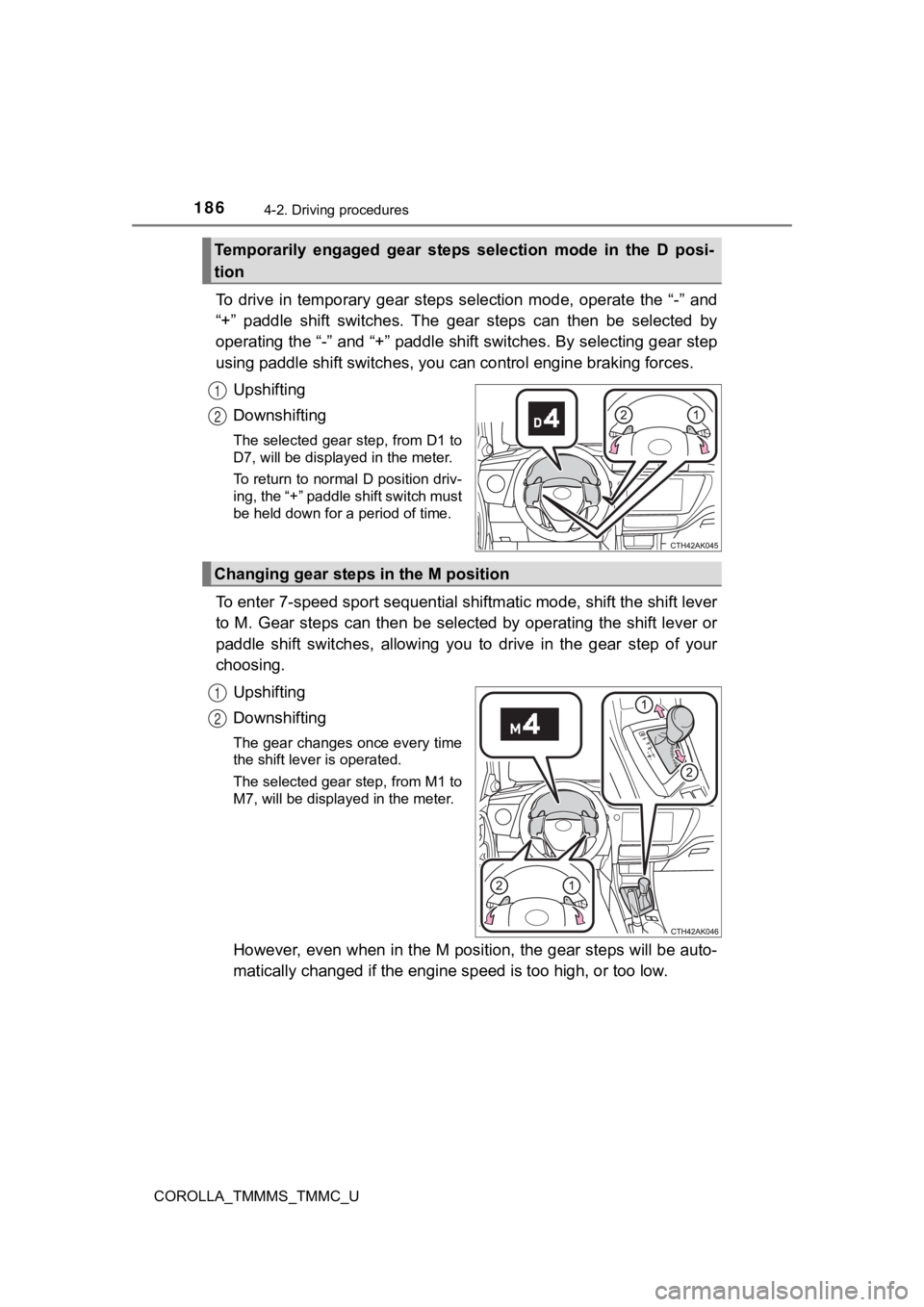
To drive in temporary gear steps selection mode, operate the “-” and
“+” paddle shift switches. The gear steps can then be selected by
operating the “-” and “+” paddle shift switches. By selecting gear step
using paddle shift switches, you can control engine braking forces.
Upshifting
Downshifting
The selected gear step, from D1 to
D7, will be displayed in the meter.
To return to normal D position driv-
ing, the “+” paddle shift switch must
be held down for a period of time.
To enter 7-speed spor t sequential shiftmatic mode, shift the sh ift lever
to M. Gear steps can then be selected by operating the shift lever or
paddle shift switches, allowing you to drive in the gear step o f your
choosing.
Upshifting
Downshifting
The gear changes once every time
the shift lever is operated.
The selected gear step, from M1 to
M7, will be displayed in the meter.
However, even when in the M position, the gear steps will be au to-
matically changed if the engine speed is too high, or too low.
Temporarily engaged gear steps selection mode in the D posi-
tion
1
2
Changing gear steps in the M position
1
2