high beam TOYOTA COROLLA 2021 Owners Manual (in English)
[x] Cancel search | Manufacturer: TOYOTA, Model Year: 2021, Model line: COROLLA, Model: TOYOTA COROLLA 2021Pages: 624, PDF Size: 20.3 MB
Page 3 of 624
3TABLE OF CONTENTS
1
2
3
4
5
6
7
8
9
10
COROLLA_U
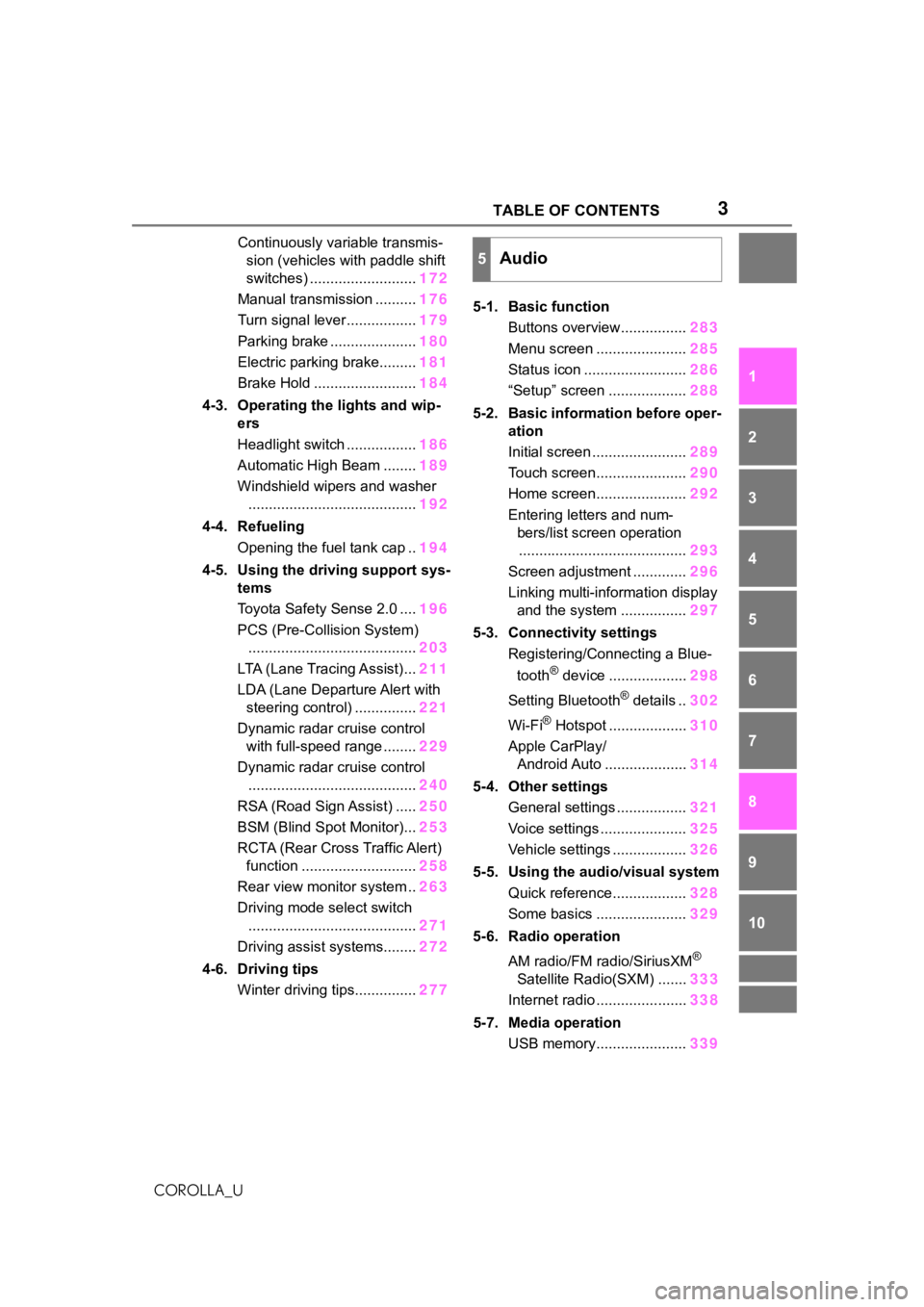
Continuously variable transmis- sion (vehicles with paddle shift
switches) .......................... 172
Manual transmission .......... 176
Turn signal lever................. 179
Parking brake ..................... 180
Electric parking brake......... 181
Brake Hold ......................... 184
4-3. Operating the lights and wip- ers
Headlight switch ................. 186
Automatic High Beam ........ 189
Windshield wipers and washer ......................................... 192
4-4. Refueling Opening the fuel tank cap .. 194
4-5. Using the driving support sys- tems
Toyota Safety Sense 2.0 .... 196
PCS (Pre-Collision System) ......................................... 203
LTA (Lane Tracing Assist)... 211
LDA (Lane Departure Alert with steering control) ............... 221
Dynamic radar cruise control with full-speed range ........ 229
Dynamic radar cruise control ......................................... 240
RSA (Road Sign Assist) ..... 250
BSM (Blind Spot Monitor)... 253
RCTA (Rear Cross Traffic Alert) function ............................ 258
Rear view monitor system .. 263
Driving mode select switch ......................................... 271
Driving assist systems........ 272
4-6. Driving tips Winter driving tips............... 2775-1. Basic function
Buttons overview................ 283
Menu screen ...................... 285
Status icon ......................... 286
“Setup” screen ................... 288
5-2. Basic information before oper- ation
Initial screen ....................... 289
Touch screen...................... 290
Home screen...................... 292
Entering letters and num- bers/list screen operation......................................... 293
Screen adjustment ............. 296
Linking multi-information display and the system ................ 297
5-3. Connectivity settings Registering/Connecting a Blue-
tooth
® device ................... 298
Setting Bluetooth
® details .. 302
Wi-Fi
® Hotspot ................... 310
Apple CarPlay/ Android Auto .................... 314
5-4. Other settings General settings ................. 321
Voice settings ..................... 325
Vehicle settings .................. 326
5-5. Using the audio/visual system Quick reference.................. 328
Some basics ...................... 329
5-6. Radio operation
AM radio/FM radio/SiriusXM
®
Satellite Radio(SXM) ....... 333
Internet radio ...................... 338
5-7. Media operation USB memory...................... 339
5Audio
Page 17 of 624
17Pictorial index
COROLLA_U
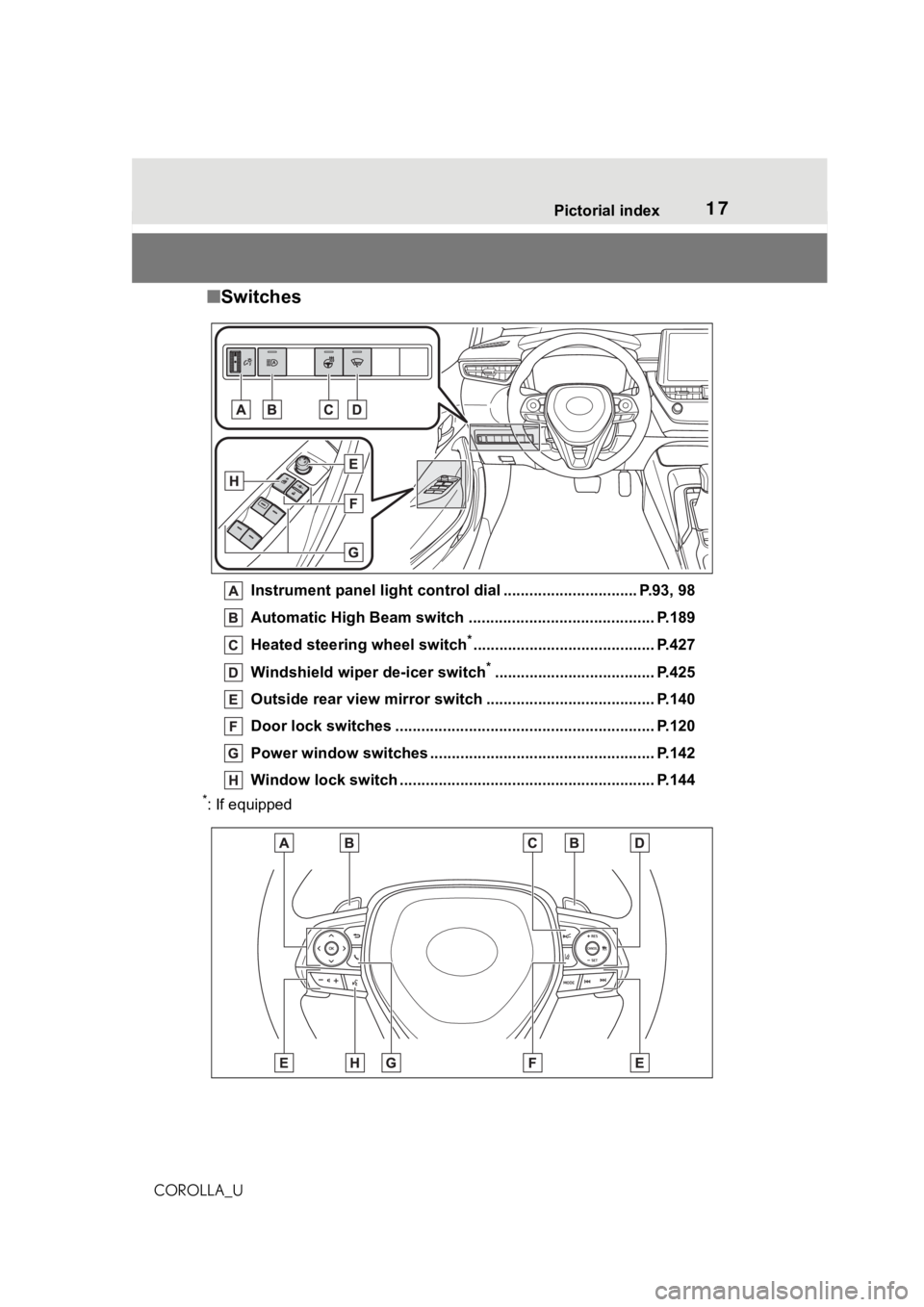
■Switches
Instrument panel light cont rol dial ............................... P.93, 98
Automatic High Beam switch ..................................... ...... P.189
Heated steering wheel switch
*.......................................... P.427
Windshield wiper de-icer switch
*..................................... P.425
Outside rear view mirror s witch ....................................... P.140
Door lock switches ............................................................ P.120
Power window switches ....... ............................................. P.142
Window lock switch ............................................. .............. P.144
*: If equipped
Page 88 of 624
882-1. Instrument cluster
COROLLA_U
*1: These lights come on when the engine switch is turned to ON to
indicate that a system check is
being performed. They will turn
off after the engine is started, or
after a few seconds. There may
be a malfunction in a system if
the lights do not come on, or turn
off. Have the vehicle inspected
by your Toyota dealer.
*2: This light illuminates on the multi-information display.
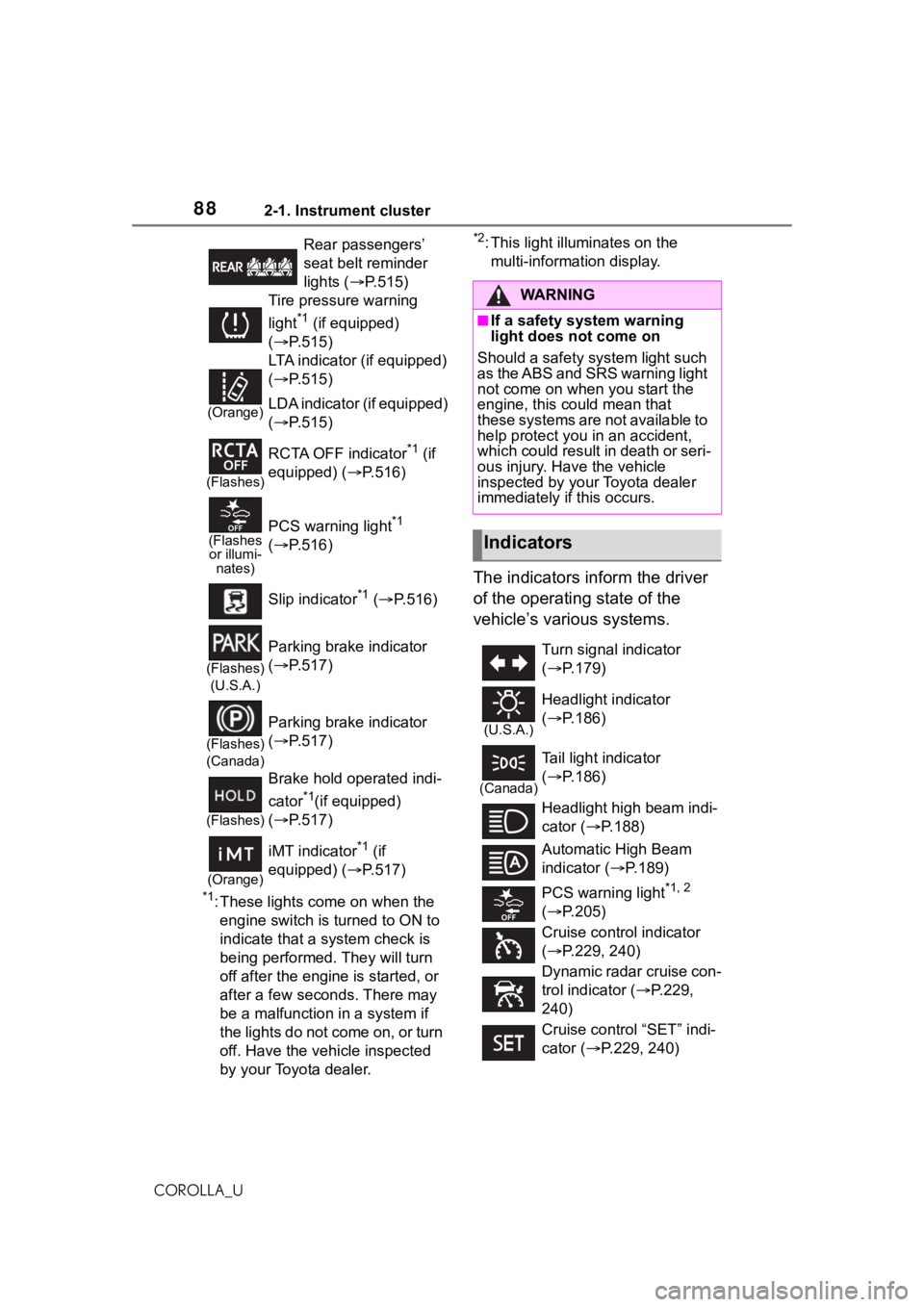
The indicators inform the driver
of the operating state of the
vehicle’s various systems.
Rear passengers’
seat belt reminder
lights ( P.515)
Tire pressure warning
light
*1 (if equipped)
( P.515)
(Orange)
LTA indicator (if equipped)
( P.515)
LDA indicator (if equipped)
( P.515)
(Flashes)
RCTA OFF indicator*1 (if
equipped) (P.516)
(Flashes or illumi- nates)PCS warning light*1
( P.516)
Slip indicator
*1 ( P.516)
(Flashes)
(U.S.A.)
Parking brake indicator
( P.517)
(Flashes)
(Canada)
Parking brake indicator
( P.517)
(Flashes)
Brake hold operated indi-
cator
*1(if equipped)
( P.517)
(Orange)
iMT indicator*1 (if
equipped) (P.517)
WA R N I N G
■If a safety system warning
light does not come on
Should a safety system light such
as the ABS and SRS warning light
not come on when you start the
engine, this cou ld mean that
these systems are not available to
help protect you in an accident,
which could result in death or seri-
ous injury. Have the vehicle
inspected by your Toyota dealer
immediately if this occurs.
Indicators
Turn signal indicator
( P.179)
(U.S.A.)
Headlight indicator
( P.186)
(Canada)
Tail light indicator
( P.186)
Headlight high beam indi-
cator ( P.188)
Automatic High Beam
indicator ( P.189)
PCS warning light
*1, 2
( P.205)
Cruise control indicator
( P.229, 240)
Dynamic radar cruise con-
trol indicator ( P.229,
240)
Cruise control “SET” indi-
cator ( P.229, 240)
Page 149 of 624
149
4
4
Driving
COROLLA_U
Driving
.4-1. Before drivingDriving the vehicle....... 150
Cargo and luggage ..... 158
Vehicle load limits ....... 161
Trailer towing............... 161
Dinghy towing ............. 162
4-2. Driving procedures Engine (ignition) switch (vehicles without a smart
key system) ............... 163
Engine (ignition) switch (vehicles with a smart key
system)...................... 164
Continuously variable trans- mission (vehicles without
paddle shift switches).................................. 169
Continuously variable trans- mission (vehicles with pad-
dle shift switches) ...... 172
Manual transmission ... 176
Turn signal lever.......... 179
Parking brake .............. 180
Electric parking brake . 181
Brake Hold .................. 184
4-3. Operating the lights and wipers
Headlight switch .......... 186
Automatic High Beam . 189
Windshield wipers and washer....................... 1924-4. Refueling
Opening the fuel tank cap.................................. 194
4-5. Using the dr iving support
systems
Toyota Safety Sense 2.0 .................................. 196
PCS (Pre-Collision System) .................................. 203
LTA (Lane Tracing Assist) .................................. 211
LDA (Lane Departure Alert with steering control) . 221
Dynamic radar cruise con- trol with full-speed range.................................. 229
Dynamic radar cruise con- trol ............................. 240
RSA (Road Sign Assist) .................................. 250
BSM (Blind Spot Monitor) .................................. 253
RCTA (Rear Cross Traffic Alert) function ............ 258
Rear view monitor system .................................. 263
Driving mode select switch .................................. 271
Driving assist systems .................................. 272
4-6. Driving tips Winter driving tips........ 277
Page 188 of 624
1884-3. Operating the lights and wipers
COROLLA_U
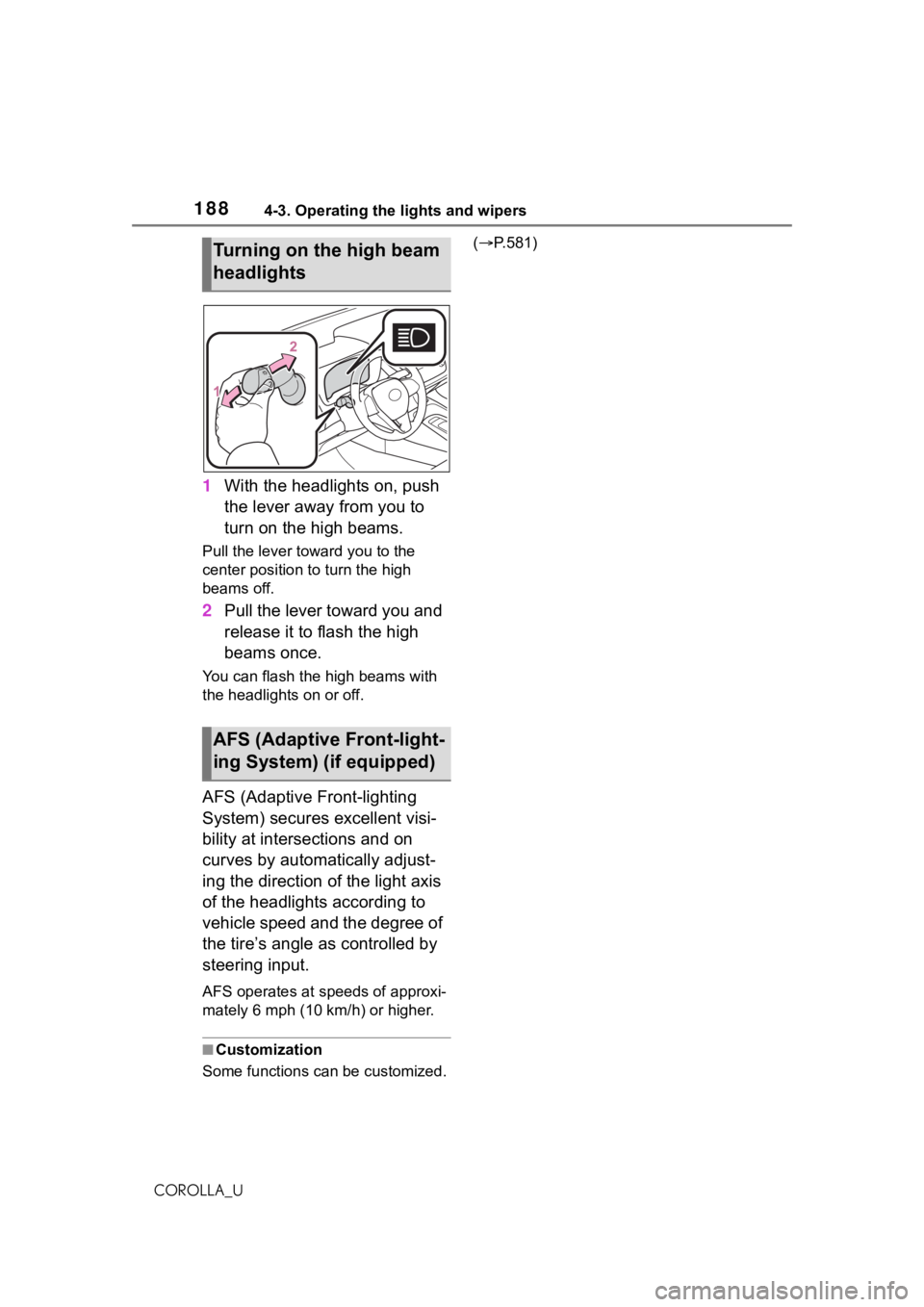
1With the headlights on, push
the lever away from you to
turn on the high beams.
Pull the lever to ward you to the
center position to turn the high
beams off.
2 Pull the lever toward you and
release it to flash the high
beams once.
You can flash the high beams with
the headlights on or off.
AFS (Adaptive Front-lighting
System) secures excellent visi-
bility at intersections and on
curves by automatically adjust-
ing the direction of the light axis
of the headlights according to
vehicle speed and the degree of
the tire’s angle as controlled by
steering input.
AFS operates at speeds of approxi-
mately 6 mph (10 km/h) or higher.
■Customization
Some functions can be customized. (
P.581)
Turning on the high beam
headlights
AFS (Adaptive Front-light-
ing System) (if equipped)
Page 189 of 624
1894-3. Operating the lights and wipers
4
Driving
COROLLA_U
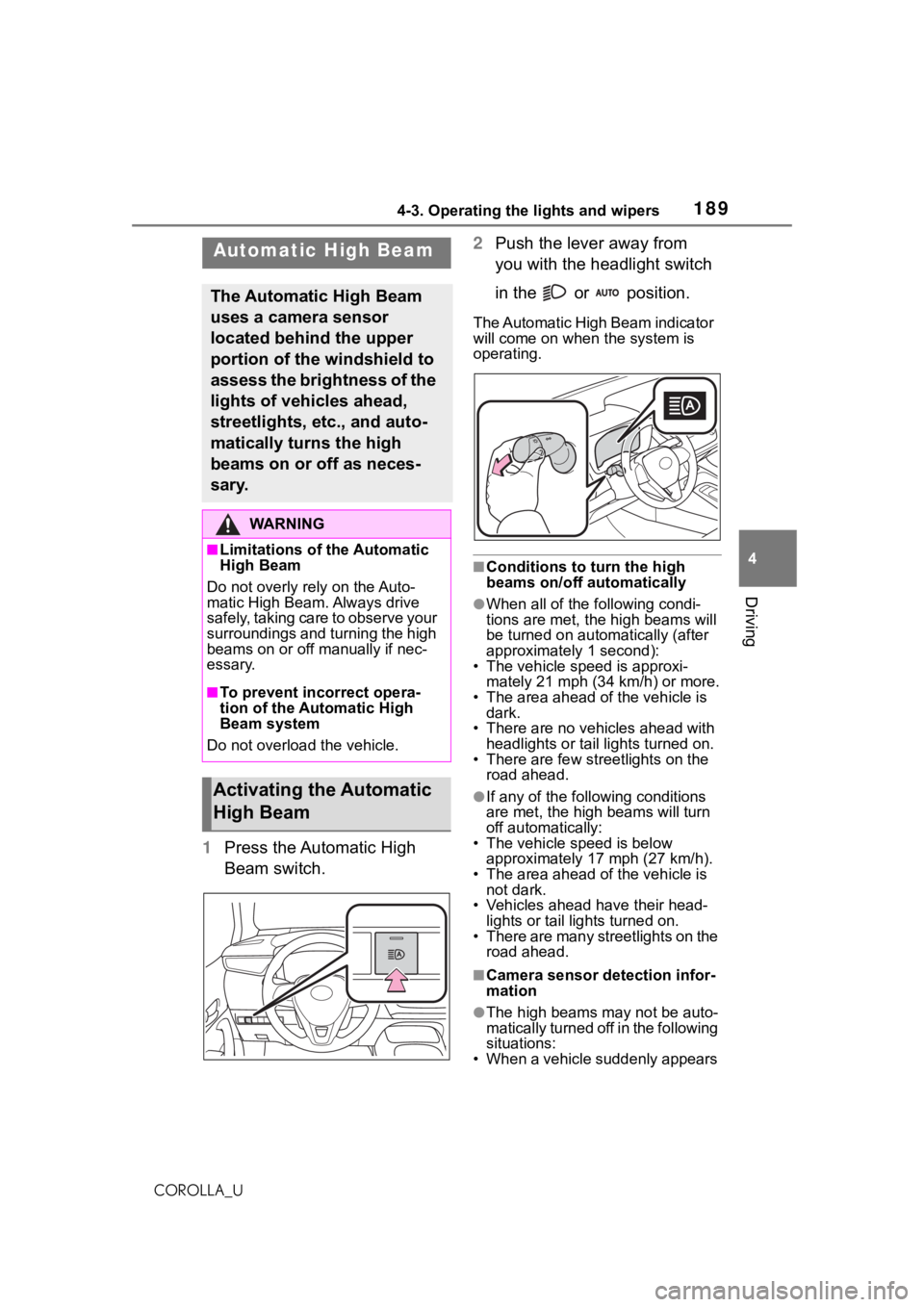
1Press the Automatic High
Beam switch. 2
Push the lever away from
you with the headlight switch
in the or position.
The Automatic High Beam indicator
will come on when the system is
operating.
■Conditions to turn the high
beams on/off automatically
●When all of the f ollowing condi-
tions are met, t he high beams will
be turned on autom atically (after
approximately 1 second):
• The vehicle speed is approxi-
mately 21 mph (34 km/h) or more.
• The area ahead of the vehicle is dark.
• There are no vehicles ahead with headlights or tail lights turned on.
• There are few str eetlights on the
road ahead.
●If any of the following conditions
are met, the high beams will turn
off automatically:
• The vehicle speed is below
approximately 17 mph (27 km/h).
• The area ahead of the vehicle is not dark.
• Vehicles ahead have their head- lights or tail lights turned on.
• There are many streetlights on the road ahead.
■Camera sensor detection infor-
mation
●The high beams m ay not be auto-
matically turned off in the following
situations:
• When a vehicle suddenly appears
Automatic High Beam
The Automatic High Beam
uses a camera sensor
located behind the upper
portion of the windshield to
assess the brightness of the
lights of vehicles ahead,
streetlights, etc., and auto-
matically turns the high
beams on or off as neces-
sary.
WA R N I N G
■Limitations of the Automatic
High Beam
Do not overly rely on the Auto-
matic High Beam. Always drive
safely, taking care to observe your
surroundings and turning the high
beams on or off manually if nec-
essary.
■To prevent incorrect opera-
tion of the Automatic High
Beam system
Do not overload the vehicle.
Activating the Automatic
High Beam
Page 190 of 624

1904-3. Operating the lights and wipers
COROLLA_Ufrom around a curve
• When the vehicle is cut in front of by another vehicle
• When vehicles ahead cannot be detected due to repeated curves,
road dividers or roadside trees
• When vehicles ahead appear in a faraway lane on a wide road
• When the lights of vehicles ahead
are not on
●The high beams may be turned off
if a vehicle ahead that is using fog
lights without its headlights turned
on is detected.
●House lights, streetlights, traffic
signals, and illumi nated billboards
or signs and other reflective
objects may cause the high
beams to change to the low
beams, or the low beams to
remain on.
●The following factors may affect
the amount of time taken for the
high beams to turn on or off:
• The brightness of the headlights, fog lights, and ta il lights of vehi-
cles ahead
• The movement and direction of vehicles ahead
• When a vehicle ahead only has
operational lights on one side
• When a vehicle ahead is a two-wheeled vehicle
• The condition of the road (gradi-
ent, curve, condi tion of the road
surface, etc.)
• The number of passengers and amount of luggage in the vehicle
●The high beams may turn on or off
unexpectedly.
●Bicycles or similar vehicles may
not be detected.
●In the following situations the sys-
tem may not be abl e to correctly
detect the surrounding brightness
level. This may cause the low
beams to remain on or the high
beams to flash or dazzle pedestri-
ans or vehicles ahead. In such a
case, it is necess ary to manually
switch between the high and low
beams. • When driving in inclement weather
(heavy rain, snow, fog, sand-
storms, etc.)
• When the windshi eld is obscured
by fog, mist, ice, dirt, etc.
• When the windshield is cracked or
damaged
• When the camera sensor is deformed or dirty
• When the temperature of the cam- era sensor is extremely high
• When the surrounding brightness
level is equal to that of headlights,
tail lights or fog lights
• When headlights or tail lights of
vehicles ahead are turned off,
dirty, changing color, or not aimed
properly
• When the vehicle is hit by water,
snow, dust, etc. from a preceding
vehicle
• When driving through an area of intermittently changing brightness
and darkness
• When frequently and repeatedly driving ascending/descending
roads, or roads with rough, bumpy
or uneven surfaces (such as
stone-paved roads, gravel roads,
etc.)
• When frequently and repeatedly taking curves or driving on a wind-
ing road
• When there is a h ighly reflective
object ahead of the vehicle, such
as a sign or mirror
• When the back of a preceding vehicle is highly reflective, such as
a container on a truck
• When the vehicle’s headlights are damaged or dirty, or are not aimed
properly
• When the vehicle is listing or titling due to a flat tire, a trailer being
towed, etc.
• When the headlights are changed between the high beams and low
beams repeatedly in an abnormal
manner
• When the driver believes that the high beams may be flashing or
dazzling pedestrians or other driv-
ers
Page 191 of 624
1914-3. Operating the lights and wipers
4
Driving
COROLLA_U
■Temporarily lowering sensor
sensitivity
The sensitivity of the sensor can be
temporarily lowered.
1 Turn the engine s witch off while
the following cond itions are met.
●The headlight switch is in or
.
●The headlight switch lever is in
high beam position.
●Automatic High Beam switch is
on.
2 Turn the engine switch to ON.
3 Within 60 seconds after step 2,
repeat pulling the headlight
switch lever to the original posi-
tion then pushing it to the high
beam position qu ickly 10 times,
then leave the lever in high beam
position.
4 If the sensitivity is changed, the
Automatic High Beam indicator
is turn on and off 3 times.
Automatic High Beam (headlights)
may turn on even w hen the vehicle
is stopped.
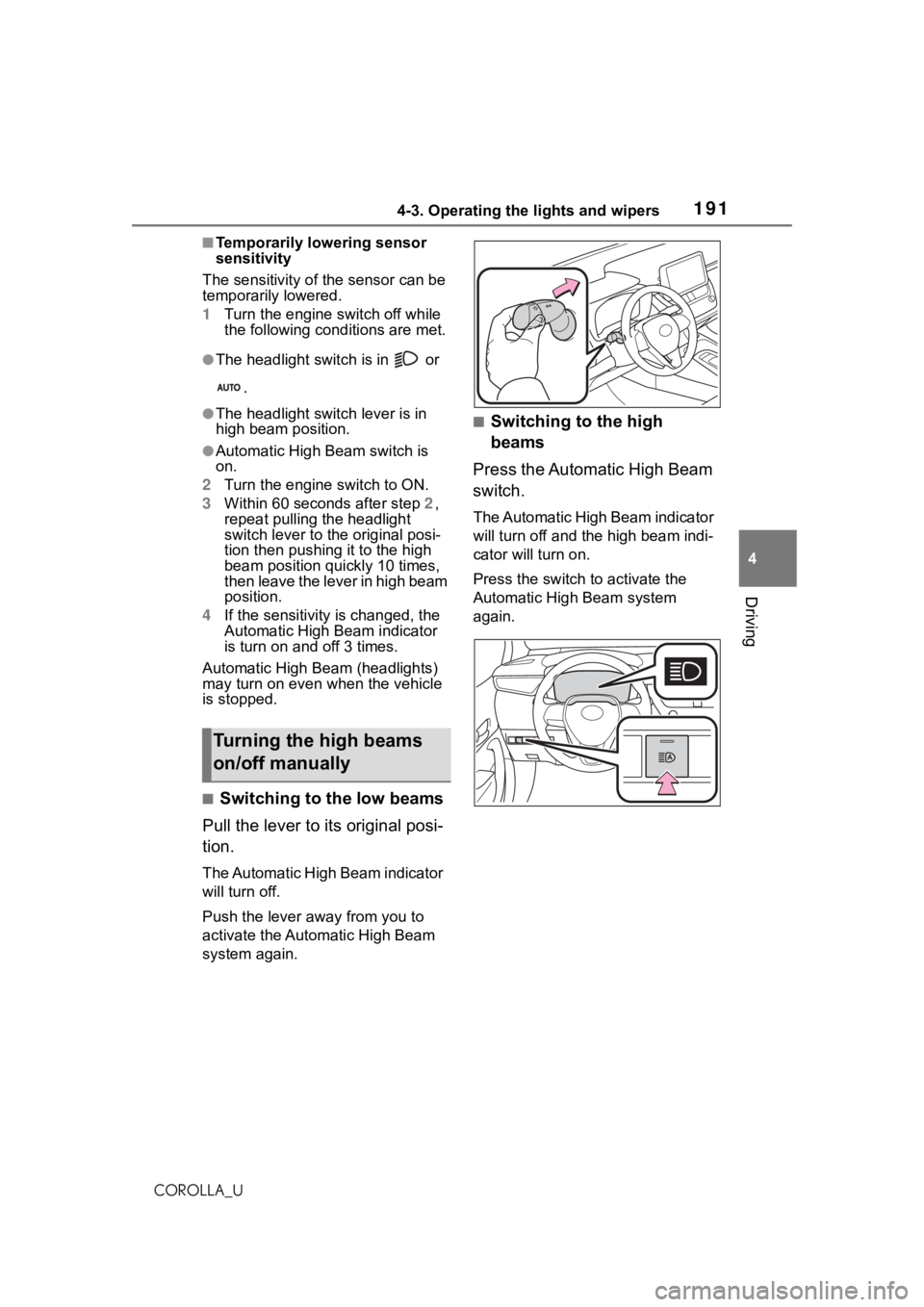
■Switching to the low beams
Pull the lever to its original posi-
tion.
The Automatic High Beam indicator
will turn off.
Push the lever away from you to
activate the Automatic High Beam
system again.
■Switching to the high
beams
Press the Automatic High Beam
switch.
The Automatic High Beam indicator
will turn off and the high beam indi-
cator will turn on.
Press the switch to activate the
Automatic High Beam system
again.
Turning the high beams
on/off manually
Page 196 of 624
1964-5. Using the driving support systems
COROLLA_U
4-5.Using the driving support systems
■PCS (Pre-Collision System)
P. 2 0 3
■LTA (Lane Tracing Assist)*
P. 2 1 1
*: If equipped
■LDA (Lane Departure Alert
with steering control)
*
P. 2 2 1
*: If equipped
■AHB (Automatic High
Beam)
P. 1 8 9
■RSA (Road Sign Assist)*
P. 2 5 0
*: If equipped
■Dynamic radar cruise con-
trol with full-speed range
*
P. 2 2 9
*: If equipped
■Dynamic radar cruise con-
trol
*
P. 2 4 0
*: If equipped
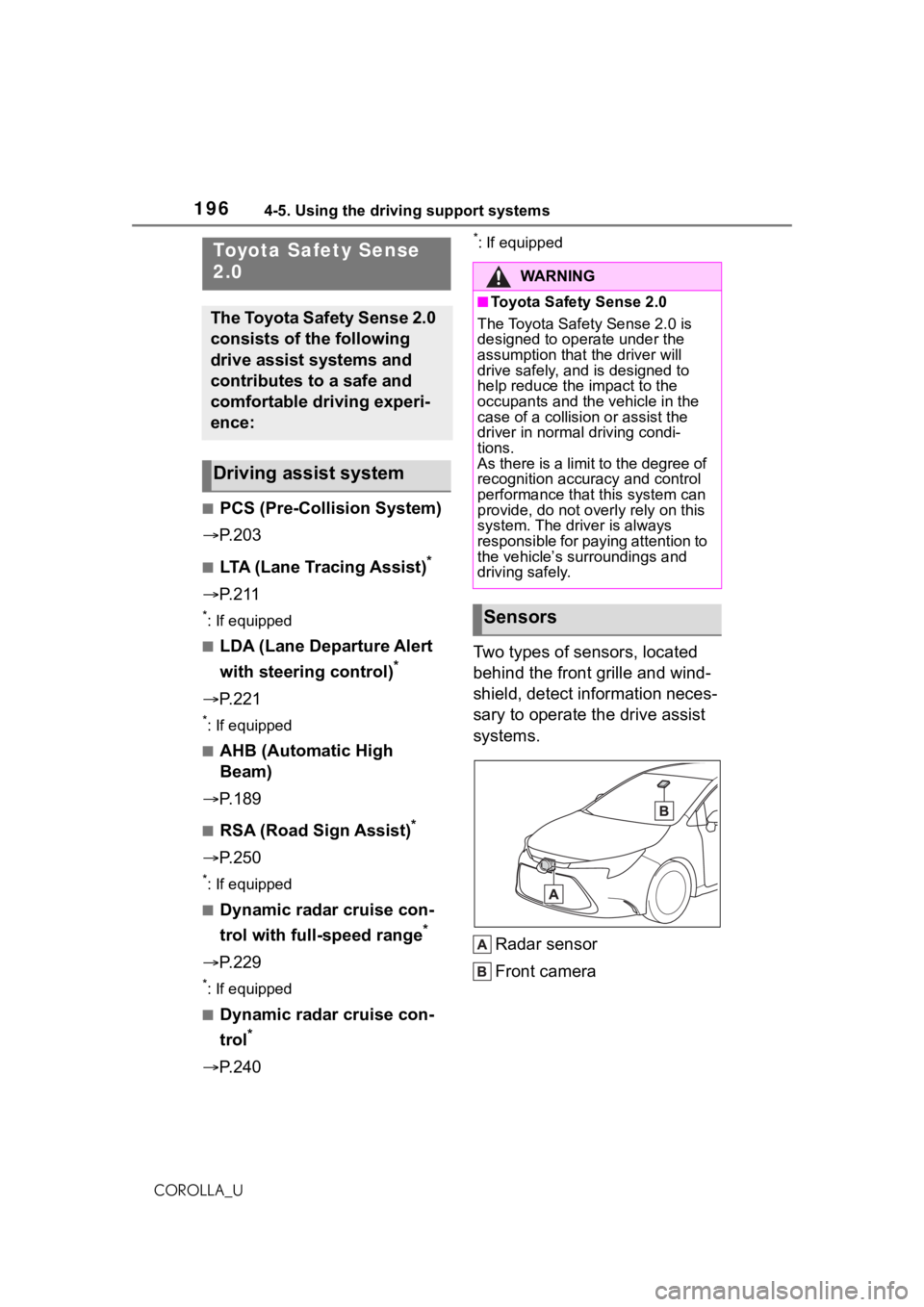
Two types of sensors, located
behind the front grille and wind-
shield, detect information neces-
sary to operate the drive assist
systems.
Radar sensor
Front camera
Toyota Safety Sense
2.0
The Toyota Safety Sense 2.0
consists of the following
drive assist systems and
contributes to a safe and
comfortable driving experi-
ence:
Driving assist system
WA R N I N G
■Toyota Safety Sense 2.0
The Toyota Safety Sense 2.0 is
designed to operate under the
assumption that the driver will
drive safely, and is designed to
help reduce the impact to the
occupants and the vehicle in the
case of a collision or assist the
driver in normal driving condi-
tions.
As there is a limit to the degree of
recognition accuracy and control
performance that this system can
provide, do not overly rely on this
system. The driver is always
responsible for paying attention to
the vehicle’s su rroundings and
driving safely.
Sensors
Page 521 of 624
5218-2. Steps to take in an emergency
8
When trouble arises
COROLLA_U
■Warning messages
The warning messages explained
below may differ from the actual
messages according to operation
conditions and vehicle specifica-
tions.
■Warning buzzer
A buzzer may sound when a mes-
sage is displayed.
The buzzer may not be audible if the
vehicle is in a noisy location or if the
audio system volume is high.
■If “Engine Oil Level Low Add or
Replace” is displayed
The engine oil leve l is low. Check the level of the engine oil, and add if
necessary.
This message may appear if the
vehicle is stopped on a slope. Move
the vehicle to a l
evel surface and
check to see if the message disap-
pears.
■If “Engine Stopped Steering
Power Low” is displayed
This message is displayed if the
engine is stopped while driving.
When steering wheel operations are
heavier than usual, grip the steering
wheel firmly and operate it using
more force than usual.
■If “Auto Power OFF to Conserve
Battery” is displayed
Power was cut off due to the auto-
matic power off function. Next time
when starting the engine, increase
the engine speed slightly and main-
tain that level for approximately 5
minutes to recharge the battery.
■If “Headlight System Malfunc-
tion Visit Your Dealer” is dis-
played
The following systems may be mal-
functioning. Hav e the vehicle
inspected by your Toyota dealer
immediately.
●The LED headlight system
●AFS (Adaptive Front-lighting Sys-
tem) (if equipped)
●The automatic headlight leveling
system (if equipped)
●Automatic High Beam
■If a message that indicates the
malfunction of front camera is
displayed
The following systems may be sus-
pended until the problem shown in
the message is resolved. (P.201,
511)
●PCS (Pre-Collision system)
●LTA (Lane Tracing Assist) (if
equipped)
●LDA (Lane Departure Alert with
If a war ning message
is displayed
The multi-information dis-
play shows warnings for
system malfunctions and
incorrectly performed oper-
ations, and messages that
indicate a need for mainte-
nance. When a message is
displayed, perform the
appropriate corrective
action for the message.
If a warning message is dis-
played again after the
appropriate actions have
been performed, contact
your Toyota dealer.
Additionally, if a warning
light comes on or flashes at
the same time that a warn-
ing message is displayed,
take the appropriate correc-
tive action for the warning
light. ( P. 5 1 1 )