low beam TOYOTA COROLLA 2022 Owners Manual (in English)
[x] Cancel search | Manufacturer: TOYOTA, Model Year: 2022, Model line: COROLLA, Model: TOYOTA COROLLA 2022Pages: 678, PDF Size: 147.24 MB
Page 181 of 678
179
4
4-3. Operating the lights and wipers
Driving
are turned on.
■Battery-saving function
In order to prevent the battery of the vehicle from discharging, if the light
switch is in the or position
when the engine switch is turned off the battery saving function will operate and
automatically turn off all the lights after
approximately 20 minutes. When the engine switch is turned to ON, the bat-
tery-saving function will be disabled.
When any of the following are per- formed, the battery-saving function is
canceled once and then reactivated. All
the lights will turn off automatically 20 minutes after the battery- saving func-
tion has been reactivated:
●When the headlight switch is operated
●When a door is opened or closed
■Customization
Some functions can be customized.
( P.538)
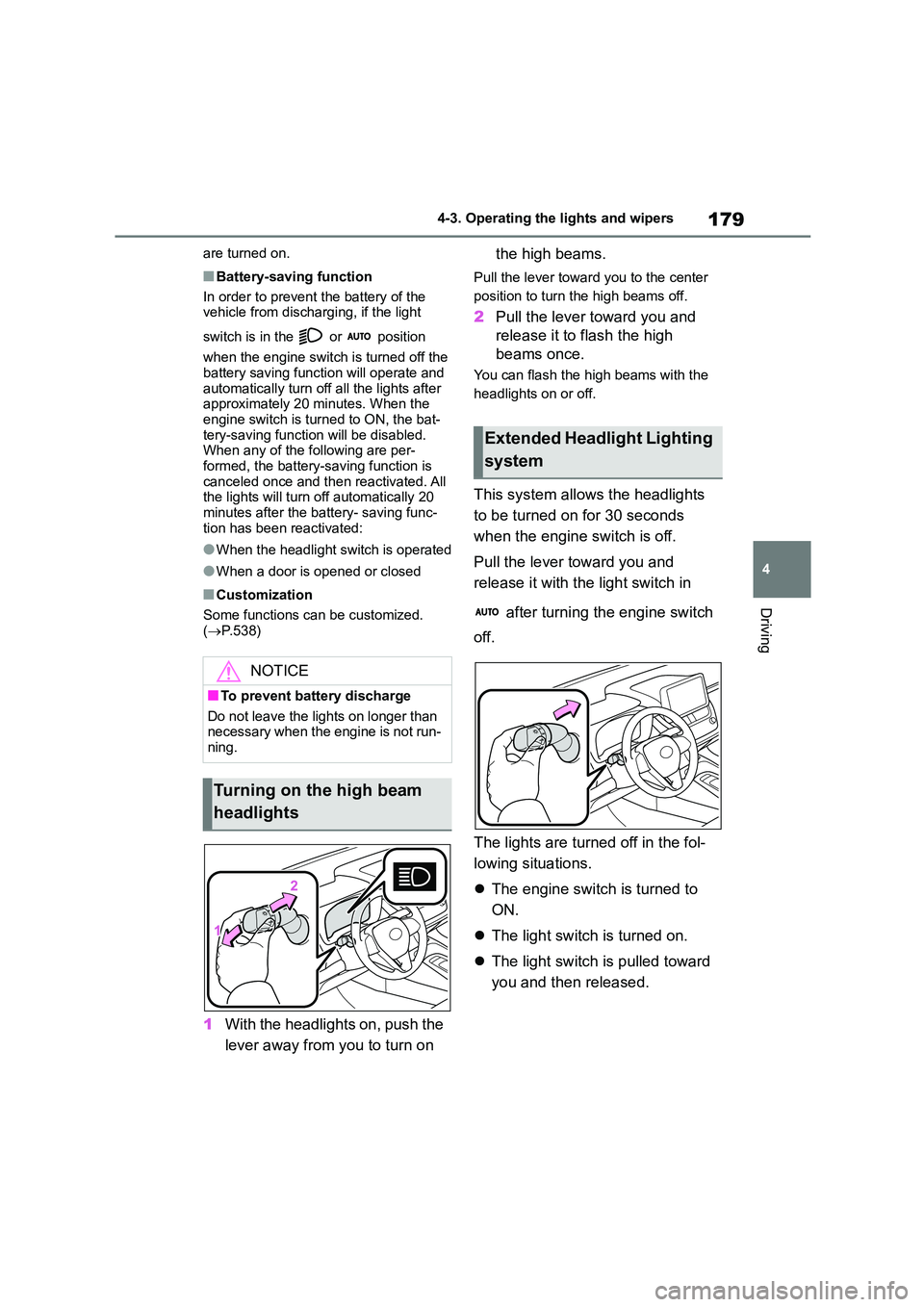
1With the headlights on, push the
lever away from you to turn on
the high beams.
Pull the lever toward you to the center
position to turn the high beams off.
2 Pull the lever toward you and
release it to flash the high
beams once.
You can flash the high beams with the
headlights on or off.
This system allows the headlights
to be turned on for 30 seconds
when the engine switch is off.
Pull the lever toward you and
release it with the light switch in
after turning the engine switch
off.
The lights are turned off in the fol-
lowing situations.
The engine switch is turned to
ON.
The light switch is turned on.
The light switch is pulled toward
you and then released.
NOTICE
■To prevent battery discharge
Do not leave the lights on longer than necessary when the engine is not run-
ning.
Turning on the high beam
headlights
Extended Headlight Lighting
system
Page 183 of 678
181
4
4-3. Operating the lights and wipers
Driving
*: If equipped
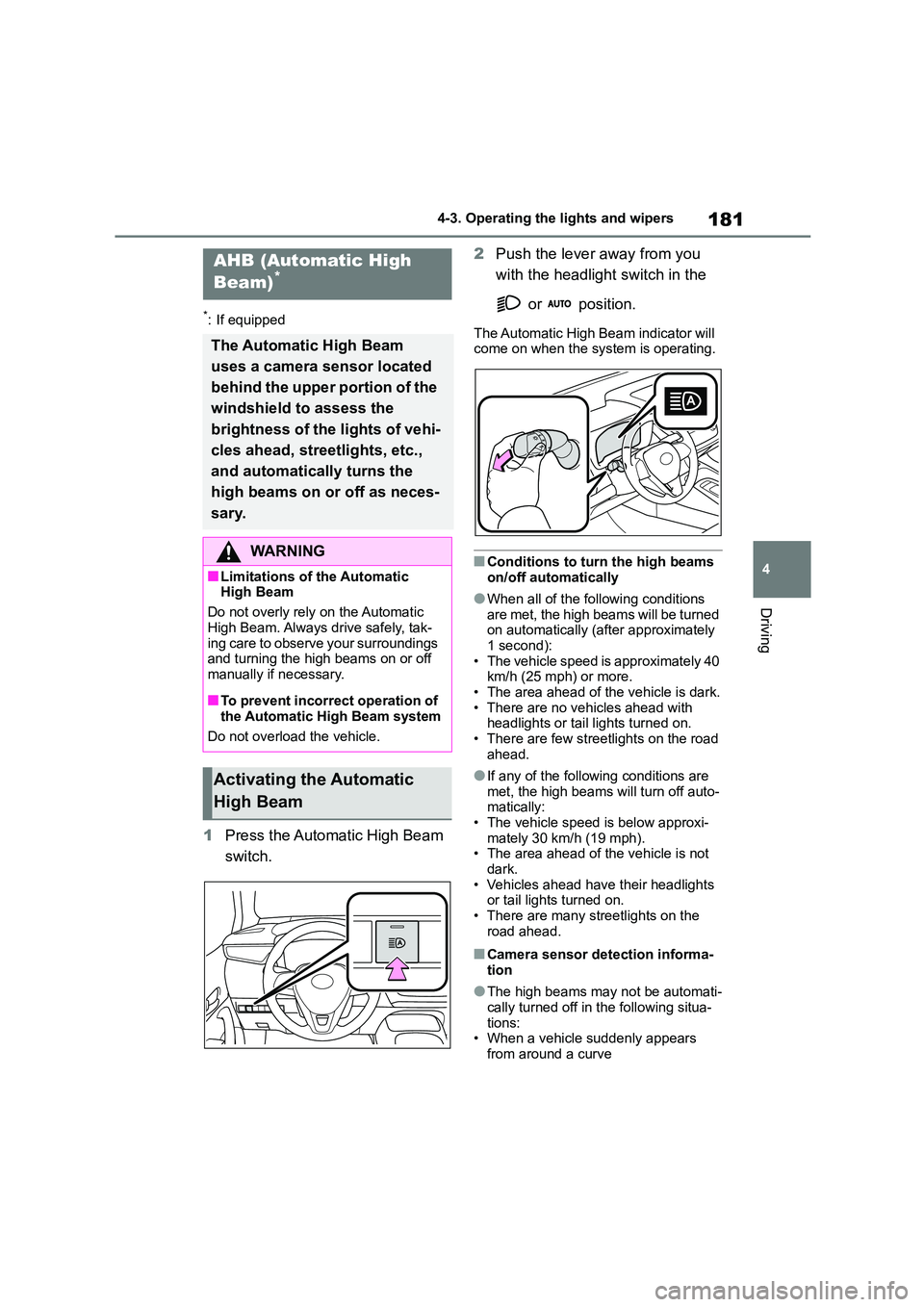
1 Press the Automatic High Beam
switch.
2 Push the lever away from you
with the headlight switch in the
or position.
The Automatic High Beam indicator will
come on when the system is operating.
■Conditions to turn the high beams
on/off automatically
●When all of the following conditions
are met, the high beams will be turned on automatically (after approximately
1 second):
• The vehicle speed is approximately 40 km/h (25 mph) or more.
• The area ahead of the vehicle is dark.
• There are no vehicles ahead with headlights or tail lights turned on.
• There are few streetlights on the road
ahead.
●If any of the following conditions are
met, the high beams will turn off auto- matically:
• The vehicle speed is below approxi-
mately 30 km/h (19 mph). • The area ahead of the vehicle is not
dark.
• Vehicles ahead have their headlights or tail lights turned on.
• There are many streetlights on the
road ahead.
■Camera sensor detection informa-
tion
●The high beams may not be automati-
cally turned off in the following situa- tions:
• When a vehicle suddenly appears
from around a curve
AHB (Automatic High
Beam)*
The Automatic High Beam
uses a camera sensor located
behind the upper portion of the
windshield to assess the
brightness of the lights of vehi-
cles ahead, streetlights, etc.,
and automatically turns the
high beams on or off as neces-
sary.
WA R N I N G
■Limitations of the Automatic High Beam
Do not overly rely on the Automatic
High Beam. Always drive safely, tak- ing care to observe your surroundings
and turning the high beams on or off
manually if necessary.
■To prevent incorrect operation of
the Automatic High Beam system
Do not overload the vehicle.
Activating the Automatic
High Beam
Page 184 of 678
1824-3. Operating the lights and wipers
• When the vehicle is cut in front of by
another vehicle • When vehicles ahead cannot be
detected due to repeated curves, road
dividers or roadside trees • When vehicles ahead appear in a far-
away lane on a wide road
• When the lights of vehicles ahead are not on
●The high beams may be turned off if a vehicle ahead that is using fog lights
without its headlights turned on is
detected.
●House lights, streetlights, traffic sig-
nals, and illuminated billboards or signs and other reflective objects may
cause the high beams to change to
the low beams, or the low beams to remain on.
●The following factors may affect the amount of time taken for the high
beams to turn on or off:
• The brightness of the headlights, fog lights, and tail lights of vehicles ahead
• The movement and direction of vehi-
cles ahead • When a vehicle ahead only has oper-
ational lights on one side
• When a vehicle ahead is a two-wheeled vehicle
• The condition of the road (gradient,
curve, condition of the road surface, etc.)
• The number of passengers and
amount of luggage in the vehicle
●The high beams may turn on or off
unexpectedly.
●Bicycles or similar vehicles may not
be detected.
●In the following sit uations the system
may not be able to correctly detect the
surrounding brightness level. This may cause the low beams to remain
on or the high beams to flash or daz-
zle pedestrians or vehicles ahead. In such a case, it is necessary to manu-
ally switch between the high and low
beams. • When driving in inclement weather
(heavy rain, snow, fog, sandstorms,
etc.)
• When the windshield is obscured by fog, mist, ice, dirt, etc.
• When the windshield is cracked or
damaged • When the camera sensor is deformed
or dirty
• When the temperature of the camera sensor is extremely high
• When the surrounding brightness
level is equal to that of headlights, tail lights or fog lights
• When headlights or tail lights of vehi-
cles ahead are turned off, dirty, chang- ing color, or not aimed properly
• When the vehicle is hit by water,
snow, dust, etc. from a preceding vehicle
• When driving through an area of inter-
mittently changing brightness and darkness
• When frequently and repeatedly driv-
ing ascending/descending roads, or roads with rough, bumpy or uneven
surfaces (such as stone-paved roads,
gravel roads, etc.) • When frequently and repeatedly tak-
ing curves or driving on a winding
road • When there is a highly reflective
object ahead of the vehicle, such as a
sign or mirror • When the back of a preceding vehicle
is highly reflective, such as a con-
tainer on a truck • When the vehicle’s headlights are
damaged or dirty, or are not aimed
properly • When the vehicle is listing or titling
due to a flat tire, a trailer being towed,
etc. • When the headlights are changed
between the high beams and low
beams repeatedly in an abnormal
manner • When the driver believes that the high
beams may be flashing or dazzling
pedestrians or other drivers
Page 185 of 678
183
4
4-3. Operating the lights and wipers
Driving
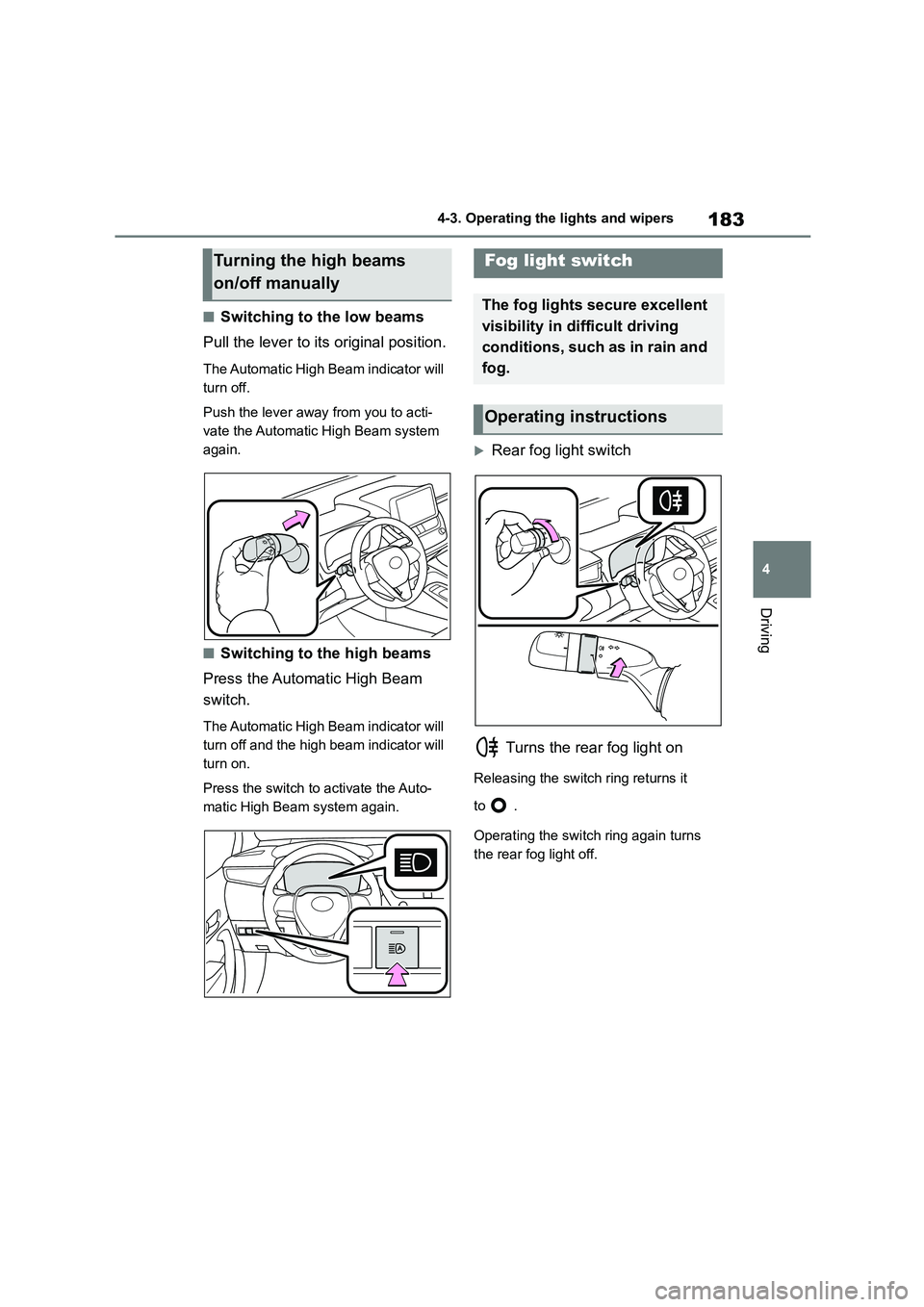
■Switching to the low beams
Pull the lever to its original position.
The Automatic High Beam indicator will
turn off.
Push the lever away from you to acti-
vate the Automatic High Beam system
again.
■Switching to the high beams
Press the Automatic High Beam
switch.
The Automatic High Beam indicator will
turn off and the high beam indicator will
turn on.
Press the switch to activate the Auto-
matic High Beam system again.
Rear fog light switch
Turns the rear fog light on
Releasing the switch ring returns it
to .
Operating the switch ring again turns
the rear fog light off.
Turning the high beams
on/off manually
Fog light switch
The fog lights secure excellent
visibility in difficult driving
conditions, such as in rain and
fog.
Operating instructions
Page 192 of 678
1904-5. Using the driving support systems
4-5.Using the driving support systems
*: If equipped
■PCS (Pre-Collision System)
P. 2 0 2
■LTA (Lane Tracing Assist)*
P. 2 0 9
*: If equipped
■LDA (Lane Departure Alert
with steering control)*
P. 2 1 9
*: If equipped
■AHB (Automatic High Beam)
P. 1 8 1
■RSA (Road Sign Assist)*
P. 2 5 4
*: If equipped
■Dynamic radar cruise control
with full-speed range*
P. 2 2 7
*: If equipped
■Dynamic radar cruise control*
P. 2 3 8
*: If equipped
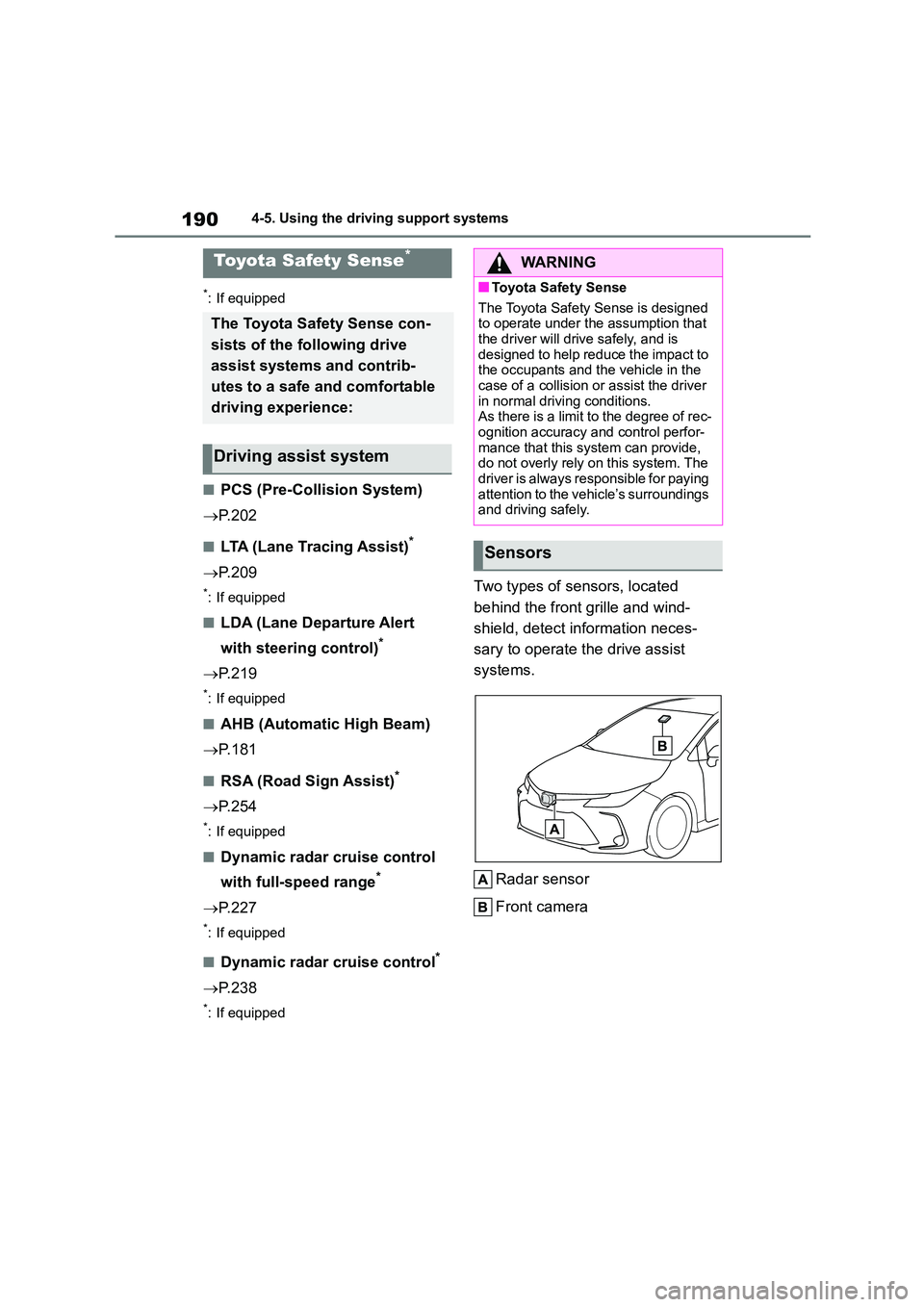
Two types of sensors, located
behind the front grille and wind-
shield, detect in formation neces-
sary to operate the drive assist
systems.
Radar sensor
Front camera
Toyota Safety Sense*
The Toyota Safety Sense con-
sists of the following drive
assist systems and contrib-
utes to a safe and comfortable
driving experience:
Driving assist system
WA R N I N G
■Toyota Safety Sense
The Toyota Safety Sense is designed
to operate under the assumption that the driver will drive safely, and is
designed to help reduce the impact to
the occupants and the vehicle in the case of a collision or assist the driver
in normal driving conditions.
As there is a limit to the degree of rec-
ognition accuracy and control perfor- mance that this system can provide,
do not overly rely on this system. The
driver is always responsible for paying attention to the vehicle’s surroundings
and driving safely.
Sensors
Page 302 of 678
3004-5. Using the driving support systems
the vehicle, within the area that the
vehicle will move to depart: • Trees or poles
• Fire hydrants
• Tall grass, flower beds, etc. • Walls which would surround the vehi-
cle
• Vehicles waiting near the parking spot • Metal I-beams
• Walls with protrusions
•Holes
■Function summary
Stop so that the cent er of the target
parking spot appears nearly per-
pendicular to the vehicle. If the
space is detectable, the forward
guidance function can be used.
Furthermore, depending on the
parking space and other conditions,
multi-turn maneuvering assist con-
trol is also provided if necessary.
WA R N I N G
■When using exit parallel parking assist mode
In the following situation, be sure to
drive carefully as the side sensors may not be able to correctly detect
objects, possibly leading to an acci-
dent.
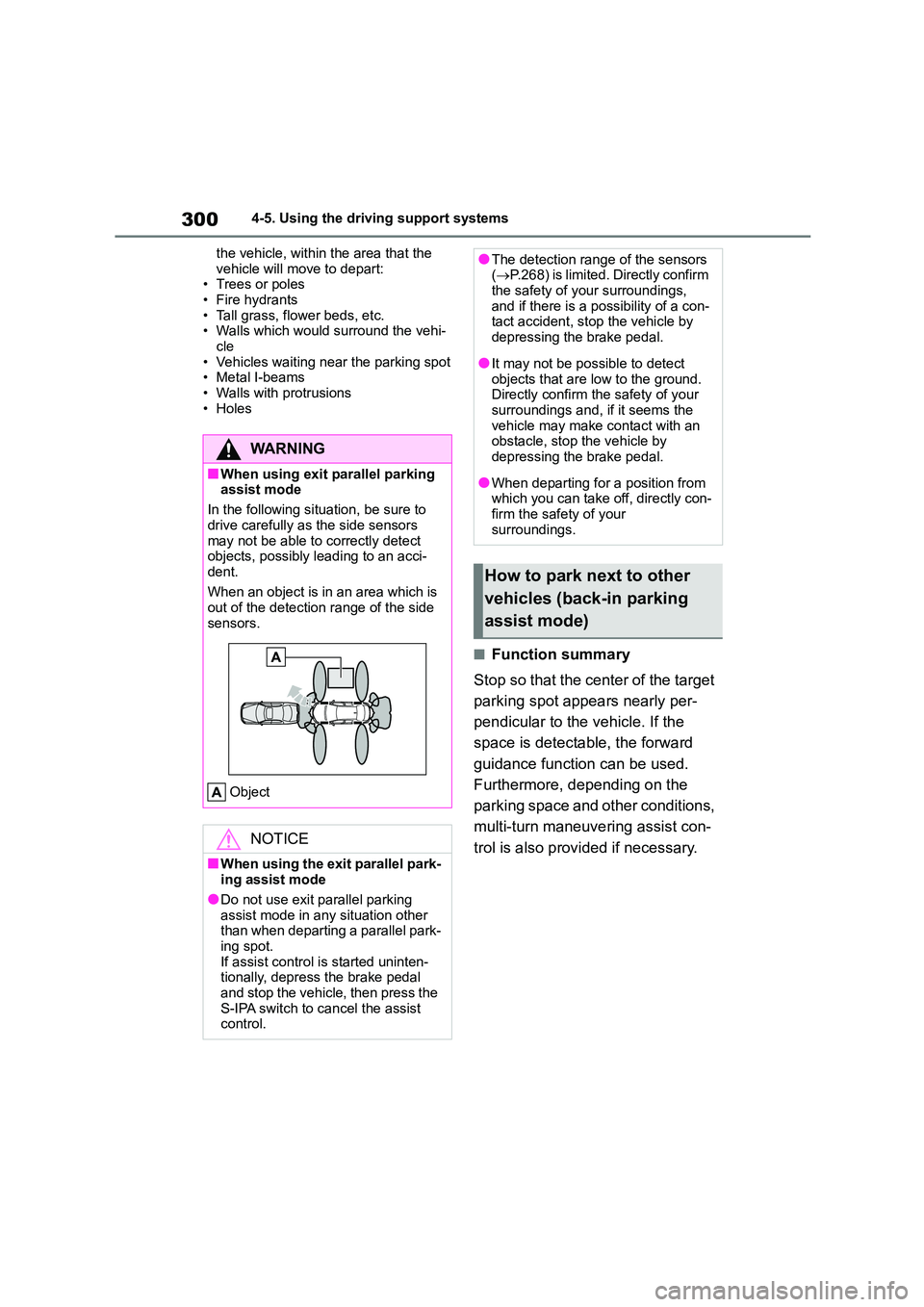
When an object is in an area which is
out of the detection range of the side
sensors.
Object
NOTICE
■When using the exit parallel park- ing assist mode
●Do not use exit parallel parking
assist mode in any situation other than when departing a parallel park-
ing spot.
If assist control is started uninten- tionally, depress the brake pedal
and stop the vehicle, then press the
S-IPA switch to cancel the assist control.
●The detection range of the sensors ( P.268) is limited. Directly confirm
the safety of your surroundings,
and if there is a possibility of a con- tact accident, stop the vehicle by
depressing the brake pedal.
●It may not be possible to detect
objects that are low to the ground.
Directly confirm the safety of your surroundings and, if it seems the
vehicle may make contact with an
obstacle, stop the vehicle by depressing the brake pedal.
●When departing for a position from which you can take off, directly con-
firm the safety of your
surroundings.
How to park next to other
vehicles (back-in parking
assist mode)
Page 483 of 678
481
8
8-2. Steps to take in an emergency
When trouble arises
■If “Engine Oil Level Low Add or
Replace” is displayed (M15A-FKS engine)
The engine oil level is low. Check the
level of the engine oil, and add if neces- sary.
This message may appear if the vehicle
is stopped on a slope. Move the vehicle to a level surface and check to see if the
message disappears.
■If “Engine Stopped Steering Power
Low” is displayed
This message is displayed if the engine
is stopped while driving.
When steering wheel operations are heavier than usual, grip the steering
wheel firmly and operate it using more
force than usual.
■If “Auto Power OFF to Conserve Battery” is displayed
Power was cut off due to the automatic
power off function. Next time when start- ing the engine, increase the engine
speed slightly and maintain that level for
approximately 5 minutes to recharge the battery.
■If “Headlight System Malfunction
Visit Your Dealer” is displayed
The following systems may be malfunc- tioning. Have the vehicle inspected by
any authorized Toyota retailer or Toyota
authorized repairer, or any reliable repairer immediately.
●The LED headli ght system (if equipped)
●Automatic High Beam (if equipped)
■If a message that indicates the mal-function of front camera is dis-
played
The following systems may be sus-
pended until the problem shown in the message is resolved. ( P.200, 471)
●PCS (Pre-Collision system) (if equipped)
●LTA (Lane Tracing Assist) (if equipped)
●LDA (Lane Departure Alert with steer-
ing control) (if equipped)
●Automatic High Beam (if equipped)
●RSA (Road Sign Assist) (if equipped)
●Dynamic radar cruise control with
full-speed range (if equipped)
●Dynamic radar cruise control (if
equipped)
■If “Radar Cruise Control Unavaila- ble See Owner's Manual” is dis-
played (if equipped)
The dynamic radar cruise control with full-speed range system or dynamic
radar cruise control system is sus-
pended temporarily or until the problem shown in the message is resolved.
(causes and coping methods: P.200)
■If “Radar Cruise Control Unavaila-
ble” is displayed (if equipped)
The dynamic radar cruise control with
full-speed range system or dynamic
radar cruise control system cannot be used temporarily. Use the system when
it becomes available again.
■If a message that indicates the
need for visiting your Toyota dealer is displayed
The system or part shown on the
multi-information display is malfunction- ing. Have the vehicle inspected by any
authorized Toyota retailer or Toyota
authorized repairer, or any reliable repairer immediately.
■If a message that indicates the
need for referrin g to Owner’s Man-
ual is displayed
●If “Engine Coolant Temp High” is dis-
played, follow the instructions accord- ingly. ( P.518)
●If “Exhaust Filter Full” is displayed, fol-
low the instructions accordingly. ( P.315)
●If “Smart Entry & Start System Mal- function” is displayed on the
multi-information display, it may indi-
cate a malfunction. Have the vehicle inspected by any authorized Toyota
retailer or Toyota authorized repairer,
Page 510 of 678
5088-2. Steps to take in an emergency
WA R N I N G
■When using the full-size spare
tire
●Replace the full-size spare tire with a standard tire as soon as possible.
●Avoid sudden acceleration, abrupt steering, sudden braking and shift-
ing operations that cause sudden
engine braking.
■When using the compact spare
tire
●Remember that the compact spare tire provided is specifically
designed for use with your vehicle.
Do not use your compact spare tire on another vehicle.
●Do not use more than one compact spare tires simultaneously.
●Replace the compact spare tire with a standard tire as soon as possible.
●Avoid sudden acceleration, abrupt steering, sudden braking and shift-
ing operations that cause sudden
engine braking.
■When the compact spare tire is
attached
The vehicle speed may not be cor-
rectly detected, an d the following sys-
tems may not operate correctly:
• ABS & Brake assist
• VSC
•TRC
• Automatic High Beam (if equipped)
• Cruise control (if equipped)
• Dynamic radar cruise control with full-speed range (if equipped)
• Dynamic radar cruise control (if equipped)
• EPS
• PCS (Pre-Collision System) (if equipped)
• LDA (Lane Departure Alert with steering control) (if equipped)
• LTA (Lane Tracing Assist) (if equipped)
• Tire pressure warning system
• Toyota parking assist-sensor (if
equipped)
• PKSB (Parking Support Brake) (if
equipped)
• BSM (Blind Spot Monitor) (if
equipped)
• Rear view monitor system (if
equipped)
• S-IPA (Simple Intelligent Parking
Assist System) (if equipped)
• Navigation system (if equipped)
■Speed limit when using the com-
pact spare tire
Do not drive at speeds in excess of 80 km/h (50 mph) when a compact spare
tire is installed on the vehicle.
The compact spare tire is not
designed for driving at high speeds.
Failure to observe this precaution may lead to an accident causing
death or serious injury.
■After using the tools and jack
Before driving, make sure all the tools
and jack are securely in place in their storage location to reduce the possi-
bility of personal injury during a colli-
sion or sudden braking.
Page 533 of 678
531
9
9-1. Specifications
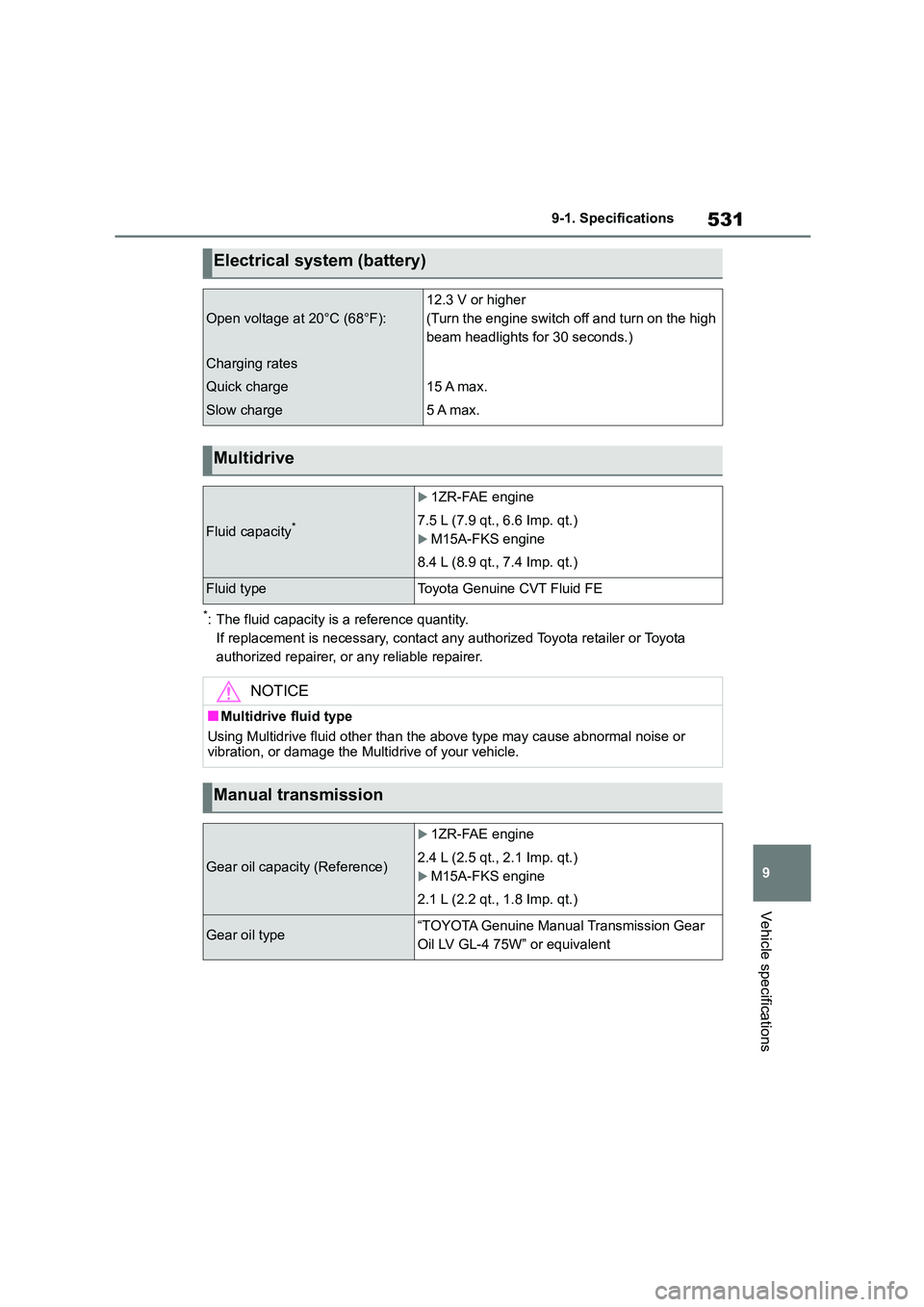
Vehicle specifications
*: The fluid capacity is a reference quantity.
If replacement is necessary, contact any authorized Toyota retailer or Toyota
authorized repairer, or any reliable repairer.
Electrical system (battery)
Open voltage at 20°C (68°F):
12.3 V or higher
(Turn the engine switch off and turn on the high
beam headlights for 30 seconds.)
Charging rates
Quick charge
Slow charge
15 A max.
5 A max.
Multidrive
Fluid capacity*
1ZR-FAE engine
7.5 L (7.9 qt., 6.6 Imp. qt.)
M15A-FKS engine
8.4 L (8.9 qt., 7.4 Imp. qt.)
Fluid typeToyota Genuine CVT Fluid FE
NOTICE
■Multidrive fluid type
Using Multidrive fluid other than the above type may cause abnormal noise or
vibration, or damage the Multidrive of your vehicle.
Manual transmission
Gear oil capacity (Reference)
1ZR-FAE engine
2.4 L (2.5 qt., 2.1 Imp. qt.)
M15A-FKS engine
2.1 L (2.2 qt., 1.8 Imp. qt.)
Gear oil type“TOYOTA Genuine Manual Transmission Gear
Oil LV GL-4 75W” or equivalent
Page 560 of 678
558Alphabetical Index
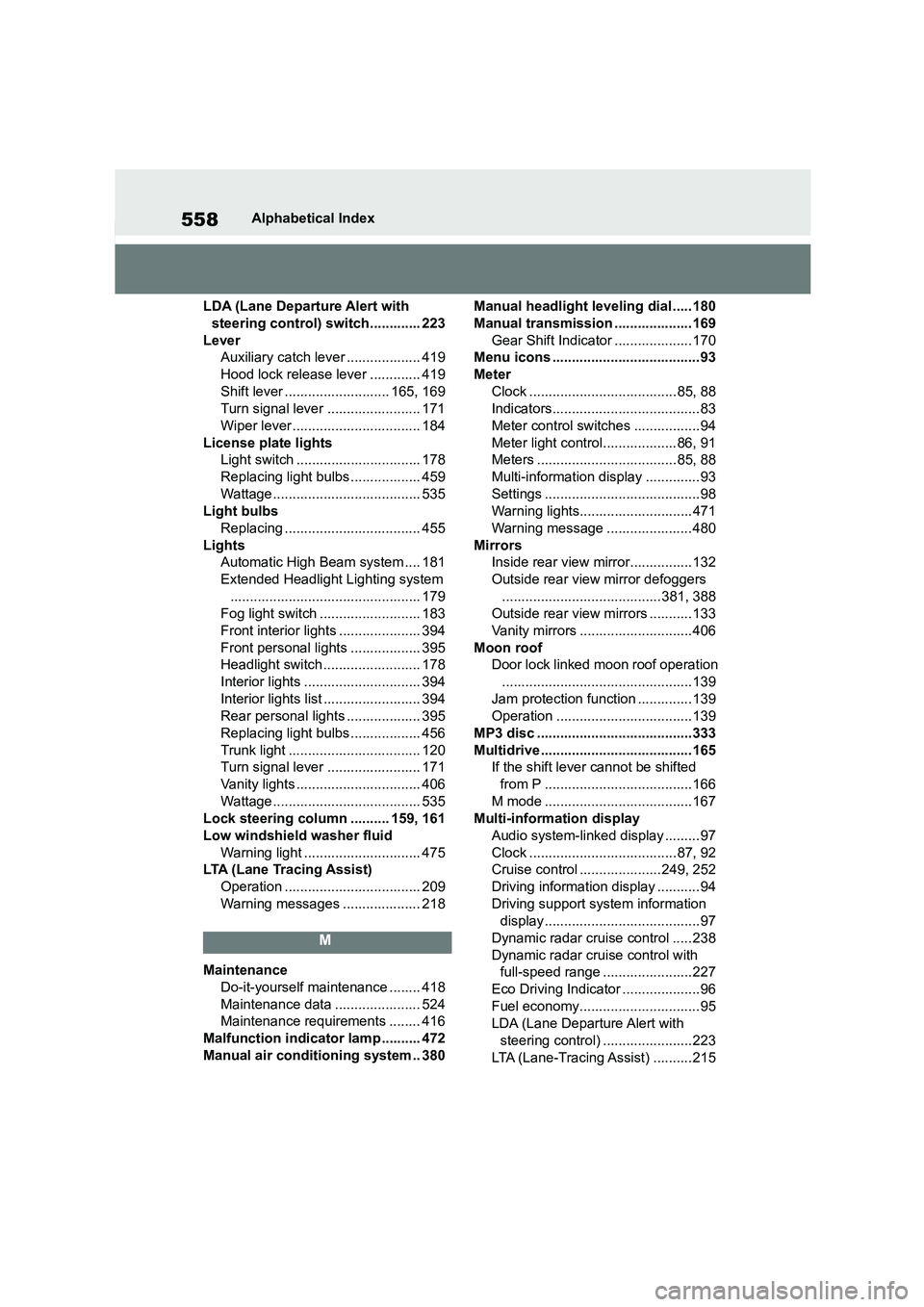
LDA (Lane Departure Alert with
steering control) switch............. 223
Lever
Auxiliary catch leve r ................... 419
Hood lock release lever ............. 419
Shift lever ........................... 165, 169
Turn signal lever ........................ 171
Wiper lever ................................. 184
License plate lights
Light switch ................................ 178
Replacing light bulbs .................. 459
Wattage...................................... 535
Light bulbs
Replacing ................................... 455
Lights
Automatic High Beam system .... 181
Extended Headlight Lighting system
................................................. 179
Fog light switch .......................... 183
Front interior lights ..................... 394
Front personal lights .................. 395
Headlight switch ......................... 178
Interior lights .............................. 394
Interior lights list ......................... 394
Rear personal lights ................... 395
Replacing light bulbs .................. 456
Trunk light .................................. 120
Turn signal lever ........................ 171
Vanity lights ................................ 406
Wattage...................................... 535
Lock steering column .......... 159, 161
Low windshield washer fluid
Warning light .............................. 475
LTA (Lane Tracing Assist)
Operation ................................... 209
Warning messages .................... 218
M
Maintenance
Do-it-yourself maintenance ........ 418
Maintenance data ...................... 524
Maintenance requirements ........ 416
Malfunction indicator lamp .......... 472
Manual air conditioning system .. 380
Manual headlight leveling dial ..... 180
Manual transmission .................... 169
Gear Shift Indicator .................... 170
Menu icons ...................................... 93
Meter
Clock ...................................... 85, 88
Indicators...................................... 83
Meter control switches ................. 94
Meter light control...................86, 91
Meters ....................................85, 88
Multi-information display .............. 93
Settings ........................................ 98
Warning lights.............................471
Warning message ...................... 480
Mirrors
Inside rear view mirror................132
Outside rear view mirror defoggers
.........................................381, 388
Outside rear view mirrors ........... 133
Vanity mirrors .............................406
Moon roof
Door lock linked moon roof operation
.................................................139
Jam protection function .............. 139
Operation ...................................139
MP3 disc ........................................333
Multidrive ....................................... 165
If the shift lever cannot be shifted
from P ......................................166
M mode ......................................167
Multi-information display
Audio system-linked display ......... 97
Clock ...................................... 87, 92
Cruise control .....................249, 252
Driving information display ........... 94
Driving support system information
display ........................................ 97
Dynamic radar cruise control ..... 238
Dynamic radar cruise control with
full-speed range .......................227
Eco Driving Indicator .................... 96
Fuel economy............................... 95
LDA (Lane Departure Alert with
steering control) .......................223
LTA (Lane-Tracing Assist) .......... 215