display TOYOTA COROLLA 2023 Owners Manual
[x] Cancel search | Manufacturer: TOYOTA, Model Year: 2023, Model line: COROLLA, Model: TOYOTA COROLLA 2023Pages: 468, PDF Size: 14.4 MB
Page 263 of 468
2635-1. Using the air conditioning system and defogger
5
Interior features
*: If equipped
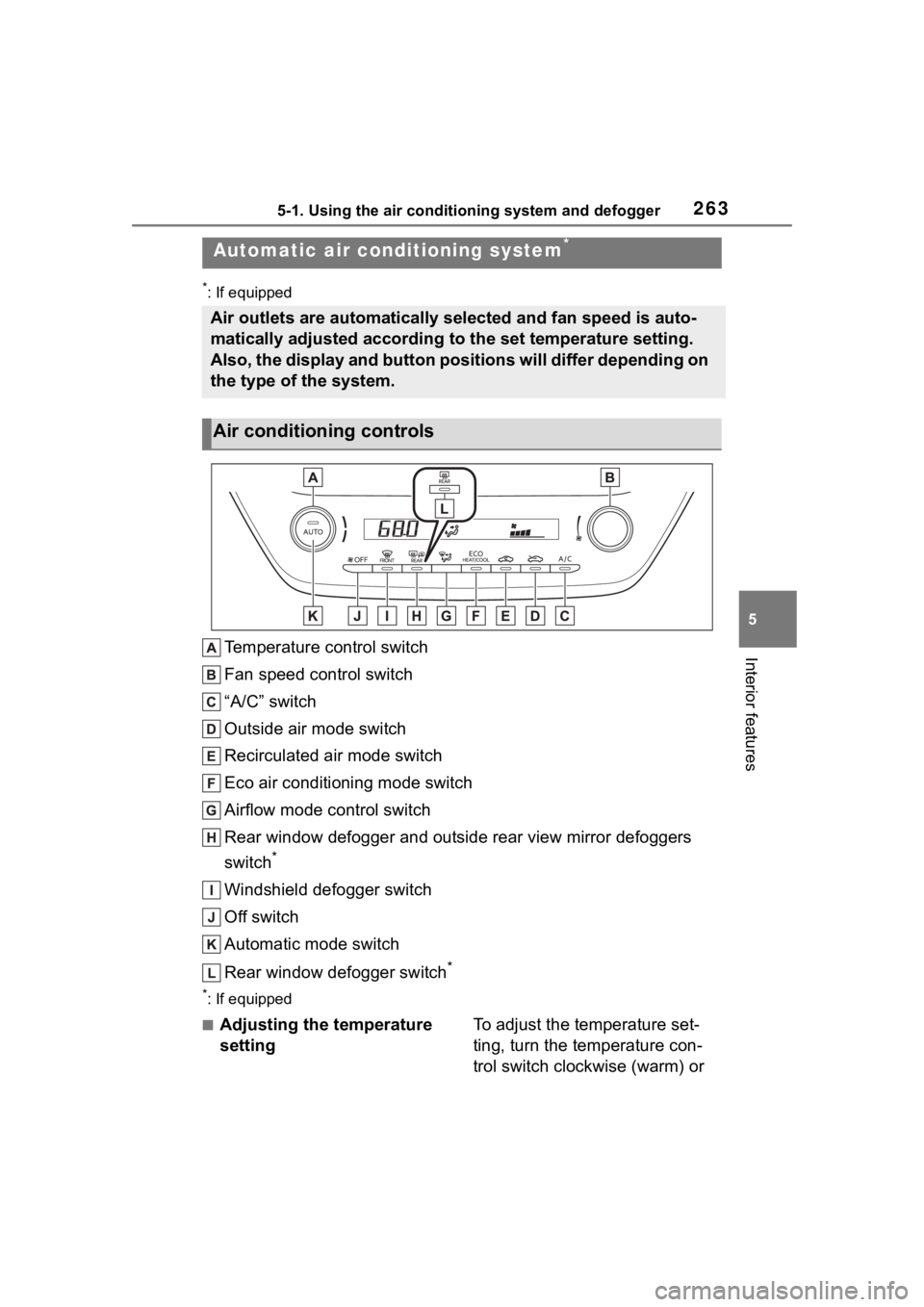
Temperature control switch
Fan speed control switch
“A/C” switch
Outside air mode switch
Recirculated air mode switch
Eco air conditioning mode switch
Airflow mode control switch
Rear window defogger and outside rear view mirror defoggers
switch
*
Windshield defogger switch
Off switch
Automatic mode switch
Rear window defogger switch
*
*: If equipped
■Adjusting the temperature
settingTo adjust the temperature set-
ting, turn the temperature con-
trol switch clockwise (warm) or
Automatic air conditioning system*
Air outlets are automatically selected and fan speed is auto-
matically adjusted according to the set temperature setting.
Also, the display and button positions will differ depending on
the type of the system.
Air conditioning controls
Page 283 of 468
2835-4. Other interior features
5
Interior features
●The portable device is being
charged with a cable connected
●There is foreign matter between
the charge area and portable
device
●Charging has caused the porta-
ble device to heat up
●The temperature around the
charging tray is 95°F (35°C) or
higher, such as in extreme heat
●The portable device is placed
with its charging side facing up
●The portable device is placed in
an area misaligned from the
charge area
●The portable device is larger
than the charging tray
●A foldable and portable device
is placed outside the charge
area
●The camera lens protrudes 0.12
in (3 mm) or more from the sur-
face of the portable device
●The vehicle is in an area where
strong electrical waves or noise
are emitted, such as near a tele-
vision tower, power plant, gaso-
line station, broadcasting
station, large display, airport,
etc.
●Any of the following objects that
is 0.08 in (2 mm) or thicker is
between the charging side of
the portable device and the
charge area
• Thick cases or covers
• A case or cover attached with an uneven or tilted surface, so
that the charging side is not flat
• Thick decorations
• Accessories, such as finger rings, straps, etc.
●When the portable device is in
contact with, or is covered by
any of the following metallic
objects:
• A card that has metal on it, such as aluminum foil, etc.
• A pack of cigarettes that includes aluminum foil
• A wallet or bag that is made of metal
• Coins
• A heating pad
• CDs, DVDs or other media
• A metal accessory
• A case or cover made of metal
• A case which has magnet in it on the charging side of the por-
table device.
●Electric wave type wireless
remote controls are being used
nearby
NOTICE
●2 or more portable devices are
placed on the charging tray at
the same time
If charging is abnormal or the
operation indicator light contin-
ues to flash for any other reason,
the wireless char ger may be mal-
functioning. Contact your Toyota
dealer.
Page 295 of 468

2956-2. Maintenance
6
Maintenance and care
■Resetting the message indicat-
ing maintenance is required
After the required maintenance is
performed according to the mainte-
nance schedule, please reset the
message.
To reset the messa ge, follow the
procedure described below:
4.2-inch display
1 Press or of the meter
control switch to select .
2 Press or to select “Vehi-
cle Settings” and then press and
hold .
3 Press or to select
“Scheduled Maintenance” and
then press .
4 Press or to select “Yes”
and then press .
A message will be displayed on the
multi-information display when the
reset procedure has been com-
pleted.
7-inch display
1 Press or of the meter
control switch to select .
2 Press or to select “Vehi-
cle Settings” and then press and
hold .
3 Press or to select
“Scheduled Maintenance” and
then press .
4 Press or to select “Yes”
and then press .
A message will be displayed on the
multi-information display when the
reset procedure has been com-
pleted.
You can perform some mainte-
nance procedures by yourself.
Please be aware that do-it-your-
self maintenance may affect
warranty coverage.
The use of Toyota repair manuals is
recommended.
For details about warranty cover-
age, refer to the separate “Owner’s
Warranty Informat ion Booklet” or
“Owner’s Manual Supplement”.
Do-it-yourself mainte-
nance
Page 310 of 468
3106-3. Do-it-yourself maintenance
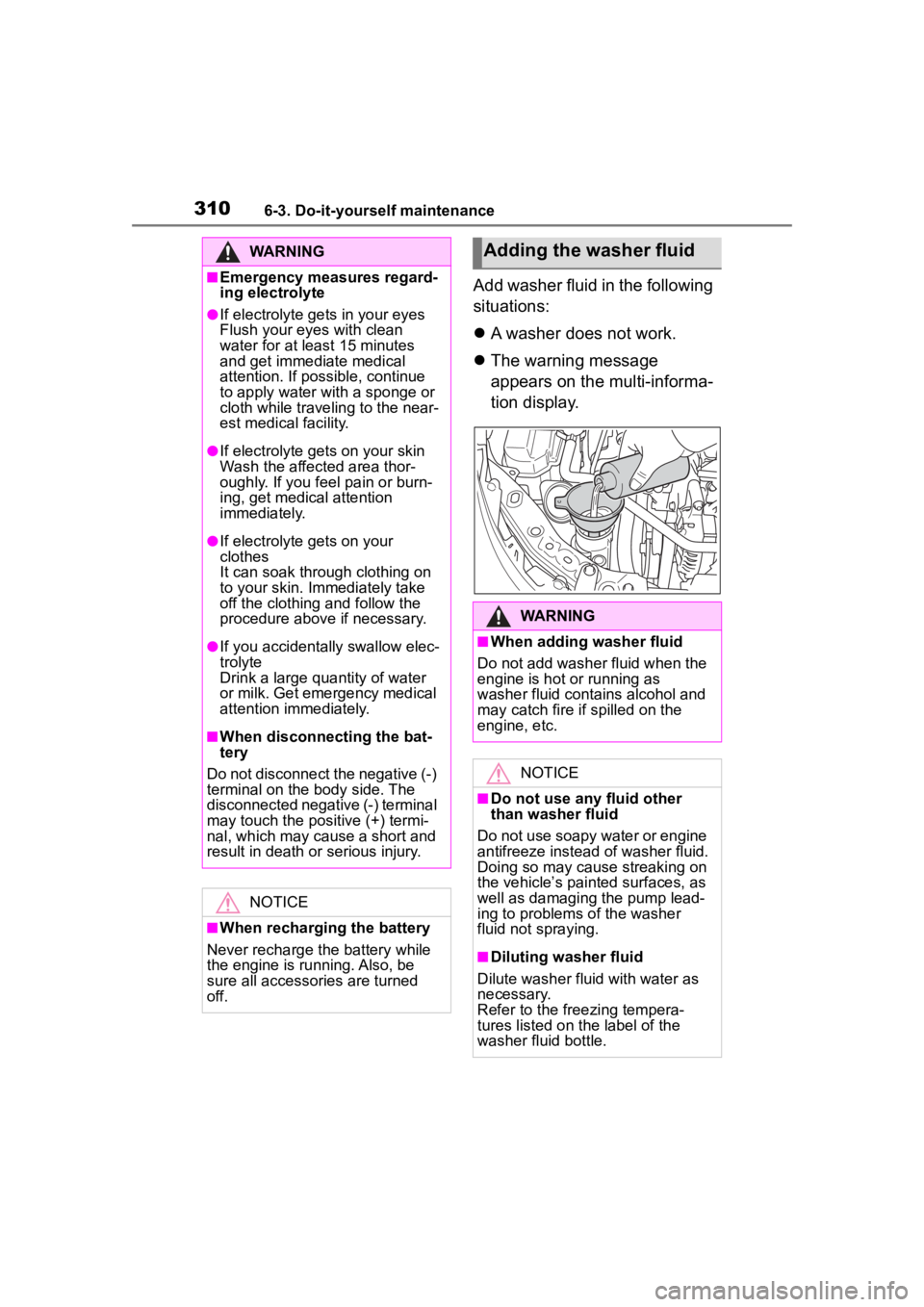
Add washer fluid in the following
situations:
A washer does not work.
The warning message
appears on the multi-informa-
tion display.
WARNING
■Emergency measures regard-
ing electrolyte
●If electrolyte gets in your eyes
Flush your eyes with clean
water for at least 15 minutes
and get immediate medical
attention. If possible, continue
to apply water with a sponge or
cloth while traveling to the near-
est medical facility.
●If electrolyte gets on your skin
Wash the affected area thor-
oughly. If you fee l pain or burn-
ing, get medical attention
immediately.
●If electrolyte gets on your
clothes
It can soak through clothing on
to your skin. Immediately take
off the clothing and follow the
procedure above if necessary.
●If you accidentally swallow elec-
trolyte
Drink a large quantity of water
or milk. Get emergency medical
attention immediately.
■When disconnecting the bat-
tery
Do not disconnect the negative (-)
terminal on the body side. The
disconnected negative (-) terminal
may touch the positive (+) termi-
nal, which may cause a short and
result in death or serious injury.
NOTICE
■When recharging the battery
Never recharge the battery while
the engine is running. Also, be
sure all accessories are turned
off.
Adding the washer fluid
WARNING
■When adding washer fluid
Do not add washer fluid when the
engine is hot or running as
washer fluid contains alcohol and
may catch fire if spilled on the
engine, etc.
NOTICE
■Do not use any fluid other
than washer fluid
Do not use soapy water or engine
antifreeze instead of washer fluid.
Doing so may cause streaking on
the vehicle’s painted surfaces, as
well as damaging the pump lead-
ing to problems of the washer
fluid not spraying.
■Diluting washer fluid
Dilute washer fluid with water as
necessary.
Refer to the freezing tempera-
tures listed on the label of the
washer fluid bottle.
Page 313 of 468
3136-3. Do-it-yourself maintenance
6
Maintenance and care
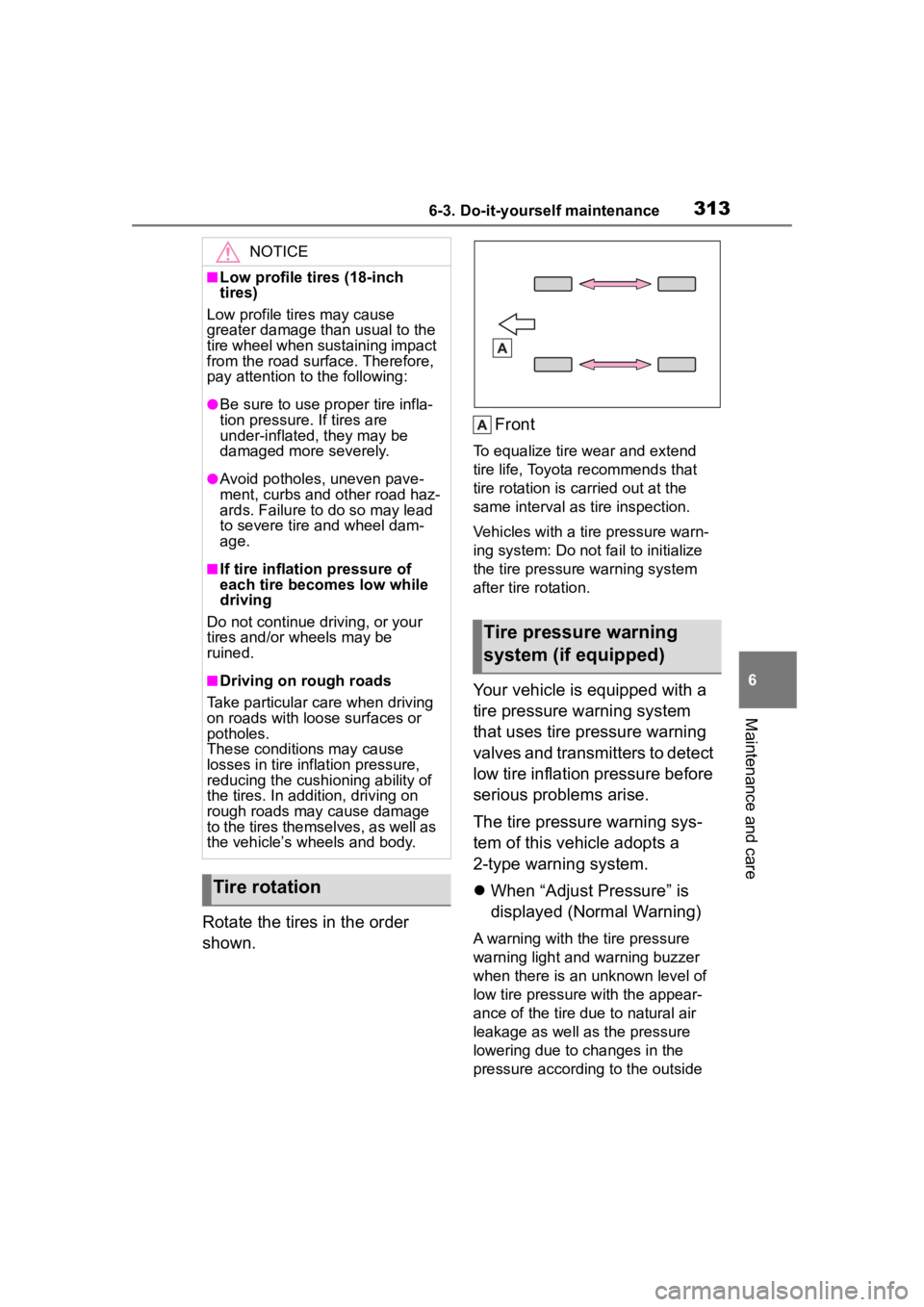
Rotate the tires in the order
shown.Front
To equalize tire w
ear and extend
tire life, Toyota recommends that
tire rotation is carried out at the
same interval as tire inspection.
Vehicles with a tire pressure warn-
ing system: Do not fa il to initialize
the tire pressure warning system
after tire rotation.
Your vehicle is equipped with a
tire pressure warning system
that uses tire pressure warning
valves and transmitters to detect
low tire inflation pressure before
serious problems arise.
The tire pressure warning sys-
tem of this vehicle adopts a
2-type warning system.
When “Adjust Pressure” is
displayed (Normal Warning)
A warning with the tire pressure
warning light and warning buzzer
when there is an unknown level of
low tire pressure with the appear-
ance of the tire due to natural air
leakage as well as the pressure
lowering due to changes in the
pressure according to the outside
NOTICE
■Low profile tires (18-inch
tires)
Low profile tires may cause
greater damage th an usual to the
tire wheel when sustaining impact
from the road surface. Therefore,
pay attention to the following:
●Be sure to use pro per tire infla-
tion pressure. If tires are
under-inflated, they may be
damaged more severely.
●Avoid potholes, uneven pave-
ment, curbs and other road haz-
ards. Failure to do so may lead
to severe tire and wheel dam-
age.
■If tire inflation pressure of
each tire becomes low while
driving
Do not continue driving, or your
tires and/or wheels may be
ruined.
■Driving on rough roads
Take particular care when driving
on roads with loose surfaces or
potholes.
These conditions may cause
losses in tire inf lation pressure,
reducing the cushio ning ability of
the tires. In addit ion, driving on
rough roads may cause damage
to the tires themselves, as well as
the vehicle’s wheels and body.
Tire rotation
Tire pressure warning
system (if equipped)
Page 314 of 468
3146-3. Do-it-yourself maintenance
temperature. (Ways of coping:
P.360, 397)
When “Immediately Check
Tire when Safe” is displayed
(Emergency Warning)
A warning with the tire pressure
warning light and warning buzzer
when there is a known level of low
tire pressure with the appearance
of the tire due to pressure suddenly
lowering. (Ways of coping: P.360,
370)
However, the system may not be
able to detect sud den tire ruptures
(bursting, etc.).
The tire pressure detected by the
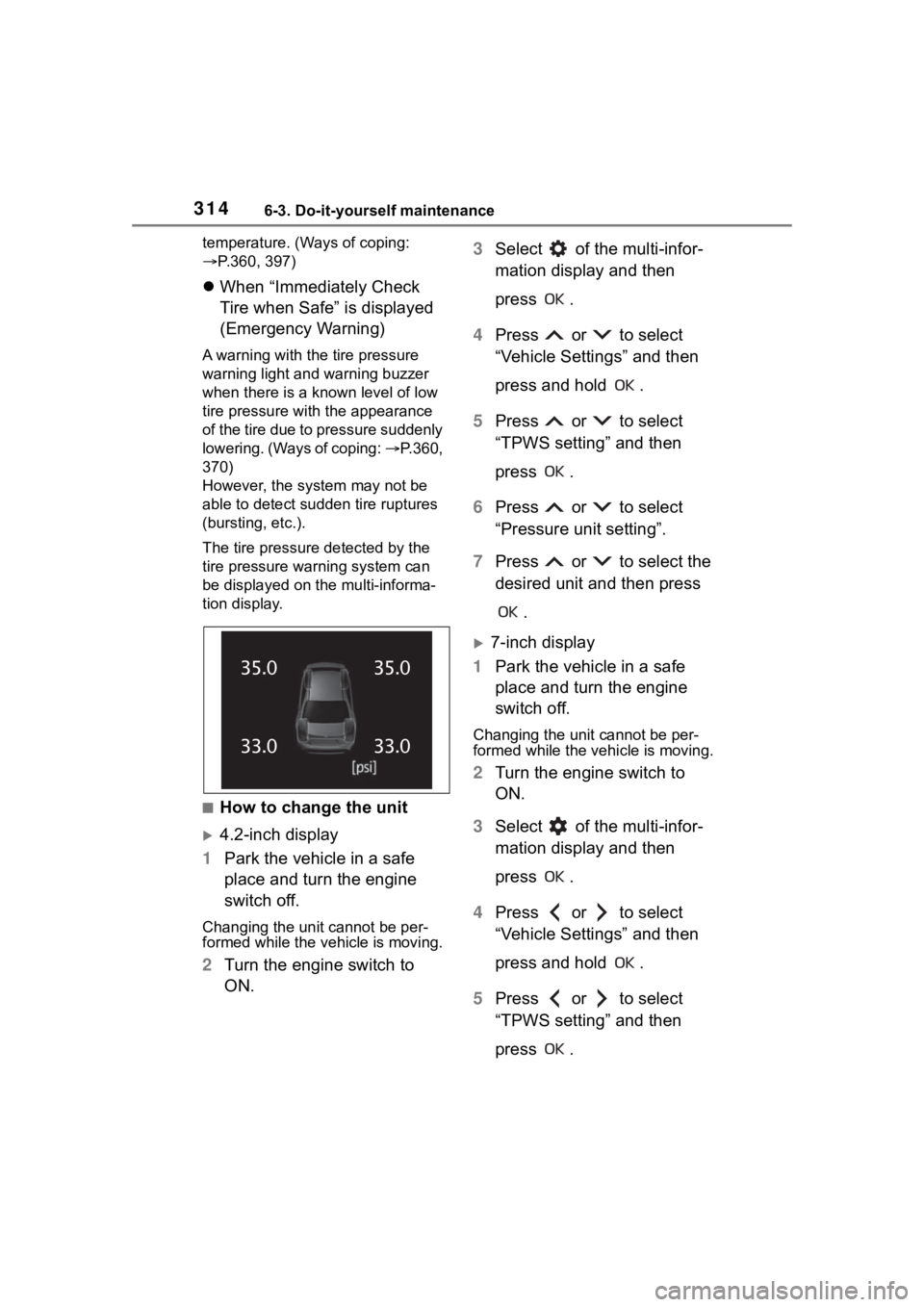
tire pressure warning system can
be displayed on the multi-informa-
tion display.
■How to change the unit
4.2-inch display
1 Park the vehicle in a safe
place and turn the engine
switch off.
Changing the unit cannot be per-
formed while the vehicle is moving.
2Turn the engine switch to
ON. 3
Select of the multi-infor-
mation display and then
press .
4 Press or to select
“Vehicle Settings” and then
press and hold .
5 Press or to select
“TPWS setting” and then
press .
6 Press or to select
“Pressure unit setting”.
7 Press or to select the
desired unit and then press
.
7-inch display
1 Park the vehicle in a safe
place and turn the engine
switch off.
Changing the unit cannot be per-
formed while the vehicle is moving.
2Turn the engine switch to
ON.
3 Select of the multi-infor-
mation display and then
press .
4 Press or to select
“Vehicle Settings” and then
press and hold .
5 Press or to select
“TPWS setting” and then
press .
Page 315 of 468
3156-3. Do-it-yourself maintenance
6
Maintenance and care
6Press or to select
“Pressure unit setting”.
7 Press or to select the
desired unit and then press
.
■Routine tire inflation pressure
checks
The tire pressure warning system
does not replace routine tire inflation
pressure checks. Make sure to
check tire inflation pressure as part
of your routine of daily vehicle
checks.
■Tire inflation pressure
●It may take a few minutes to dis-
play the tire inflation pressure
after the engine switch is turned to
ON. It may also take a few min-
utes to display the tire inflation
pressure after inflation pressure
has been adjusted.
●Tire inflation pressure changes
with temperature.
The displayed values may also be
different from th e values mea-
sured using a tire pressure gauge.
■Situations in which the tire
pressure warning system may
not operate properly
●In the following cases, the tire
pressure warning system may not
operate properly.
• If non-genuine Toyota wheels are
used.
• A tire has been replaced with a tire that is not an OE (Original
Equipment) tire.
• A tire has been replaced with a tire that is not of the specified size.
• Tire chains, etc. are equipped.
• An auxiliary-supported run-flat tire is equipped.
• If a window tint that affects the radio wave signals is installed.
• If there is a lot of snow or ice on
the vehicle, particularly around the wheels or wheel housings.
• If the tire inflation pressure is extremely higher than the speci-
fied level.
• If tires not equipped with tire pres- sure warning valves and transmit-
ters are used.
• If the ID code on the tire pressure warning valves and transmitters is
not registered in the tire pressure
warning computer.
●Performance may be affected in
the following situations.
• Near a TV tower, electric power
plant, gas station, radio station,
large display, airpo rt or other facil-
ity that generates strong radio
waves or electrical noise.
• When carrying a portable radio, cellular phone, cordless phone or
other wireless communication
device.
●When the vehicle is parked, the
time taken for the warning to start
or go off could be extended.
●When tire inflation pressure
declines rapidly for example when
a tire has burst, the warning may
not function.
■Warning performance of the tire
pressure warning system
The warning of the tire pressure
warning system w ill change in
accordance with driving conditions.
For this reason, the system may
give a warning even if the tire pres-
sure does not reach a low enough
level, or if the p ressure is higher
than the pressure that was adjusted
to when the system w as initialized.
When replacing tires or wheels,
tire pressure warning valves and
Installing tire pressure
warning valves and trans-
mitters (vehicles with a
tire pressure warning sys-
tem)
Page 316 of 468
3166-3. Do-it-yourself maintenance
transmitters must also be
installed.
When new tire pressure warning
valves and transmitters are
installed, new ID codes must be
registered in the tire pressure
warning computer and the tire
pressure warning system must
be initialized. Have tire pressure
warning valves and transmitter
ID codes registered by your Toy-
ota dealer. (P.322)
■Replacing tires and wheels
If the ID code of the tire pressure
warning valve and transmitter is not
registered, the tire pressure warning
system will not work properly. After
driving for about 20 minutes, the tire
pressure warning light blinks for 1
minute and stays on to indicate a
system malfunction.
It is necessary to register the
position of each wheel after per-
forming a tire rotation.
Wheel position registration can
be performed by oneself. Wheel
position registration is per-
formed by driving forward with
moderate left and right turns.
However, depending on the driv-
ing conditions and driving envi-
ronment, registration may take
some time to complete.
4.2-inch display
1 Park the vehicle in a safe
place and turn the engine
switch off, wait for approxi-
mately 20 minutes or more,
and then start the engine.
NOTICE
■Repairing or replacing tires,
wheels, tire pressure warn-
ing valves, transmitters and
tire valve caps
●When removing or fitting the
wheels, tires or the tire pressure
warning valves and transmit-
ters, contact your Toyota dealer
as the tire pr essure warning
valves and transmitters may be
damaged if not handled cor-
rectly.
●Make sure to install the tire
valve caps. If the tire valve caps
are not installed, water could
enter the tire pressure warning
valves and the tire pressure
warning valves could be bound.
●When replacing tire valve caps,
do not use tire valve caps other
than those specified. The cap
may become stuck.
■To avoid damage to the tire
pressure warning valves and
transmitters
When a tire is repa ired with liquid
sealants, the tire pressure warn-
ing valve and transmitter may not
operate properly. If a liquid seal-
ant is used, contact your Toyota
dealer or other qualified service
shop as soon as possible. Make
sure to replace the tire pressure
warning valve and transmitter
when replacing the tire. ( P.315)
Registration of the posi-
tion of each wheel after
performing a tire rotation
(vehicles with a tire pres-
sure warning system)
Page 317 of 468

3176-3. Do-it-yourself maintenance
6
Maintenance and care
The wheel position registration pro-
cedure cannot be performed while
the vehicle is moving.
2 Select of the multi-infor-
mation display and then
press .
3 Press or to select
“Vehicle Settings” and then
press and hold .
4 Press or to select
“TPWS setting” and then
press .
5 Press or to select
“Tire Rotation” and then
press .
6 Select “OK” and then press
.
A message indicating that wheel
position registrati on is being per-
formed will be displayed on the
multi-information display. “---” will
be displayed for th e tire inflation
pressure of each tire and wheel
position registration will begin.
7 Drive straight (with occa-
sional left and right turns) at
approximately 25 mph (40
km/h) or more for approxi-
mately 10 to 30 minutes.
When wheel position registration is
complete, a message indicating
that registration has been com-
pleted and the inflation pressure of
each tire will be d isplayed on the
multi-information display.
Even if it is not possible to drive
continuously at a pproximately 25
mph (40 km/h) or more, registration
can be completed by driving for a long time. However, if registration
does not complete after driving for
1 hour or more, par
k the vehicle in
a safe place and leave it with the
engine switch in ON for approxi-
mately 15 minutes or more, and
then perform the driving procedure
again.
7-inch display
1 Park the vehicle in a safe
place and turn the engine
switch off, wait for approxi-
mately 20 minutes or more,
and then start the engine.
The wheel position registration pro-
cedure cannot be performed while
the vehicle is moving.
2Select of the multi-infor-
mation display and then
press .
3 Press or to select
“Vehicle Settings” and then
press and hold .
4 Press or to select
“TPWS setting” and then
press .
5 Press or to select
“Tire Rotation” and then
press .
6 Select “OK” and then press
.
A message indicating that wheel
position registration is being per-
formed will be disp layed on the
multi-information display. “---” will
be displayed for the tire inflation
pressure of each tire and wheel
position registr ation will begin.
Page 318 of 468
3186-3. Do-it-yourself maintenance
7Drive straight (with occa-
sional left and right turns) at
approximately 25 mph (40
km/h) or more for approxi-
mately 10 to 30 minutes.
When wheel position registration is
complete, a message indicating
that registration has been com-
pleted and the inflation pressure of
each tire will be d isplayed on the
multi-information display.
Even if it is not possible to drive
continuously at a pproximately 25
mph (40 km/h) or more, registration
can be completed by driving for a
long time. However, if registration
does not complete a fter driving for
1 hour or more, park the vehicle in
a safe place and leave it with the
engine switch in ON for approxi-
mately 15 minute s or more, and
then perform the dr iving procedure
again.
■When performing wheel posi-
tion registration
●Normally, wheel position registra-
tion can be completed within
approximately 30 minutes.
●Wheel position registration is per-
formed while driving at a vehicle
speed of approximately 25 mph
(40 km/h) or more.
■Wheel position registration pro-
cedure
●If the engine switch is turned off
while registering the wheel posi-
tion, the next time the engine
switch is turned to ON, the wheel
position registr ation will resume
and it will not be necessary to
restart the procedure.
●While the position of each wheel is
being determined and the inflation
pressures are not being dis-
played, if the infl ation pressure of
a tire drops, the tire pressure
warning light will come on.
■If the wheel position cannot be
registered easily
●In the following situations, wheel
position registration may take lon-
ger than usual to be completed or
may not be possible.
• Vehicle is not dr iven at approxi-
mately 25 mph (40 km/h) or more
• Vehicle is driven on unpaved roads
• If wheel position registration does
not complete after driving for 1
hour or more, park the vehicle in a
safe place for a pproximately 15
minutes and then drive the vehicle
again.
●If the vehicle is reversed during
wheel position registration, all
data collected unt il then will be
cleared. Perform driving again.
In the following situations, it will
be necessary to perform the tire
inflation pressure setting proce-
dure of the tire pressure warning
system.
When the specified tire infla-
tion pressure has changed,
such as due to carried load,
etc.
When the tire inflation pres-
sure is changed such as
when the tire size is changed.
If the tire inflation pressure has
been adjusted to the specified
level, perform the tire inflation set-
ting procedure by selecting speci-
fied inflation pressure on the
multi-information display.
When the tire inflation pressure is
Setting the tire pressure
(vehicles with a tire pres-
sure warning system)