lock TOYOTA COROLLA 2023 Owners Manual
[x] Cancel search | Manufacturer: TOYOTA, Model Year: 2023, Model line: COROLLA, Model: TOYOTA COROLLA 2023Pages: 468, PDF Size: 14.4 MB
Page 382 of 468
3827-2. Steps to take in an emergency
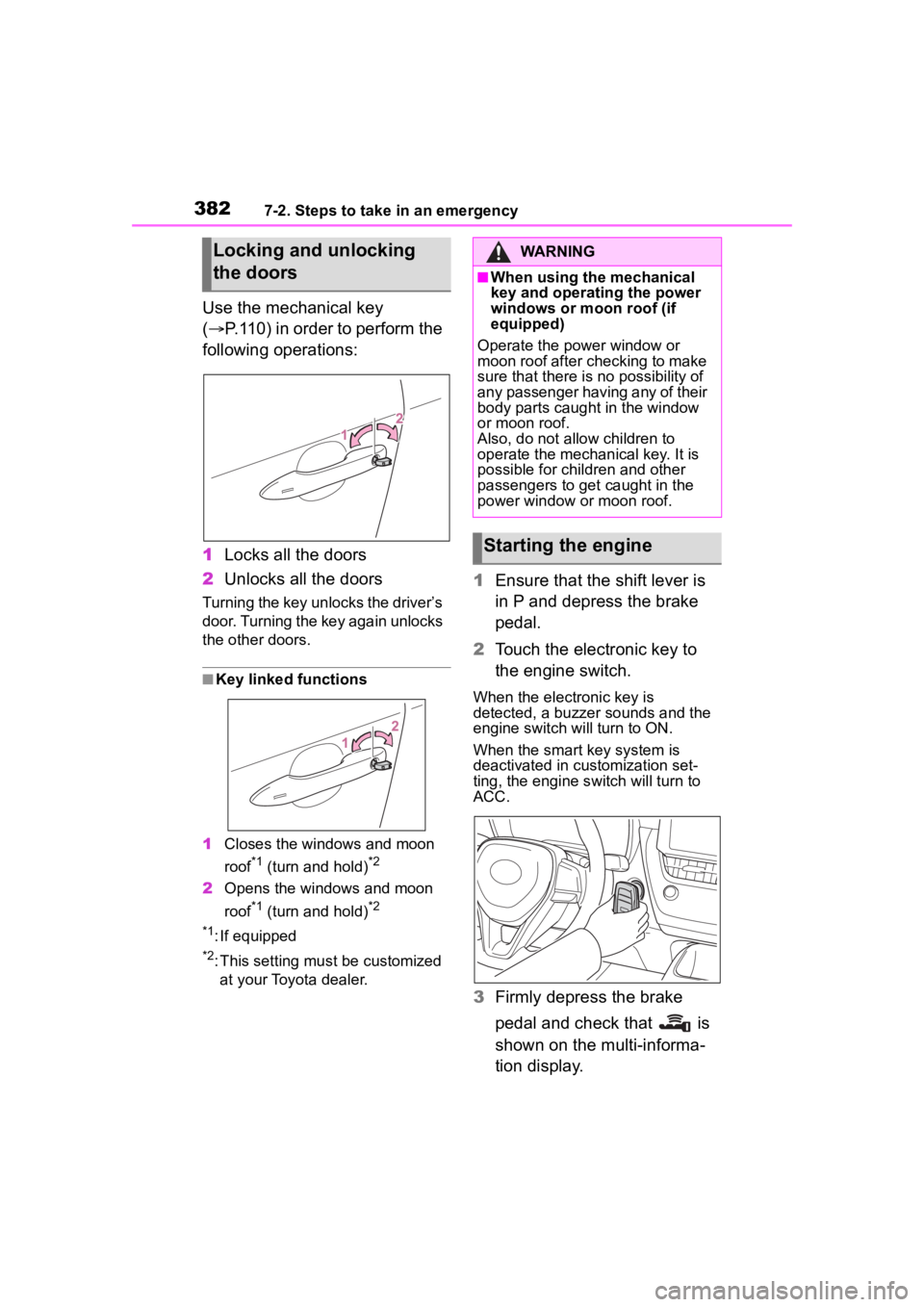
Use the mechanical key
(P.110) in order to perform the
following operations:
1 Locks all the doors
2 Unlocks all the doors
Turning the key unlocks the driver’s
door. Turning the key again unlocks
the other doors.
■Key linked functions
1 Closes the windows and moon
roof
*1 (turn and hold)*2
2Opens the windows and moon
roof
*1 (turn and hold)*2
*1
: If equipped
*2: This setting mu st be customized
at your Toyota dealer.
1 Ensure that the shift lever is
in P and depress the brake
pedal.
2 Touch the electronic key to
the engine switch.
When the electronic key is
detected, a buzzer sounds and the
engine switch will turn to ON.
When the smart key system is
deactivated in customization set-
ting, the engine switch will turn to
ACC.
3Firmly depress the brake
pedal and check that is
shown on the multi-informa-
tion display.
Locking and unlocking
the doorsWARNING
■When using the mechanical
key and operating the power
windows or moon roof (if
equipped)
Operate the power window or
moon roof after checking to make
sure that there is no possibility of
any passenger having any of their
body parts caught in the window
or moon roof.
Also, do not allo w children to
operate the mechanical key. It is
possible for children and other
passengers to get caught in the
power window or moon roof.
Starting the engine
Page 384 of 468
3847-2. Steps to take in an emergency
If you have a set of jumper (or
booster) cables and a second
vehicle with a 12-volt battery,
you can jump start your vehicle
by following the steps below.
1Vehicles with an alarm
( P.78): Confirm that the
electronic key (vehicles with
a smart key system) or key
(vehicles without a smart key
system) is being carried.
When connecting the jumper (or
booster) cables, depending on the
situation, the alarm may activate
and doors locked. ( P. 7 9 )
2 Open the hood. ( P.302)
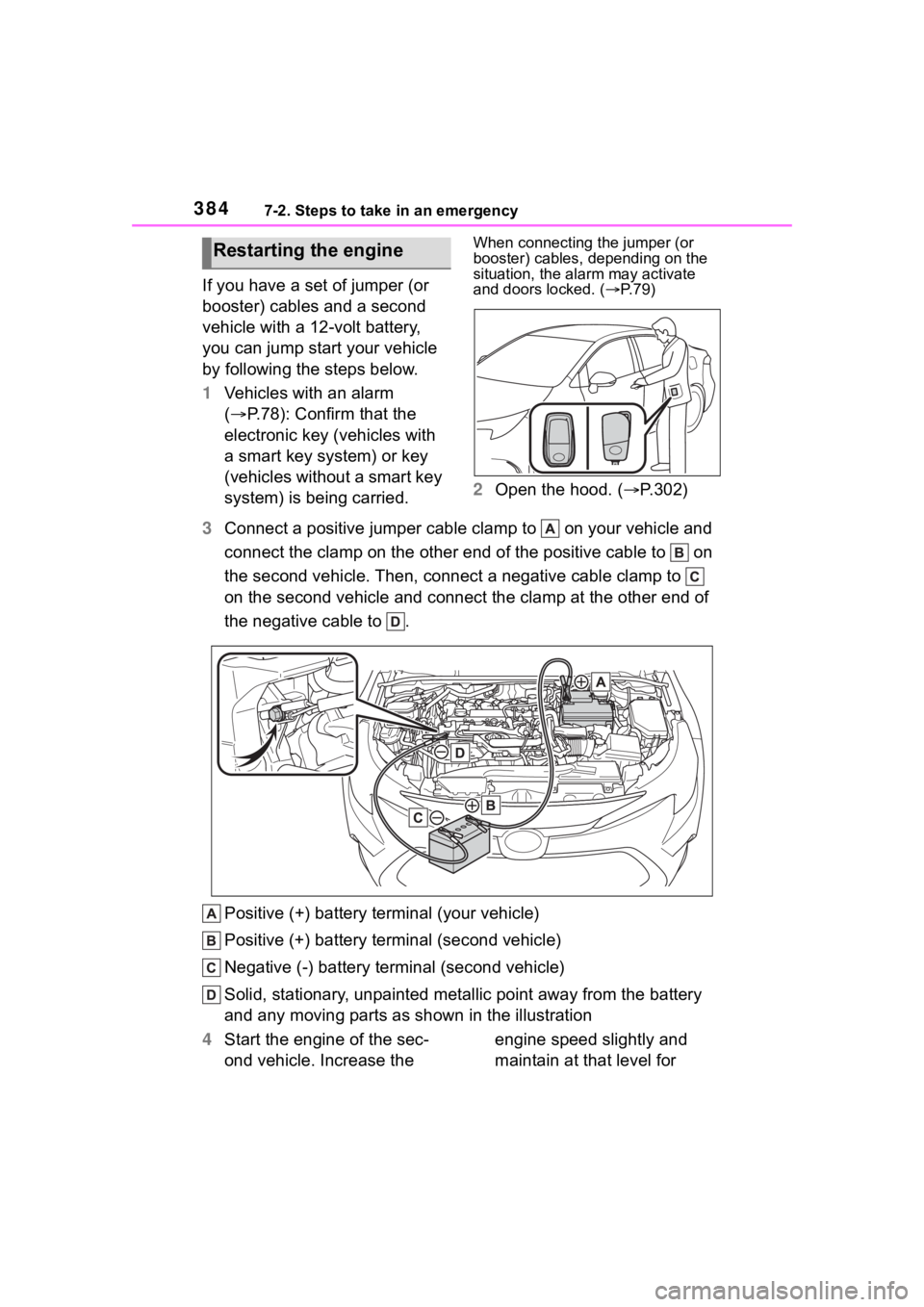
3 Connect a positive jumper cable clamp to on your vehicle and
connect the clamp on the other end of the positive cable to on
the second vehicle. Then, connect a negative cable clamp to
on the second vehicle and connect the clamp at the other end of
the negative cable to .
Positive (+) battery terminal (your vehicle)
Positive (+) battery terminal (second vehicle)
Negative (-) battery term inal (second vehicle)
Solid, stationary, unpainted metallic point away from the batte ry
and any moving parts as shown in the illustration
4 Start the engine of the sec-
ond vehicle. Increase the engine speed slightly and
maintain at that level for
Restarting the engine
Page 385 of 468
3857-2. Steps to take in an emergency
7
When trouble arises
approximately 5 minutes to
recharge the battery of your
vehicle.
5 Vehicles with a smart key
system: Open and close any
of the doors of your vehicle
with the engine switch OFF.
6 Maintain the engine speed of
the second vehicle and start
the engine of your vehicle by
turning the engine switch to
ON.
7 Once the vehicle’s engine
has started, remove the
jumper cables in the exact
reverse order from which
they were connected.
Once the engine starts, have the
vehicle inspected at your Toyota
dealer as soon as possible.
■Starting the engine when the
battery is discharged
The engine cannot be started by
push-starting.
■To prevent battery discharge
●Turn off the headlights and the
audio system while the engine is
off.
●Turn off any unnecessary electri-
cal components when the vehicle
is running at a low speed for an
extended period, such as in heavy
traffic.
■When the battery is removed or
discharged
●Information stor ed in the ECU is
cleared. When the battery is
depleted, have the vehicle
inspected at you r Toyota dealer.
●Some systems may require initial-
ization. ( P.422)
■When removing the battery ter-
minals
When the battery terminals are
removed, the information stored in
the ECU is cleared. Before remov-
ing the battery term inals, contact
your Toyota dealer.
■Charging the battery
The electricity stored in the battery
will discharge grad ually even when
the vehicle is not in use, due to nat-
ural discharge and the draining
effects of certain electrical appli-
ances. If the vehicle is left for a long
time, the battery may discharge,
and the engine may be unable to
start. (The battery recharges auto-
matically during driving.)
■When recharging or replacing
the battery (vehicles with a
smart key system)
●In some cases, it may not be pos-
sible to unlock the doors using the
smart key system when the bat-
tery is discharged. Use the wire-
less remote control or the
mechanical key to lock or unlock
the doors.
●The engine may not start on the
first attempt after the battery has
recharged but will start normally
after the second attempt. This is
not a malfunction.
●The engine switch mode is memo-
rized by the vehicle. When the
battery is reconnected, the system
will return to the mode it was in
before the bat tery was dis-
charged. Before disconnecting the
battery, turn the engine switch off.
If you are unsure what mode the
engine switch wa s in before the
battery discharged, be especially
careful when reconnecting the
battery.
■When replacing the battery
●Use a battery that conforms to
European regulations.
●Use a battery that the case size is
same as the previous one (LN1),
Page 393 of 468
3938-1. Specifications
8
Vehicle specifications
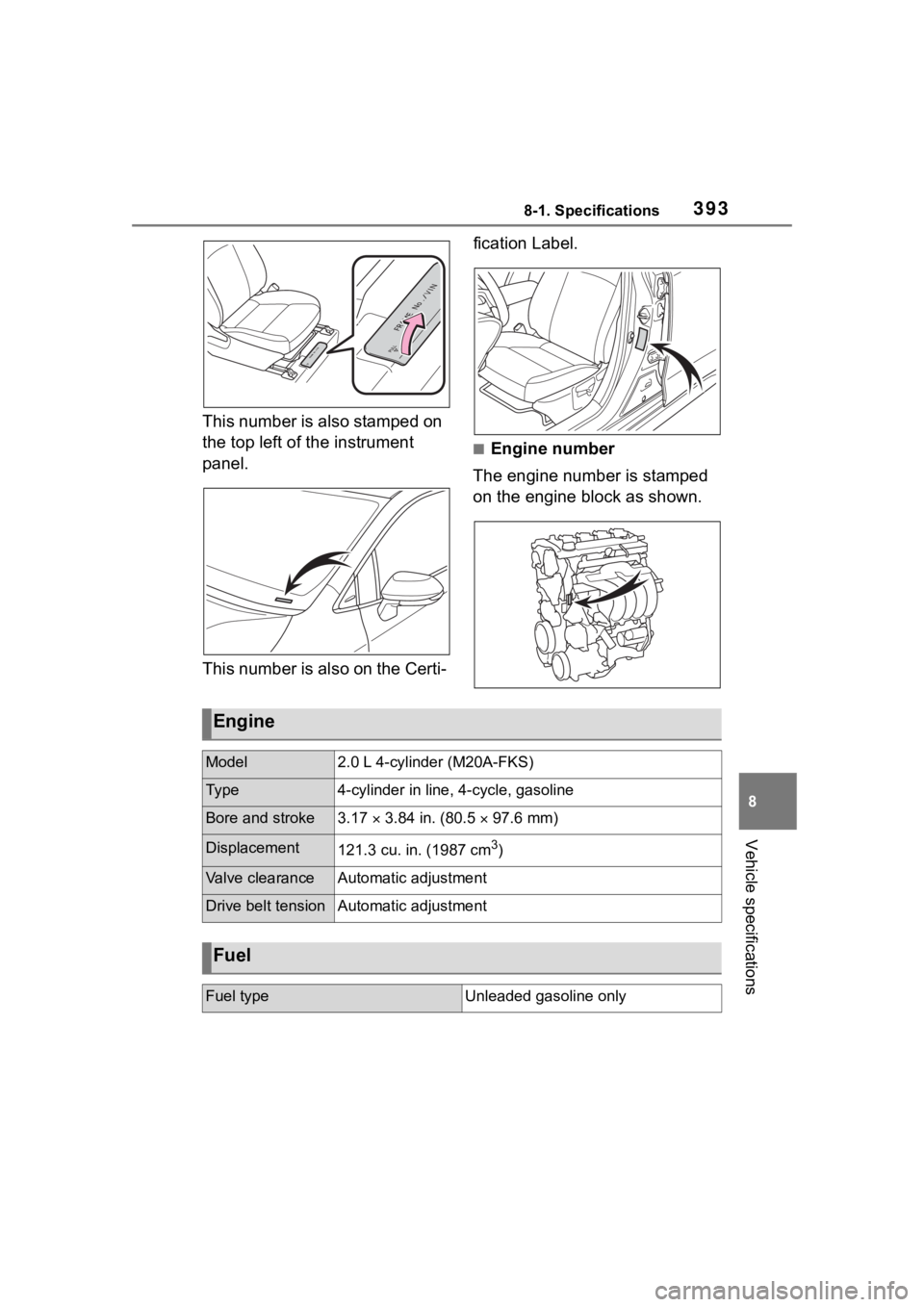
This number is also stamped on
the top left of the instrument
panel.
This number is also on the Certi-fication Label.
■Engine number
The engine number is stamped
on the engine block as shown.
Engine
Model2.0 L 4-cylinder (M20A-FKS)
Ty p e4-cylinder in line, 4-cycle, gasoline
Bore and stroke3.17 3.84 in. (80.5 97.6 mm)
Displacement121.3 cu. in. (1987 cm3)
Valve clearanceAutomatic adjustment
Drive belt tensionAutomatic adjustment
Fuel
Fuel typeUnleaded gasoline only
Page 414 of 468
4148-2. Customization
*1: For details about each function: P. 9 5
*2: The default setting varies according to country.
*3: 7-inch display
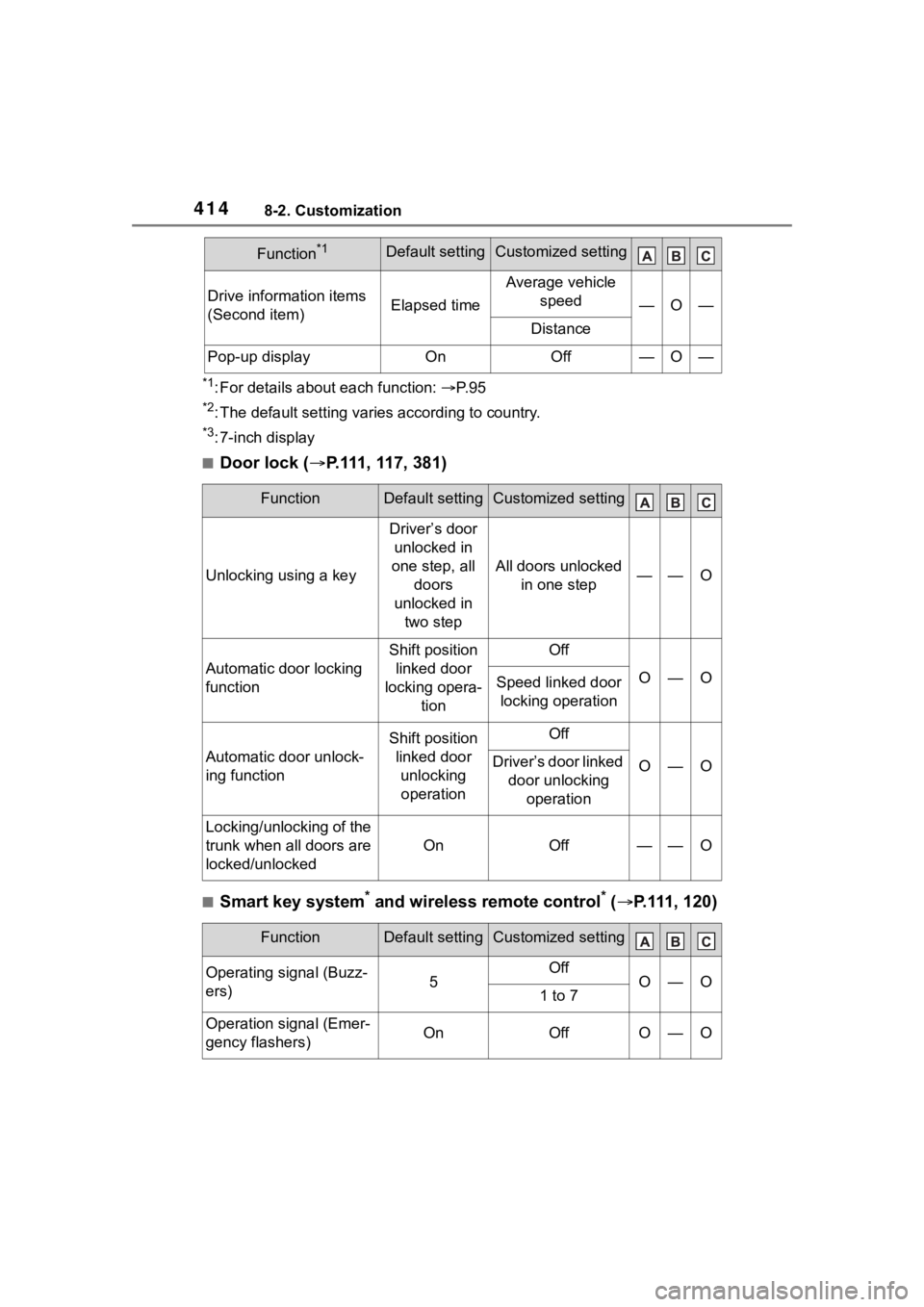
■Door lock ( P.111, 117, 381)
■Smart key system* and wireless remote control* ( P.111, 120)
Drive information items
(Second item)Elapsed time
Average vehicle
speed
—O—
Distance
Pop-up displayOnOff—O—
FunctionDefault settingCustomized setting
Unlocking using a key
Driver’s door unlocked in
one step, all doors
unlocked in two step
All doors unlocked in one step——O
Automatic door locking
function
Shift position linked door
locking opera- tionOff
O—OSpeed linked door locking operation
Automatic door unlock-
ing function
Shift position linked door unlocking operationOff
O—ODriver’s door linked door unlocking operation
Locking/unlocking of the
trunk when all doors are
locked/unlocked
OnOff——O
FunctionDefault settingCustomized setting
Operating signal (Buzz-
ers)5OffO—O1 to 7
Operation signal (Emer-
gency flashers)OnOffO—O
Function*1Default settingCustomized setting
Page 415 of 468
4158-2. Customization
8
Vehicle specifications
*: If equipped
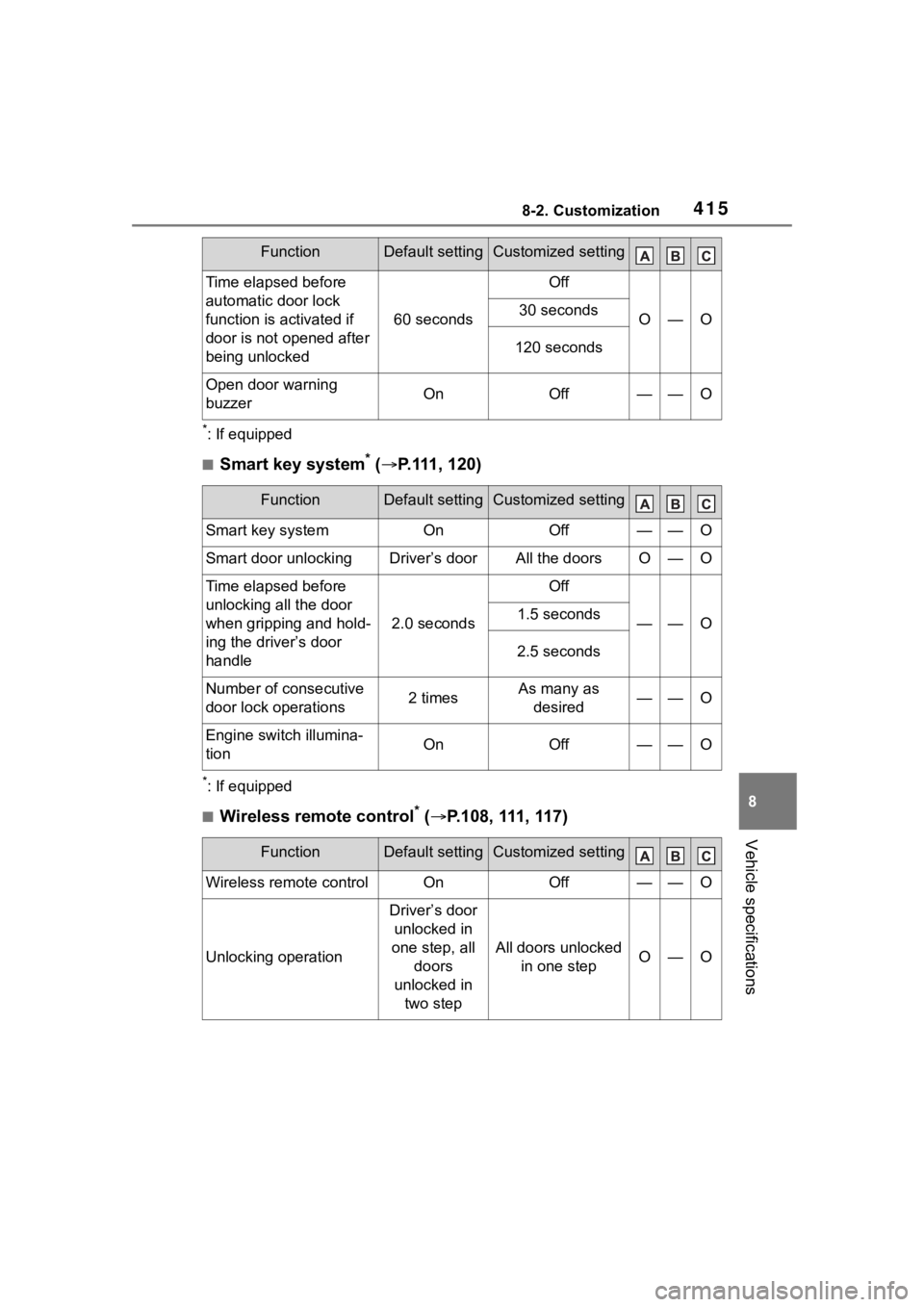
■Smart key system* ( P.111, 120)
*: If equipped
■Wireless remote control* ( P.108, 111, 117)
Time elapsed before
automatic door lock
function is activated if
door is not opened after
being unlocked
60 seconds
Off
O—O30 seconds
120 seconds
Open door warning
buzzerOnOff——O
FunctionDefault settingCustomized setting
Smart key systemOnOff——O
Smart door unlockingDriver’s doorAll the doorsO—O
Time elapsed before
unlocking all the door
when gripping and hold-
ing the driver’s door
handle
2.0 seconds
Off
——O1.5 seconds
2.5 seconds
Number of consecutive
door lock operations2 timesAs many as
desired——O
Engine switch illumina-
tionOnOff——O
FunctionDefault settingCustomized setting
Wireless remote controlOnOff——O
Unlocking operation
Driver’s door unlocked in
one step, all doors
unlocked in two step
All doors unlocked in one stepO—O
FunctionDefault settingCustomized setting
Page 416 of 468
4168-2. Customization
*: If equipped
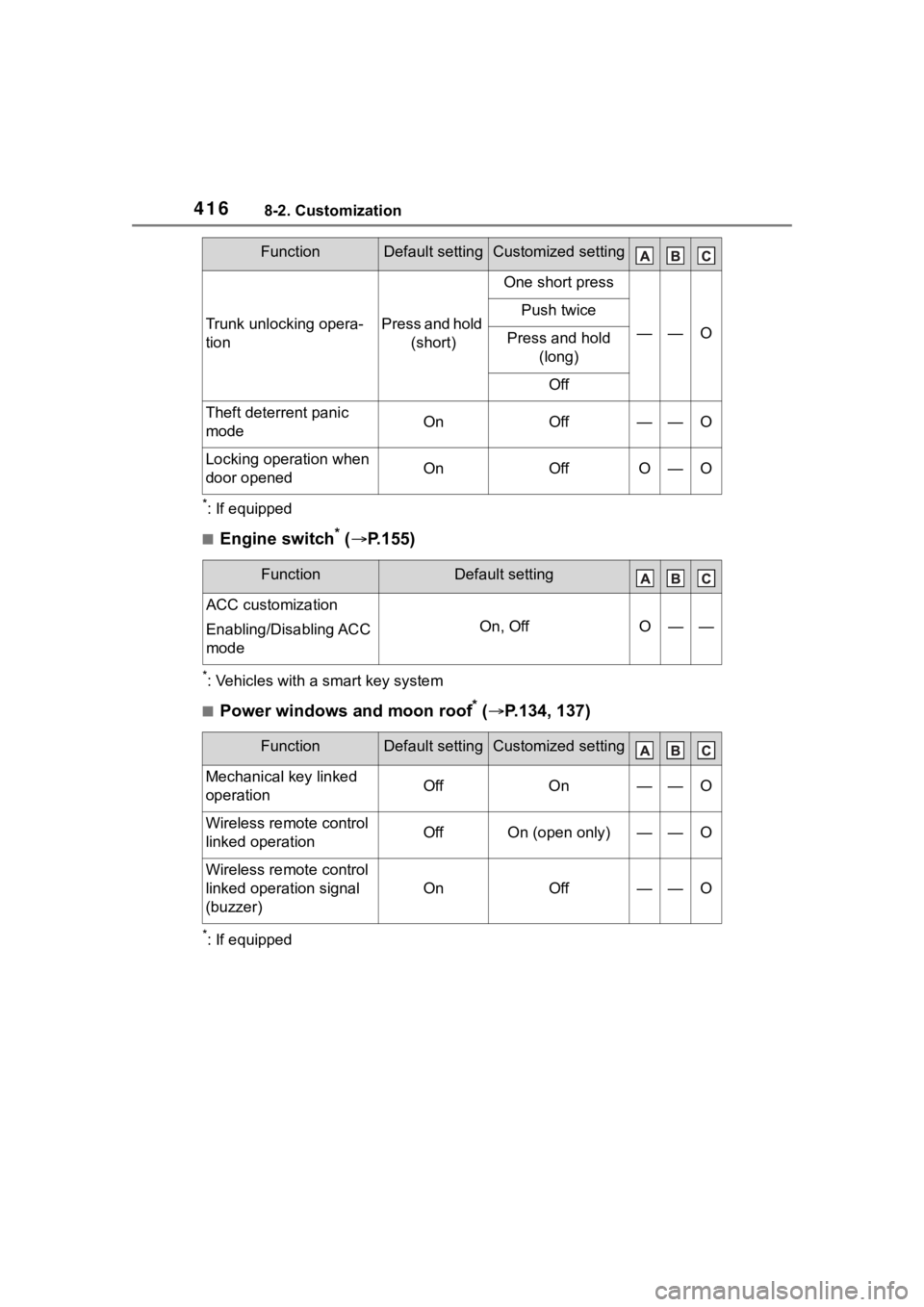
■Engine switch* ( P.155)
*: Vehicles with a smart key system
■Power windows and moon roof* ( P.134, 137)
*: If equipped
Trunk unlocking opera-
tionPress and hold
(short)
One short press
——O
Push twice
Press and hold (long)
Off
Theft deterrent panic
modeOnOff——O
Locking operation when
door openedOnOffO—O
FunctionDefault setting
ACC customization
Enabling/Disabling ACC
mode
On, OffO——
FunctionDefault settingCustomized setting
Mechanical key linked
operationOffOn——O
Wireless remote control
linked operationOffOn (open only)——O
Wireless remote control
linked operation signal
(buzzer)
OnOff——O
FunctionDefault settingCustomized setting
Page 420 of 468
4208-2. Customization
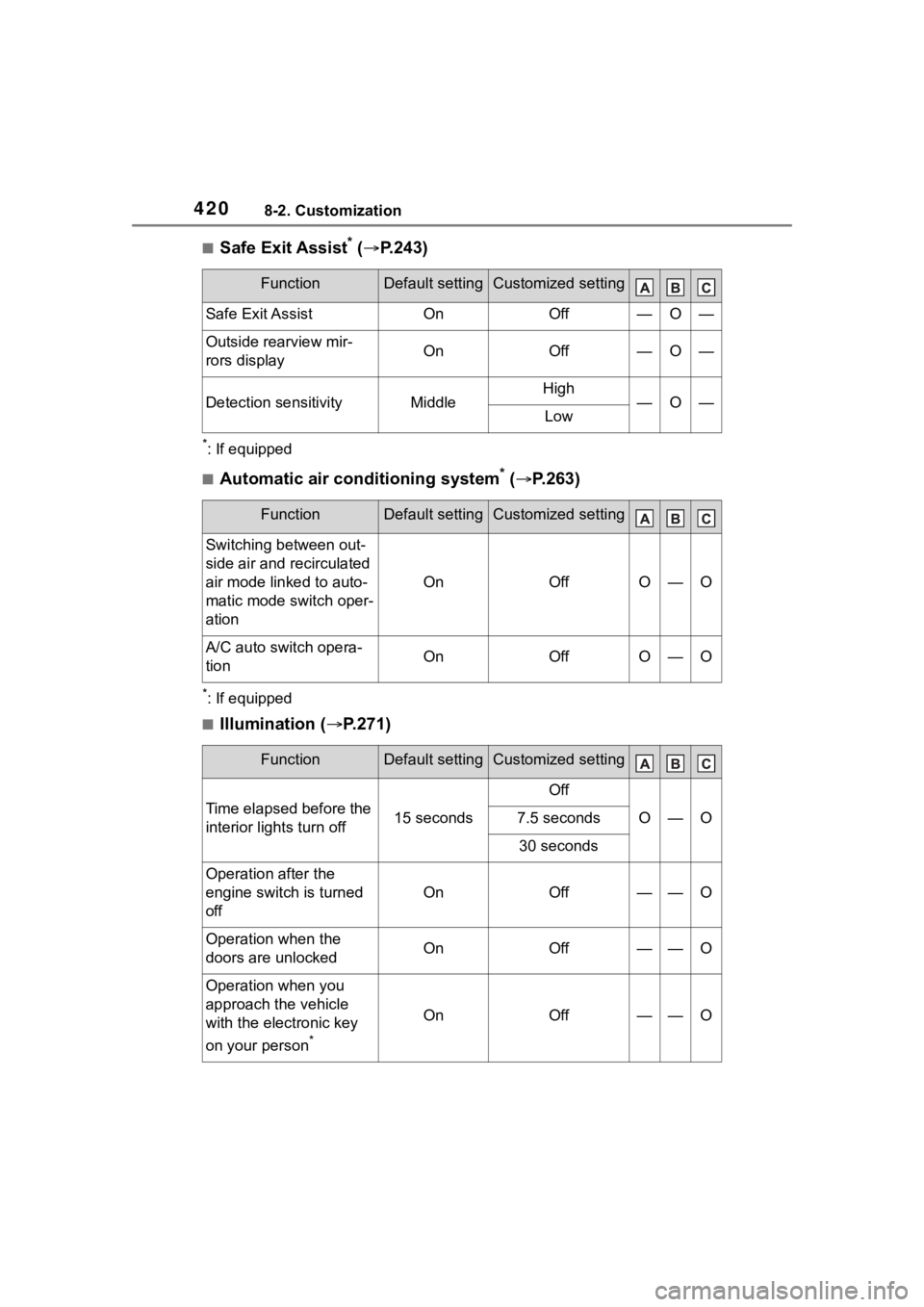
■Safe Exit Assist* ( P.243)
*: If equipped
■Automatic air conditioning system* ( P.263)
*: If equipped
■Illumination ( P.271)
FunctionDefault settingCustomized setting
Safe Exit AssistOnOff—O—
Outside rearview mir-
rors displayOnOff—O—
Detection sensitivityMiddleHigh—O—Low
FunctionDefault settingCustomized setting
Switching between out-
side air and recirculated
air mode linked to auto-
matic mode switch oper-
ation
OnOffO—O
A/C auto switch opera-
tionOnOffO—O
FunctionDefault settingCustomized setting
Time elapsed before the
interior lights turn off15 seconds
Off
O—O7.5 seconds
30 seconds
Operation after the
engine switch is turned
off
OnOff——O
Operation when the
doors are unlockedOnOff——O
Operation when you
approach the vehicle
with the electronic key
on your person
*
OnOff——O
Page 421 of 468
4218-2. Customization
8
Vehicle specifications
*: If equipped
■Vehicle customization
●When the smart key system is off,
Smart door unlocking cannot be
customized.
●When the doors remain closed
after unlocking the doors and the
automatic door lock function is
activated, the signals will be gen-
erated in accordance with the
operation signal (buzzer) and the
operation signal (emergency
flashers) settings.
■In the following situations, cus-
tomize mode in which the set-
tings can be changed through
the multi-information display
will automatically be turned off
●The engine switch is turned off.
●The vehicle begins to move while
the customize mode screen is dis-
played.
Page 436 of 468
436What to do if... (Troubleshooting)
1-1.What to do if... (Troubleshooting)What to do if... (Troubleshooting)
If you lose your keys or
mechanical keys, new genu-
ine keys or mechanical keys
can be made by your Toyota
dealer. ( P.381)
If you lose your keys or elec-
tronic keys, the risk of vehicle
theft increases significantly.
Contact your Toyota dealer
immediately. ( P.381)
Is the key battery weak or
depleted? ( P.333)
Vehicles with a smart key sys-
tem: Is the engine switch in
ON?
When locking the doors, turn the
engine switch off. ( P.157)
Vehicles with a smart key sys-
tem: Is the electronic key left
inside the vehicle?
When locking the doors, make sure
that you have the electronic key on
your person.
The function may not operate
properly due to the condition
of the radio wave. ( P.109,
121)
Is the child-protector lock set?
The rear door cannot be opened
from inside the vehicle when the
lock is set. Open the rear door from
outside and then unlock the
child-protector lock. ( P. 1 1 6 )
Is the shift lever in P?
( P.154)
Is the steering wheel
unlocked? ( P.154)
Is the battery discharged?
( P.383)
Did you press the engine
switch while firmly depress-
ing the brake pedal?
( P.155)
If you have a problem,
check the following before
contacting your Toyota
dealer.
The doors cannot be
locked, unlocked, opened
or closed
You lose your keys
The doors cannot be
locked or unlocked
The rear door cannot be
opened
If you think something is
wrong
The engine does not start
(vehicles without a smart
key system)
The engine does not start
( v e h i c l e s w i t h a s m a r t k e y
system)