change time TOYOTA COROLLA 2023 Owner's Manual
[x] Cancel search | Manufacturer: TOYOTA, Model Year: 2023, Model line: COROLLA, Model: TOYOTA COROLLA 2023Pages: 468, PDF Size: 14.4 MB
Page 217 of 468
2174-5. Using the driving support systems
4
Driving
*: If equipped
When the front camera detects a sign or information
of a sign is available from the
navigation system, the sign
will be displayed on the dis-
p l a y.
Multiple signs can be dis-
played.
Depending on the specifications of
the vehicle, the number of dis-
played signs may be limited.
■Operating conditions of sign
display
Signs will be displayed when the fol-
lowing conditions are met:
●The system has detected a sign
In the following si tuations, a dis-
played sign may stop being dis-
played:
●When a new sign has not been
detected for a certain distance
●When the system determines that
the road being driven on has
changed, such as after a left or
right turn
■Situations in which the display
function may not operate prop-
erly
In the following situ ations, the RSA
system may not operate properly
and may not detect signs or may
display the incorrect sign. However,
this does not indicate a malfunction.
●When a sign is dirty, faded, tilted
or bent
●When the contrast of an electronic
sign is low
●When all or part of a sign is hidden
by a tree, utility pole, etc.
●When a sign is d etected by the
front camera for a short amount of
time
●When the driving state (turning,
changing lanes, etc.) is judged
incorrectly
RSA (Road Sign
Assist)*
The RSA system detects
specific road signs using
the front camera and/or nav-
igation system (when speed
limit information is avail-
able) and warns the driver
via displays and buzzers.
WARNING
■For safe use
●Driving safely is solely the
responsibility of the driver. Pay
careful attention to the sur-
rounding conditions in order to
ensure safe driving.
●Do not rely solely upon the
RSA. The RSA assists the
driver by providing road sign
information, but it is not a
replacement for the driver’s own
vision and awareness. Driving
safely is solely the responsibility
of the driver. Pay careful atten-
tion to the surrounding condi-
tions in order to ensure safe
driving.
■Situations in which the RSA
should not be used
●When it is necessary to disable
the system: P. 1 8 4
■Situations in which the sys-
tem may not operate properly
●Situations in wh ich the sensors
may not operate properly:
P. 1 8 8
Display Function
Page 221 of 468
2214-5. Using the driving support systems
4
Driving
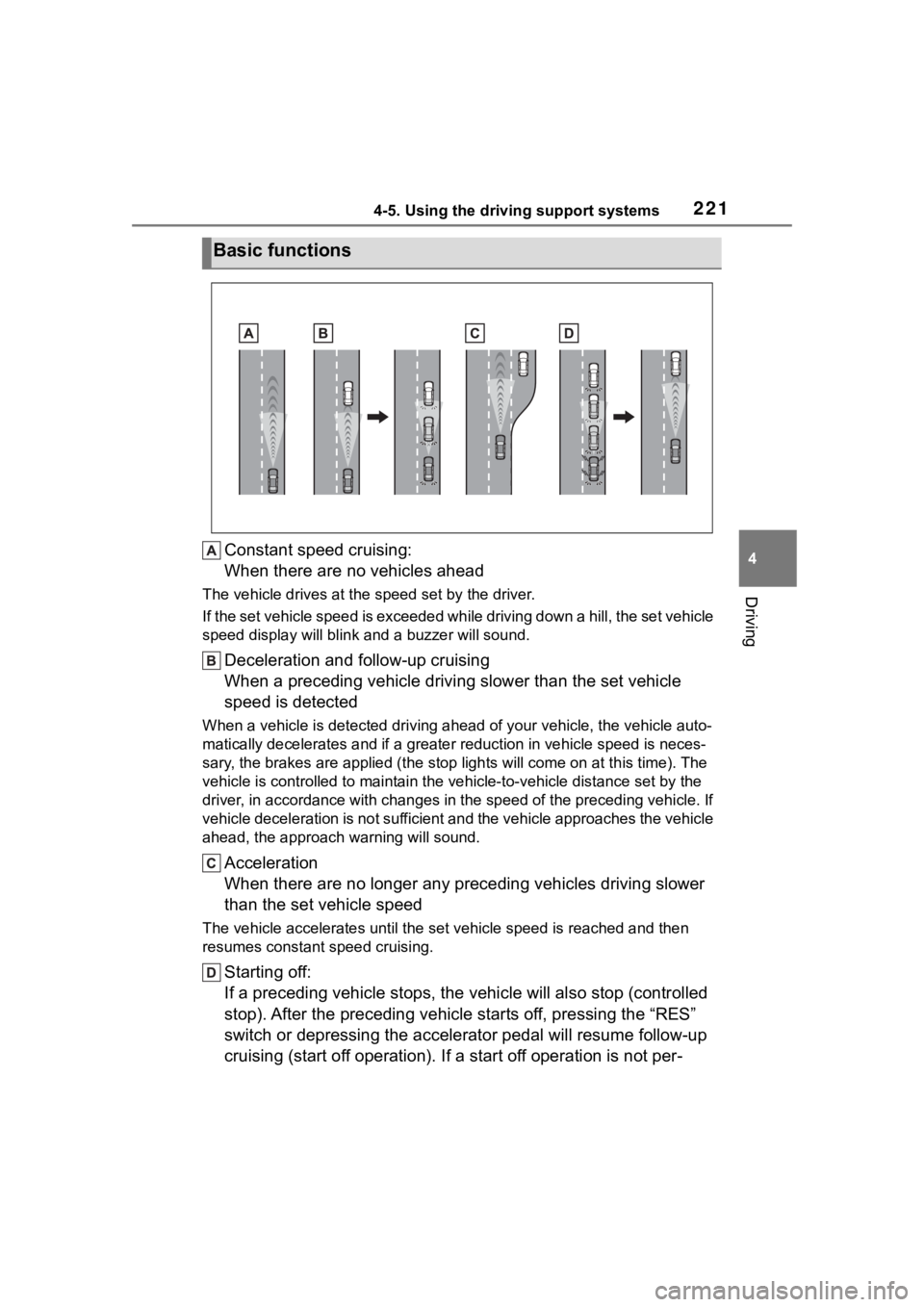
Constant speed cruising:
When there are no vehicles ahead
The vehicle drives at the speed set by the driver.
If the set vehicle speed is exceeded while driving down a hill, the set vehicle
speed display will blin k and a buzzer will sound.
Deceleration and follow-up cruising
When a preceding vehicle driving slower than the set vehicle
speed is detected
When a vehicle is detected driving ahead of your vehicle, the v ehicle auto-
matically decelerates and if a greater reduction in vehicle spe ed is neces-
sary, the brakes are applied (the stop lights will come on at t his time). The
vehicle is controlled to maintai n the vehicle-to-vehicle distance set by the
driver, in accordance with changes in the speed of the precedin g vehicle. If
vehicle deceleration is not sufficient and the vehicle approaches the vehicle
ahead, the approach wa rning will sound.
Acceleration
When there are no longer any preceding vehicles driving slower
than the set vehicle speed
The vehicle accelerates until th e set vehicle speed is reached and then
resumes constant speed cruising.
Starting off:
If a preceding vehicle stops, the vehicle will also stop (contr olled
stop). After the preceding vehicle starts off, pressing the “RES”
switch or depressing the accelerator pedal will resume follow-u p
cruising (start off operation). If a start off operation is not per-
Basic functions
Page 223 of 468
2234-5. Using the driving support systems
4
Driving
vehicle speed.
Adjusting the set vehicle
speed using the switches
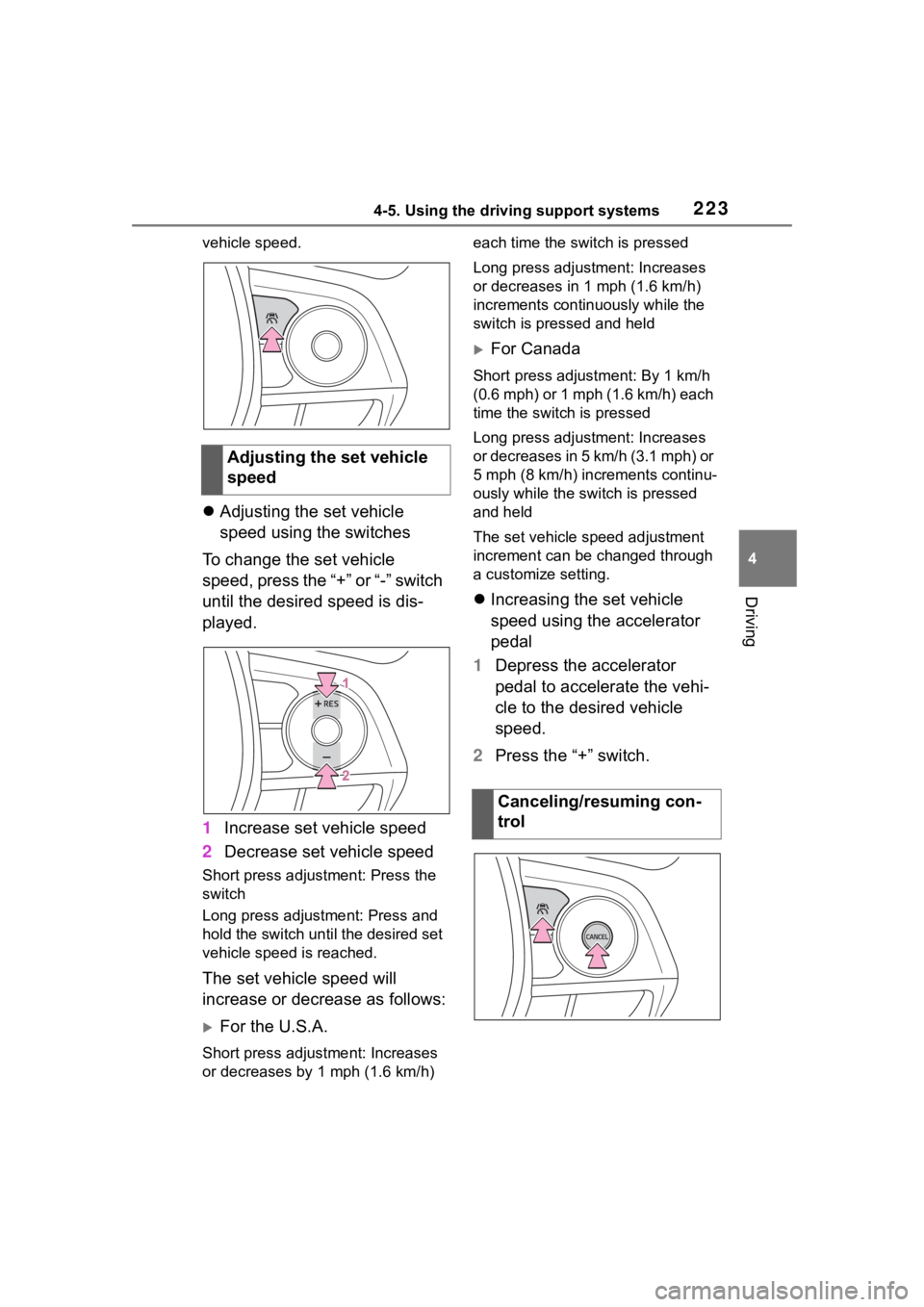
To change the set vehicle
speed, press the “+” or “-” switch
until the desired speed is dis-
played.
1 Increase set vehicle speed
2 Decrease set vehicle speed
Short press adjustment: Press the
switch
Long press adjustment: Press and
hold the switch until the desired set
vehicle speed is reached.
The set vehicle speed will
increase or decrease as follows:
For the U.S.A.
Short press adjus tment: Increases
or decreases by 1 mph (1.6 km/h) each time the switch is pressed
Long press adjustment: Increases
or decreases in 1
mph (1.6 km/h)
increments continuously while the
switch is pressed and held
For Canada
Short press adjust ment: By 1 km/h
(0.6 mph) or 1 mph (1.6 km/h) each
time the switch is pressed
Long press adjustment: Increases
or decreases in 5 km/h (3.1 mph) or
5 mph (8 km/h) inc rements continu-
ously while the switch is pressed
and held
The set vehicle speed adjustment
increment can be changed through
a customize setting.
Increasing the set vehicle
speed using the accelerator
pedal
1 Depress the accelerator
pedal to accelerate the vehi-
cle to the desired vehicle
speed.
2 Press the “+” switch.
Adjusting the set vehicle
speed
Canceling/resuming con-
trol
Page 224 of 468
2244-5. Using the driving support systems
1Press the cancel switch or
driving assist switch to cancel
control.
Control will also be canceled if the
brake pedal is depressed. (If the vehicle has been stopped by
system control, depressing the
brake pedal will no
t cancel control.)2Press the “RES” switch to
resume control.
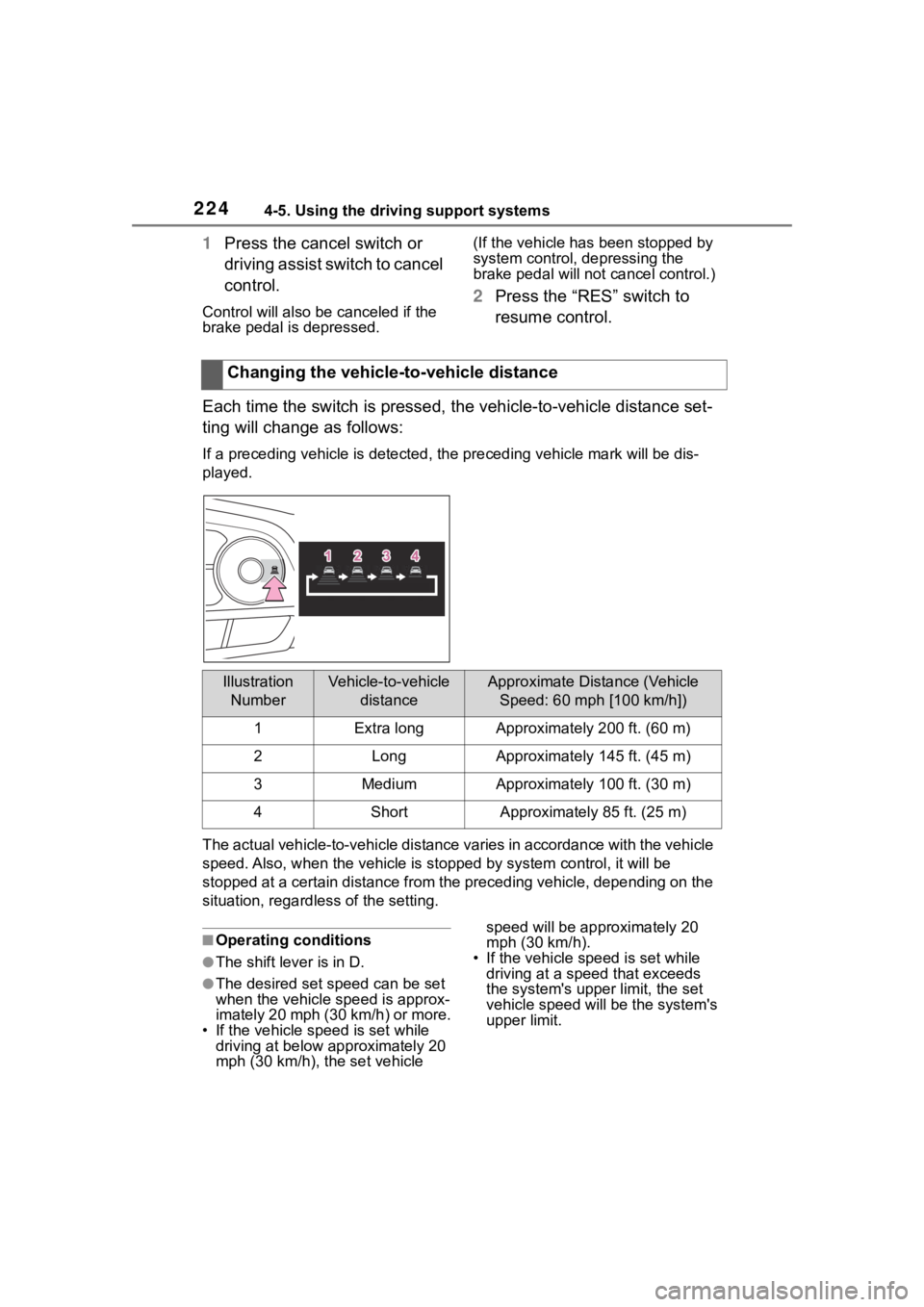
Each time the switch is pressed , the vehicle-to-vehicle distance set-
ting will change as follows:
If a preceding vehicle is detecte d, the preceding vehicle mark will be dis-
played.
The actual vehicle-to-vehicle di stance varies in accordance wit h the vehicle
speed. Also, when the vehicle is stopped by system control, it will be
stopped at a certain distance from the preceding vehicle, depending on the
situation, regardless of the setting.
■Operating conditions
●The shift lever is in D.
●The desired set speed can be set
when the vehicle speed is approx-
imately 20 mph (30 km/h) or more.
• If the vehicle speed is set while driving at below approximately 20
mph (30 km/h), the set vehicle speed will be appr
oximately 20
mph (30 km/h).
• If the vehicle speed is set while driving at a speed that exceeds
the system's upper limit, the set
vehicle speed will be the system's
upper limit.
Changing the vehicle-to-vehicle distance
Illustration
NumberVehicle-to-vehicle distanceApproximate Distance (Vehicle Speed: 60 mph [100 km/h])
1Extra longApproximately 200 ft. (60 m)
2LongApproximately 145 ft. (45 m)
3MediumApproximately 100 ft. (30 m)
4ShortApproximately 85 ft. (25 m)
Page 229 of 468
2294-5. Using the driving support systems
4
Driving
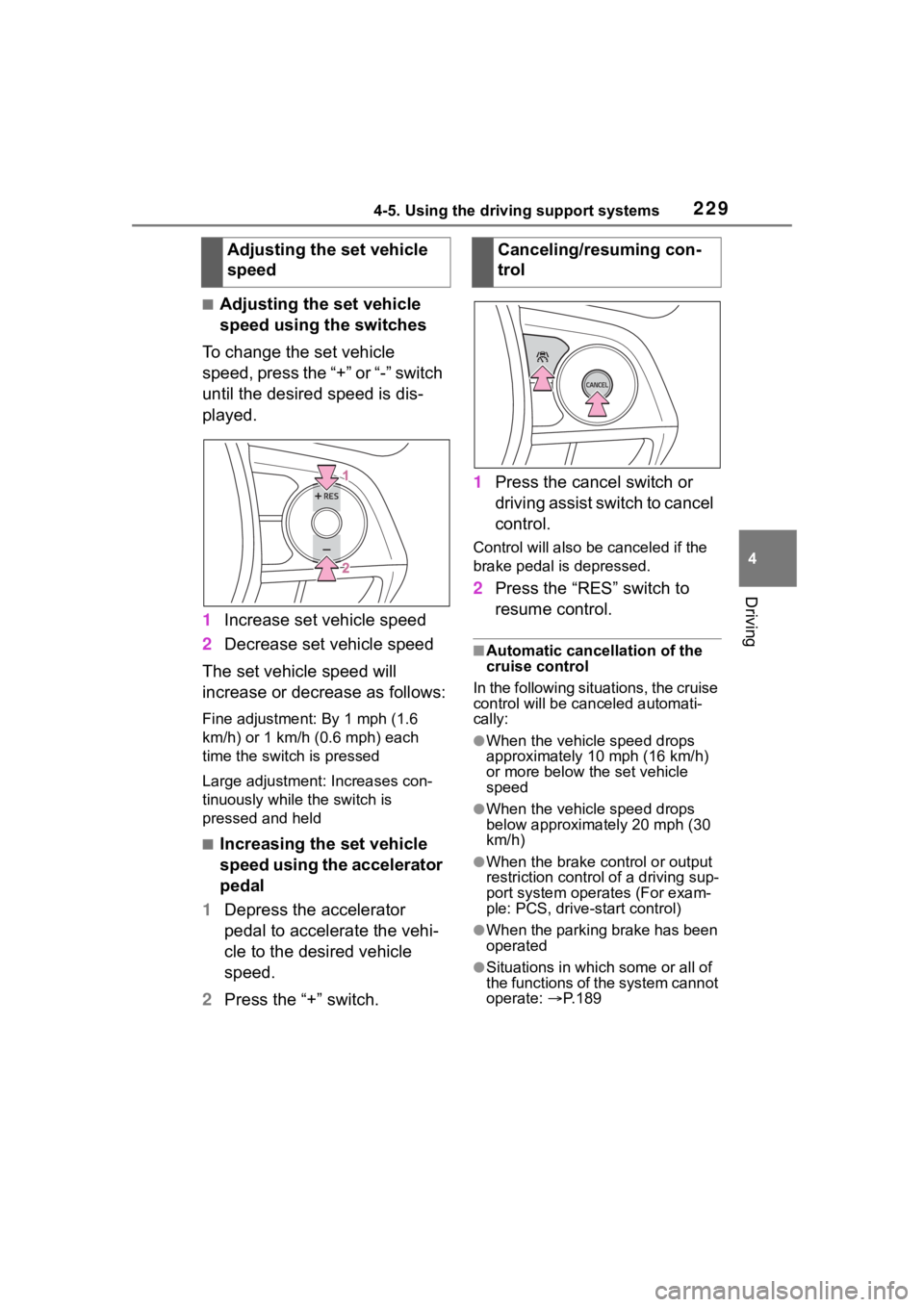
■Adjusting the set vehicle
speed using the switches
To change the set vehicle
speed, press the “+” or “-” switch
until the desired speed is dis-
played.
1 Increase set vehicle speed
2 Decrease set vehicle speed
The set vehicle speed will
increase or decrease as follows:
Fine adjustment: By 1 mph (1.6
km/h) or 1 km/h (0.6 mph) each
time the switch is pressed
Large adjustment: Increases con-
tinuously while the switch is
pressed and held
■Increasing the set vehicle
speed using the accelerator
pedal
1 Depress the accelerator
pedal to accelerate the vehi-
cle to the desired vehicle
speed.
2 Press the “+” switch. 1
Press the cancel switch or
driving assist switch to cancel
control.
Control will also be canceled if the
brake pedal is depressed.
2Press the “RES” switch to
resume control.
■Automatic cancellation of the
cruise control
In the following situations, the cruise
control will be canceled automati-
cally:
●When the vehicle speed drops
approximately 10 mph (16 km/h)
or more below the set vehicle
speed
●When the vehicle speed drops
below approximately 20 mph (30
km/h)
●When the brake control or output
restriction control of a driving sup-
port system oper ates (For exam-
ple: PCS, drive-start control)
●When the parking brake has been
operated
●Situations in which some or all of
the functions of the system cannot
operate: P. 1 8 9
Adjusting the set vehicle
speedCanceling/resuming con-
trol
Page 246 of 468

2464-5. Using the driving support systems
(the time which operation is possi-
ble may be extended if a door is
opened and closed)
●Safe exit assist is on
●The vehicle is stopped.
●The shift lever is in a position
other than R.
■The Safe exit assist will detect a
vehicle when
The Safe exit assist will detect a
vehicle present in the detection area
in the followin g situations:
●When the vehicle is stopped and a
vehicle or bicycle, which is travel-
ing parallel to the vehicle, is
approaching within the area that a
door opens
■Conditions under which the
system will not detect a vehicle
●Safe exit assist does not detect
the following objects, vehicles,
and bicycles:
• Vehicles or bicycles which are
approaching slowly
*
• Vehicles or bicycles which are determined to have a low possibil-
ity of colliding with a door when
opened
*
• Vehicles or bicycles which are
approaching from directly behind*
• Vehicles or bicycles which are approaching from the front*
• Guardrails, walls , signs, parked
vehicles, and other stationary
objects
*
• Pedestrians, animals, etc.*
*
: Depending on the conditions, detection of a vehicle and/or
object may occur.
●In situations such as the following,
safe exit assist will not operate:
• When 3 minutes or more have elapsed since the engine off (the
time which operation is possible
may be extended if a door is
opened and closed)
• When your vehicle is not com- pletely stopped
■Conditions under which the
system may not function cor-
rectly
●The Safe exit assist may not
detect vehicles corr ectly in the fol-
lowing situations:
• When the sensor is misaligned due to a strong impact to the sen-
sor or its surrounding area
• When mud, snow, ice, a sticker, etc. is covering the sensor or sur-
rounding area on the rear bumper
• When the vehicle is stopped on a
wet road surface, such as in a
puddle, while in inclement
weather, such as heavy rain,
snow, fog, etc.
• When a vehicle or bicycle approaches from behind a nearby
parked vehicle
• When an approaching vehicle or bicycle suddenly changes direc-
tion
• Immediately after a vehicle or bicycle starts moving
• When the trunk is open
• When a bicycle carrier, ramp, or
other accessory is installed to the
back of the vehicle
• When a parked vehicle, wall, sign, person or other stationary object
is behind the vehicle
• When the vehicle is stopped at an angle to the road
• When a vehicle is traveling near
an approaching vehicle or bicycle
• When an approaching vehicle or bicycle is traveling along a station-
ary object, such a wall or sign
• When a vehicle or bicycle is approaching at high speed
• When towing with the vehicle
• When stopped on a steep slope
• When stopped on a curve or at the exit of a curve
●Instances of the Safe exit assist
unnecessarily detecting a vehicle
and/or object may increase in the
following situations:
• When the sensor is misaligned
due to a strong impact to the sen-
sor or its surrounding area
• When a vehicle or bicycle
Page 252 of 468
2524-5. Using the driving support systems
WARNING
■TRAC/VSC may not operate
effectively when
Directional control and power may
not be achievable while driving on
slippery road surfaces, even if the
TRAC/VSC system is operating.
Drive the vehicle carefully in con-
ditions where stability and power
may be lost.
■Active Cornering Assist does
not operate effectively when
●Do not overly rely on Active
Cornering Assist. Active Corner-
ing Assist may not operate
effectively when accelerating
down slopes or driving on slip-
pery road surfaces.
●When Active Cornering Assist
frequently operates, Active Cor-
nering Assist may temporarily
stop operating to ensure proper
operation of the brakes, TRAC
and VSC.
■Hill-start assist control does
not operate effectively when
●Do not overly rely on hill-start
assist control. Hill-start assist
control may not operate effec-
tively on steep inclines and
roads covered with ice.
●Unlike the parking brake,
hill-start assist control is not
intended to hold the vehicle sta-
tionary for an extended period
of time. Do not attempt to use
hill-start assist control to hold
the vehicle on an incline, as
doing so may lead to an acci-
dent.
■When the TRAC/VSC is acti-
vated
The slip indicator light flashes.
Always drive carefully. Reckless
driving may cause an accident.
Exercise particular care when the
indicator light flashes.
■When the TRAC/VSC systems
are turned off
Be especially careful and drive at
a speed appropriate to the road
conditions. As these are the sys-
tems to help ensure vehicle stabil-
ity and driving force, do not turn
the TRAC/VSC systems off
unless necessary.
■Replacing tires
Make sure that all tires are of the
specified size, brand, tread pat-
tern and total load capacity. In
addition, make sure that the tires
are inflated to the recommended
tire inflation p ressure level.
The ABS, TRAC and VSC sys-
tems will not functi on correctly if
different tires are installed on the
vehicle.
Contact your Toyota dealer for fur-
ther information when replacing
tires or wheels.
■Handling of tires and the sus-
pension
Using tires with any kind of prob-
lem or modifying the suspension
will affect the driving assist sys-
tems, and may cause a system to
malfunction.
■Secondary Collision Brake
Do not rely solely upon the Sec-
ondary Collision Brake. This sys-
tem is designed to help reduce
the possibility of further damage
due to a secondary collision, how-
ever, that effect changes accord-
ing to various conditions. Overly
relying on the system may result
in death or serious injury.
Page 259 of 468
2595-1. Using the air conditioning system and defogger
5
Interior features
air outlet position or is
selected, the system will be set to
recirculated air mode. While “MAX
A/C” is selected, it is not possible to
turn off the air conditioning.
■Fan speed setting
To adjust the fan speed, turn the
fan speed control switch clock-
wise (increase) or counterclock-
wise (decrease).
Pressing the on/off switch to turns
off the fan.
When the fan is o ff, pressing the
on/off switch or turning the fan
speed control switch clockwise will
turn on the fan.
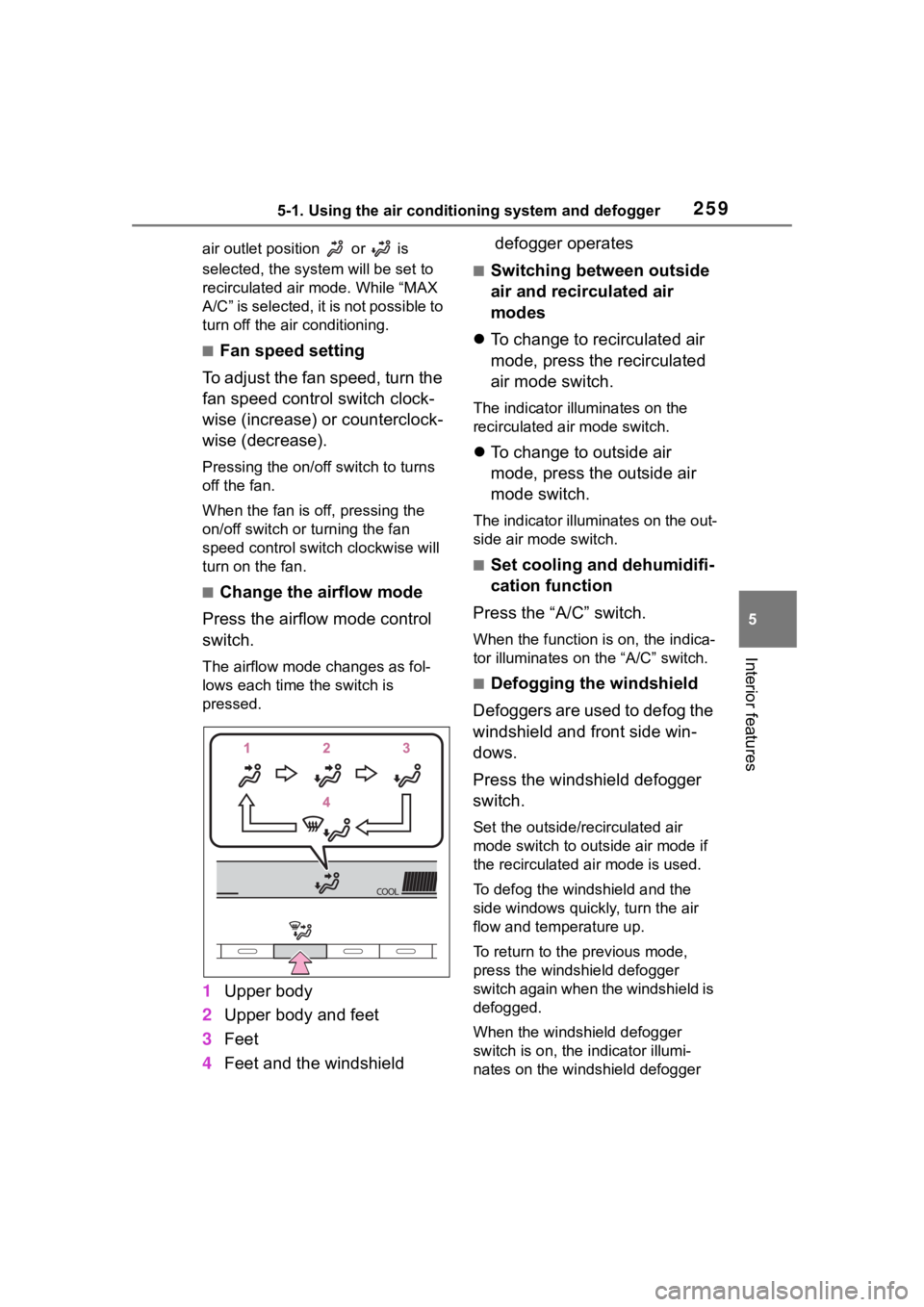
■Change the airflow mode
Press the airflow mode control
switch.
The airflow mode changes as fol-
lows each time the switch is
pressed.
1 Upper body
2 Upper body and feet
3 Feet
4 Feet and the windshield defogger operates
■Switching between outside
air and recirculated air
modes
To change to recirculated air
mode, press the recirculated
air mode switch.
The indicator illuminates on the
recirculated air mode switch.
To change to outside air
mode, press the outside air
mode switch.
The indicator illuminates on the out-
side air mode switch.
■Set cooling and dehumidifi-
cation function
Press the “A/C” switch.
When the function is on, the indica-
tor illuminates on the “A/C” switch.
■Defogging the windshield
Defoggers are used to defog the
windshield and front side win-
dows.
Press the windshield defogger
switch.
Set the outside/recirculated air
mode switch to outside air mode if
the recirculated air mode is used.
To defog the windshield and the
side windows quickly, turn the air
flow and temperature up.
To return to the previous mode,
press the windshield defogger
switch again when the windshield is
defogged.
When the windshield defogger
switch is on, the indicator illumi-
nates on the windshield defogger
Page 264 of 468
2645-1. Using the air conditioning system and defogger
counterclockwise (cool).
If “A/C” switch is not pressed, the
system will blow ambient tempera-
ture air or heated air.
■Setting the fan speed
To adjust the fan speed, turn the
fan speed control switch clock-
wise (increase) or counterclock-
wise (decrease).
Pressing the off switch to turns off
the fan.
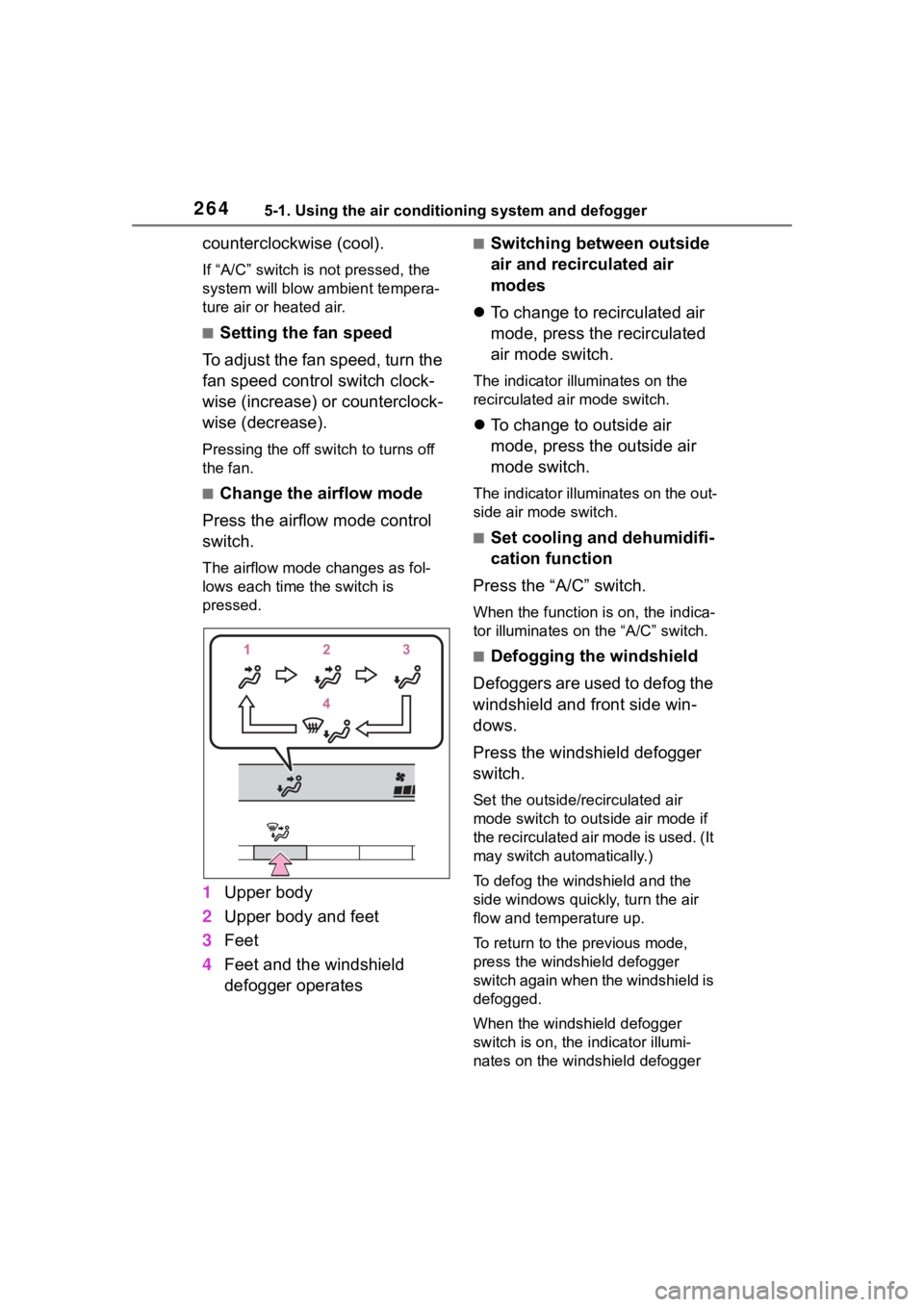
■Change the airflow mode
Press the airflow mode control
switch.
The airflow mode changes as fol-
lows each time the switch is
pressed.
1 Upper body
2 Upper body and feet
3 Feet
4 Feet and the windshield
defogger operates
■Switching between outside
air and recirculated air
modes
To change to recirculated air
mode, press the recirculated
air mode switch.
The indicator illuminates on the
recirculated air mode switch.
To change to outside air
mode, press the outside air
mode switch.
The indicator illuminates on the out-
side air mode switch.
■Set cooling and dehumidifi-
cation function
Press the “A/C” switch.
When the function is on, the indica-
tor illuminates on the “A/C” switch.
■Defogging the windshield
Defoggers are used to defog the
windshield and front side win-
dows.
Press the windshield defogger
switch.
Set the outside/recirculated air
mode switch to outside air mode if
the recirculated air mode is used. (It
may switch automatically.)
To defog the windshield and the
side windows quickly, turn the air
flow and temperature up.
To return to the previous mode,
press the windshield defogger
switch again when the windshield is
defogged.
When the windshield defogger
switch is on, the indicator illumi-
nates on the windshield defogger
Page 267 of 468
2675-1. Using the air conditioning system and defogger
5
Interior features
1Press the automatic mode
switch.
2 Adjust the temperature set-
ting.
3 To stop the operation, press
the off switch.
If the fan speed setting or air
flow modes are operated, the
automatic mode indicator goes
off. However, automatic mode
for functions other than that
operated is maintained.
■Using automatic mode
Fan speed is adjusted automati-
cally according to the temperature
setting and the ambient conditions. Therefore, the fan may stop for a
while until warm or
cool air is ready
to flow immediately after the auto-
matic mode switch pressed.
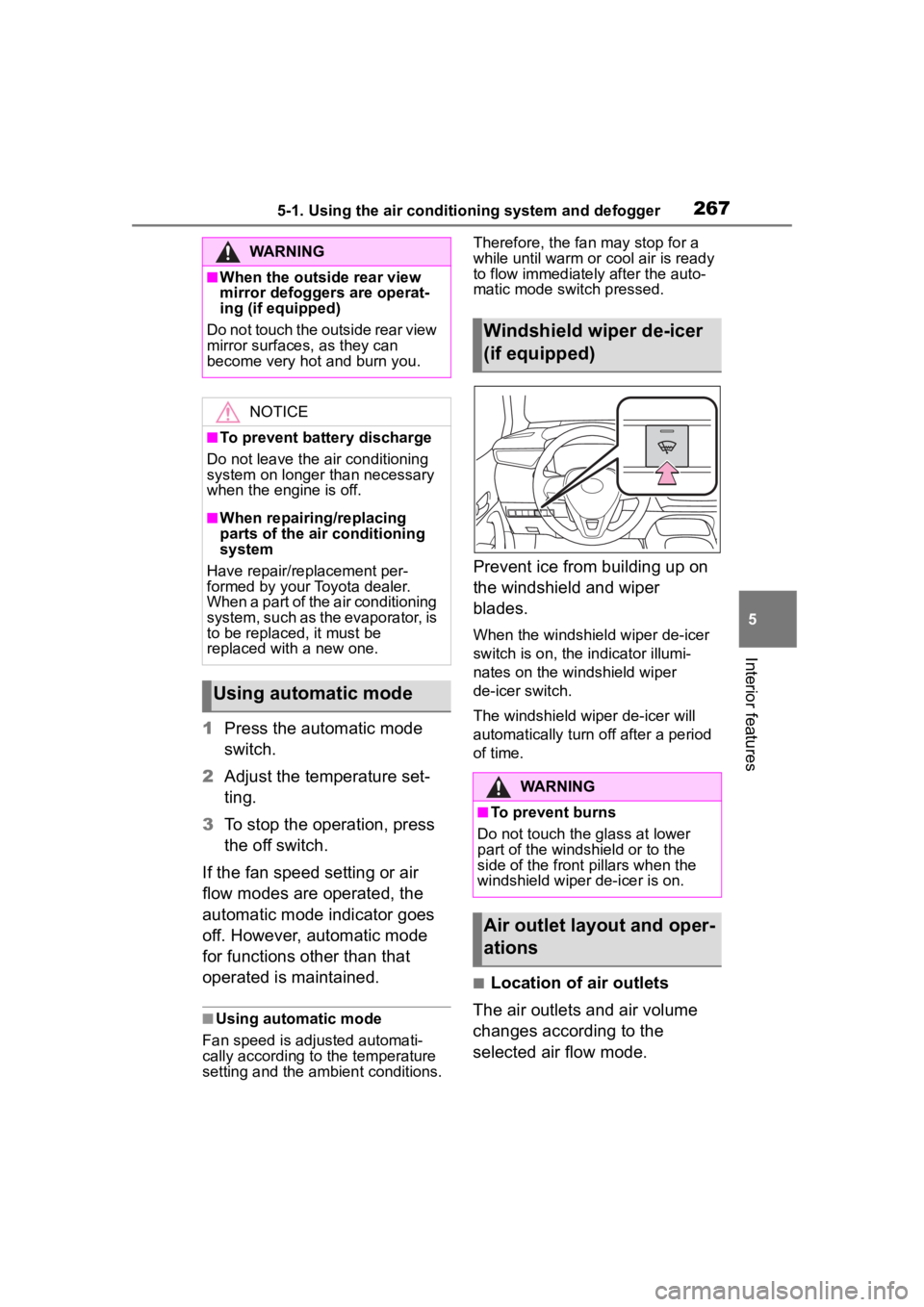
Prevent ice from building up on
the windshield and wiper
blades.
When the windshield wiper de-icer
switch is on, the indicator illumi-
nates on the windshield wiper
de-icer switch.
The windshield wiper de-icer will
automatically turn off after a period
of time.
■Location of air outlets
The air outlets and air volume
changes according to the
selected air flow mode.
WARNING
■When the outside rear view
mirror defoggers are operat-
ing (if equipped)
Do not touch the outside rear view
mirror surfaces, as they can
become very hot and burn you.
NOTICE
■To prevent battery discharge
Do not leave the air conditioning
system on longer than necessary
when the engine is off.
■When repairing/replacing
parts of the air conditioning
system
Have repair/replacement per-
formed by your Toyota dealer.
When a part of the air conditioning
system, such as the evaporator, is
to be replaced, it must be
replaced with a new one.
Using automatic mode
Windshield wiper de-icer
(if equipped)
WARNING
■To prevent burns
Do not touch the glass at lower
part of the windshield or to the
side of the front p illars when the
windshield wiper de-icer is on.
Air outlet layout and oper-
ations