motor TOYOTA COROLLA 2023 Owners Manual
[x] Cancel search | Manufacturer: TOYOTA, Model Year: 2023, Model line: COROLLA, Model: TOYOTA COROLLA 2023Pages: 468, PDF Size: 14.4 MB
Page 33 of 468
331-1. For safe use
1
For safety and security
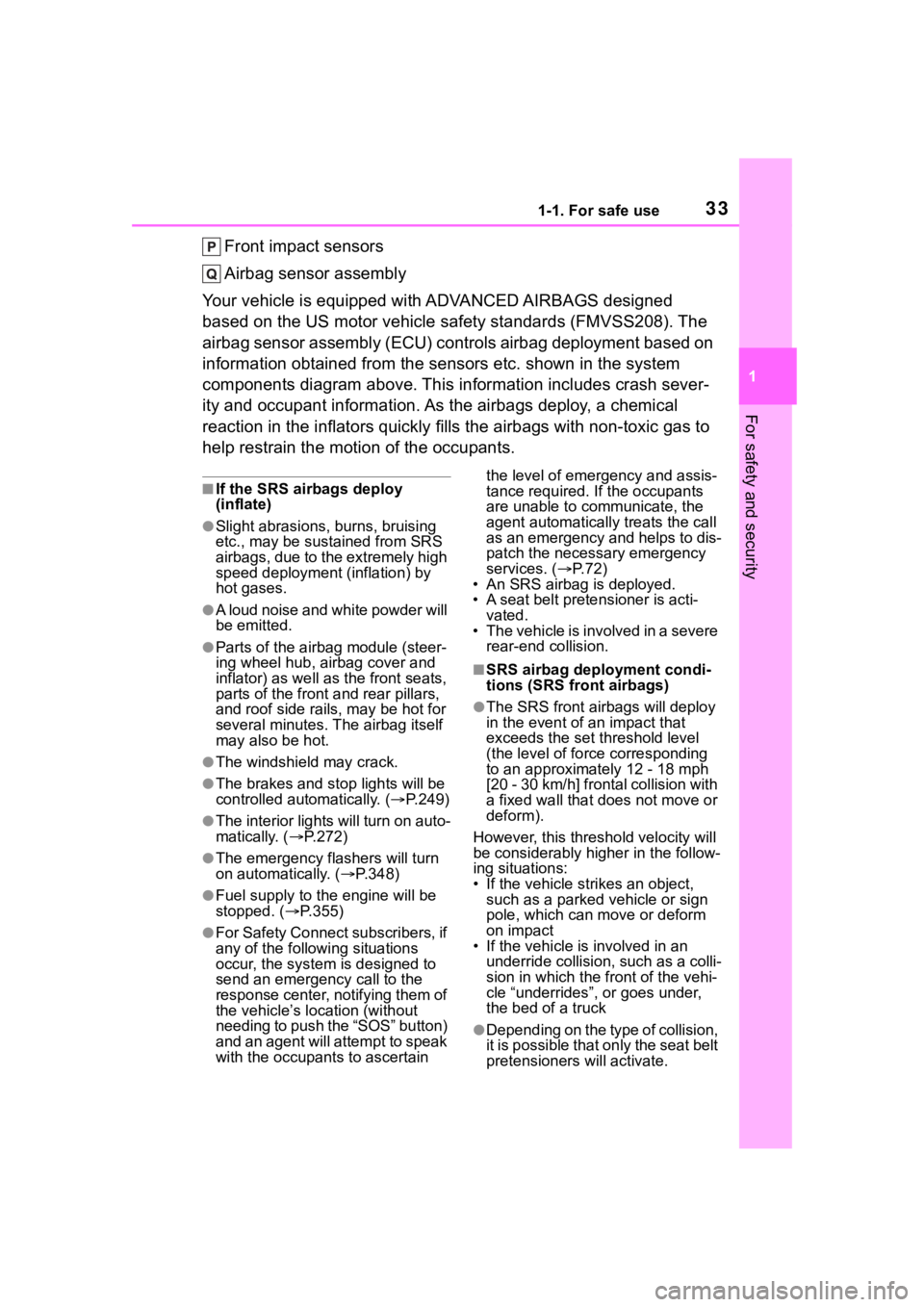
Front impact sensors
Airbag sensor assembly
Your vehicle is equipped with ADVANCED AIRBAGS designed
based on the US motor vehicle safety standards (FMVSS208). The
airbag sensor assembly (ECU) cont rols airbag deployment based on
information obtained from the sensors etc. shown in the system
components diagram above. This in formation includes crash sever-
ity and occupant information. As the airbags deploy, a chemical
reaction in the inflators quickly fills the airbags with non-toxic gas to
help restrain the motion of the occupants.
■If the SRS airbags deploy
(inflate)
●Slight abrasions, burns, bruising
etc., may be sustained from SRS
airbags, due to the extremely high
speed deployment (inflation) by
hot gases.
●A loud noise and white powder will
be emitted.
●Parts of the airbag module (steer-
ing wheel hub, airbag cover and
inflator) as well as the front seats,
parts of the front and rear pillars,
and roof side rails, may be hot for
several minutes. T he airbag itself
may also be hot.
●The windshield may crack.
●The brakes and st op lights will be
controlled automatically. ( P.249)
●The interior lights will turn on auto-
matically. ( P.272)
●The emergency flashers will turn
on automatically. ( P.348)
●Fuel supply to the engine will be
stopped. (P.355)
●For Safety Connect subscribers, if
any of the followin g situations
occur, the system is designed to
send an emergency call to the
response center, notifying them of
the vehicle’s location (without
needing to push the “SOS” button)
and an agent will attempt to speak
with the occupants to ascertain the level of emergency and assis-
tance required. If the occupants
are unable to communicate, the
agent automatically treats the call
as an emergency and helps to dis-
patch the necessary emergency
services. (
P. 7 2 )
• An SRS airbag is deployed.
• A seat belt pretensioner is acti- vated.
• The vehicle is involved in a severe rear-end collision.
■SRS airbag deployment condi-
tions (SRS front airbags)
●The SRS front airbags will deploy
in the event of an impact that
exceeds the set threshold level
(the level of forc e corresponding
to an approximately 12 - 18 mph
[20 - 30 km/h] frontal collision with
a fixed wall that does not move or
deform).
However, this threshold velocity will
be considerably higher in the follow-
ing situations:
• If the vehicle strikes an object, such as a parked vehicle or sign
pole, which can move or deform
on impact
• If the vehicle is involved in an underride collision, such as a colli-
sion in which the front of the vehi-
cle “underrides”, or goes under,
the bed of a truck
●Depending on the type of collision,
it is possible that only the seat belt
pretensioners will activate.
Page 153 of 468
1534-1. Before driving
4
Driving
Dinghy towing
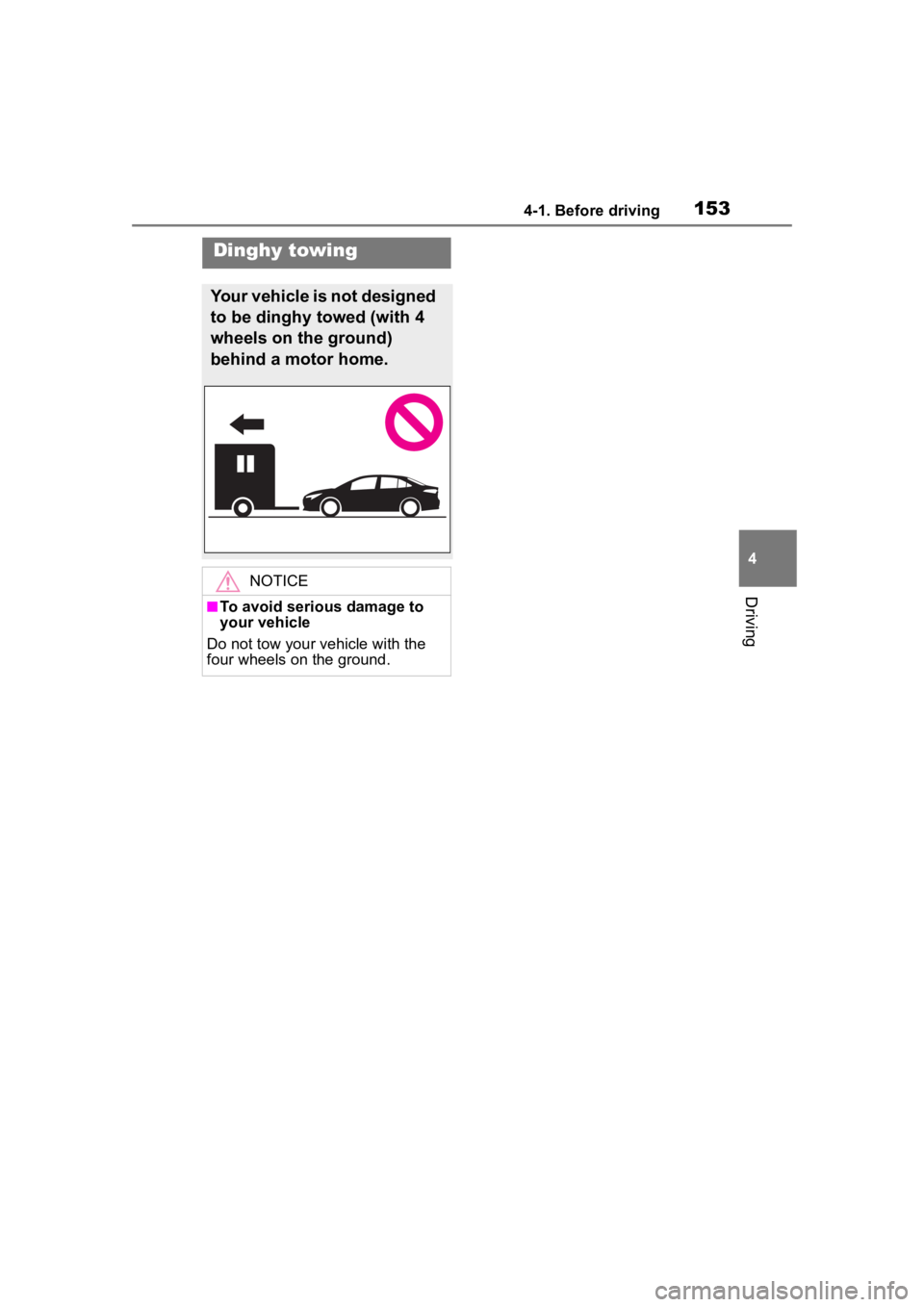
Your vehicle is not designed
to be dinghy towed (with 4
wheels on the ground)
behind a motor home.
NOTICE
■To avoid serious damage to
your vehicle
Do not tow your vehicle with the
four wheels on the ground.
Page 169 of 468
1694-2. Driving procedures
4
Driving
indicator light will turn on.
Operate the shift lever with the
vehicle stopped and the brake
pedal depressed.
The auto function may not operate
if the shift lever is moved extremely
quickly. In this situation, apply the
parking brake manually. ( P.168)
■Turning the automatic
mode off
While the vehicle is stopped and
depressing the brake pedal,
press and hold the parking
brake switch until a buzzer
sounds and a message is
shown on the multi-information
display.
■Parking brake operation
●When the engine switch is not in
ON, the parking brake cannot be
released using the parking brake
switch.
●When the engine switch is not in
ON, automatic mode (automatic
brake setting and releasing) is not
available.
■Parking brake automatic
release function
When all of the follo wing conditions
are met, the parking brake can be
released by depressing the acceler-
ator pedal.
●The driver’s door is closed
●The driver is wearing the seat belt
●The shift lever is in a forward driv-
ing position or reverse driving
position
●The malfunction in dicator lamp or
brake system warning light is not
illuminated.
When depressing the accelerator
pedal, depress it slowly. If the parking brak
e is not released
when the accelerator pedal is
depressed, release the parking
brake manually.
When the shift lever is shifted from
P, the parking brake will be released
automatically.
■Parking brake automatic lock
function
The parking brak e will be set auto-
matically under the following condi-
tions:
●The brake pedal is not depressed
●The driver’s door is open
●The driver’s seat belt is not fas-
tened
●The shift lever is in a position
other than P or N
●The malfunction indicator lamp
and brake system warning light
are not illuminated
■If “Parking Brake Temporarily
Unavailable” is displayed on
the multi-info rmation display
If the parking brake is operated
repeatedly over a short period of
time, the system may restrict opera-
tion to prevent ove rheating. If this
happens, refrain from operating the
parking brake. Normal operation will
return after about 1 minute.
■If “Parking Brake Unavailable”
is displayed on the multi-infor-
mation display
Operate the parking brake switch. If
the message does not disappear
after operating the switch several
times, the system may be malfunc-
tioning. Have the vehicle inspected
by your Toyota dealer.
■Parking brake operation sound
When the parking brake operates, a
motor sound (whirr ing sound) may
be heard. This does not indicate a
malfunction.
■Parking brake indicator light
●Depending on the engine switch
Page 191 of 468
1914-5. Using the driving support systems
4
Driving
The system can detect the fol-
lowing as detectable objects.
(Detectable objects differ
depending on the function.)
Vehicles
Bicycles
*
Pedestrians
Motorcycles
*
*: Detected as a detectable object
only when being ridden.
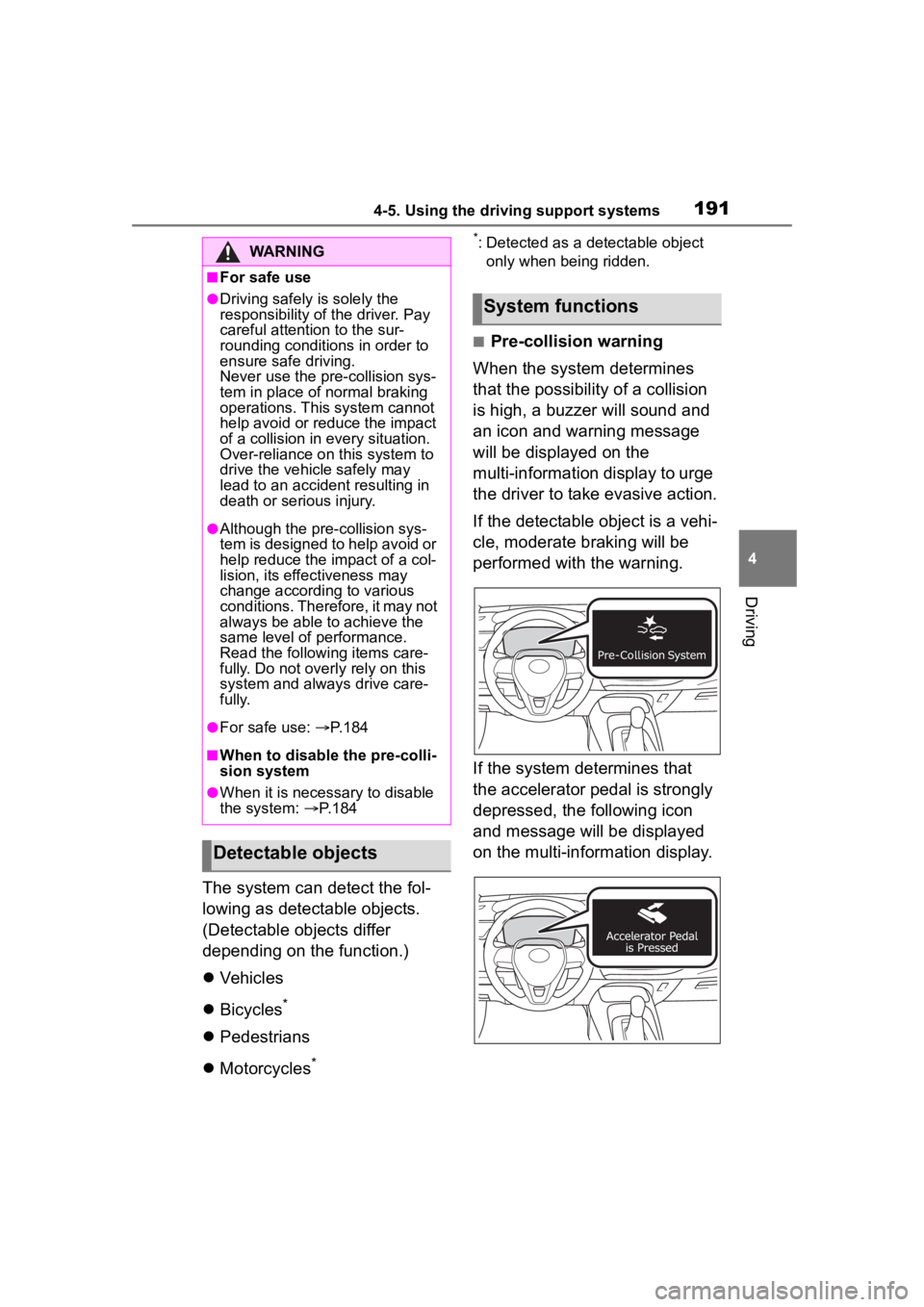
■Pre-collision warning
When the system determines
that the possibility of a collision
is high, a buzzer will sound and
an icon and warning message
will be displayed on the
multi-information display to urge
the driver to take evasive action.
If the detectable object is a vehi-
cle, moderate braking will be
performed with the warning.
If the system determines that
the accelerator pedal is strongly
depressed, the following icon
and message will be displayed
on the multi-information display.
WARNING
■For safe use
●Driving safely is solely the
responsibility of the driver. Pay
careful attention to the sur-
rounding conditions in order to
ensure safe driving.
Never use the pre-collision sys-
tem in place of normal braking
operations. This system cannot
help avoid or reduce the impact
of a collision in every situation.
Over-reliance on this system to
drive the vehicle safely may
lead to an accident resulting in
death or serious injury.
●Although the pr e-collision sys-
tem is designed to help avoid or
help reduce the im pact of a col-
lision, its effectiveness may
change according to various
conditions. Therefore, it may not
always be able to achieve the
same level of performance.
Read the followi ng items care-
fully. Do not overl y rely on this
system and always drive care-
fully.
●For safe use: P.184
■When to disable the pre-colli-
sion system
●When it is necessary to disable
the system: P. 1 8 4
Detectable objects
System functions
Page 193 of 468
1934-5. Using the driving support systems
4
Driving
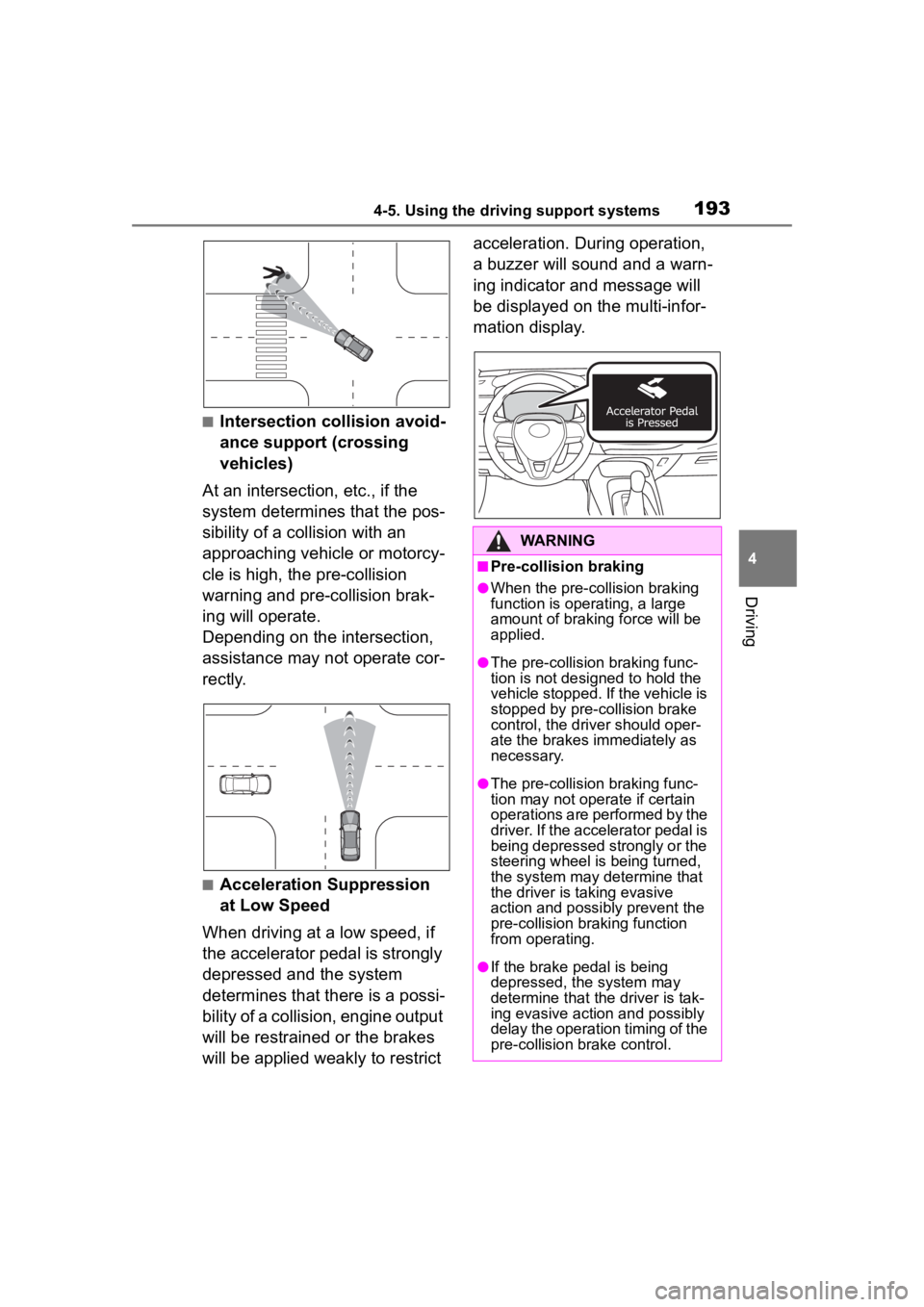
■Intersection collision avoid-
ance support (crossing
vehicles)
At an intersection, etc., if the
system determines that the pos-
sibility of a collision with an
approaching vehicle or motorcy-
cle is high, the pre-collision
warning and pre-collision brak-
ing will operate.
Depending on the intersection,
assistance may not operate cor-
rectly.
■Acceleration Suppression
at Low Speed
When driving at a low speed, if
the accelerator pedal is strongly
depressed and the system
determines that there is a possi-
bility of a collision, engine output
will be restrained or the brakes
will be applied weakly to restrict acceleration. During operation,
a buzzer will sound and a warn-
ing indicator and message will
be displayed on the multi-infor-
mation display.
WARNING
■Pre-collision braking
●When the pre-collision braking
function is operating, a large
amount of braking force will be
applied.
●The pre-collision braking func-
tion is not desig
ned to hold the
vehicle stopped. If the vehicle is
stopped by pre-collision brake
control, the dri ver should oper-
ate the brakes immediately as
necessary.
●The pre-collision braking func-
tion may not operate if certain
operations are performed by the
driver. If the accelerator pedal is
being depressed strongly or the
steering wheel is being turned,
the system may determine that
the driver is taking evasive
action and possibly prevent the
pre-collision braking function
from operating.
●If the brake pedal is being
depressed, the system may
determine that t he driver is tak-
ing evasive action and possibly
delay the operation timing of the
pre-collision brake control.
Page 195 of 468
1954-5. Using the driving support systems
4
Driving
■Operating conditions of each function of the pre-collision system
The pre-collision syst em is enabled and the system determines t hat the pos-
sibility of a frontal c ollision with a detected object is high.
However, the system will not operate in the follo wing situations:
●When the vehicle has not been driven a certain amount after a t erminal of
the battery has been disc onnected and reconnected
●When the shift lever is in R
●When the VSC OFF indicator is illuminated (only the pre-collision warning
function will be operational)
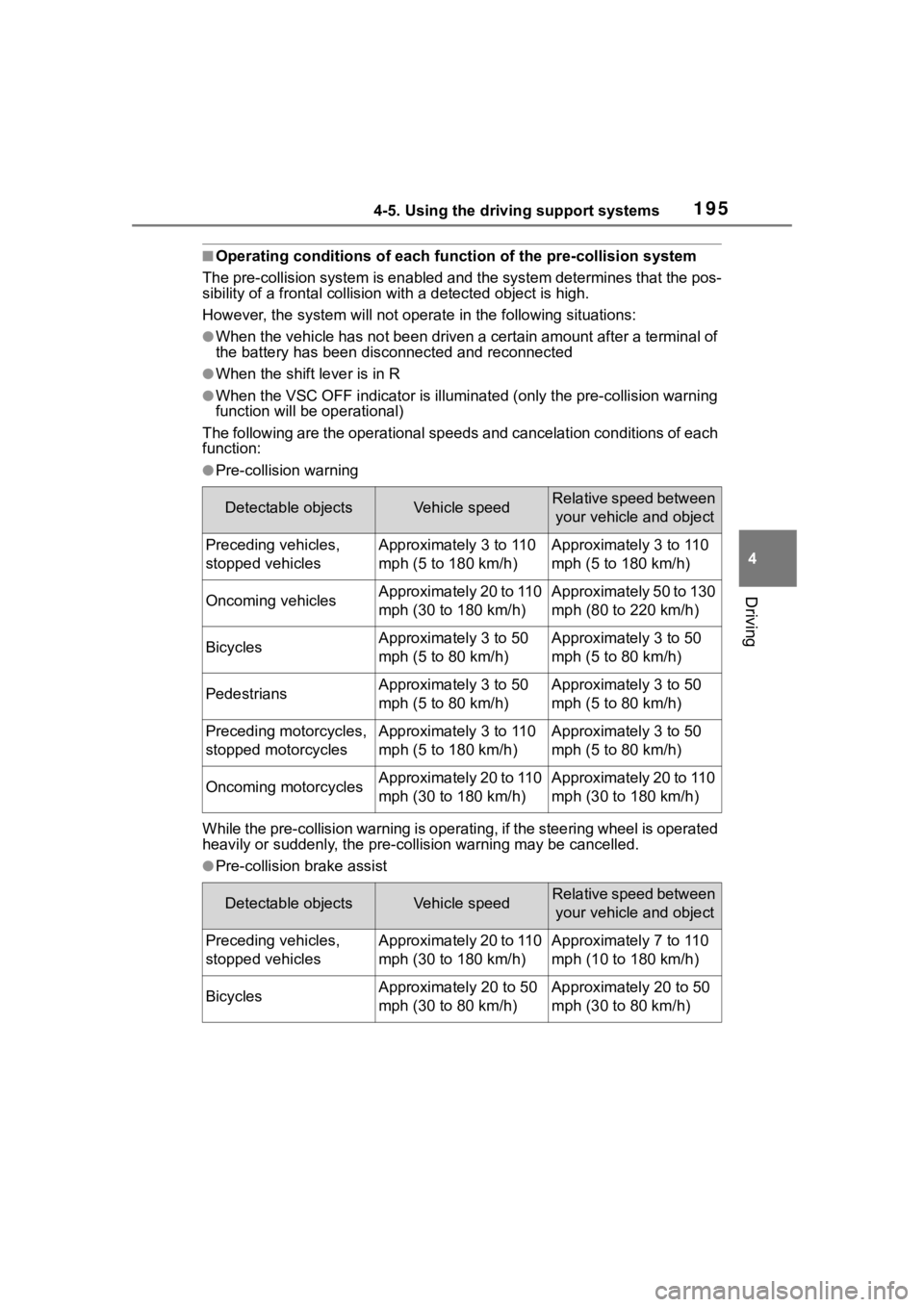
The following are the operational speeds and cancelation condit ions of each
function:
●Pre-collision warning
While the pre-collision warning is operating, if the steering w heel is operated
heavily or suddenly, the pre-co llision warning may be cancelled.
●Pre-collision brake assist
Detectable objectsVehicle speedRelative speed between
your vehicle and object
Preceding vehicles,
stopped vehiclesApproximately 3 to 110
mph (5 to 180 km/h)Approximately 3 to 110
mph (5 to 180 km/h)
Oncoming vehiclesApproximately 20 to 110
mph (30 to 180 km/h)Approximately 50 to 130
mph (80 to 220 km/h)
BicyclesApproximately 3 to 50
mph (5 to 80 km/h)Approximately 3 to 50
mph (5 to 80 km/h)
PedestriansApproximately 3 to 50
mph (5 to 80 km/h)Approximately 3 to 50
mph (5 to 80 km/h)
Preceding motorcycles,
stopped motorcyclesApproximately 3 to 110
mph (5 to 180 km/h)Approximately 3 to 50
mph (5 to 80 km/h)
Oncoming motorcyclesApproximately 20 to 110
mph (30 to 180 km/h)Approximately 20 to 110
mph (30 to 180 km/h)
Detectable objectsVehicle speedRelative speed between your vehicle and object
Preceding vehicles,
stopped vehiclesApproximately 20 to 110
mph (30 to 180 km/h)Approximately 7 to 110
mph (10 to 180 km/h)
BicyclesApproximately 20 to 50
mph (30 to 80 km/h)Approximately 20 to 50
mph (30 to 80 km/h)
Page 196 of 468
1964-5. Using the driving support systems
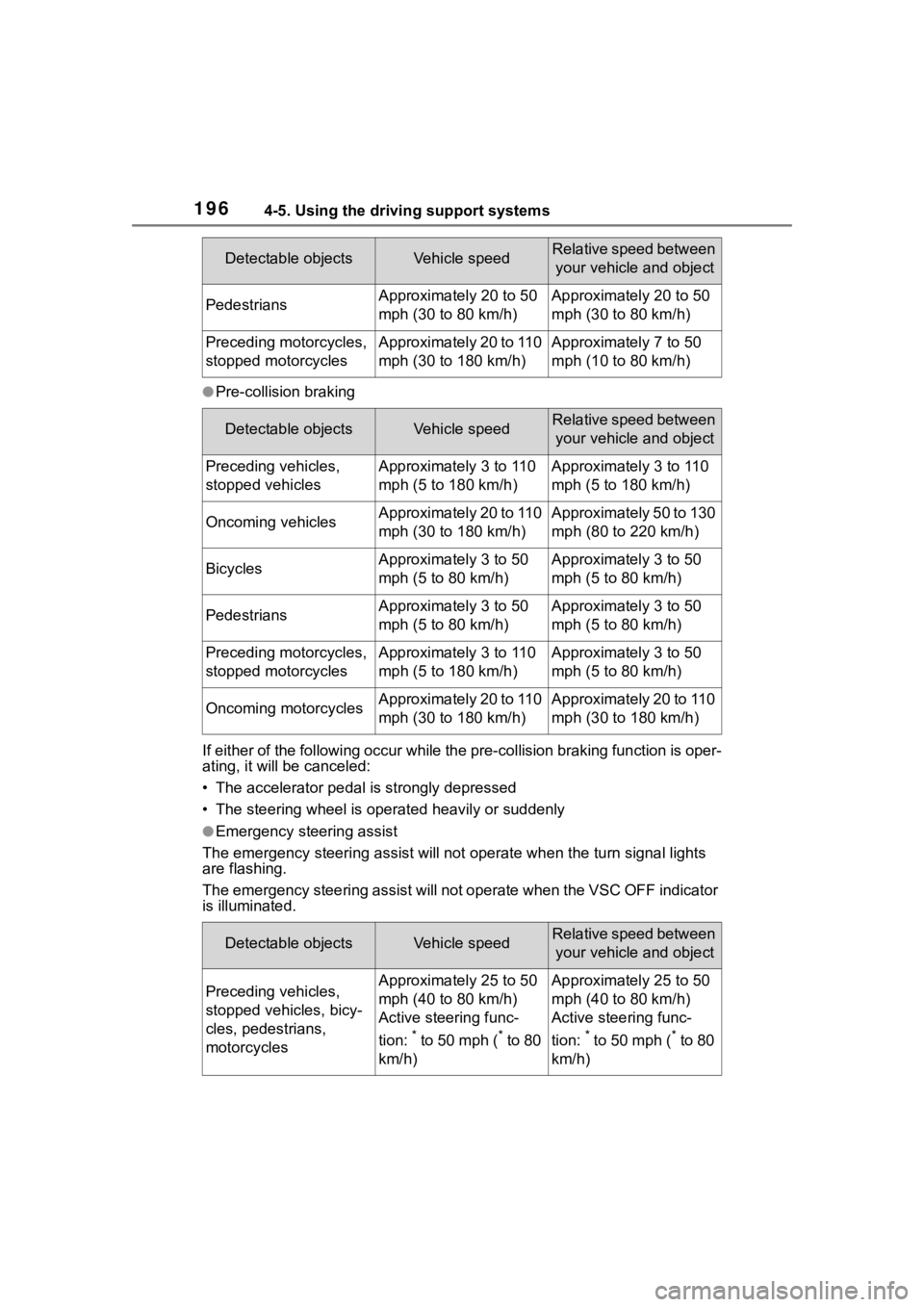
●Pre-collision braking
If either of the following occur while the pre-collision braking function is oper-
ating, it will be canceled:
• The accelerator pedal is strongly depressed
• The steering wheel is ope rated heavily or suddenly
●Emergency steering assist
The emergency steeri ng assist will not opera te when the turn signal lights
are flashing.
The emergency steering assist will not operate when the VSC OFF indicator
is illuminated.
PedestriansApproximately 20 to 50
mph (30 to 80 km/h)Approximately 20 to 50
mph (30 to 80 km/h)
Preceding motorcycles,
stopped motorcyclesApproximately 20 to 110
mph (30 to 180 km/h)Approximately 7 to 50
mph (10 to 80 km/h)
Detectable objectsVehicle speedRelative speed between
your vehicle and object
Preceding vehicles,
stopped vehiclesApproximately 3 to 110
mph (5 to 180 km/h)Approximately 3 to 110
mph (5 to 180 km/h)
Oncoming vehiclesApproximately 20 to 110
mph (30 to 180 km/h)Approximately 50 to 130
mph (80 to 220 km/h)
BicyclesApproximately 3 to 50
mph (5 to 80 km/h)Approximately 3 to 50
mph (5 to 80 km/h)
PedestriansApproximately 3 to 50
mph (5 to 80 km/h)Approximately 3 to 50
mph (5 to 80 km/h)
Preceding motorcycles,
stopped motorcyclesApproximately 3 to 110
mph (5 to 180 km/h)Approximately 3 to 50
mph (5 to 80 km/h)
Oncoming motorcyclesApproximately 20 to 110
mph (30 to 180 km/h)Approximately 20 to 110
mph (30 to 180 km/h)
Detectable objectsVehicle speedRelative speed between your vehicle and object
Preceding vehicles,
stopped vehicles, bicy-
cles, pedestrians,
motorcyclesApproximately 25 to 50
mph (40 to 80 km/h)
Active steering func-
tion:
* to 50 mph (* to 80
km/h)
Approximately 25 to 50
mph (40 to 80 km/h)
Active steering func-
tion:
* to 50 mph (* to 80
km/h)
Detectable objectsVehicle speedRelative speed between your vehicle and object
Page 197 of 468
1974-5. Using the driving support systems
4
Driving
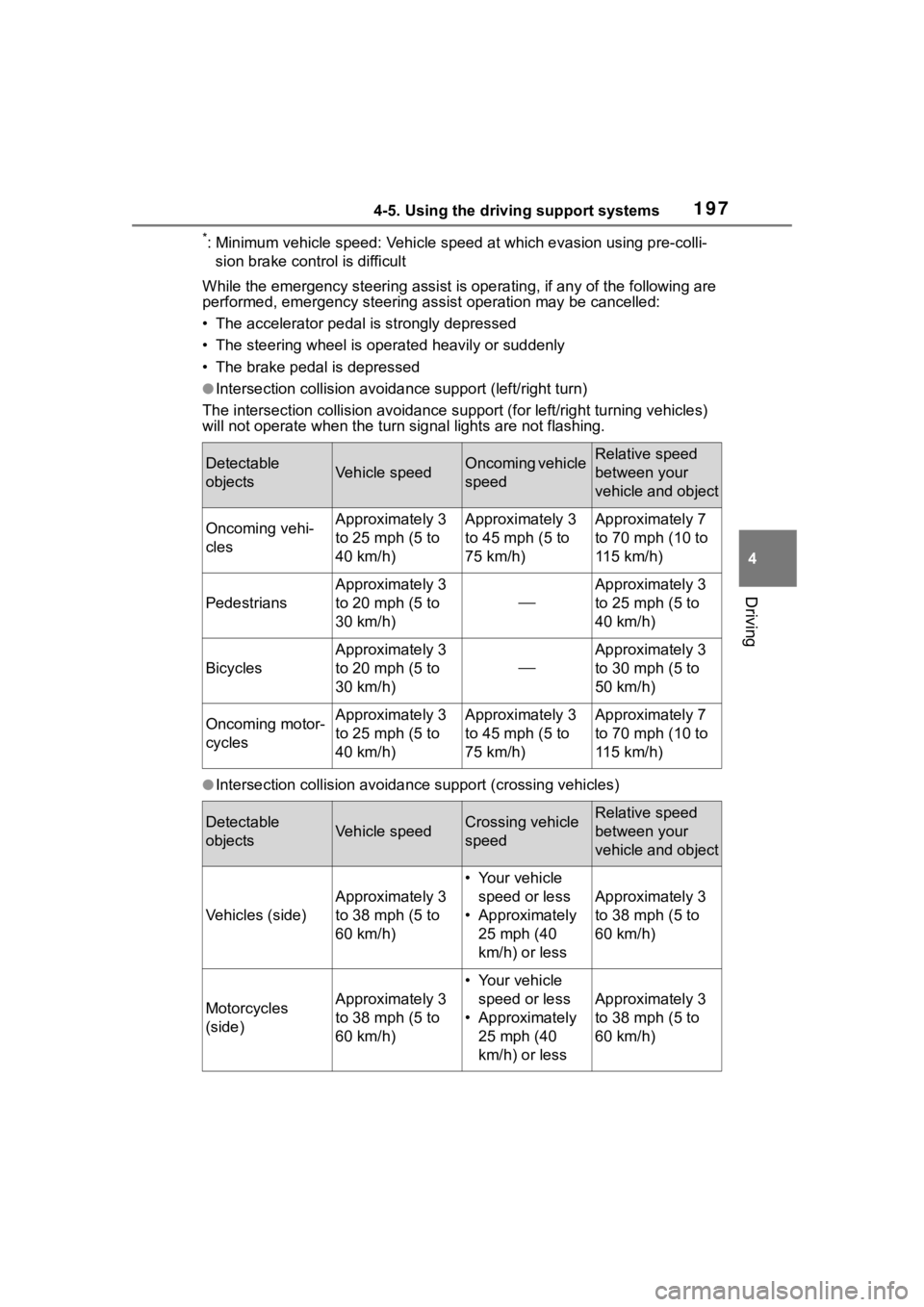
*: Minimum vehicle speed: Vehicle speed at which evasion using pr e-colli-
sion brake control is difficult
While the emergency ste ering assist is operating, if any of the following are
performed, emergency steering assist operation may be cancelled :
• The accelerator pedal is strongly depressed
• The steering wheel is ope rated heavily or suddenly
• The brake pedal is depressed
●Intersection collisio n avoidance support (left/right turn)
The intersection collision avoida nce support (for left/right turning vehicles)
will not operate when the turn signal light s are not flashing.
●Intersection collision avoidance support (crossing vehicles)
Detectable
objectsVehicle speedOncoming vehicle
speedRelative speed
between your
vehicle and object
Oncoming vehi-
clesApproximately 3
to 25 mph (5 to
40 km/h)Approximately 3
to 45 mph (5 to
75 km/h)Approximately 7
to 70 mph (10 to
115 km/h)
Pedestrians
Approximately 3
to 20 mph (5 to
30 km/h)
Approximately 3
to 25 mph (5 to
40 km/h)
Bicycles
Approximately 3
to 20 mph (5 to
30 km/h)
Approximately 3
to 30 mph (5 to
50 km/h)
Oncoming motor-
cyclesApproximately 3
to 25 mph (5 to
40 km/h)Approximately 3
to 45 mph (5 to
75 km/h)Approximately 7
to 70 mph (10 to
115 km/h)
Detectable
objectsVehicle speedCrossing vehicle
speedRelative speed
between your
vehicle and object
Vehicles (side)
Approximately 3
to 38 mph (5 to
60 km/h)
• Your vehicle
speed or less
• Approximately 25 mph (40
km/h) or less
Approximately 3
to 38 mph (5 to
60 km/h)
Motorcycles
(side)Approximately 3
to 38 mph (5 to
60 km/h)
• Your vehicle speed or less
• Approximately 25 mph (40
km/h) or less
Approximately 3
to 38 mph (5 to
60 km/h)
Page 203 of 468
2034-5. Using the driving support systems
4
Driving
the following conditions are met:
●The LTA system detects lane lines
or the path of preceding or sur-
rounding vehicles (except when
the preceding vehicle is small,
such as a motorcycle).
●The dynamic radar cruise control
is operating.
●The lane width is approximately
10 to 13 ft. (3 to 4 m).
●The turn signal le ver is not being
operated.
●The vehicle is not being driven
around a sharp curve.
●The vehicle is not accelerating or
decelerating more than a certain
amount.
●The steering wheel is not being
turned with a large force.
●The hands off steering wheel
warning ( P.203) is not operat-
ing.
●The vehicle is being driven in the
center of a lane.
■Temporary cancelation of func-
tions
●When the operating conditions are
no longer met, a function may be
temporarily canceled. However,
when the operation conditions are
met again, operation of the func-
tion will automatically be restored.
( P.202)
●If the operating conditions of a
function are no longer met while
the function is operating, a buzzer
may sound to indicate that the
function has been temporarily
canceled.
●The steering assist operation of
the function can be overridden by
the steering wheel operation of
the driver.
■Lane departure warning func-
tion when the LTA is operating
●Even if the LDA warning method is
changed to vibration of the steer-
ing wheel, if the vehicle deviates from the lane while the LTA is
operating, the warning buzzer will
sound to aler
t the driver.
●If steering wheel operation equiv-
alent to that necessary for a lane
change is detected, the system
will determine the vehicle is not
deviating from the lane and the
warning will not operate.
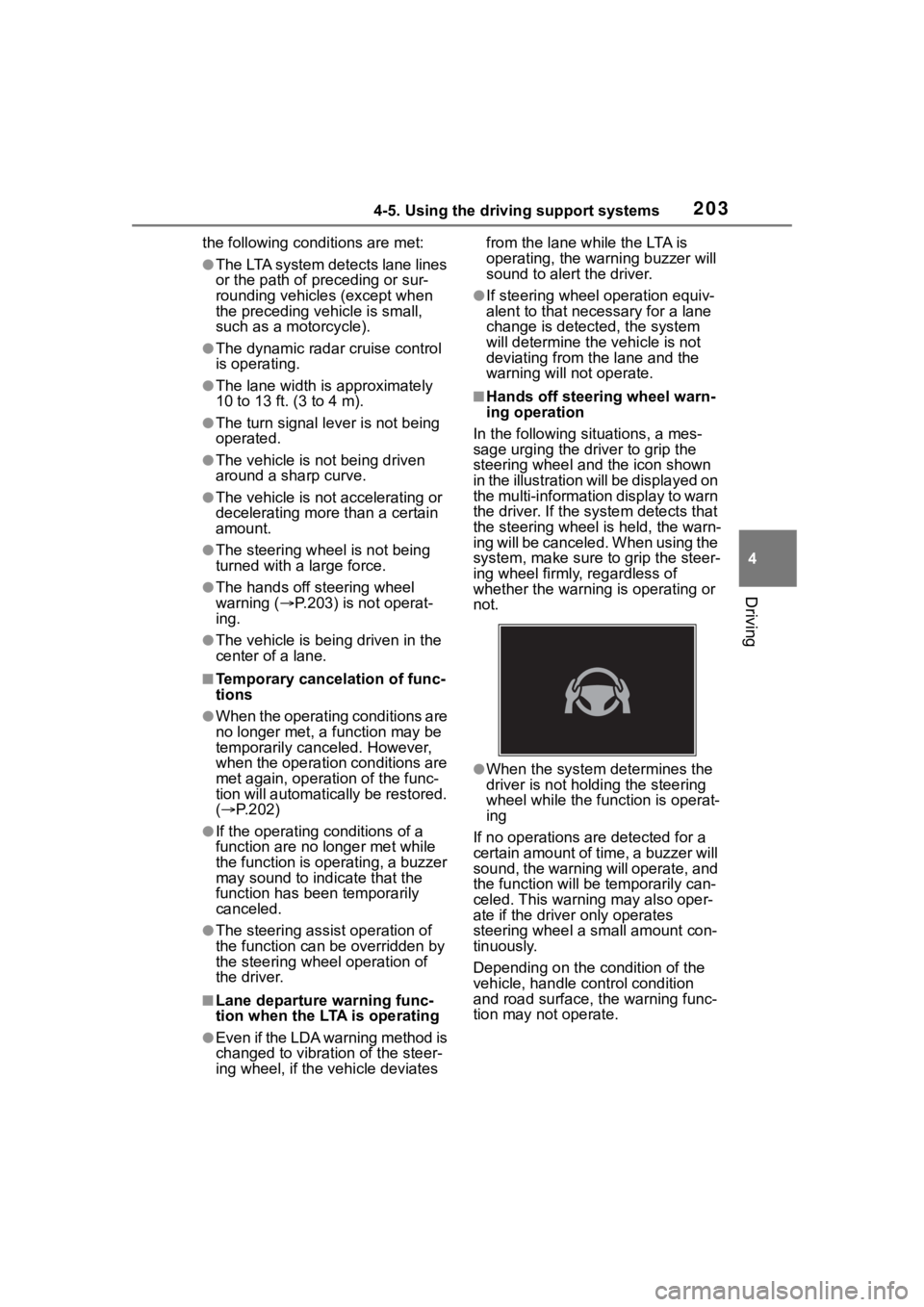
■Hands off steering wheel warn-
ing operation
In the following si tuations, a mes-
sage urging the driver to grip the
steering wheel and the icon shown
in the illustration will be displayed on
the multi-information display to warn
the driver. If the system detects that
the steering wheel is held, the warn-
ing will be canceled. When using the
system, make sure to grip the steer-
ing wheel firmly, regardless of
whether the warning is operating or
not.
●When the system determines the
driver is not hold ing the steering
wheel while the function is operat-
ing
If no operations are detected for a
certain amount of time, a buzzer will
sound, the warning will operate, and
the function will be temporarily can-
celed. This warnin g may also oper-
ate if the driver only operates
steering wheel a small amount con-
tinuously.
Depending on the condition of the
vehicle, handle control condition
and road surface, t he warning func-
tion may not operate.
Page 208 of 468

2084-5. Using the driving support systems
This function is operable when all of
the following conditions are met:
• The vehicle speed is approxi-
mately 30 mph (50 km/h) or more.
Operation may be possible when
the vehicle speed is approximately
25 mph (40 km/h) or more if vehi-
cles, motorcycles, bicycles, or
pedestrians are detected near the
lane.
• The system reco gnizes a lane or
course
*. (When recognized on
only one side, the system will
operate only for the recognized
side.)
• The lane width is approximately 9.8 ft. (3 m) or more.
• The turn signal l ever is not being
operated. (Vehicles with BSM:
Except when a vehicle is detected
in the direction that the turn signal
lever is operated.)
• The vehicle is not being driven around a sharp curve.
• The vehicle is not accelerating or decelerating more than a certain
amount.
• The steering wheel is not being turned sufficiently to perform a
lane change.
*: Boundary between the asphalt
and grass, soil, etc., or structures,
such as a curb, guardrail, etc.
●Break suggestion function
This function is operable when all of
the following cond itions are met:
• The vehicle speed is approxi-
mately 32 mph (50 km/h) or more.
• The lane width is approximately 9.8 ft. (3 m) or more.
■Temporary cancellation of func-
tions
When the operating conditions are
no longer met, a function may be
temporarily canceled. However,
when the operation conditions are
met again, operation of the function
will automatically be restored.
( P.207)
■Operation of the lane departure
alert function/lane departure
prevention function
●Depending on the vehicle speed,
road conditions, lane departure
angle, etc., operation of the lane
departure prevention function may
not be felt or the function may not
operate.
●Depending on the conditions, the
warning buzzer may operate even
if vibration is selected through a
customize setting.
●If a course* is not clear or straight,
the lane departure alert function or
lane departure prevention function
may not operate.
●The lane departure alert function
or lane departure prevention func-
tion may not operate if the system
judges that the vehicle is inten-
tionally being ste ered to avoid a
pedestrian or parked vehicle.
●Vehicles with BSM: It may not be
possible for the sys tem to judge if
there is danger of a collision with a
vehicle in an adjacent lane.
●The steering assist operation of
the lane departure prevention
function can be overridden by the
steering wheel operation of the
driver.
*: Boundary between the asphalt
and grass, soil, etc., or structures,
such as a curb, guardrail, etc.
■Hands off steering wheel warn-
ing operation
In the following si tuations, a mes-
sage urging the driver to operate the
steering wheel and an icon will be
displayed and a buzzer will sound to
warn the driver. When using the sys-
tem, make sure to grip the steering
wheel firmly, rega rdless of whether
the warning is operating or not.