Multi function TOYOTA COROLLA CROSS 2023 Workshop Manual
[x] Cancel search | Manufacturer: TOYOTA, Model Year: 2023, Model line: COROLLA CROSS, Model: TOYOTA COROLLA CROSS 2023Pages: 500, PDF Size: 15.11 MB
Page 396 of 500
3967-2. Steps to take in an emergency
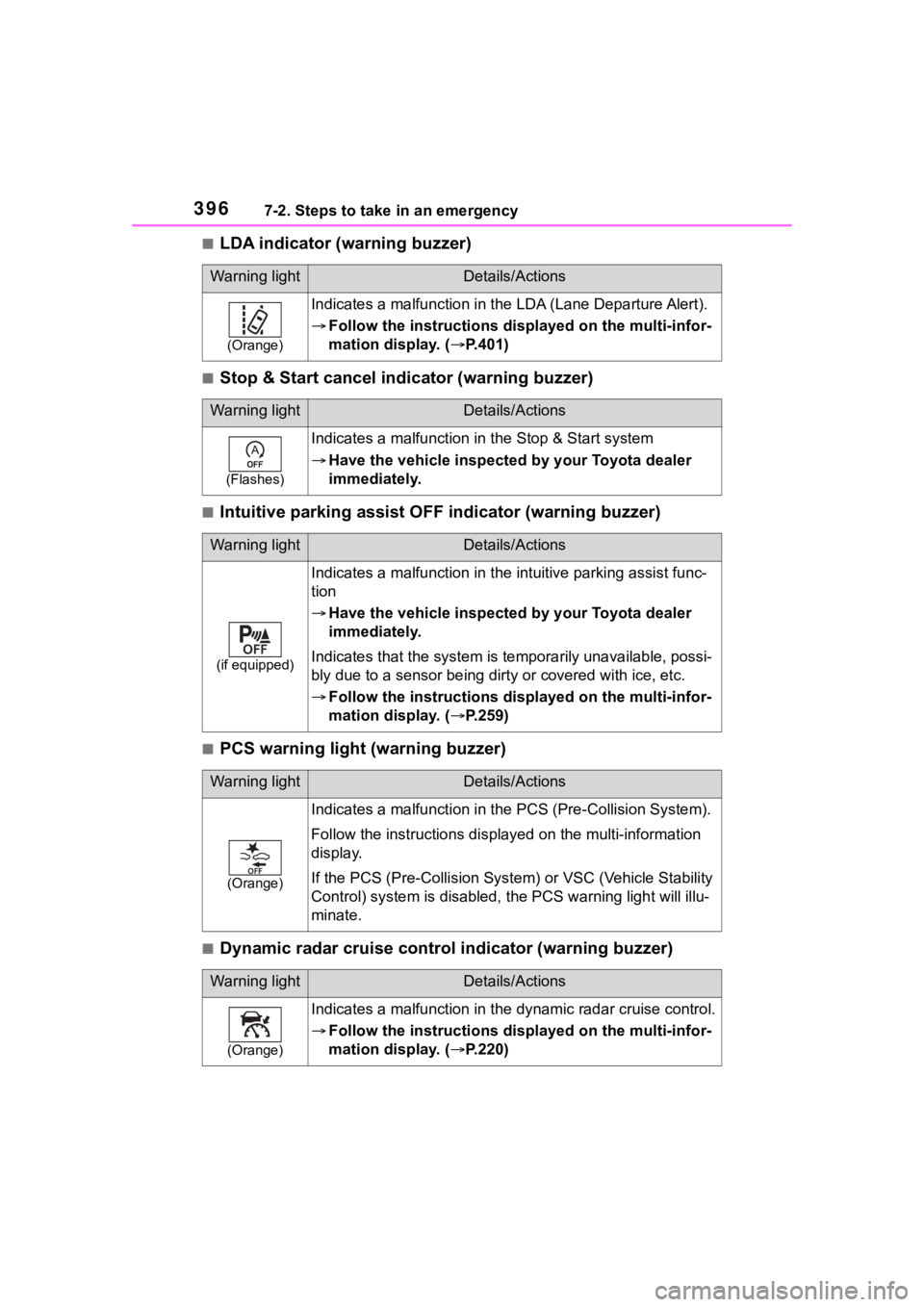
■LDA indicator (warning buzzer)
■Stop & Start cancel indicator (warning buzzer)
■Intuitive parking assist OFF indicator (warning buzzer)
■PCS warning light (warning buzzer)
■Dynamic radar cruise control indicator (warning buzzer)
Warning lightDetails/Actions
(Orange)
Indicates a malfunction in the LDA (Lane Departure Alert).
Follow the instructions di splayed on the multi-infor-
mation display. ( P.401)
Warning lightDetails/Actions
(Flashes)
Indicates a malfunction in the Stop & Start system
Have the vehicle inspected by your Toyota dealer
immediately.
Warning lightDetails/Actions
(if equipped)
Indicates a malfunction in the intuitive parking assist func-
tion
Have the vehicle inspected by your Toyota dealer
immediately.
Indicates that the system is te mporarily unavailable, possi-
bly due to a sensor being dirty or covered with ice, etc.
Follow the instructions di splayed on the multi-infor-
mation display. ( P.259)
Warning lightDetails/Actions
(Orange)
Indicates a malfuncti on in the PCS (Pre-Collision System).
Follow the instructions display ed on the multi-information
display.
If the PCS (Pre-Collision Syst em) or VSC (Vehicle Stability
Control) system is disabled, the PCS warning light will illu-
minate.
Warning lightDetails/Actions
(Orange)
Indicates a malfunction in the dynamic radar cruise control.
Follow the instructions di splayed on the multi-infor-
mation display. ( P.220)
Page 397 of 500
3977-2. Steps to take in an emergency
7
When trouble arises
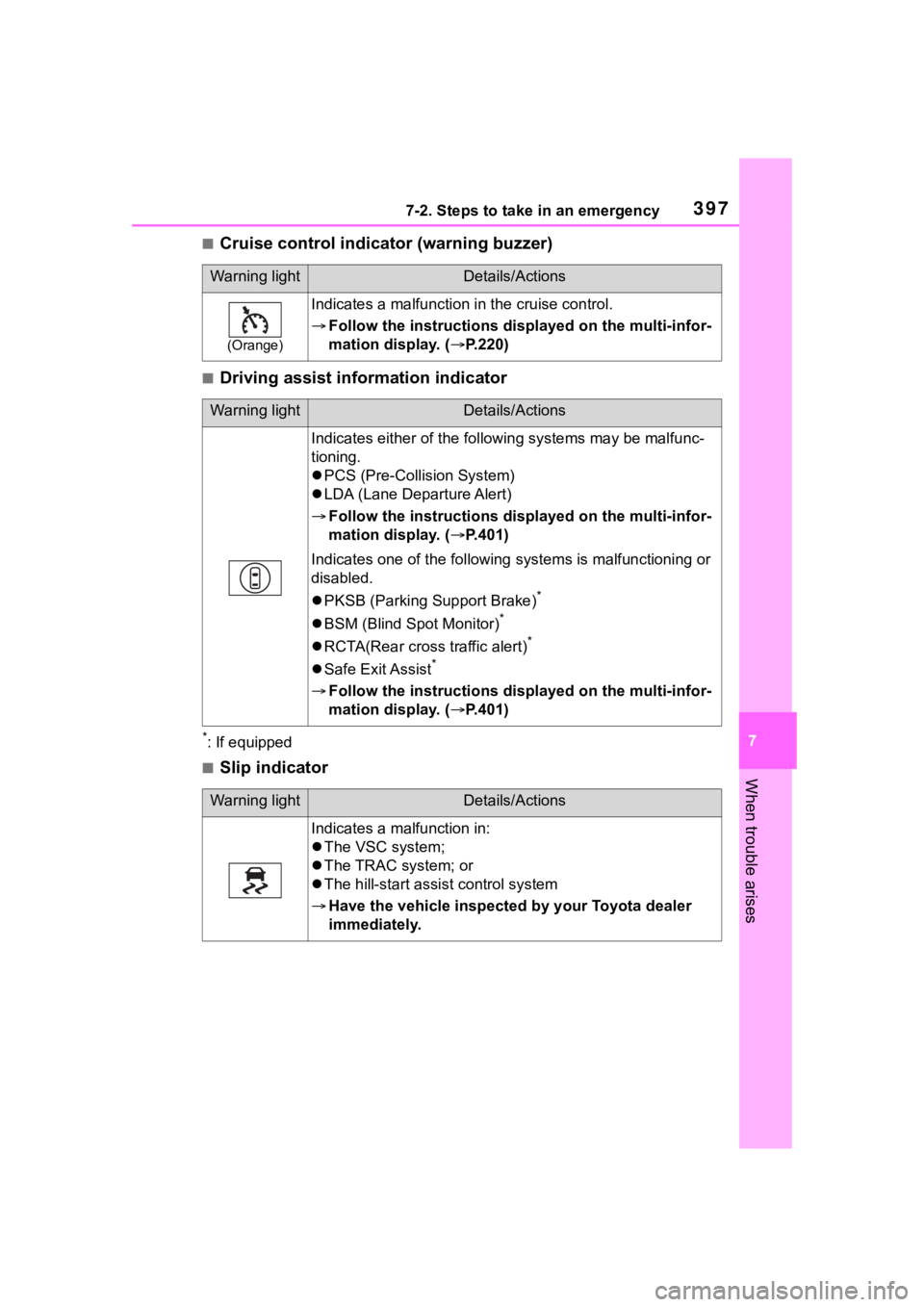
■Cruise control indicator (warning buzzer)
■Driving assist information indicator
*: If equipped
■Slip indicator
Warning lightDetails/Actions
(Orange)
Indicates a malfunction in the cruise control.
Follow the instructions di splayed on the multi-infor-
mation display. ( P.220)
Warning lightDetails/Actions
Indicates either of the follo wing systems may be malfunc-
tioning.
PCS (Pre-Collision System)
LDA (Lane Departure Alert)
Follow the instructions di splayed on the multi-infor-
mation display. ( P.401)
Indicates one of the following systems is malfunctioning or
disabled.
PKSB (Parking Support Brake)
*
BSM (Blind Spot Monitor)*
RCTA(Rear cross traffic alert)*
Safe Exit Assist*
Follow the instructions di splayed on the multi-infor-
mation display. ( P.401)
Warning lightDetails/Actions
Indicates a malfunction in:
The VSC system;
The TRAC system; or
The hill-start assist control system
Have the vehicle inspected by your Toyota dealer
immediately.
Page 401 of 500
4017-2. Steps to take in an emergency
7
When trouble arises
■Warning messages
The warning messages explained
below may differ from the actual
messages according to operation
conditions and vehicle specifica-
tions.
■Warning buzzer
A buzzer may sound when a mes-
sage is displayed.
The buzzer may not be audible if the
vehicle is in a noisy location or if the
audio system volume is high.
■If “Engine Oil Level Low Add or
Replace” is displayed
The engine oil level is low. Check
NOTICE
■To ensure the tire pressure
warning system operates
properly
Do not install tires with different
specifications or makers, as the
tire pressure warning system may
not operate properly.
If a war ning message
is displayed
The multi-information dis-
play shows warnings for
system malfunctions and
incorrectly performed oper-
ations, and messages that
indicate a need for mainte-
nance. When a message is
displayed, perform the
appropriate corrective
action for the message.
If a warning message is dis-
played again after the
appropriate actions have
been performed, contact
your Toyota dealer.
Additionally, if a warning
light comes on or flashes at
the same time that a warn-
ing message is displayed,
take the appropriate correc-
tive action for the warning
light. ( P.391)
Page 402 of 500
4027-2. Steps to take in an emergency
the level of the engine oil, and add if
necessary.
This message may appear if the
vehicle is stopped on a slope. Move
the vehicle to a level surface and
check to see if the message disap-
pears.
■If “Engine Stopped Steering
Power Low” is displayed
This message is displayed if the
engine is stopped while driving.
When steering wheel operations are
heavier than usual, grip the steering
wheel firmly and operate it using
more force th an usual.
■If “Auto power off to conserve
battery” is displayed
Power was cut off due to the auto-
matic power off function. Next time
when starting the engine, increase
the engine speed slightly and main-
tain that level for approximately 5
minutes to recha rge the battery.
■If “Headlight System Malfunc-
tion Visit Your Dealer” is dis-
played
The following systems may be mal-
functioning. Have the vehicle
inspected by your Toyota dealer
immediately.
●The LED headlight system
●AFS (Adaptive Fr ont-lighting Sys-
tem) (if equipped)
●The automatic headlight leveling
system (if equipped)
●Automatic High Beam
■If “AWD System Malfunction
2WD Mode Engaged Visit Your
Dealer” or “AWD System Over-
heated Switching to 2WD
Mode” is displayed
This message may be displayed
when driving under extremely high
load conditions.
Drive the vehicle at low speeds and
stop the vehicle in a safe place with
the engine operating until the mes-
sage is cleared. If the message is not cleared, have
the vehicle inspected by your Toyota
dealer.
■If “System Malfunction Visit
Your Dealer” is displayed
Indicates one of the following sys-
tems is disabled.
●PCS (Pre-Collision System)
●LTA (Lane Tracing Assist)
●LDA (Lane Departure Alert)
●AHB (Automatic High Beam)
●Dynamic radar cruise control
● RSA (Road Sign Assist) (if
equipped)
● BSM (Blind Spot Monitor) (if
equipped)
● RCTA (Rear Cross Traffic
Alert) (if equipped)
● Safe Exit Assist (if equipped)
●Intuitive parking assist (if
equipped)
●PKSB (Parking Support Brake)
(if equipped)
Have the vehicle inspected by your
Toyota dealer immediately.
■If a message that indicates the
need for visiting your Toyota
dealer is displayed
The system or part shown on the
multi-information di splay is malfunc-
tioning. Have the vehicle inspected
by your Toyota dealer immediately.
■If “System Stopped See
Owner's Manual” is displayed
Indicates one of the following sys-
tems is disabled.
●PCS (Pre-Collision System)
●LDA (Lane Departure Alert)
●LTA (Lane Tracing Assist)
●AHB (Automatic High Beam)
●Dynamic radar cruise control
Page 405 of 500
4057-2. Steps to take in an emergency
7
When trouble arises
necessary maintenance. Please
reset the message after the mainte-
nance is performed. ( P.428)
*: Refer to the separate “Scheduled
Maintenance” or “Owner’s Man-
ual Supplement” for the mainte-
nance interval applicable to your
vehicle.
■If a message that indicates the
need for referring to Owner’s
Manual is displayed
●If “Engine Coolant Temp High” is
displayed, follow the instructions
accordingly. ( P.423)
●If the following m essage is dis-
played on the multi-information
display, it may indicate a malfunc-
tion. Have the vehicle inspected
by your Toyota dealer immedi-
ately.
• “Smart Key System malfunction”
●If any of the following messages
are displayed on the multi-infor-
mation display, it may indicate a
malfunction. Immediately stop the
vehicle and contact your Toyota
dealer.
• “Braking Power Low”
• “Oil Pressure Low”
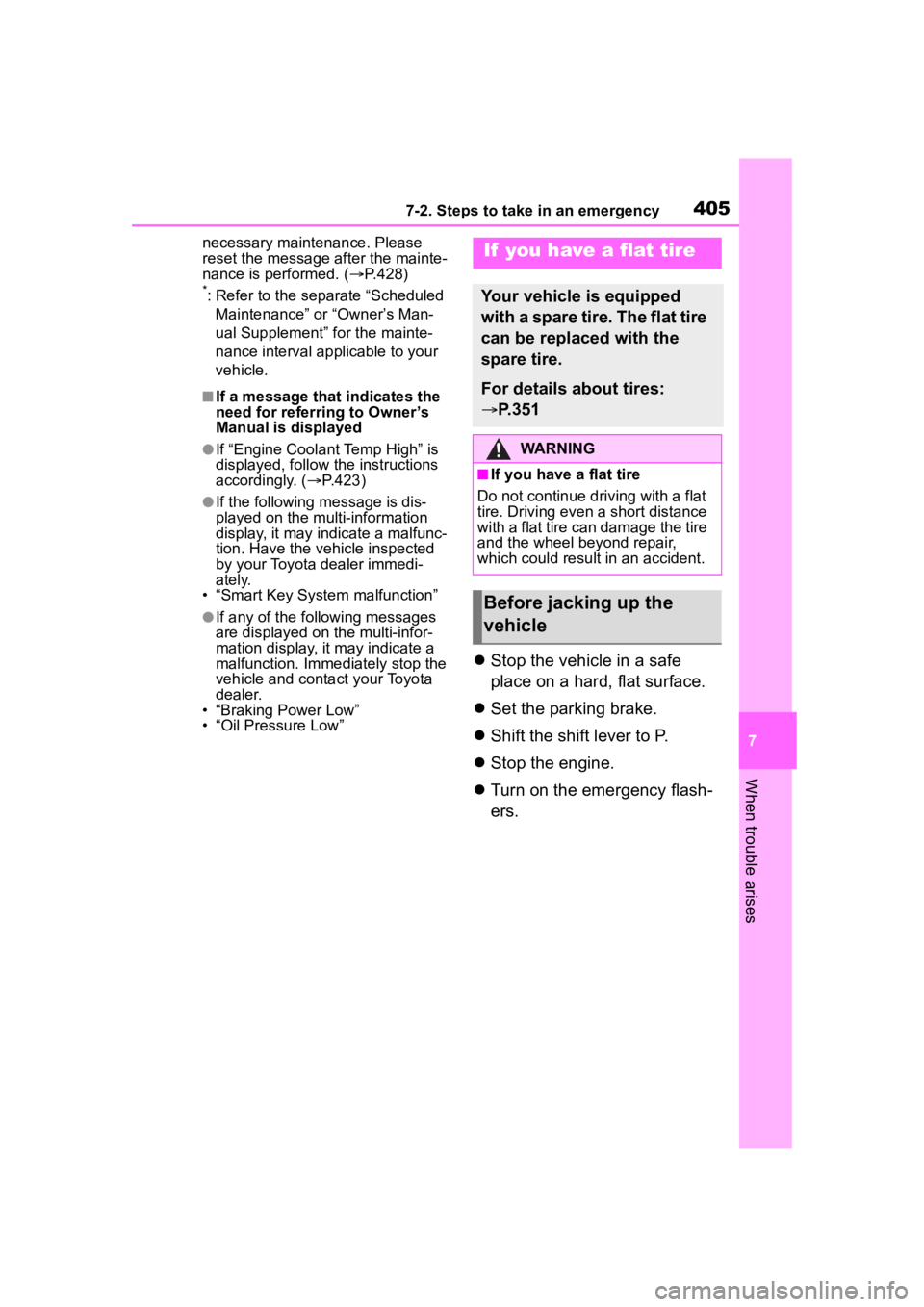
Stop the vehicle in a safe
place on a hard, flat surface.
Set the parking brake.
Shift the shift lever to P.
Stop the engine.
Turn on the emergency flash-
ers.
If you have a flat tire
Your vehicle is equipped
with a spare tire. The flat tire
can be replaced with the
spare tire.
For details about tires:
P.351
WARNING
■If you have a flat tire
Do not continue driving with a flat
tire. Driving even a short distance
with a flat tire can damage the tire
and the wheel beyond repair,
which could resul t in an accident.
Before jacking up the
vehicle
Page 418 of 500
4187-2. Steps to take in an emergency
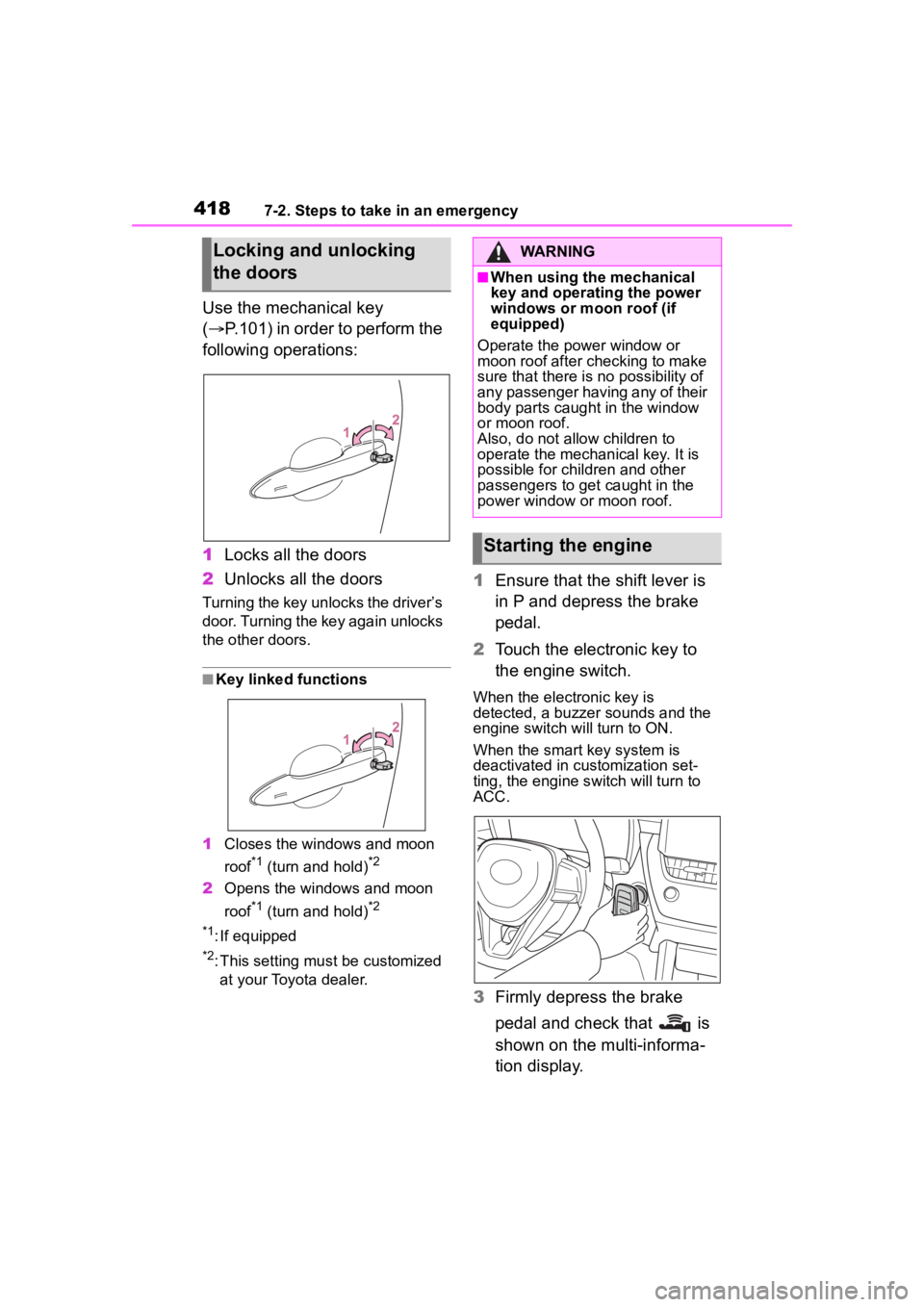
Use the mechanical key
(P.101) in order to perform the
following operations:
1 Locks all the doors
2 Unlocks all the doors
Turning the key unlocks the driver’s
door. Turning the key again unlocks
the other doors.
■Key linked functions
1 Closes the windows and moon
roof
*1 (turn and hold)*2
2Opens the windows and moon
roof
*1 (turn and hold)*2
*1
: If equipped
*2: This setting mu st be customized
at your Toyota dealer.
1 Ensure that the shift lever is
in P and depress the brake
pedal.
2 Touch the electronic key to
the engine switch.
When the electronic key is
detected, a buzzer sounds and the
engine switch will turn to ON.
When the smart key system is
deactivated in customization set-
ting, the engine switch will turn to
ACC.
3Firmly depress the brake
pedal and check that is
shown on the multi-informa-
tion display.
Locking and unlocking
the doorsWARNING
■When using the mechanical
key and operating the power
windows or moon roof (if
equipped)
Operate the power window or
moon roof after checking to make
sure that there is no possibility of
any passenger having any of their
body parts caught in the window
or moon roof.
Also, do not allo w children to
operate the mechanical key. It is
possible for children and other
passengers to get caught in the
power window or moon roof.
Starting the engine
Page 449 of 500
4498-2. Customization
8
Vehicle specifications
8-2.Customization
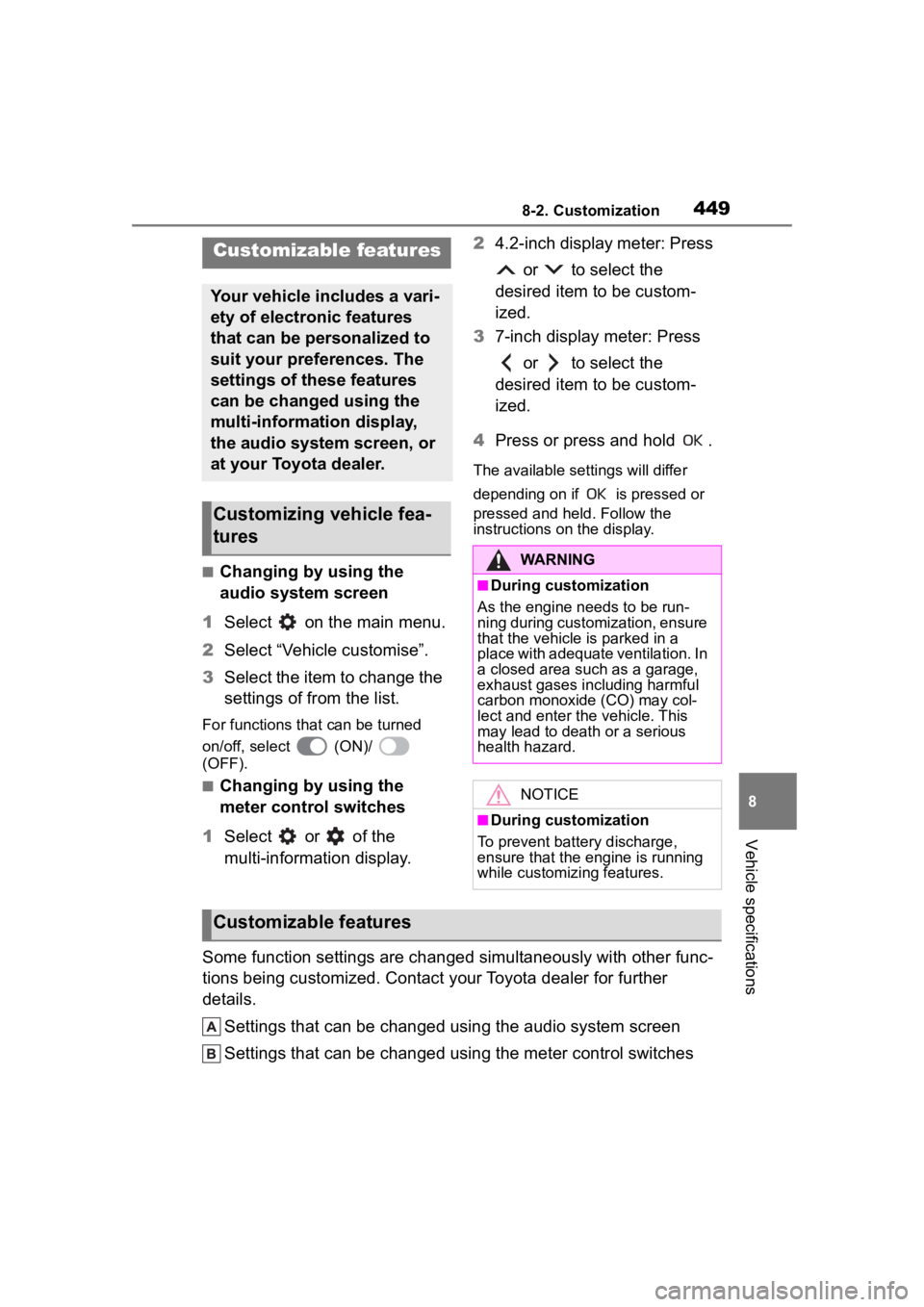
■Changing by using the
audio system screen
1 Select on the main menu.
2 Select “Vehicle customise”.
3 Select the item to change the
settings of from the list.
For functions that can be turned
on/off, select (ON)/
(OFF).
■Changing by using the
meter control switches
1 Select or of the
multi-information display. 2
4.2-inch display meter: Press
or to select the
desired item to be custom-
ized.
3 7-inch display meter: Press
or to select the
desired item to be custom-
ized.
4 Press or press and hold .
The available settings will differ
depending on if is pressed or
pressed and held. Follow the
instructions on the display.
Some function settings are changed simultaneously with other fu nc-
tions being customized. Contact y our Toyota dealer for further
details.
Settings that can be changed using the audio system screen
Settings that can be changed using the meter control switches
Customizable features
Your vehicle includes a vari-
ety of electronic features
that can be personalized to
suit your preferences. The
settings of these features
can be changed using the
multi-information display,
the audio system screen, or
at your Toyota dealer.
Customizing vehicle fea-
tures
WARNING
■During customization
As the engine needs to be run-
ning during customization, ensure
that the vehicle is parked in a
place with adequate ventilation. In
a closed area such as a garage,
exhaust gases in cluding harmful
carbon monoxide (CO) may col-
lect and enter the vehicle. This
may lead to death or a serious
health hazard.
NOTICE
■During customization
To prevent batte ry discharge,
ensure that the engine is running
while customizing features.
Customizable features
Page 450 of 500
4508-2. Customization
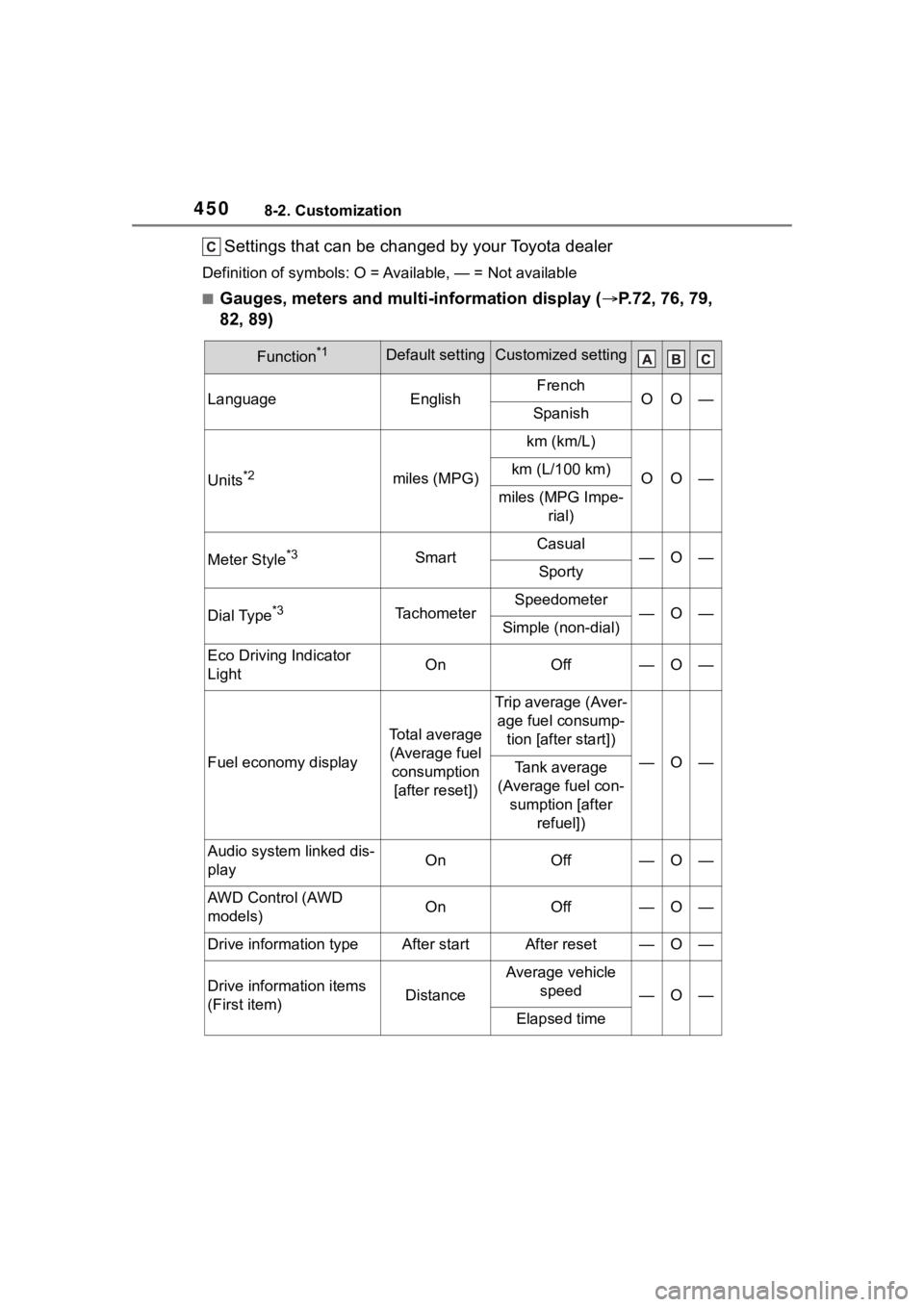
Settings that can be changed by your Toyota dealer
Definition of symbols: O = Available, — = Not available
■Gauges, meters and multi-information display ( P.72, 76, 79,
82, 89)
Function*1Default settingCustomized setting
LanguageEnglishFrenchOO—Spanish
Units*2miles (MPG)
km (km/L)
OO—km (L/100 km)
miles (MPG Impe- rial)
Meter Style*3SmartCasual—O—Sporty
Dial Type*3TachometerSpeedometer—O—Simple (non-dial)
Eco Driving Indicator
LightOnOff—O—
Fuel economy display
Total average (Average fuel consumption [after reset])
Trip average (Aver- age fuel consump- tion [after start])
—O—Tank average
(Average fuel con- sumption [after refuel])
Audio system linked dis-
playOnOff—O—
AWD Control (AWD
models)OnOff—O—
Drive information typeAfter startAfter reset—O—
Drive information items
(First item)Distance
Average vehicle speed
—O—
Elapsed time
Page 458 of 500
4588-2. Customization
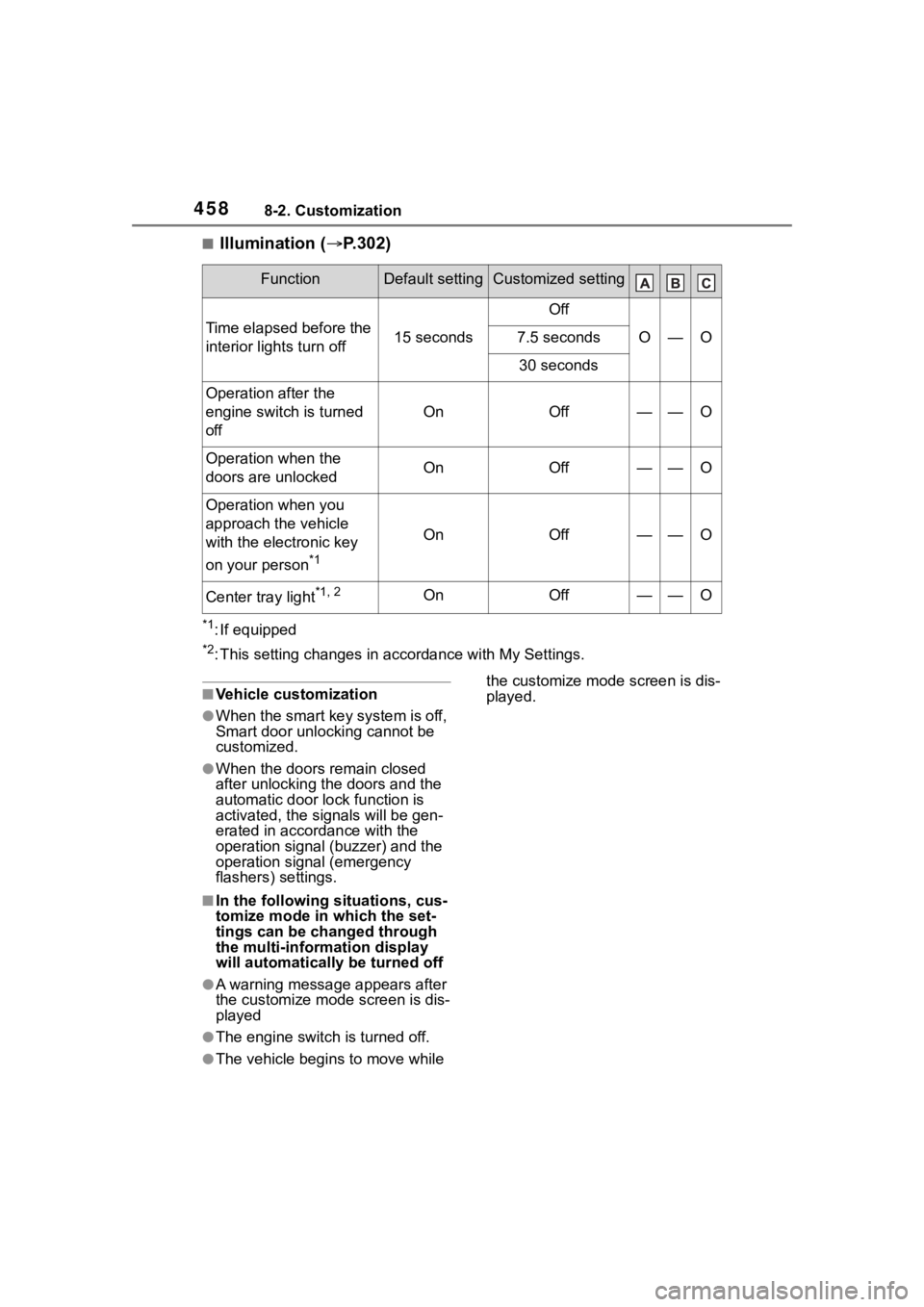
■Illumination (P.302)
*1: If equipped
*2: This setting changes in ac cordance with My Settings.
■Vehicle customization
●When the smart key system is off,
Smart door unlocking cannot be
customized.
●When the doors remain closed
after unlocking the doors and the
automatic door lock function is
activated, the signals will be gen-
erated in accordance with the
operation signal (buzzer) and the
operation signal (emergency
flashers) settings.
■In the following situations, cus-
tomize mode in which the set-
tings can be changed through
the multi-information display
will automatically be turned off
●A warning message appears after
the customize mode screen is dis-
played
●The engine switch is turned off.
●The vehicle begins to move while the customize mode screen is dis-
played.
FunctionDefault settingCustomized setting
Time elapsed before the
interior lights turn off15 seconds
Off
O—O7.5 seconds
30 seconds
Operation after the
engine switch is turned
off
OnOff——O
Operation when the
doors are unlockedOnOff——O
Operation when you
approach the vehicle
with the electronic key
on your person
*1
OnOff——O
Center tray light*1, 2OnOff——O
Page 477 of 500
477Alphabetical Index
Daytime running lights/parking lightsReplacing light bulbs ............ 375
Defogger Outside rear view mirrors ... 288, 295
Rear window ................ 288, 295
Windshield.................... 287, 294
Differential Rear differential oil ............... 433
Dimensions ............................. 428
Dinghy towing ........................ 161
Display Cruise control ....................... 231
Dynamic radar cruise control 223
Intuitive parking assist .......... 259
Multi-information display .. 82, 89
RCTA .................................... 249
Warning message ................ 401
Display change button ....... 77, 80
Do-it-yourself maintenance ... 335
Door lock Back door ............................. 108
Key ....................................... 104
Side doors ............................ 103
Smart key system................. 118
Wireless remote control ....... 100
Doors Automatic door locking and unlocking system................ 107
Back door ............................. 108
Door glasses ........................ 132
Door lock .............................. 108
Open door warning buzzer . 105, 107
Outside rear view mirrors ..... 130
Rear door child-protectors.... 107
Drive distance ..................... 85, 92
Drive information ............... 85, 92
Drive-Start Control (DSC) Sudden start restraint control147 Driving
Break-in tips .........................142
Correct driving posture ...........23
Procedures ...........................141
Winter drive tips....................279
Driving information display83, 90
Driving range ................83, 84, 90
Driving support system informa- tion display........................85, 91
DSC (Drive-Start Control) Sudden start restraint control147
Dynamic radar cruise control 220
Dynamic Torque Control AWD system ...................................274
E
Eco Driving Indicator .........84, 90
Eco Driving Indicator Light84, 90
EDR (Event data recorder) .........8
Elapsed time .......................85, 92
Electric Power Steering (EPS) ...............................................274Warning light.........................393
Electronic key ...........................98 Battery-saving function ......... 119
If the electronic key does not operate properly .................417
Replacing the battery ...........368
Emergency Driving Stop System ...............................................235
Emergency flashers ...............382
Emergency, in case of If a warning buzzer sounds ..391
If a warning light turns on .....391
If a warning message is dis-played .................................401
If the battery is d ischarged ...419
If the electronic key does not operate properly .................417
If the engine will not start......415
If the vehicle is submerged or water on the road is rising ..384