charging TOYOTA COROLLA HATCHBACK 2022 Owners Manual (in English)
[x] Cancel search | Manufacturer: TOYOTA, Model Year: 2022, Model line: COROLLA HATCHBACK, Model: TOYOTA COROLLA HATCHBACK 2022Pages: 758, PDF Size: 155.26 MB
Page 84 of 758
821-4. Theft deterrent system
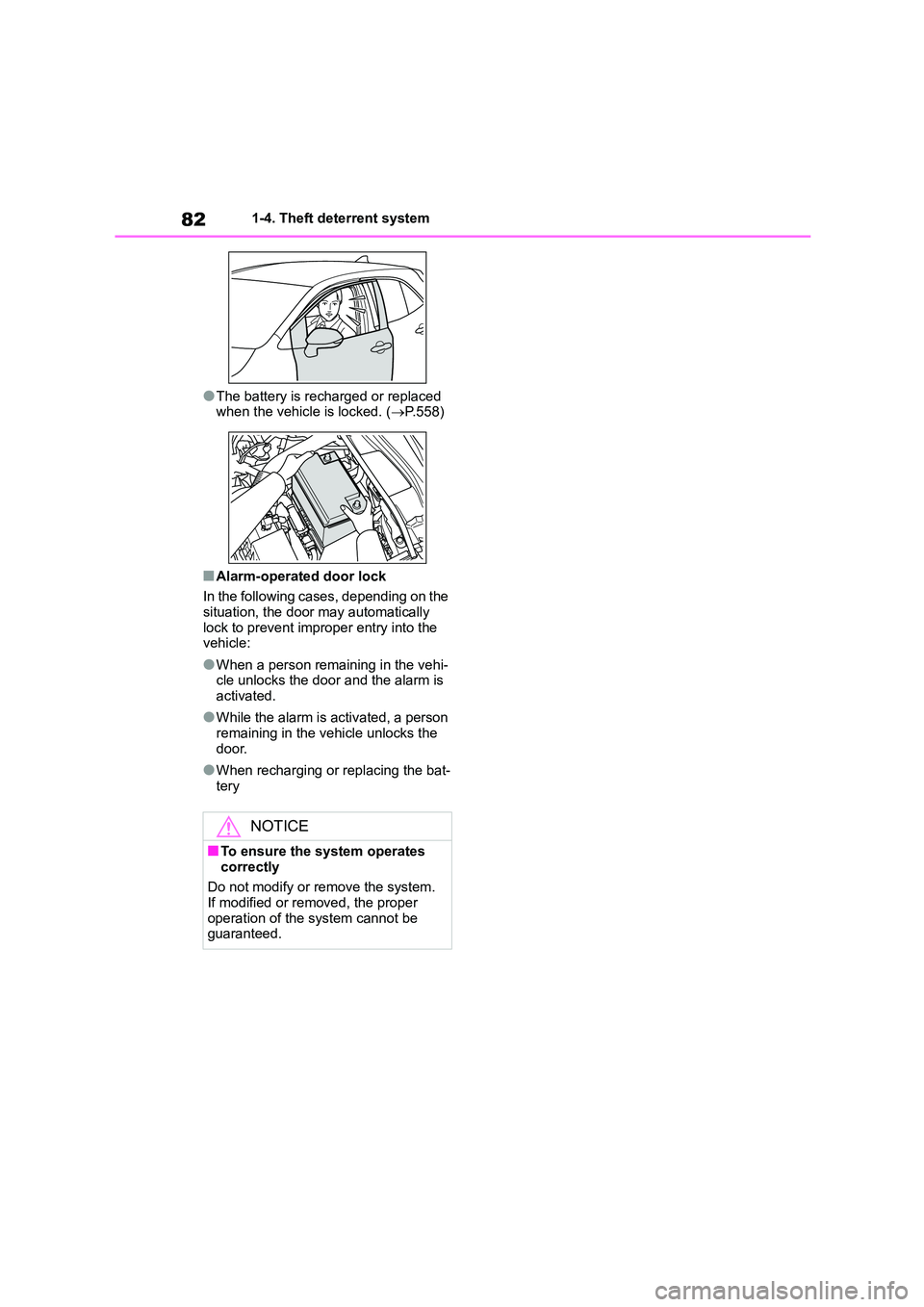
●The battery is recharged or replaced
when the vehicle is locked. ( P.558)
■Alarm-operated door lock
In the following cases, depending on the situation, the door may automatically
lock to prevent improper entry into the
vehicle:
●When a person remaining in the vehi-
cle unlocks the door and the alarm is activated.
●While the alarm is activated, a person remaining in the vehicle unlocks the
door.
●When recharging or replacing the bat-
tery
NOTICE
■To ensure the system operates
correctly
Do not modify or remove the system.
If modified or removed, the proper
operation of the system cannot be guaranteed.
Page 87 of 758
85
2
2-1. Instrument cluster
Vehicle status information and indicators
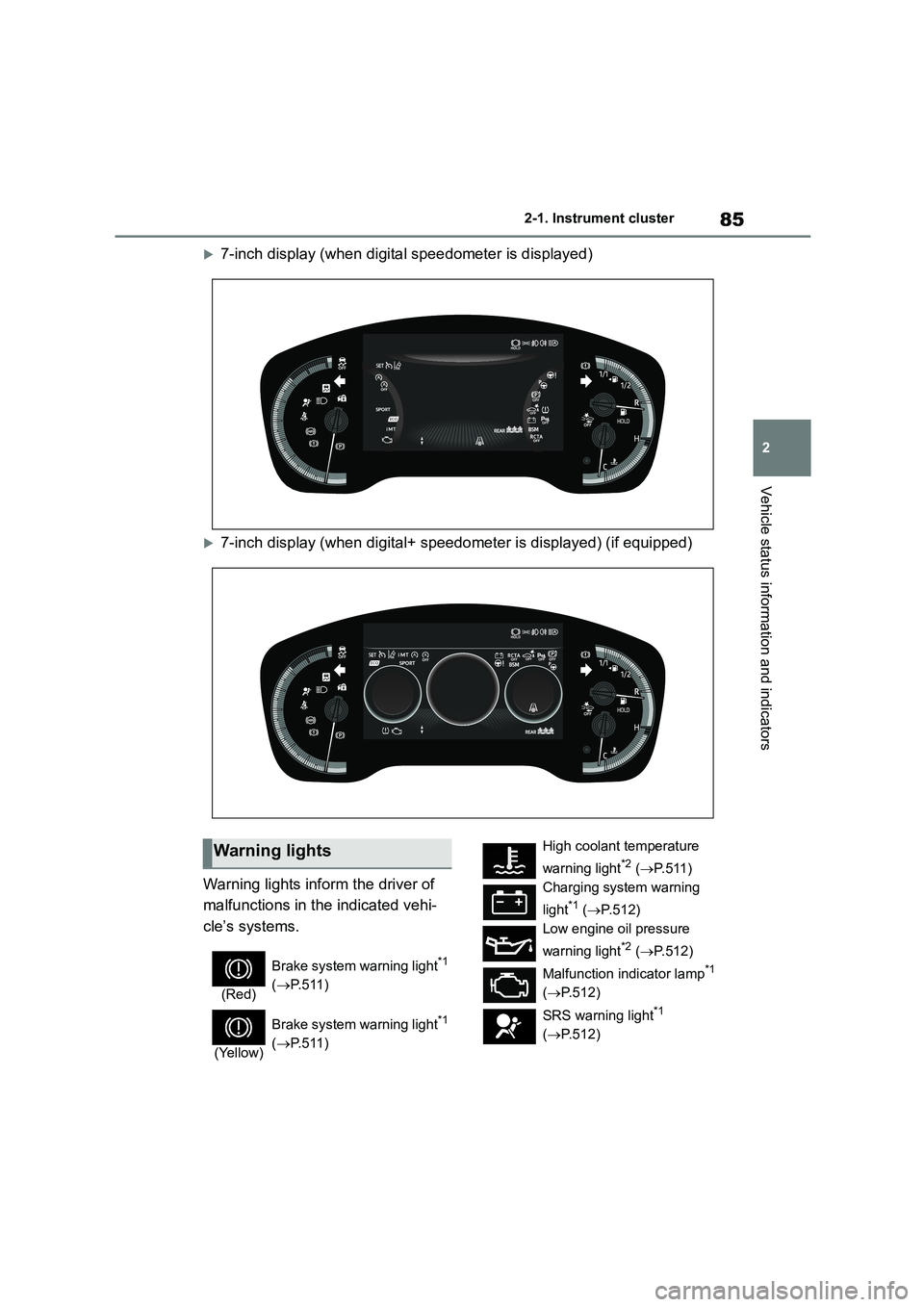
7-inch display (when digital speedometer is displayed)
7-inch display (when digital+ speedometer is displayed) (if equipped)
Warning lights inform the driver of
malfunctions in the indicated vehi-
cle’s systems.
Warning lights
(Red)
Brake system warning light*1
( P. 5 1 1 )
(Yellow)
Brake system warning light*1
( P. 5 1 1 )
High coolant temperature
warning light*2 ( P.511)
Charging system warning
light*1 ( P.512)
Low engine oil pressure
warning light*2 ( P.512)
Malfunction indicator lamp*1
( P.512)
SRS warning light*1
( P.512)
Page 117 of 758
115
3
3-1. Key information
Before driving
Vehicles with a smart entry & start
system
●The standard battery life is 1 to 2
years.
●If the battery becomes low, an alarm
will sound in the cabin and a message will be shown on the multi-information
display when the engine is stopped.
●To reduce key battery depletion when
the electronic key is to not be used for
long periods of time, set the electronic key to the batter y-saving mode.
( P.138)
●As the electronic key always receives
radio waves, the battery will become
depleted even if the electronic key is not used. The following symptoms
indicate that the electronic key battery
may be depleted. Replace the battery when necessary. ( P.490)
• The smart entry & start system or the
wireless remote control does not oper- ate.
• The detection area becomes smaller.
• The LED indicator on the key surface does not turn on.
●To avoid serious deterioration, do not leave the electronic key within 1 m (3
ft.) of the following electrical appli-
ances that produce a magnetic field: •TVs
• Personal computers
• Cellular phones, cordless phones and battery chargers
• Recharging cellular phones or cord-
less phones • Table lamps
• Induction cookers
●If the electronic key is near the vehicle
for longer than necessary, even if the
smart entry & start system is not oper-
ated, the key battery may become depleted faster than normal.
■Replacing the battery
P.490
■If “New Key Registered Contact
Your Dealer if You Did Not Register a New Key” is shown on the
multi-information display (vehicles
with a smart entry & start system)
This message will be displayed each
time the driver’s door is opened when
the doors are unlocked from the outside for approximately 10 days after a new
electronic key has been registered.
If this message is displayed but you have not had a new electronic key regis-
tered, ask any authorized Toyota retailer
or Toyota authorized repairer, or any reli- able repairer to check if an unknown
electronic key (other than those in your
possession) has been registered.
■If a wrong key is used
The key cylinder rotates freely, isolated
from the internal mechanism.
NOTICE
■To prevent key damage
●Do not drop the keys, subject them to strong shocks or bend them.
●Do not expose the keys to high temperatures for long periods of
time.
●Do not get the keys wet or wash
them in an ultrasonic washer etc.
●Vehicles with a smart entry & start
system: Do not attach metallic or
magnetic materials to the keys or place the keys close to such materi-
als.
●Do not disassemble the keys.
●Do not attach a sticker or anything else to the surface of the key.
●Vehicles with a smart entry & start system: Do not place the keys near
objects that produce magnetic
fields, such as TVs, audio systems and induction cookers.
Page 177 of 758
175
4
4-1. Before driving
Driving
operation of the connection
between the trailer and lights after
driving for a brief period as well as
before starting off.
■Practicing driving with a cou-
pled trailer
Get the feel for turning, stopping
and reversing with the trailer
coupled by practicing in an area
with no or light traffic.
When reversing with a coupled
trailer, hold the section of the
steering wheel nearest to you
and rotate clockw ise to turn the
trailer left or counterclockwise to
turn it right. Always rotate a little
at a time to prevent steering
error. Have someone guide you
when reversing to lessen the risk
of an accident.
■Increasing vehicle-to-vehicle
distance
At a speed of 10 km/h (6 mph), the
distance to the vehicle running
ahead of you should be equivalent
to or greater than the combined
length of your vehicle and trailer.
Avoid sudden braking that may
cause skidding. Otherwise, the
vehicle may spin out of control. This
is especially true when driving on
wet or slippery road surfaces.
■Sudden acceleration/steering
input/cornering
Executing sharp turns when towing
may result in th e trailer colliding
with your vehicle. Decelerate well in
advance when approaching turns
and take them slowly and carefully
to avoid sudden braking.
■Important points regarding
turning
The wheels of the tr ailer will travel
closer to the inside of the curve
than the wheels of the vehicle. To
make allowance for this, take the
turns wider than you would nor-
mally do.
■Important points regarding
stability
Vehicle movement resulting from
uneven road surfaces and strong
crosswinds will affect handling. The
vehicle may also be rocked by
passing buses or large trucks. Fre-
quently check behind when moving
alongside such vehicles. As soon
as such vehicle movement occurs,
immediately start to decelerate
smoothly by slowly applying the
brakes. Always steer the vehicle
straight ahead while braking.
■Passing other vehicles
Consider the total combined length
of your vehicle and trailer and
ensure that the vehicle-to-vehicle
distance is sufficient before execut-
ing lane changes.
■Transmission information
Multidrive
To maintain engine braking effi-
ciency and charging system perfor-
mance when using engine braking,
do not use the transmission in D,
Page 178 of 758
1764-1. Before driving
must be in M and select gear step 4
or lower. ( P. 1 8 2 )
Manual transmission
Refrain from driving in 6th gear to
maintain the effectiveness of
engine braking and to maintain
charging system performance.
■If the engine overheats
Towing a loaded trailer up a long,
steep incline in temperatures
exceeding 30°C (85°F) may result
in the engine overheating. If the
engine coolant temperature gauge
indicates that the engine is over-
heating, turn the air conditioning off
immediately, leave the road and
stop the vehicle in a safe place.
( P.560)
■When parking the vehicle
Always place wheel chocks under
the wheels of both the vehicle and
trailer. Firmly set the parking brake
and shift the shift lever to P
(Multidrive) and 1 or R (manual
transmission).
WA R N I N G
Follow all the instructions described in this section. Failure to do so could
cause an accident resulting in death
or serious injury.
■Trailer towing precautions
When towing, make sure that none of the weight limits are exceeded.
( P.171)
■Vehicle speed in towing
Observe the legal maximum speeds
for trailer towing.
■Before descending hills or long declines
Reduce speed and downshift. How-
ever, never downshift suddenly while descending steep or long downhill
grades.
■Operation of the brake pedal
Do not hold the brake pedal
depressed often or for long periods of time. Doing so may result in the brake
overheating or reduce braking effects.
■To avoid accident or injury
●Vehicles with a compact spare tire:
Do not tow a trailer when the com- pact spare tire is installed on your
vehicle.
●Vehicles with the emergency tire
puncture repair kit: Do not tow a
trailer when the tire installed is repaired with the emergency tire
puncture repair kit.
●Do not use the following systems
when trailer towing.
• Cruise control (if equipped)
• Dynamic radar cruise control (if
equipped)
• Dynamic radar cruise control with
full-speed range (if equipped)
NOTICE
■Do not directly splice trailer lights
Directly splicing trailer lights may
damage your vehicle’s electrical sys- tem and cause a malfunction.
Page 185 of 758
183
4
4-2. Driving procedures
Driving
■Restraining sudden start
(Drive-Start Control)
P.163
■G AI-SHIFT
G AI-SHIFT automatically selects a suit-
able gear for sporty driving according to driver’s input and driving conditions. G
AI-SHIFT operates automatically when
the shift lever is in D and Sport mode is selected for the driving mode. (Selecting
other than Sport mode or shifting the
shift lever to the M position cancels this function.)
■After recharging/reconnecting the
battery
P.558
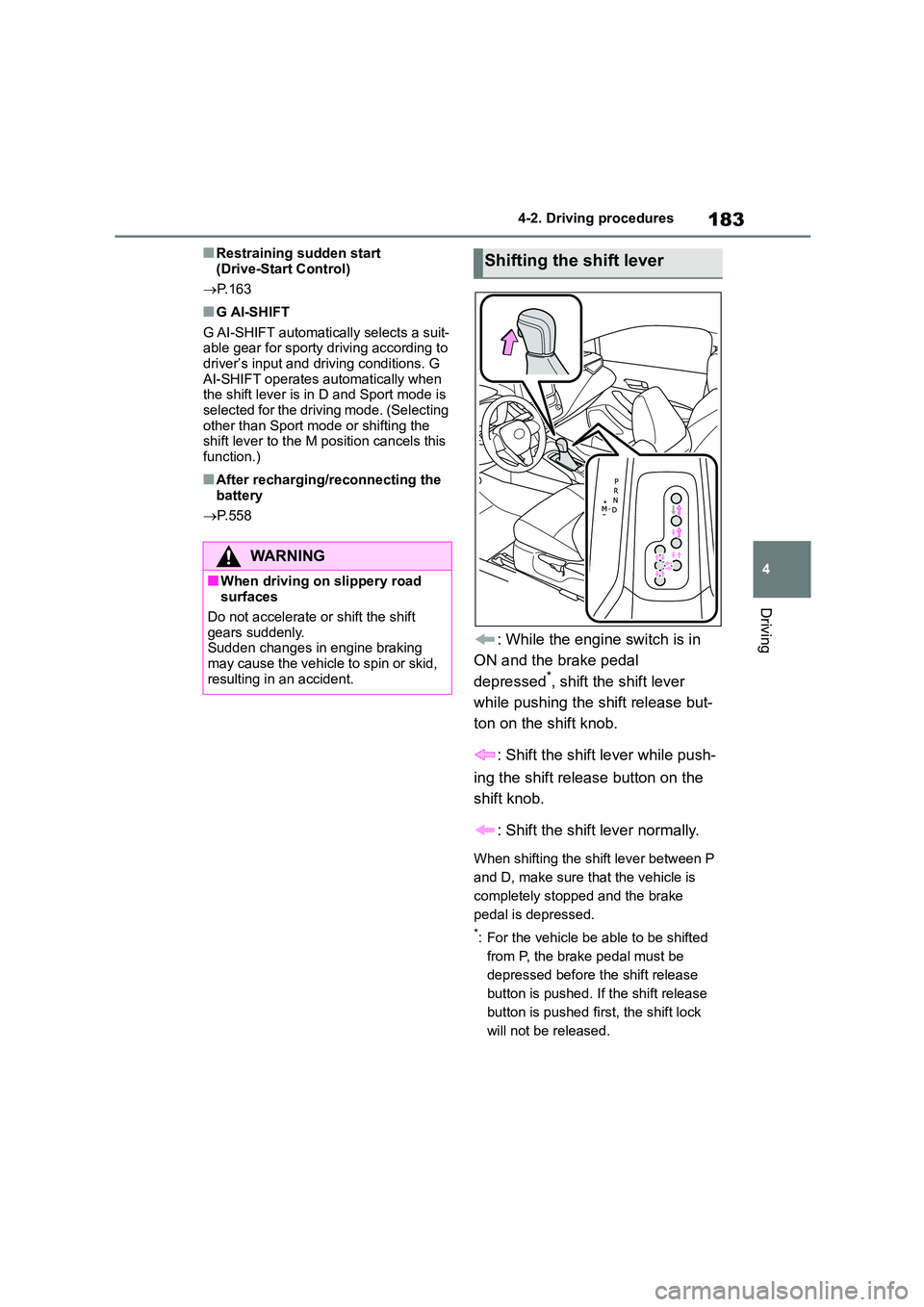
: While the engine switch is in
ON and the brake pedal
depressed*, shift the shift lever
while pushing the shift release but-
ton on the shift knob.
: Shift the shift lever while push-
ing the shift release button on the
shift knob.
: Shift the shift lever normally.
When shifting the shift lever between P
and D, make sure that the vehicle is
completely stopped and the brake
pedal is depressed.
*: For the vehicle be able to be shifted
from P, the brake pedal must be
depressed before the shift release
button is pushed. If the shift release
button is pushed first, the shift lock
will not be released.
WA R N I N G
■When driving on slippery road surfaces
Do not accelerate or shift the shift
gears suddenly. Sudden changes in engine braking
may cause the vehicle to spin or skid,
resulting in an accident.
Shifting the shift lever
Page 198 of 758
1964-3. Operating the lights and wipers
are turned on.
■Automatic headlight leveling sys-
tem (if equipped)
The level of the headlights is automati-
cally adjusted according to the number
of passengers and the loading condition of the vehicle to ensure that the head-
lights do not interfere with other road
users.
■Battery-saving function
In order to prevent the battery of the
vehicle from discharging, if the light
switch is in the or position
when the engine switch is turned off the
battery saving function will operate and
automatically turn off all the lights after approximately 20 minutes. When the
engine switch is turned to ON, the bat-
tery-saving function will be disabled. When any of the following are per-
formed, the battery-saving function is
canceled once and then reactivated. All the lights will turn off automatically 20
minutes after the battery- saving func-
tion has been reactivated:
●When the headlight switch is operated
●When a door is opened or closed
■Customization
Some functions can be customized.
( P.577)
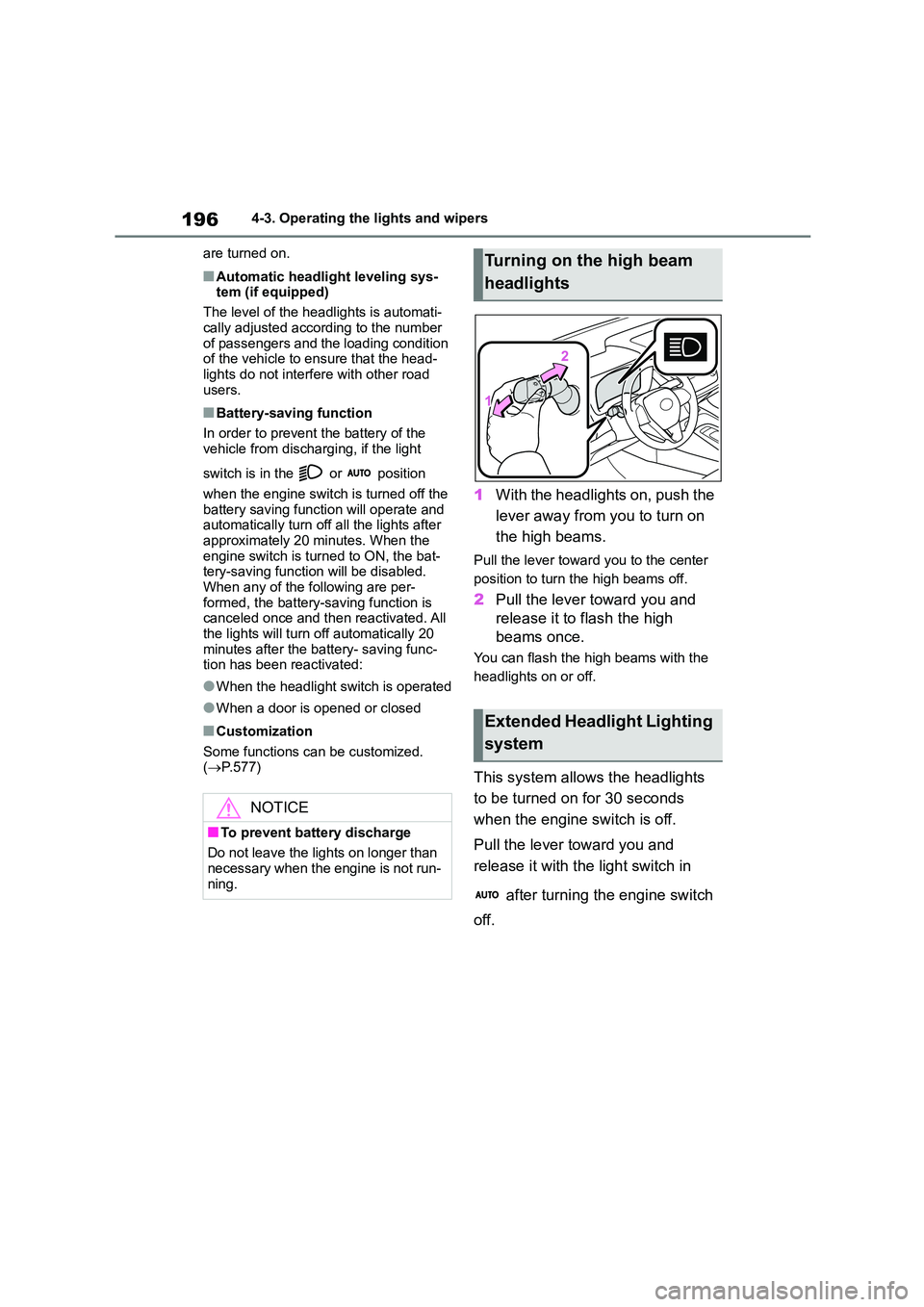
1With the headlights on, push the
lever away from you to turn on
the high beams.
Pull the lever toward you to the center
position to turn the high beams off.
2 Pull the lever toward you and
release it to flash the high
beams once.
You can flash the high beams with the
headlights on or off.
This system allows the headlights
to be turned on for 30 seconds
when the engine switch is off.
Pull the lever toward you and
release it with the light switch in
after turning the engine switch
off.
NOTICE
■To prevent battery discharge
Do not leave the lights on longer than
necessary when the engine is not run-
ning.
Turning on the high beam
headlights
Extended Headlight Lighting
system
Page 287 of 758
285
4
4-5. Using the driving support systems
Driving
■Multi-information display mes-
sages
If the following situations, and a
message may be displayed on the
multi-information display.
●When the engine cannot be stopped
by the Stop & Start system
“Press Brake Harder to Activate”
• The brake pedal is not depressed enough.
If the brake pedal is depressed fur-
ther, the system will operate.
“Non-Dedicated Battery.”
• A non-dedicated battery for the Stop &
Start system may have been installed.
The Stop & Start system does not
operate. Have the vehicle inspected by
any authorized Toyota retailer or Toyota
authorized repairer, or any reliable
repairer.
“Battery Charging”
• The battery charge amount may be
low.
Engine stop is temporarily prohibited
to prioritize charging of the battery, but if
the engine is operated for a short while,
engine stop is allowed.
• A refresh charge may be occurring,
such as when the battery is undergo-
ing a periodic recharge, for a while after the battery terminals have been
disconnected and reconnected, for a
while after the battery has been replaced, etc.
After a refresh charge of approxi-
mately 5 to 60 minutes completes, the
system can be operated.
• Continuously displayed for a long term
The battery may be deteriorated. Con-
tact any authorized Toyota retailer or
Toyota authorized repairer, or any reli-
able repairer for details.
“Stop & Start System Unavailable”
• The Stop & Start system is temporarily
disabled.
Operate the engine for a short while.
• The engine may have been started
with the hood open.
Close the hood, turn the engine
switch off, wait for 30 seconds or more,
and then start the engine.
“Preparing to Operate”
• The vehicle is being driven in a high
altitude area.
• The brake booster vacuum is low.
When the brake booster vacuum
reaches a predetermined level, the sys-
tem will be enabled.
“For Climate Control”
• The air conditioning system is being
used when the ambient temperature is high or low.
If the difference between the set tem-
perature and cabin temperature is small,
the system will be enabled.
• The windshield defogger is ON.
●When the engine automatically
restarts while stopped by the Stop & Start system
“Preparing to Operate”
• The brake pedal has been depressed further or pumped.
The system will be enabled after the
engine runs and the brake booster vac-
uum reaches a predetermined level.
“For Climate Control”
• The air conditioning system has been
turned on or is being used.
• The windshield defogger has been
turned on.
“Battery Charging”
Page 288 of 758
2864-5. Using the driving support systems
• The battery charge amount may be
low.
The engine is restarted to prioritize
battery charging. Operating the engine
for a short while allows the system to
recover.
●When the engine cannot be restarted
by the Stop & Start system
“Shift to N and Press Clutch” (vehi-
cles with a manual transmission)
When the engine is stopped by the
Stop & Start system, the shift lever was
moved to a position other than N without
depressing the clutch pedal.
■Stop & Start system warning mes- sages
If a system malfuncti on occurs, a warn-
ing message will be displayed on the multi-information display to inform the
driver of the need for caution. ( P.520)
■If the Stop & Start cancel indicator
continues to flash
The system may be malfunctioning.
Have the vehicle inspected by any
authorized Toyota retailer or Toyota authorized repairer, or any reliable
repairer.
WA R N I N G
■When the Stop & Start system is
operating
●Depress the brake pedal and apply
the parking brake when necessary
while the engine is stopped by the
Stop & Start system (while the Stop & Start indicator is on). (Except
when the brake hold system is
operating or when the vehicle comes to a controlled stop while
driving with the dynamic radar
cruise control with full-speed range in vehicle-to-vehicle distance con-
trol mode*)
●Do not leave the vehicle while the engine is stopped by the Stop &
Start system (while the Stop & Start
indicator is on). An accident may occur due to the
automatic engine start function.
●Ensure that the engine is not
stopped by the Stop & Start system
while the vehicle is in a poorly venti- lated area. The engine may restart
due to the automatic engine start
function, causing exhaust gases to collect and enter the vehicle, possi-
bly resulting in death or a serious
health hazard.
*: Vehicles with a dynamic radar
cruise control with full-speed range
NOTICE
■To ensure the system operates
correctly
If any of the following situations occur,
the Stop & Start syst em may not oper-
ate correctly. Have your vehicle checked by any authorized Toyota
retailer or Toyota authorized repairer,
or any reliable repairer.
●While the driver’s seat belt is fas-
tened, the driver’s and front pas- senger’s seat belt reminder light
flashes.
●Even though the driver’s seat belt is
not fastened, the driver’s and front
passenger’s seat belt reminder light does not illuminate.
●Even though the driver’s door is closed, the open door warning light
is illuminated or the interior light is
illuminated when the interior light switch is in the door position.
Page 453 of 758
451
6
6-4. Other interior features
Interior features
6-4.Other interior features
The USB charging port are used to
supply 2.1 A of electricity at 5 V to
external devices.
The USB charging port are for
charging only. They are not
designed for data transfer or other
purposes.
Depending on the external device,
it may not charge properly. Refer to
the manual included with the device
before using a USB charging port.
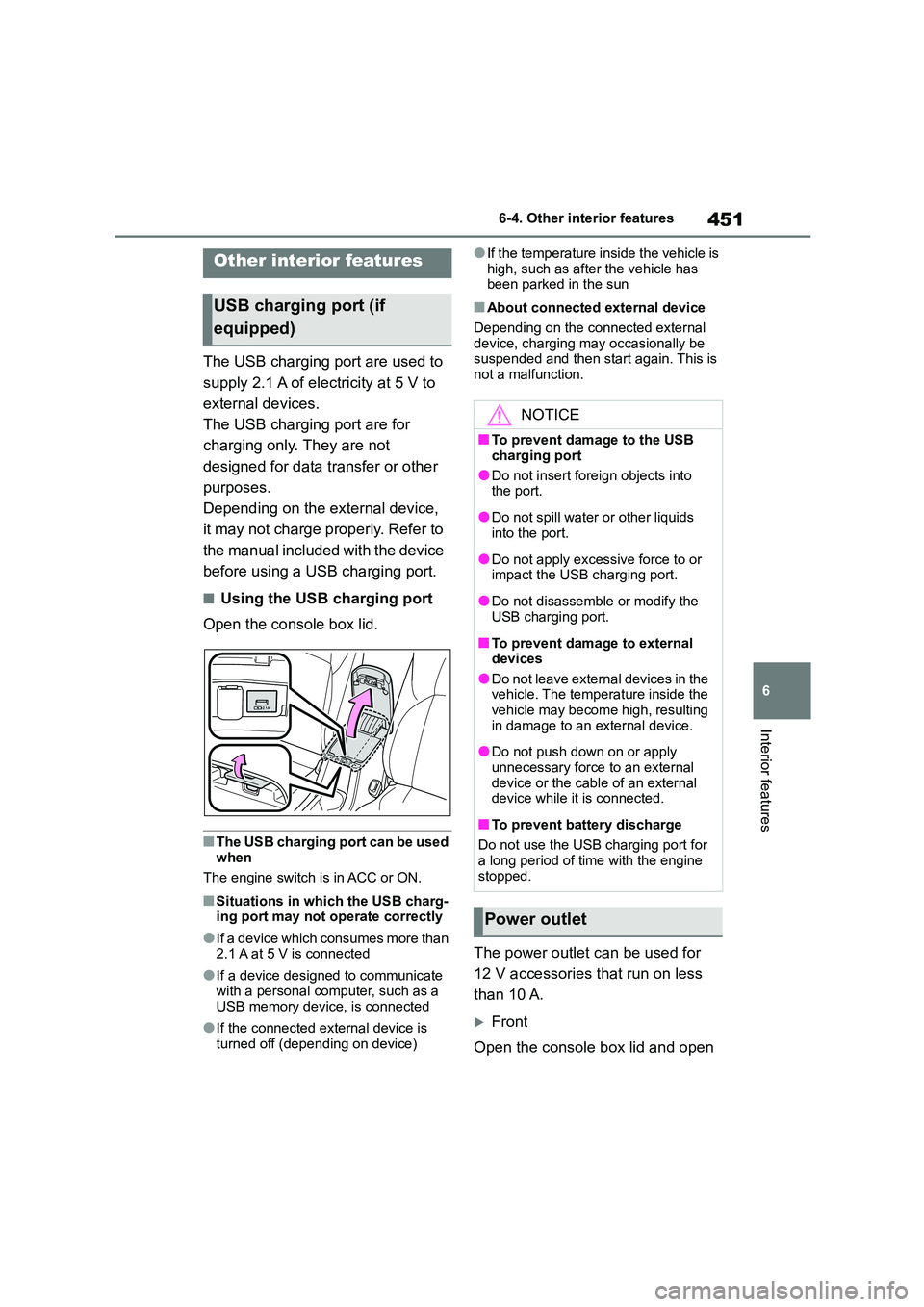
■Using the USB charging port
Open the console box lid.
■The USB charging port can be used
when
The engine switch is in ACC or ON.
■Situations in which the USB charg- ing port may not operate correctly
●If a device which consumes more than
2.1 A at 5 V is connected
●If a device designed to communicate
with a personal computer, such as a USB memory device, is connected
●If the connected external device is turned off (depending on device)
●If the temperature inside the vehicle is
high, such as afte r the vehicle has been parked in the sun
■About connected external device
Depending on the connected external
device, charging may occasionally be suspended and then start again. This is
not a malfunction.
The power outlet can be used for
12 V accessories that run on less
than 10 A.
Front
Open the console box lid and open
Other interior features
USB charging port (if
equipped)
NOTICE
■To prevent damage to the USB
charging port
●Do not insert foreign objects into
the port.
●Do not spill water or other liquids
into the port.
●Do not apply excessive force to or
impact the USB charging port.
●Do not disassemble or modify the
USB charging port.
■To prevent damage to external
devices
●Do not leave external devices in the vehicle. The temperature inside the
vehicle may become high, resulting
in damage to an external device.
●Do not push down on or apply
unnecessary force to an external device or the cable of an external
device while it is connected.
■To prevent battery discharge
Do not use the USB charging port for
a long period of time with the engine stopped.
Power outlet