turn signal TOYOTA COROLLA HATCHBACK 2022 Owners Manual (in English)
[x] Cancel search | Manufacturer: TOYOTA, Model Year: 2022, Model line: COROLLA HATCHBACK, Model: TOYOTA COROLLA HATCHBACK 2022Pages: 758, PDF Size: 155.26 MB
Page 5 of 758
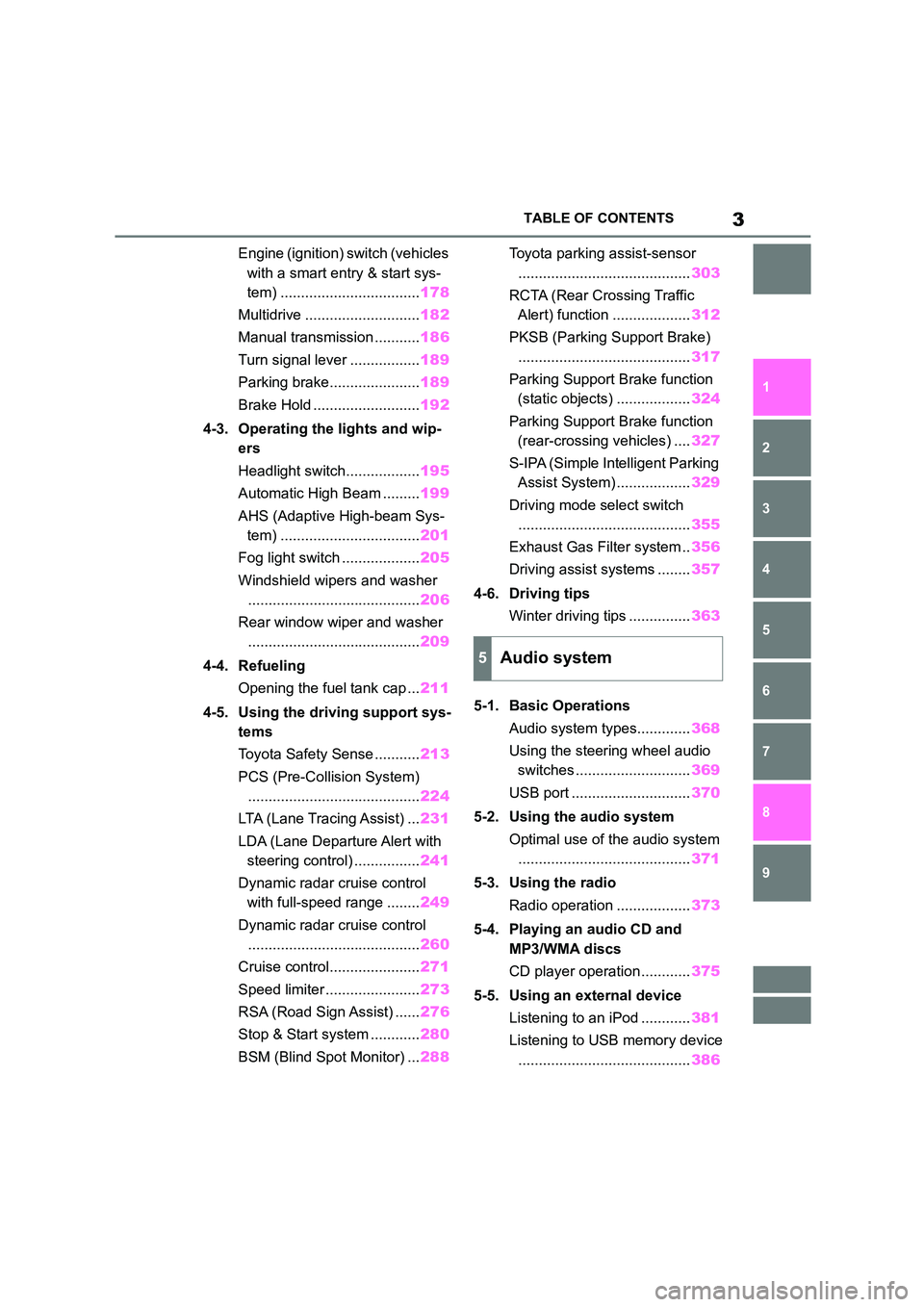
3TABLE OF CONTENTS
1
6
5
4
3
2
9
8
7
Engine (ignition) switch (vehicles
with a smart entry & start sys-
tem) .................................. 178
Multidrive ............................ 182
Manual transmission ........... 186
Turn signal lever ................. 189
Parking brake...................... 189
Brake Hold .......................... 192
4-3. Operating the lights and wip-
ers
Headlight switch.................. 195
Automatic High Beam ......... 199
AHS (Adaptive High-beam Sys-
tem) .................................. 201
Fog light switch ................... 205
Windshield wipers and washer
.......................................... 206
Rear window wiper and washer
.......................................... 209
4-4. Refueling
Opening the fuel tank cap ... 211
4-5. Using the driving support sys-
tems
Toyota Safety Sense ........... 213
PCS (Pre-Collision System)
.......................................... 224
LTA (Lane Tracing Assist) ... 231
LDA (Lane Departure Alert with
steering control) ................ 241
Dynamic radar cruise control
with full-speed range ........ 249
Dynamic radar cruise control
.......................................... 260
Cruise control...................... 271
Speed limiter ....................... 273
RSA (Road Sign Assist) ...... 276
Stop & Start system ............ 280
BSM (Blind Spot Monitor) ... 288
Toyota parking assist-sensor
.......................................... 303
RCTA (Rear Crossing Traffic
Alert) function ................... 312
PKSB (Parking Support Brake)
.......................................... 317
Parking Support Brake function
(static objects) .................. 324
Parking Support Brake function
(rear-crossing vehicles) .... 327
S-IPA (Simple Intelligent Parking
Assist System) .................. 329
Driving mode select switch
.......................................... 355
Exhaust Gas Filter system .. 356
Driving assist systems ........ 357
4-6. Driving tips
Winter driving tips ............... 363
5-1. Basic Operations
Audio system types............. 368
Using the steering wheel audio
switches ............................ 369
USB port ............................. 370
5-2. Using the audio system
Optimal use of the audio system
..........................................371
5-3. Using the radio
Radio operation .................. 373
5-4. Playing an audio CD and
MP3/WMA discs
CD player operation ............ 375
5-5. Using an external device
Listening to an iPod ............ 381
Listening to USB memory device
.......................................... 386
5Audio system
Page 14 of 758
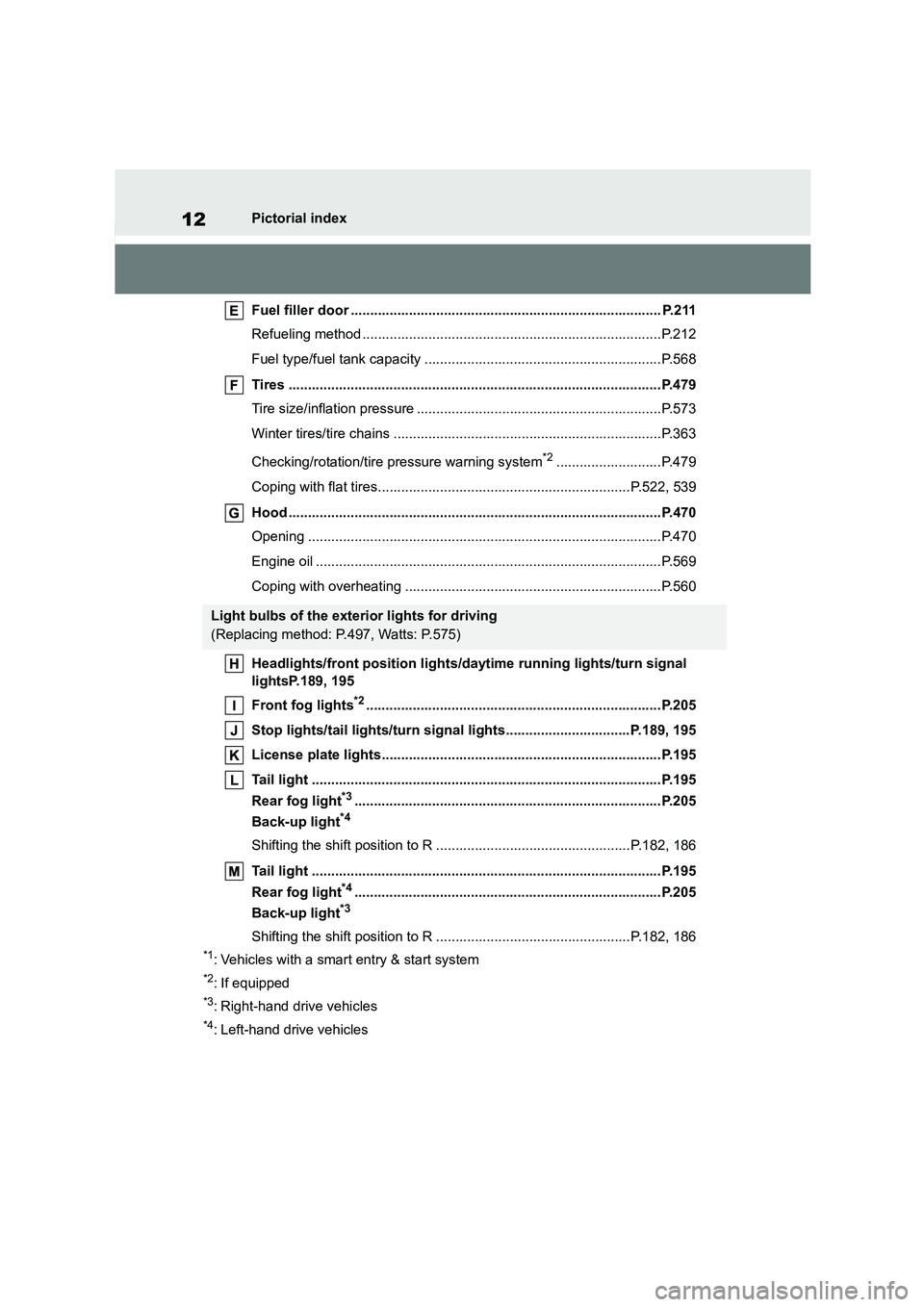
12Pictorial index
Fuel filler door ................................................................................ P.211
Refueling method .............................................................................P.212
Fuel type/fuel tank capacity .............................................................P.568
Tires ................................................................................................P.479
Tire size/inflation pressure ...............................................................P.573
Winter tires/tire chains .....................................................................P.363
Checking/rotation/tire pressure warning system*2...........................P.479
Coping with flat tires.................................................................P.522, 539
Hood ................................................................................................P.470
Opening ...........................................................................................P.470
Engine oil .........................................................................................P.569
Coping with overheating ..................................................................P.560
Headlights/front position lights/daytime running lights/turn signal
lightsP.189, 195
Front fog lights*2............................................................................P.205
Stop lights/tail lights/turn signal lights................................P.189, 195
License plate lights........................................................................P.195
Tail light ..........................................................................................P.195
Rear fog light*3...............................................................................P.205
Back-up light*4
Shifting the shift position to R ..................................................P.182, 186
Tail light ..........................................................................................P.195
Rear fog light*4...............................................................................P.205
Back-up light*3
Shifting the shift position to R ..................................................P.182, 186
*1: Vehicles with a smart entry & start system
*2: If equipped
*3: Right-hand drive vehicles
*4: Left-hand drive vehicles
Light bulbs of the exterior lights for driving
(Replacing method: P.497, Watts: P.575)
Page 16 of 758
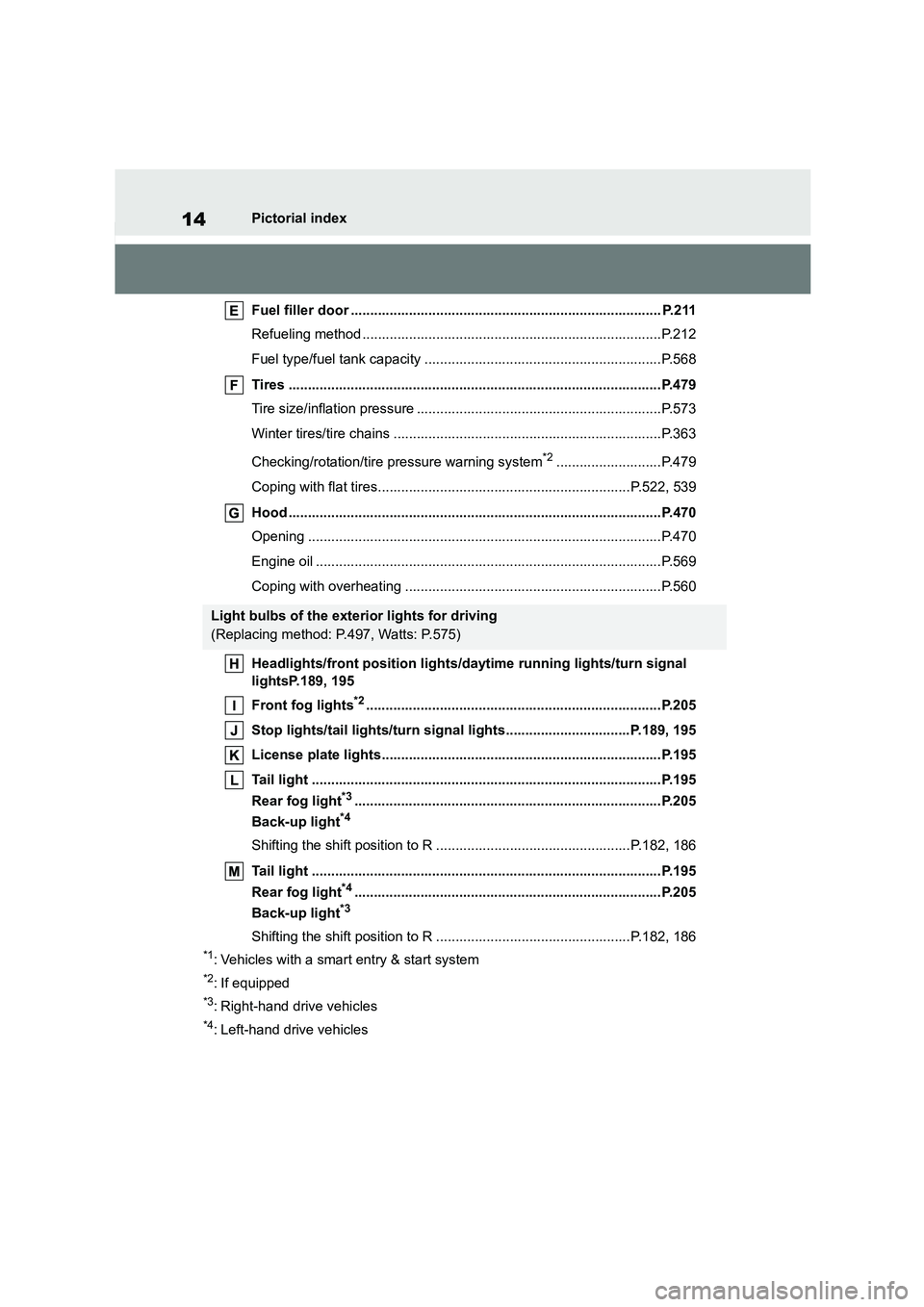
14Pictorial index
Fuel filler door ................................................................................ P.211
Refueling method .............................................................................P.212
Fuel type/fuel tank capacity .............................................................P.568
Tires ................................................................................................P.479
Tire size/inflation pressure ...............................................................P.573
Winter tires/tire chains .....................................................................P.363
Checking/rotation/tire pressure warning system*2...........................P.479
Coping with flat tires.................................................................P.522, 539
Hood ................................................................................................P.470
Opening ...........................................................................................P.470
Engine oil .........................................................................................P.569
Coping with overheating ..................................................................P.560
Headlights/front position lights/daytime running lights/turn signal
lightsP.189, 195
Front fog lights*2............................................................................P.205
Stop lights/tail lights/turn signal lights................................P.189, 195
License plate lights........................................................................P.195
Tail light ..........................................................................................P.195
Rear fog light*3...............................................................................P.205
Back-up light*4
Shifting the shift position to R ..................................................P.182, 186
Tail light ..........................................................................................P.195
Rear fog light*4...............................................................................P.205
Back-up light*3
Shifting the shift position to R ..................................................P.182, 186
*1: Vehicles with a smart entry & start system
*2: If equipped
*3: Right-hand drive vehicles
*4: Left-hand drive vehicles
Light bulbs of the exterior lights for driving
(Replacing method: P.497, Watts: P.575)
Page 18 of 758
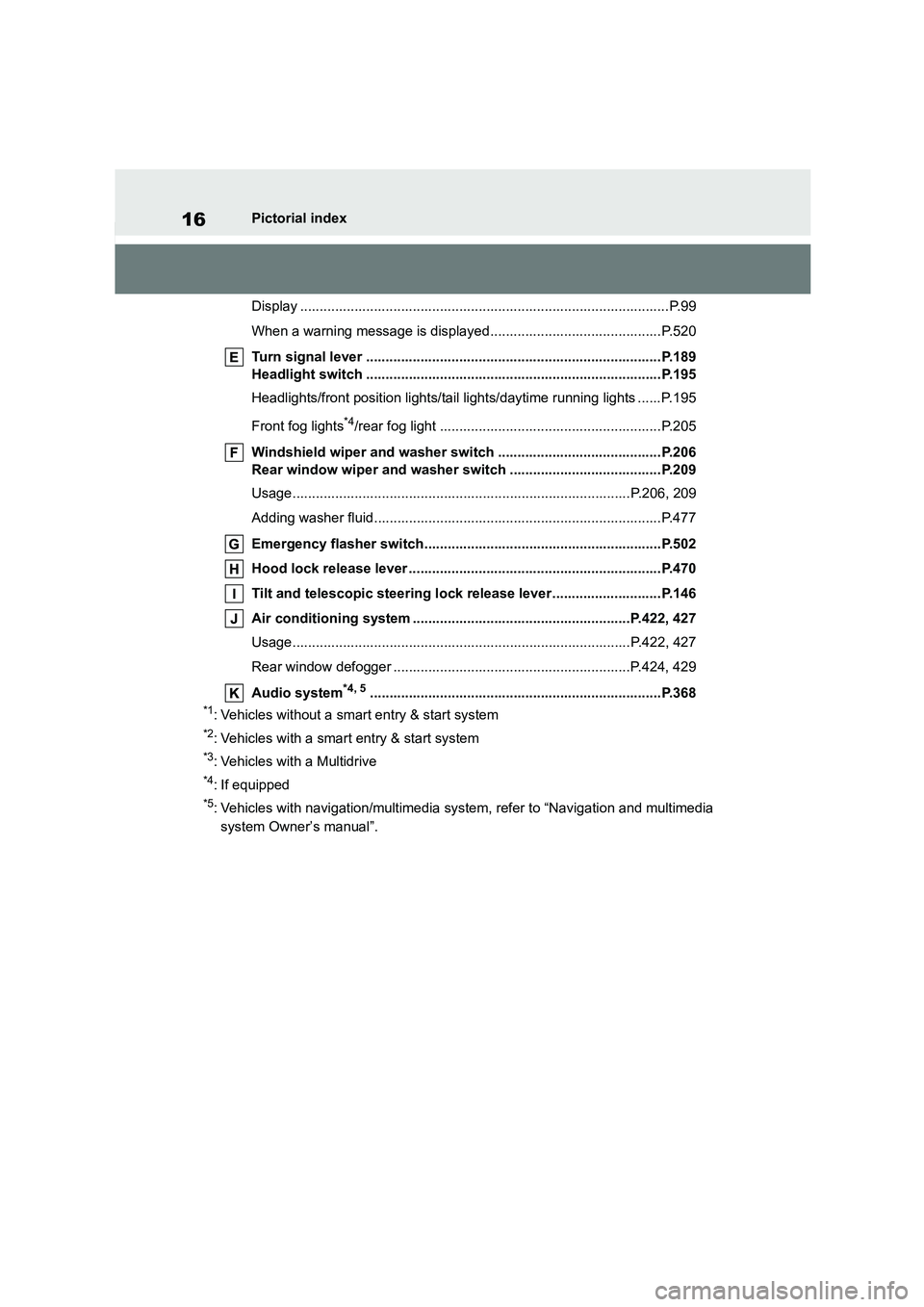
16Pictorial index
Display ...............................................................................................P.99
When a warning message is displayed............................................P.520
Turn signal lever ............................................................................P.189
Headlight switch ............................................................................P.195
Headlights/front position lights/tail lights/daytime running lights ......P.195
Front fog lights*4/rear fog light .........................................................P.205
Windshield wiper and washer switch ..........................................P.206
Rear window wiper and washer switch .......................................P.209
Usage.......................................................................................P.206, 209
Adding washer fluid..........................................................................P.477
Emergency flasher switch.............................................................P.502
Hood lock release lever .................................................................P.470
Tilt and telescopic steering lock release lever ............................P.146
Air conditioning system ........................................................P.422, 427
Usage.......................................................................................P.422, 427
Rear window defogger .............................................................P.424, 429
Audio system*4, 5...........................................................................P.368
*1: Vehicles without a smart entry & start system
*2: Vehicles with a smart entry & start system
*3: Vehicles with a Multidrive
*4: If equipped
*5: Vehicles with navigation/mu ltimedia system, refer to “Navigation and multimedia
system Owner’s manual”.
Page 25 of 758
23Pictorial index
Display ...............................................................................................P.99
When a warning message is displayed............................................P.520
Turn signal lever ............................................................................P.189
Headlight switch ............................................................................P.195
Headlights/front position lights/tail lights/daytime running lights ......P.195
Front fog lights*4/rear fog light .........................................................P.205
Windshield wiper and washer switch ..........................................P.206
Rear window wiper and washer switch .......................................P.209
Usage.......................................................................................P.206, 209
Adding washer fluid..........................................................................P.477
Emergency flasher switch.............................................................P.502
Hood lock release lever .................................................................P.470
Tilt and telescopic steering lock release lever ............................P.146
Air conditioning system ........................................................P.422, 427
Usage.......................................................................................P.422, 427
Rear window defogger .............................................................P.424, 429
Audio system*4, 5...........................................................................P.368
*1: Vehicles without a smart entry & start system
*2: Vehicles with a smart entry & start system
*3: Vehicles with a Multidrive
*4: If equipped
*5: Vehicles with navigation/mu ltimedia system, refer to “Navigation and multimedia
system Owner’s manual”.
Page 72 of 758
701-3. Emergency assistance
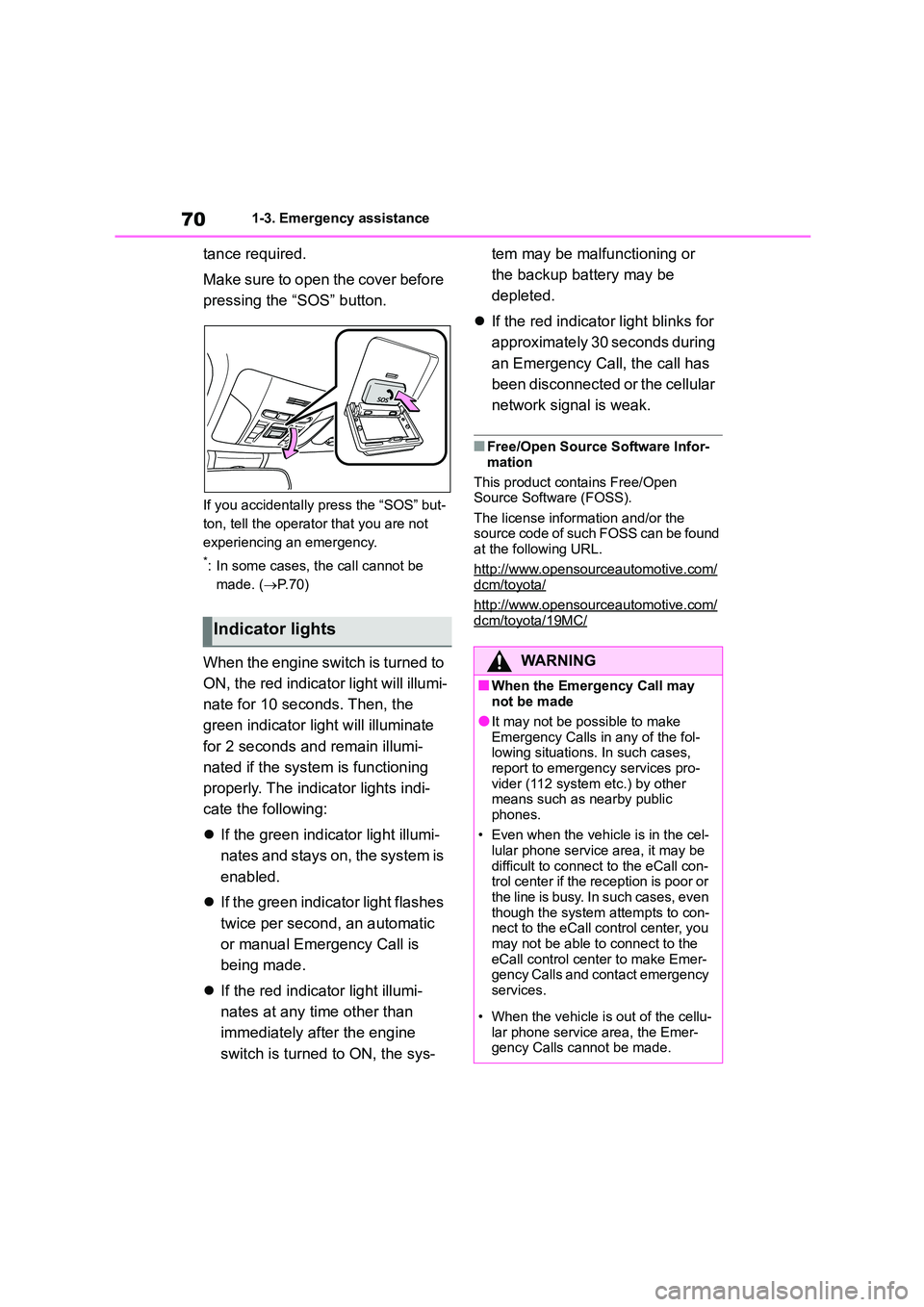
tance required.
Make sure to open the cover before
pressing the “SOS” button.
If you accidentally press the “SOS” but-
ton, tell the operator that you are not
experiencing an emergency.
*: In some cases, the call cannot be
made. ( P. 7 0 )
When the engine switch is turned to
ON, the red indicato r light will illumi-
nate for 10 seconds. Then, the
green indicator light will illuminate
for 2 seconds and remain illumi-
nated if the system is functioning
properly. The indicator lights indi-
cate the following:
If the green indicator light illumi-
nates and stays on, the system is
enabled.
If the green indicator light flashes
twice per second, an automatic
or manual Emergency Call is
being made.
If the red indicator light illumi-
nates at any time other than
immediately after the engine
switch is turned to ON, the sys-
tem may be malfunctioning or
the backup battery may be
depleted.
If the red indicator light blinks for
approximately 30 seconds during
an Emergency Call, the call has
been disconnected or the cellular
network signal is weak.
■Free/Open Source Software Infor-
mation
This product contains Free/Open
Source Software (FOSS).
The license information and/or the source code of such FOSS can be found
at the following URL.
http://www.opensourceautomotive.com/dcm/toyota/
http://www.opensourceautomotive.com/
dcm/toyota/19MC/Indicator lights
WA R N I N G
■When the Emergency Call may not be made
●It may not be possible to make
Emergency Calls in any of the fol- lowing situations. In such cases,
report to emergency services pro-
vider (112 system etc.) by other means such as nearby public
phones.
• Even when the vehicle is in the cel- lular phone service area, it may be
difficult to connect to the eCall con-
trol center if the reception is poor or the line is busy. In such cases, even
though the system attempts to con-
nect to the eCall control center, you may not be able to connect to the
eCall control center to make Emer-
gency Calls and contact emergency services.
• When the vehicle is out of the cellu-
lar phone service area, the Emer- gency Calls cannot be made.
Page 89 of 758
87
2
2-1. Instrument cluster
Vehicle status information and indicators
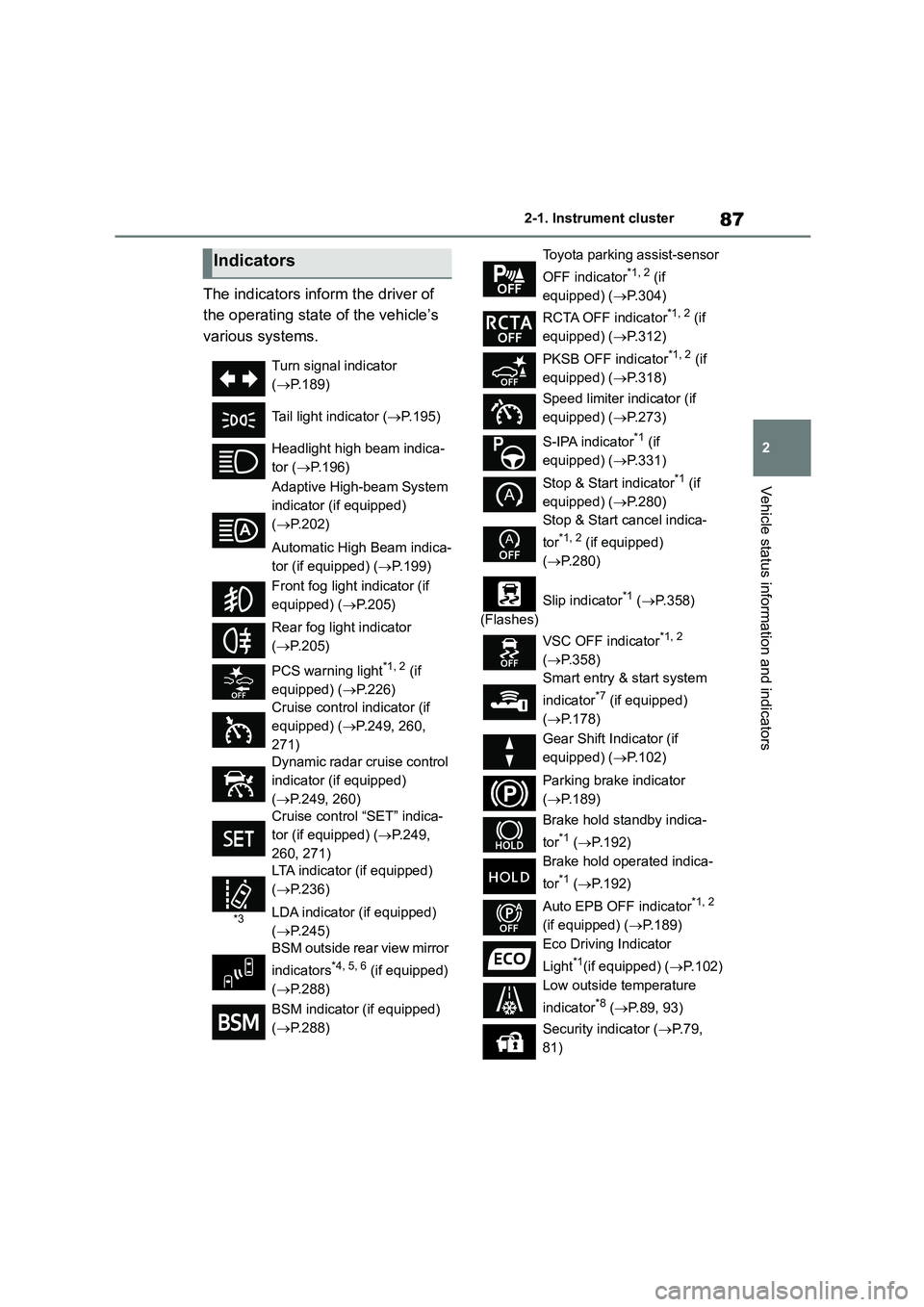
The indicators inform the driver of
the operating state of the vehicle’s
various systems.
Indicators
Turn signal indicator
( P.189)
Tail light indicator ( P.195)
Headlight high beam indica-
tor ( P.196)
Adaptive High-beam System
indicator (if equipped)
( P.202)
Automatic High Beam indica-
tor (if equipped) ( P.199)
Front fog light indicator (if
equipped) ( P.205)
Rear fog light indicator
( P.205)
PCS warning light*1, 2 (if
equipped) ( P.226)
Cruise control indicator (if
equipped) ( P.249, 260,
271)
Dynamic radar cruise control
indicator (if equipped)
( P.249, 260)
Cruise control “SET” indica-
tor (if equipped) ( P.249,
260, 271)
*3
LTA indicator (if equipped)
( P.236)
LDA indicator (if equipped)
( P.245)
BSM outside rear view mirror
indicators*4, 5, 6 (if equipped)
( P.288)
BSM indicator (if equipped)
( P.288)
Toyota parking assist-sensor
OFF indicator*1, 2 (if
equipped) ( P.304)
RCTA OFF indicator*1, 2 (if
equipped) ( P.312)
PKSB OFF indicator*1, 2 (if
equipped) ( P.318)
Speed limiter indicator (if
equipped) ( P.273)
S-IPA indicator*1 (if
equipped) ( P.331)
Stop & Start indicator*1 (if
equipped) ( P.280)
Stop & Start cancel indica-
tor*1, 2 (if equipped)
( P.280)
(Flashes)
Slip indicator*1 ( P.358)
VSC OFF indicator*1, 2
( P.358)
Smart entry & start system
indicator*7 (if equipped)
( P.178)
Gear Shift Indicator (if
equipped) ( P.102)
Parking brake indicator
( P.189)
Brake hold standby indica-
tor*1 ( P.192)
Brake hold operated indica-
tor*1 ( P.192)
Auto EPB OFF indicator*1, 2
(if equipped) ( P.189)
Eco Driving Indicator
Light*1(if equipped) ( P.102)
Low outside temperature
indicator*8 ( P.89, 93)
Security indicator ( P. 7 9 ,
81)
Page 132 of 758
1303-2. Opening, closing and locking the doors
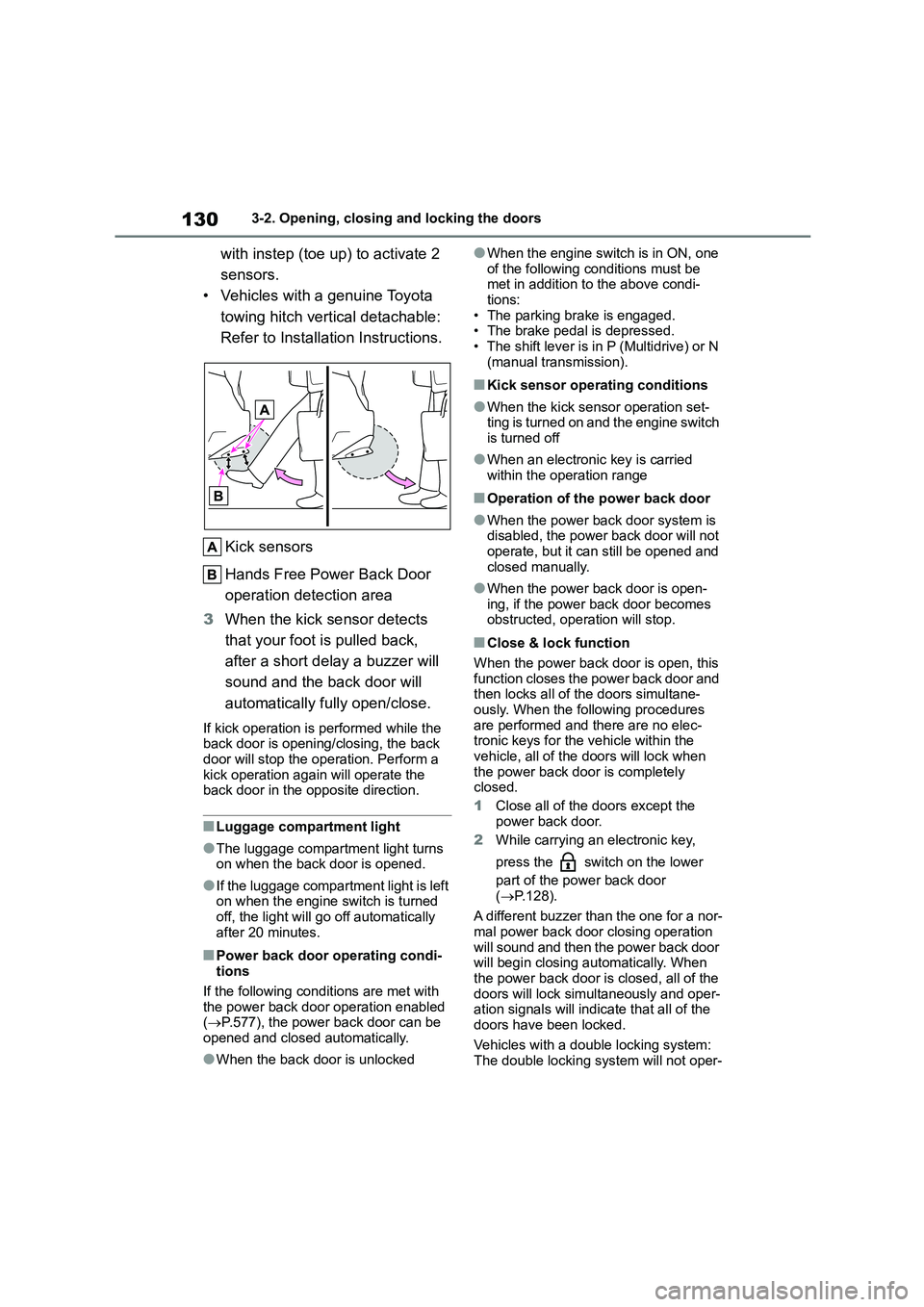
with instep (toe up) to activate 2
sensors.
• Vehicles with a genuine Toyota
towing hitch vertical detachable:
Refer to Installation Instructions.
Kick sensors
Hands Free Power Back Door
operation detection area
3 When the kick sensor detects
that your foot is pulled back,
after a short delay a buzzer will
sound and the back door will
automatically fully open/close.
If kick operation is performed while the
back door is opening/closing, the back door will stop the operation. Perform a
kick operation again will operate the
back door in the opposite direction.
■Luggage compartment light
●The luggage compartment light turns
on when the back door is opened.
●If the luggage compartment light is left
on when the engine switch is turned off, the light will go off automatically
after 20 minutes.
■Power back door operating condi-
tions
If the following conditions are met with
the power back door operation enabled
( P.577), the power back door can be opened and closed automatically.
●When the back door is unlocked
●When the engine switch is in ON, one
of the following conditions must be met in addition to the above condi-
tions:
• The parking brake is engaged. • The brake pedal is depressed.
• The shift lever is in P (Multidrive) or N
(manual transmission).
■Kick sensor operating conditions
●When the kick sensor operation set-
ting is turned on and the engine switch is turned off
●When an electronic key is carried within the operation range
■Operation of the power back door
●When the power back door system is disabled, the power back door will not
operate, but it can still be opened and
closed manually.
●When the power back door is open-
ing, if the power back door becomes obstructed, operation will stop.
■Close & lock function
When the power back door is open, this
function closes the power back door and then locks all of the doors simultane-
ously. When the following procedures
are performed and there are no elec- tronic keys for the vehicle within the
vehicle, all of the doors will lock when
the power back door is completely closed.
1 Close all of the doors except the
power back door.
2 While carrying an electronic key,
press the switch on the lower
part of the power back door
( P.128).
A different buzzer than the one for a nor-
mal power back door closing operation will sound and then the power back door
will begin closing automatically. When
the power back door is closed, all of the doors will lock simultaneously and oper-
ation signals will indicate that all of the
doors have been locked.
Vehicles with a double locking system:
The double locking syst em will not oper-
Page 141 of 758
139
3
3-2. Opening, closing and locking the doors
Before driving
• The electronic key is on the instru-
ment panel, luggage cover or floor, or in the door pockets or glove box when
the engine is started or engine switch
modes are changed.
●Do not leave the electronic key on top
of the instrument panel or near the door pockets when exiting the vehicle.
Depending on the radio wave recep-
tion conditions, it may be detected by the antenna outside the cabin and the
door will become lockable from the
outside, possibly trapping the elec- tronic key inside the vehicle.
●As long as the electronic key is within the effective range, the doors may be
locked or unlocked by anyone. How-
ever, only the doors detecting the electronic key can be used to unlock
the vehicle.
●Even if the electronic key is not inside
the vehicle, it may be possible to start
the engine if the electronic key is near the window.
●The doors may unlock or lock if a large amount of water splashes on the
door handle, such as in the rain or in a
car wash when the electronic key is within the effective range. (The doors
will automatically be locked after
approximately 30 seconds if the doors are not opened and closed.)
●If the wireless remote control is used to lock the doors when the electronic
key is near the vehicle, there is a pos-
sibility that the door may not be unlocked by the entry function. (Use
the wireless remote control to unlock
the doors.)
●Touching the door lock or unlock sen-
sor while wearing gloves may prevent
lock or unlock operation.
●Some models: When the lock opera-
tion is performed using the lock sen- sor, recognition signals will be shown
up to two consecutive times. After
this, no recognition signals will be given.
●If the door handle becomes wet while
the electronic key is within the effec-
tive range, the door may lock and unlock repeatedly. In that case, follow
the following correction procedures to
wash the vehicle: • Place the electronic key in a location 2
m (6 ft.) or more away from the vehi-
cle. (Take care to ensure that the key is not stolen.)
• Set the electronic key to battery-sav-
ing mode to disable the smart entry & start system. ( P.138)
●If the electronic key is inside the vehi- cle and a door handle becomes wet
during a car wash, a message may be
shown on the multi-information dis- play and a buzzer will sound outside
the vehicle. To turn off the alarm, lock
all the doors.
●The lock sensor may not work prop-
erly if it comes into contact with ice, snow, mud, etc. Clean the lock sensor
and attempt to operate it again.
●A sudden handle operation or a han-
dle operation immediately after enter-
ing the effective range may prevent the doors from being unlocked. Touch
the door unlock sensor and check that
the doors are unlocked before pulling the door handle again.
●If there is another electronic key in the detection area, it may take slightly
longer to unlock the doors after the
door handle is gripped.
■When the vehicle is not driven for extended periods
●To prevent theft of the vehicle, do not leave the electronic key within 2 m (6
ft.) of the vehicle.
●The smart entry & start system can be
deactivated in advance. ( P.577)
●Setting the electronic key to bat- tery-saving mode helps to reduce key
battery depletion. ( P.138)
■To operate the system properly
Make sure to carry the electronic key when operating the system. Do not get
the electronic key too close to the vehi-
cle when operating the system from the
Page 161 of 758
4
159
4
Driving
Driving
.4-1. Before driving
Driving the vehicle ............ 161
Cargo and luggage ........... 168
Trailer towing .................... 170
4-2. Driving procedures
Engine (ignition) switch (vehi-
cles without a smart entry &
start system) ................... 177
Engine (ignition) switch (vehi-
cles with a smart entry & start
system) ........................... 178
Multidrive .......................... 182
Manual transmission ......... 186
Turn signal lever ............... 189
Parking brake ................... 189
Brake Hold ........................ 192
4-3. Operating the lights and wip-
ers
Headlight switch ............... 195
Automatic High Beam ....... 199
AHS (Adaptive High-beam
System) .......................... 201
Fog light switch ................. 205
Windshield wipers and washer
....................................... 206
Rear window wiper and washer
....................................... 209
4-4. Refueling
Opening the fuel tank cap
....................................... 211
4-5. Using the driving support
systems
Toyota Safety Sense......... 213
PCS (Pre-Collision System)
........................................ 224
LTA (Lane Tracing Assist)
........................................ 231
LDA (Lane Departure Alert with
steering control) .............. 241
Dynamic radar cruise control
with full-speed range ...... 249
Dynamic radar cruise control
........................................ 260
Cruise control.................... 271
Speed limiter ..................... 273
RSA (Road Sign Assist) .... 276
Stop & Start system .......... 280
BSM (Blind Spot Monitor)
........................................ 288
Toyota parking assist-sensor
........................................ 303
RCTA (Rear Crossing Traffic
Alert) function ................. 312
PKSB (Parking Support Brake)
........................................ 317
Parking Support Brake function
(static objects) ................ 324
Parking Support Brake function
(rear-crossing vehicles) .. 327
S-IPA (Simple Intelligent Park-
ing Assist System) .......... 329
Driving mode select switch
........................................ 355
Exhaust Gas Filter system
........................................ 356
Driving assist systems ...... 357