audio TOYOTA COROLLA HYBRID 2021 (in English) Service Manual
[x] Cancel search | Manufacturer: TOYOTA, Model Year: 2021, Model line: COROLLA HYBRID, Model: TOYOTA COROLLA HYBRID 2021Pages: 584, PDF Size: 19.59 MB
Page 274 of 584
2745-3. Connectivity settings
COROLLA HV_U
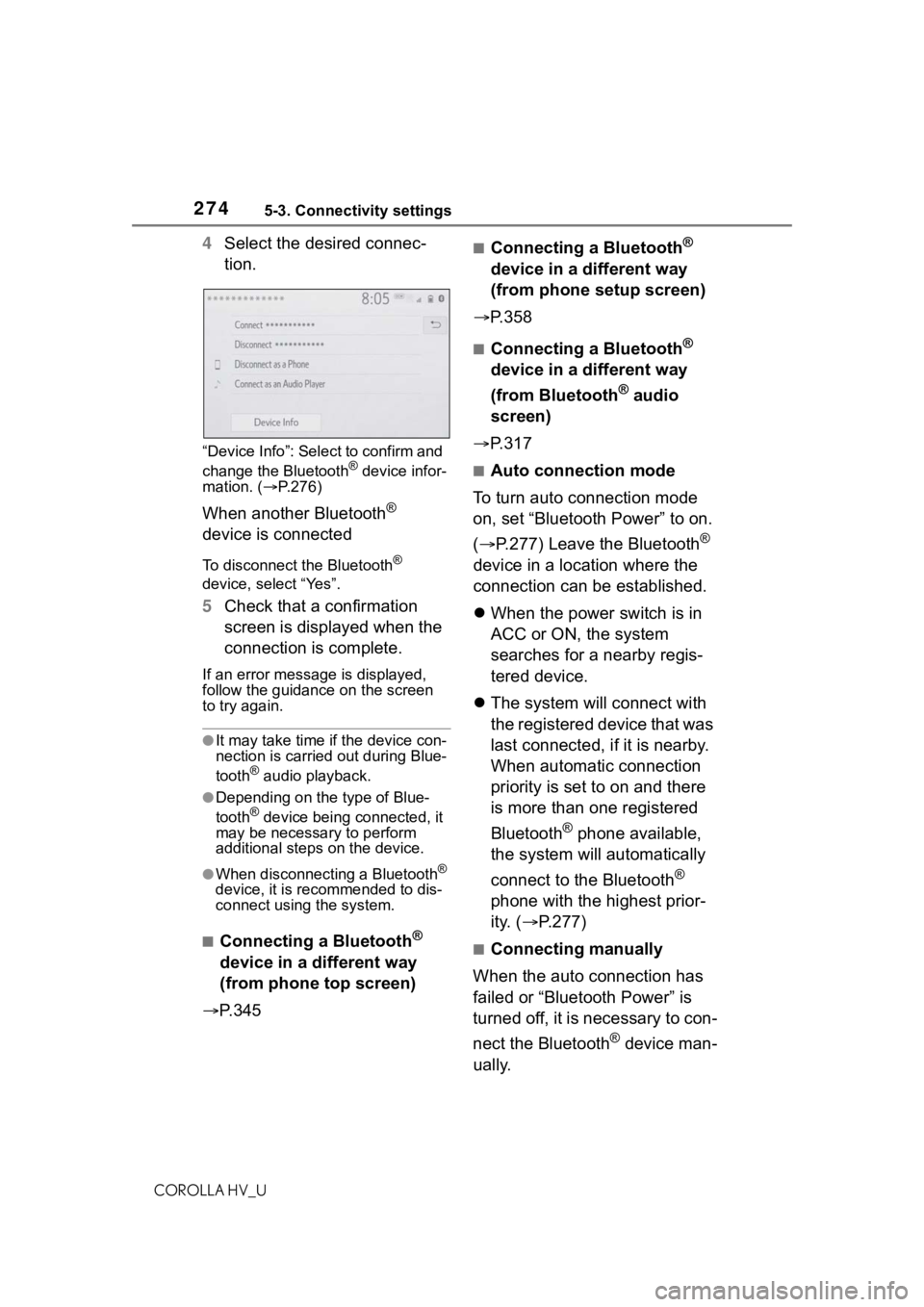
4Select the desired connec-
tion.
“Device Info”: Select to confirm and
change the Bluetooth® device infor-
mation. ( P.276)
When another Bluetooth®
device is connected
To disconnect the Bluetooth®
device, select “Yes”.
5 Check that a confirmation
screen is displayed when the
connection is complete.
If an error messa ge is displayed,
follow the guidance on the screen
to try again.
●It may take time if the device con-
nection is carried out during Blue-
tooth
® audio playback.
●Depending on the type of Blue-
tooth® device being connected, it
may be necessary to perform
additional steps on the device.
●When disconnecting a Bluetooth®
device, it is recommended to dis-
connect using the system.
■Connecting a Bluetooth®
device in a different way
(from phone top screen)
P. 3 4 5
■Connecting a Bluetooth®
device in a different way
(from phone setup screen)
P.358
■Connecting a Bluetooth®
device in a different way
(from Bluetooth
® audio
screen)
P.317
■Auto connection mode
To turn auto connection mode
on, set “Bluetooth Power” to on.
( P.277) Leave the Bluetooth
®
device in a location where the
connection can be established.
When the power switch is in
ACC or ON, the system
searches for a nearby regis-
tered device.
The system will connect with
the registered device that was
last connected, if it is nearby.
When automatic connection
priority is set to on and there
is more than one registered
Bluetooth
® phone available,
the system will automatically
connect to the Bluetooth
®
phone with the highest prior-
ity. ( P.277)
■Connecting manually
When the auto connection has
failed or “Bluetooth Power” is
turned off, it is necessary to con-
nect the Bluetooth
® device man-
ually.
Page 275 of 584
2755-3. Connectivity settings
COROLLA HV_U
5
Audio
1 Display the Bluetooth® set-
tings screen. ( P.272)
2 Follow the steps in “Connect-
ing a Bluetooth
® device” from
step 2. (P.273)
■Reconnecting the Blue-
tooth
® phone
If a Bluetooth
® phone is discon-
nected due to poor reception
from the Bluetooth
® network
when the power switch is in
ACC or ON, the system auto-
matically reconnects the Blue-
tooth
® phone.
Up to 5 Bluetooth
® devices can
be registered.
Bluetooth
® compatible phones
(HFP) and audio players (AVP)
can be registered simultane-
ously.
This operation cannot be per-
formed while driving.
1 Display the Bluetooth
® set-
tings screen. ( P.272)
2 Select “Add New Device”.
When another Bluetooth®
device is connected
To disconnect the Bluetooth®
device, select “Yes”.
When 5 Bluetooth® devices
have already been registered
A registered device needs to be
replaced. Select “Yes”, and select
the device to be replaced.
3 Follow the steps in “Register-
ing a Bluetooth
® phone for
the first time” from step 5.
( P.268)
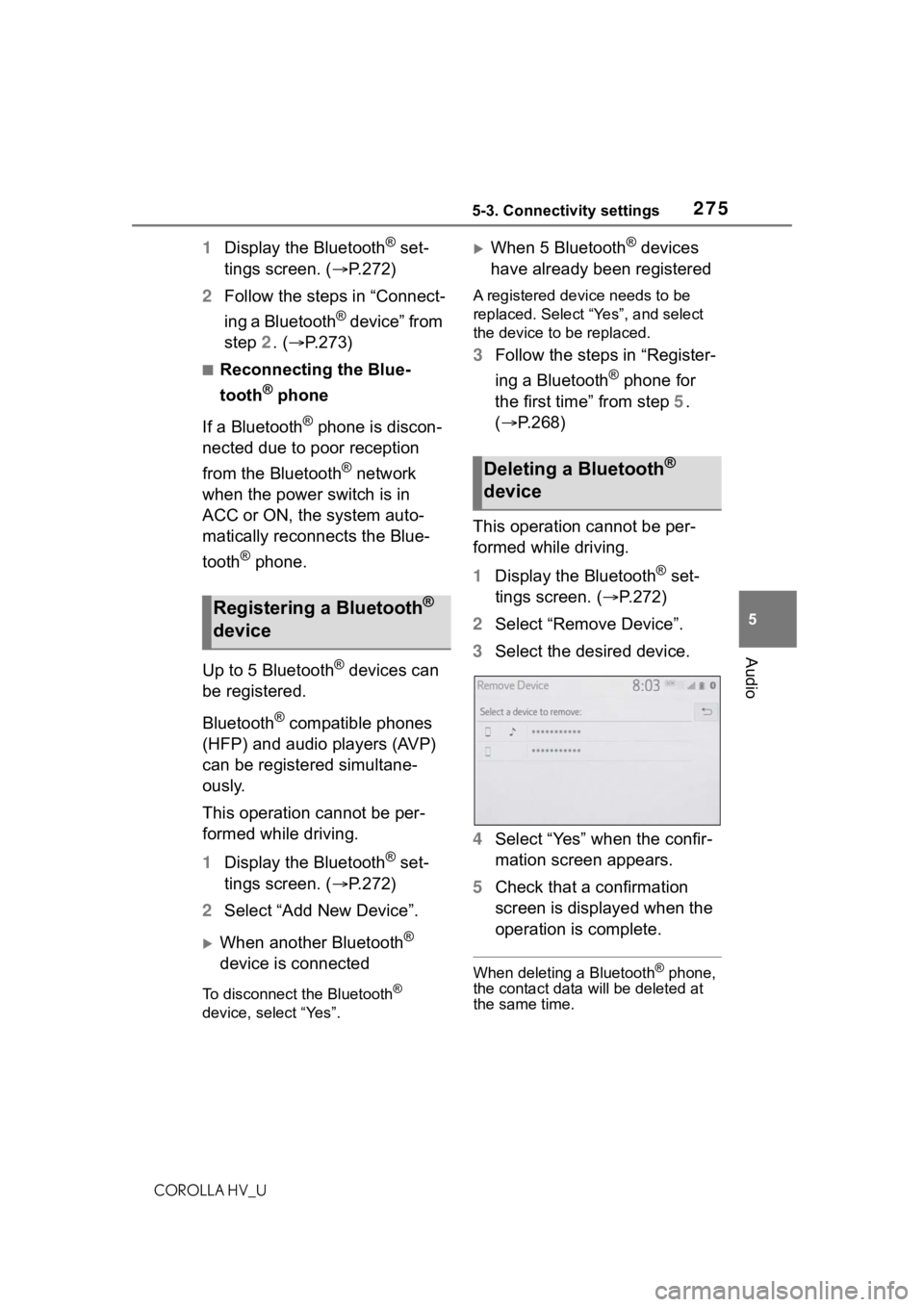
This operation cannot be per-
formed while driving.
1 Display the Bluetooth
® set-
tings screen. ( P.272)
2 Select “Remove Device”.
3 Select the desired device.
4 Select “Yes” when the confir-
mation screen appears.
5 Check that a confirmation
screen is displayed when the
operation is complete.
When deleting a Bluetooth® phone,
the contact data will be deleted at
the same time.
Registering a Bluetooth®
device
Deleting a Bluetooth®
device
Page 276 of 584
2765-3. Connectivity settings
COROLLA HV_U
The Bluetooth® device’s infor-
mation can be displayed on the
screen. The displayed informa-
tion can be edited.
This operation cannot be per-
formed while driving.
1 Display the Bluetooth
® set-
tings screen. ( P.272)
2 Select “Registered Device”.
3 Select the desired device to
be edited.
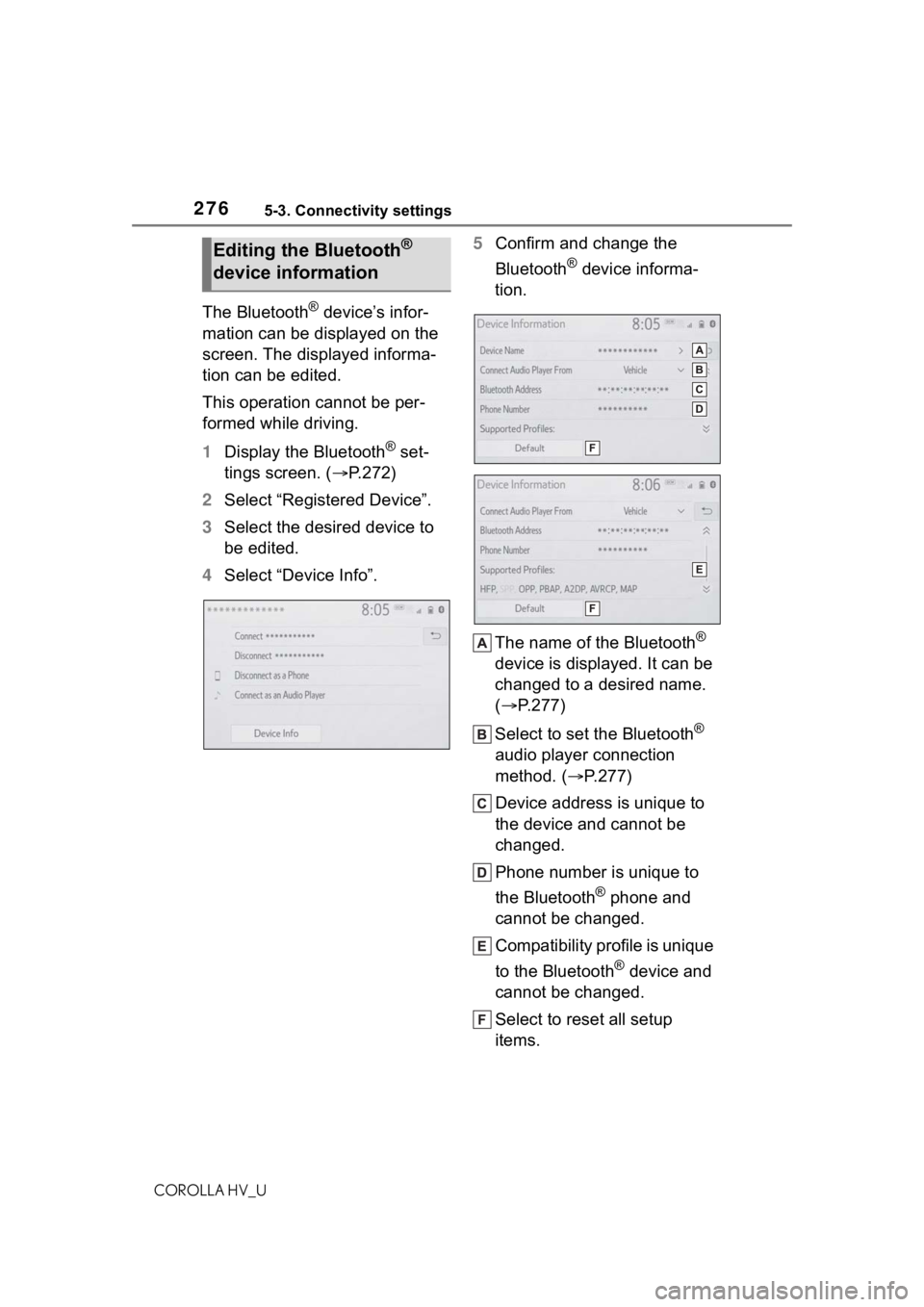
4 Select “Device Info”. 5
Confirm and change the
Bluetooth
® device informa-
tion.
The name of the Bluetooth
®
device is displayed. It can be
changed to a desired name.
( P.277)
Select to set the Bluetooth
®
audio player connection
method. ( P.277)
Device address is unique to
the device and cannot be
changed.
Phone number is unique to
the Bluetooth
® phone and
cannot be changed.
Compatibility profile is unique
to the Bluetooth
® device and
cannot be changed.
Select to reset all setup
items.
Editing the Bluetooth®
device information
Page 277 of 584
2775-3. Connectivity settings
COROLLA HV_U
5
Audio
●If 2 Bluetooth® devices have been
registered with the same device
name, the devices can be distin-
guished referring to the device’s
address.
●Depending on the type of Blue-
tooth® phone, some information
may not be displayed.
1 Select “Device Name”.
2 Enter the name and select
“OK”.
Even if the device name is changed,
the name registered in your Blue-
tooth
® device does not change.
1Select “Connect Audio Player
From”.
2 Select the desired connec-
tion method.
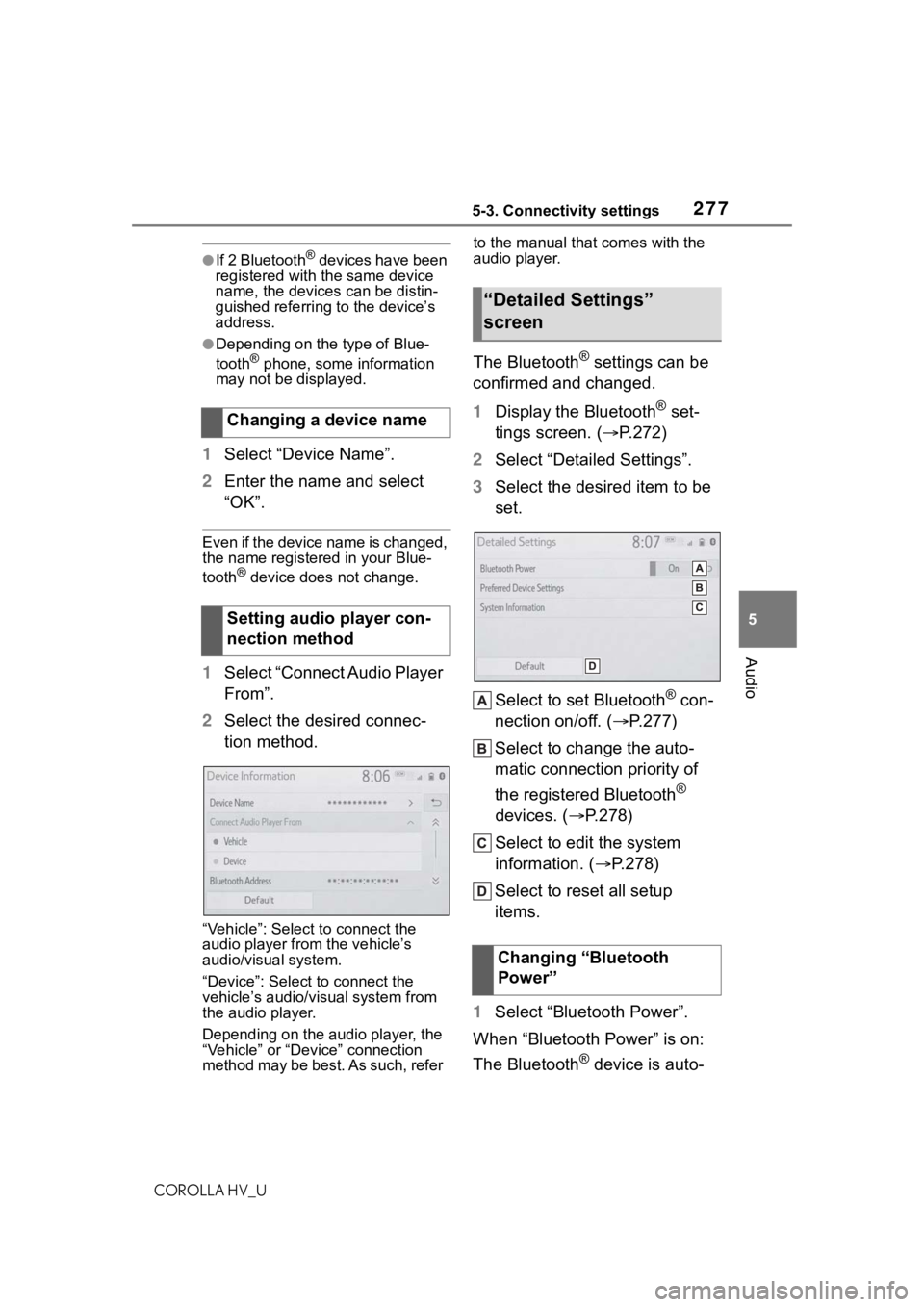
“Vehicle”: Select to connect the
audio player from the vehicle’s
audio/visual system.
“Device”: Select to connect the
vehicle’s audio/visual system from
the audio player.
Depending on the audio player, the
“Vehicle” or “Device” connection
method may be best. As such, refer to the manual that comes with the
audio player.
The Bluetooth® settings can be
confirmed and changed.
1 Display the Bluetooth
® set-
tings screen. ( P.272)
2 Select “Detailed Settings”.
3 Select the desired item to be
set.
Select to set Bluetooth
® con-
nection on/off. ( P.277)
Select to change the auto-
matic connection priority of
the registered Bluetooth
®
devices. ( P.278)
Select to edit the system
information. ( P.278)
Select to reset all setup
items.
1 Select “Bluetooth Power”.
When “Bluetooth Power” is on:
The Bluetooth
® device is auto-
Changing a device name
Setting audio player con-
nection method
“Detailed Settings”
screen
Changing “Bluetooth
Power”
Page 278 of 584
2785-3. Connectivity settings
COROLLA HV_U
matically connected when the
power switch is in ACC or ON.
When “Bluetooth Power” is off:
The Bluetooth
® device is dis-
connected, and the system will
not connect to it next time.
While driving, the auto connection
state can be changed from off to on,
but cannot be changed from on to
off.
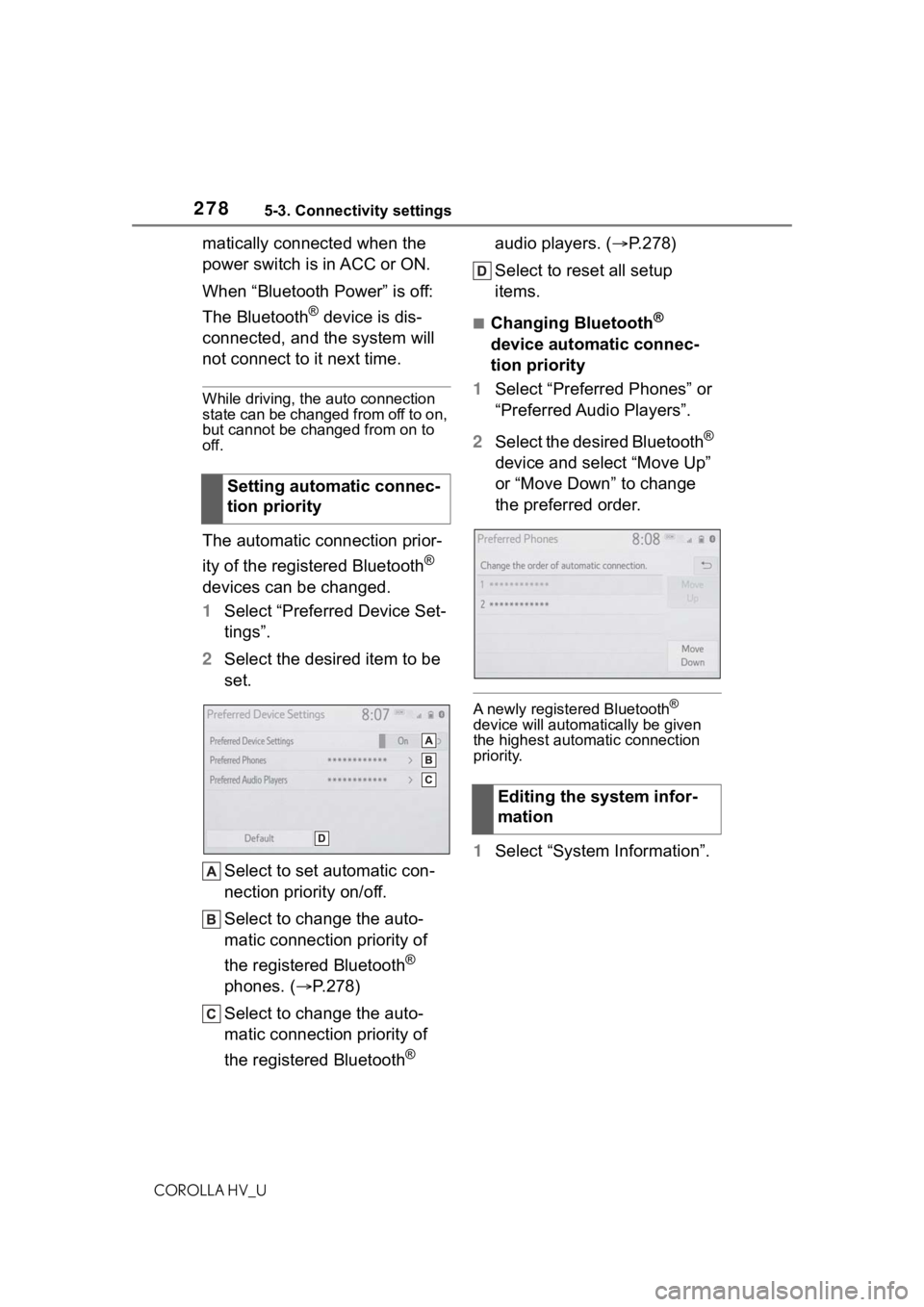
The automatic connection prior-
ity of the registered Bluetooth
®
devices can be changed.
1 Select “Preferred Device Set-
tings”.
2 Select the desired item to be
set.
Select to set automatic con-
nection priority on/off.
Select to change the auto-
matic connection priority of
the registered Bluetooth
®
phones. ( P.278)
Select to change the auto-
matic connection priority of
the registered Bluetooth
® audio players. (
P.278)
Select to reset all setup
items.
■Changing Bluetooth®
device automatic connec-
tion priority
1 Select “Preferred Phones” or
“Preferred Audio Players”.
2 Select the desired Bluetooth
®
device and select “Move Up”
or “Move Down” to change
the preferred order.
A newly registered Bluetooth®
device will automat ically be given
the highest autom atic connection
priority.
1 Select “System Information”.
Setting automatic connec-
tion priority
Editing the system infor-
mation
Page 279 of 584
2795-3. Connectivity settings
COROLLA HV_U
5
Audio
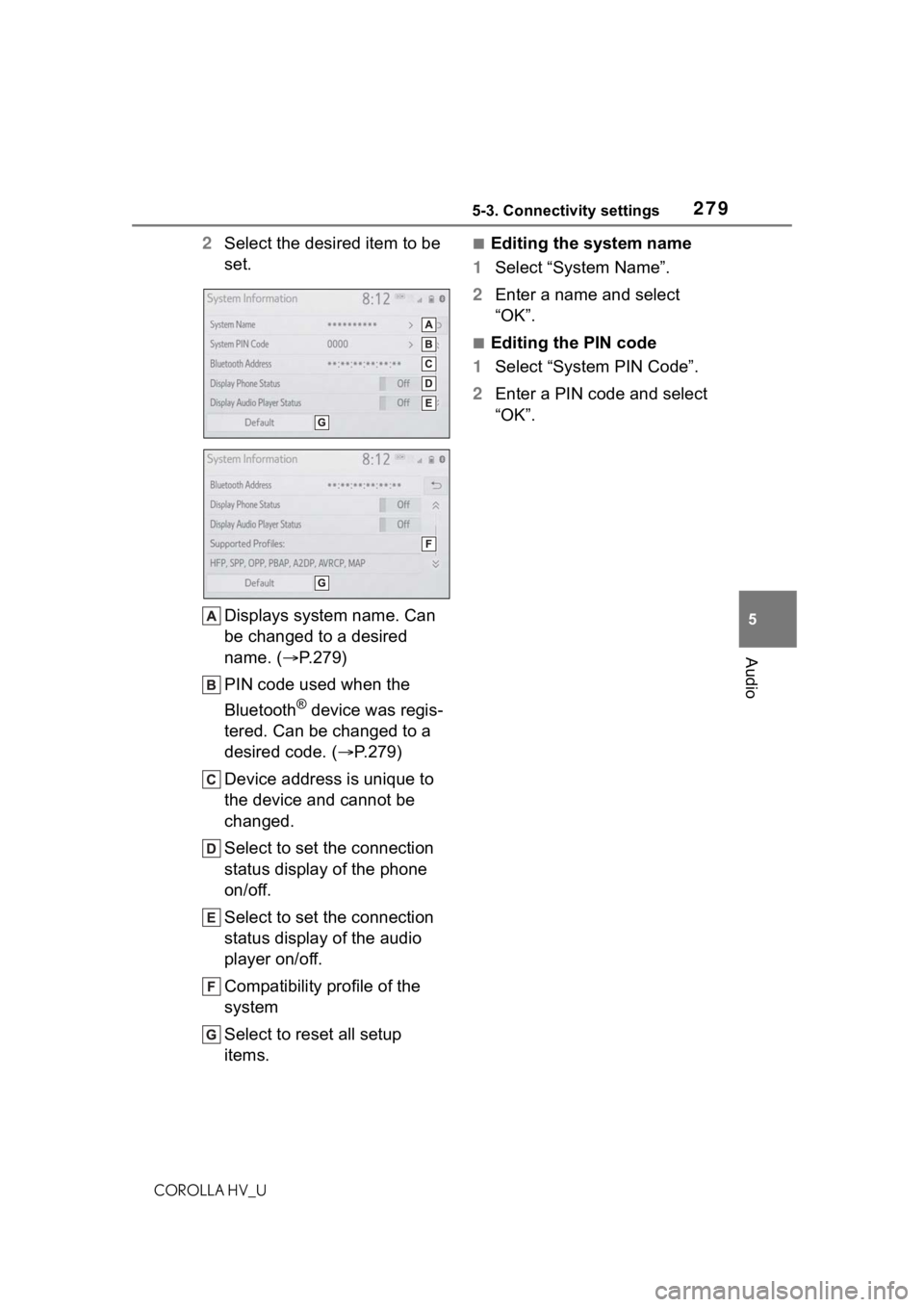
2 Select the desired item to be
set.
Displays system name. Can
be changed to a desired
name. ( P.279)
PIN code used when the
Bluetooth
® device was regis-
tered. Can be changed to a
desired code. ( P.279)
Device address is unique to
the device and cannot be
changed.
Select to set the connection
status display of the phone
on/off.
Select to set the connection
status display of the audio
player on/off.
Compatibility profile of the
system
Select to reset all setup
items.
■Editing the system name
1 Select “System Name”.
2 Enter a name and select
“OK”.
■Editing the PIN code
1 Select “System PIN Code”.
2 Enter a PIN code and select
“OK”.
Page 281 of 584
2815-3. Connectivity settings
COROLLA HV_U
5
Audio
1 Press the “MENU” button.
2 Select “Setup”.
3 Select “Wi-Fi
*”.
*:Wi-Fi® is a registered trademark
of Wi-Fi Alliance
®.
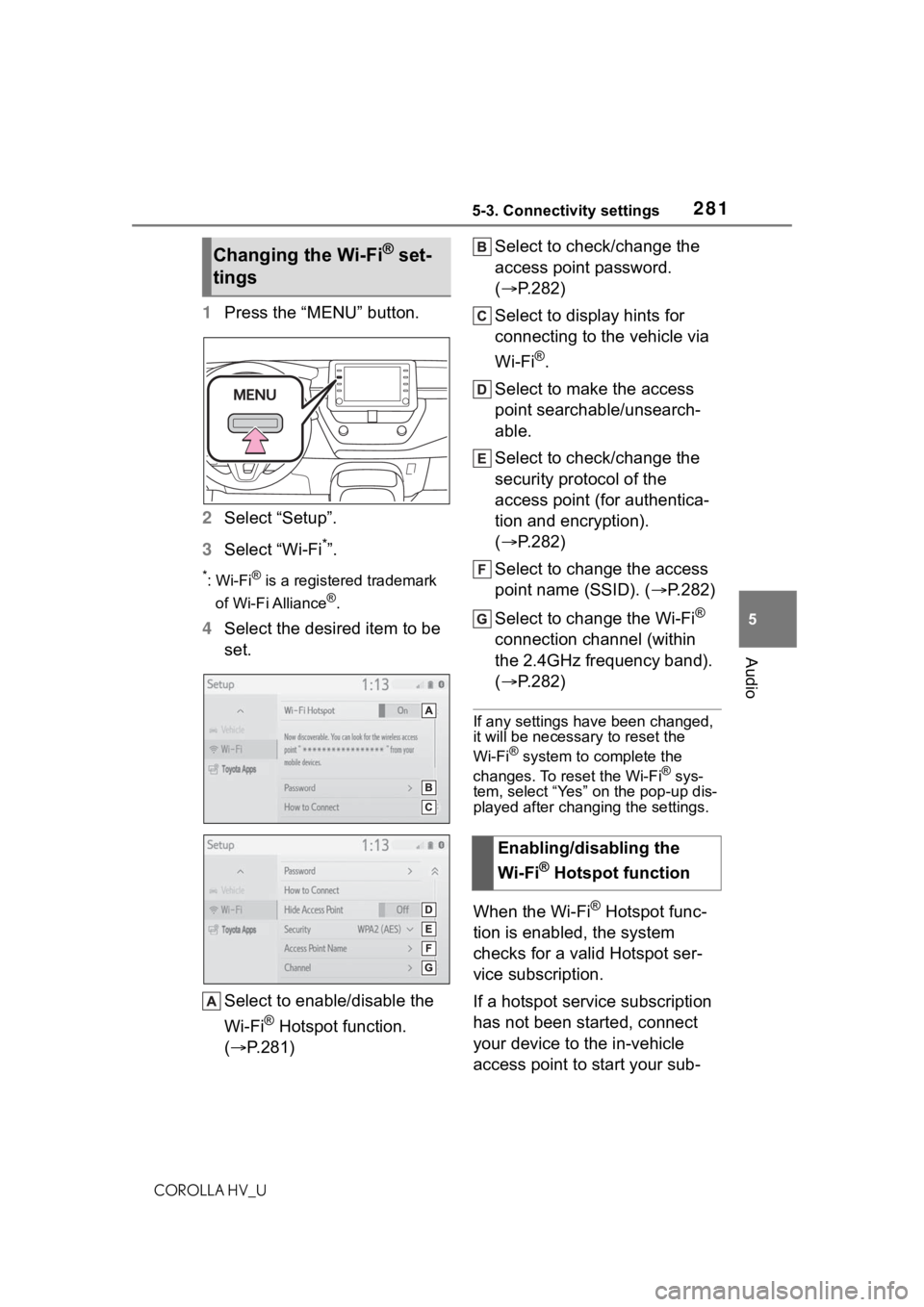
4 Select the desired item to be
set.
Select to enable/disable the
Wi-Fi
® Hotspot function.
( P.281) Select to check/change the
access point password.
(
P.282)
Select to display hints for
connecting to the vehicle via
Wi-Fi
®.
Select to make the access
point searchable/unsearch-
able.
Select to check/change the
security protocol of the
access point (for authentica-
tion and encryption).
( P.282)
Select to change the access
point name (SSID). ( P.282)
Select to change the Wi-Fi
®
connection channel (within
the 2.4GHz frequency band).
( P.282)
If any settings have been changed,
it will be necessary to reset the
Wi-Fi
® system to complete the
changes. To reset the Wi-Fi® sys-
tem, select “Yes” on the pop-up dis-
played after changing the settings.
When the Wi-Fi® Hotspot func-
tion is enabled, the system
checks for a valid Hotspot ser-
vice subscription.
If a hotspot service subscription
has not been started, connect
your device to the in-vehicle
access point to start your sub-
Changing the Wi-Fi® set-
tings
Enabling/disabling the
Wi-Fi
® Hotspot function
Page 283 of 584
2835-3. Connectivity settings
COROLLA HV_U
5
Audio
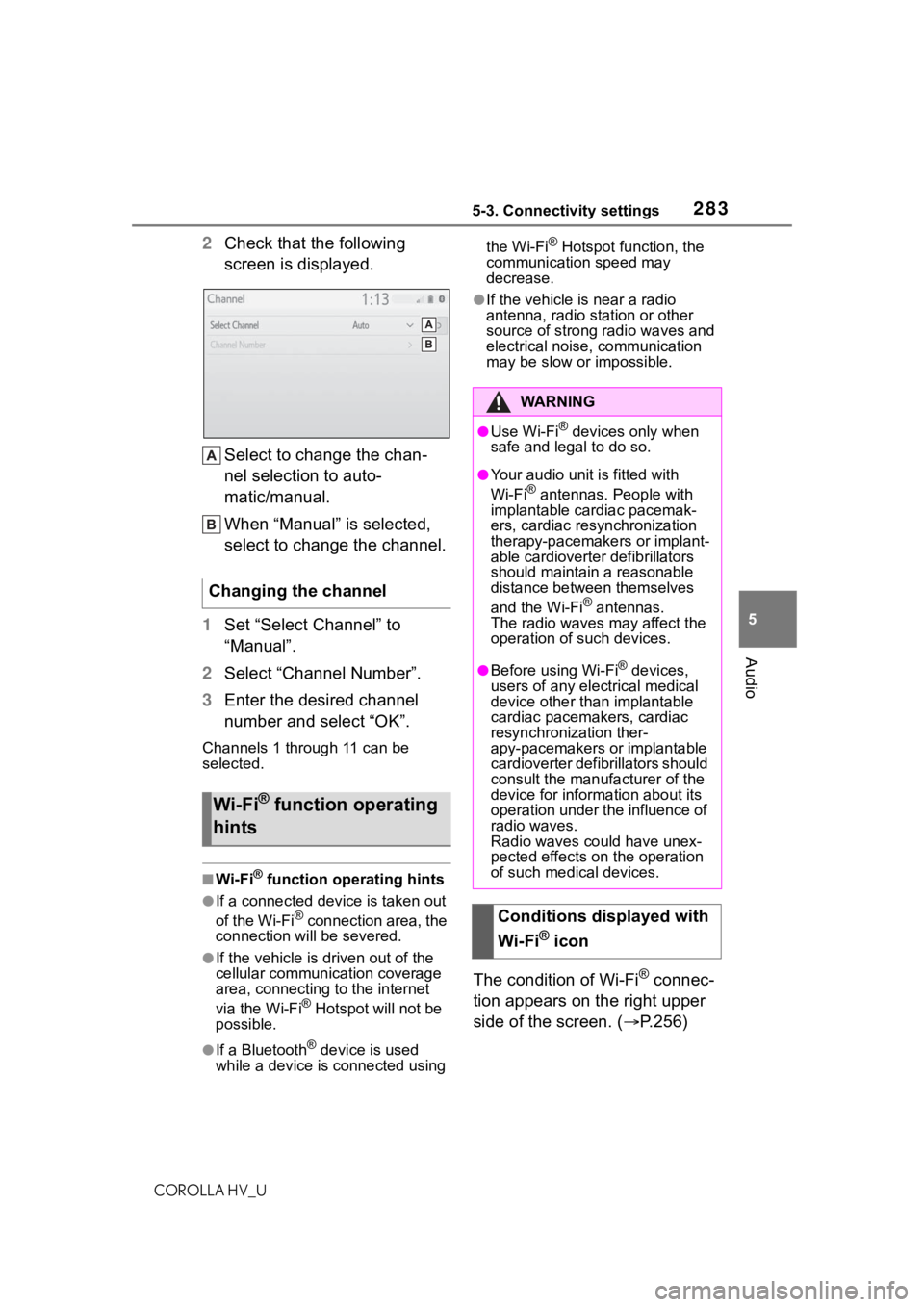
2 Check that the following
screen is displayed.
Select to change the chan-
nel selection to auto-
matic/manual.
When “Manual” is selected,
select to change the channel.
1 Set “Select Channel” to
“Manual”.
2 Select “Channel Number”.
3 Enter the desired channel
number and select “OK”.
Channels 1 through 11 can be
selected.
■Wi-Fi® function operating hints
●If a connected devi ce is taken out
of the Wi-Fi® connection area, the
connection will be severed.
●If the vehicle is driven out of the
cellular communication coverage
area, connecting to the internet
via the Wi-Fi
® Hotspot will not be
possible.
●If a Bluetooth® device is used
while a device is connected using the Wi-Fi
® Hotspot function, the
communication speed may
decrease.
●If the vehicle is near a radio
antenna, radio station or other
source of strong radio waves and
electrical noise, communication
may be slow or impossible.
The condition of Wi-Fi® connec-
tion appears on the right upper
side of the screen. ( P.256)
Changing the channel
Wi-Fi® function operating
hints
WA R N I N G
●Use Wi-Fi® devices only when
safe and legal to do so.
●Your audio unit is fitted with
Wi-Fi® antennas. People with
implantable cardiac pacemak-
ers, cardiac resynchronization
therapy-pacemakers or implant-
able cardioverter defibrillators
should maintain a reasonable
distance between themselves
and the Wi-Fi
® antennas.
The radio waves may affect the
operation of such devices.
●Before using Wi-Fi® devices,
users of any electrical medical
device other than implantable
cardiac pacemakers, cardiac
resynchronization ther-
apy-pacemakers or implantable
cardioverter defibrillators should
consult the manufacturer of the
device for information about its
operation under the influence of
radio waves.
Radio waves could have unex-
pected effects on the operation
of such medical devices.
Conditions displayed with
Wi-Fi
® icon
Page 285 of 584
2855-3. Connectivity settings
COROLLA HV_U
5
Audio
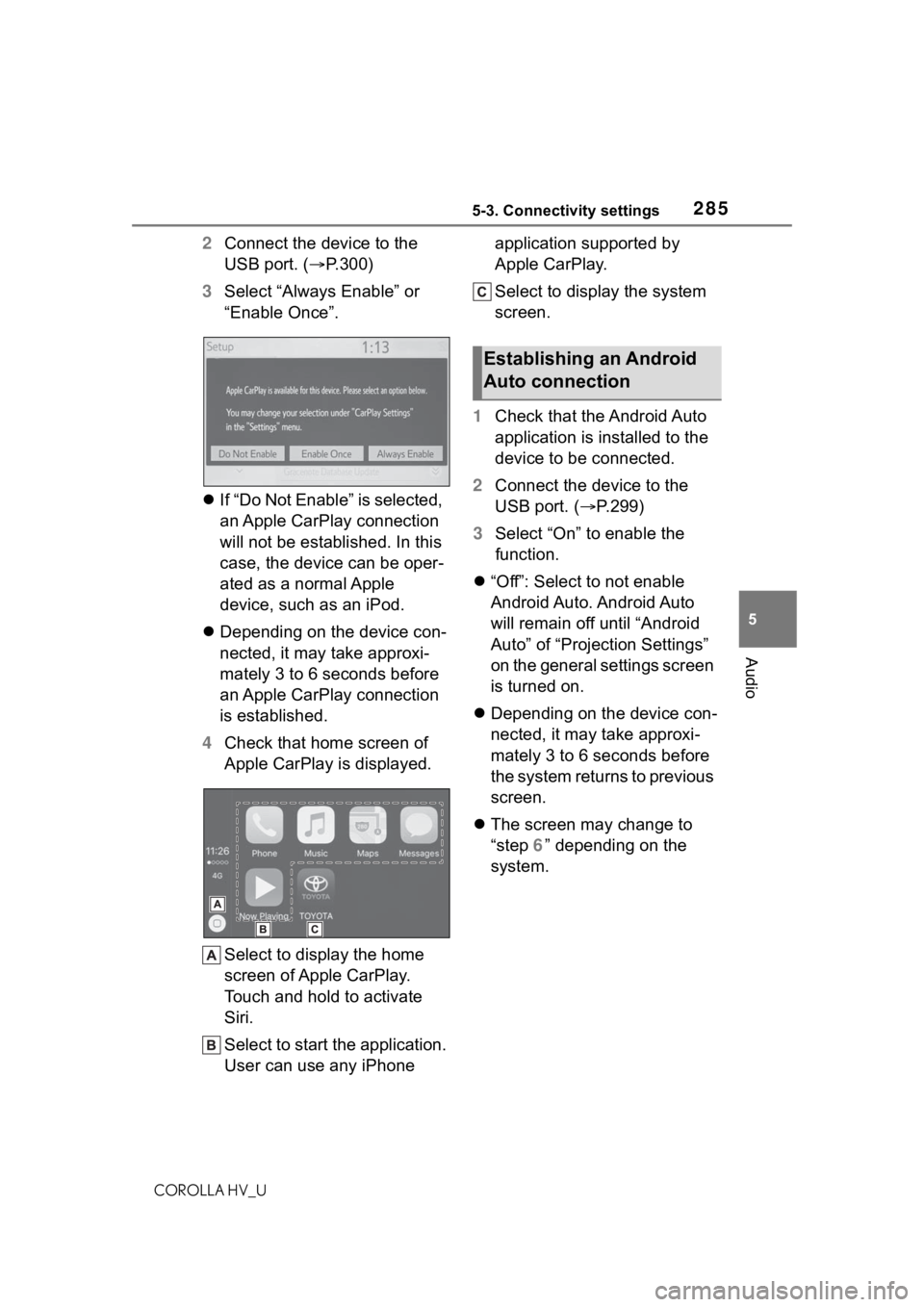
2 Connect the device to the
USB port. ( P.300)
3 Select “Always Enable” or
“Enable Once”.
If “Do Not Enable” is selected,
an Apple CarPlay connection
will not be established. In this
case, the device can be oper-
ated as a normal Apple
device, such as an iPod.
Depending on the device con-
nected, it may take approxi-
mately 3 to 6 seconds before
an Apple CarPlay connection
is established.
4 Check that home screen of
Apple CarPlay is displayed.
Select to display the home
screen of Apple CarPlay.
Touch and hold to activate
Siri.
Select to start the application.
User can use any iPhone application supported by
Apple CarPlay.
Select to display the system
screen.
1 Check that the Android Auto
application is installed to the
device to be connected.
2 Connect the device to the
USB port. ( P.299)
3 Select “On” to enable the
function.
“Off”: Select to not enable
Android Auto. Android Auto
will remain off until “Android
Auto” of “Projection Settings”
on the general settings screen
is turned on.
Depending on the device con-
nected, it may take approxi-
mately 3 to 6 seconds before
the system returns to previous
screen.
The screen may change to
“step 6” depending on the
system.
Establishing an Android
Auto connection
Page 286 of 584
2865-3. Connectivity settings
COROLLA HV_U
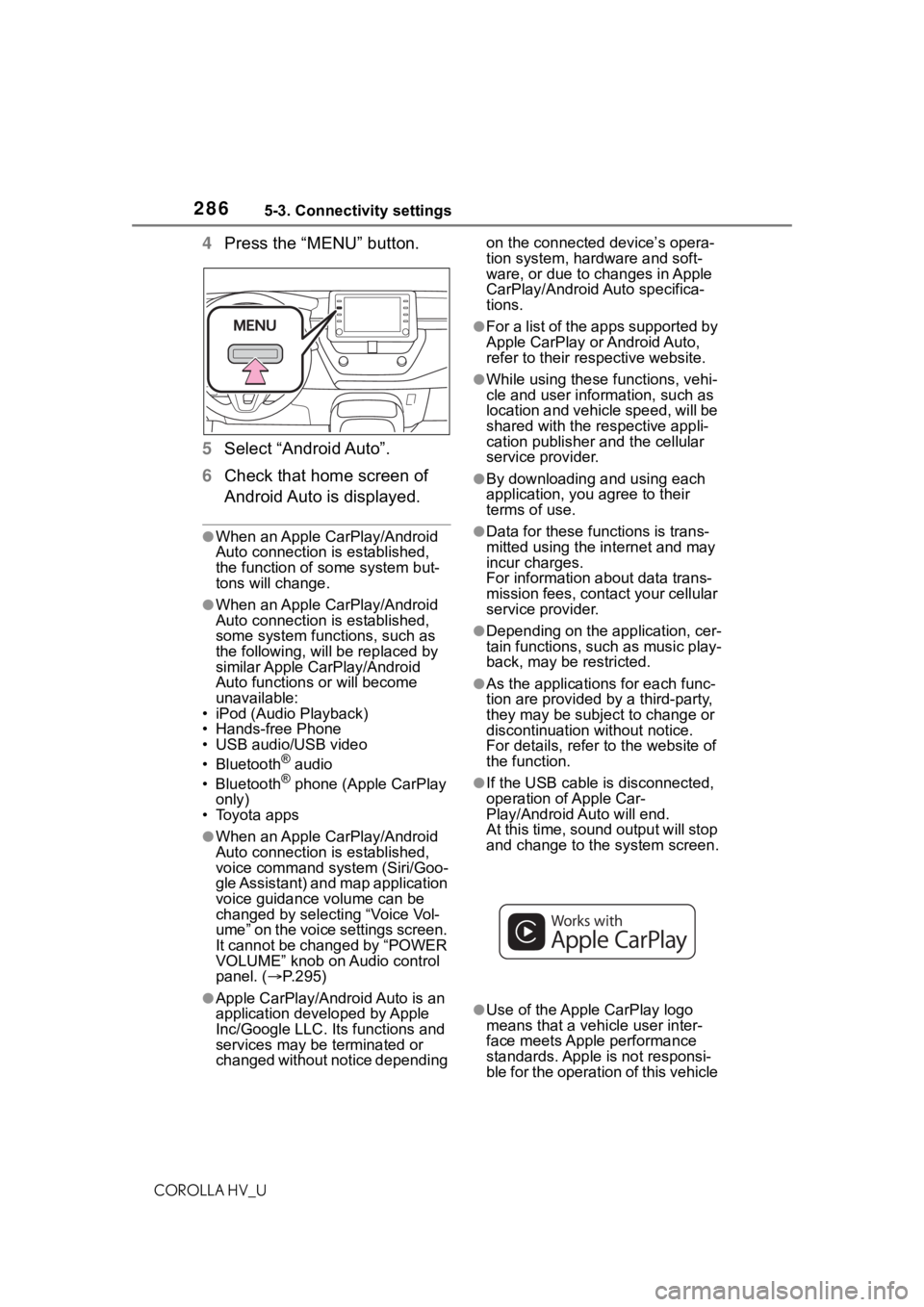
4Press the “MENU” button.
5 Select “Android Auto”.
6 Check that home screen of
Android Auto is displayed.
●When an Apple CarPlay/Android
Auto connection is established,
the function of some system but-
tons will change.
●When an Apple CarPlay/Android
Auto connection is established,
some system functions, such as
the following, will be replaced by
similar Apple CarPlay/Android
Auto functions or will become
unavailable:
• iPod (Audio Playback)
• Hands-free Phone
• USB audio/USB video
• Bluetooth
® audio
• Bluetooth® phone (Apple CarPlay
only)
• Toyota apps
●When an Apple CarPlay/Android
Auto connection is established,
voice command system (Siri/Goo-
gle Assistant) and map application
voice guidance volume can be
changed by selecting “Voice Vol-
ume” on the voice settings screen.
It cannot be changed by “POWER
VOLUME” knob on Audio control
panel. ( P.295)
●Apple CarPlay/Android Auto is an
application developed by Apple
Inc/Google LLC. Its functions and
services may be terminated or
changed without notice depending on the connected device’s opera-
tion system, hardware and soft-
ware, or due to changes in Apple
CarPlay/Android Auto specifica-
tions.
●For a list of the apps supported by
Apple CarPlay or Android Auto,
refer to their respective website.
●While using these functions, vehi-
cle and user information, such as
location and vehicle speed, will be
shared with the respective appli-
cation publisher
and the cellular
service provider.
●By downloading and using each
application, you agree to their
terms of use.
●Data for these functions is trans-
mitted using the in ternet and may
incur charges.
For information about data trans-
mission fees, contact your cellular
service provider.
●Depending on the application, cer-
tain functions, such as music play-
back, may be restricted.
●As the applications for each func-
tion are provided by a third-party,
they may be subject to change or
discontinuation without notice.
For details, refer to the website of
the function.
●If the USB cable is disconnected,
operation of Apple Car-
Play/Android Auto will end.
At this time, sound output will stop
and change to the system screen.
●Use of the Apple CarPlay logo
means that a vehicle user inter-
face meets Apple performance
standards. Apple is not responsi-
ble for the operation of this vehicle