air condition TOYOTA COROLLA HYBRID 2021 Owners Manual (in English)
[x] Cancel search | Manufacturer: TOYOTA, Model Year: 2021, Model line: COROLLA HYBRID, Model: TOYOTA COROLLA HYBRID 2021Pages: 584, PDF Size: 19.59 MB
Page 1 of 584
1
2
3
4
5
6
7
8
9
9
10
COROLLA HV_U
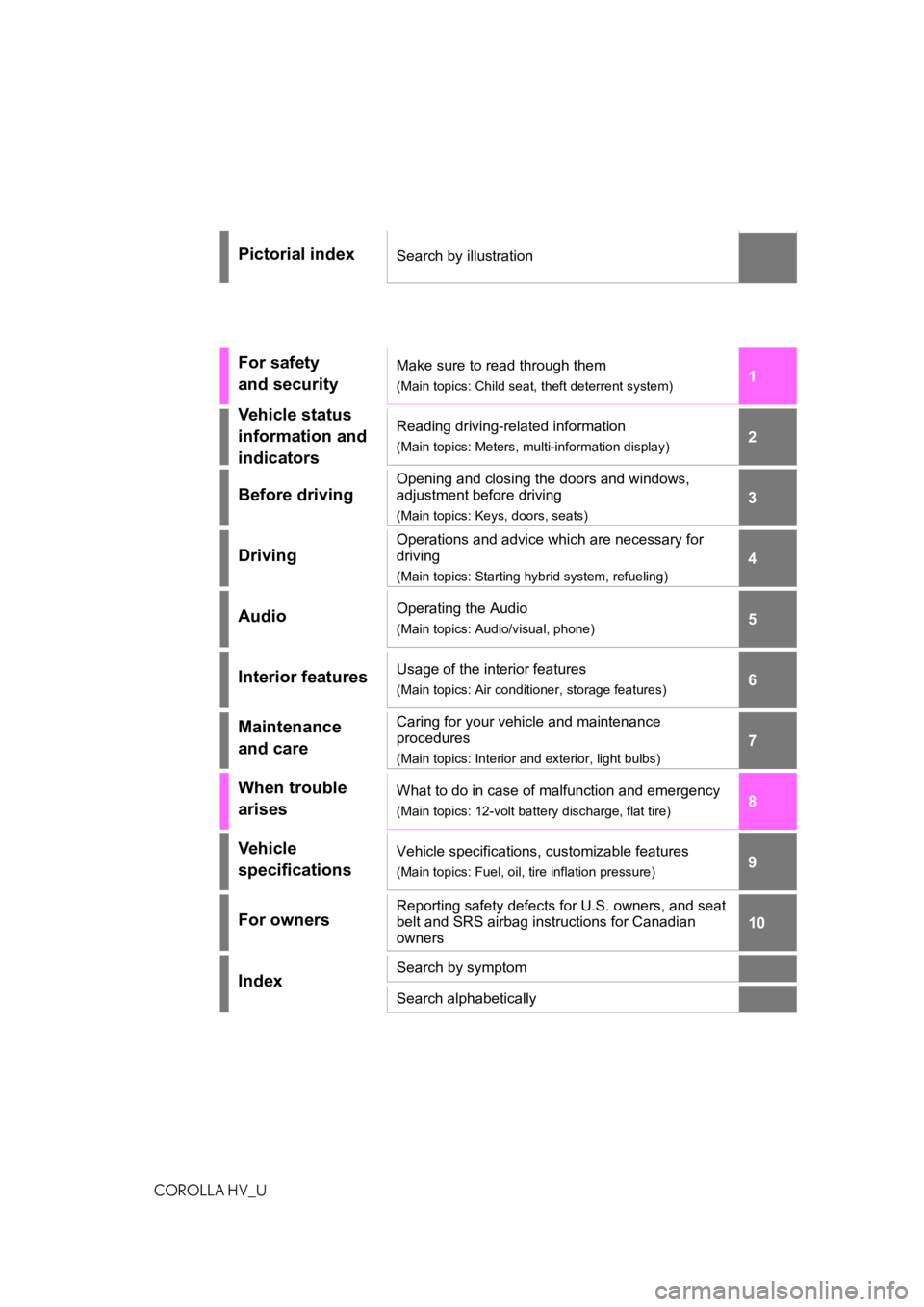
Pictorial indexSearch by illustration
For safety
and securityMake sure to read through them
(Main topics: Child seat, theft deterrent system)
Vehicle status
information and
indicatorsReading driving-related information
(Main topics: Meters, multi-information display)
Before driving
Opening and closing the doors and windows,
adjustment before driving
(Main topics: Keys, doors, seats)
Driving
Operations and advice which are necessary for
driving
(Main topics: Starting hybrid system, refueling)
AudioOperating the Audio
(Main topics: Audio/visual, phone)
Interior featuresUsage of the interior features
(Main topics: Air conditioner, storage features)
Maintenance
and careCaring for your vehicle and maintenance
procedures
(Main topics: Interior and exterior, light bulbs)
When trouble
arisesWhat to do in case of malfunction and emergency
(Main topics: 12-volt battery discharge, flat tire)
Vehicle
specificationsVehicle specifications, customizable features
(Main topics: Fuel, oil, tire inflation pressure)
For ownersReporting safety defects for U.S. owners, and seat
belt and SRS airbag instructions for Canadian
owners
IndexSearch by symptom
Search alphabetically
Page 4 of 584
4TABLE OF CONTENTS
COROLLA HV_U
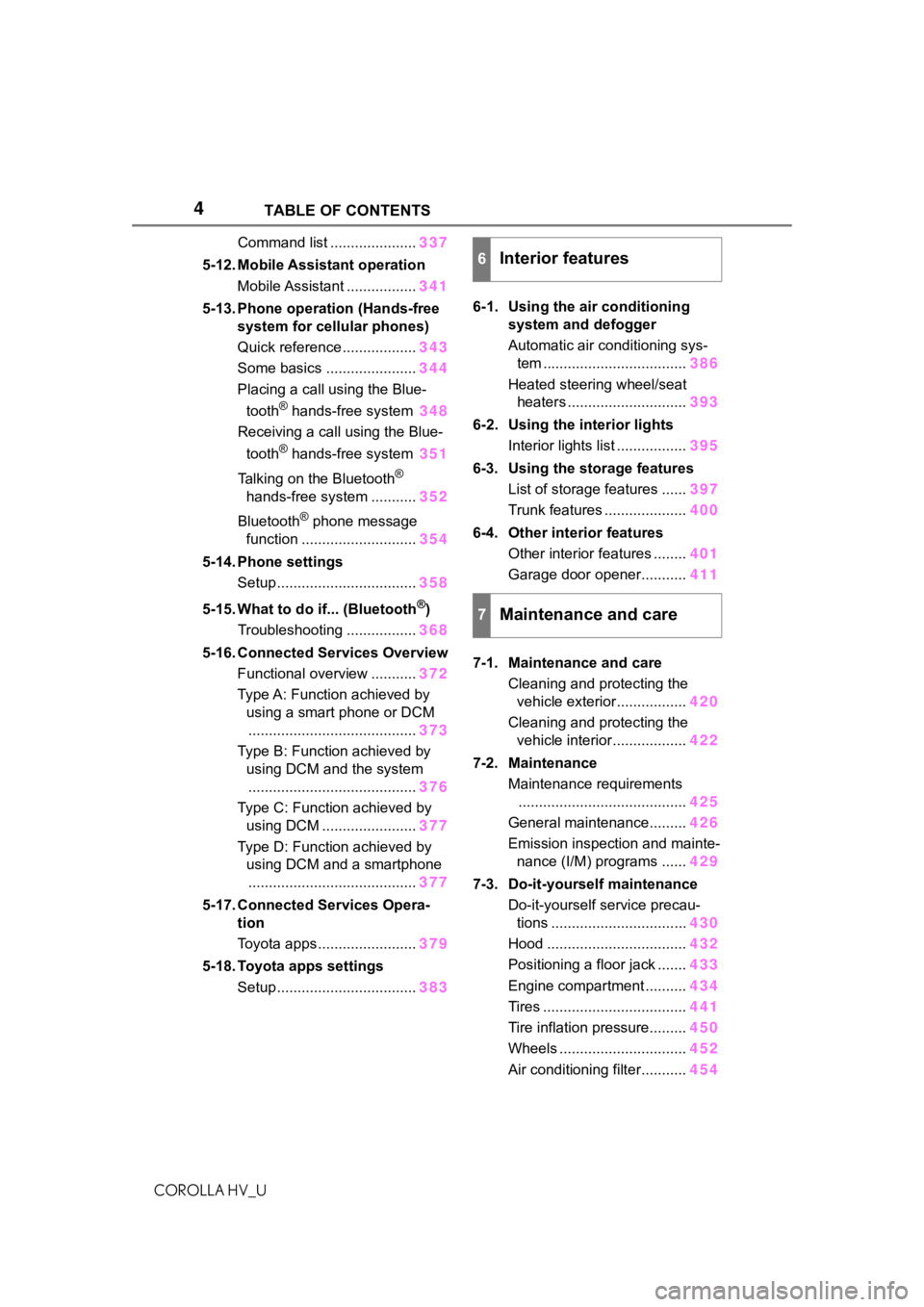
Command list .....................337
5-12. Mobile Assistant operation Mobile Assistant ................. 341
5-13. Phone operation (Hands-free system for cellular phones)
Quick reference .................. 343
Some basics ...................... 344
Placing a call using the Blue-
tooth
® hands-free system 348
Receiving a call using the Blue-
tooth
® hands-free system 351
Talking on the Bluetooth
®
hands-free system ........... 352
Bluetooth
® phone message
function ............................ 354
5-14. Phone settings Setup .................................. 358
5-15. What to do if... (Bluetooth
®)
Troubleshooting ................. 368
5-16. Connected Services Overview Functional overview ........... 372
Type A: Function achieved by using a smart phone or DCM......................................... 373
Type B: Function achieved by using DCM and the system
......................................... 376
Type C: Function achieved by using DCM ....................... 377
Type D: Function achieved by using DCM and a smartphone
......................................... 377
5-17. Connected Services Opera- tion
Toyota apps ........................ 379
5-18. Toyota apps settings Setup .................................. 3836-1. Using the air conditioning
system and defogger
Automatic air conditioning sys-tem ................................... 386
Heated steering wheel/seat heaters ............................. 393
6-2. Using the interior lights Interior lights list ................. 395
6-3. Using the storage features List of storage features ...... 397
Trunk features .................... 400
6-4. Other interior features Other interior features ........ 401
Garage door opener........... 411
7-1. Maintenance and care Cleaning and protecting the vehicle exterior................. 420
Cleaning and protecting the vehicle interior.................. 422
7-2. Maintenance Maintenance requirements......................................... 425
General maintenance......... 426
Emission inspection and mainte- nance (I/M) programs ...... 429
7-3. Do-it-yourself maintenance Do-it-yourself service precau-tions ................................. 430
Hood .................................. 432
Positioning a floor jack ....... 433
Engine compartment .......... 434
Tires ................................... 441
Tire inflation pressure......... 450
Wheels ............................... 452
Air conditioning filter........... 454
6Interior features
7Maintenance and care
Page 8 of 584

8
COROLLA HV_U
shared by Toyota, please visit
www.toyota.com/privacyvts/
.
If your Toyota has Safety Con-
nect and if you have subscribed
to those services, please refer to
the Safety Connect Telematics
Subscription Service Agreement
for information on data collected
and its usage.
To learn more about the vehicle
data collected, used and shared
by Toyota, please visit
www.toyota.com/privacyvts/
.
This vehicle is equipped with an
event data recorder (EDR). The
main purpose of an EDR is to
record, in certain crash or near
crash-like situations, such as an
air bag deployment or hitting a
road obstacle, data that will
assist in understanding how a
vehicle’s systems performed.
The EDR is designed to record
data related to vehicle dynamics
and safety systems for a short
period of time, typically 30 sec-
onds or less.
The EDR in this vehicle is
designed to record such data
as:
• How various systems in your vehicle were operating;
• Whether or not the driver and passenger safety belts were
buckled/fastened;
• How far (if at all) the driver was depressing the accelera-
tor and/or brake pedal; and,
• How fast the vehicle was trav- eling.
These data can help provide a
better understanding of the cir-
cumstances in which crashes
and injuries occur.
NOTE: EDR data are recorded
by your vehicle only if a non-triv-
ial crash situation occurs; no
data are recorded by the EDR
under normal driving conditions
and no personal data (e.g.,
name, gender, age, and crash
location) are recorded. How-
ever, other parties, such as law
enforcement, could combine the
EDR data with the type of per-
sonally identifying data rou-
tinely acquired during a crash
investigation.
To read data recorded by an
EDR, special equipment is
required, and access to the
vehicle or the EDR is needed. In
addition to the vehicle manufac-
turer, other parties, such as law
enforcement, that have the spe-
cial equipment, can read the
information if they have access
to the vehicle or the EDR.
Disclosure of the EDR data
Toyota will not disclose the data
Usage of data collected
through Safety Connect
(U.S. mainland only)
Event data recorder
Page 16 of 584

16Pictorial index
COROLLA HV_U
When a warning message is displayed ............................ .... P.487
Turn signal lever.............................................. ................... P.166
Headlight switch ............................................... ................. P.173
Headlights/parking lights/tail lig hts/side marker lights/daytime run-
ning lights .................................................... ......................... P.173
Windshield wiper and washer switch............................... P.178
Usage................................................................................... P.178
Adding washer fluid .............................................................. P.440
Emergency flasher switch ....................................... .......... P.470
Hood lock release lever ........................................ ............. P.432
Tilt and telescopic steering lock release lever ................P. 1 3 8
Air conditioning system ............................. ....................... P.386
Usage................................................................................... P.386
Rear window defogger ........................................... .............. P.387
Audio .......................................................... ......................... P.253
Audio Plus
*
*
: Refer to “NAVIGATION AND MU LTIMEDIA SYSTEM OWNER’S MAN-
UAL”.
Page 34 of 584
341-1. For safe use
COROLLA HV_U
●Depending on the type of collision,
it is possible that only the seat belt
pretensioners will activate.
●The SRS front airbags for the front
passenger will not activate if there
is no passenger sitting in the front
passenger seat. However, the
SRS front airbags for the front
passenger may de ploy if luggage
is put in the seat, even if the seat
is unoccupied.
●The SRS seat cushion airbag on
the front passen ger seat will not
operate if the occupant is not
wearing a seat belt.
■SRS airbag deployment condi-
tions (SRS side and curtain
shield airbags)
●The SRS side and curtain shield
airbags will deploy i n the event of
an impact that exceeds the set
threshold level (the level of force
corresponding to the impact force
produced by an approximately
3300 lb. [1500 kg] vehicle colliding
with the vehicle cabin from a
direction perpendicular to the
vehicle orientation at an approxi-
mate speed of 12 - 18 mph [20 -
30 km/h]).
●Both SRS curtain shield airbags
may deploy in the event of a
severe side collision.
●Both SRS curtain shield airbags
will deploy in the event of vehicle
rollover.
●Both SRS curtain shield airbags
may also deploy in the event of a
severe frontal collision.
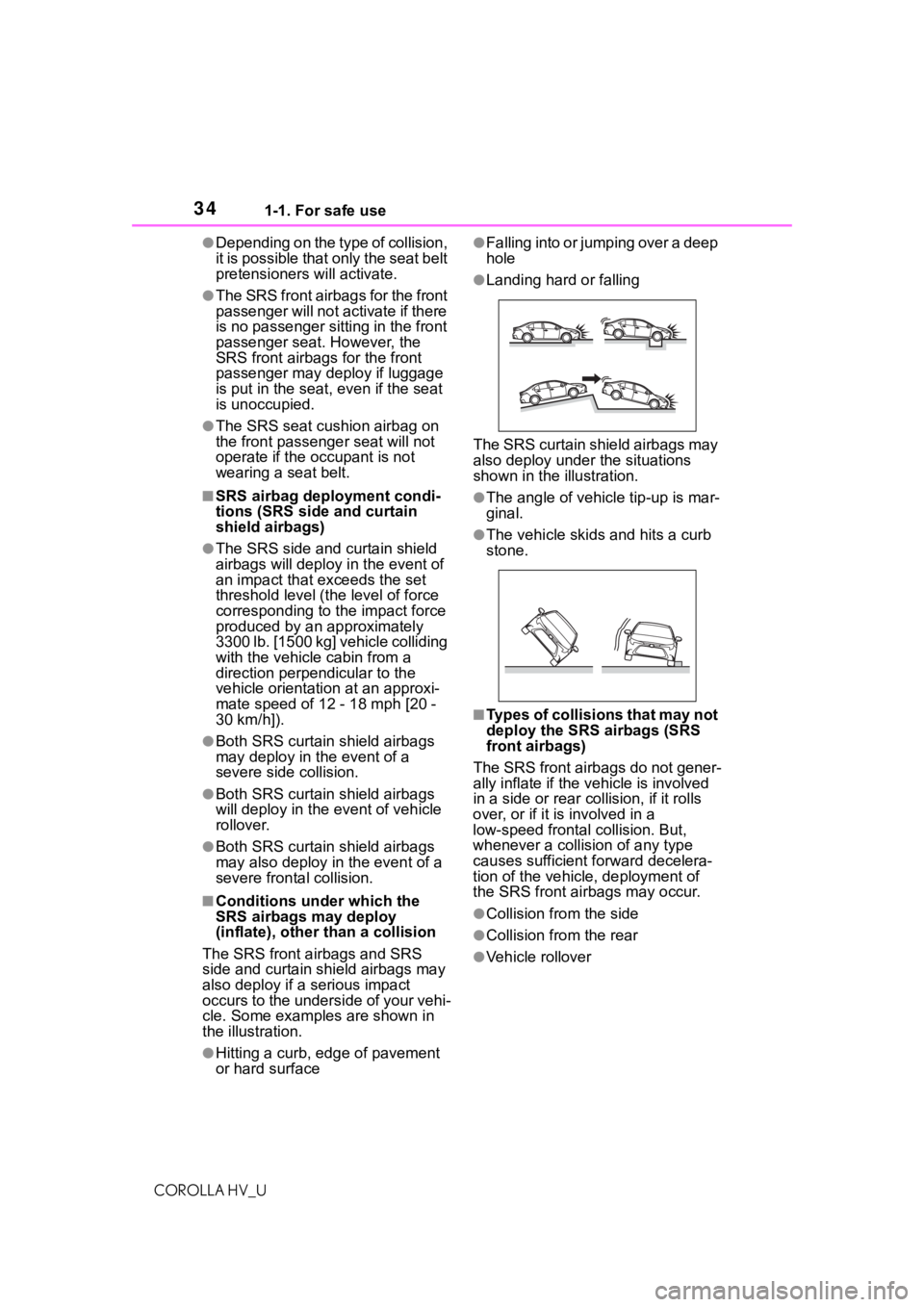
■Conditions under which the
SRS airbags may deploy
(inflate), other t han a collision
The SRS front airbags and SRS
side and curtain shield airbags may
also deploy if a serious impact
occurs to the underside of your vehi-
cle. Some examples are shown in
the illustration.
●Hitting a curb, edge of pavement
or hard surface
●Falling into or jumping over a deep
hole
●Landing hard or falling
The SRS curtain shield airbags may
also deploy under the situations
shown in the illustration.
●The angle of vehicle tip-up is mar-
ginal.
●The vehicle skids and hits a curb
stone.
■Types of collisions that may not
deploy the SRS airbags (SRS
front airbags)
The SRS front airbags do not gener-
ally inflate if the vehicle is involved
in a side or r ear collision, if it rolls
over, or if it is involved in a
low-speed frontal collision. But,
whenever a collis ion of any type
causes sufficient forward decelera-
tion of the vehicle, deployment of
the SRS front airbags may occur.
●Collision from the side
●Collision from the rear
●Vehicle rollover
Page 41 of 584
411-1. For safe use
COROLLA HV_U
1
For safety and security
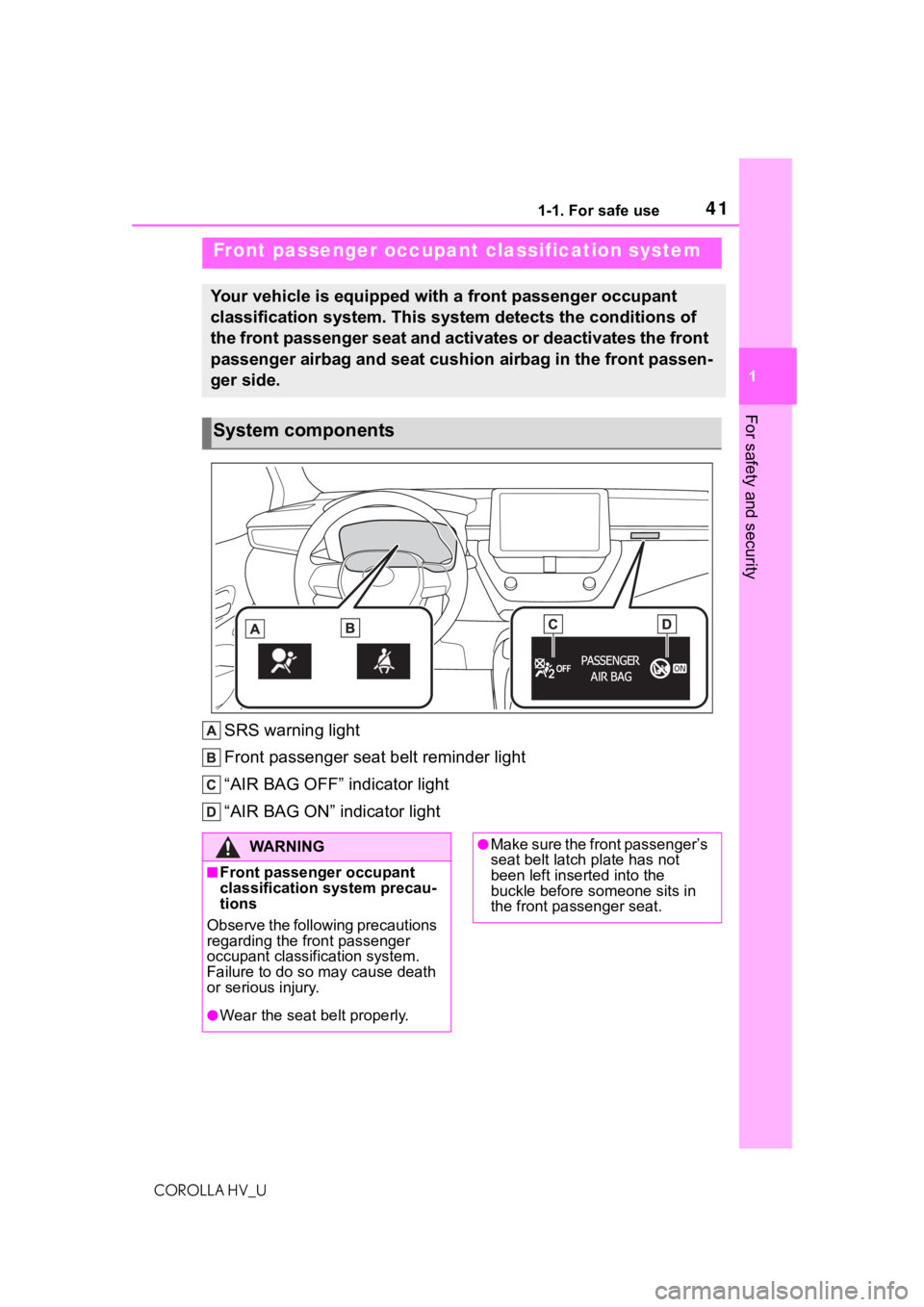
SRS warning light
Front passenger seat belt reminder light
“AIR BAG OFF” indicator light
“AIR BAG ON” indicator light
Front passenger occupant classification system
Your vehicle is equipped with a front passenger occupant
classification system. This system detects the conditions of
the front passenger seat and activates or deactivates the front
passenger airbag and seat cushion airbag in the front passen-
ger side.
System components
WA R N I N G
■Front passenger occupant
classification system precau-
tions
Observe the following precautions
regarding the front passenger
occupant classification system.
Failure to do so may cause death
or serious injury.
●Wear the seat belt properly.
●Make sure the front passenger’s
seat belt latch plate has not
been left inserted into the
buckle before someone sits in
the front passenger seat.
Page 43 of 584
431-1. For safe use
COROLLA HV_U
1
For safety and security
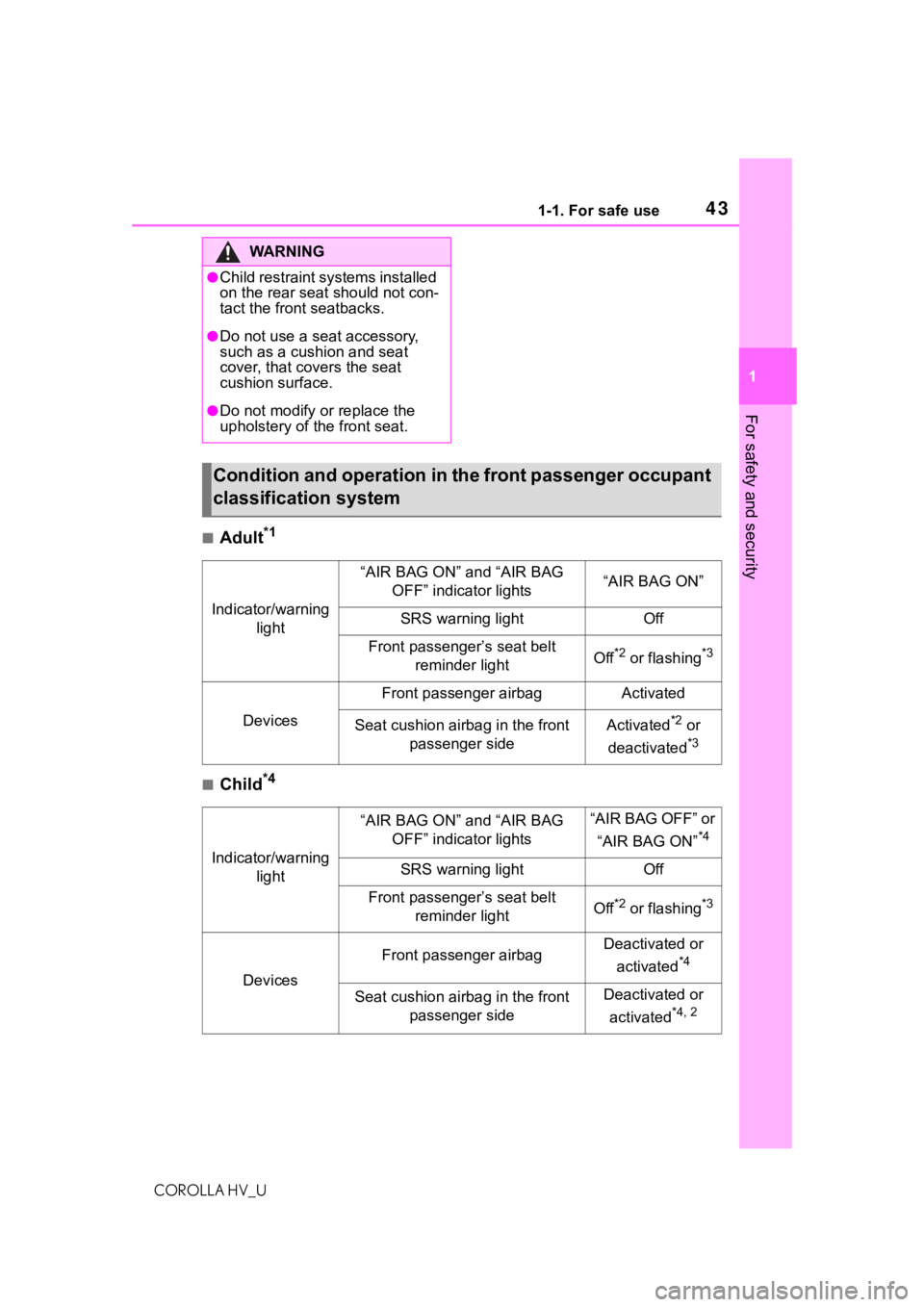
■Adult*1
■Child*4
WA R N I N G
●Child restraint systems installed
on the rear seat should not con-
tact the front seatbacks.
●Do not use a seat accessory,
such as a cushion and seat
cover, that covers the seat
cushion surface.
●Do not modify or replace the
upholstery of the front seat.
Condition and operation in th e front passenger occupant
classification system
Indicator/warning light
“AIR BAG ON” and “AIR BAG OFF” indicator lights“AIR BAG ON”
SRS warning lightOff
Front passenger’s seat belt reminder lightOff*2 or flashing*3
Devices
Front passenger airbagActivated
Seat cushion airbag in the front passenger sideActivated*2 or
deactivated
*3
Indicator/warning light
“AIR BAG ON” and “AIR BAG OFF” indicator lights“AIR BAG OFF” or
“AIR BAG ON”
*4
SRS warning lightOff
Front passenger’s seat belt reminder lightOff*2 or flashing*3
Devices
Front passenger airbagDeactivated or
activated
*4
Seat cushion airbag in the front passenger sideDeactivated or
activated
*4, 2
Page 83 of 584
831-4. Hybrid system
COROLLA HV_U
1
For safety and security
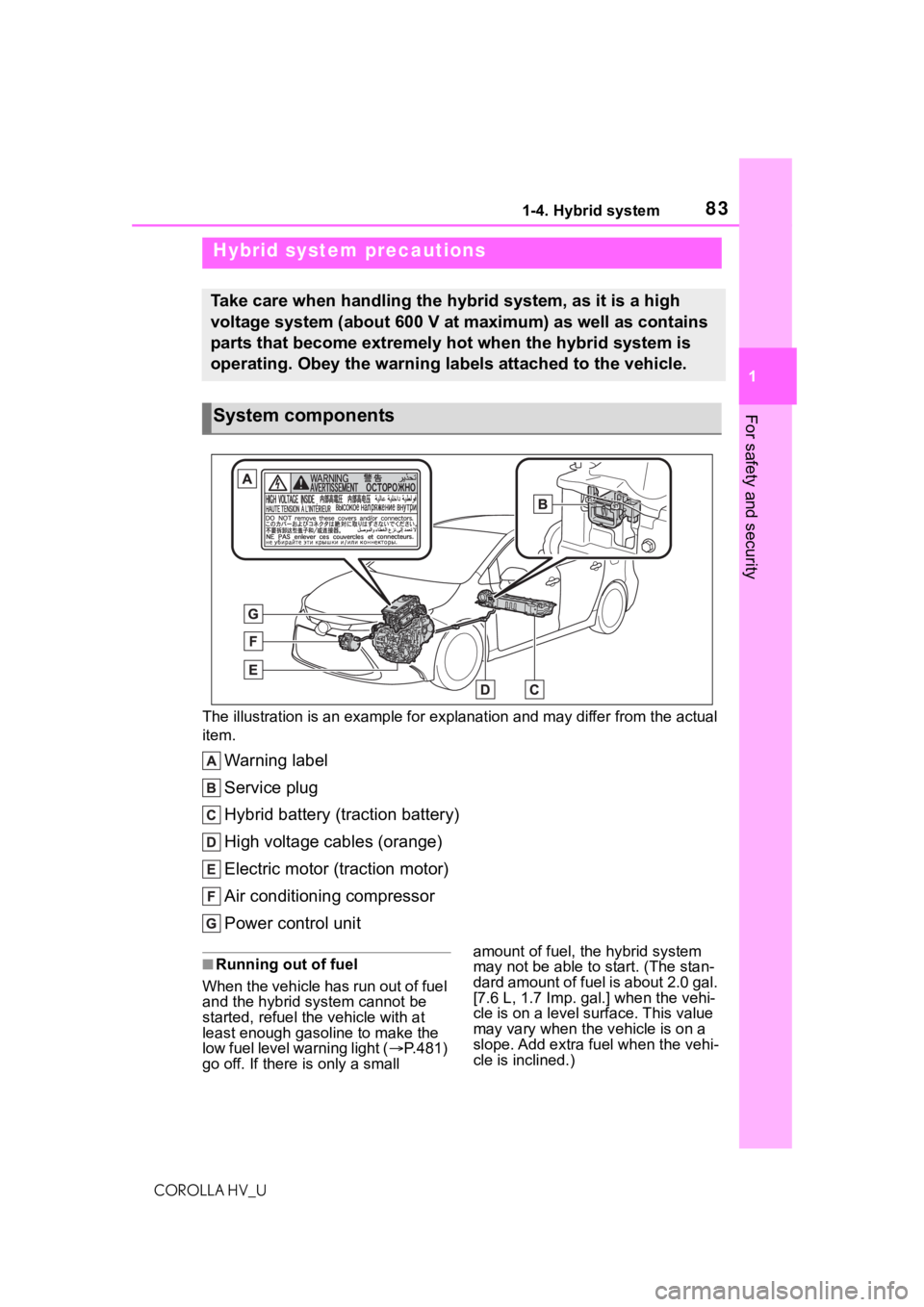
The illustration is an example for explanation and may differ from the actual
item.
Warning label
Service plug
Hybrid battery (traction battery)
High voltage cables (orange)
Electric motor (traction motor)
Air conditioning compressor
Power control unit
■Running out of fuel
When the vehicle has run out of fuel
and the hybrid system cannot be
started, refuel th e vehicle with at
least enough gasoline to make the
low fuel level warning light ( P.481)
go off. If there is only a small amount of fuel, the hybrid system
may not be able to
start. (The stan-
dard amount of fuel is about 2.0 gal.
[7.6 L, 1.7 I mp. gal.] when the vehi-
cle is on a level surface. This value
may vary when the v ehicle is on a
slope. Add extra fu el when the vehi-
cle is inclined.)
Hybrid system precautions
Take care when handling the hybrid system, as it is a high
voltage system (about 600 V at maximum) as well as contains
parts that become extremely hot when the hybrid system is
operating. Obey the warning labels attached to the vehicle.
System components
Page 127 of 584
1273-2. Opening, closing and locking the doors
COROLLA HV_U
3
Before driving
been used for 5 days or longer.
●If the smart key system has not
been used for 14 days or longer,
the doors cann ot be unlocked
from any door except the driver’s
door. In this case, hold the driver’s
door handle, or use the wireless
remote control or mechanical key
to unlock the doors.
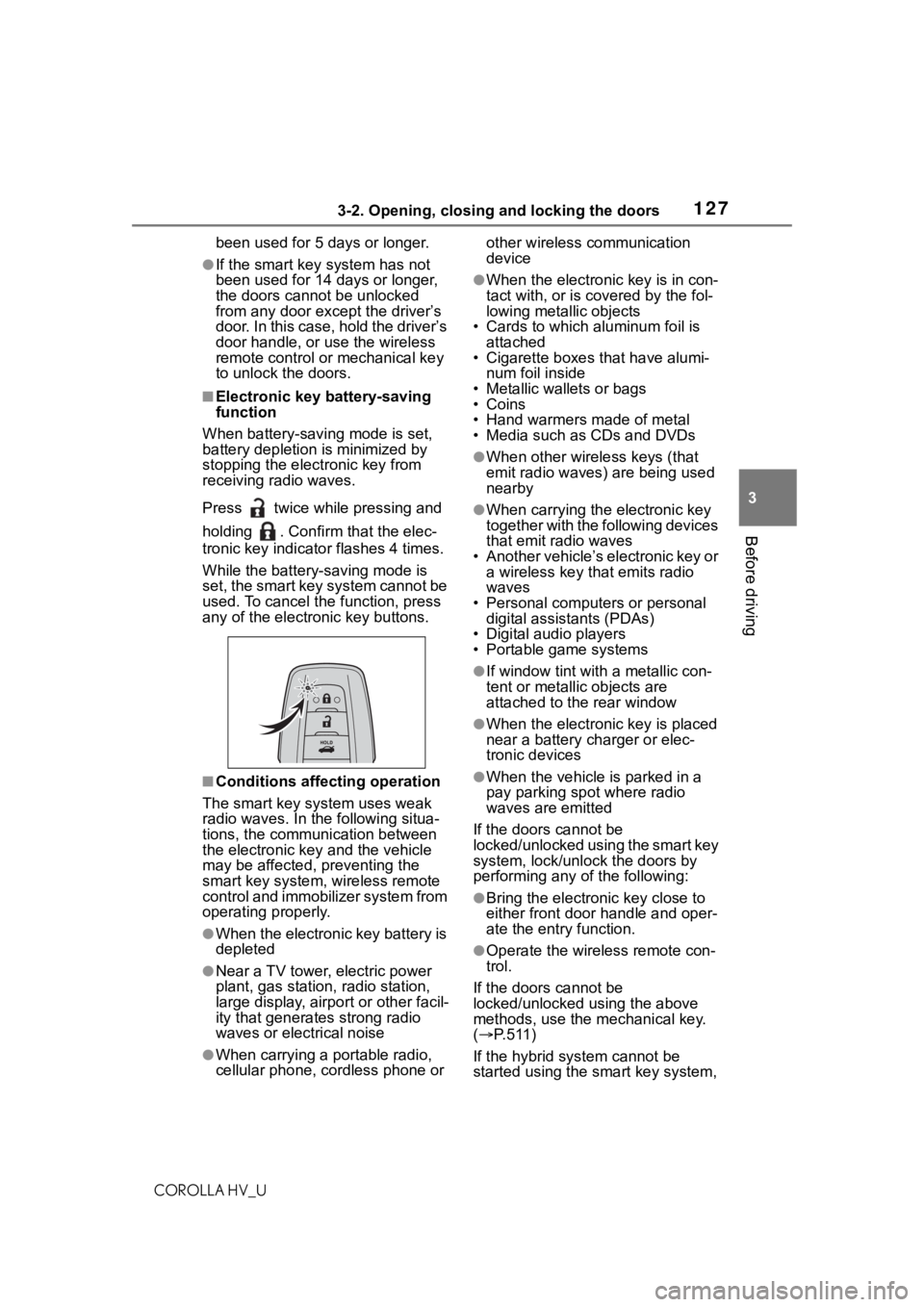
■Electronic key battery-saving
function
When battery-savi ng mode is set,
battery depletion is minimized by
stopping the electronic key from
receiving radio waves.
Press twice while pressing and
holding . Confirm that the elec-
tronic key indicator flashes 4 times.
While the battery-saving mode is
set, the smart key system cannot be
used. To cancel the function, press
any of the electronic key buttons.
■Conditions affecting operation
The smart key system uses weak
radio waves. In the following situa-
tions, the communication between
the electronic key and the vehicle
may be affected, preventing the
smart key system, wireless remote
control and immobilizer system from
operating properly.
●When the electronic key battery is
depleted
●Near a TV tower, electric power
plant, gas station , radio station,
large display, airpo rt or other facil-
ity that generates strong radio
waves or electrical noise
●When carrying a portable radio,
cellular phone, cordless phone or other wireless communication
device
●When the electronic key is in con-
tact with, or is c
overed by the fol-
lowing metallic objects
• Cards to which aluminum foil is
attached
• Cigarette boxes that have alumi-
num foil inside
• Metallic wallets or bags
•Coins
• Hand warmers made of metal
• Media such as CDs and DVDs
●When other wirel ess keys (that
emit radio waves) are being used
nearby
●When carrying the electronic key
together with the following devices
that emit radio waves
• Another vehicle’s electronic key or a wireless key that emits radio
waves
• Personal computers or personal digital assistants (PDAs)
• Digital audio players
• Portable game systems
●If window tint wit h a metallic con-
tent or metallic objects are
attached to the rear window
●When the electronic key is placed
near a battery charger or elec-
tronic devices
●When the vehicle is parked in a
pay parking spot where radio
waves are emitted
If the doors cannot be
locked/unlocked using the smart key
system, lock/unlock the doors by
performing any of the following:
●Bring the electronic key close to
either front door handle and oper-
ate the entry function.
●Operate the wireless remote con-
trol.
If the doors cannot be
locked/unlocked using the above
methods, use the mechanical key.
( P. 5 1 1 )
If the hybrid system cannot be
started using the smart key system,
Page 187 of 584
1874-5. Using the driving support systems
COROLLA HV_U
4
Driving
■If a warning message is displayed on the multi-information disp lay
A system may be tempor arily unavailable or there may be a malfu nction in
the system.
●In the following situations, perform the actions specified in t he table. When
the normal operating conditions are detected, the message will disappear
and the system will be come operational.
If the message does not disapp ear, contact your Toyota dealer.
SituationActions
When the area around a sensor is
covered with dirt, moisture (fogged
up, covered with condensation, ice,
etc.), or other foreign matterTo clean the part of the windshield in
front of the front camera, use the
windshield wipers or the windshield
defogger of the air conditioning sys-
tem ( P.387)