air conditioning TOYOTA COROLLA HYBRID 2021 Owners Manual (in English)
[x] Cancel search | Manufacturer: TOYOTA, Model Year: 2021, Model line: COROLLA HYBRID, Model: TOYOTA COROLLA HYBRID 2021Pages: 584, PDF Size: 19.59 MB
Page 4 of 584
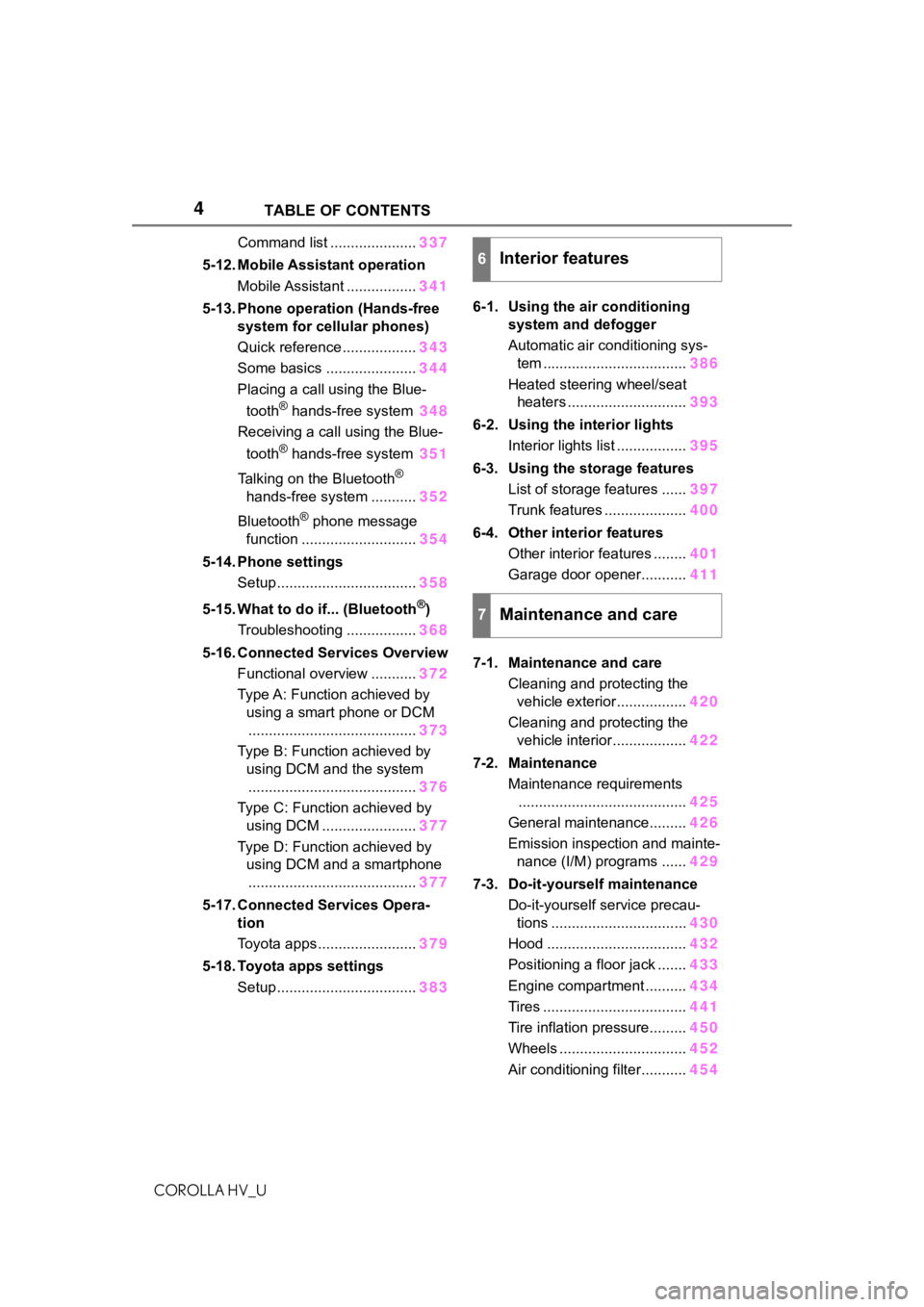
4TABLE OF CONTENTS
COROLLA HV_U
Command list .....................337
5-12. Mobile Assistant operation Mobile Assistant ................. 341
5-13. Phone operation (Hands-free system for cellular phones)
Quick reference .................. 343
Some basics ...................... 344
Placing a call using the Blue-
tooth
® hands-free system 348
Receiving a call using the Blue-
tooth
® hands-free system 351
Talking on the Bluetooth
®
hands-free system ........... 352
Bluetooth
® phone message
function ............................ 354
5-14. Phone settings Setup .................................. 358
5-15. What to do if... (Bluetooth
®)
Troubleshooting ................. 368
5-16. Connected Services Overview Functional overview ........... 372
Type A: Function achieved by using a smart phone or DCM......................................... 373
Type B: Function achieved by using DCM and the system
......................................... 376
Type C: Function achieved by using DCM ....................... 377
Type D: Function achieved by using DCM and a smartphone
......................................... 377
5-17. Connected Services Opera- tion
Toyota apps ........................ 379
5-18. Toyota apps settings Setup .................................. 3836-1. Using the air conditioning
system and defogger
Automatic air conditioning sys-tem ................................... 386
Heated steering wheel/seat heaters ............................. 393
6-2. Using the interior lights Interior lights list ................. 395
6-3. Using the storage features List of storage features ...... 397
Trunk features .................... 400
6-4. Other interior features Other interior features ........ 401
Garage door opener........... 411
7-1. Maintenance and care Cleaning and protecting the vehicle exterior................. 420
Cleaning and protecting the vehicle interior.................. 422
7-2. Maintenance Maintenance requirements......................................... 425
General maintenance......... 426
Emission inspection and mainte- nance (I/M) programs ...... 429
7-3. Do-it-yourself maintenance Do-it-yourself service precau-tions ................................. 430
Hood .................................. 432
Positioning a floor jack ....... 433
Engine compartment .......... 434
Tires ................................... 441
Tire inflation pressure......... 450
Wheels ............................... 452
Air conditioning filter........... 454
6Interior features
7Maintenance and care
Page 16 of 584

16Pictorial index
COROLLA HV_U
When a warning message is displayed ............................ .... P.487
Turn signal lever.............................................. ................... P.166
Headlight switch ............................................... ................. P.173
Headlights/parking lights/tail lig hts/side marker lights/daytime run-
ning lights .................................................... ......................... P.173
Windshield wiper and washer switch............................... P.178
Usage................................................................................... P.178
Adding washer fluid .............................................................. P.440
Emergency flasher switch ....................................... .......... P.470
Hood lock release lever ........................................ ............. P.432
Tilt and telescopic steering lock release lever ................P. 1 3 8
Air conditioning system ............................. ....................... P.386
Usage................................................................................... P.386
Rear window defogger ........................................... .............. P.387
Audio .......................................................... ......................... P.253
Audio Plus
*
*
: Refer to “NAVIGATION AND MU LTIMEDIA SYSTEM OWNER’S MAN-
UAL”.
Page 83 of 584
831-4. Hybrid system
COROLLA HV_U
1
For safety and security
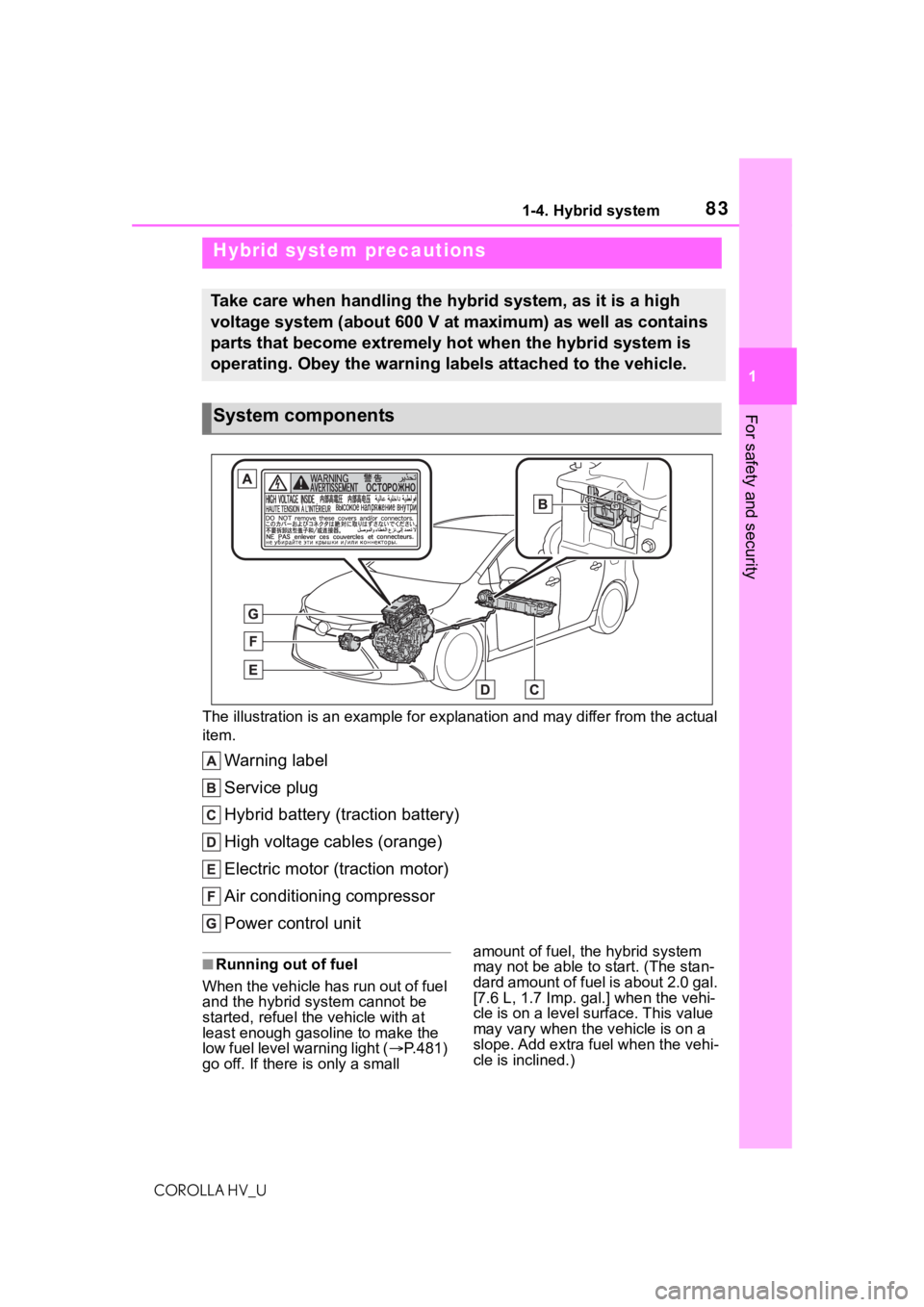
The illustration is an example for explanation and may differ from the actual
item.
Warning label
Service plug
Hybrid battery (traction battery)
High voltage cables (orange)
Electric motor (traction motor)
Air conditioning compressor
Power control unit
■Running out of fuel
When the vehicle has run out of fuel
and the hybrid system cannot be
started, refuel th e vehicle with at
least enough gasoline to make the
low fuel level warning light ( P.481)
go off. If there is only a small amount of fuel, the hybrid system
may not be able to
start. (The stan-
dard amount of fuel is about 2.0 gal.
[7.6 L, 1.7 I mp. gal.] when the vehi-
cle is on a level surface. This value
may vary when the v ehicle is on a
slope. Add extra fu el when the vehi-
cle is inclined.)
Hybrid system precautions
Take care when handling the hybrid system, as it is a high
voltage system (about 600 V at maximum) as well as contains
parts that become extremely hot when the hybrid system is
operating. Obey the warning labels attached to the vehicle.
System components
Page 187 of 584
1874-5. Using the driving support systems
COROLLA HV_U
4
Driving
■If a warning message is displayed on the multi-information disp lay
A system may be tempor arily unavailable or there may be a malfu nction in
the system.
●In the following situations, perform the actions specified in t he table. When
the normal operating conditions are detected, the message will disappear
and the system will be come operational.
If the message does not disapp ear, contact your Toyota dealer.
SituationActions
When the area around a sensor is
covered with dirt, moisture (fogged
up, covered with condensation, ice,
etc.), or other foreign matterTo clean the part of the windshield in
front of the front camera, use the
windshield wipers or the windshield
defogger of the air conditioning sys-
tem ( P.387)
Page 188 of 584
1884-5. Using the driving support systems
COROLLA HV_U
●In the following situations, if the situation has changed (or the vehicle has
been driven for some time) and the normal operating conditions are
detected, the message will disappear and the system will become opera-
tional.
If the message does not disapp ear, contact your Toyota dealer.
• When the temperature around the radar sensor is outside of the opera-
tional range, such as when the vehicle is in the sun or in an e xtremely cold
environment
• When the front camera cannot d etect objects in front of the vehicle, such
as when driving in the dark, sno w, or fog, or when bright lights are shining
into the front camera
When the temperature around the
front camera is out side of the opera-
tional range, such as when the vehi-
cle is in the sun or in an extremely
cold environment
If the front camera is hot, such as
after the vehicle had been parked in
the sun, use the air conditioning sys-
tem to decrease the temperature
around the front camera.
If a sunshade was used when the
vehicle was parked, depending on its
type, the sunlight r eflected from the
surface of the sunshade may cause
the temperature of the front camera
to become exce ssively high.
If the front camera is cold, such after
the vehicle is parked in an extremely
cold environment, use the air condi-
tioning system to increase the tem-
perature around the front camera.
The area in front of the front camera
is obstructed, such as when the
hood is open or a sticker is attached
to the part of the windshield in front
of the front camera.
Close the hood, remove the sticker,
etc. to clear the obstruction.
SituationActions
Page 239 of 584
2394-5. Using the driving support systems
COROLLA HV_U
4
Driving
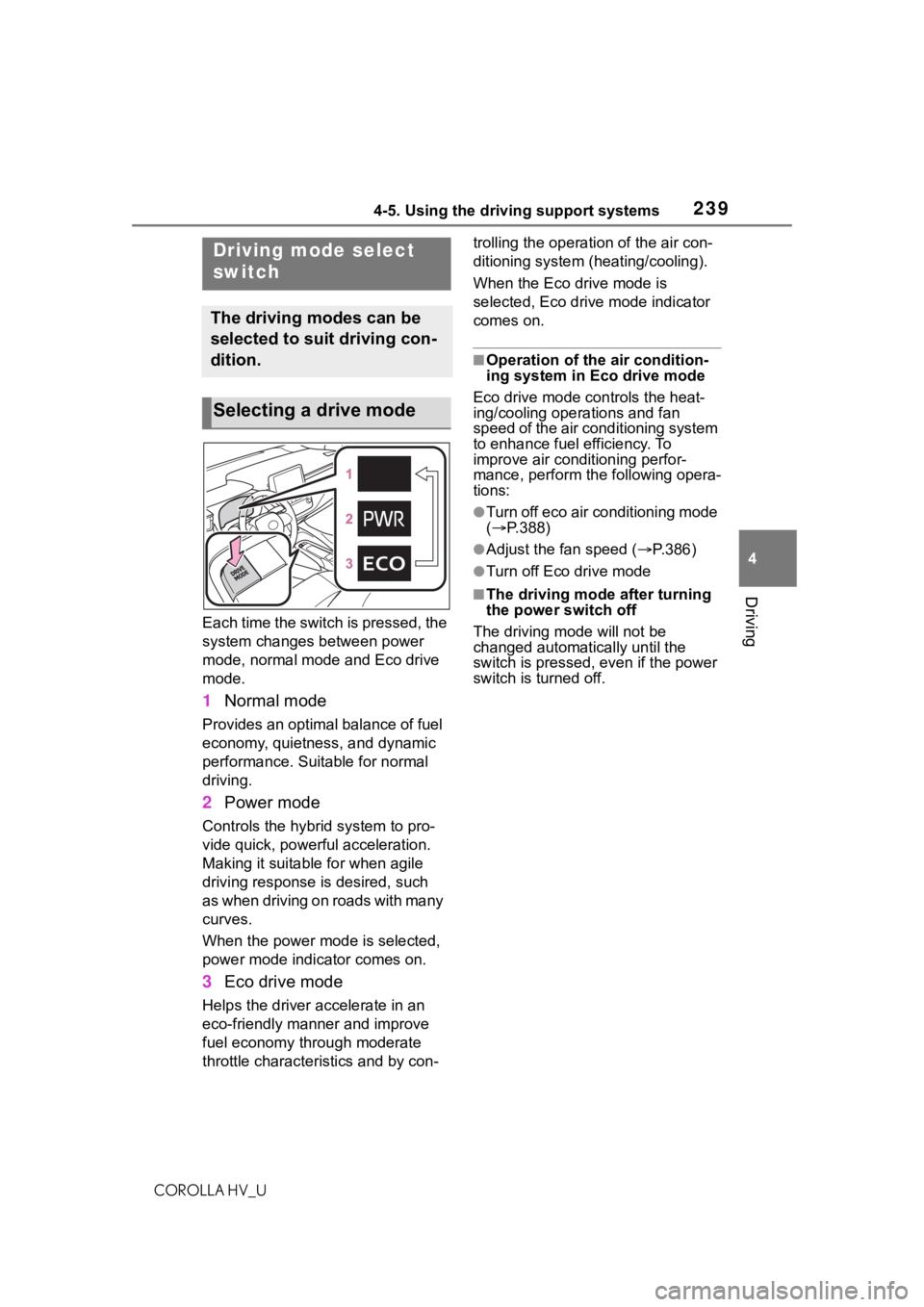
Each time the switch is pressed, the
system changes between power
mode, normal mode and Eco drive
mode.
1 Normal mode
Provides an optimal balance of fuel
economy, quietness, and dynamic
performance. Suitable for normal
driving.
2Power mode
Controls the hybrid system to pro-
vide quick, powerful acceleration.
Making it suitable for when agile
driving response is desired, such
as when driving on roads with many
curves.
When the power mode is selected,
power mode indicator comes on.
3Eco drive mode
Helps the driver a ccelerate in an
eco-friendly manner and improve
fuel economy through moderate
throttle characteri stics and by con- trolling the operation of the air con-
ditioning system (heating/cooling).
When the Eco drive mode is
selected, Eco drive mode indicator
comes on.
■Operation of the air condition-
ing system in Eco drive mode
Eco drive mode con trols the heat-
ing/cooling operations and fan
speed of the air conditioning system
to enhance fuel efficiency. To
improve air conditioning perfor-
mance, perform the following opera-
tions:
●Turn off eco air conditioning mode
( P.388)
●Adjust the fan speed ( P.386)
●Turn off Eco drive mode
■The driving mode after turning
the power switch off
The driving mode will not be
changed automatically until the
switch is pressed, even if the power
switch is turned off.
Driving mode select
switch
The driving modes can be
selected to suit driving con-
dition.
Selecting a drive mode
Page 245 of 584
2454-6. Driving tips
COROLLA HV_U
4
Driving
4-6.Driving tips
When using Eco drive mode, the
torque corresponding to the
accelerator pedal depression
amount can be generated more
smoothly than it is in normal
conditions. In addition, the oper-
ation of the air conditioning sys-
tem (heating/cooling) will be
minimized, improving the fuel
economy. ( P.239)
The Eco-friendly driving is pos-
sible by keeping the indicate of
Hybrid System Indicator within
Eco area. ( P.105)
Shift the shift lever to D when
stopped at a traffic light, or driv-
ing in heavy traffic etc. Shift the
shift lever to P when parking.
When using the N, there is no
positive effect on fuel consump-
tion. In the N, the gasoline
engine operates but electricity
cannot be generated. Also,
when using the air conditioning system, etc., the hybrid battery
(traction battery) power is con-
sumed.
Drive your vehicle smoothly.
Avoid abrupt acceleration and
deceleration. Gradual accel-
eration and deceleration will
make more effective use of
the electric motor (traction
motor) without having to use
gasoline engine power.
Avoid repeated acceleration.
Repeated acceleration con-
sumes hybrid battery (trac-
tion battery) power, resulting
in poor fuel consumption. Bat-
tery power can be restored by
driving with the accelerator
pedal slightly released.
Make sure to operate the brakes
gently and in a timely manner. A
greater amount of electrical
energy can be regenerated
when slowing down.
Repeated acceleration and
deceleration, as well as long
waits at traffic lights, will lead to
bad fuel economy. Check traffic
reports before leaving and avoid
delays as much as possible.
Hybrid vehicle driving
tips
For economical and ecolog-
ical driving, pay attention to
the following points:
Using Eco drive mode
Use of Hybrid System
Indicator
Shift lever operation
Accelerator pedal/brake
pedal operation
When braking
Delays
Page 246 of 584
2464-6. Driving tips
COROLLA HV_U
When driving in a traffic jam,
gently release the brake pedal
to allow the vehicle to move for-
ward slightly while avoiding
overuse of the accelerator
pedal. Doing so can help control
excessive gasoline consump-
tion.
Control and maintain the vehicle
at a constant speed. Before
stopping at a toll booth or simi-
lar, allow plenty of time to
release the accelerator and gen-
tly apply the brakes. A greater
amount of electrical energy can
be regenerated when slowing
down.
Use the air conditioning only
when necessary. Doing so can
help reduce excessive gasoline
consumption.
In summer: When the ambient
temperature is high, use the
recirculated air mode. Doing so
will help to reduce the burden on
the air conditioning system and
reduce fuel consumption as
well.
In winter: Because the gasoline
engine will not automatically cut
out until it and the interior of the
vehicle are warm, it will con-
sume fuel. Also, fuel consump-
tion can be improved by avoiding overuse of the heater.
Make sure to check the tire infla-
tion pressure frequently.
Improper tire inflation pressure
can cause poor fuel economy.
Also, as snow tires can cause
large amounts of friction, their
use on dry roads can lead to
poor fuel economy. Use tires
that are appropriate for the sea-
son.
Carrying heavy luggage will lead
to poor fuel economy. Avoid car-
rying unnecessary luggage.
Installing a large roof rack will
also cause poor fuel economy.
Since the gasoline engine starts
up and cuts out automatically
when cold, warming up the
engine is unnecessary. More-
over, frequently driving short
distances will cause the engine
to repeatedly warm up, which
can lead to excess fuel con-
sumption.
Highway driving
Air conditioning
Checking tire inflation
pressure
Luggage
Warming up before driv-
ing
Page 334 of 584
3345-11. Voice command system operation
COROLLA HV_U
5-11.Voice command system operation
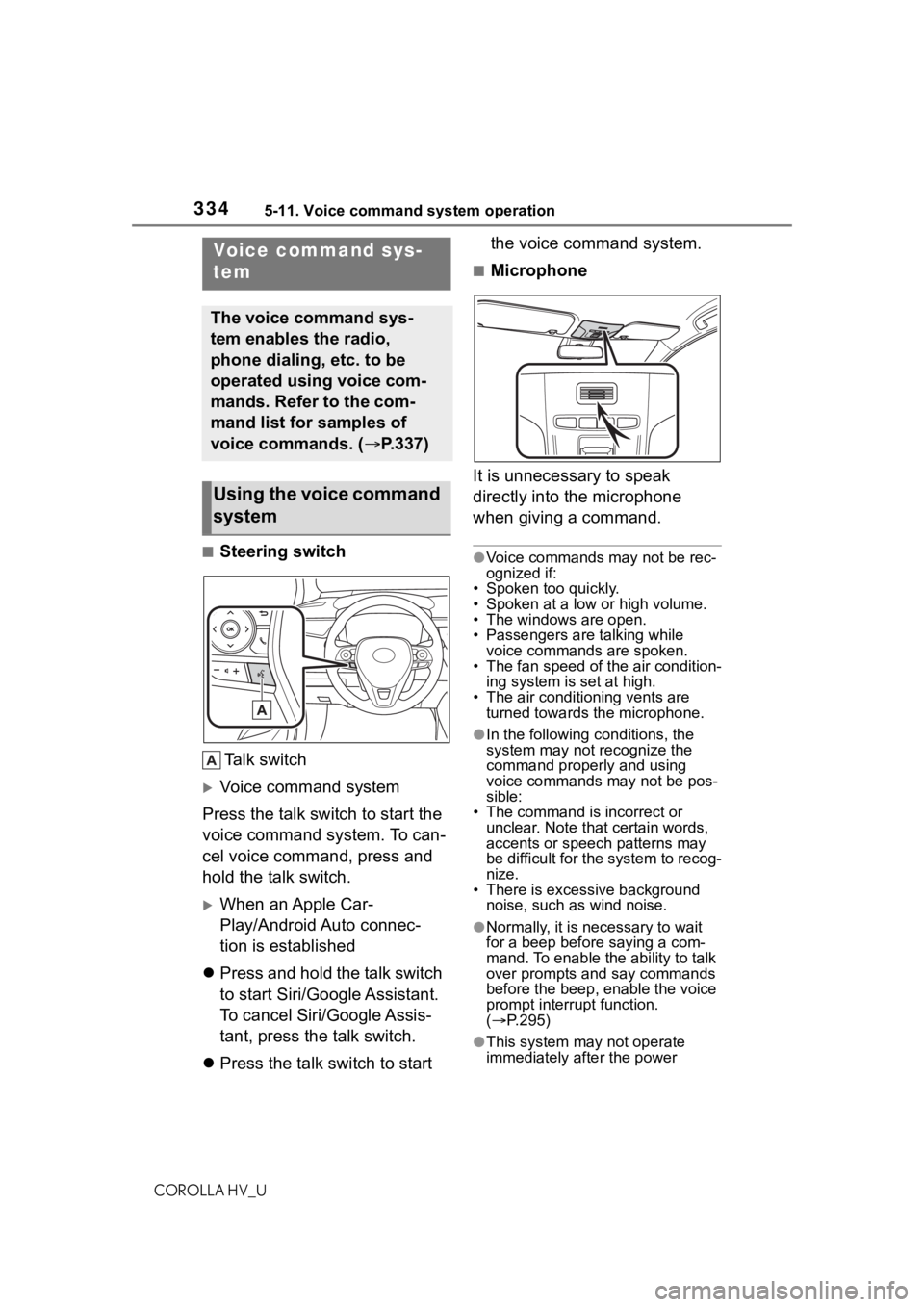
■Steering switchTa l k s w i t c h
Voice command system
Press the talk switch to start the
voice command system. To can-
cel voice command, press and
hold the talk switch.
When an Apple Car-
Play/Android Auto connec-
tion is established
Press and hold the talk switch
to start Siri/Google Assistant.
To cancel Siri/Google Assis-
tant, press the talk switch.
Press the talk switch to start the voice command system.
■Microphone
It is unnecessary to speak
directly into the microphone
when giving a command.
●Voice commands may not be rec-
ognized if:
• Spoken too quickly.
• Spoken at a low or high volume.
• The windows are open.
• Passengers are talking while voice commands are spoken.
• The fan speed of the air condition-
ing system is set at high.
• The air conditioning vents are turned towards the microphone.
●In the following c onditions, the
system may not recognize the
command properly and using
voice commands may not be pos-
sible:
• The command is incorrect or unclear. Note that certain words,
accents or speech patterns may
be difficult for the system to recog-
nize.
• There is excessive background
noise, such as wind noise.
●Normally, it is necessary to wait
for a beep before saying a com-
mand. To enable th e ability to talk
over prompts and say commands
before the beep, enable the voice
prompt interrupt function.
( P.295)
●This system may not operate
immediately after the power
Voice command sys-
tem
The voice command sys-
tem enables the radio,
phone dialing, etc. to be
operated using voice com-
mands. Refer to the com-
mand list for samples of
voice commands. ( P.337)
Using the voice command
system
Page 341 of 584
3415-12. Mobile Assistant operation
COROLLA HV_U
5
Audio
5-12.Mobile Assistant operation
●While a phone call is active, the
Mobile Assistant cannot be used.
●If using the navig ation feature of
the cellular phone, ensure the
active audio source is Bluetooth
®
audio or iPod in order to hear turn
by turn direction prompts.
●Wait for the listening beeps before
using the Mobile Assistant.
●The Mobile Assistant may not rec-
ognize commands in the following
situations:
• Spoken too quickly.
• Spoken at a low or high volume. • The windows are open.
• Passengers are talking while the
Mobile Assistant is being used.
• The fan speed of the air condition- ing system is set at high.
• The air conditioning vents are
turned toward the microphone.
Mobile Assist supports the Siri
Eyes Free Mode and Google
App. The available features and
functions may vary based on the
iOS/Android version installed on
the connected device.
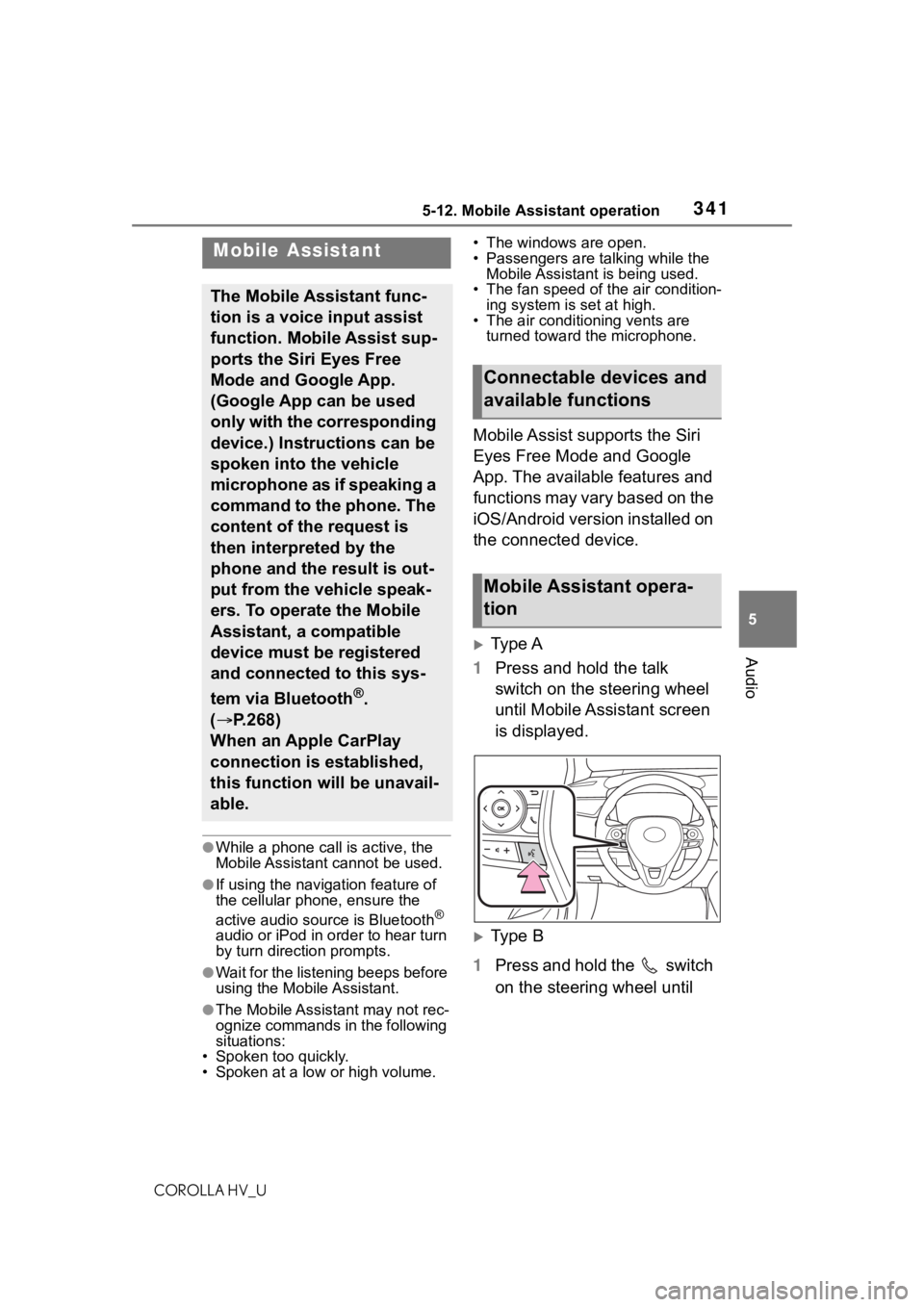
Type A
1 Press and hold the talk
switch on the steering wheel
until Mobile Assistant screen
is displayed.
Type B
1 Press and hold the switch
on the steering wheel until
Mobile Assistant
The Mobile Assistant func-
tion is a voice input assist
function. Mobile Assist sup-
ports the Siri Eyes Free
Mode and Google App.
(Google App can be used
only with the corresponding
device.) Instructions can be
spoken into the vehicle
microphone as if speaking a
command to the phone. The
content of the request is
then interpreted by the
phone and the result is out-
put from the vehicle speak-
ers. To operate the Mobile
Assistant, a compatible
device must be registered
and connected to this sys-
tem via Bluetooth
®.
( P.268)
When an Apple CarPlay
connection is established,
this function will be unavail-
able.
Connectable devices and
available functions
Mobile Assistant opera-
tion