fog light TOYOTA COROLLA HYBRID 2021 Owners Manual (in English)
[x] Cancel search | Manufacturer: TOYOTA, Model Year: 2021, Model line: COROLLA HYBRID, Model: TOYOTA COROLLA HYBRID 2021Pages: 584, PDF Size: 19.59 MB
Page 4 of 584
4TABLE OF CONTENTS
COROLLA HV_U
Command list .....................337
5-12. Mobile Assistant operation Mobile Assistant ................. 341
5-13. Phone operation (Hands-free system for cellular phones)
Quick reference .................. 343
Some basics ...................... 344
Placing a call using the Blue-
tooth
® hands-free system 348
Receiving a call using the Blue-
tooth
® hands-free system 351
Talking on the Bluetooth
®
hands-free system ........... 352
Bluetooth
® phone message
function ............................ 354
5-14. Phone settings Setup .................................. 358
5-15. What to do if... (Bluetooth
®)
Troubleshooting ................. 368
5-16. Connected Services Overview Functional overview ........... 372
Type A: Function achieved by using a smart phone or DCM......................................... 373
Type B: Function achieved by using DCM and the system
......................................... 376
Type C: Function achieved by using DCM ....................... 377
Type D: Function achieved by using DCM and a smartphone
......................................... 377
5-17. Connected Services Opera- tion
Toyota apps ........................ 379
5-18. Toyota apps settings Setup .................................. 3836-1. Using the air conditioning
system and defogger
Automatic air conditioning sys-tem ................................... 386
Heated steering wheel/seat heaters ............................. 393
6-2. Using the interior lights Interior lights list ................. 395
6-3. Using the storage features List of storage features ...... 397
Trunk features .................... 400
6-4. Other interior features Other interior features ........ 401
Garage door opener........... 411
7-1. Maintenance and care Cleaning and protecting the vehicle exterior................. 420
Cleaning and protecting the vehicle interior.................. 422
7-2. Maintenance Maintenance requirements......................................... 425
General maintenance......... 426
Emission inspection and mainte- nance (I/M) programs ...... 429
7-3. Do-it-yourself maintenance Do-it-yourself service precau-tions ................................. 430
Hood .................................. 432
Positioning a floor jack ....... 433
Engine compartment .......... 434
Tires ................................... 441
Tire inflation pressure......... 450
Wheels ............................... 452
Air conditioning filter........... 454
6Interior features
7Maintenance and care
Page 16 of 584

16Pictorial index
COROLLA HV_U
When a warning message is displayed ............................ .... P.487
Turn signal lever.............................................. ................... P.166
Headlight switch ............................................... ................. P.173
Headlights/parking lights/tail lig hts/side marker lights/daytime run-
ning lights .................................................... ......................... P.173
Windshield wiper and washer switch............................... P.178
Usage................................................................................... P.178
Adding washer fluid .............................................................. P.440
Emergency flasher switch ....................................... .......... P.470
Hood lock release lever ........................................ ............. P.432
Tilt and telescopic steering lock release lever ................P. 1 3 8
Air conditioning system ............................. ....................... P.386
Usage................................................................................... P.386
Rear window defogger ........................................... .............. P.387
Audio .......................................................... ......................... P.253
Audio Plus
*
*
: Refer to “NAVIGATION AND MU LTIMEDIA SYSTEM OWNER’S MAN-
UAL”.
Page 176 of 584
1764-3. Operating the lights and wipers
COROLLA HV_U
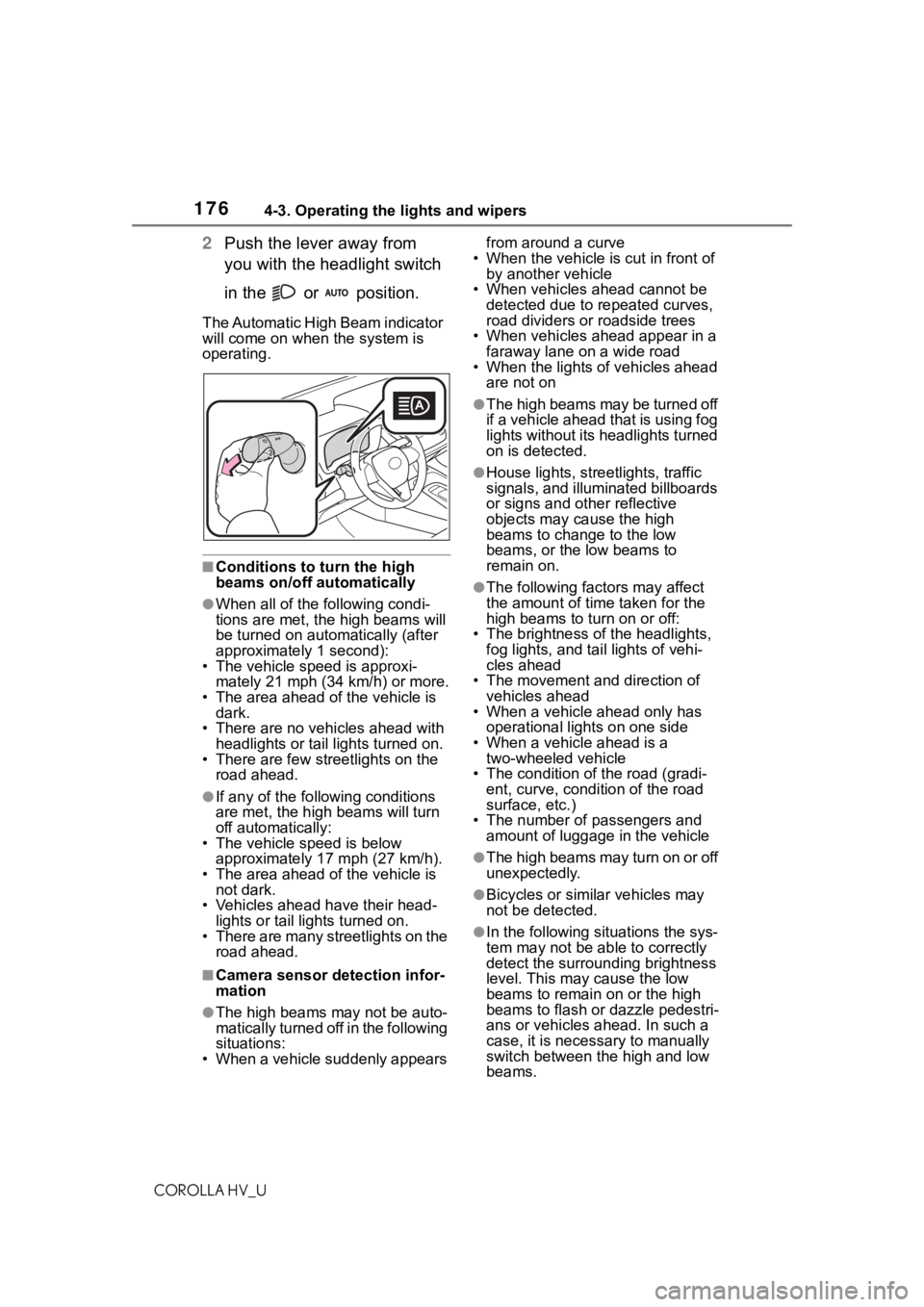
2Push the lever away from
you with the headlight switch
in the or position.
The Automatic High Beam indicator
will come on when the system is
operating.
■Conditions to t urn the high
beams on/off automatically
●When all of the following condi-
tions are met, the high beams will
be turned on automatically (after
approximately 1 second):
• The vehicle speed is approxi-
mately 21 mph (34 km/h) or more.
• The area ahead of the vehicle is dark.
• There are no vehicles ahead with headlights or tail lights turned on.
• There are few streetlights on the
road ahead.
●If any of the following conditions
are met, the high beams will turn
off automatically:
• The vehicle speed is below
approximately 17 mph (27 km/h).
• The area ahead of the vehicle is not dark.
• Vehicles ahead have their head- lights or tail lights turned on.
• There are many streetlights on the road ahead.
■Camera sensor detection infor-
mation
●The high beams may not be auto-
matically turned off in the following
situations:
• When a vehicle suddenly appears from around a curve
• When the vehicle is cut in front of by another vehicle
• When vehicles ahead cannot be detected due to repeated curves,
road dividers or roadside trees
• When vehicles ahead appear in a faraway lane on a wide road
• When the lights of vehicles ahead
are not on
●The high beams may be turned off
if a vehicle ahead that is using fog
lights without its headlights turned
on is detected.
●House lights, stree tlights, traffic
signals, and illuminated billboards
or signs and other reflective
objects may cause the high
beams to change to the low
beams, or the low beams to
remain on.
●The following fact ors may affect
the amount of time taken for the
high beams to turn on or off:
• The brightness of the headlights, fog lights, and ta il lights of vehi-
cles ahead
• The movement and direction of vehicles ahead
• When a vehicle ahead only has
operational lights on one side
• When a vehicle ahead is a two-wheeled vehicle
• The condition of the road (gradi- ent, curve, condition of the road
surface, etc.)
• The number of passengers and amount of luggage in the vehicle
●The high beams may turn on or off
unexpectedly.
●Bicycles or similar vehicles may
not be detected.
●In the following situations the sys-
tem may not be able to correctly
detect the surrounding brightness
level. This may cause the low
beams to remain on or the high
beams to flash or dazzle pedestri-
ans or vehicles ahead. In such a
case, it is necessary to manually
switch between the high and low
beams.
Page 177 of 584
1774-3. Operating the lights and wipers
COROLLA HV_U
4
Driving
• When driving in inclement weather (heavy rain, snow, fog, sand-
storms, etc.)
• When the windshield is obscured by fog, mist, ice, dirt, etc.
• When the windshield is cracked or
damaged
• When the camera sensor is deformed or dirty
• When the temperature of the cam- era sensor is extremely high
• When the surrounding brightness
level is equal to that of headlights,
tail lights or fog lights
• When headlights or tail lights of
vehicles ahead are turned off,
dirty, changing color, or not aimed
properly
• When the vehicle is hit by water, snow, dust, etc. from a preceding
vehicle
• When driving thr ough an area of
intermittently changing brightness
and darkness
• When frequently and repeatedly driving ascending/descending
roads, or roads with rough, bumpy
or uneven surfaces (such as
stone-paved roads, gravel roads,
etc.)
• When frequently and repeatedly taking curves or driving on a wind-
ing road
• When there is a hi ghly reflective
object ahead of th e vehicle, such
as a sign or mirror
• When the back of a preceding vehicle is highly reflective, such as
a container on a truck
• When the vehicle’s headlights are damaged or dirty, or are not aimed
properly
• When the vehicle is listing or titling due to a flat tire, a trailer being
towed, etc.
• When the headlights are changed between the high beams and low
beams repeatedly in an abnormal
manner
• When the driver believes that the high beams may be flashing or
dazzling pedestrians or other driv-
ers■Temporarily lowering sensor
sensitivity
The sensitivity of the sensor can be
temporarily lowered.
1 Turn the power s witch off while
the following conditions are met.
●The headlight switch is in or
.
●The headlight switch lever is in
high beam position.
●Automatic High Beam switch is
on.
2 Turn the power switch to ON.
3 Within 60 seconds after step 2,
repeat pulling the headlight
switch lever to the original posi-
tion then pushing it to the high
beam position qui ckly 10 times,
then leave the lever in high beam
position.
4 If the sensitivity is changed, the
Automatic High Beam indicator
is turn on and off 3 times.
Automatic High Beam (headlights)
may turn on even when the vehicle
is stopped.
■Switching to the low beams
Pull the lever to its original posi-
tion.
The Automatic High Beam indicator
will turn off.
Push the lever away from you to
activate the Automatic High Beam
system again.
Turning the high beams
on/off manually
Page 185 of 584
1854-5. Using the driving support systems
COROLLA HV_U
4
Driving
WA R N I N G
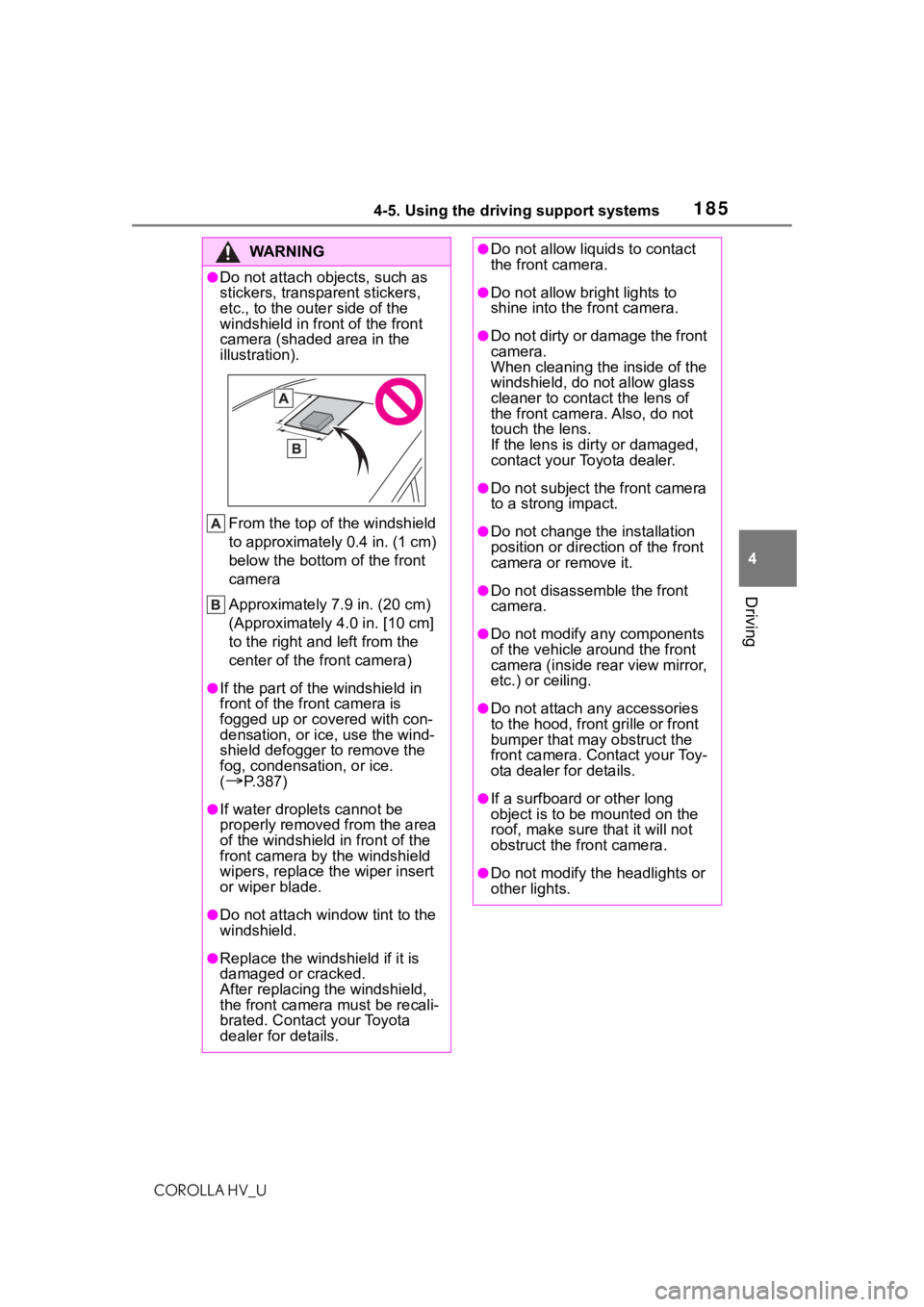
●Do not attach objects, such as
stickers, transparent stickers,
etc., to the oute r side of the
windshield in fr ont of the front
camera (shaded area in the
illustration).
From the top of the windshield
to approximately 0.4 in. (1 cm)
below the bottom of the front
camera
Approximately 7.9 in. (20 cm)
(Approximately 4.0 in. [10 cm]
to the right and left from the
center of the front camera)
●If the part of the windshield in
front of the front camera is
fogged up or covered with con-
densation, or ice, use the wind-
shield defogger to remove the
fog, condensation, or ice.
(
P.387)
●If water droplets cannot be
properly removed from the area
of the windshield in front of the
front camera by the windshield
wipers, replace the wiper insert
or wiper blade.
●Do not attach win dow tint to the
windshield.
●Replace the windshield if it is
damaged or cracked.
After replacing the windshield,
the front camera must be recali-
brated. Contact your Toyota
dealer for details.
●Do not allow liquids to contact
the front camera.
●Do not allow bright lights to
shine into the front camera.
●Do not dirty or damage the front
camera.
When cleaning the inside of the
windshield, do not allow glass
cleaner to contact the lens of
the front camera. Also, do not
touch the lens.
If the lens is dirty or damaged,
contact your Toyota dealer.
●Do not subject the front camera
to a strong impact.
●Do not change the installation
position or direction of the front
camera or remove it.
●Do not disasse mble the front
camera.
●Do not modify any components
of the vehicle around the front
camera (inside rear view mirror,
etc.) or ceiling.
●Do not attach a ny accessories
to the hood, front grille or front
bumper that may obstruct the
front camera. Contact your Toy-
ota dealer for details.
●If a surfboard or other long
object is to be mounted on the
roof, make sure that it will not
obstruct the front camera.
●Do not modify the headlights or
other lights.
Page 188 of 584
1884-5. Using the driving support systems
COROLLA HV_U
●In the following situations, if the situation has changed (or the vehicle has
been driven for some time) and the normal operating conditions are
detected, the message will disappear and the system will become opera-
tional.
If the message does not disapp ear, contact your Toyota dealer.
• When the temperature around the radar sensor is outside of the opera-
tional range, such as when the vehicle is in the sun or in an e xtremely cold
environment
• When the front camera cannot d etect objects in front of the vehicle, such
as when driving in the dark, sno w, or fog, or when bright lights are shining
into the front camera
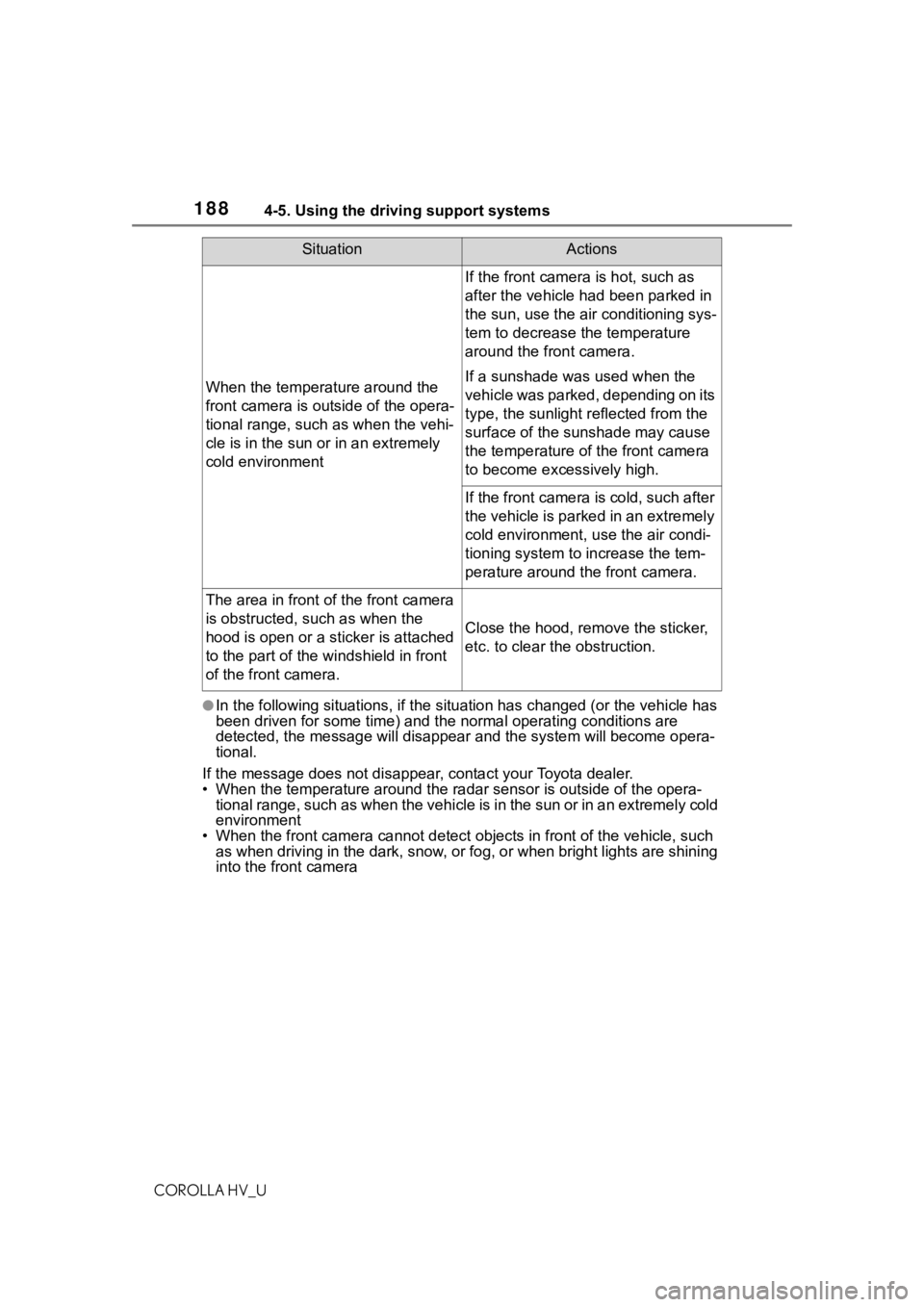
When the temperature around the
front camera is out side of the opera-
tional range, such as when the vehi-
cle is in the sun or in an extremely
cold environment
If the front camera is hot, such as
after the vehicle had been parked in
the sun, use the air conditioning sys-
tem to decrease the temperature
around the front camera.
If a sunshade was used when the
vehicle was parked, depending on its
type, the sunlight r eflected from the
surface of the sunshade may cause
the temperature of the front camera
to become exce ssively high.
If the front camera is cold, such after
the vehicle is parked in an extremely
cold environment, use the air condi-
tioning system to increase the tem-
perature around the front camera.
The area in front of the front camera
is obstructed, such as when the
hood is open or a sticker is attached
to the part of the windshield in front
of the front camera.
Close the hood, remove the sticker,
etc. to clear the obstruction.
SituationActions
Page 195 of 584
1954-5. Using the driving support systems
COROLLA HV_U
4
Driving
swerving, accelera tion or deceler-
ation)
• When your vehicle approaches a
detectable object rapidly
• When a detectable object is not directly in front of your vehicle
• When a detectable object is near a wall, fence, guardrail, manhole
cover, vehicle, steel plate on the
road, etc.
• When a detectable object is under
a structure
• When part of a detectable object is hidden by an object, such as
large baggage, an umbrella, or
guardrail
• When multiple detectable objects
are close together
• If the sun or other light is shining directly on a detectable object
• When a detectable object is a shade of white and looks
extremely bright
• When a detectable object appears to be nearly the same color or
brightness as its surroundings
• If a detectable object cuts or sud- denly emerges in front of your
vehicle
• When the front of your vehicle is hit by water, snow, dust, etc.
• When a very bright light ahead,
such as the sun or the headlights
of oncoming traffic, shines directly
into the front camera
• When approaching the side or front of a vehicle ahead
• If a vehicle ahead is a motorcycle
• If a vehicle ahead is narrow, such as a personal mobility vehicle
• If a preceding vehicle has a small rear end, such as an unloaded
truck
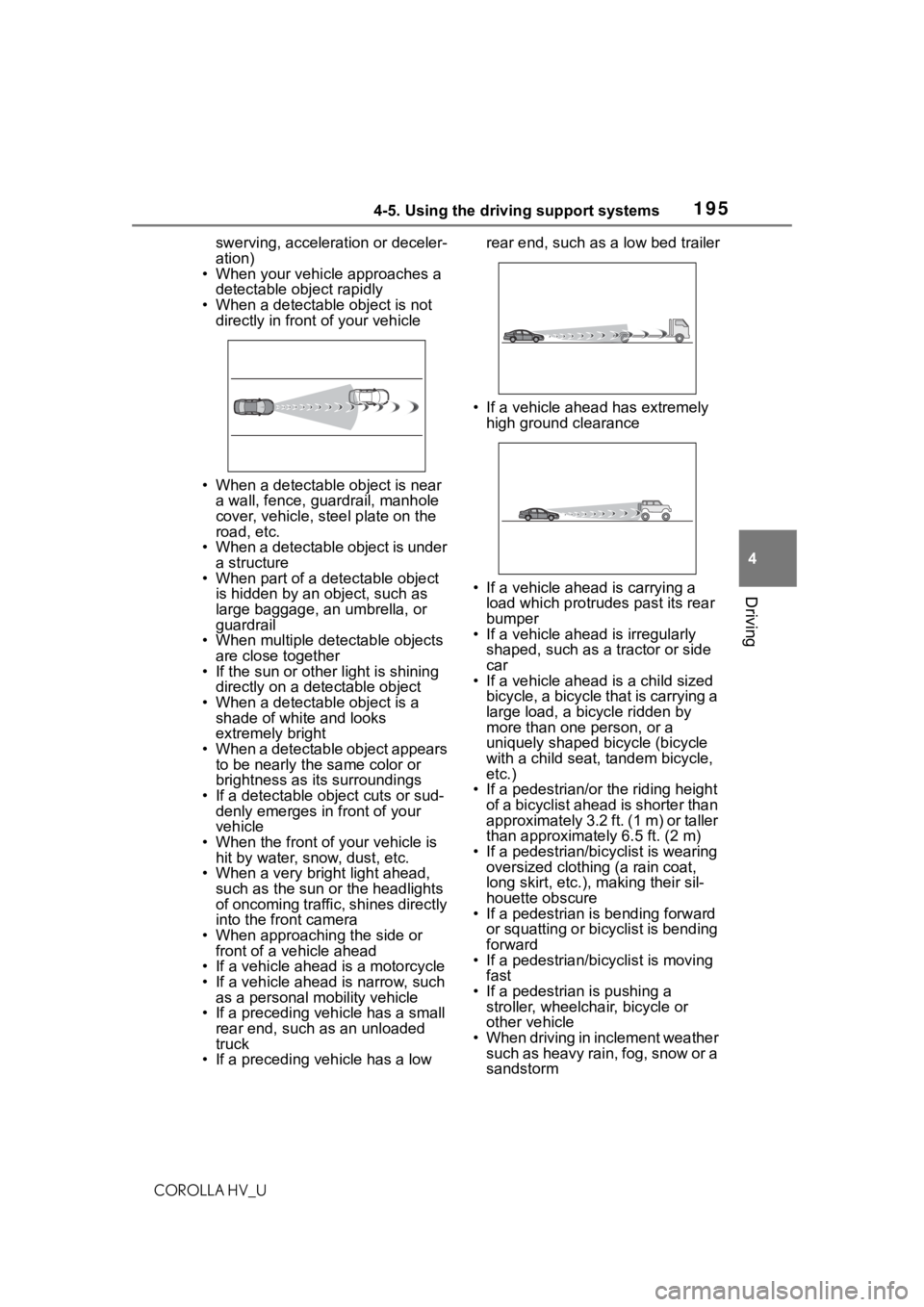
• If a preceding vehicle has a low rear end, such as a low bed trailer
• If a vehicle ahead has extremely high ground clearance
• If a vehicle ahead is carrying a load which protrudes past its rear
bumper
• If a vehicle ahead is irregularly
shaped, such as a tractor or side
car
• If a vehicle ahead is a child sized
bicycle, a bicycle that is carrying a
large load, a bicycle ridden by
more than one person, or a
uniquely shaped bicycle (bicycle
with a child seat, tandem bicycle,
etc.)
• If a pedestrian/or the riding height of a bicyclist ahead is shorter than
approximately 3.2 ft. (1 m) or taller
than approximate ly 6.5 ft. (2 m)
• If a pedestrian/bic yclist is wearing
oversized clothing (a rain coat,
long skirt, etc.), making their sil-
houette obscure
• If a pedestrian is bending forward
or squatting or bicyclist is bending
forward
• If a pedestrian/bicyclist is moving
fast
• If a pedestrian is pushing a stroller, wheelchair, bicycle or
other vehicle
• When driving in inclement weather such as heavy rain, fog, snow or a
sandstorm
Page 220 of 584

2204-5. Using the driving support systems
COROLLA HV_Uapplied to the sensor, etc.
●Dirt, snow, stickers, etc. are on the
windshield near the front camera.
●In inclement weather such as
heavy rain, fog, snow or sand
storms.
●Light from an oncoming vehicle,
the sun, etc. enters the front cam-
era.
●The sign is dirty, faded, tilted or
bent.
●The contrast of electronic sign is
low.
●All or part of the sign is hidden by
the leaves of a tree, a pole, etc.
●The sign is only visible to the front
camera for a short amount of time.
●The driving scene (turning, lane
change, etc.) is judged incorrectly.
●Even if it is a sign not appropriate
for the currently traveled lane,
such a sign exists
directly after a
freeway branches, or in an adja-
cent lane just before merging.
●Stickers are attached to the rear of
the preceding vehicle.
●A sign resembling a system com-
patible sign is recognized.
●Side road speed signs may be
detected and displayed (if posi-
tioned in sight of the front camera)
while the vehicle is traveling on
the main road.
●Roundabout exit road speed signs
may be detected and displayed (if
positioned in sight of the front
camera) while traveling on a
roundabout.
●The front of the vehicle is raised or
lowered due to the carried load.
●The surrounding brightness is not
sufficient or changes suddenly.
●When a sign intended for trucks,
etc. is recognized.
●The speed information displayed
on the meter and that displayed
on the navigation system may be different due to the navigation sys-
tem using map data.
■Speed limit sign display
If the power switch was last turned
off while a speed limit sign was dis-
played on the multi-information dis-
play, the same sig n displays again
when the power switch is turned to
ON.
■If “RSA Malfunction Visit Your
Dealer” is shown
The system may be malfunctioning.
Have the vehicle inspected by your
Toyota dealer.
■Customization
Some functions can be customized.
( P.544)
Page 385 of 584
385
COROLLA HV_U
6
6
Interior features
Interior features
.6-1. Using the air conditioning system and defogger
Automatic air conditioning system ....................... 386
Heated steering wheel/seat heaters ...................... 393
6-2. Using the interior lights Interior lights list .......... 395
6-3. Using the storage features List of storage features.................................. 397
Trunk features ............. 400
6-4. Other interior features Other interior features . 401
Garage door opener.... 411
Page 464 of 584
4647-3. Do-it-yourself maintenance
COROLLA HV_U
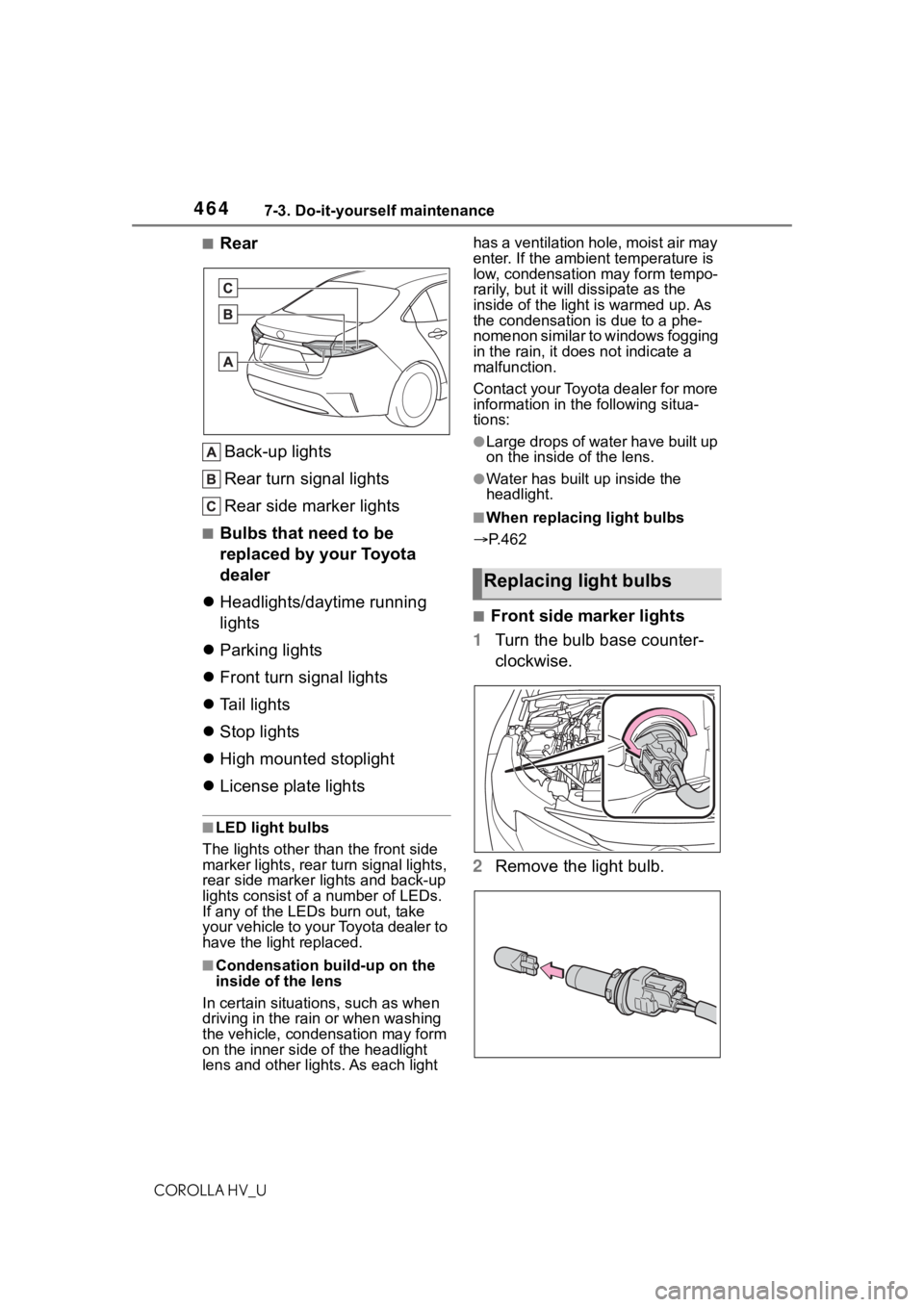
■Rear
Back-up lights
Rear turn signal lights
Rear side marker lights
■Bulbs that need to be
replaced by your Toyota
dealer
Headlights/daytime running
lights
Parking lights
Front turn signal lights
Tail lights
Stop lights
High mounted stoplight
License plate lights
■LED light bulbs
The lights other than the front side
marker lights, rear turn signal lights,
rear side marker lights and back-up
lights consist of a number of LEDs.
If any of the LEDs burn out, take
your vehicle to your Toyota dealer to
have the light replaced.
■Condensation build-up on the
inside of the lens
In certain situatio ns, such as when
driving in the rain or when washing
the vehicle, condensation may form
on the inner side of the headlight
lens and other li ghts. As each light has a ventilation hole, moist air may
enter. If the ambien
t temperature is
low, condensation may form tempo-
rarily, but it will dissipate as the
inside of the light is warmed up. As
the condensation is due to a phe-
nomenon similar to windows fogging
in the rain, it does not indicate a
malfunction.
Contact your Toyota dealer for more
information in t he following situa-
tions:
●Large drops of water have built up
on the inside of the lens.
●Water has built up inside the
headlight.
■When replacing light bulbs
P.462
■Front side marker lights
1 Turn the bulb base counter-
clockwise.
2 Remove the light bulb.
Replacing light bulbs