navigation update TOYOTA COROLLA HYBRID 2021 Owners Manual (in English)
[x] Cancel search | Manufacturer: TOYOTA, Model Year: 2021, Model line: COROLLA HYBRID, Model: TOYOTA COROLLA HYBRID 2021Pages: 584, PDF Size: 19.59 MB
Page 104 of 584
1042-1. Instrument cluster
COROLLA HV_U
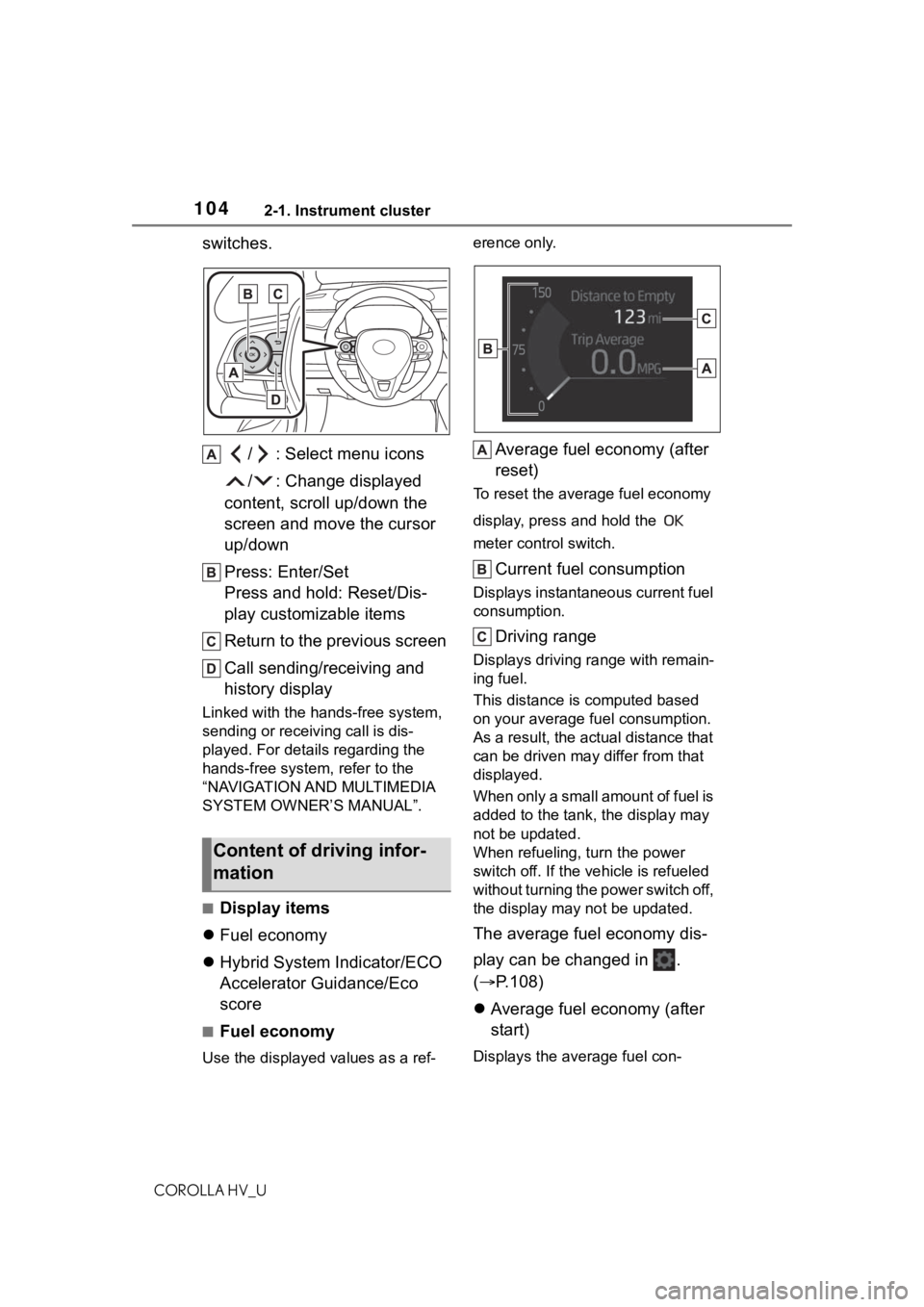
switches./ : Select menu icons
/ : Change displayed
content, scroll up/down the
screen and move the cursor
up/down
Press: Enter/Set
Press and hold: Reset/Dis-
play customizable items
Return to the previous screen
Call sending/receiving and
history display
Linked with the hands-free system,
sending or receiv ing call is dis-
played. For details regarding the
hands-free system, refer to the
“NAVIGATION AND MULTIMEDIA
SYSTEM OWNER’S MANUAL”.
■Display items
Fuel economy
Hybrid System Indicator/ECO
Accelerator Guidance/Eco
score
■Fuel economy
Use the displayed values as a ref- erence only.
Average fuel economy (after
reset)
To reset the average fuel economy
display, press and hold the
meter control switch.
Current fuel consumption
Displays instantaneous current fuel
consumption.
Driving range
Displays driving ra
nge with remain-
ing fuel.
This distance is computed based
on your average f uel consumption.
As a result, the actual distance that
can be driven may differ from that
displayed.
When only a small amount of fuel is
added to the tank, the display may
not be updated.
When refueling, turn the power
switch off. If the ve hicle is refueled
without turning the power switch off,
the display may not be updated.
The average fuel economy dis-
play can be changed in .
( P.108)
Average fuel economy (after
start)
Displays the average fuel con-
Content of driving infor-
mation
Page 289 of 584
2895-3. Connectivity settings
COROLLA HV_U
5
Audio
The Apple Car-
Play/Android Auto screen
has artifacts and/or audio
from Apple Car-
Play/Android Auto has
noise.
Check if the USB cable being used to connect
the device to the system is damaged.
To check if the USB cable is damaged inter-
nally, connect the devic e to another system,
such as a PC, and check i f the device is recog-
nized by the connect ed system. (The device
should begin charging when connected.)
After checking all of the above, try to establish
an Apple CarPlay/Android Auto connection.
( P.284, 285)
The map display of the
Apple CarPlay Maps app
cannot be enlarged or
contracted with pinch
multi-touch gestures.
As the Apple CarPlay Maps app is not compati-
ble with pinch multi-touch gestures, this is not a
malfunction.
During Apple CarPlay
music application (Apple
Music, Spotify, etc.) play-
back, if the iPhone is
operated to start and play
audio from an application
that is not compatible with
Apple CarPlay* and the
onboard device volume is
changed, the audio of the
incompatible application
stops and the system
resumes playback of the
original music application.
This operation is perfo rmed according to the
specification of the onboard device, this is not a
malfunction.
After interrupt audio (such
as navigation route guid-
ance) is played from an
application that is not
compatible with Apple
CarPlay while the onboard
device is playing audio,
the system does not
resume playback of the
original audio.This operation is perfo rmed according to the
specification of the onboard device, this is not a
malfunction.
Manually change the audi o source by yourself.
Or, do not use applications that are not compat-
ible with Apple CarPlay.
* Due to some naviga-
tion applications are compatible from iOS 12,
update to the latest iOS and application ver-
sions.
SymptomSolution