ad blue TOYOTA COROLLA iM 2018 Accessories, Audio & Navigation (in English)
[x] Cancel search | Manufacturer: TOYOTA, Model Year: 2018, Model line: COROLLA iM, Model: TOYOTA COROLLA iM 2018Pages: 164, PDF Size: 8.51 MB
Page 96 of 164
1.SETUPOPERATION1.SETUPOPERATION
Settings are available for Bluetooth®
devices.
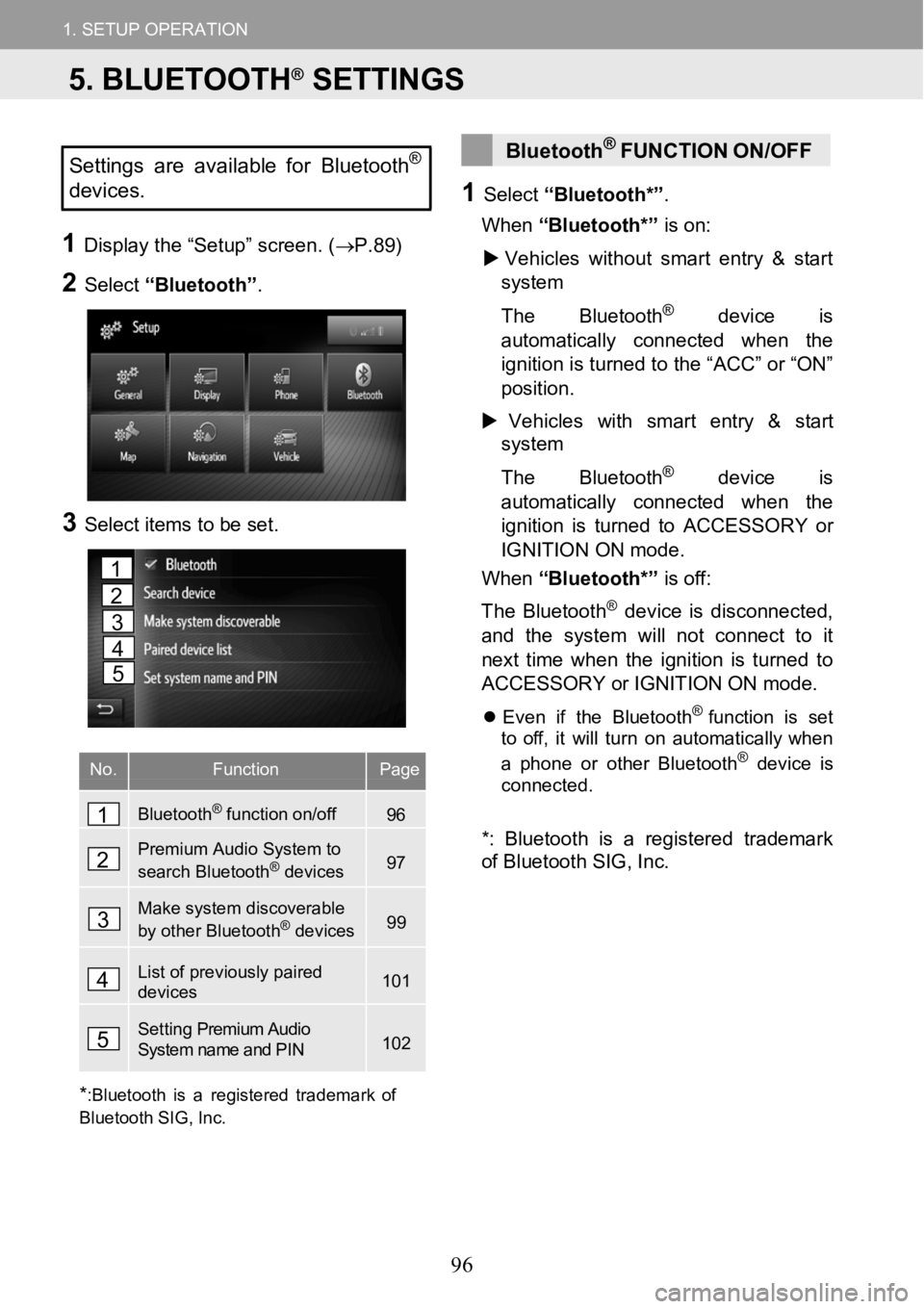
1D ispl ay the “Setup” scr een. ( →P.8 9)
2Select “Bluetooth” .
3Selectitems tobe set.
No.FunctionPage
Bluetooth®function on/off96
Premium Audio System to
search Bluetooth®devices97
Make system discoverable
by other Bluetooth®devices99
List of previously paired devices101
Setting Premium Audio System name and PIN102
Bluetoot h®FU NCTION ON/OFF
1Select “Bluetooth* ”.
When “Bluetooth*” ison:
Vehic les with out smart entry& start
sys tem
Th e Bl uetooth
®device is
automa ticall y con nected w hen the
ignition is turned tothe “A CC”or“ON”
position.
Vehicles withsmart entry& start
system
Th e Bl uetooth
®device is
automa ticall y con nected w hen the
ignition is turned to ACCESSORY or
IGNITION ON mode.
When “Bluetooth*” is off:
Th e Blueto oth
®device is d isconn ected,
and the system w ill not connect to it
next time when the ignition isturn edto
ACCESSORY or IGNITIONON mode.
Even if the Bluet oo th®function is set
to off, itwill turn on a utomat ically whe n
a phone or other Bl uetooth
®devic e is
connect ed.
*:Blue tooth is a regi steredtrademark
of Bluetooth S IG, Inc.
*
:Bluetooth isa registered trademark of
Bluetooth SIG,Inc.
1
2
3
4
5
1
2
3
4
5
5. BLUETOOTH®SETTINGS
96
Page 97 of 164
1.SETUPOPERATION1.SETUPOPERATION
PAIRING ABluetoot h®DEVICE3Confirm the PIN.
PAIRING FROMTHESYSTEM
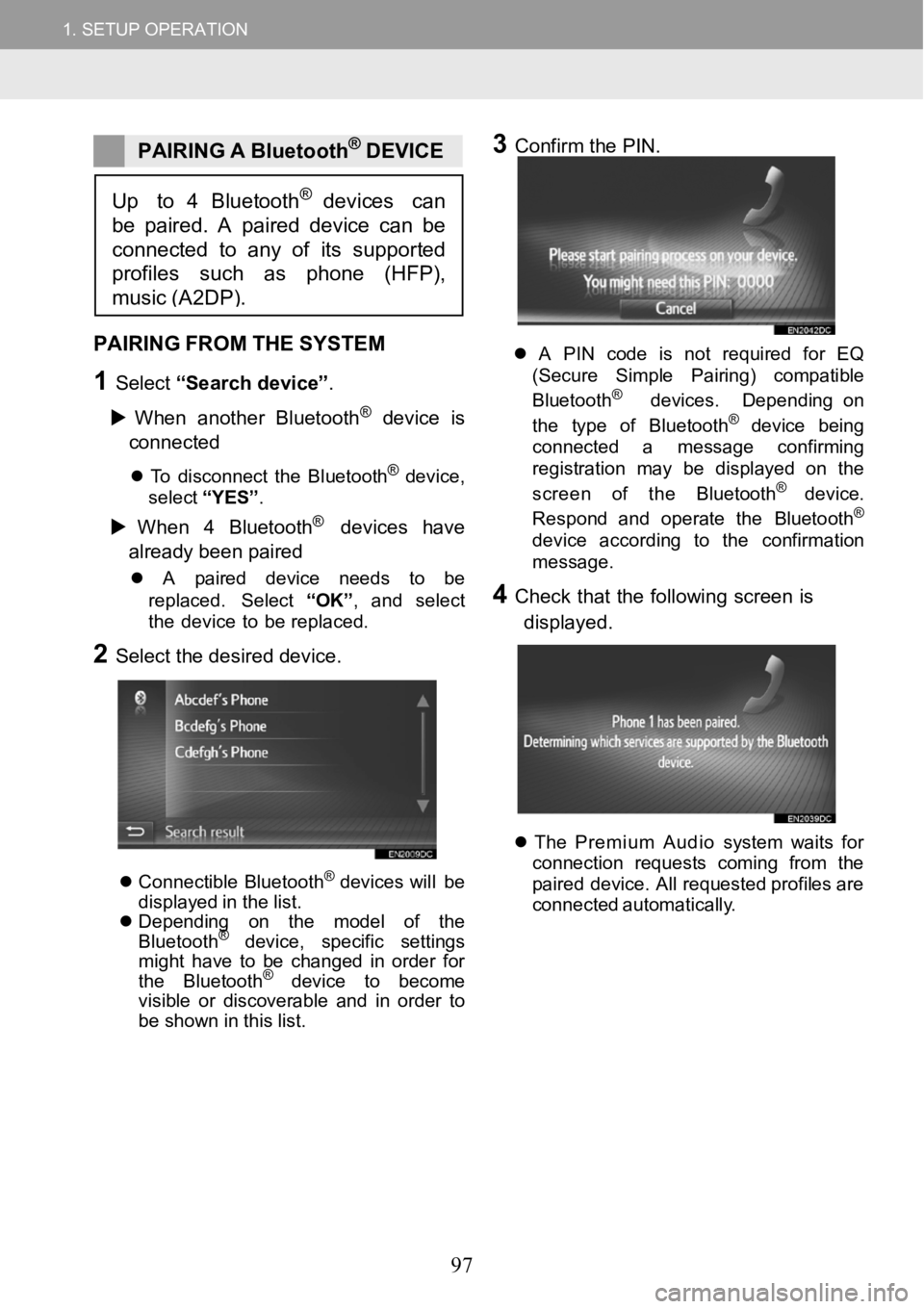
1Select “Search de vice”.
When another Bluet ooth
®device is
co nn ected
To disconnect the Bluet oo th®devi ce,
select “YES”.
When 4 Bl uetooth®devices have
alr ead y been p air ed
A pair eddevice needs to be
re placed. Se lect “OK ”, and select
the device to be replaced.
2Select the desireddevice.
Connectible Bluet ooth®devices will be
displ ayedin the l ist.
Depending on the model of the
Bluet ooth
®device , specific settings
might have to be changed in order for
the Bluet ooth
®device to become
visible or discoverable and in order to
be shown in this list.
A P IN code is not r equired for EQ
(S ecur e Simp lePairing) compatible
Bl ue tooth
®dev ices. Depending on
t he typ e of Bl uetooth®device being
conn ect ed a message conf irming
reg istrati onmay be displa yed on the
screen of the Bluet oot h
® de vic e.
Respond andoperate t heBlueto oth®
device accordi ng to the confirma tion
messag e.
4Check that the follow ing screen is
di sp laye d.
Th ePremium Audio system waits for
conn ection reque sts coming from the
paired devi ce. All req uested profiles are
c onne cted a utomat ically.
Up to 4 Bluetooth®devices can
be paired. A paireddevice can be
connected to any of itssuppor ted
profiles such as p hone(HFP),
music(A2DP).
97
Page 99 of 164
1. SETUP OPERATION
1. SETUP OPERATION
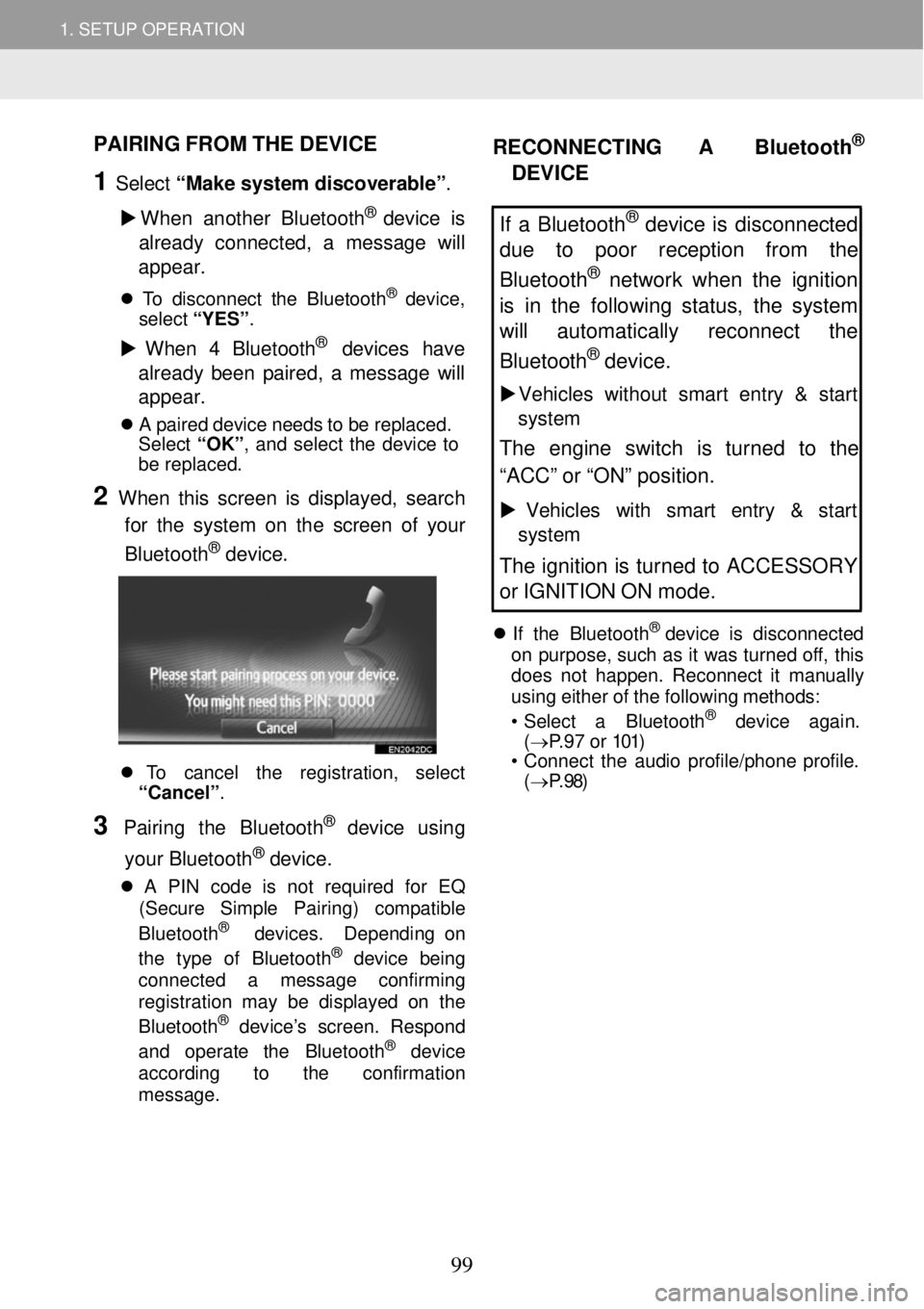
PAIRING FROM THE DEVICE
1 Select “Make sy stem discove rable” .
W hen an other Bluetooth
® device is
alread y connecte d, a me ssage wi ll
a ppe ar.
T o disc onnec t the Bluet ooth® device,
select “YES”.
W hen 4 Bl uetooth® devices have
alread y been paired, a messag e will
a ppe ar.
A pair ed dev ice needs to be repla ced.
Se lect “OK ”, and select the dev ice to
be rep laced.
2 When this screen is di splayed, search
for the system on the sc reen of yo ur
Blueto oth
® device.
To c ancel the regis tra tion, select
“Cancel” .
3 Pairing the B luetooth® dev ice usi ng
your Bluetooth
® device.
A PIN cod e is not require d for EQ
(Se cur e Si mple Pair ing) comp atible
Bl uet ooth
® devi ces. Depen ding o n
t he t ype of Bluet oo th® devic e b eing
connected a me ssage conf irming
reg istra tion may be d isplay ed on the
Blue tooth
® devi ce’s s creen. Respond
and operate the B luetooth® dev ice
accord ing to the confirmatio n
me ssage.
RECONNECTING A Bluetoot h®
DEVI CE
If a Bluetooth® device is disconnected
due to poor reception from the
Bluetooth
® network when the ignition
is in the following status, the system
will au tomatical ly reconnect the
Bluetoo th
® device.
Vehi cles with out smart entry & start
system
The engine switch is turned to the
“ACC” or “ON” position.
Vehicles with sm art entry & start
system
The ignition is turned to ACCESSORY
or IGNITION ON mode.
If the Bluetooth® device is disconnected
on purpose, such as it wa s turned of f, this
does not ha ppen. Reconnec t it ma nua lly
using eit her of the foll owing me thods:
• Se lect a Bl uet oo th
® dev ice ag ain.
( → P.97 or 101)
• Co nnect the audio profile/phone profile.
( → P.98)
99
Page 100 of 164
1. SETUP OPERATION 1. SETUP OPERATION
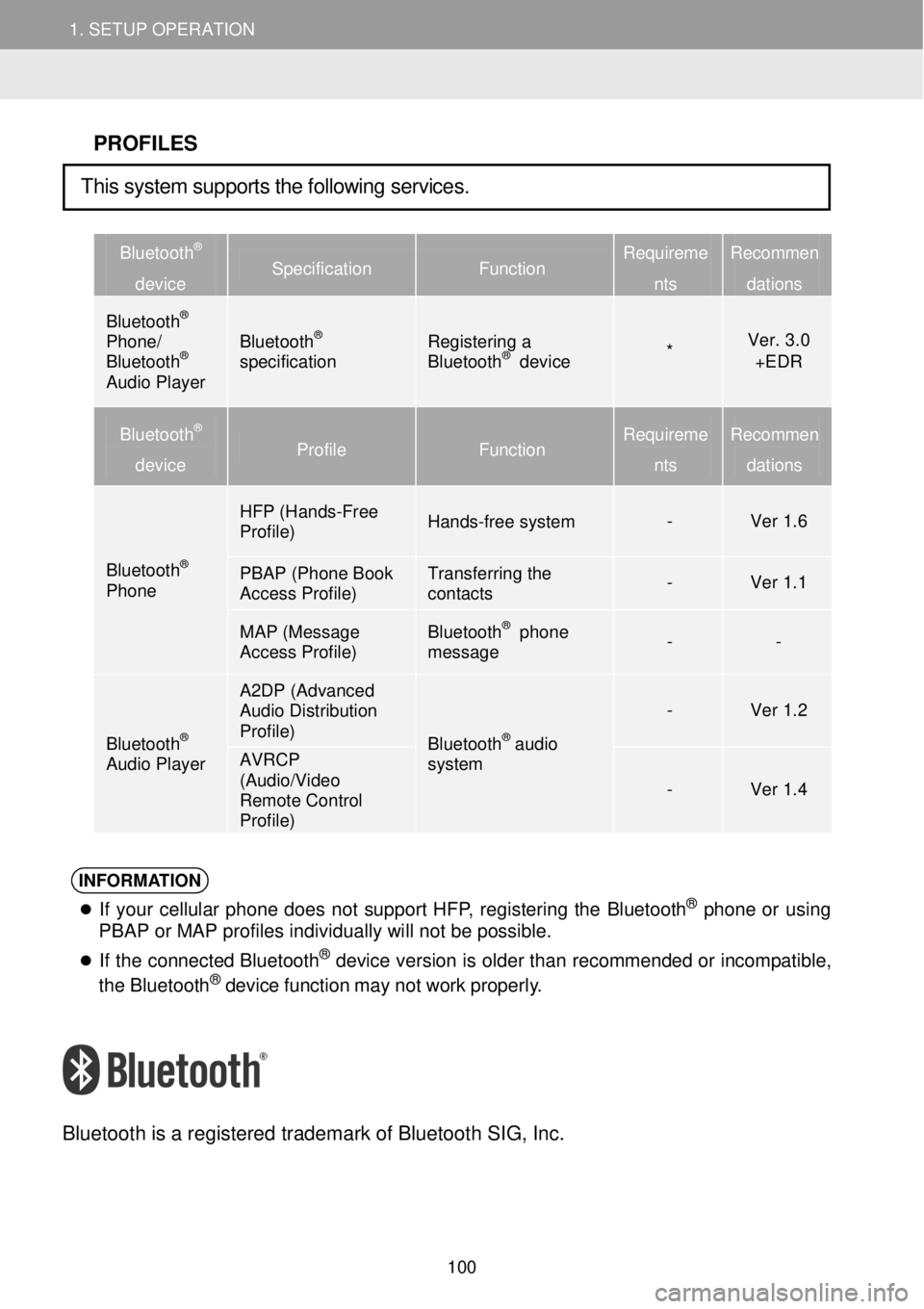
PROFILES
Bluetooth®
device Specification Function Requireme
nts
Recommen
dations
Bluetooth® Phone/ Bluetooth® Audio Player
Bluetooth® specification Registering a Bluetooth® device * Ver. 3.0 +EDR
Bluetooth®
device Profile Function Requirem e
nts
Recommen
dations
Bluetooth® Phone
HFP (Hands- Free Profile) Hands-free system - Ver 1.6
PBAP (Phone Book Access Profile) Transferring the contacts - Ver 1.1
MAP (Message Access Profile) Bluetooth® phone message - -
Bluetooth® Audio Player
A2DP (Advanced Audio Distribution Profile) Bluetooth® audio system
- Ver 1.2
AVRCP (Audio/Video Remote Control Profile)
- Ver 1.4
INFORMATION
If you r cellular ph one does not support HFP, reg isterin g the Bluet oo th® phon e or using
PBAP or MAP profiles individually will not be possible.
If the co nnec ted Bl uet oot h® de vic e version is o lder t han recommended or in compatibl e,
the Bluet ooth® device fun ction may not work pro perly.
Blue tooth is a re gistered tradem ark of B lueto oth SIG, Inc.
This system supports the following services.
100
Page 101 of 164
1.SETUPOPERATION1.SETUPOPERATION
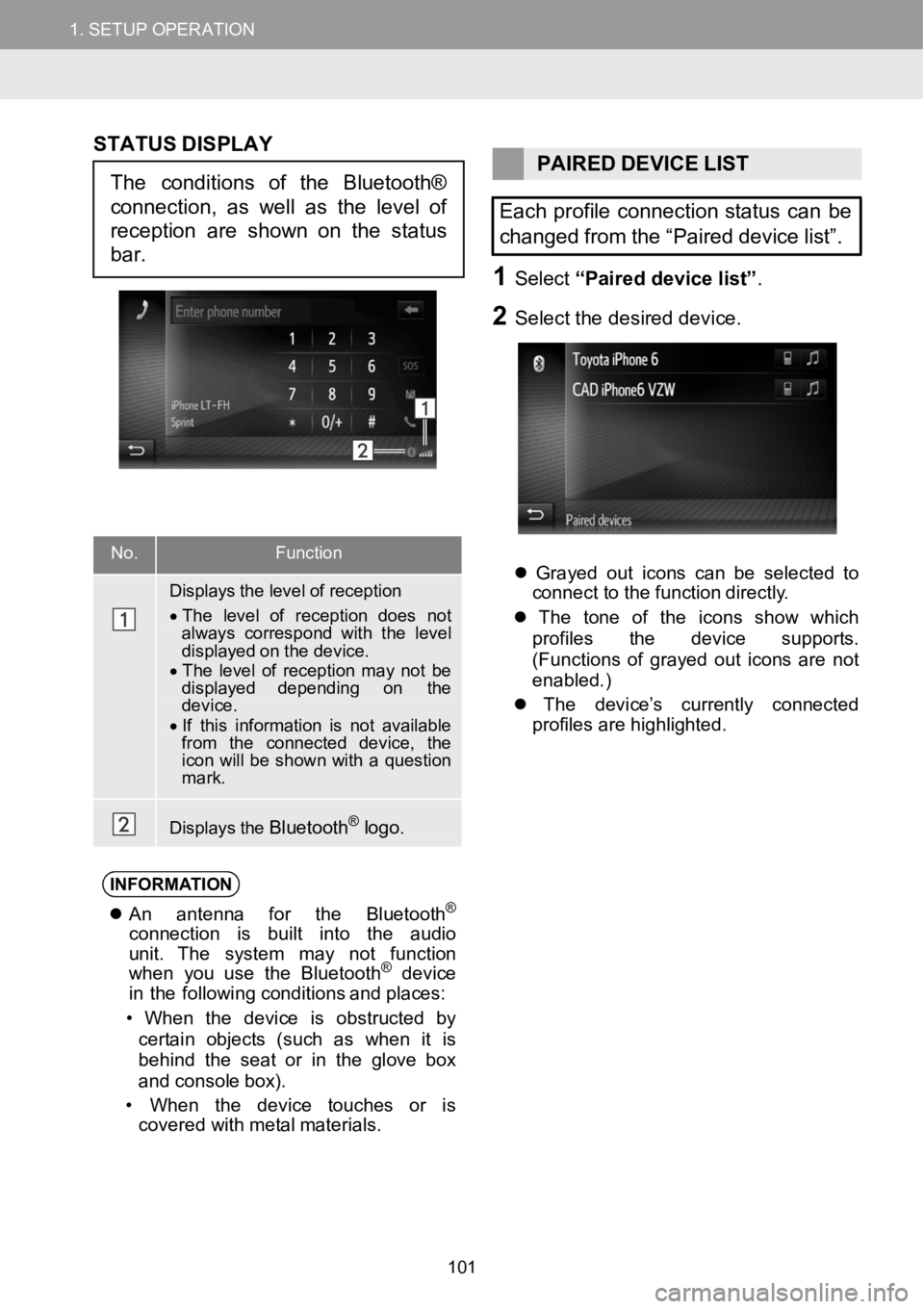
No.Functi on
Displays the level of reception
•The level of reception does notalways correspond with thelevel displayed on the device.•The level of reception m aynot be displayed depending on thedevice.•If this information isnot available from the connected device, the icon willbe shown witha question mark.
Displays theBluetooth®logo.
STAT US DISPLAY
PAIREDDEVICELIST
Each profile connection status canbe
changed from the “Paired devicelist”.
1Select“Paired device list ”.
2Se lect the d esired d evice.
Grayed out icons can be selected to
c onne ct to the f unction dire ctly.
The tone of the icons show which
pro files the d evice su pports.
( Functions of grayed out icons are not
enabled.)
The de vice’s cu rrently connec ted
pro files ar e highlig hted.
INFORMA TION
An ant enna for the Bluet ooth®
conn ect ion is built into the audio
unit . Th esystem may not funct ion
when youuse the Bluet ooth
®device
in the f ollowin g conditions and p laces:
• When the dev ice is obstructed by
cer tai n objects (such as when it is
beh ind the seat or in the g love box
and conso lebo x).
• When the device t ouches or is
covered with me talma terials.
Theconditions of theBluetooth®
connection, as well as the level of
reception are shownon the status
bar.
101
Page 103 of 164
1. SETUP OPERATION 1. SETUP OPERATION
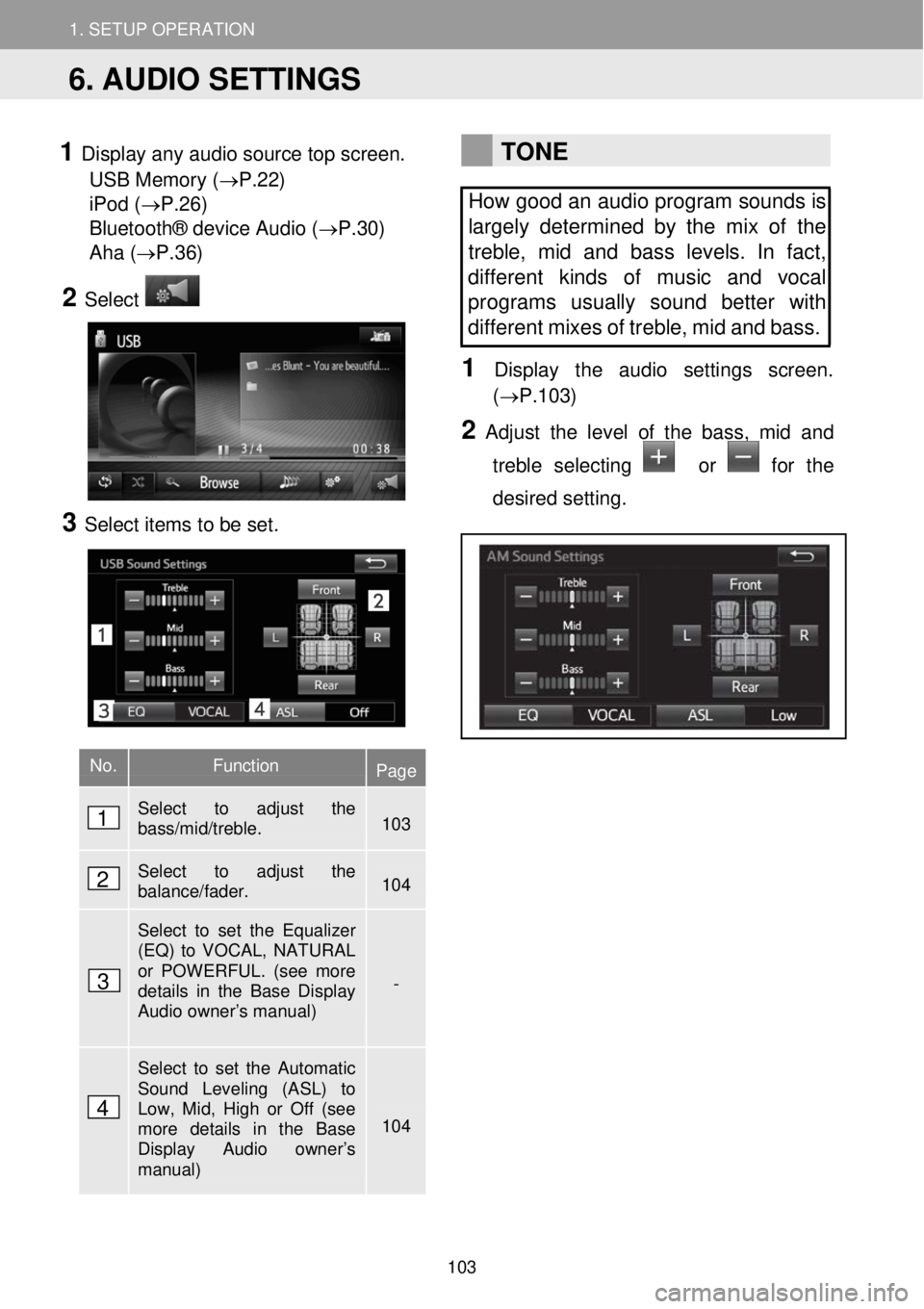
1 Display any audio source top screen.
USB Memory ( →P.22)
iPod ( →P.26)
Bluetooth® device Audio (→P.30)
Aha ( →P.36)
2 Select
3 Select ite ms to be set.
TONE
How good an audio program sounds is
largely determined by the mix of the
treble, mid and bass levels. In fact,
dif ferent kinds of music and vocal
programs usually sound better with
different mi xes of treble, mid and bass.
1 Disp lay t he audi o setti ngs scre en.
(→P.1 03)
2 Adjust the le vel of the bass, mid and
treble selecting
or for the
desired setting.
No. Function Page
Select to adjust the bass/mid/treble. 103
Select to adjust the balance/fader. 104
Select to set the Equalizer (EQ) to VOCAL, NATURAL or POWERFUL. (see more details in the Base Display Audio owner’s manual)
-
Select to set the Automatic Sound Leveling (ASL) to Low, Mid, High or Off (see more details in the Base Display Audio owner’s manual)
104
6. AUDIO SETTINGS
1
2
3
4
103
Page 125 of 164
3. DESTINATION SEARCH
2. SEARCH OPERATION
3. DESTINATION SEARCH
SEARCHING BY PH ONE
BO OK ENTRY
Be fore using this function, connec t a
Bluetooth® ph one with a phone
profile. ( →P.96)
If a con tact does not have address
information stored, the entry will be
grayed out .
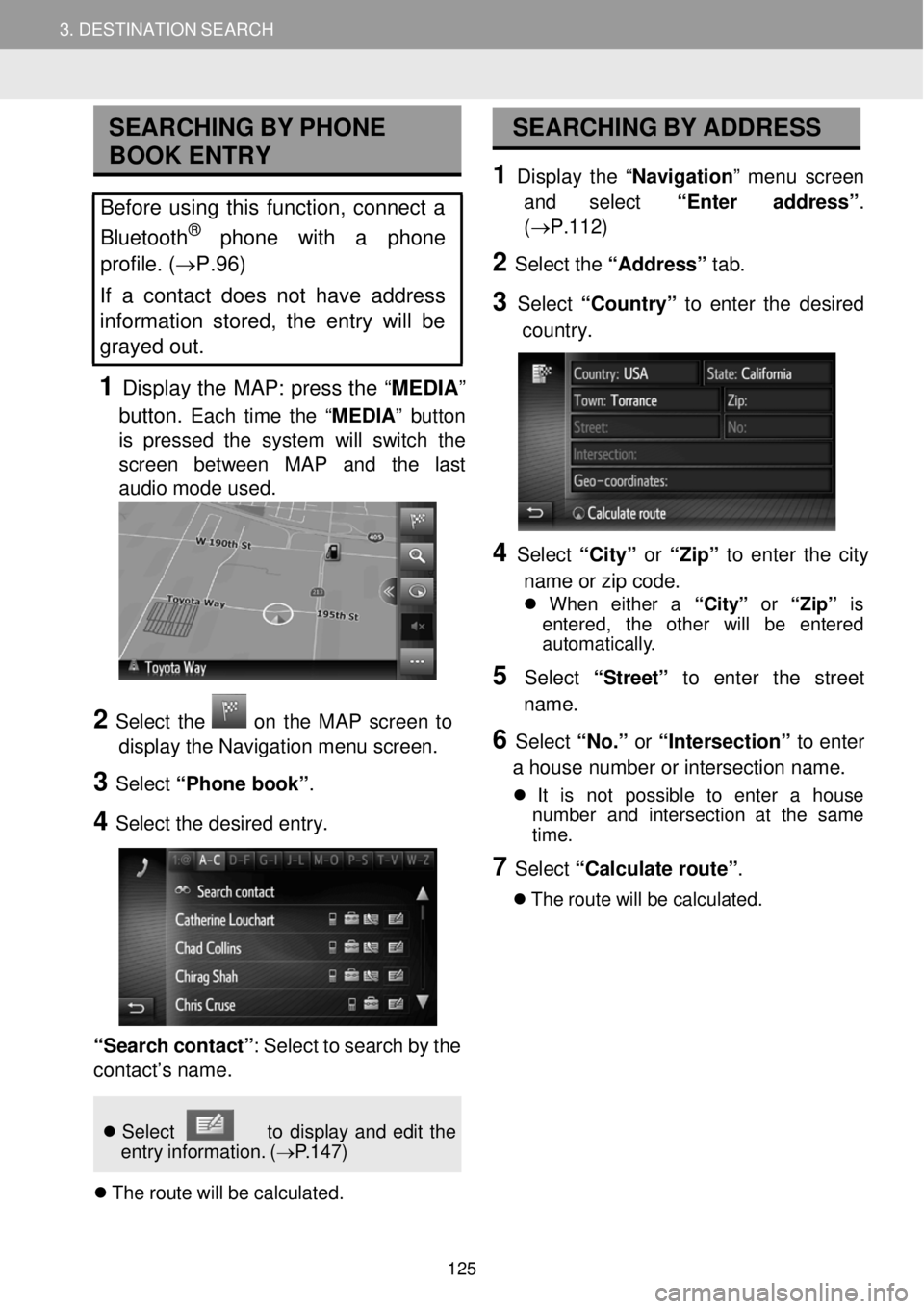
1 Display the MAP: press the “ MEDIA ”
butt on.
Each time the “MEDIA ” button
is pr essed the system w ill switch the
scre en betwe en MAP and the last
a udio mode u sed.
SEA RCHING BY AD DRESS
1 Displ ay the “Navi gation ” menu screen
and select “Ente r addr ess” .
(→P.112)
2 Select the “Ad dress” tab.
3 Select “Count ry” to enter the desired
co untry.
2 Select the on the MAP screen to
display the Navig atio n m enu screen.
3 Select “Phone book”.
4 Select the de sired e ntry.
“Search co ntac t”: Select to search by the
co ntact ’s name.
4 Select “Ci ty” or “Zip” to enter the city
n am e or zi p co de.
When ei ther a “City” or “Zip” is
en tere d, the ot her will be ent ered
aut oma tica lly.
5 Select “Street ” to enter the str eet
name.
6 Select “No.” or “Inte rsecti on” to en ter
a hou se number or intersection n ame.
It is not possi ble to enter a house
number and int ersection at the same
t im e.
7 Select “Ca lculate route” .
Th e rou te will be c alculate d.
Selec t to di spla y and edit the
en try info rmation. (→P.147)
The route will be ca lcula ted.
125