brake TOYOTA COROLLA iM 2018 Owners Manual (in English)
[x] Cancel search | Manufacturer: TOYOTA, Model Year: 2018, Model line: COROLLA iM, Model: TOYOTA COROLLA iM 2018Pages: 36, PDF Size: 1.57 MB
Page 3 of 36
1
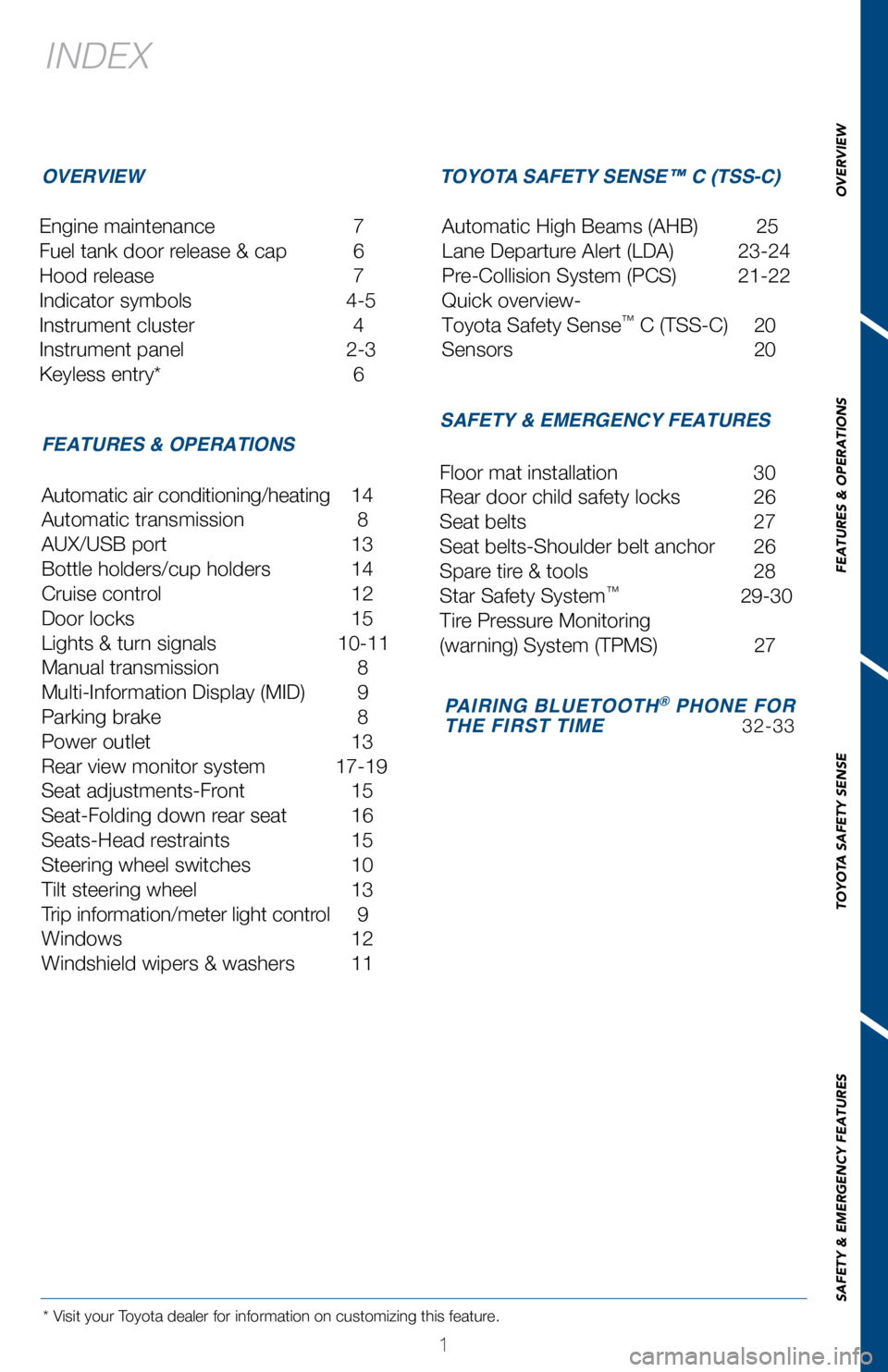
INDEX
Engine maintenance 7
Fuel tank door release & cap
6
Hood release
7
Indicator symbols
4-5
Instrument cluster
4
Instrument panel
2-3
Keyless entry*
6
* Visit your Toyota dealer for information on customizing this feature.
OVERVIEW
FEATURES & OPERATIONS TOYOTA SAFETY SENSE™ C (TSS-C)
SAFETY & EMERGENCY FEATURES
Automatic air conditioning/heating 14
Automatic transmission
8
AUX/USB port
13
Bottle holders/cup holders
14
Cruise control
12
Door locks
15
Lights & turn signals
10-11
Manual transmission
8
Multi-Information Display (MID)
9
Parking brake
8
Power outlet
13
Rear view monitor system
17-19
Seat adjustments-Front
15
Seat-Folding down rear seat
16
Seats-Head restraints
15
Steering wheel switches
10
Tilt steering wheel
13
Trip information/meter light contr
ol
9
Windows
12
W
indshield wipers & washers
11 Floor mat installation
30
Rear door child safety locks
26
Seat belts
27
Seat belts-Shoulder belt anchor
26
Spare tir
e & tools
28
Star Safety System™ 29-30
Tir
e Pressure Monitoring
(warning) System (TPMS)
27
Automatic High Beams (AHB)
25
Lane Departure Alert (LDA)
23-24
Pre-Collision System (PCS)
21-22
Quick overview-
Toyota Safety Sense
™ C (TSS-C) 20
Sensors
20
PAIRING BLUETOOTH® PHONE FOR
THE FIRST TIME 32-33
OVERVIEW
FEATURES & OPERATIONS
TOYOTA SAFETY SENSE
SAFETY & EMERGENCY FEATURES
Page 6 of 36
 4
OVERVIEWInstrument cluster
For details, refer to “Indicators and warning lights,” Section 2-2\
, 2018 Owner’s
Manual.
Cruise control indicator
Anti-lock Brake System (ABS)
warning
1
Brake s")
4
OVERVIEWInstrument cluster
For details, refer to “Indicators and warning lights,” Section 2-2\
, 2018 Owner’s
Manual.
Cruise control indicator
Anti-lock Brake System (ABS)
warning
1
Brake system warning1
Airbag SRS warning1
Automatic High Beam indicator1
Cruise control SET indicator Tachometer
Speedometer
Outside temperature
Engine coolant temperature gauge Shift and gear position indicator (if equipped)
Fuel gauge
Multi-Information Display (MID) Odometer and trip meter display
Indicator symbols
Service indicators and reminders
Page 10 of 36
 8
Pull(2) Push(1) Pull slightly
(3) LowerRelease
Set
* The ignition switch must be “ON” and the brake pedal depressed t\
o shift from
Park.
Push shift lever to the left from “D” position, to")
8
Pull(2) Push(1) Pull slightly
(3) LowerRelease
Set
* The ignition switch must be “ON” and the brake pedal depressed t\
o shift from
Park.
Push shift lever to the left from “D” position, to “M” posit\
ion.
+ :
Upshift (push and release)
-
:
Downshift (pull and release)
Downshifting increases power going uphill, or provides engine braking do\
wnhill. For
best fuel economy during normal driving conditions, always drive with th\
e shift lever in
the “D” position.
Lift up ring to shift into reverse
“M”
-
++ (“M” mode)
- (“M” mode)
P
R
N
D
M
Park*
Reverse
Neutral
Drive
“M” mode
Shift lever
FEATURES & OPERATIONS
“M” 7-SPEED SPORT SEQUENTIAL SHIFTMATIC MODE
Automatic transmission (if equipped)
Manual transmission (if equipped)
Parking brake
Page 14 of 36
 12
Windows
Cruise control
Automatic operation (driver’s window only) Push the switch completely down and
release to fully open. To stop the window partway, operate the switch in\
the opposite
dir")
12
Windows
Cruise control
Automatic operation (driver’s window only) Push the switch completely down and
release to fully open. To stop the window partway, operate the switch in\
the opposite
direction.
Window lock switch Deactivates all passenger windows. Driver’s window remains
operable.
Up
Down
Driver side
Window lock switch
1 The set speed may also be cancelled by depressing the brake pedal or the\
clutch pedal (manual
transmission only).
2 The set speed may be resumed once vehicle speed reaches approximately 25\
mph.
System ON/OFF
Resume2/Increase speed
Set/Decrease speed
Cancel1
FEATURES & OPERATIONS
SYSTEM ON/OFF
FUNCTIONS
Page 23 of 36
 21
OVERVIEW
FEATURES & OPERATIONS
TOYOTA SAFETY SENSE
SAFETY & EMERGENCY FEATURES
Pre-Collision System (PCS)
The Pre-Collision System uses a laser sensor and camera sensor to help d\
etect a
vehicle")
21
OVERVIEW
FEATURES & OPERATIONS
TOYOTA SAFETY SENSE
SAFETY & EMERGENCY FEATURES
Pre-Collision System (PCS)
The Pre-Collision System uses a laser sensor and camera sensor to help d\
etect a
vehicle in front of your vehicle.
As there is a limit to the degree of recognition accuracy and control pe\
rformance that
this system can provide, do not overly rely on this system. This system \
will not prevent
collisions or lessen collision damage or injury in every situation. Do n\
ot use PCS
instead of normal braking operations under any circumstances. Do not att\
empt to test
the operation of the Pre-Collision System yourself, as the system may no\
t operate or
engage, possibly leading to an accident. In some situations, such as whe\
n driving in
inclement weather such as heavy rain, fog, snow or a sandstorm or while \
driving on a
curve and for a few seconds after driving on a curve, a vehicle may not \
be detected
by the laser and camera sensors, preventing the system from operating or\
engaging
properly.
Refer to a Toyota Owner’s Manual for a list of additional situations \
in which the
system may not operate properly.
Refer to the Toyota Owner’s Manual for additional information on PCS \
operation,
settings adjustments, limitations, and precautions before attempting to \
use it. Pre-Collision Warning
When the system determines that the possibility of a frontal collision i\
s high, a buzzer
will sound and a warning message will be displayed on the Multi-Informat\
ion Display
(MID) to urge the driver to take evasive action.
Pre-Collision Brake Assist
If the driver notices the hazard and brakes, the system may provide addi\
tional braking
force using Brake Assist. This system may prime the brakes and may apply\
greater
braking force in relation to how strongly the brake pedal is depressed.
Pre-Collision Braking
If the driver does not brake in a set time and the system determines tha\
t the possibility
of a frontal collision with a preceding vehicle is extremely high, the s\
ystem may
automatically apply the brakes, reducing speed in order to help the driv\
er reduce the
impact and in certain cases avoid the collision.
Page 24 of 36
 22
CHANGING THE PRE-COLLISION ALERT TIMING
DISABLING THE PRE-COLLISION SYSTEM (PCS)
Each time the PCS switch is pressed, the response to the PCS alert timin\
g changes.
To disable the system
Press the")
22
CHANGING THE PRE-COLLISION ALERT TIMING
DISABLING THE PRE-COLLISION SYSTEM (PCS)
Each time the PCS switch is pressed, the response to the PCS alert timin\
g changes.
To disable the system
Press the PCS switch for 3 seconds or more.
The
will turn on and a message will be displayed on the
Multi-Information Display (MID).
To enable the system
Press the PCS switch again.
The system is enabled.
Note: PCS is enabled each time the engine switch is turned to Ignition O\
n.
The system can be disabled/enabled and the alert timing of the system ca\
n be
changed. (Alert timing only, brake operation remains the same).
Far Middle
(default) Near
TOYOTA SAFETY SENSE™
Page 31 of 36
 29
OVERVIEW
FEATURES & OPERATIONS
TOYOTA SAFETY SENSE
SAFETY & EMERGENCY FEATURES
Smart Stop Technology automatically reduces engine power when the accele\
rator and
brake pedals are pressed simultan")
29
OVERVIEW
FEATURES & OPERATIONS
TOYOTA SAFETY SENSE
SAFETY & EMERGENCY FEATURES
Smart Stop Technology automatically reduces engine power when the accele\
rator and
brake pedals are pressed simultaneously under certain conditions.
SST engages when the accelerator is depressed first and the brakes are a\
pplied firmly
for longer than one-half second at speeds greater than five miles per ho\
ur.
SST doesn’t engage if the brake pedal is depressed before the acceler\
ator pedal,
allowing vehicles to start on a steep hill and safely accelerate without\
rolling backward.
Star Safety System™
Your vehicle comes standard with the Star Safety SystemTM, which combines Anti-lock
Braking System (ABS), Brake Assist (BA), Electronic Brake-force Dist\
ribution (EBD),
Smart Stop Technology (SST), Traction Control (TRAC) and Vehicle Sta\
bility Control
(VSC).
Refer to the Owner’s Manual for more details and important informatio\
n on
limitations to these systems.
Toyota’s ABS sensors detect which wheels are locking up and limits wh\
eel lockup
by “pulsing” each wheel’s brakes independently. Pulsing release\
s brake pressure
repeatedly for fractions of a second. This helps the tires attain the tr\
action that current
road conditions will allow, helping you to stay in directional control. \
ANTI-LOCK BRAKE SYSTEM (ABS)
Brake Assist is designed to detect sudden or “panic” braking, and \
then add braking
pressure to help decrease the vehicle’s stopping distance. When there\
’s only a split
second to react, Brake Assist can add additional brake pressure more qui\
ckly than just
the driver alone can.
BRAKE ASSIST (BA)
Toyota’s ABS technology has Electronic Brake-force Distribution (EBD\
) to help maintain
control and balance when braking. Abrupt stops can cause a vehicle to ti\
lt forward,
reducing the braking power of the rear wheels. EBD responds to sudden st\
ops by
redistributing brake force to enhance the braking effectiveness of all f\
our wheels.
ELECTRONIC BRAKE FORCE DISTRIBUTION (EBD)
VSC helps prevent loss of traction during cornering by reducing engine p\
ower and
applying brake force to selected wheels.
Toyota’s VSC monitors steering angle and the direction your vehicle i\
s traveling. When
it senses that the front or rear wheels begin to lose traction, VSC redu\
ces engine power
and applies braking to selected wheels. This helps restore traction and \
vehicle control.
VEHICLE STABILITY CONTROL (VSC)
SMART STOP TECHNOLOGY (SST)
Page 32 of 36
 30
SAFETY & EMERGENCY FEATURESFloor mat installation
There are two types of Toyota floor mats: carpeted and all-weather. Each\
vehicle has
model-specific floor mats. Installation is easy.
To keep y")
30
SAFETY & EMERGENCY FEATURESFloor mat installation
There are two types of Toyota floor mats: carpeted and all-weather. Each\
vehicle has
model-specific floor mats. Installation is easy.
To keep your floor mat properly positioned, follow these steps:
• Only use Toyota floor mats designed for your specific model.
• Use only one floor mat at a time, using the retaining hooks to keep\
the mat in place.
• Install floor mats right side up.
The shape of the retaining hooks (clips) may
differ from that shown in the
illustration.
Always align the marks
VSC helps prevent loss of traction during cornering by reducing engine p\
ower, and
Traction Control helps maintain traction on loose gravel and wet, icy, o\
r uneven
surfaces by applying brake force to the spinning wheel(s).
Toyota’s TRAC sensors are activated when one of the drive wheels star\
ts to slip. TRAC
limits engine output and applies the brakes to the spinning wheel. This \
transfers power
to the wheels that still have traction to help keep you on track.
TRACTION CONTROL (TRAC)