steering wheel TOYOTA COROLLA iM 2018 Owners Manual (in English)
[x] Cancel search | Manufacturer: TOYOTA, Model Year: 2018, Model line: COROLLA iM, Model: TOYOTA COROLLA iM 2018Pages: 36, PDF Size: 1.57 MB
Page 3 of 36
1
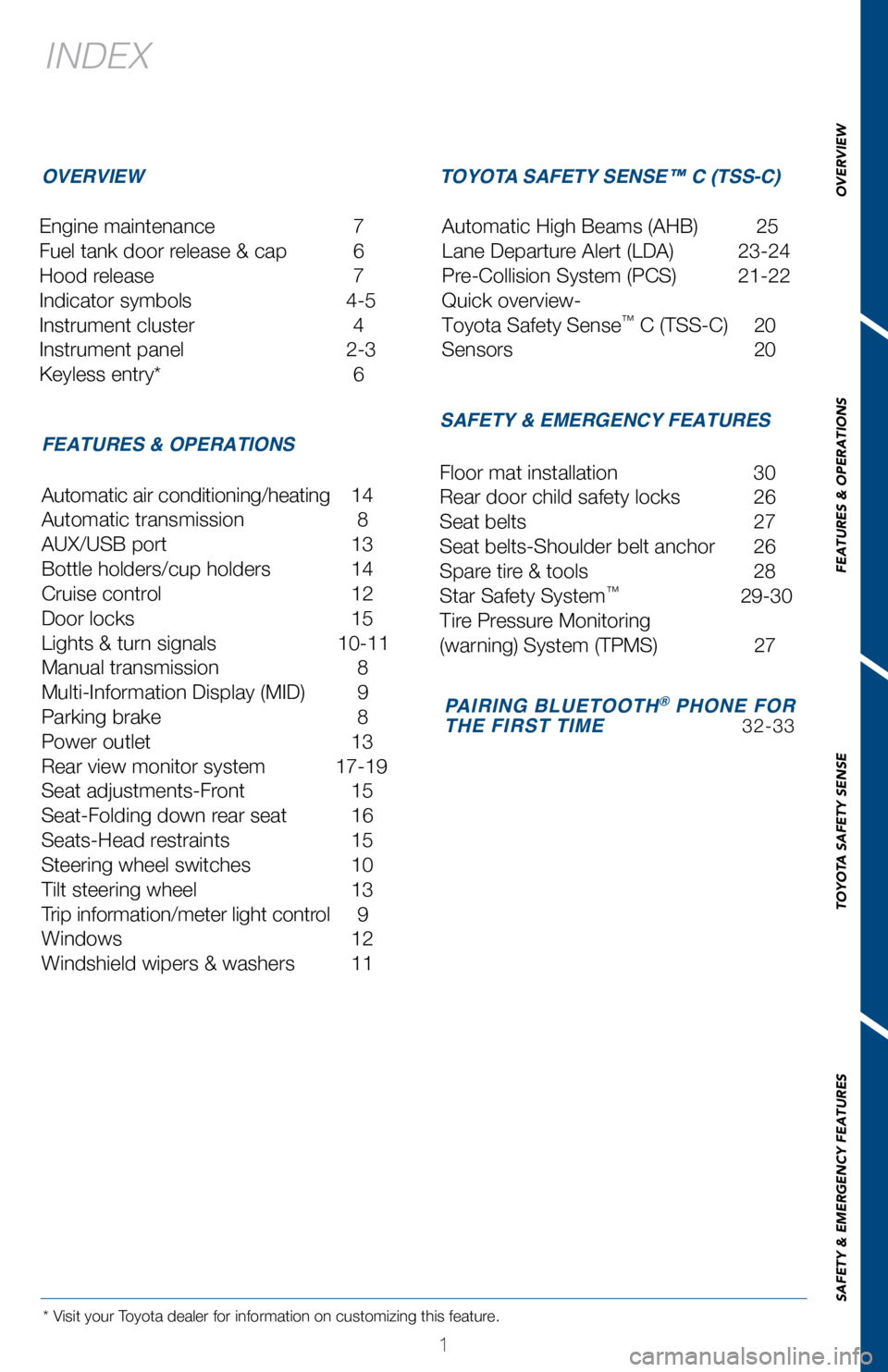
INDEX
Engine maintenance 7
Fuel tank door release & cap
6
Hood release
7
Indicator symbols
4-5
Instrument cluster
4
Instrument panel
2-3
Keyless entry*
6
* Visit your Toyota dealer for information on customizing this feature.
OVERVIEW
FEATURES & OPERATIONS TOYOTA SAFETY SENSE™ C (TSS-C)
SAFETY & EMERGENCY FEATURES
Automatic air conditioning/heating 14
Automatic transmission
8
AUX/USB port
13
Bottle holders/cup holders
14
Cruise control
12
Door locks
15
Lights & turn signals
10-11
Manual transmission
8
Multi-Information Display (MID)
9
Parking brake
8
Power outlet
13
Rear view monitor system
17-19
Seat adjustments-Front
15
Seat-Folding down rear seat
16
Seats-Head restraints
15
Steering wheel switches
10
Tilt steering wheel
13
Trip information/meter light contr
ol
9
Windows
12
W
indshield wipers & washers
11 Floor mat installation
30
Rear door child safety locks
26
Seat belts
27
Seat belts-Shoulder belt anchor
26
Spare tir
e & tools
28
Star Safety System™ 29-30
Tir
e Pressure Monitoring
(warning) System (TPMS)
27
Automatic High Beams (AHB)
25
Lane Departure Alert (LDA)
23-24
Pre-Collision System (PCS)
21-22
Quick overview-
Toyota Safety Sense
™ C (TSS-C) 20
Sensors
20
PAIRING BLUETOOTH® PHONE FOR
THE FIRST TIME 32-33
OVERVIEW
FEATURES & OPERATIONS
TOYOTA SAFETY SENSE
SAFETY & EMERGENCY FEATURES
Page 4 of 36
2
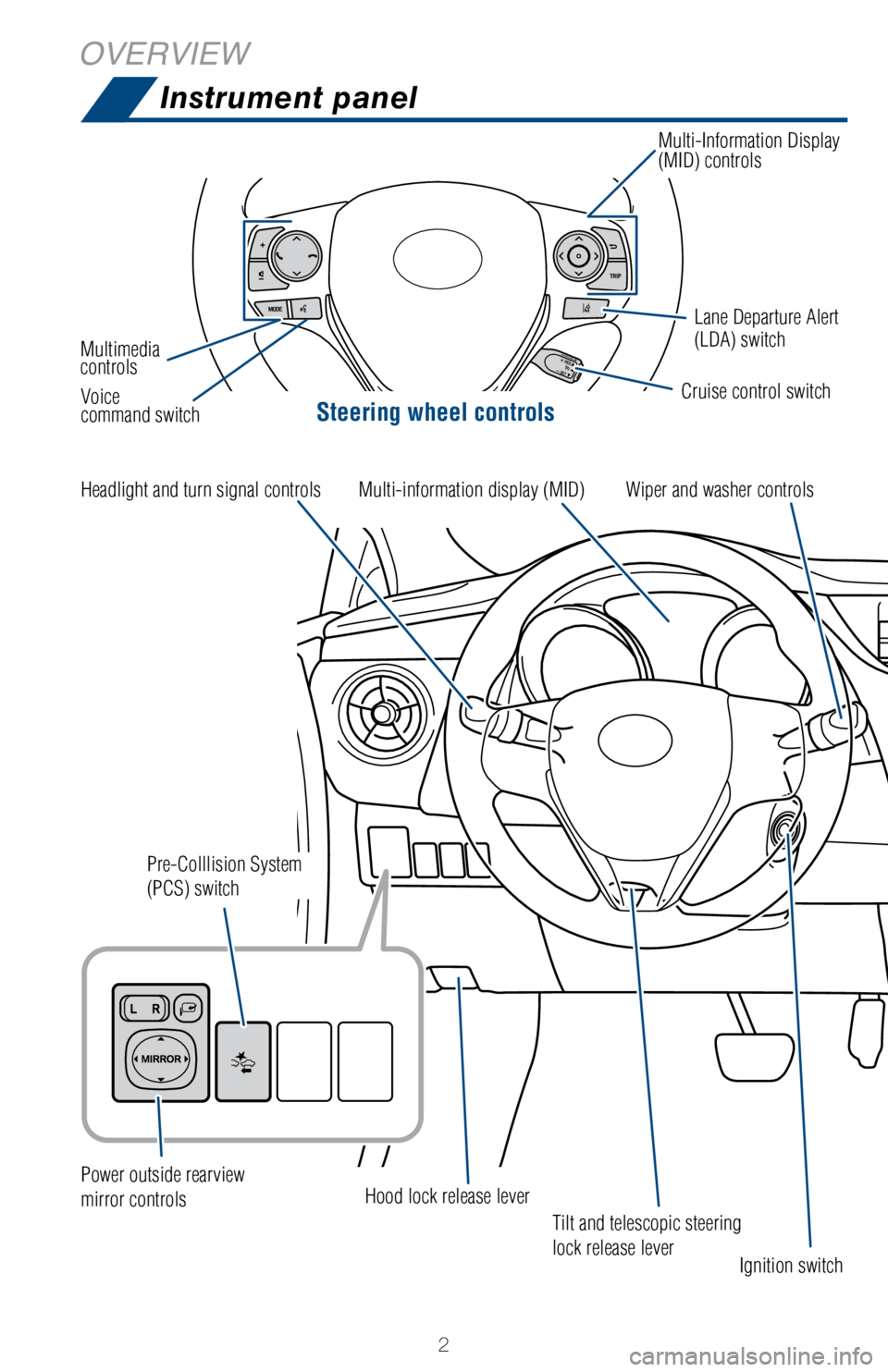
OVERVIEWInstrument panel
Steering wheel controls
Tilt and telescopic steering
lock release lever
Cruise control switchLane Departure Alert
(LDA) switch
Multi-Information Display
(MID) controls
Multimedia
controls Voice
command switch
Headlight and turn signal controls
Power outside rearview
mirror controls
Pre-Colllision System
(PCS) switch
Hood lock release lever Ignition switch
Wiper and washer controls
Multi-information display (MID)
Page 11 of 36
9
OVERVIEW
FEATURES & OPERATIONS
TOYOTA SAFETY SENSE
SAFETY & EMERGENCY FEATURES
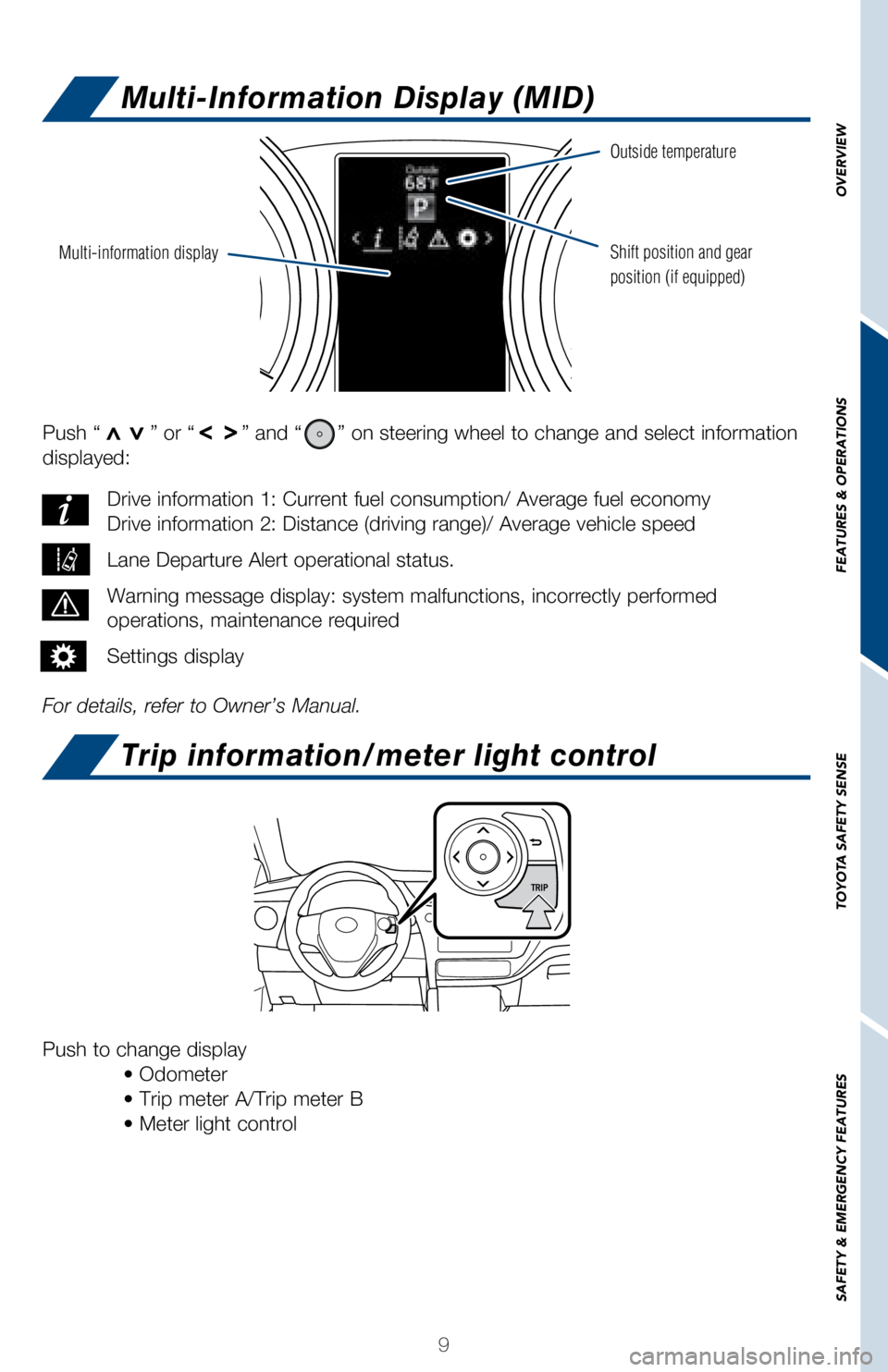
Push “>>” or “>>” and “” on steering wheel to change and select information
displayed:
For details, refer to Owner’s Manual. Drive information 1: Current fuel consumption/ Average fuel economy
Drive information 2: Distance (driving range)/ Average vehicle speed
Lane Departure Alert operational status.
Warning message display: system malfunctions, incorrectly performed
operations, maintenance required
Settings display
Push to change display
• Odometer
• Trip meter A/Trip meter B
• Meter light control
Multi-information display
Outside temperature
Shift position and gear
position (if equipped)
Multi-Information Display (MID)
Trip information/meter light control
Page 12 of 36
10
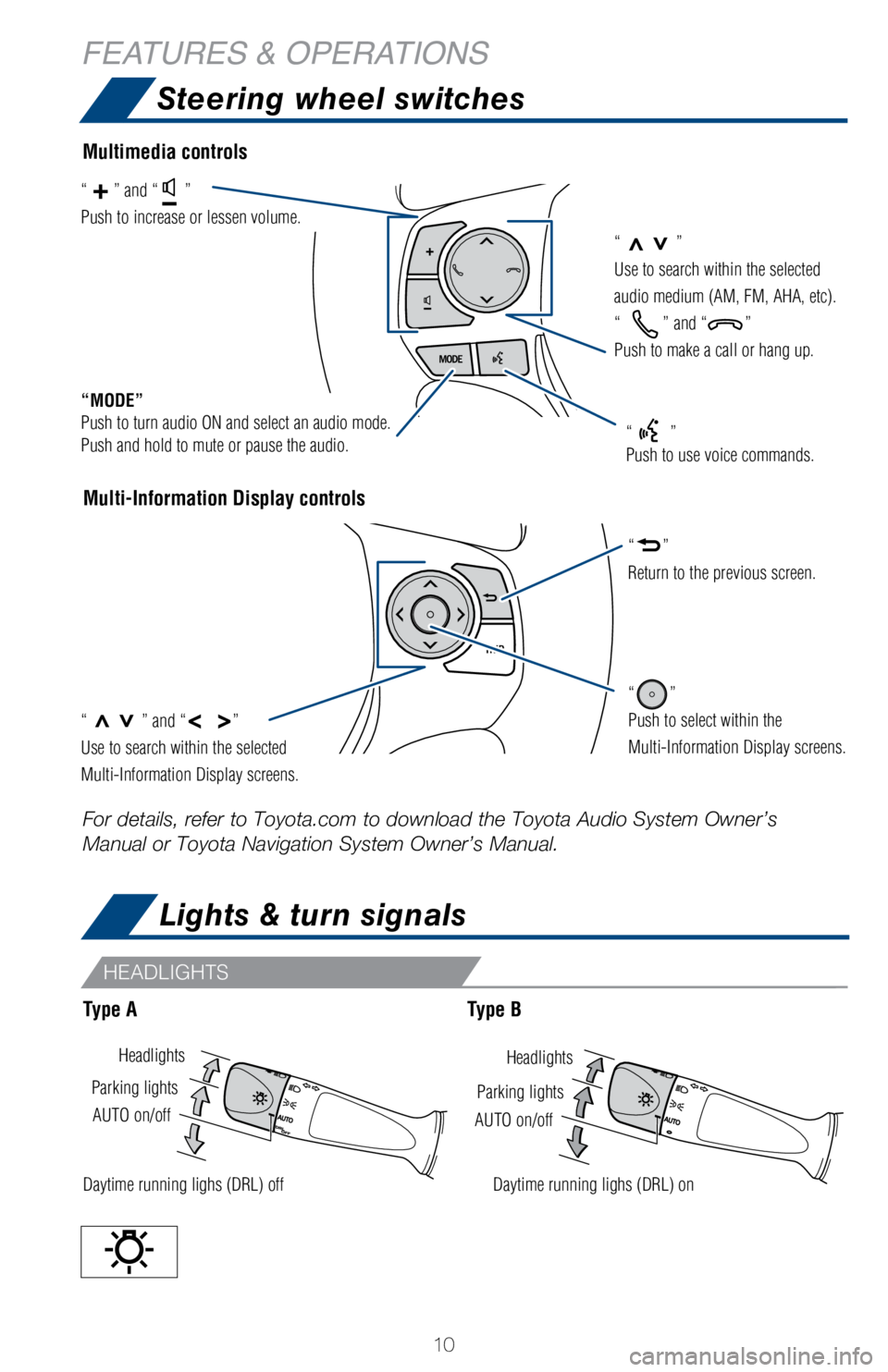
Lights & turn signals
HeadlightsHeadlights
AUTO on/off
AUTO on/off
Parking lights
Parking lights
Daytime running lighs (DRL) offDaytime running lighs (DRL) on
Steering wheel switches
Multi-Information Display controls
“>>”
Use to search within the selected
audio medium (AM, FM, AHA, etc).
“
” and “”
Push to make a call or hang up.
“MODE”
Push to turn audio ON and select an audio mode.
Push and hold to mute or pause the audio.
“>>” and “< >”
Use to search within the selected
Multi-Information Display screens.
“”
Push to select within the
Multi-Information Display screens.
“”
Return to the previous screen.
“” and “”
Push to increase or lessen volume.
“”
Push to use voice commands.
Multimedia controls
Type AType B
For details, refer to Toyota.com to download the Toyota Audio System Own\
er’s
Manual or Toyota Navigation System Owner’s Manual.
HEADLIGHTS
FEATURES & OPERATIONS
Page 15 of 36
13
OVERVIEW
FEATURES & OPERATIONS
TOYOTA SAFETY SENSE
SAFETY & EMERGENCY FEATURES
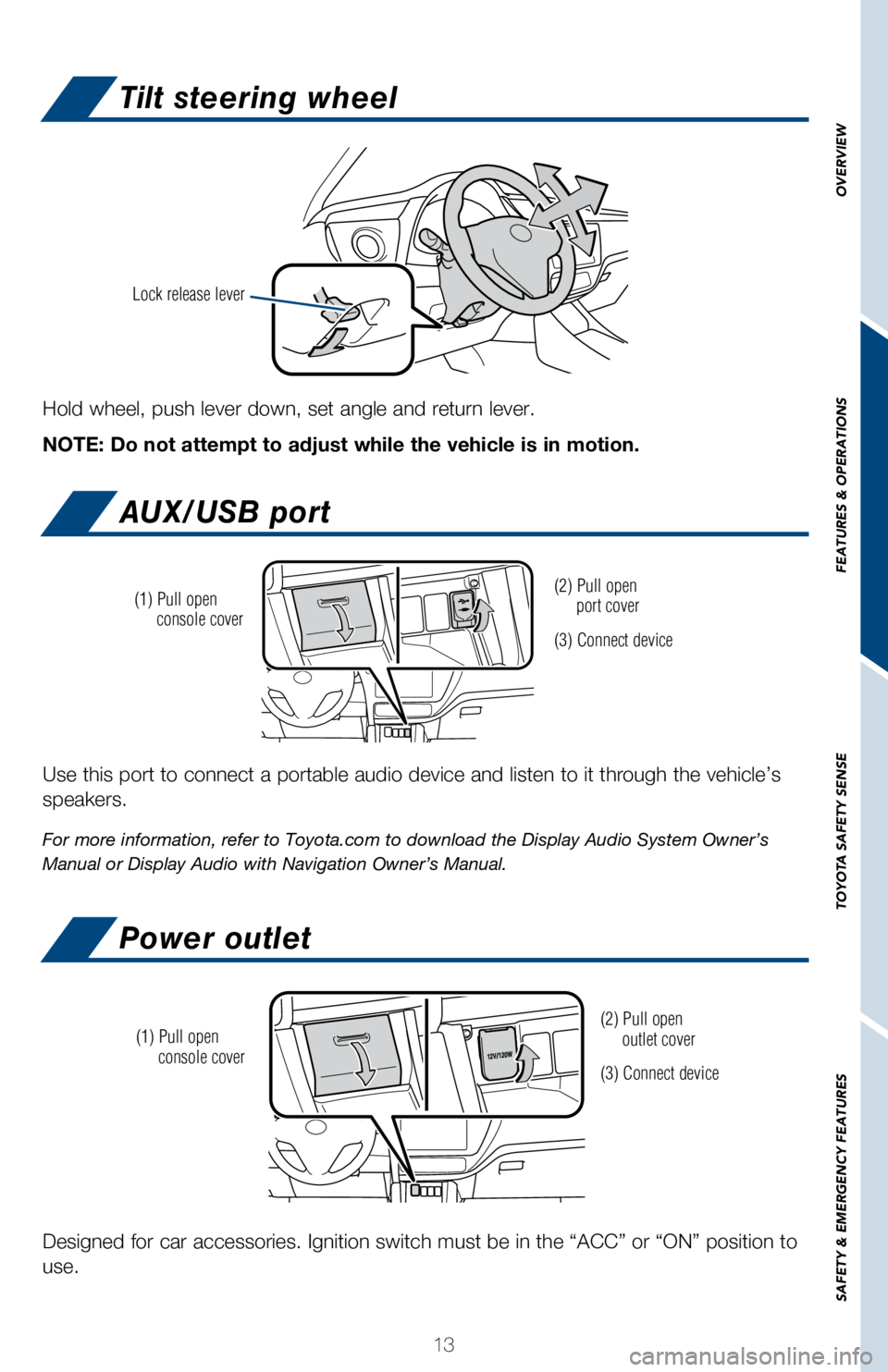
Tilt steering wheel
AUX/USB port
Power outlet
Hold wheel, push lever down, set angle and return lever.
NOTE: Do not attempt to adjust while the vehicle is in motion.
Lock release lever
Use this port to connect a portable audio device and listen to it throug\
h the vehicle’s
speakers.
For more information, refer to Toyota.com to download the Display Audio \
System Owner’s
Manual or Display Audio with Navigation Owner’s Manual.
(2) Pull open
port cover
(3) Connect device
(1) Pull open
console cover
Designed for car accessories. Ignition switch must be in the “ACC”\
or “ON” position to
use.
(2) Pull open
outlet cover
(3) Connect device
(1) Pull open
console cover
Page 25 of 36
 23
OVERVIEW
FEATURES & OPERATIONS
TOYOTA SAFETY SENSE
SAFETY & EMERGENCY FEATURES
Press the LDA switch to turn the LDA system on. Depress again to turn it\
off.
Note: Operation of the LDA system and")
23
OVERVIEW
FEATURES & OPERATIONS
TOYOTA SAFETY SENSE
SAFETY & EMERGENCY FEATURES
Press the LDA switch to turn the LDA system on. Depress again to turn it\
off.
Note: Operation of the LDA system and setting adjustments continues in t\
he
same condition regardless of Ignition cycle until changed by the driver \
or the
system is reset.
Refer to the Toyota Owner’s Manual for additional information on LDA \
operation,
settings adjustments, limitations, and precautions before attempting to \
use it.
Lane Departure Alert (LDA)
TURNING ON THE LDA SYSTEM
LDA in TSS-C uses an in-vehicle camera designed to detect visible white \
and yellow
lane markers in front of the vehicle and the vehicle’s position on th\
e road. If the system
determines that the vehicle is starting to unintentionally deviate from \
its lane, the system
alerts the driver with an audio and visual alert. When the alerts occur,\
the driver must
check the surrounding road situation and carefully operate the steering \
wheel to move
the vehicle back to the center part of their lane.
LDA is designed to function at speeds of approximately 32 MPH or higher \
on relatively
straight roadways.
Page 31 of 36
 29
OVERVIEW
FEATURES & OPERATIONS
TOYOTA SAFETY SENSE
SAFETY & EMERGENCY FEATURES
Smart Stop Technology automatically reduces engine power when the accele\
rator and
brake pedals are pressed simultan")
29
OVERVIEW
FEATURES & OPERATIONS
TOYOTA SAFETY SENSE
SAFETY & EMERGENCY FEATURES
Smart Stop Technology automatically reduces engine power when the accele\
rator and
brake pedals are pressed simultaneously under certain conditions.
SST engages when the accelerator is depressed first and the brakes are a\
pplied firmly
for longer than one-half second at speeds greater than five miles per ho\
ur.
SST doesn’t engage if the brake pedal is depressed before the acceler\
ator pedal,
allowing vehicles to start on a steep hill and safely accelerate without\
rolling backward.
Star Safety System™
Your vehicle comes standard with the Star Safety SystemTM, which combines Anti-lock
Braking System (ABS), Brake Assist (BA), Electronic Brake-force Dist\
ribution (EBD),
Smart Stop Technology (SST), Traction Control (TRAC) and Vehicle Sta\
bility Control
(VSC).
Refer to the Owner’s Manual for more details and important informatio\
n on
limitations to these systems.
Toyota’s ABS sensors detect which wheels are locking up and limits wh\
eel lockup
by “pulsing” each wheel’s brakes independently. Pulsing release\
s brake pressure
repeatedly for fractions of a second. This helps the tires attain the tr\
action that current
road conditions will allow, helping you to stay in directional control. \
ANTI-LOCK BRAKE SYSTEM (ABS)
Brake Assist is designed to detect sudden or “panic” braking, and \
then add braking
pressure to help decrease the vehicle’s stopping distance. When there\
’s only a split
second to react, Brake Assist can add additional brake pressure more qui\
ckly than just
the driver alone can.
BRAKE ASSIST (BA)
Toyota’s ABS technology has Electronic Brake-force Distribution (EBD\
) to help maintain
control and balance when braking. Abrupt stops can cause a vehicle to ti\
lt forward,
reducing the braking power of the rear wheels. EBD responds to sudden st\
ops by
redistributing brake force to enhance the braking effectiveness of all f\
our wheels.
ELECTRONIC BRAKE FORCE DISTRIBUTION (EBD)
VSC helps prevent loss of traction during cornering by reducing engine p\
ower and
applying brake force to selected wheels.
Toyota’s VSC monitors steering angle and the direction your vehicle i\
s traveling. When
it senses that the front or rear wheels begin to lose traction, VSC redu\
ces engine power
and applies braking to selected wheels. This helps restore traction and \
vehicle control.
VEHICLE STABILITY CONTROL (VSC)
SMART STOP TECHNOLOGY (SST)