AUX TOYOTA GT86 2015 Owners Manual (in English)
[x] Cancel search | Manufacturer: TOYOTA, Model Year: 2015, Model line: GT86, Model: TOYOTA GT86 2015Pages: 464, PDF Size: 10.65 MB
Page 3 of 464

1
2
3
4
5
6
3
2-2. Instrument cluster
Gauges and meters ............ 194
Indicators and warning
lights ................................. 198
Multi-information
display .............................. 203
2-3. Operating the lights and
windshield wipers
Headlight switch.................. 208
Fog light switch ................... 215
Windshield wipers and
washer .............................. 217
2-4. Using other driving
systems
Cruise control...................... 220
Driving assist systems ........ 225
2-5. Driving information
Cargo and luggage ............. 231
Winter driving tips ............... 233
Trailer towing ...................... 237
3-1. Using the air conditioning
system and defogger
Manual air conditioning
system .............................. 240
Automatic air conditioning
system .............................. 248
Rear window and
outside rear view mirror
defoggers.......................... 2563-2. Using the audio system
Using the AUX/
USB port .......................... 258
3-3. Using the interior lights
Interior lights list ................. 259
• Interior light ...................... 260
3-4. Using the storage
features
List of storage features....... 261
• Glove box ......................... 262
• Bottle holders ................... 263
• Cup holders/
console tray...................... 264
3-5. Other interior features
Sun visors .......................... 266
Vanity mirrors ..................... 267
Clock .................................. 268
Outside temperature
display .............................. 269
Ashtray ............................... 270
Power outlets ..................... 271
Seat heaters ....................... 273
Floor mat ............................ 275
Trunk features .................... 278
3Interior features
Page 12 of 464
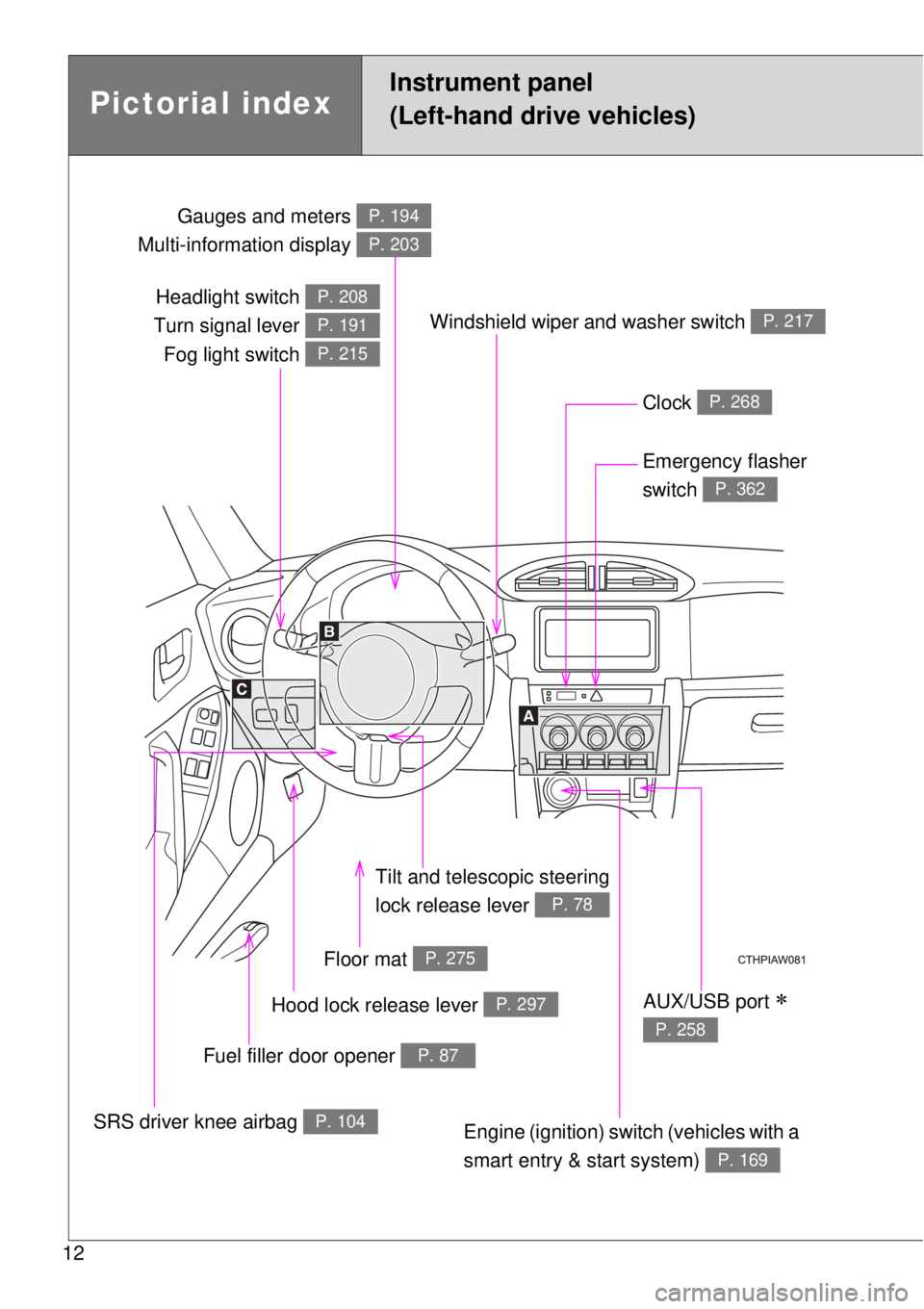
12
Headlight switch
Turn signal lever
Fog light switch P. 208
P. 191
P. 215
Gauges and meters
Multi-information display P. 194
P. 203
Clock P. 268
Windshield wiper and washer switch P. 217
Emergency flasher
switch
P. 362
Tilt and telescopic steering
lock release lever
P. 78
Floor mat P. 275
Hood lock release lever P. 297
Fuel filler door opener P. 87
SRS driver knee airbag P. 104Engine (ignition) switch (vehicles with a
smart entry & start system)
P. 169
AUX/USB port
P. 258
Pictorial index
Instrument panel
(Left-hand drive vehicles)
Page 19 of 464
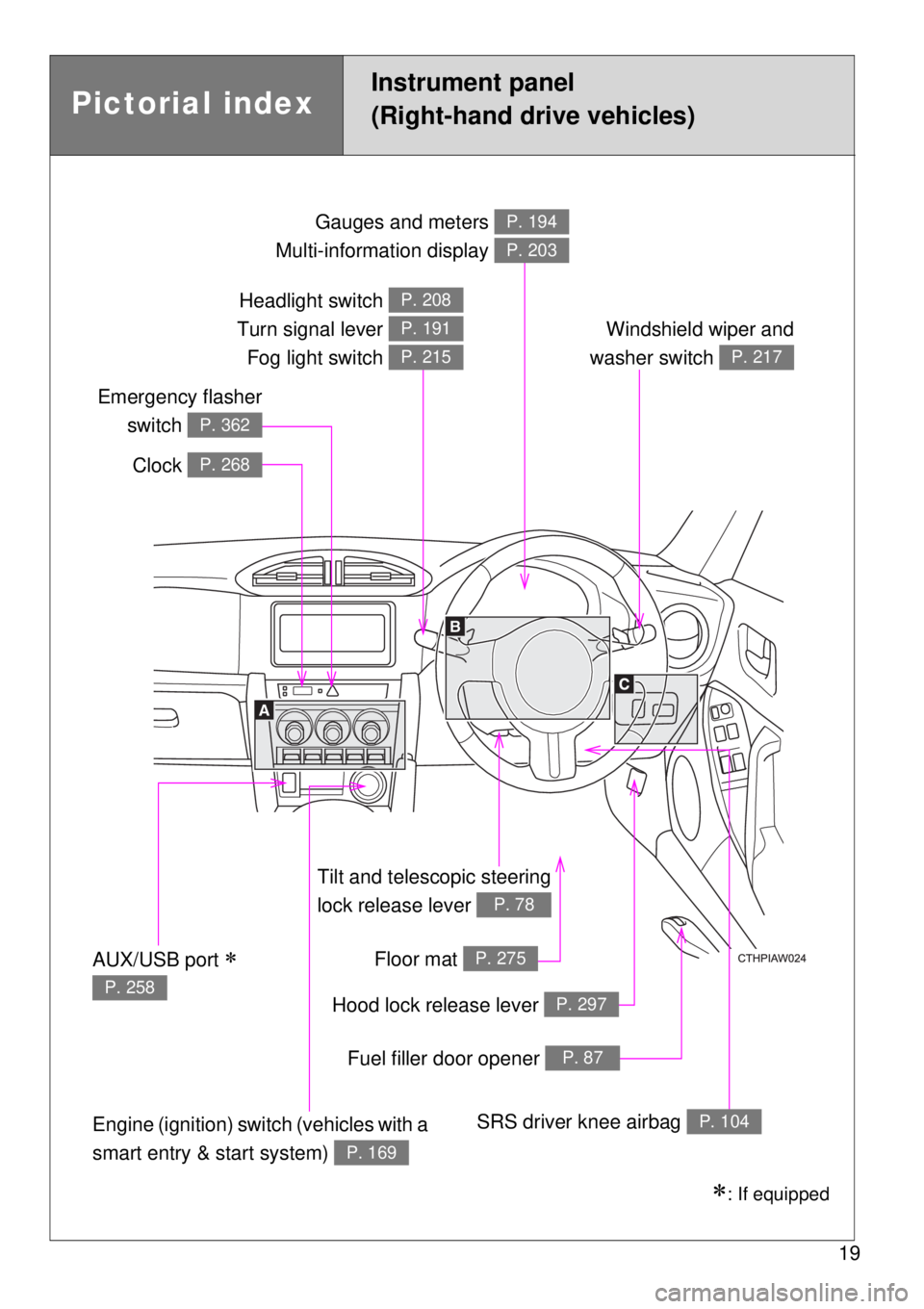
19
Tilt and telescopic steering
lock release lever
P. 78
Gauges and meters
Multi-information display P. 194
P. 203
Clock P. 268
Windshield wiper and
washer switch
P. 217
Emergency flasher
switch
P. 362
Floor mat P. 275
Hood lock release lever P. 297
Fuel filler door opener P. 87
Engine (ignition) switch (vehicles with a
smart entry & start system)
P. 169
SRS driver knee airbag P. 104
Headlight switch
Turn signal lever
Fog light switch P. 208
P. 191
P. 215
AUX/USB port
P. 258
: If equipped
Pictorial index
Instrument panel
(Right-hand drive vehicles)
Page 41 of 464

41 1-2. Opening, closing and locking the doors and trunk
1
Before driving
Notes for the entry function
Even when the electronic key is within the effective range (detection
areas), the system may not operate properly in the following cases:
• The electronic key is too close to the window or outside door handle,
near the ground, or in a high place when the doors are locked or
unlocked.
• The electronic key is near the ground or in a high place, or too close to
the rear bumper center when the trunk is unlocked.
• The electronic key is on the instrument panel, rear package tray or
floor, in the door pockets or glove box or auxiliary box when the engine
is started or “ENGINE START STOP” switch modes are changed.
Do not leave the electronic key on top of the instrument panel or near the
door pockets when exiting the vehicle. Depending on the radio wave
reception conditions, it may be detected by the antenna outside the cabin
and the door will become lockable from the outside, possibly trapping the
electronic key inside the vehicle.
As long as the electronic key is within the effective range, the doors may
be locked or unlocked by anyone.
Even if the electronic key is not inside the vehicle, it may be possible to
start the engine if the electronic key is near the window.
The doors may unlock if a large amount of water splashes on the door
handle, such as in the rain or in a car wash when the electronic key is
within the effective range. (The door will automatically be locked after
approximately 30 seconds if the doors are not opened and closed.)
Gripping the door handle when wearing a glove may not unlock the door.
If the wireless remote control is used to lock the doors when the elec-
tronic key is near the vehicle, there is a possibility that the door may not
be unlocked by the entry function. (Use the wireless remote control to
unlock the doors.)
A sudden approach to the effective range or door handle may prevent the
doors from being unlocked. In this case, return the door handle to the
original position and check that the doors unlock before pulling the door
handle again.
Page 239 of 464
3Interior features
239
3-1. Using the air
conditioning system
and defogger
Manual air conditioning
system ............................ 240
Automatic air conditioning
system ............................ 248
Rear window and
outside rear view
mirror defoggers ............. 256
3-2. Using the audio system
Using the AUX/USB
port ................................. 258
3-3. Using the interior lights
Interior lights list................ 259
• Interior light ..................... 260
3-4. Using the storage
features
List of storage features ..... 261
• Glove box ....................... 262
• Bottle holders ................. 263
• Cup holders/
console tray .................... 2643-5. Other interior features
Sun visors ......................... 266
Vanity mirrors.................... 267
Clock ................................. 268
Outside temperature
display ............................ 269
Ashtray.............................. 270
Power outlets .................... 271
Seat heaters ..................... 273
Floor mat........................... 275
Trunk features................... 278
Page 258 of 464
258
3-2. Using the audio system
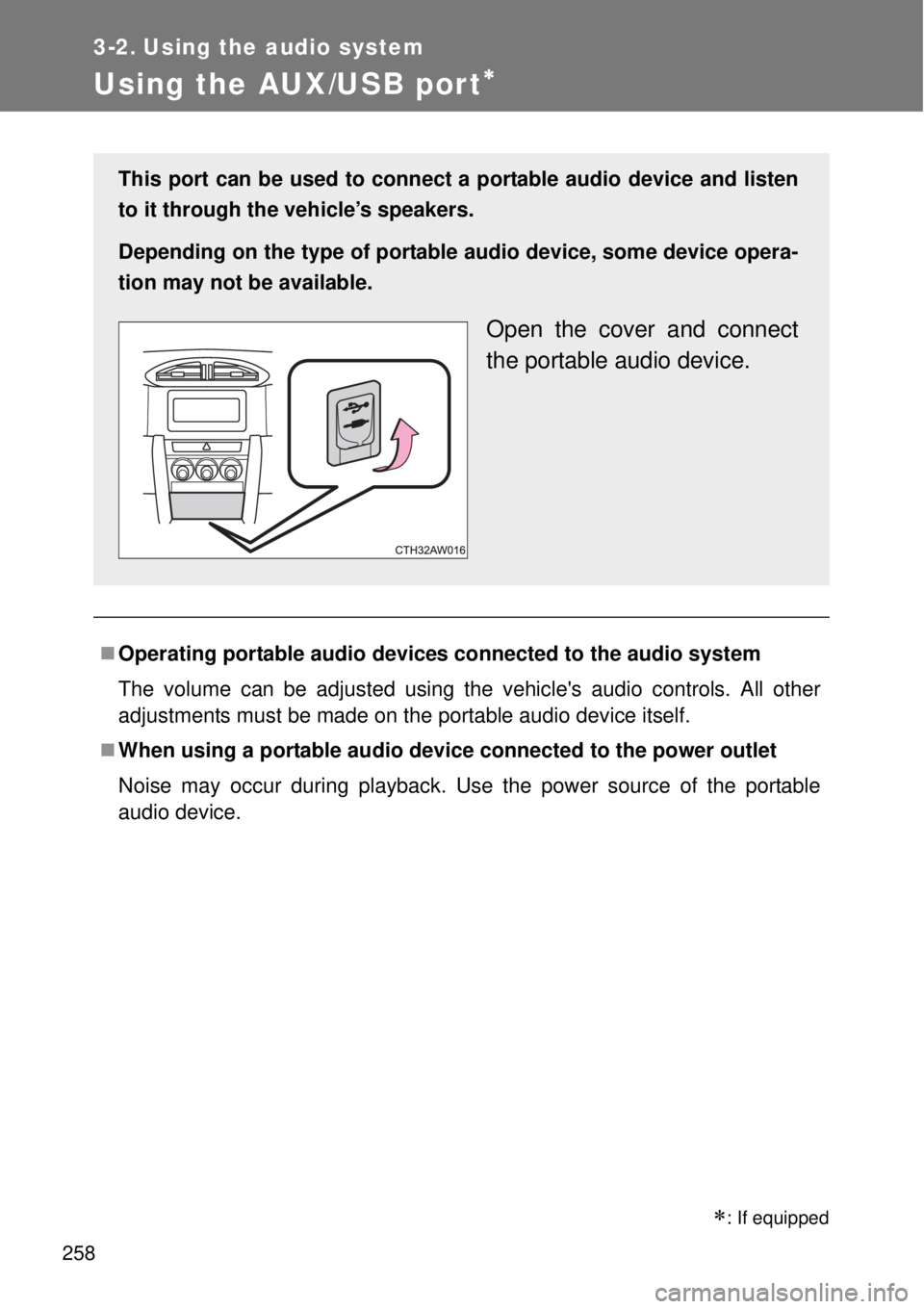
Using the AUX/USB por t
Operating portable audio devices connected to the audio system
The volume can be adjusted using the vehicle's audio controls. All other
adjustments must be made on the portable audio device itself.
When using a portable audio device connected to the power outlet
Noise may occur during playback. Use the power source of the portable
audio device.
: If equipped
This port can be used to connect a portable audio device and listen
to it through the vehicle’s speakers.
Depending on the type of portable audio device, some device opera-
tion may not be available.
Open the cover and connect
the portable audio device.
Page 278 of 464
278
3-5. Other interior features
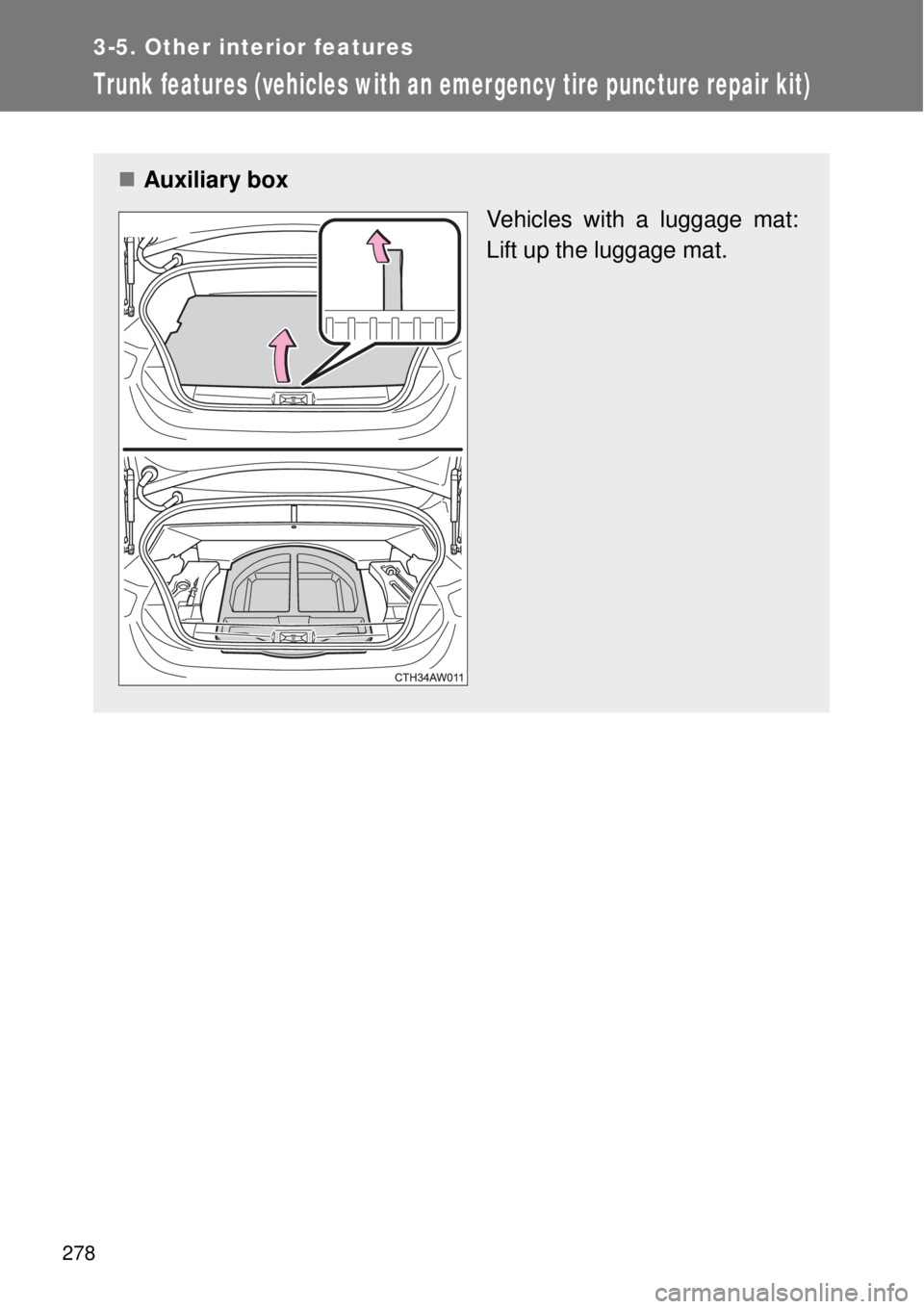
Trunk features (vehicles with an emergency tire puncture repair kit)
Auxiliary box
Vehicles with a luggage mat:
Lift up the luggage mat.
Page 297 of 464
297
4-3. Do-it-yourself maintenance
4
Maintenance and care
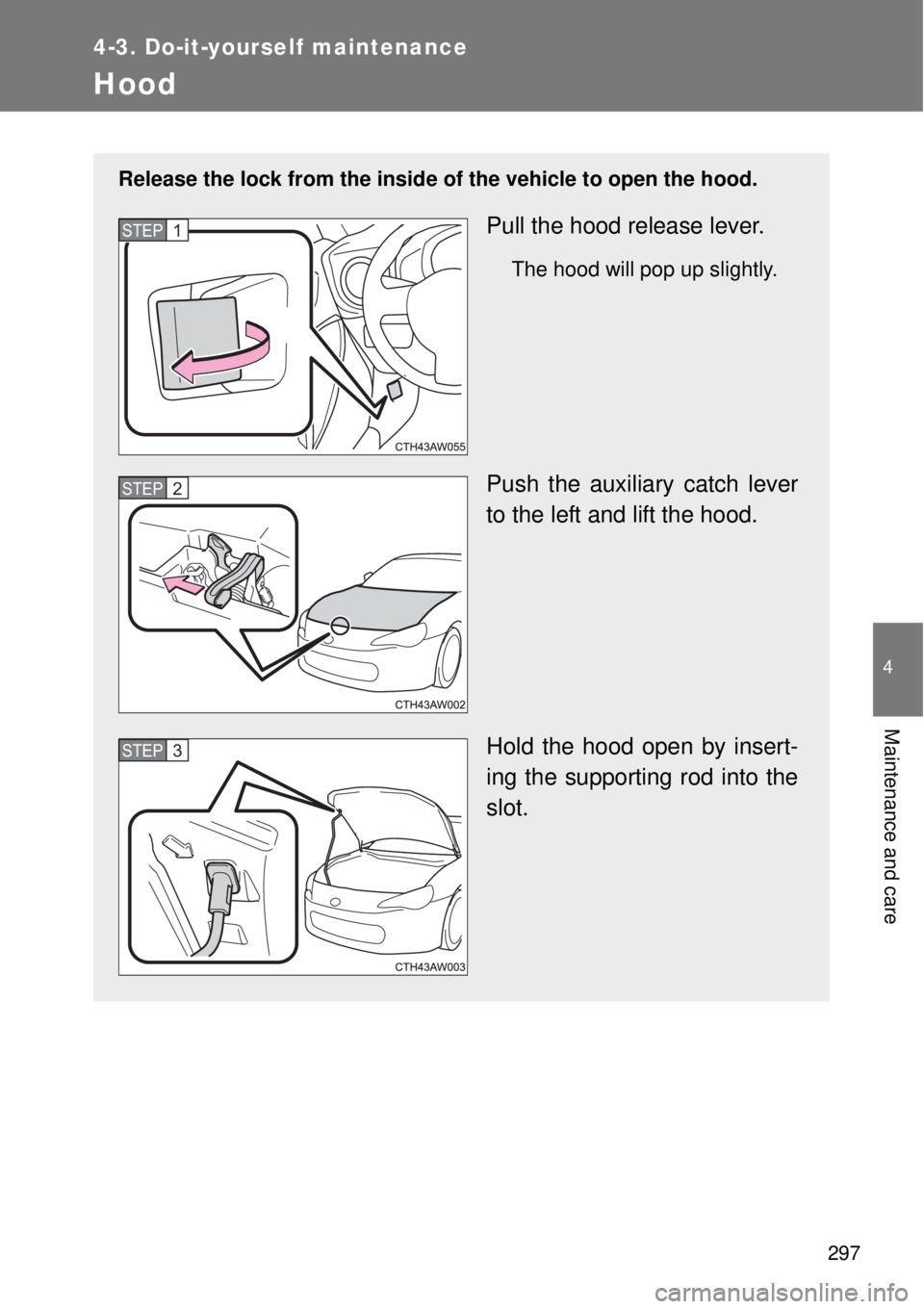
Hood
Release the lock from the inside of the vehicle to open the hood.
Pull the hood release lever.
The hood will pop up slightly.
Push the auxiliary catch lever
to the left and lift the hood.
Hold the hood open by insert-
ing the supporting rod into the
slot.
STEP 1
STEP 2
STEP 3
Page 451 of 464

451
Alphabetical index
Alphabetical index
A/C..................................... 240, 248
ABS ........................................... 225
Air conditioning filter .............. 328
Air conditioning system
Air conditioning filter.............. 328
Automatic air conditioning
system ................................ 248
Manual air conditioning
system ................................ 240
Airbags
Airbag manual on/off
system ................................ 151
Airbag operating
conditions ................... 113, 119
Airbag precautions for
your child ............................ 125
Airbag warning light .............. 373
Curtain shield airbag
operating conditions ........... 119
Curtain shield airbag
precautions ......................... 125
General airbag precautions... 125
Locations of airbags .............. 104
Modification and
disposal of airbags.............. 129
Proper driving posture... 102, 125
Side airbag operating
conditions ........................... 119
Side airbag precautions ........ 125
Side and curtain shield
airbags operating
conditions ........................... 119
Side and curtain shield
airbags precautions ............ 125
SRS airbags .......................... 104Anti-lock brake system ........... 225
Ashtray ..................................... 270
Audio input............................... 258
Audio system
Audio input ............................ 258
AUX port ............................... 258
Portable music player ........... 258
USB port ............................... 258
Automatic air conditioning
system .................................... 248
Automatic headlight
leveling system ..................... 212
Automatic light
control system....................... 208
Automatic transmission
Automatic transmission......... 181
If the shift lever cannot be
shifted from P ..................... 412
Manual mode ........................ 184
Mode select switch ............... 183
AUX port ................................... 258
Auxiliary box ............................ 278A
Page 464 of 464
464
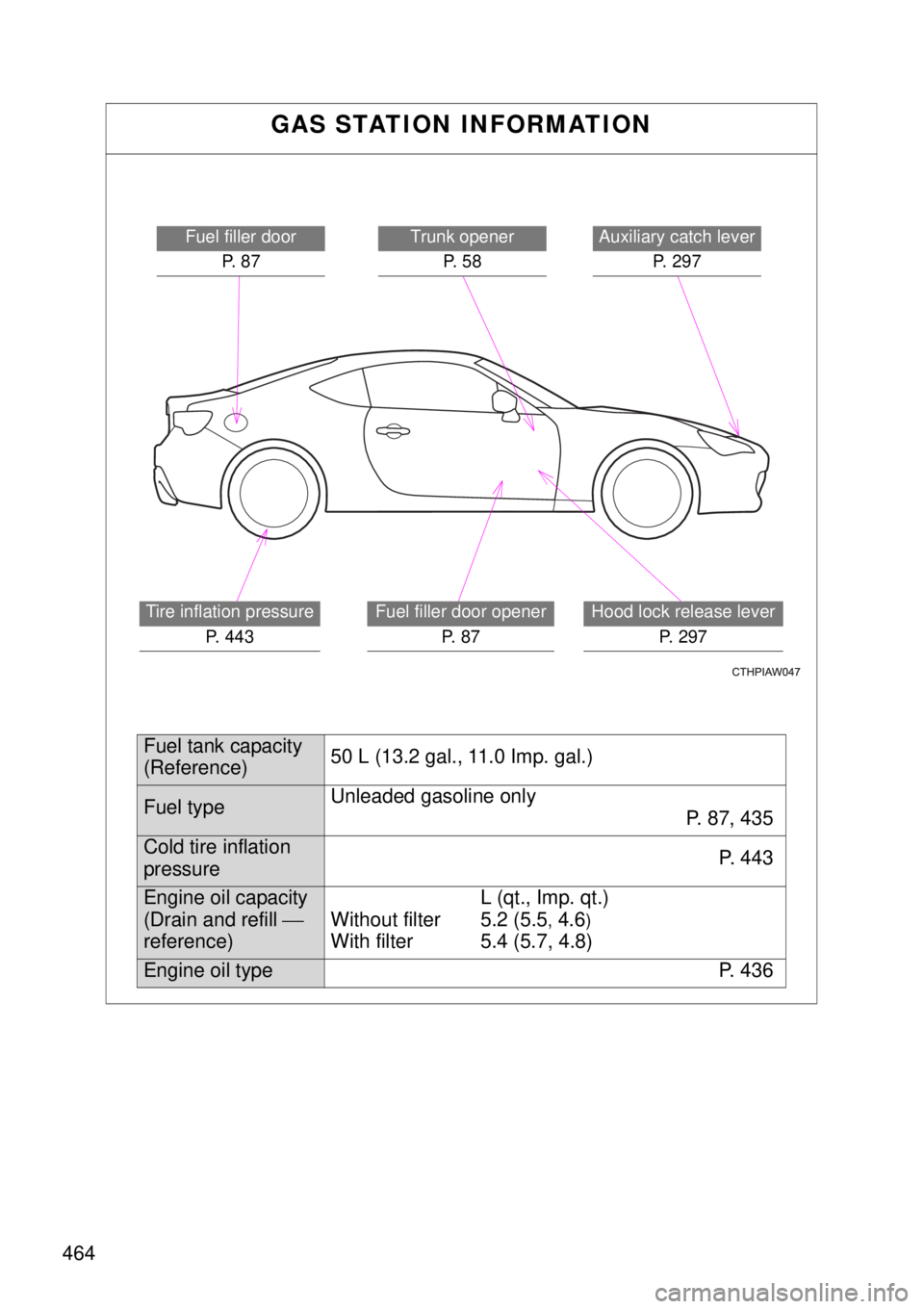
GAS STATION INFORMATION
Auxiliary catch lever
P. 2 9 7Trunk opener
P. 5 8
Hood lock release lever
P. 297
Fuel filler door
P. 8 7
Tire inflation pressure
P. 443Fuel filler door opener
P. 8 7
Fuel tank capacity
(Reference)50 L (13.2 gal., 11.0 Imp. gal.)
Fuel typeUnleaded gasoline only
P. 8 7 , 4 3 5
Cold tire inflation
pressureP. 4 4 3
Engine oil capacity
(Drain and refill
reference)L (qt., Imp. qt.)
Without filter 5.2 (5.5
, 4.6)With filter 5.4 (5.7, 4.8)
Engine oil type P. 436