tow TOYOTA GT86 2015 Owners Manual (in English)
[x] Cancel search | Manufacturer: TOYOTA, Model Year: 2015, Model line: GT86, Model: TOYOTA GT86 2015Pages: 464, PDF Size: 10.65 MB
Page 1 of 464

TABLE OF CONTENTS
1
1Before drivingAdjusting and operating features such as door locks,
mirrors, and steering column.
2When drivingDriving, stopping and safe-driving information.
3Interior featuresAir conditioning and audio systems, as well as other in-
terior features for a comfortable driving experience.
4Maintenance and
careCleaning and protecting your vehicle, performing do-it-
yourself maintenance, and maintenance information.
5When trouble
arisesWhat to do if the vehicle needs to be towed, gets a flat
tire, or is involved in an accident.
6Vehicle specifi-
cationsDetailed vehicle information.
IndexAlphabetical listing of information contained in this man-
ual.
Page 3 of 464

1
2
3
4
5
6
3
2-2. Instrument cluster
Gauges and meters ............ 194
Indicators and warning
lights ................................. 198
Multi-information
display .............................. 203
2-3. Operating the lights and
windshield wipers
Headlight switch.................. 208
Fog light switch ................... 215
Windshield wipers and
washer .............................. 217
2-4. Using other driving
systems
Cruise control...................... 220
Driving assist systems ........ 225
2-5. Driving information
Cargo and luggage ............. 231
Winter driving tips ............... 233
Trailer towing ...................... 237
3-1. Using the air conditioning
system and defogger
Manual air conditioning
system .............................. 240
Automatic air conditioning
system .............................. 248
Rear window and
outside rear view mirror
defoggers.......................... 2563-2. Using the audio system
Using the AUX/
USB port .......................... 258
3-3. Using the interior lights
Interior lights list ................. 259
• Interior light ...................... 260
3-4. Using the storage
features
List of storage features....... 261
• Glove box ......................... 262
• Bottle holders ................... 263
• Cup holders/
console tray...................... 264
3-5. Other interior features
Sun visors .......................... 266
Vanity mirrors ..................... 267
Clock .................................. 268
Outside temperature
display .............................. 269
Ashtray ............................... 270
Power outlets ..................... 271
Seat heaters ....................... 273
Floor mat ............................ 275
Trunk features .................... 278
3Interior features
Page 4 of 464

TABLE OF CONTENTSIndex
4
4-1. Maintenance and care
Cleaning and protecting
the vehicle exterior
............. 282
Cleaning and protecting
the vehicle interior ............ 285
Cleaning and protecting
the Alcantara
® area .......... 289
4-2. Maintenance
Maintenance
requirements..................... 291
4-3. Do-it-yourself
maintenance
Do-it-yourself service
precautions ....................... 294
Hood ................................... 297
Positioning a floor jack ........ 299
Engine compartment........... 301
Tires .................................... 314
Tire inflation pressure ......... 323
Wheels ................................ 325
Air conditioning filter ........... 328
Wireless remote control/
electronic key battery........ 331
Checking and replacing
fuses ................................. 335
Light bulbs .......................... 3435-1. Essential information
Emergency flashers ........... 362
If your vehicle needs to
be towed .......................... 363
If you think something is
wrong ............................... 370
Fuel pump shut off
system.............................. 371
5-2. Steps to take in
an emergency
If a warning light turns
on or a warning buzzer
sounds... ......................... 372
If you have a flat tire
(vehicles with
a spare tire) ...................... 384
If you have a flat tire
(vehicles with
an emergency tire
puncture repair kit) ........... 393
If the engine will
not start ............................ 409
If the shift lever cannot be
shifted from P ................... 412
If you lose your keys .......... 413
If the electronic key does
not operate properly ......... 414
If the battery is
discharged ....................... 418
4Maintenance and care5When trouble arises
Page 40 of 464

40 1-2. Opening, closing and locking the doors and trunk
Conditions affecting operation
The smart entry & start system uses weak radio waves. In the following situ-
ations, the communication between the electronic key and the vehicle may
be affected, preventing the smart entry & start system, wireless remote con-
trol and engine immobilizer system from operating properly.
(Way of coping P. 414)
When the electronic key battery is depleted
Near a TV tower, electric power plant, gas station, radio station, large dis-
play, airport or other facility that generates strong radio waves or electri-
cal noise
When the electronic key is in contact with, or is covered by the following
metallic objects
• Cards to which aluminum foil is attached
• Cigarette boxes that have aluminum foil inside
• Metallic wallets or bags
• Coins
• Hand warmers made of metal
• Media such as CDs and DVDs
When other wireless key (that emit radio waves) is being used nearby
When carrying the electronic key together with the following devices that
emit radio waves
• A portable radio, cellular phone, cordless phone or other wireless com-
munication device
• Another vehicle's electronic key or a wireless key that emits radio
waves
• Personal computers or personal digital assistants (PDAs)
• Digital audio players
• Portable game systems
If window tint with a metallic content or metallic objects are attached to
the rear window
When the electronic key is placed near a battery charger or electronic
devices
Page 52 of 464

52 1-2. Opening, closing and locking the doors and trunk
Operation signals
The emergency flashers flash to indicate that the doors have been locked/
unlocked. (Locked: Once; Unlocked: Twice)
Door lock buzzer (vehicles with a smart entry & start system)
If an attempt to lock the doors is made when a door is not fully closed, a
buzzer sounds continuously. Fully close the door to stop the buzzer, and lock
the vehicle once more.
Security feature
If a door is not opened within approximately 30 seconds after the vehicle is
unlocked, the security feature automatically locks the vehicle again.
Conditions affecting operation
Vehicles without a smart entry & start system
The wireless remote control function may not operate normally in the follow-
ing situations:
When the wireless key battery is depleted
Near a TV tower, electric power plant, gas station, radio station, large dis-
play, airport or other facility that generates strong radio waves or electri-
cal noise
When carrying a portable radio, cellular phone or other wireless commu-
nication devices
When the wireless key is in contact with, or is covered by a metallic
object
When other wireless key (that emit radio waves) is being used nearby
If window tint with a metallic content or metallic objects are attached to
the rear window
Vehicles with a smart entry & start system
P. 4 0
Page 111 of 464

111 1-7. Safety information
1
Before driving
SRS front airbag
The driver’s SRS front airbag is stowed in the center portion of the steering
wheel. The driver’s knee airbag is stowed under the steering column. The
passenger’s SRS front airbag is stowed near the top of the dashboard under
an “SRS AIRBAG” mark.
In a moderate to severe front collision, the following components deploy.
SRS front airbag for driver
SRS front airbag for front passenger
Knee airbag for driver
These components supplement the seat belts by reducing the impact to the
occupant’s head, chest and knees.
If the SRS airbags deploy (inflate)
Bruising and slight abrasions may result from contact with a deploying
(inflating) SRS airbag.
A loud noise and white powder will be emitted.
Parts of the airbag module (steering wheel hub, airbag cover and inflator)
as well as the front seats, parts of the front and rear pillars, and roof side
rails, may be hot for several minutes. The airbag itself may also be hot.
The windshield may crack.
Front-seat passenger airbag manual cut off switch
The passenger-side front airbag can be deactivated by the cut off switch
located in the instrumental panel side. When the cut off switch is turned to
the deactivation mode the passenger-side front airbag becomes deacti-
vated. When the cutoff switch is turned to the activation mode the passen-
ger-side front airbag becomes active to deploy. While the passenger-side
front airbag is active the A/B ON indicator is illuminated.
Page 126 of 464
126 1-7. Safety information
CAUTION
SRS airbag precautions
• Slightly recline the back of the seat. Although vehicle designs vary,
many drivers can achieve the 250 mm (10 in.) distance, even with the
driver seat all the way forward, simply by reclining the back of the seat
somewhat. If reclining the back of your seat makes it hard to see the
road, raise yourself by using a firm, non-slippery cushion, or raise the
seat if your vehicle has that feature.
• If your steering wheel is adjustable, tilt it downward. This points the air-
bag toward your chest instead of your head and neck.
The seat should be adjusted as recommended above, while still maintain-
ing control of the foot pedals, steering wheel, and your view of the instru-
ment panel controls.
The SRS front passenger airbag also deploys with considerable force, and
can cause death or serious injury especially if the front passenger is very
close to the airbag. The front passenger seat should be as far from the air-
bag as possible with the seatback adjusted, so the front passenger sits
upright.
Improperly seated and/or restrained infants and children can be killed or
seriously injured by a deploying airbag. An infant or child who is too small
to use a seat belt should be properly secured using a child restraint sys-
tem. Toyota strongly recommends that all infants and children be placed in
the rear seats of the vehicle and properly restrained. The rear seats are
safer for infants and children than the front passenger seat. (P. 133)
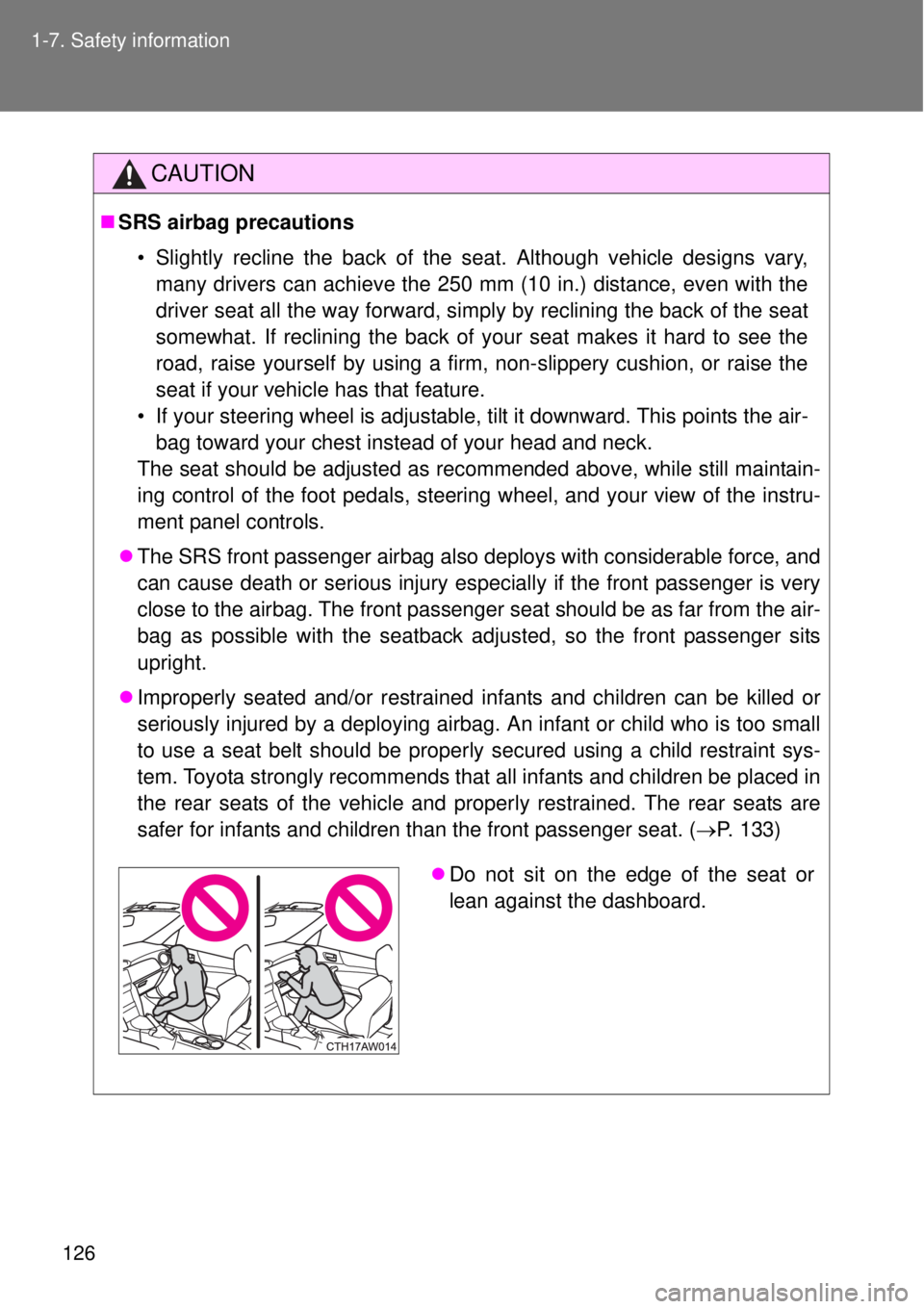
Do not sit on the edge of the seat or
lean against the dashboard.
Page 127 of 464
127 1-7. Safety information
1
Before driving
CAUTION
SRS airbag precautions
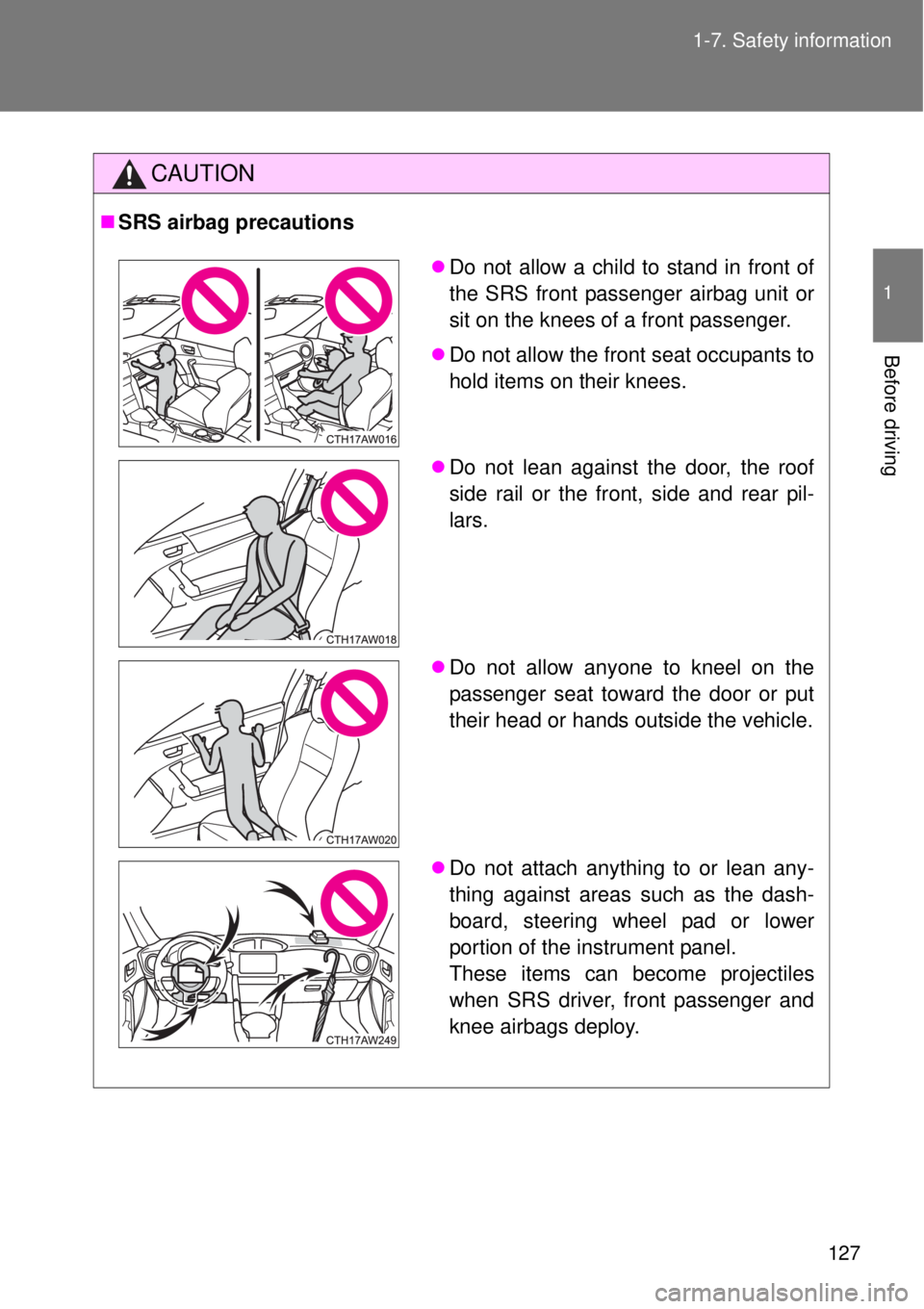
Do not allow a child to stand in front of
the SRS front passenger airbag unit or
sit on the knees of a front passenger.
Do not allow the front seat occupants to
hold items on their knees.
Do not lean against the door, the roof
side rail or the front, side and rear pil-
lars.
Do not allow anyone to kneel on the
passenger seat toward the door or put
their head or hands outside the vehicle.
Do not attach anything to or lean any-
thing against areas such as the dash-
board, steering wheel pad or lower
portion of the instrument panel.
These items can become projectiles
when SRS driver, front passenger and
knee airbags deploy.
Page 155 of 464
2When driving
155
2-1. Driving procedures
Driving the vehicle ............ 156
Engine (ignition) switch
(vehicles with a smart
entry & start system)....... 169
Engine (ignition) switch
(vehicles without a smart
entry & start system)....... 178
Automatic
transmission ................... 181
Manual Transmission ....... 188
Turn signal lever ............... 191
Parking brake ................... 192
Horn .................................. 193
2-2. Instrument cluster
Gauges and meters .......... 194
Indicators and warning
lights ............................... 198
Multi-information
display ............................ 2032-3. Operating the lights and
windshield wipers
Headlight switch................ 208
Fog light switch ................. 215
Windshield wipers and
washer ............................ 217
2-4. Using other driving
systems
Cruise control.................... 220
Driving assist systems ...... 225
2-5. Driving information
Cargo and luggage ........... 231
Winter driving tips ............. 233
Trailer towing .................... 237
Page 209 of 464
209 2-3. Operating the lights and windshield wipers
2
When driving
Turning on the high beam headlights
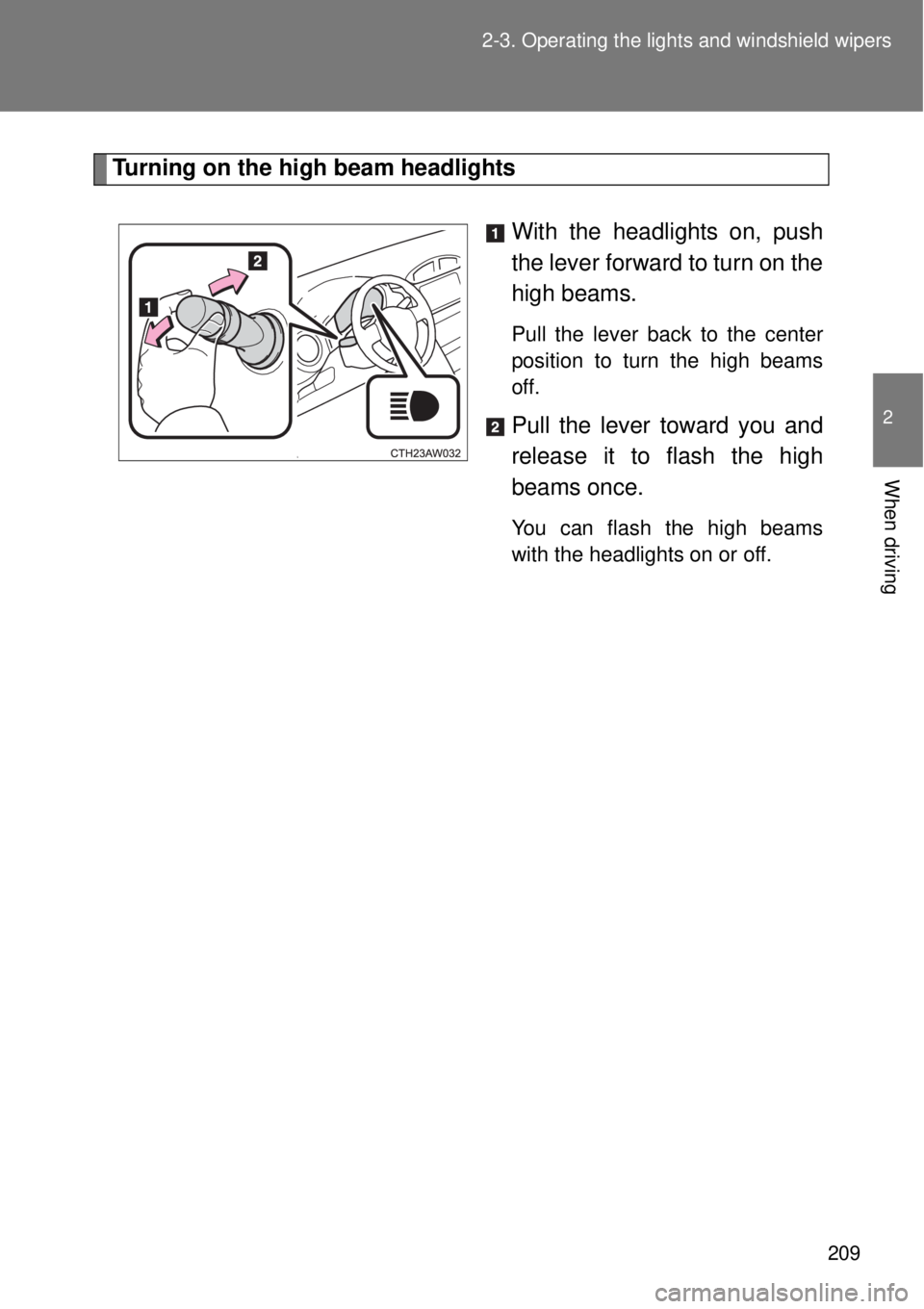
With the headlights on, push
the lever forward to turn on the
high beams.
Pull the lever back to the center
position to turn the high beams
off.
Pull the lever toward you and
release it to flash the high
beams once.
You can flash the high beams
with the headlights on or off.