tow TOYOTA HIGHLANDER 2020 (in English) Owner's Guide
[x] Cancel search | Manufacturer: TOYOTA, Model Year: 2020, Model line: HIGHLANDER, Model: TOYOTA HIGHLANDER 2020Pages: 560, PDF Size: 14.42 MB
Page 199 of 560
1994-1. Before driving
HIGHLANDER_U
4
Driving
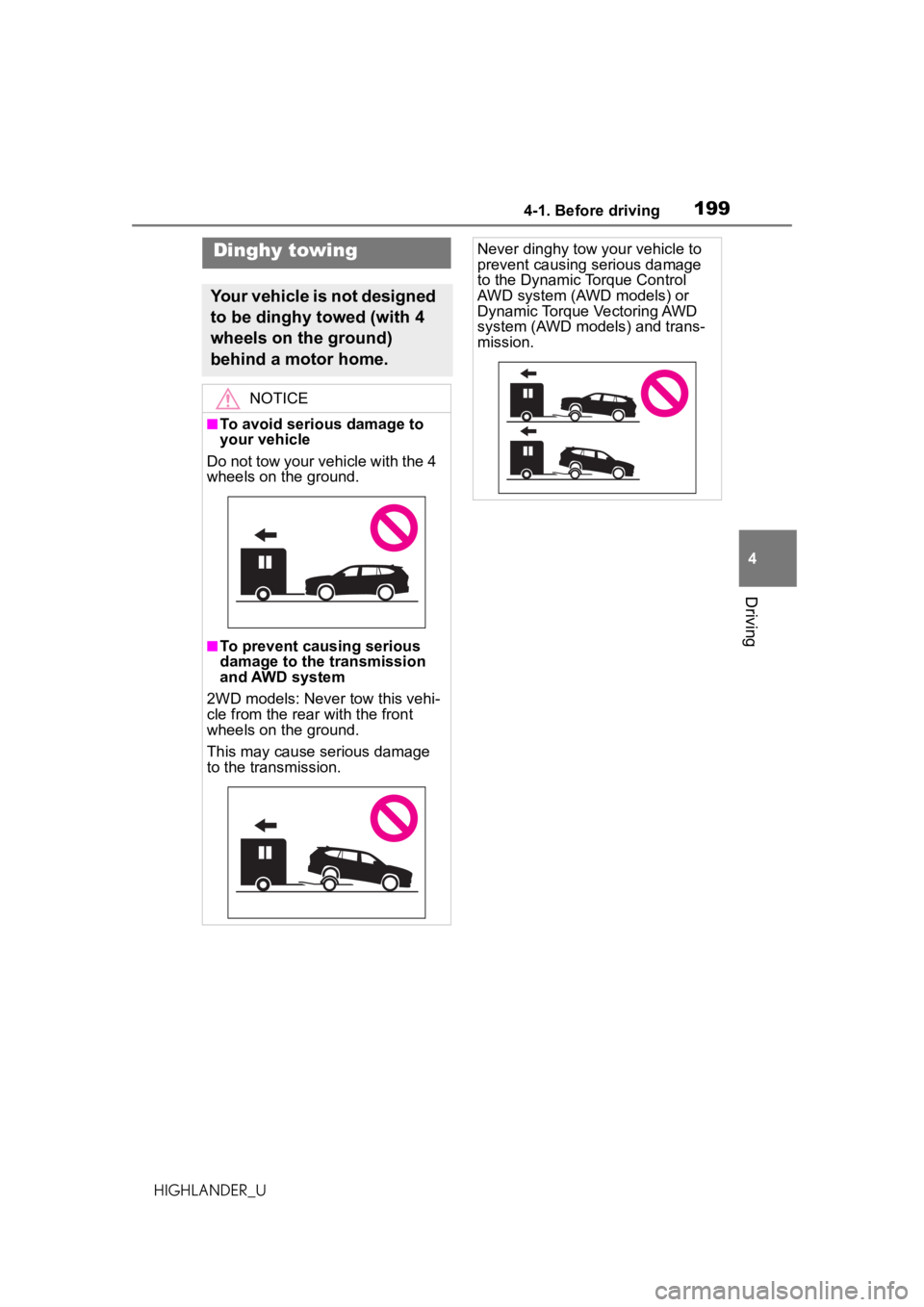
Dinghy towing
Your vehicle is not designed
to be dinghy towed (with 4
wheels on the ground)
behind a motor home.
NOTICE
■To avoid serious damage to
your vehicle
Do not tow your vehicle with the 4
wheels on the ground.
■To prevent causing serious
damage to the transmission
and AWD system
2WD models: Never tow this vehi-
cle from the rear with the front
wheels on the ground.
This may cause serious damage
to the transmission.
Never dinghy tow your vehicle to
prevent causing serious damage
to the Dynamic Torque Control
AWD system (AWD models) or
Dynamic Torque Vectoring AWD
system (AWD models) and trans-
mission.
Page 216 of 560
2164-3. Operating the lights and wipers
HIGHLANDER_U
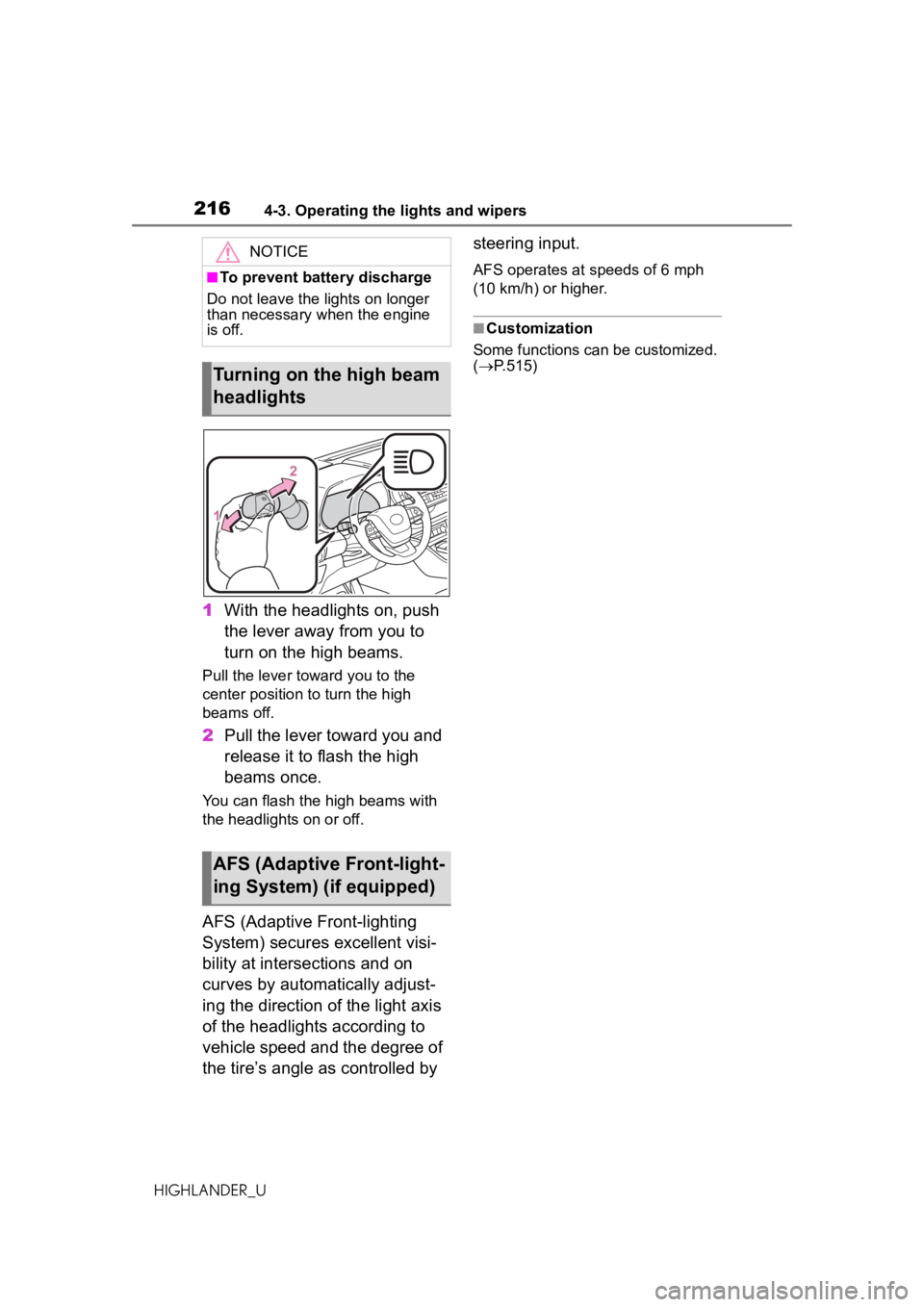
1With the headlights on, push
the lever away from you to
turn on the high beams.
Pull the lever towa rd you to the
center position to turn the high
beams off.
2 Pull the lever toward you and
release it to flash the high
beams once.
You can flash the high beams with
the headlights on or off.
AFS (Adaptive Front-lighting
System) secures excellent visi-
bility at intersections and on
curves by automatically adjust-
ing the direction of the light axis
of the headlights according to
vehicle speed and the degree of
the tire’s angle as controlled by steering input.
AFS operates at speeds of 6 mph
(10 km/h) or higher.
■Customization
Some functions can be customized.
( P.515)
NOTICE
■To prevent battery discharge
Do not leave the lights on longer
than necessary when the engine
is off.
Turning on the high beam
headlights
AFS (Adaptive Front-light-
ing System) (if equipped)
Page 218 of 560

2184-3. Operating the lights and wipers
HIGHLANDER_Ufrom around a curve
• When the vehicle is cut in front of by another vehicle
• When vehicles ahead cannot be detected due to repeated curves,
road dividers or roadside trees
• When vehicles ahead appear in a faraway lane on a wide road
• When the lights of vehicles ahead
are not on
●The high beams may be turned off
if a vehicle ahead that is using fog
lights without its headlights turned
on is detected.
●House lights, street lights, traffic
signals, and illumi nated billboards
or signs and other reflective
objects may cause the high
beams to change to the low
beams, or the low beams to
remain on.
●The following factors may affect
the amount of time taken for the
high beams to turn on or off:
• The brightness of the headlights, fog lights, and tail lights of vehi-
cles ahead
• The movement and direction of vehicles ahead
• When a vehicle ahead only has
operational lights on one side
• When a vehicle ahead is a two-wheeled vehicle
• The condition of the road (gradi- ent, curve, condition of the road
surface, etc.)
• The number of passengers and amount of luggage in the vehicle
●The high beams may turn on or off
unexpectedly.
●Bicycles or similar vehicles may
not be detected.
●In the following situations the sys-
tem may not be able to correctly
detect the surrounding brightness
level. This may cause the low
beams to remain on or the high
beams to flash or dazzle pedestri-
ans or vehicles ahead. In such a
case, it is necess ary to manually
switch between the high and low
beams. • When driving in inclement weather
(heavy rain, snow, fog, sand-
storms, etc.)
• When the windshield is obscured by fog, mist, ice, dirt, etc.
• When the windshield is cracked or
damaged
• When the camera sensor is deformed or dirty
• When the temperature of the cam- era sensor is extremely high
• When the surrounding brightness
level is equal to that of headlights,
tail lights or fog lights
• When headlights or tail lights of
vehicles ahead are turned off,
dirty, changing color, or not aimed
properly
• When the vehicle is hit by water, snow, dust, etc. from a preceding
vehicle
• When driving through an area of intermittently changing brightness
and darkness
• When frequently and repeatedly driving ascending/descending
roads, or roads with rough, bumpy
or uneven surfaces (such as
stone-paved roads, gravel roads,
etc.)
• When frequently and repeatedly taking curves or driving on a wind-
ing road
• When there is a highly reflective object ahead of the vehicle, such
as a sign or mirror
• When the back of a preceding vehicle is highly reflective, such as
a container on a truck
• When the vehicle’s headlights are damaged or dirty, or are not aimed
properly
• When the vehicle is listing or titling due to a flat tire, a trailer being
towed, etc.
• When the headlights are changed between the high beams and low
beams repeatedly in an abnormal
manner
• When the driver believes that the high beams may be flashing or
dazzling pedestrians or other driv-
ers
Page 222 of 560
2224-3. Operating the lights and wipers
HIGHLANDER_U
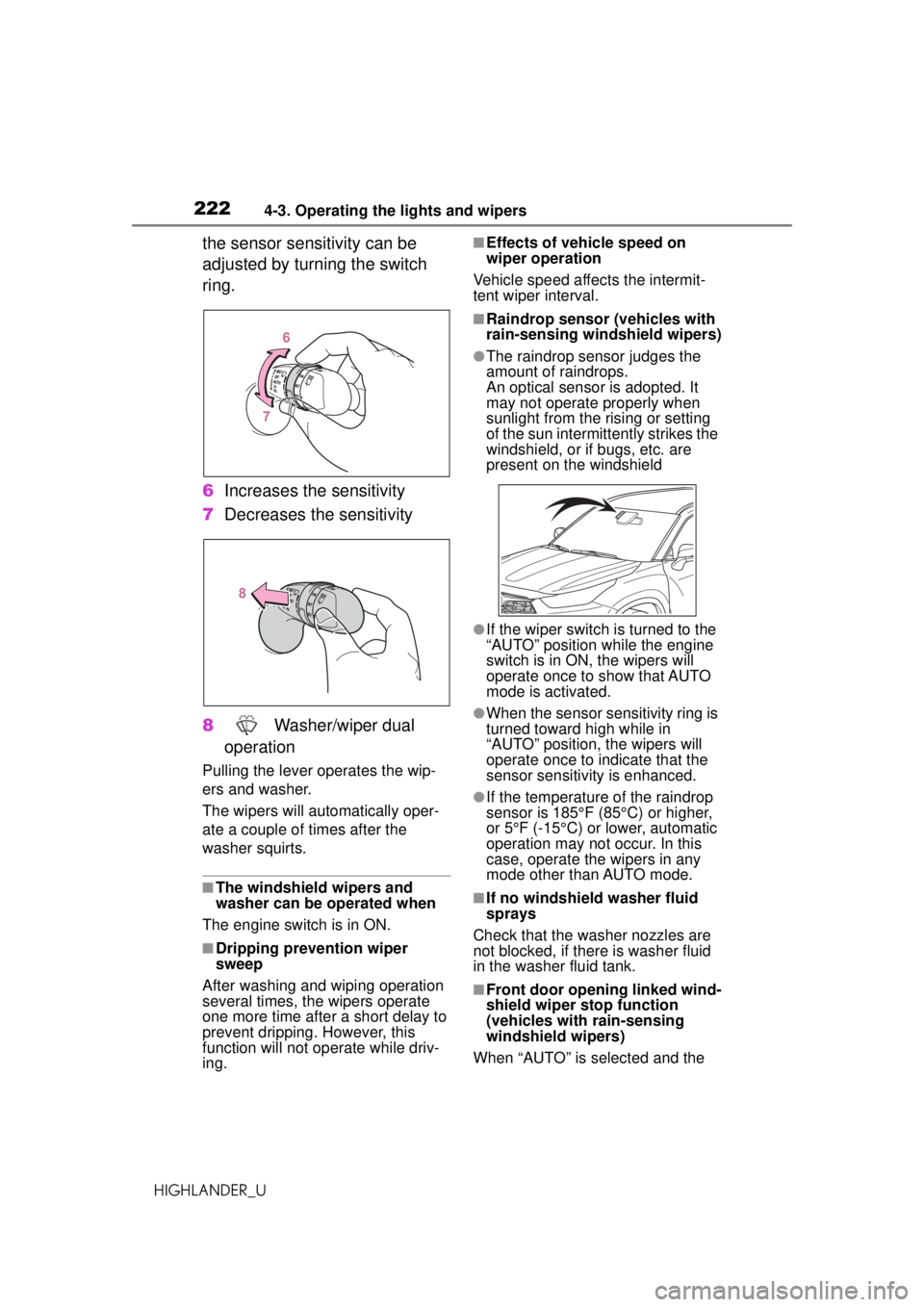
the sensor sensitivity can be
adjusted by turning the switch
ring.
6Increases the sensitivity
7 Decreases the sensitivity
8 Washer/wiper dual
operation
Pulling the lever operates the wip-
ers and washer.
The wipers will automatically oper-
ate a couple of times after the
washer squirts.
■The windshield wipers and
washer can be operated when
The engine switch is in ON.
■Dripping prevention wiper
sweep
After washing and wiping operation
several times, the wipers operate
one more time afte r a short delay to
prevent dripping. However, this
function will not op erate while driv-
ing.
■Effects of vehicle speed on
wiper operation
Vehicle speed affects the intermit-
tent wiper interval.
■Raindrop sensor (vehicles with
rain-sensing windshield wipers)
●The raindrop sensor judges the
amount of raindrops.
An optical sensor is adopted. It
may not operate properly when
sunlight from the rising or setting
of the sun intermit tently strikes the
windshield, or if bugs, etc. are
present on the windshield
●If the wiper switch is turned to the
“AUTO” position while the engine
switch is in ON, the wipers will
operate once to show that AUTO
mode is activated.
●When the sensor sensitivity ring is
turned toward high while in
“AUTO” position, the wipers will
operate once to indicate that the
sensor sensitivity is enhanced.
●If the temperature of the raindrop
sensor is 185°F (85°C) or higher,
or 5°F (-15°C) or lower, automatic
operation may not occur. In this
case, operate the wipers in any
mode other than AUTO mode.
■If no windshield washer fluid
sprays
Check that the washer nozzles are
not blocked, if there is washer fluid
in the washer fluid tank.
■Front door opening linked wind-
shield wiper stop function
(vehicles with rain-sensing
windshield wipers)
When “AUTO” is selected and the
Page 234 of 560
2344-5. Using the driving support systems
HIGHLANDER_U
WARNING
■Limitations of the pre-colli-
sion system
●The driver is solely responsible
for safe driving. Always drive
safely, taking care to observe
your surroundings.
Do not use the pre-collision sys-
tem instead of normal braking
operations under any circum-
stances. This system will not
prevent collisions or lessen col-
lision damage or injury in every
situation. Do not overly rely on
this system. Failure to do so
may lead to an accident, result-
ing in death or serious injury.
●Although this system is
designed to help avoid a colli-
sion or help reduce the impact
of the collision, its effectiveness
may change according to vari-
ous conditions, therefore the
system may not always be able
to achieve the same level of
performance.
Read the following conditions
carefully. Do not overly rely on
this system and always drive
carefully.
• Conditions under which the sys- tem may operate even if there is
no possibility of a collision:
P. 2 3 7
• Conditions under which the sys- tem may not operate properly:
P. 2 3 8
●Do not attempt to test the oper-
ation of the pre-collision system
yourself.
Depending on the objects used
for testing (dummies, card-
board objects imitating detect-
able objects, etc.), the system
may not operate properly, possi-
bly leading to an accident.
■Pre-collision braking
●When the pre-co llision braking
function is operating, a large
amount of braking force will be
applied.
●If the vehicle is stopped by the
operation of the pre-collision
braking function, the pre-colli-
sion braking function operation
will be canceled after approxi-
mately 2 seconds. Depress the
brake pedal as necessary.
●The pre-collision braking func-
tion may not operate if certain
operations are performed by the
driver. If the accelerator pedal is
being depressed strongly or the
steering wheel is being turned,
the system may determine that
the driver is taking evasive
action and possibly prevent the
pre-collision braking function
from operating.
●In some situations, while the
pre-collision braking function is
operating, operation of the func-
tion may be canceled if the
accelerator pedal is depressed
strongly or the steering wheel is
turned and the system deter-
mines that the driver is taking
evasive action.
●If the brake pedal is being
depressed, the system may
determine that the driver is tak-
ing evasive action and possibly
delay the operation timing of the
pre-collision braking function.
■When to disable the pre-colli-
sion system
In the following situations, disable
the system, as it may not operate
properly, possibly leading to an
accident resulting in death or seri-
ous injury:
●When the vehicle is being towed
Page 235 of 560
2354-5. Using the driving support systems
HIGHLANDER_U
4
Driving
■Enabling/disabling the
pre-collision system
The pre-collision system can be
enabled/disabled on ( P.87,
96) of the multi-information dis-
p l a y.
The system is automatically
enabled each time the engine
switch is turned to ON.
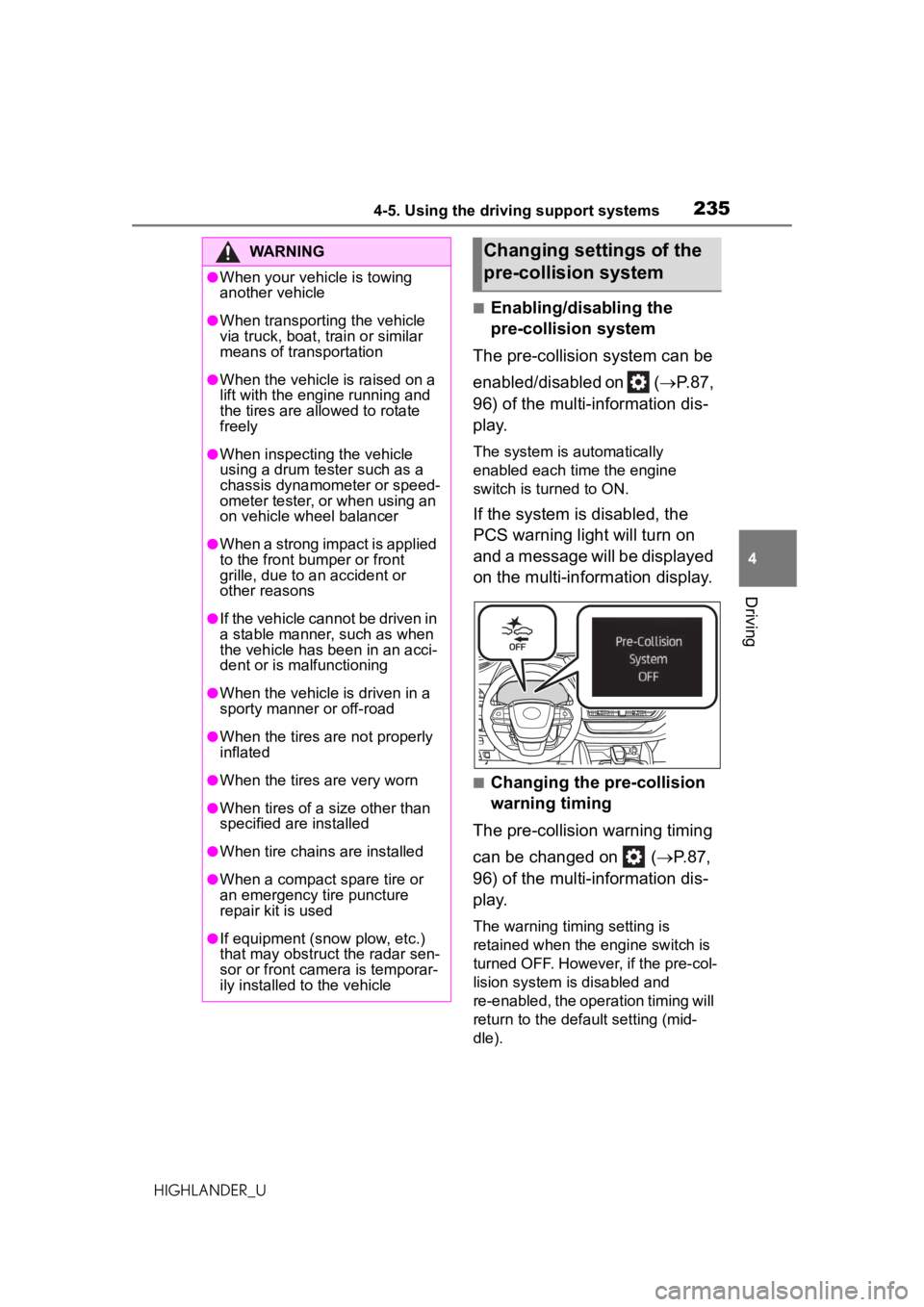
If the system is disabled, the
PCS warning light will turn on
and a message will be displayed
on the multi-information display.
■Changing the pre-collision
warning timing
The pre-collision warning timing
can be changed on ( P.87,
96) of the multi-information dis-
p l a y.
The warning timing setting is
retained when the engine switch is
turned OFF. However, if the pre-col-
lision system is disabled and
re-enabled, the operation timing will
return to the default setting (mid-
dle).
WARNING
●When your vehicle is towing
another vehicle
●When transporting the vehicle
via truck, boat, train or similar
means of transportation
●When the vehicle is raised on a
lift with the engine running and
the tires are allowed to rotate
freely
●When inspecting the vehicle
using a drum tester such as a
chassis dynamometer or speed-
ometer tester, or when using an
on vehicle wheel balancer
●When a strong impact is applied
to the front bumper or front
grille, due to an accident or
other reasons
●If the vehicle cannot be driven in
a stable manner, such as when
the vehicle has been in an acci-
dent or is malfunctioning
●When the vehicle is driven in a
sporty manner or off-road
●When the tires are not properly
inflated
●When the tires are very worn
●When tires of a size other than
specified are installed
●When tire chains are installed
●When a compact spare tire or
an emergency tire puncture
repair kit is used
●If equipment (snow plow, etc.)
that may obstruct the radar sen-
sor or front camera is temporar-
ily installed to the vehicle
Changing settings of the
pre-collision system
Page 238 of 560
2384-5. Using the driving support systems
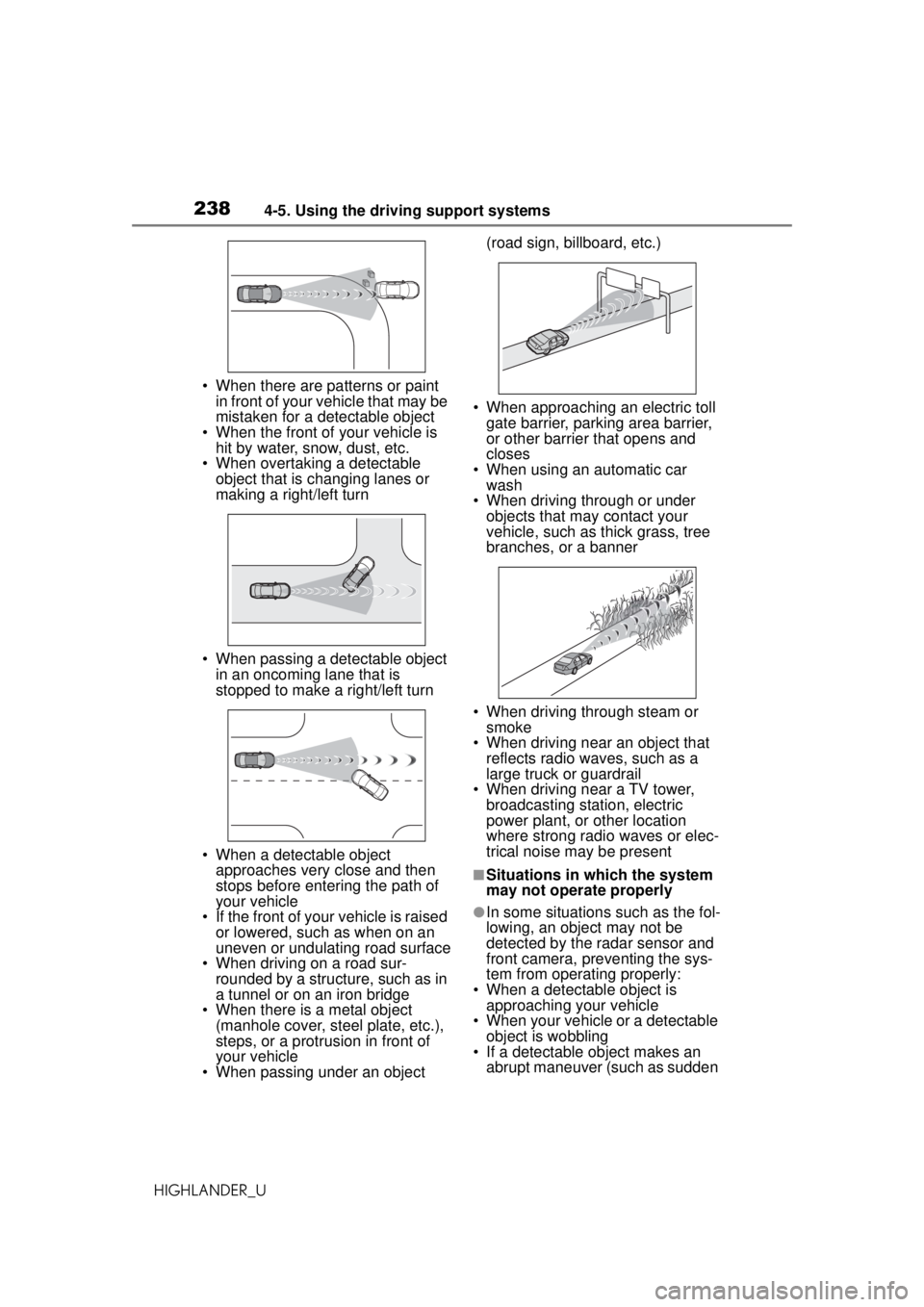
HIGHLANDER_U• When there are patterns or paint
in front of your vehicle that may be
mistaken for a detectable object
• When the front of your vehicle is hit by water, snow, dust, etc.
• When overtaking a detectable
object that is changing lanes or
making a right/left turn
• When passing a detectable object in an oncoming lane that is
stopped to make a right/left turn
• When a detectable object approaches very close and then
stops before entering the path of
your vehicle
• If the front of your vehicle is raised
or lowered, such as when on an
uneven or undulating road surface
• When driving on a road sur-
rounded by a structure, such as in
a tunnel or on an iron bridge
• When there is a metal object
(manhole cover, steel plate, etc.),
steps, or a protrusion in front of
your vehicle
• When passing under an object (road sign, billboard, etc.)
• When approaching an electric toll gate barrier, parking area barrier,
or other barrier that opens and
closes
• When using an automatic car wash
• When driving through or under
objects that may contact your
vehicle, such as thick grass, tree
branches, or a banner
• When driving through steam or smoke
• When driving near an object that reflects radio waves, such as a
large truck or guardrail
• When driving near a TV tower, broadcasting station, electric
power plant, or other location
where strong radio waves or elec-
trical noise may be present
■Situations in which the system
may not operate properly
●In some situations such as the fol-
lowing, an object may not be
detected by the radar sensor and
front camera, preventing the sys-
tem from operating properly:
• When a detectable object is approaching your vehicle
• When your vehicle or a detectable object is wobbling
• If a detectable object makes an abrupt maneuver (such as sudden
Page 242 of 560
2424-5. Using the driving support systems
HIGHLANDER_U
WARNING
●Vehicle is driven in a construc-
tion zone.
●A spare tire, tire chains, etc. are
equipped.
●When the tires have been
excessively worn, or when the
tire inflation pressure is low.
●When tires of a size other than
specified are installed.
●Vehicle is driven in traffic lanes
other than that highways and
freeways.
●When your vehicle is towing a
trailer or during emergency tow-
ing.
■Preventing LTA system mal-
functions and operations per-
formed by mistake
●Do not modify the headlights or
place stickers, etc. on the sur-
face of the lights.
●Do not modify the suspension
etc. If the suspension etc. needs
to be replaced, contact your
Toyota dealer.
●Do not install or place anything
on the hood or grille. Also, do
not install a grille guard (bull
bars, kangaroo bar, etc.).
●If your windshield needs
repairs, contact your Toyota
dealer.
■Conditions in which functions
may not operate properly
In the following situations, the
functions may not operate prop-
erly and the vehicle may depart
from its lane. Drive safely by
always paying careful attention to
your surroundings and operate
the steering wheel to correct the
path of the vehicle without relying
solely on the functions.
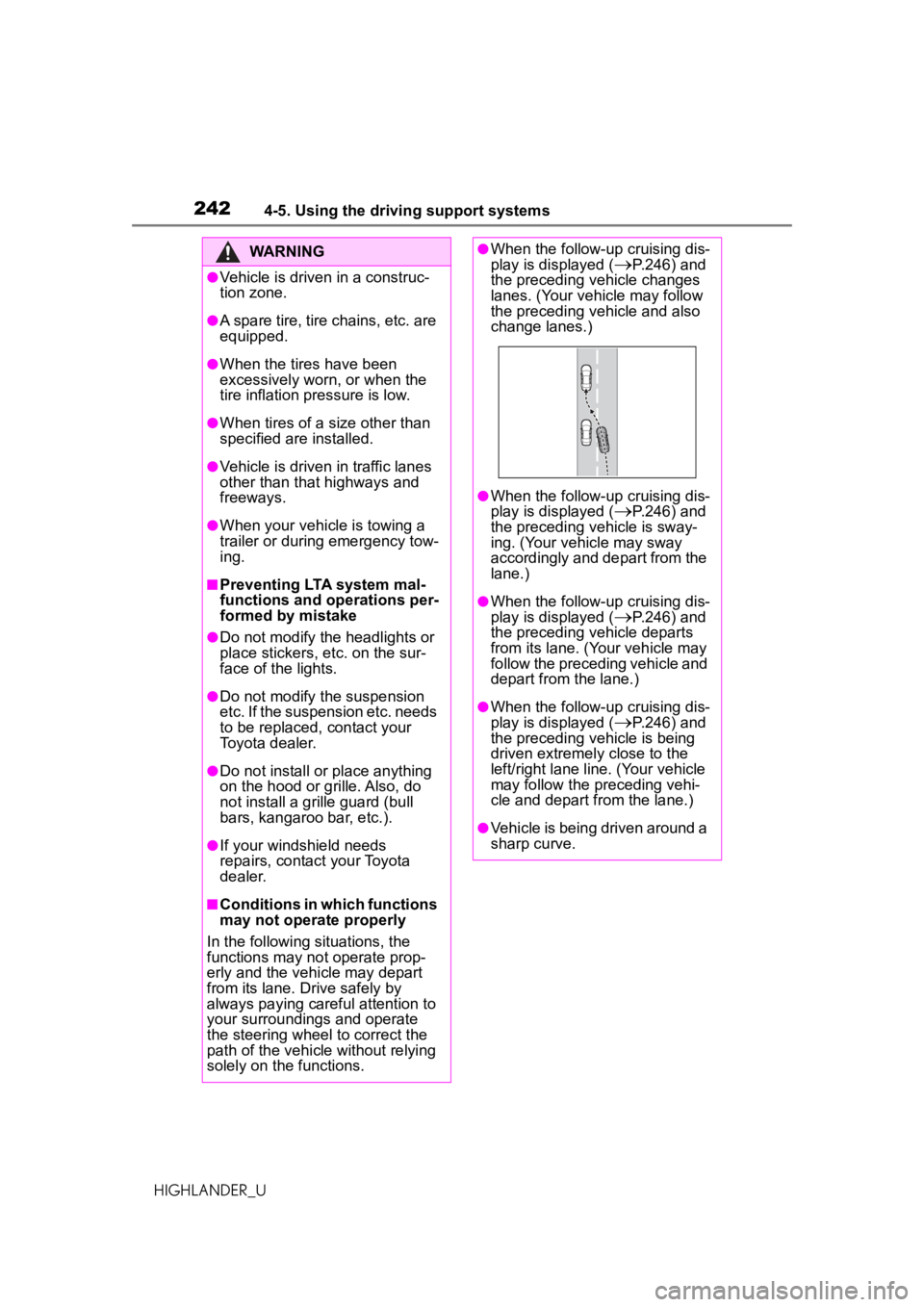
●When the follow-up cruising dis-
play is displayed (P.246) and
the preceding vehicle changes
lanes. (Your vehicle may follow
the preceding vehicle and also
change lanes.)
●When the follow-up cruising dis-
play is displayed (
P.246) and
the preceding vehicle is sway-
ing. (Your vehicle may sway
accordingly and depart from the
lane.)
●When the follow-up cruising dis-
play is displayed (P.246) and
the preceding vehicle departs
from its lane. (Your vehicle may
follow the preceding vehicle and
depart from the lane.)
●When the follow-up cruising dis-
play is displayed (
P.246) and
the preceding vehicle is being
driven extremely close to the
left/right lane line. (Your vehicle
may follow the preceding vehi-
cle and depart from the lane.)
●Vehicle is being driven around a
sharp curve.
Page 256 of 560
2564-5. Using the driving support systems
HIGHLANDER_U
WARNING
■Situations unsuitable for
dynamic radar cruise control
with full-speed range
Do not use dynamic radar cruise
control with full-speed range in
any of the following situations.
Doing so may resu lt in inappropri-
ate speed control and could
cause an accident resulting in
death or serious injury.
●Roads where there are pedes-
trians, cyclists, etc.
●In heavy traffic
●On roads with sharp bends
●On winding roads
●On slippery roads, such as
those covered with rain, ice or
snow
●On steep downhills, or where
there are sudden changes
between sharp up and down
gradients
Vehicle speed may exceed the
set speed when driving down a
steep hill.
●At entrances to freeways and
highways
●When weather conditions are
bad enough that they may pre-
vent the sensors from detecting
correctly (fog, snow, sand-
storm, heavy rain, etc.)
●When there is rain, snow, etc.
on the front surface of the radar
or front camera
●In traffic conditions that require
frequent repeated acceleration
and deceleration
●When your vehicle is towing a
trailer or during emergency tow-
ing
●When an approach warning
buzzer is heard often
Page 271 of 560
2714-5. Using the driving support systems
HIGHLANDER_U
4
Driving
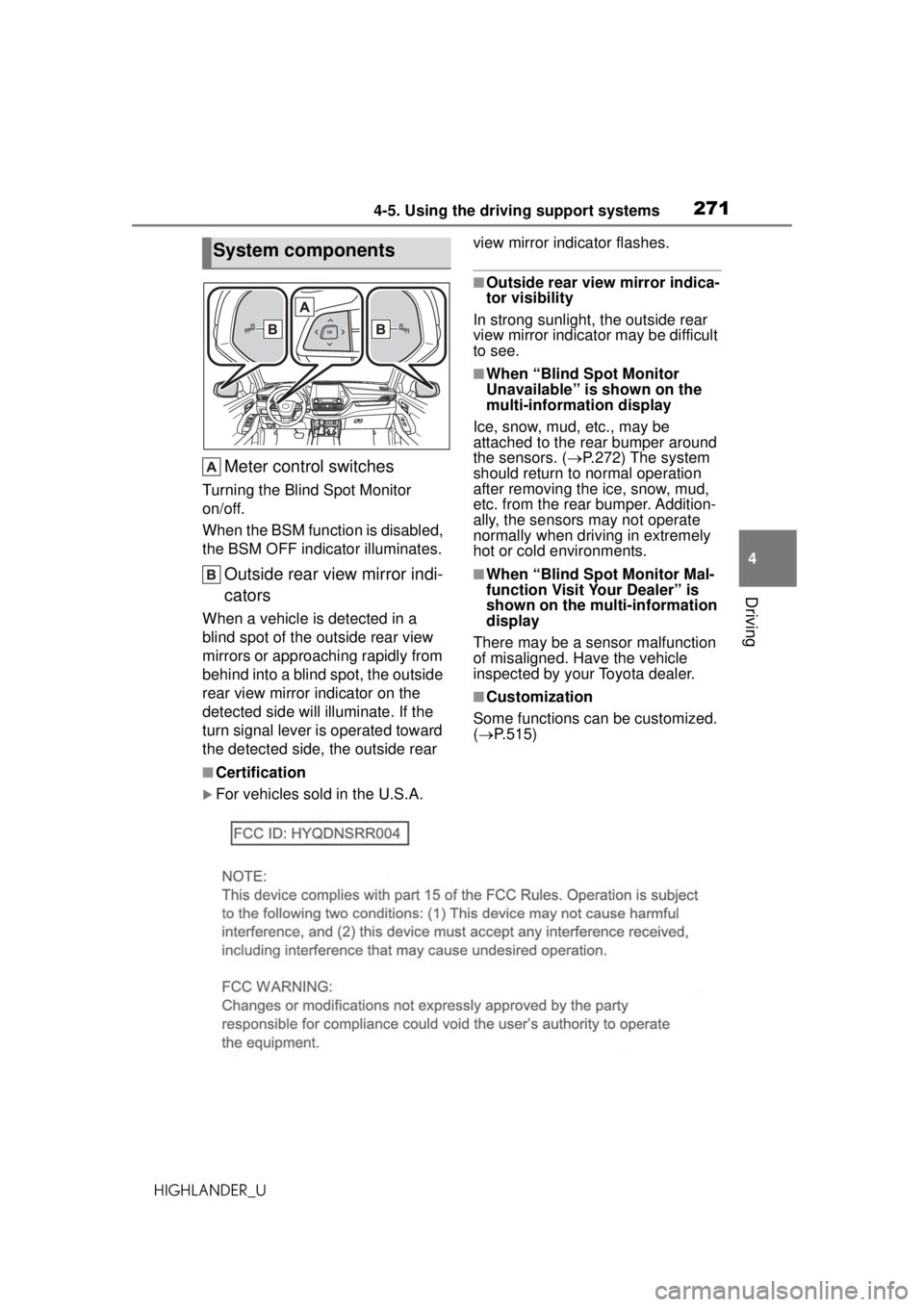
Meter control switches
Turning the Blind Spot Monitor
on/off.
When the BSM function is disabled,
the BSM OFF indicator illuminates.
Outside rear view mirror indi-
cators
When a vehicle is detected in a
blind spot of the outside rear view
mirrors or approaching rapidly from
behind into a blind spot, the outside
rear view mirror indicator on the
detected side will illuminate. If the
turn signal lever is operated toward
the detected side, the outside rear view mirror indicator flashes.
■Outside rear view mirror indica-
tor visibility
In strong sunlight, the outside rear
view mirror indicator may be difficult
to see.
■When “Blind Spot Monitor
Unavailable” is shown on the
multi-information display
Ice, snow, mud, etc., may be
attached to the rear bumper around
the sensors. ( P.272) The system
should return to normal operation
after removing the ice, snow, mud,
etc. from the rear bumper. Addition-
ally, the sensors may not operate
normally when driving in extremely
hot or cold environments.
■When “Blind Spot Monitor Mal-
function Visit Your Dealer” is
shown on the multi-information
display
There may be a sensor malfunction
of misaligned. Have the vehicle
inspected by your Toyota dealer.
■Customization
Some functions can be customized.
( P.515)
■Certification
For vehicles sold in the U.S.A.
System components