tow TOYOTA HIGHLANDER 2020 (in English) Service Manual
[x] Cancel search | Manufacturer: TOYOTA, Model Year: 2020, Model line: HIGHLANDER, Model: TOYOTA HIGHLANDER 2020Pages: 560, PDF Size: 14.42 MB
Page 275 of 560
2754-5. Using the driving support systems
HIGHLANDER_U
4
Driving
tional when all of the following con-
ditions are met:
●The Blind Spot Monitor is on.
●The shift lever is in a position
other than R.
●The vehicle speed is greater than
approximately 10 mph (16 km/h).
■The Blind Spot Monitor will
detect a vehicle when
The Blind Spot Monitor will detect a
vehicle present in the detection area
in the following situations:
●A vehicle in an adjacent lane over-
takes your vehicle.
●You overtake a vehicle in an adja-
cent lane slowly.
●Another vehicle enters the detec-
tion area when it changes lanes.
■Conditions under which the
Blind Spot Monitor will not
detect a vehicle
The Blind Spot Monitor is not
designed to detect the following
types of vehicles and/or objects:
●Small motorcycles, bicycles,
pedestrians, etc.*
●Vehicles traveling in the opposite
direction
●Guardrails, walls, signs, parked
vehicles and similar stationary
objects
*
●Following vehicles that are in the
same lane*
●Vehicles traveling 2 lanes away
from your vehicle*
●Vehicles which are being over-
taken rapidly by your vehicle*
*
: Depending on the conditions, detection of a vehicle and/or
object may occur.
■Conditions under which the
Blind Spot Monitor may not
function correctly
●The Blind Spot Monitor may not detect vehicles correctly in the fol-
lowing situations:
• When the sensor is misaligned
due to a strong impact to the sen-
sor or its surrounding area
• When mud, snow, ice, a sticker,
etc. is covering the sensor or sur-
rounding area on the rear bumper
• When driving on a road surface
that is wet with standing water
during bad weather, such as
heavy rain, snow, or fog
• When multiple vehicles are approaching with only a small gap
between each vehicle
• When the distance between your vehicle and a following vehicle is
short
• When there is a significant differ- ence in speed between your vehi-
cle and the vehicle that enters the
detection area
• When the difference in speed between your vehicle and another
vehicle is changing
• When a vehicle enters a detection area traveling at about the same
speed as your vehicle
• As your vehicle starts from a stop, a vehicle remains in the detection
area
• When driving up and down con- secutive steep inclines, such as
hills, dips in the road, etc.
• When driving on roads with sharp bends, consecutive curves, or
uneven surfaces
• When vehicle lanes are wide, or when driving on the edge of a
lane, and the vehicle in an adja-
cent lane is far away from your
vehicle
• When towing a trailer
• When an accessory (such as a bicycle carrier) is installed to the
rear of the vehicle
• When there is a significant differ- ence in height between your vehi-
cle and the vehicle that enters the
detection area
• Immediately after the Blind Spot Monitor is turned on●Instances of the Blind Spot Moni-
tor unnecessarily detecting a vehi-
Page 278 of 560
2784-5. Using the driving support systems
HIGHLANDER_U
WARNING
■When using the intuitive park-
ing assist
Observe the following precau-
tions.
Failing to do so ma y result in the
vehicle being unable to be driven
safely and possibly cause an acci-
dent.
●Do not use the sensor at
speeds in excess of 6 mph (10
km/h).
●The sensors’ detection areas
and reaction times are limited.
When moving forward or revers-
ing, check the areas surround-
ing the vehicle (especially the
sides of the vehicle) for safety,
and drive slowly, using the
brake to control the vehicle’s
speed.
●Do not install accessories within
the sensors’ detection areas.
●The area directly under the
bumpers is not detected.
Thin posts or objects lower than
the sensor may not be detected
when approached, even if they
have been detected once.
■When to disable the function
In the following situations, disable
the function as it may operate
even though there is no possibility
of a collision.
●The vehicle is equipped with a
fender pole, wireless antenna or
fog lights.
●The front or rear bumper or a
sensor receives a strong
impact.
●A non-genuine Toyota suspen-
sion (lowered suspension, etc.)
is installed.
●Towing eyelets are installed.
●A backlit licence plate is
installed.
■When using intuitive parking
assist
In the following situations, the
system may not function correctly
due to a sensor malfunction, etc.
Have the vehicle checked by your
Toyota dealer.
●The intuitive parking assist
operation display flashes or
shows continuously, and a
buzzer sounds when no objects
are detected.
●If the area around a sensor col-
lides with something, or is sub-
jected to strong impact.
●If the bumper or grille collides
with something.
●If the display flashes or is dis-
played continuously and a
buzzer does not sound, except
when the mute function has
been turned on.
●If a display error occurs, first
check the sensor.
If the error occurs even when
there is no ice, snow or mud on
the sensor, it is likely that the
sensor is malfunctioning.
■Notes when washing the vehi-
cle
Do not apply intensive bursts of
water or steam to the sensor
area.
Doing so may result in the sensor
malfunctioning.
●When using a high pressure
washer to wash the vehicle, do
not spray the sensors directly,
as doing so may cause a sensor
to malfunction.
Page 288 of 560
2884-5. Using the driving support systems
HIGHLANDER_U
●Guardrails, walls, signs, parked
vehicles and similar stationary
objects
*
●Small motorcycles, bicycles,
pedestrians, etc.*
●Vehicles moving away from your
vehicle
●Vehicles approaching from the
parking spaces next to your vehi-
cle
*
*
: Depending on the conditions, detection of a vehicle and/or
object may occur.
■Conditions under which the
RCTA function may not function
correctly
●The RCTA function may not detect
vehicles correctly in the following
situations:
• When a sensor is misaligned due to a strong impact to the sensor or
its surrounding area
• When mud, snow, ice, a sticker, etc. is covering a sensor or its sur-
rounding area on the rear bumper
• When driving on a road surface that is wet with standing water
during bad weather, such as
heavy rain, snow, or fog
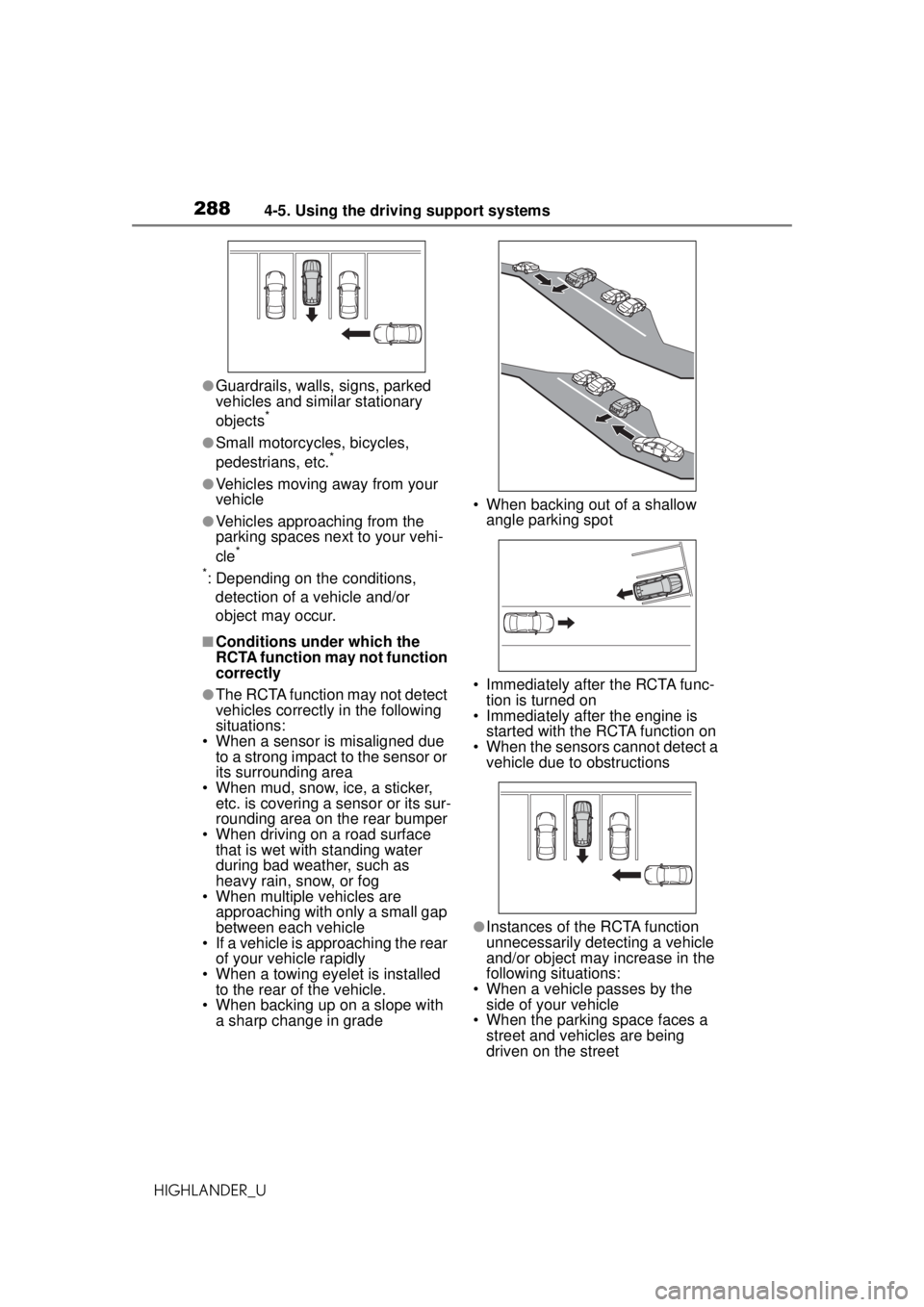
• When multiple vehicles are
approaching with only a small gap
between each vehicle
• If a vehicle is approaching the rear
of your vehicle rapidly
• When a towing eyelet is installed to the rear of the vehicle.
• When backing up on a slope with
a sharp change in grade • When backing out of a shallow
angle parking spot
• Immediately after the RCTA func- tion is turned on
• Immediately after the engine is started with the RCTA function on
• When the sensors cannot detect a
vehicle due to obstructions
●Instances of the RCTA function
unnecessarily detecting a vehicle
and/or object may increase in the
following situations:
• When a vehicle passes by the side of your vehicle
• When the parking space faces a
street and vehicles are being
driven on the street
Page 289 of 560
2894-5. Using the driving support systems
HIGHLANDER_U
4
Driving
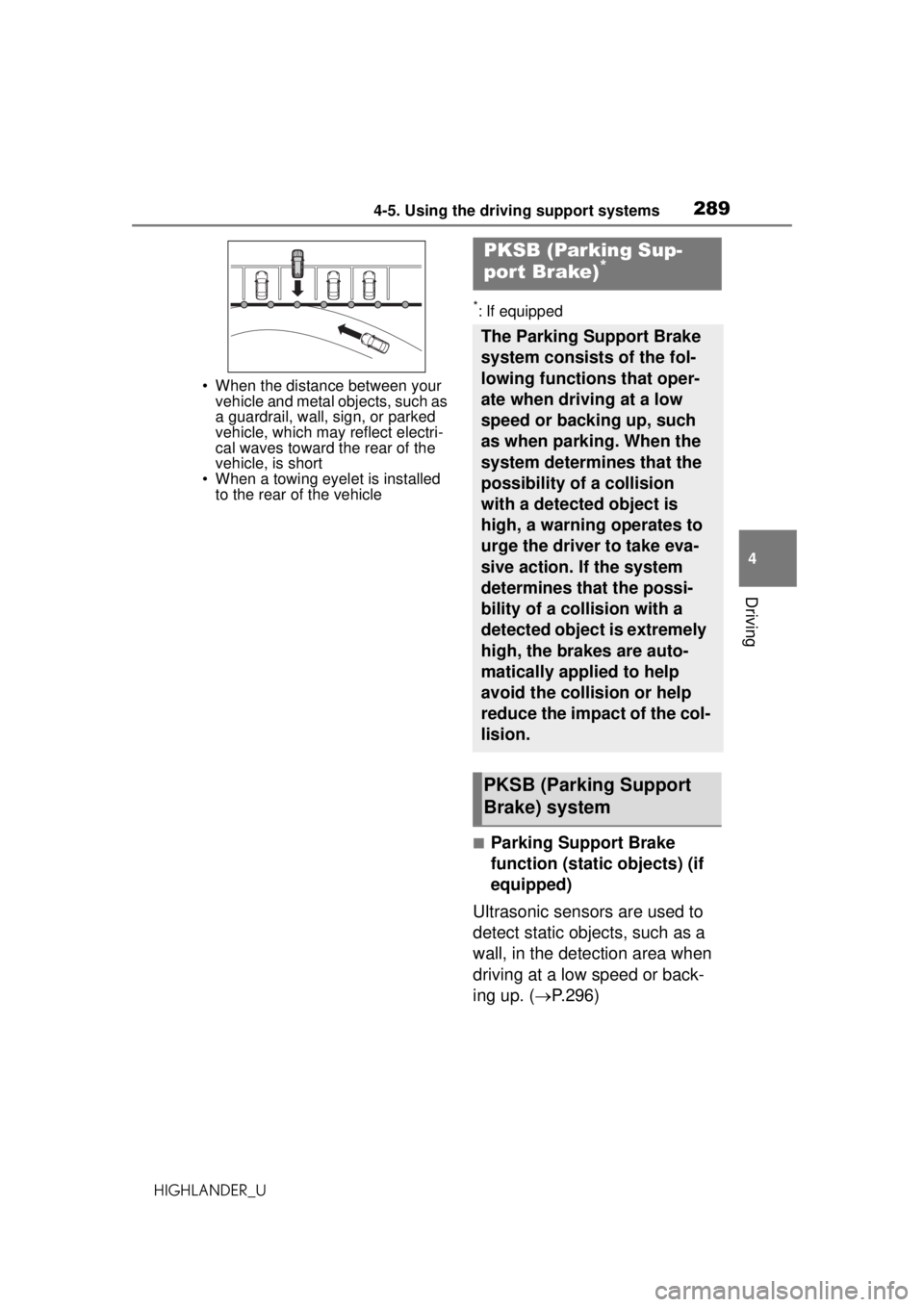
• When the distance between your vehicle and metal objects, such as
a guardrail, wall, sign, or parked
vehicle, which may reflect electri-
cal waves toward the rear of the
vehicle, is short
• When a towing eyelet is installed to the rear of the vehicle
*: If equipped
■Parking Support Brake
function (static objects) (if
equipped)
Ultrasonic sensors are used to
detect static objects, such as a
wall, in the detection area when
driving at a low speed or back-
ing up. ( P.296)
PKSB (Parking Sup-
port Brake)*
The Parking Support Brake
system consists of the fol-
lowing functions that oper-
ate when driving at a low
speed or backing up, such
as when parking. When the
system determines that the
possibility of a collision
with a detected object is
high, a warning operates to
urge the driver to take eva-
sive action. If the system
determines that the possi-
bility of a collision with a
detected object is extremely
high, the brakes are auto-
matically applied to help
avoid the collision or help
reduce the impact of the col-
lision.
PKSB (Parking Support
Brake) system
Page 298 of 560
2984-5. Using the driving support systems
HIGHLANDER_U
WARNING
●Do not replace a sensor with a
part other than a genuine part.
●Do not subject a sensor or its
surrounding area to a strong
impact.
●Do not damage the sensors,
and always keep them clean.
●If the area around a radar sen-
sor is subjected to an impact,
the system may not operate
properly due to a sensor mal-
function. Have the vehicle
inspected by your Toyota
dealer.
■Handling the suspension
Do not modify the suspension, as
changes to the height or inclina-
tion of the vehicle may prevent
the sensors from detecting
objects correctly or cause the sys-
tem to not operate or operate
unnecessarily.
■If the Parking Support Brake
function (static objects) oper-
ates unnecessarily, such as
at a railroad crossing
In the event that the Parking Sup-
port Brake function (static objects)
operates unnecessarily, such as
at a railroad crossing, brake con-
trol will be cancel ed after approxi-
mately 2 seconds, allowing you to
proceed forward and leave the
area, brake control can also be
canceled by depressing the brake
pedal. Depressing the accelera-
tor pedal after brake control is
canceled will allow you to proceed
forward and leave the area.
■Notes when washing the vehi-
cle
Do not apply intensive bursts of
water or steam to the sensor
area.
Doing so may result in the sensor
malfunctioning.
●When using a high pressure
washer to wash the vehicle, do
not spray the sensors directly,
as doing so may cause a sensor
to malfunction.
●When using steam to clean the
vehicle, do not direct steam too
close to the sensors as doing so
may cause a sensor to malfunc-
tion.
■When to disable the Parking
Support Brake
In the following situations, disable
the Parking Support Brake as the
system may operate even though
there is no possibility of a colli-
sion.
●When inspecting the vehicle
using a chassis roller, chassis
dynamo or free roller
●When loading the vehicle onto a
boat, truck or other transport
vessel
●If the suspension has been
modified or tires of a size other
than specified are installed
●If the front of the vehicle is
raised or lowered due to the
carried load
●When equipment that may
obstruct a sensor is installed,
such as a towing eyelet, bumper
protector (an additional trim
strip, etc.), bicycle carrier, or
snow plow
●When using an automatic car
wash
Page 300 of 560
3004-5. Using the driving support systems
HIGHLANDER_U
■Situation in which the Parking
Support Brake function (static
objects) may not operate
When driving with the shift lever in
N.
■Intuitive parking assist buzzer
Regardless of whether the intuitive
parking assist system is enabled or
not ( P.277), if the Parking Support
Brake function (static objects) is
enabled ( P.290), the front or rear
sensors detect an object and brake
control is performed, the intuitive
parking assist buzzer will sound to
notify the driver of the approximate
distance to the object.
■Situations in which the Parking
Support Brake function (static
objects) may operate even if
there is no possibility of a colli-
sion
In some situations, such as the fol-
lowing, the Parking Support Brake
function (static objects) may operate
even though there is no possibility of
a collision.
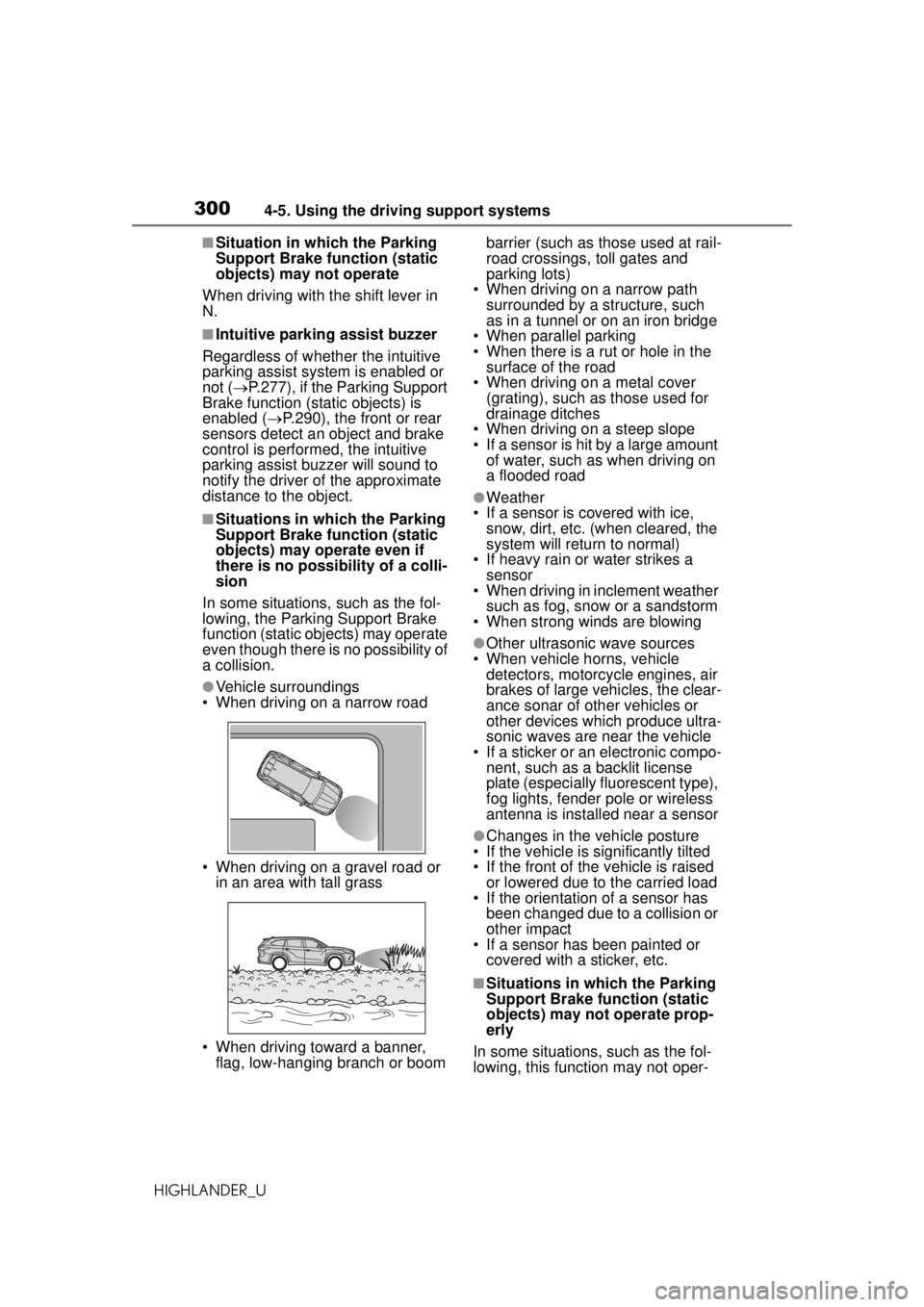
●Vehicle surroundings
• When driving on a narrow road
• When driving on a gravel road or in an area with tall grass
• When driving toward a banner, flag, low-hanging branch or boom barrier (such as those used at rail-
road crossings, toll gates and
parking lots)
• When driving on a narrow path surrounded by a structure, such
as in a tunnel or on an iron bridge
• When parallel parking
• When there is a rut or hole in the surface of the road
• When driving on a metal cover (grating), such as those used for
drainage ditches
• When driving on a steep slope
• If a sensor is hit by a large amount of water, such as when driving on
a flooded road
●Weather
• If a sensor is covered with ice, snow, dirt, etc. (when cleared, the
system will return to normal)
• If heavy rain or water strikes a sensor
• When driving in inclement weather
such as fog, snow or a sandstorm
• When strong winds are blowing
●Other ultrasonic wave sources
• When vehicle horns, vehicle detectors, motorcycle engines, air
brakes of large vehicles, the clear-
ance sonar of other vehicles or
other devices which produce ultra-
sonic waves are near the vehicle
• If a sticker or an electronic compo- nent, such as a backlit license
plate (especially fluorescent type),
fog lights, fender pole or wireless
antenna is installed near a sensor
●Changes in the vehicle posture
• If the vehicle is significantly tilted
• If the front of the vehicle is raised
or lowered due to the carried load
• If the orientation of a sensor has
been changed due to a collision or
other impact
• If a sensor has been painted or covered with a sticker, etc.
■Situations in which the Parking
Support Brake function (static
objects) may not operate prop-
erly
In some situations, such as the fol-
lowing, this function may not oper-
Page 305 of 560
3054-5. Using the driving support systems
HIGHLANDER_U
4
Driving
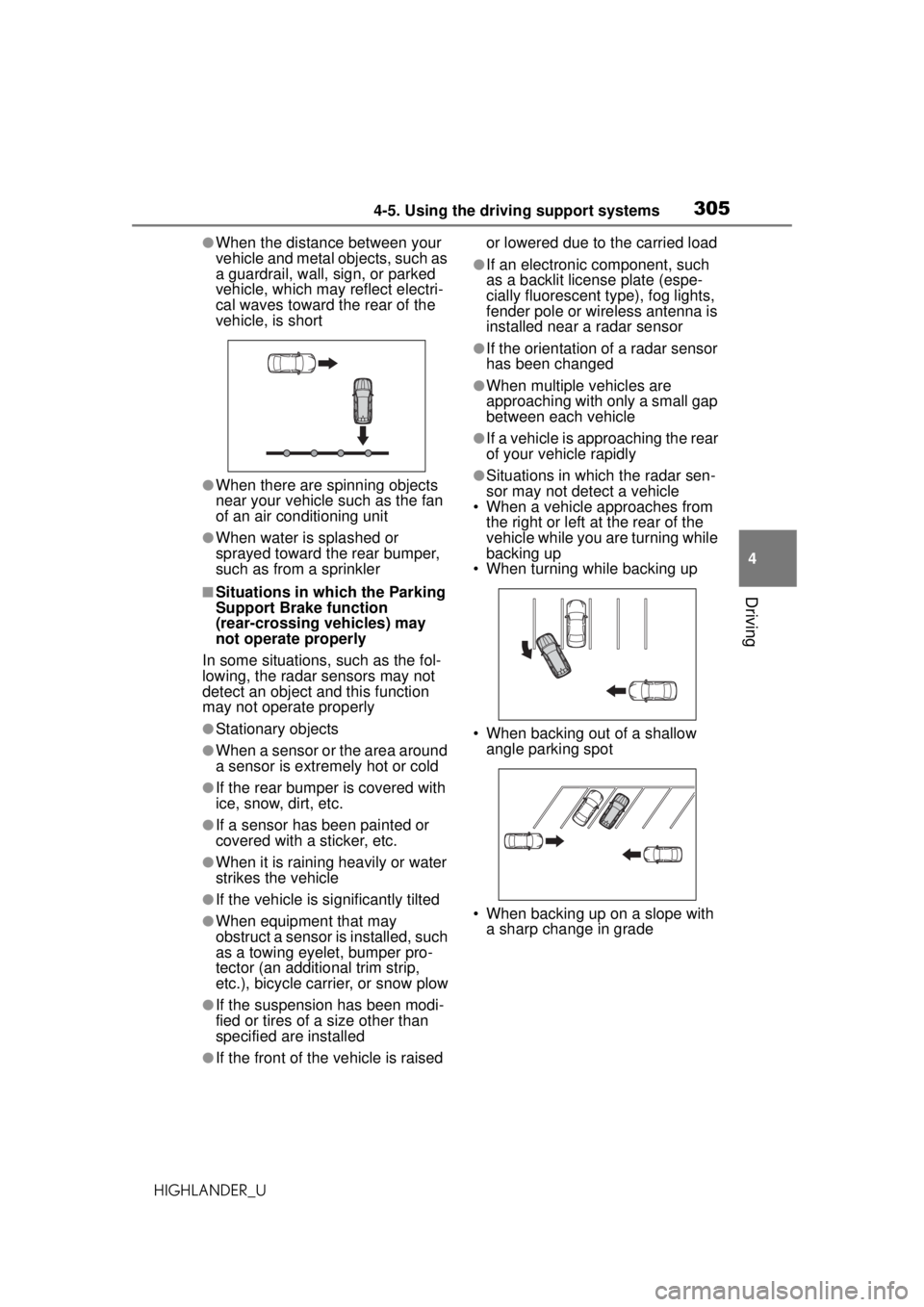
●When the distance between your
vehicle and metal objects, such as
a guardrail, wall, sign, or parked
vehicle, which may reflect electri-
cal waves toward the rear of the
vehicle, is short
●When there are spinning objects
near your vehicle such as the fan
of an air conditioning unit
●When water is splashed or
sprayed toward the rear bumper,
such as from a sprinkler
■Situations in which the Parking
Support Brake function
(rear-crossing vehicles) may
not operate properly
In some situations, such as the fol-
lowing, the radar sensors may not
detect an object and this function
may not operate properly
●Stationary objects
●When a sensor or the area around
a sensor is extremely hot or cold
●If the rear bumper is covered with
ice, snow, dirt, etc.
●If a sensor has been painted or
covered with a sticker, etc.
●When it is rainin g heavily or water
strikes the vehicle
●If the vehicle is significantly tilted
●When equipment that may
obstruct a sensor is installed, such
as a towing eyelet, bumper pro-
tector (an additional trim strip,
etc.), bicycle carrier, or snow plow
●If the suspension has been modi-
fied or tires of a size other than
specified are installed
●If the front of the vehicle is raised or lowered due to the carried load
●If an electronic component, such
as a backlit license plate (espe-
cially fluorescent type), fog lights,
fender pole or wireless antenna is
installed near a radar sensor
●If the orientation of a radar sensor
has been changed
●When multiple vehicles are
approaching with only a small gap
between each vehicle
●If a vehicle is approaching the rear
of your vehicle rapidly
●Situations in which the radar sen-
sor may not detect a vehicle
• When a vehicle approaches from
the right or left at the rear of the
vehicle while you are turning while
backing up
• When turning while backing up
• When backing out of a shallow angle parking spot
• When backing up on a slope with a sharp change in grade
Page 318 of 560
3184-5. Using the driving support systems
HIGHLANDER_U
WARNING
■Handling of tires and the sus-
pension
Using tires with any kind of prob-
lem or modifying the suspension
will affect the driving assist sys-
tems, and may cause a system to
malfunction.
■Trailer Sway Control precau-
tion
The Trailer Sway Control system
is not able to reduce trailer sway
in all situations. Depending on
many factors such as the condi-
tions of the vehicle, trailer, road
surface and driving environment,
the Trailer Sway Control system
may not be effect ive. Refer to
your trailer owner’s manual for
information on how to tow your
trailer properly.
■If trailer sway occurs
Observe the following precau-
tions.
Failing to do so may cause death
or serious injury.
●Firmly grip the steering wheel.
Steer straight ahead. Do not try
to control trailer sway by turning
the steering wheel.
●Begin releasing the accelerator
pedal immediately but very
gradually to reduce speed.
Do not increase speed. Do not
apply vehicle brakes.
If you make no extreme correction
with the steering or brakes, your
vehicle and trailer should stabi-
lize. (
P.189)
■Secondary Collision Brake
Do not rely solely upon the Sec-
ondary Collision Brake. This sys-
tem is designed to help reduce
the possibility of further damage
due to a secondary collision, how-
ever, that effect changes accord-
ing to various conditions. Overly
relying on the system may result
in death or serious injury.
Page 363 of 560
3635-4. Using the storage features
HIGHLANDER_U
5
Interior features
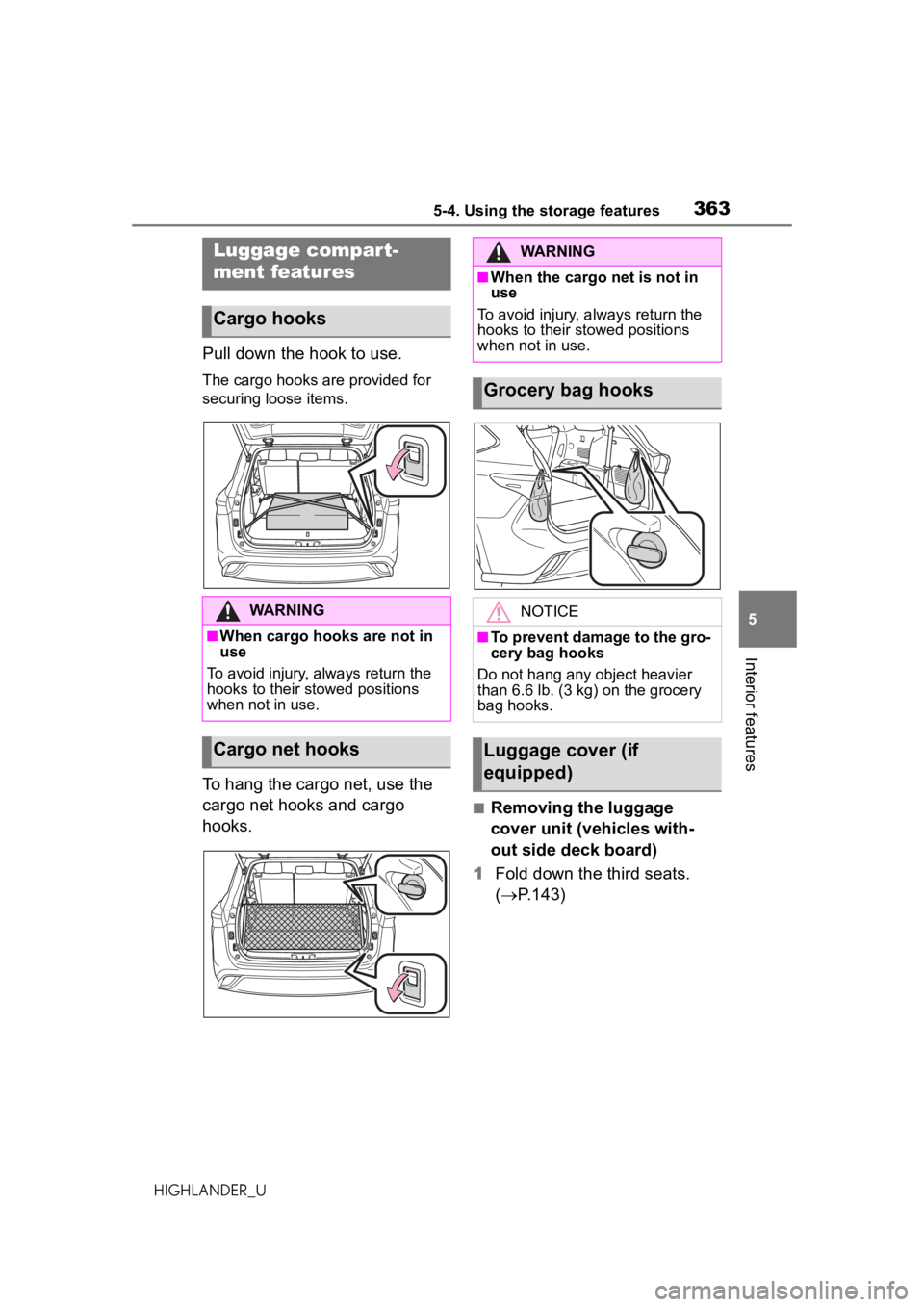
Pull down the hook to use.
The cargo hooks are provided for
securing loose items.
To hang the cargo net, use the
cargo net hooks and cargo
hooks.
■Removing the luggage
cover unit (vehicles with-
out side deck board)
1 Fold down the third seats.
( P.143)
Luggage compart-
ment features
Cargo hooks
WARNING
■When cargo hooks are not in
use
To avoid injury, always return the
hooks to their stowed positions
when not in use.
Cargo net hooks
WARNING
■When the cargo net is not in
use
To avoid injury, always return the
hooks to their stowed positions
when not in use.
Grocery bag hooks
NOTICE
■To prevent damage to the gro-
cery bag hooks
Do not hang any object heavier
than 6.6 lb. (3 kg) on the grocery
bag hooks.
Luggage cover (if
equipped)
Page 365 of 560
3655-4. Using the storage features
HIGHLANDER_U
5
Interior features
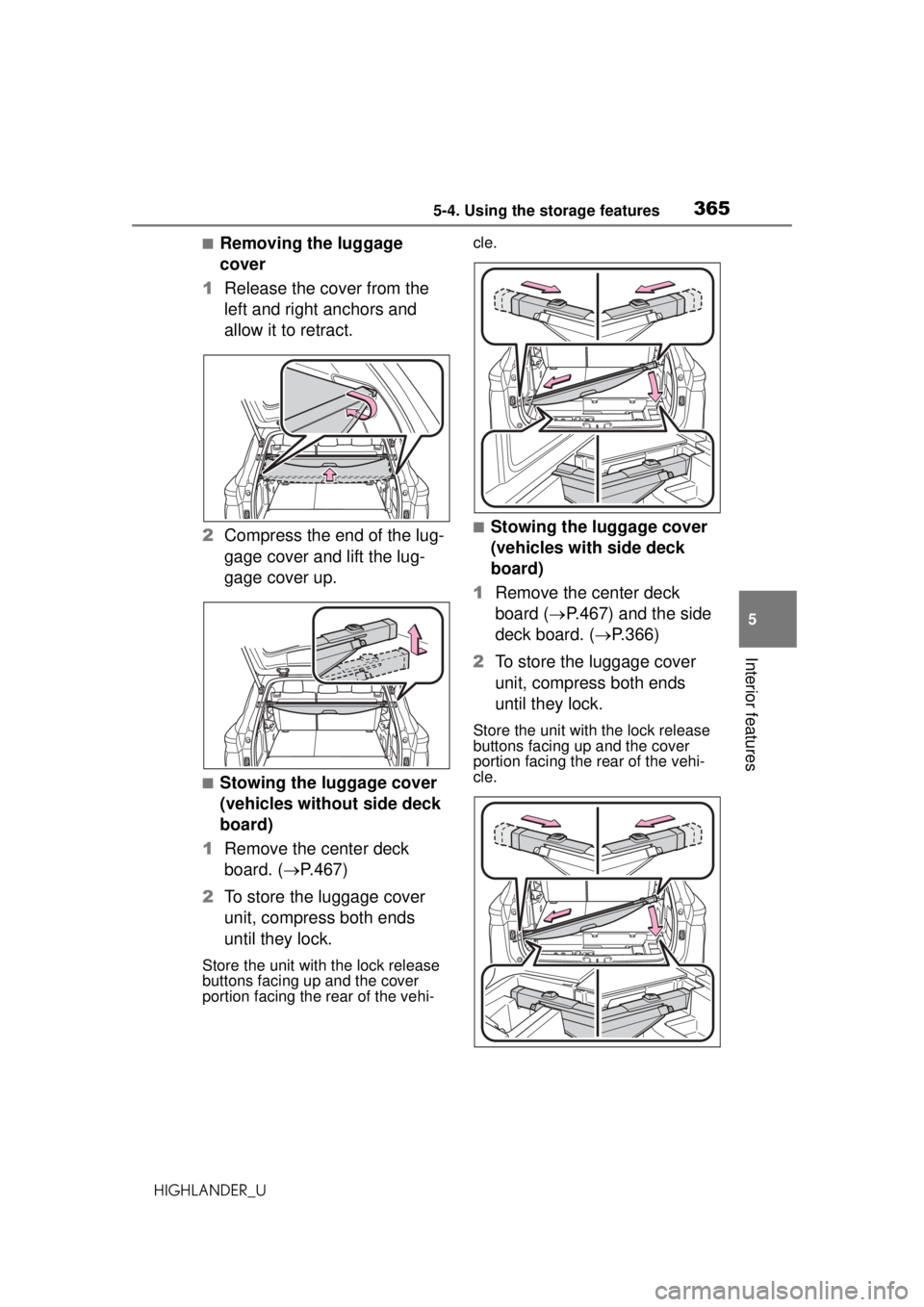
■Removing the luggage
cover
1 Release the cover from the
left and right anchors and
allow it to retract.
2 Compress the end of the lug-
gage cover and lift the lug-
gage cover up.
■Stowing the luggage cover
(vehicles without side deck
board)
1 Remove the center deck
board. ( P.467)
2 To store the luggage cover
unit, compress both ends
until they lock.
Store the unit with the lock release
buttons facing up and the cover
portion facing the rear of the vehi- cle.
■Stowing the luggage cover
(vehicles with side deck
board)
1 Remove the center deck
board ( P.467) and the side
deck board. ( P.366)
2 To store the luggage cover
unit, compress both ends
until they lock.
Store the unit with the lock release
buttons facing up and the cover
portion facing the rear of the vehi-
cle.