display TOYOTA HIGHLANDER 2023 Owners Manual
[x] Cancel search | Manufacturer: TOYOTA, Model Year: 2023, Model line: HIGHLANDER, Model: TOYOTA HIGHLANDER 2023Pages: 552, PDF Size: 13.36 MB
Page 268 of 552
2684-5. Using the driving support systems
After a refresh charge for up to
an hour completes, the system can
be operated.
• If displayed continuously for a long time (more than an hour)
The battery may b e deteriorated.
Contact your Toyota dealer for
details.
“Stop & Start System Unavail-
able”
• The Stop & Start system is tempo- rarily disabled.
Allow the engine to run for some
time.
• The engine may have been started with the hood open.
Close the hood , turn the engine
switch off, wait for 30 seconds or
more, and then start the engine.
“In Preparation”
• The vehicle is being driven in a high altitude area.
• The brake booster vacuum is low.
When the brake booster vacuum
reaches a predetermined level, the
system will be enabled.
“For Climate Control”
• The air conditioning system is being used when the ambient
temperature is high or low.
If the difference between the set
temperature and cabin temperature
becomes small, the system will be
enabled.
• The windshield defogger is on.
●When the engine automatically
restarts while stopped by the Stop
& Start system
“In Preparation”
• The brake pedal has been depressed further or pumped.
The system will be enabled after
the engine runs and the brake
booster vacuum reaches a predeter-
mined level.
“For Climate Control”
• The air conditioning system is being used.
• The windshield defogger has been turned on.
“Battery Charging”
• The battery charge may be low.
The system will be enabled after
the engine runs to sufficiently
charge the battery.
■When the buzzer sounds
If the driver’s door is opened when
the engine is stopped by the Stop &
Start system and the shift lever is in
D, a buzzer will soun d and the Stop
& Start system indicator will flash. To
stop the buzzer, c lose the driver’s
door.
■The Stop & Start system protec-
tion function
●When the volume of the audio
system is excessively high, sound
output from the audio system may
suddenly be cut off in order to
reduce battery consumption. To
prevent the audio system from
being cut off, keep the volume of
audio system at a moderate level.
If the audio system has been cut
off, turn the engine switch off, wait
for 3 seconds or more and then
turn it to ACC or ON to re-enable
the audio system.
●The audio system may not be acti-
vated if the battery terminals are
disconnected and then recon-
nected. If this o ccurs, turn the
engine switch off and then repeat
the following oper ation twice to
activate the audio system nor-
mally.
• Turn the engine switch to ON and then to OFF.
Page 269 of 552
2694-5. Using the driving support systems
4
Driving
■Replacing the battery
P. 4 6 7
■If the Stop & Start cancel indica-
tor flashes continuously
The system may be malfunctioning.
Have the vehicle inspected by your
Toyota dealer.
■If “Stop & Start System Mal-
function Visit Your Dealer” is
displayed on the multi-informa-
tion display
The system may be malfunctioning.
Have the vehicle inspected by your
Toyota dealer.
WARNING
■When the Stop & Start system
is operating
Make sure to dis able the Stop &
Start system while the vehicle is in
a poorly ventilated area. If not dis-
abled, the engine may be auto-
matically restarted unexpectedly,
causing exhaust gases to collect
and enter the vehicle, possibly
resulting in death or a serious
health hazard.
●Do not leave the vehicle while
the engine is stopped by the
Stop & Start system (while the
Stop & Start indicator is on). An
accident may occur due to the
automatic engine start function.
●Depress the brake pedal and
apply the parking brake when
necessary while the engine is
stopped by the Stop & Start sys-
tem (while the Stop & Start indi-
cator is on).
NOTICE
■To ensure the system oper-
ates correctly
If any of the follo wing situations
occur, the Stop & Start system
may not operate correctly. Have
your vehicle inspected by your
Toyota dealer.
●While the driver’s seat belt is
fastened, the driver’s and front
passenger’s seat belt reminder
light flashes.
●Even though the driver’s seat
belt is not fastened, the driver’s
and front passenger’s seat belt
reminder light does not illumi-
nate.
●Even though the driver’s door is
closed, the open door warning
light is illuminated or the interior
light is illumina ted when the
interior light switch is in the door
position.
●Even though the driver’s door is
open, the open door warning
light does not illu minate or the
interior light doe s not illuminate
when the interior light switch is
in the door position.
Page 270 of 552
2704-5. Using the driving support systems
*: If equipped
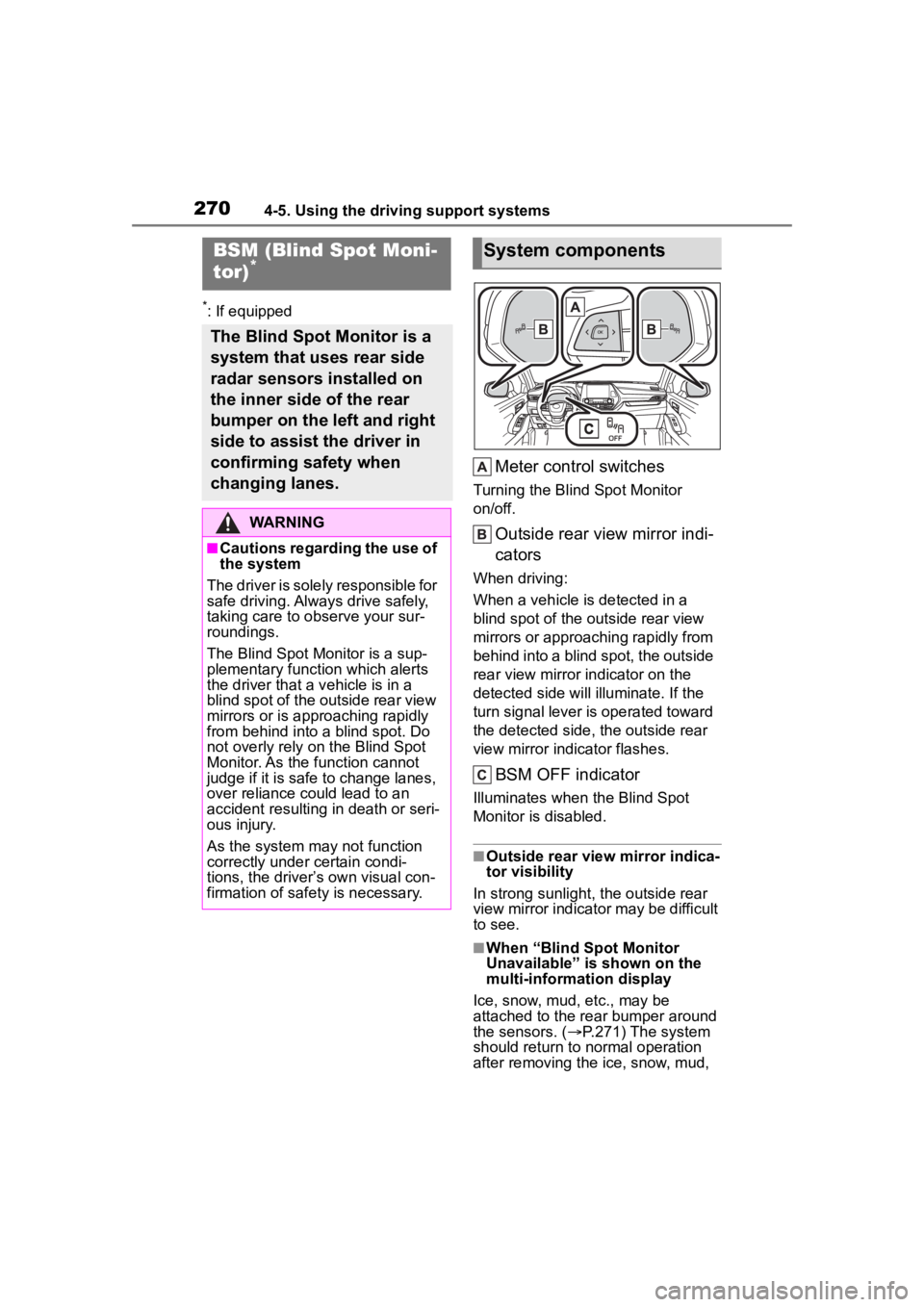
Meter control switches
Turning the Blind Spot Monitor
on/off.
Outside rear view mirror indi-
cators
When driving:
When a vehicle is detected in a
blind spot of the outside rear view
mirrors or approaching rapidly from
behind into a blind spot, the outside
rear view mirror indicator on the
detected side will illuminate. If the
turn signal lever is operated toward
the detected side, the outside rear
view mirror indicator flashes.
BSM OFF indicator
Illuminates when the Blind Spot
Monitor is disabled.
■Outside rear view mirror indica-
tor visibility
In strong sunlight, the outside rear
view mirror indicator may be difficult
to see.
■When “Blind Spot Monitor
Unavailable” is shown on the
multi-information display
Ice, snow, mud, etc., may be
attached to the rear bumper around
the sensors. ( P.271) The system
should return to normal operation
after removing the ice, snow, mud,
BSM (Blind Spot Moni-
tor)*
The Blind Spot Monitor is a
system that uses rear side
radar sensors installed on
the inner side of the rear
bumper on the left and right
side to assist the driver in
confirming safety when
changing lanes.
WARNING
■Cautions regarding the use of
the system
The driver is solely responsible for
safe driving. Always drive safely,
taking care to o bserve your sur-
roundings.
The Blind Spot Monitor is a sup-
plementary function which alerts
the driver that a v ehicle is in a
blind spot of the outside rear view
mirrors or is approaching rapidly
from behind into a blind spot. Do
not overly rely on the Blind Spot
Monitor. As the function cannot
judge if it is safe to change lanes,
over reliance could lead to an
accident resulting in death or seri-
ous injury.
As the system may not function
correctly under certain condi-
tions, the driver’s own visual con-
firmation of safety is necessary.
System components
Page 271 of 552
2714-5. Using the driving support systems
4
Driving
etc. from the rear bumper. Addition-
ally, the sensors may not operate
normally when driving in extremely
hot or cold environments.
■When “Blind Spot Monitor Mal-
function Visit Your Dealer” is
shown on the multi-information
display
There may be a sensor malfunction
of misaligned. Have the vehicle
inspected by your Toyota dealer.
■Customization
Some functions can be customized.
( P.494)
WARNING
■To ensure the system can
operate properly
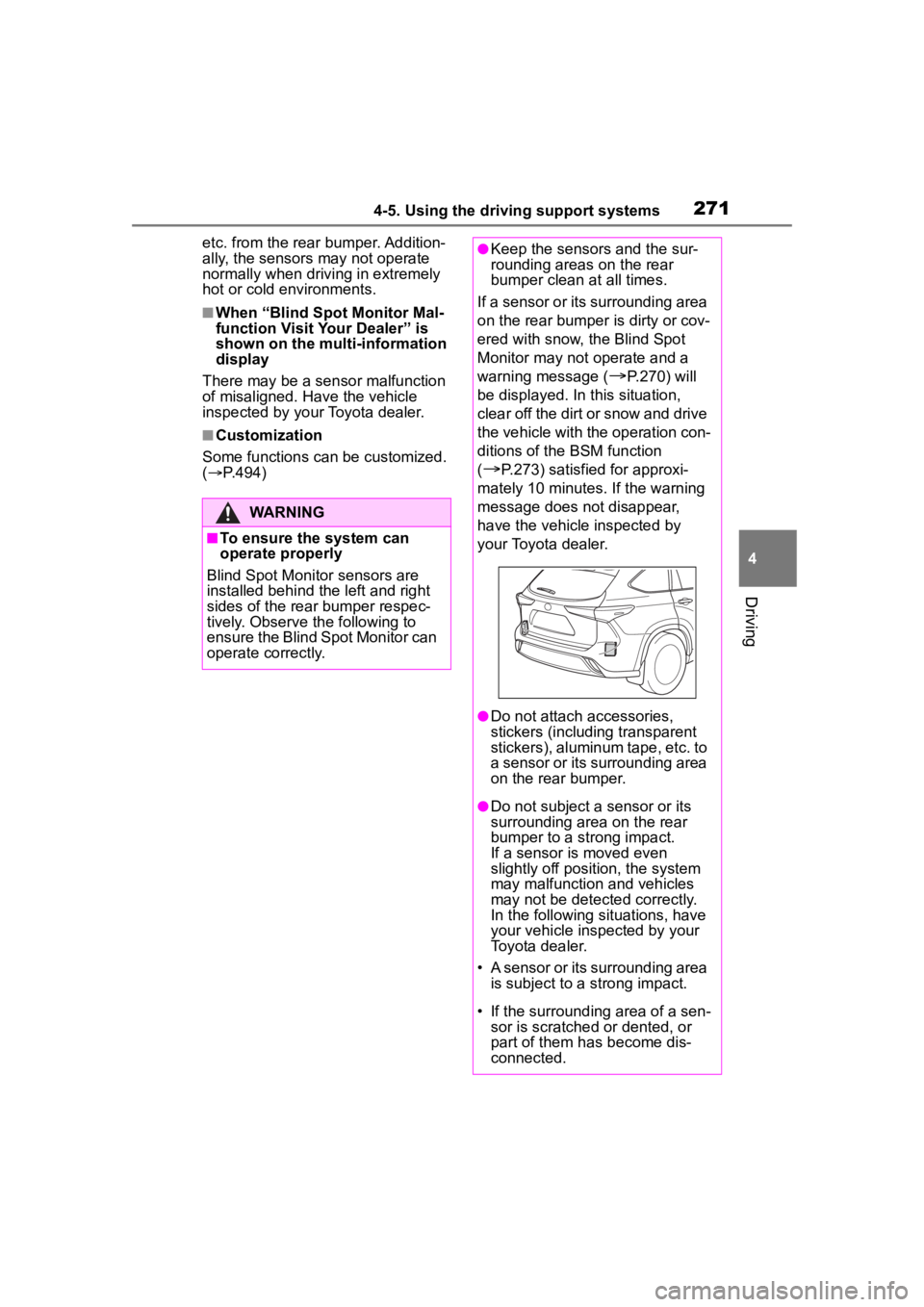
Blind Spot Monitor sensors are
installed behind the left and right
sides of the rear bumper respec-
tively. Observe the following to
ensure the Blind Spot Monitor can
operate correctly.
●Keep the sensors and the sur-
rounding areas on the rear
bumper clean at all times.
If a sensor or its surrounding area
on the rear bumper is dirty or cov-
ered with snow, the Blind Spot
Monitor may not operate and a
warning message (
P.270) will
be displayed. In this situation,
clear off the dirt or snow and drive
the vehicle with the operation con-
ditions of the BSM function
(
P.273) satisfied for approxi-
mately 10 minutes. If the warning
message does not disappear,
have the vehicle inspected by
your Toyota dealer.
●Do not attach a ccessories,
stickers (including transparent
stickers), aluminum tape, etc. to
a sensor or its surrounding area
on the rear bumper.
●Do not subject a sensor or its
surrounding area on the rear
bumper to a strong impact.
If a sensor is moved even
slightly off position, the system
may malfunction and vehicles
may not be detected correctly.
In the following si tuations, have
your vehicle inspected by your
Toyota dealer.
• A sensor or its surrounding area is subject to a strong impact.
• If the surrounding area of a sen- sor is scratched or dented, or
part of them h as become dis-
connected.
Page 275 of 552
2754-5. Using the driving support systems
4
Driving
*: If equipped
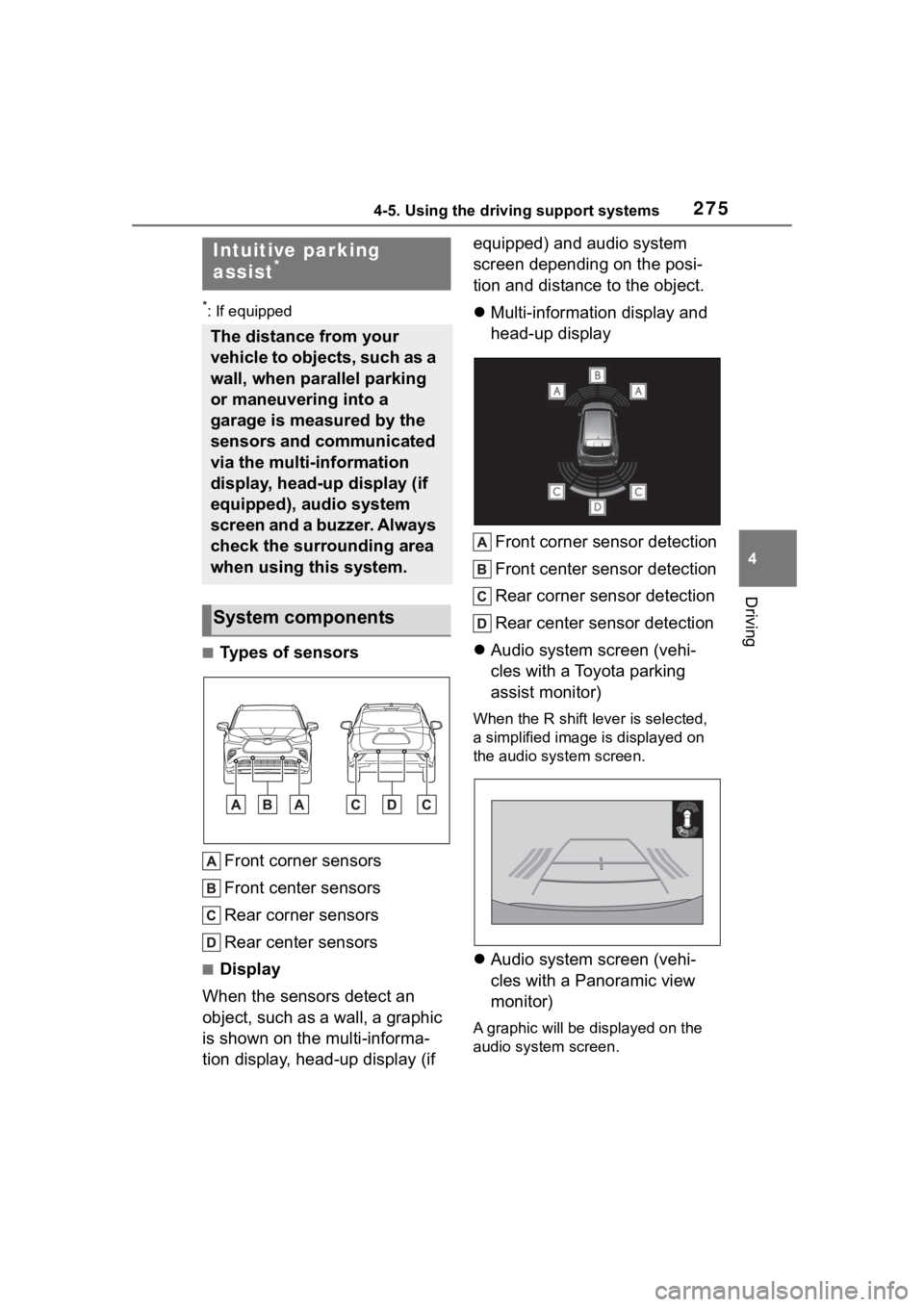
■Types of sensorsFront corner sensors
Front center sensors
Rear corner sensors
Rear center sensors
■Display
When the sensors detect an
object, such as a wall, a graphic
is shown on the multi-informa-
tion display, head-up display (if equipped) and audio system
screen depending on the posi-
tion and distance to the object.
Multi-information display and
head-up display
Front corner sensor detection
Front center sensor detection
Rear corner sensor detection
Rear center sensor detection
Audio system screen (vehi-
cles with a Toyota parking
assist monitor)
When the R shift le ver is selected,
a simplified image is displayed on
the audio system screen.
Audio system screen (vehi-
cles with a Panoramic view
monitor)
A graphic will be di splayed on the
audio system screen.
Intuitive parking
assist*
The distance from your
vehicle to objects, such as a
wall, when parallel parking
or maneuvering into a
garage is measured by the
sensors and communicated
via the multi-information
display, head-up display (if
equipped), audio system
screen and a buzzer. Always
check the surrounding area
when using this system.
System components
Page 276 of 552
2764-5. Using the driving support systems
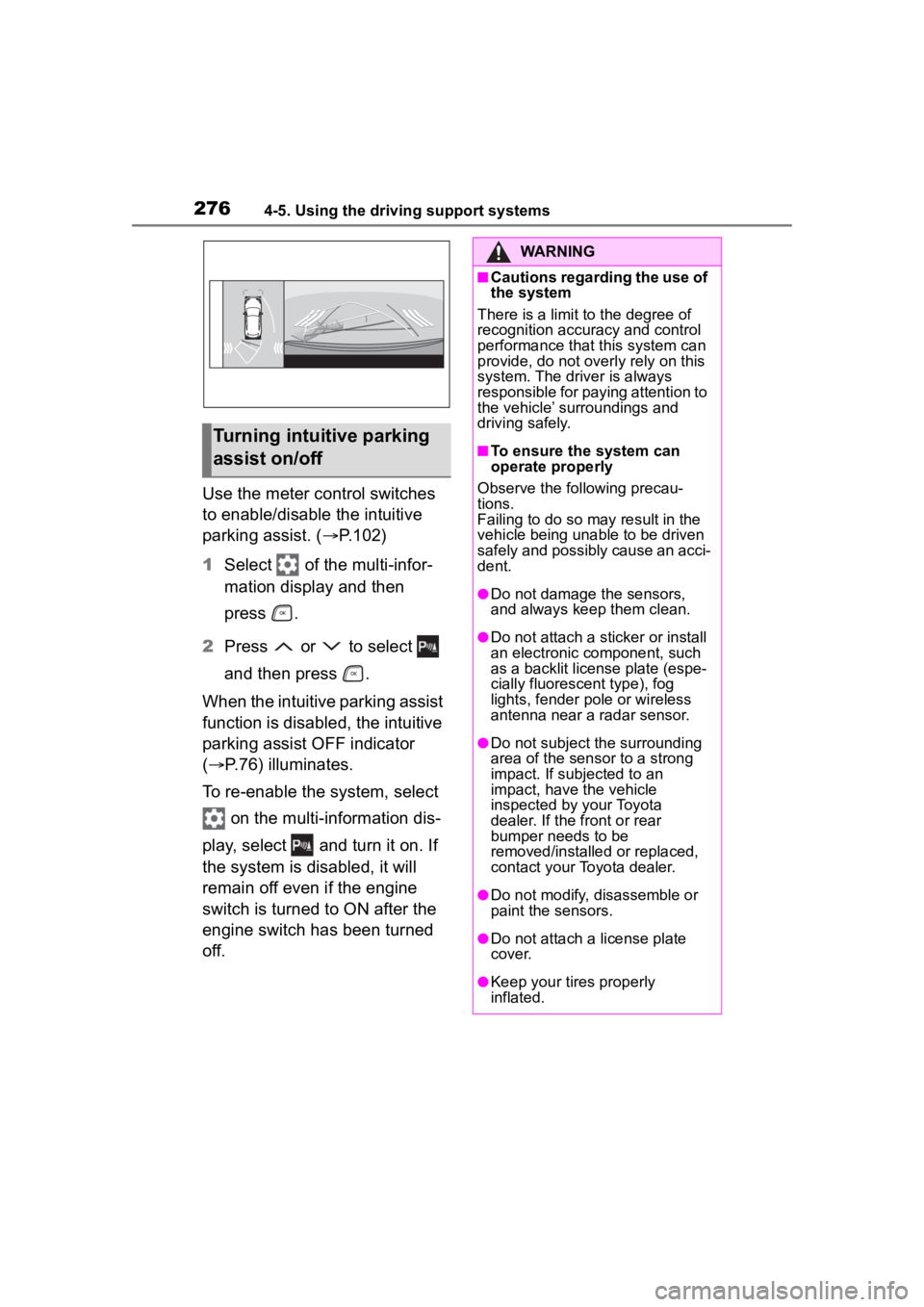
Use the meter control switches
to enable/disable the intuitive
parking assist. (P.102)
1 Select of the multi-infor-
mation display and then
press .
2 Press or to select
and then press .
When the intuitive parking assist
function is disabled, the intuitive
parking assist OFF indicator
( P.76) illuminates.
To re-enable the system, select on the multi-information dis-
play, select and turn it on. If
the system is di sabled, it will
remain off even if the engine
switch is turned to ON after the
engine switch has been turned
off.
Turning intuitive parking
assist on/off
WARNING
■Cautions regarding the use of
the system
There is a limit t o the degree of
recognition accuracy and control
performance that this system can
provide, do not overly rely on this
system. The driver is always
responsible for paying attention to
the vehicle’ surroundings and
driving safely.
■To ensure the system can
operate properly
Observe the following precau-
tions.
Failing to do so may result in the
vehicle being unable to be driven
safely and possibly cause an acci-
dent.
●Do not damage the sensors,
and always keep them clean.
●Do not attach a sticker or install
an electronic component, such
as a backlit licen se plate (espe-
cially fluorescent type), fog
lights, fender po le or wireless
antenna near a radar sensor.
●Do not subject the surrounding
area of the sensor to a strong
impact. If subjected to an
impact, have the vehicle
inspected by your Toyota
dealer. If the front or rear
bumper needs to be
removed/installed or replaced,
contact your Toyota dealer.
●Do not modify, disassemble or
paint the sensors.
●Do not attach a license plate
cover.
●Keep your tires properly
inflated.
Page 277 of 552
2774-5. Using the driving support systems
4
Driving
■The system can be operated
when
●The engine switch is in ON.
●Intuitive parking assist function is
on.
●The vehicle speed is less than
about 6 mph (10 km/h).
●A shift lever other than P.
■If “Parking Assist Unavailable”
is displayed on the multi-infor-
mation display
●Water may be continuously flow-
ing over the sensor surface, such
as in a heavy rain. When the sys-
tem determines that it is normal, the system will retu
rn to normal.
●Initialization may not have been
performed after a battery terminal
was disconnected and recon-
nected. Initialize the system.
( P.277) If this message contin-
ues to be displayed even after ini-
tialization, have the vehicle
inspected by your Toyota dealer.
■If “Parking Assist Unavailable
Clean Parking Assist Sensor” is
displayed on the multi-informa-
tion display
A sensor may be covered with ice,
snow, dirt, etc. Remove the ice,
snow, dirt, etc., from the sensor to
return the system to normal.
Also, due to ice forming on a sensor
at low temperatures, a warning
message may be displayed or the
sensor may not be able to detect an
object. Once the ice melts, the sys-
tem will return to normal.
■If a battery terminal has been
disconnected and reconnected
The system needs to be initialized.
To initialize the system, drive the
vehicle straight ahead for 5 seconds
or more at a speed of approximately
22 mph (35 km/h) or more.
■Sensor detection information
●The following situations may occur
during use.
• The sensor's detec tion areas are
limited to the areas around the
vehicle front and rear bumpers.
• Depending on the shape of the
object and other factors, the
detection distance may shorten, or
detection may be impossible.
• If an object is extremely close to a sensor, it may not be detected.
• There will be a short delay between object detection and dis-
play. Even at low speeds, there is
a possibility that the object will
come within the sensor’s detec-
tion areas before the display is
shown and the warning beep
sounds.
WARNING
■When to disable the function
In the following situations, disable
the function as it may operate
even though there is no possibility
of a collision.
●Failing to observe the warnings
above.
●A non-genuine Toyota suspen-
sion (lowered suspension, etc.)
is installed.
■Notes when washing the vehi-
cle
Do not apply intensive bursts of
water or steam to the sensor
area.
Doing so may result in the sensor
malfunctioning.
●When using a high pressure
washer to wash the vehicle, do
not spray the sensors directly,
as doing so may cause a sensor
to malfunction.
●When using steam to clean the
vehicle, do not direct steam too
close to the sensors as doing so
may cause a sens or to malfunc-
tion.
Page 278 of 552
2784-5. Using the driving support systems
• It might be difficult to hear the buzzer due to the volume of the
audio system or air flow noise of
the air conditioning system.
• It may be difficult to hear the buzzer if buzzers for other sys-
tems are sounding.
■Objects which the system may
not be properly detected
The shape of the object may pre-
vent the sensor from detecting it.
Pay particular attention to the follow-
ing objects:
●Wires, fences, ropes, etc.
●Cotton, snow and other materials
that absorb sound waves
●Sharply-angled objects
●Low objects
●Tall objects with upper sections
projecting outwards in the direc-
tion of your vehicle
People may not be detected if they
are wearing certain types of cloth-
ing.
■Situations in which the system
may not operate properly
Certain vehicle conditions and the
surrounding environment may affect
the ability of a sensor to correctly
detect objects. Particular instances
where this may occur are listed
below.
●There is dirt, snow, water drops or
ice on a sensor. (Cleaning the
sensors will resolve this problem.)
●A sensor is frozen. (Thawing the
area will resolve this problem.)
In especially cold weather, if a
sensor is frozen the sensor dis-
play may be displayed abnormally,
or objects, such as a wall, may not
be detected.
●When a sensor or the area around
a sensor is extremely hot or cold.
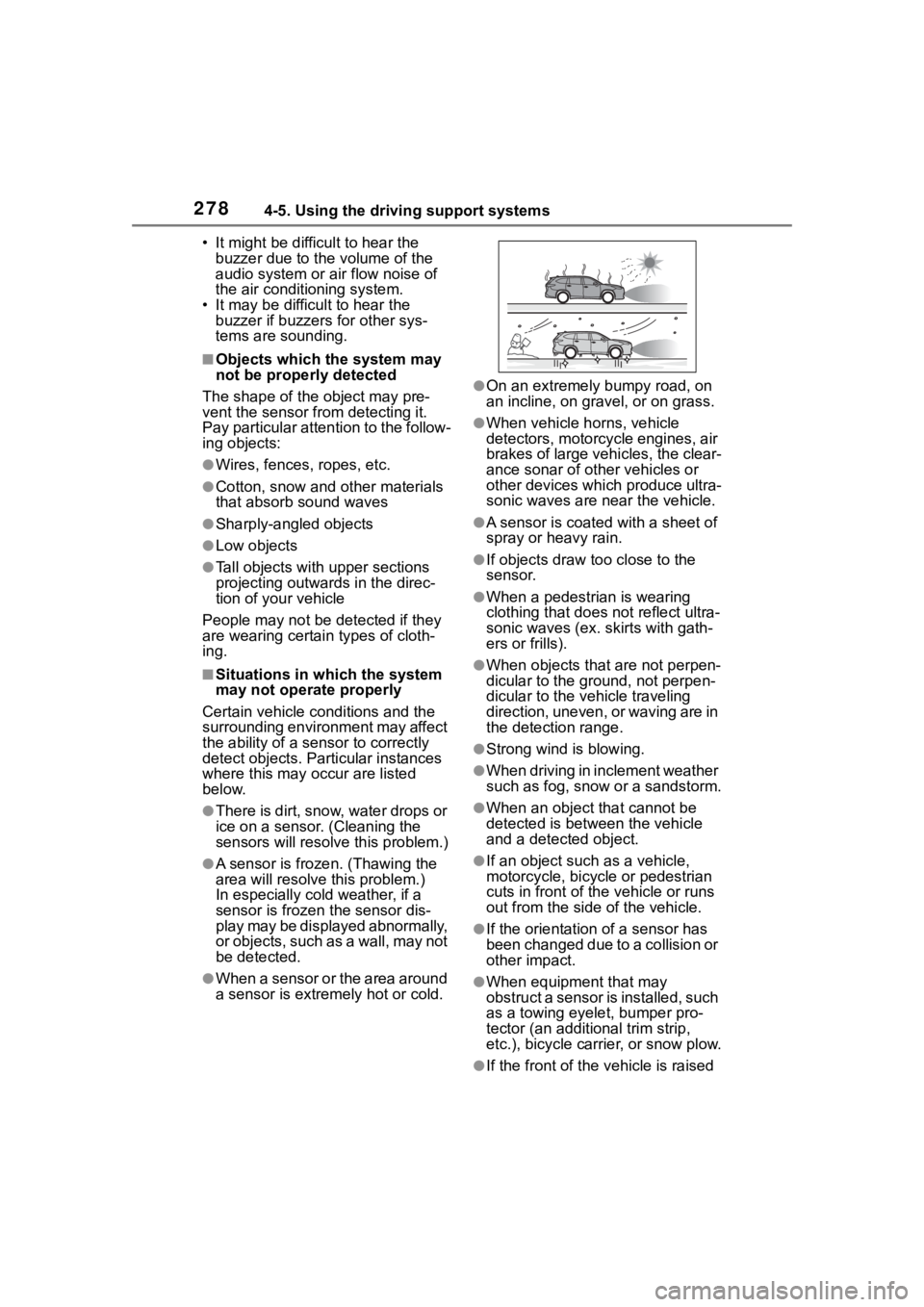
●On an extremely bumpy road, on
an incline, on gravel, or on grass.
●When vehicle horns, vehicle
detectors, motorcycle engines, air
brakes of large vehicles, the clear-
ance sonar of ot her vehicles or
other devices which produce ultra-
sonic waves are near the vehicle.
●A sensor is coated with a sheet of
spray or heavy rain.
●If objects draw too close to the
sensor.
●When a pedestrian is wearing
clothing that does not reflect ultra-
sonic waves (ex. skirts with gath-
ers or frills).
●When objects that are not perpen-
dicular to the ground, not perpen-
dicular to the vehicle traveling
direction, uneven, or waving are in
the detection range.
●Strong wind is blowing.
●When driving in inclement weather
such as fog, snow or a sandstorm.
●When an object that cannot be
detected is between the vehicle
and a detected object.
●If an object such as a vehicle,
motorcycle, bicycle or pedestrian
cuts in front of the vehicle or runs
out from the side of the vehicle.
●If the orientation of a sensor has
been changed due to a collision or
other impact.
●When equipment that may
obstruct a sensor is installed, such
as a towing eyelet, bumper pro-
tector (an additional trim strip,
etc.), bicycle carrier, or snow plow.
●If the front of the v ehicle is raised
Page 280 of 552
2804-5. Using the driving support systems
■Adjusting the buzzer vol-
ume
The buzzer volume can be
adjusted on the multi-informa-
tion display.
Use the meter control switches
to change settings. ( P.102)
1 Select of the multi-infor-
mation display and then
press .
2 Press or to select
and then press and hold .
3 Select the volume and then
press .
Each time the switch is pressed,
the volume level will change
between 1, 2, and 3.
■Muting a buzzer temporarily
A mute button will be displayed
on the multi-information display
when an object is detected. To
mute the buzzer, press .
Mute will be canceled automati-
cally in the following situations:
When the shift lever is
changed.
When the vehicle speed
exceeds a certain speed.
When there is malfunction in
a sensor or the system is tem-
porarily unavailable.
When the operating function
is disabled manually.
When the engine switch is
turned off.
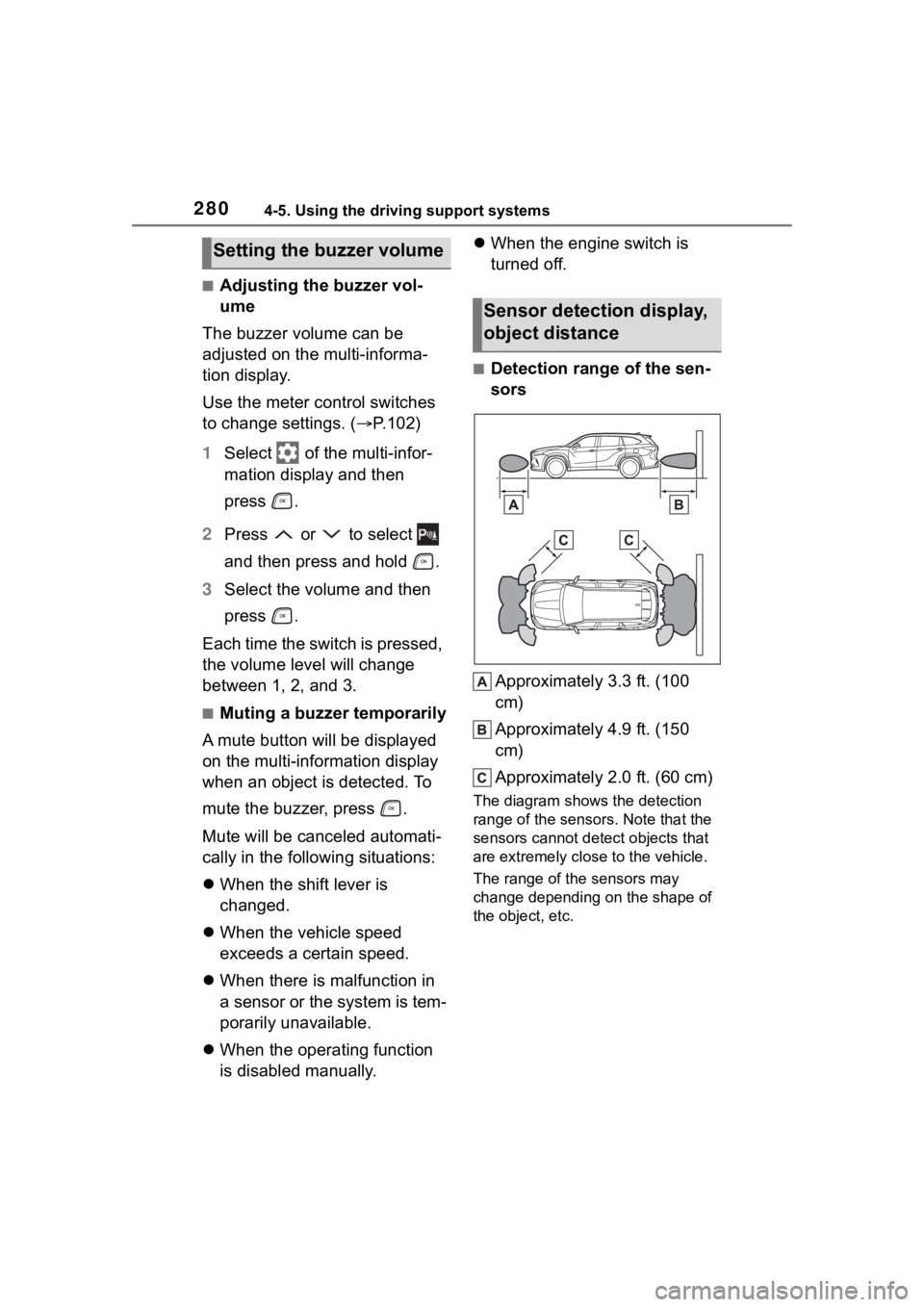
■Detection range of the sen-
sors
Approximately 3.3 ft. (100
cm)
Approximately 4.9 ft. (150
cm)
Approximately 2.0 ft. (60 cm)
The diagram shows the detection
range of the sensors. Note that the
sensors cannot detect objects that
are extremely clos e to the vehicle.
The range of the sensors may
change depending on the shape of
the object, etc.
Setting the buzzer volume
Sensor detection display,
object distance
Page 281 of 552
2814-5. Using the driving support systems
4
Driving
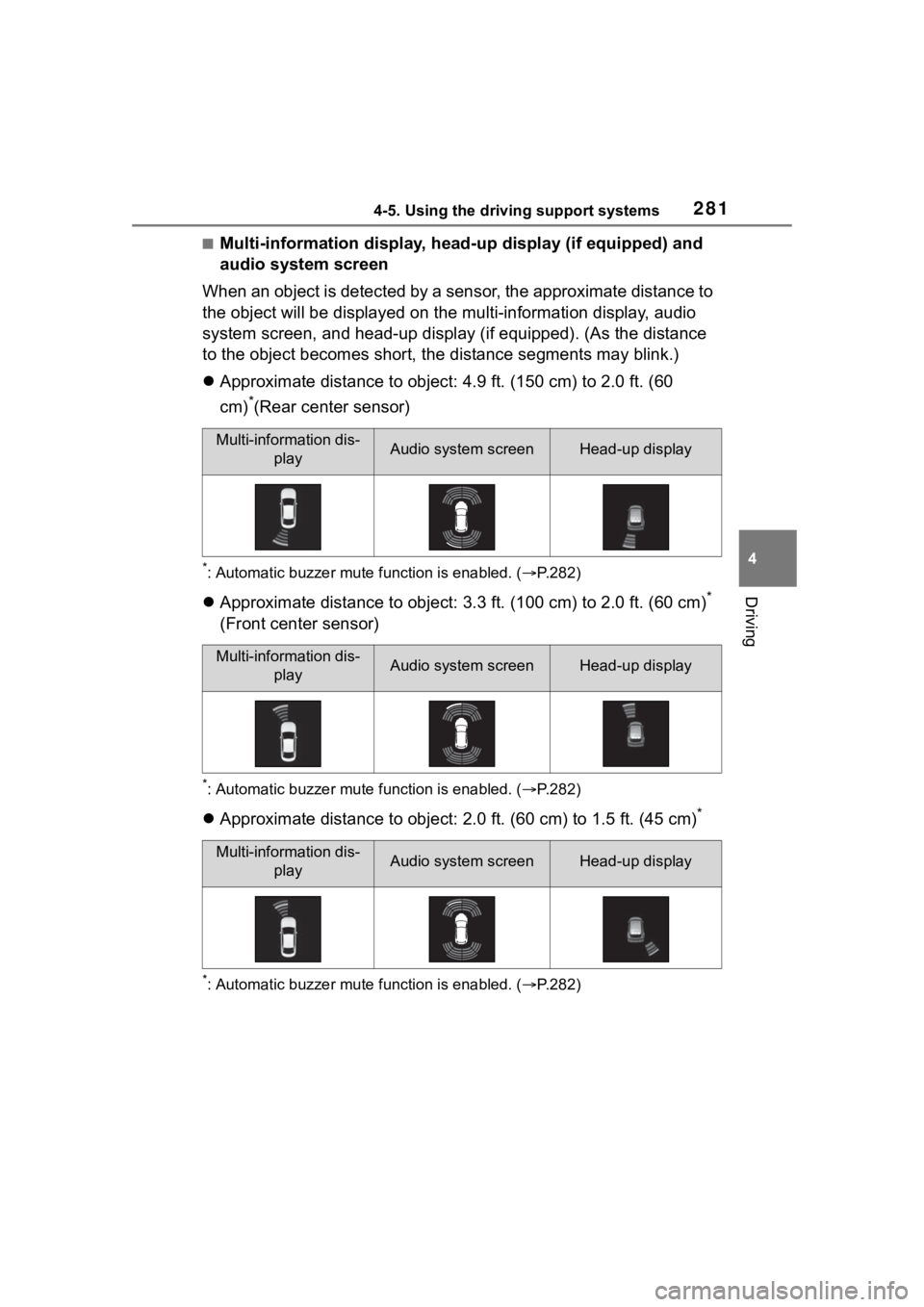
■Multi-information display, head-up display (if equipped) and
audio system screen
When an object is detected by a sensor, the approximate distanc e to
the object will be displayed on th e multi-information display, audio
system screen, and head-up display (if equipped). (As the dista nce
to the object becomes short, the distance segments may blink.)
Approximate distance to object: 4.9 ft. (150 cm) to 2.0 ft. (60
cm)
*(Rear center sensor)
*: Automatic buzzer mute function is enabled. ( P.282)
Approximate distance to object: 3.3 ft. (100 cm) to 2.0 ft. (60 cm)*
(Front center sensor)
*: Automatic buzzer mute function is enabled. ( P.282)
Approximate distance to object: 2.0 ft. (60 cm) to 1.5 ft. (45 cm)*
*: Automatic buzzer mute function is enabled. (P.282)
Multi-information dis-
playAudio system screenHead-up display
Multi-information dis-playAudio system screenHead-up display
Multi-information dis-playAudio system screenHead-up display