air condition TOYOTA HIGHLANDER HYBRID 2019 (in English) Owner's Manual
[x] Cancel search | Manufacturer: TOYOTA, Model Year: 2019, Model line: HIGHLANDER HYBRID, Model: TOYOTA HIGHLANDER HYBRID 2019Pages: 716, PDF Size: 14.31 MB
Page 434 of 716
4345-11. Using the voice command system
HIGHLANDER_HV_U
■Microphone
P. 402
■ When using the microphone
●It is unnecessary to speak directly into the microphone when gi ving a com-
mand.
● When “Voice Prompt Interrupt” set to on, it is not necessary to wait for the
confirmation beep before speaking a command. ( P. 366)
● Voice commands may not be recognized if:
• Spoken too quickly.
• Spoken at a low or high volume.
• The roof or windows are open.
• Passengers are talking while voice commands are spoken.
• The air conditioning speed is set high.
• The air conditioning vents are turned towards the microphone.
● In the following conditions, the system may not recognize the command
properly and using voice commands may not be possible:
• The command is incorrect or unclear. Note that certain words, accents or
speech patterns may be difficult for the system to recognize.
• There is excessive background noise, such as wind noise.
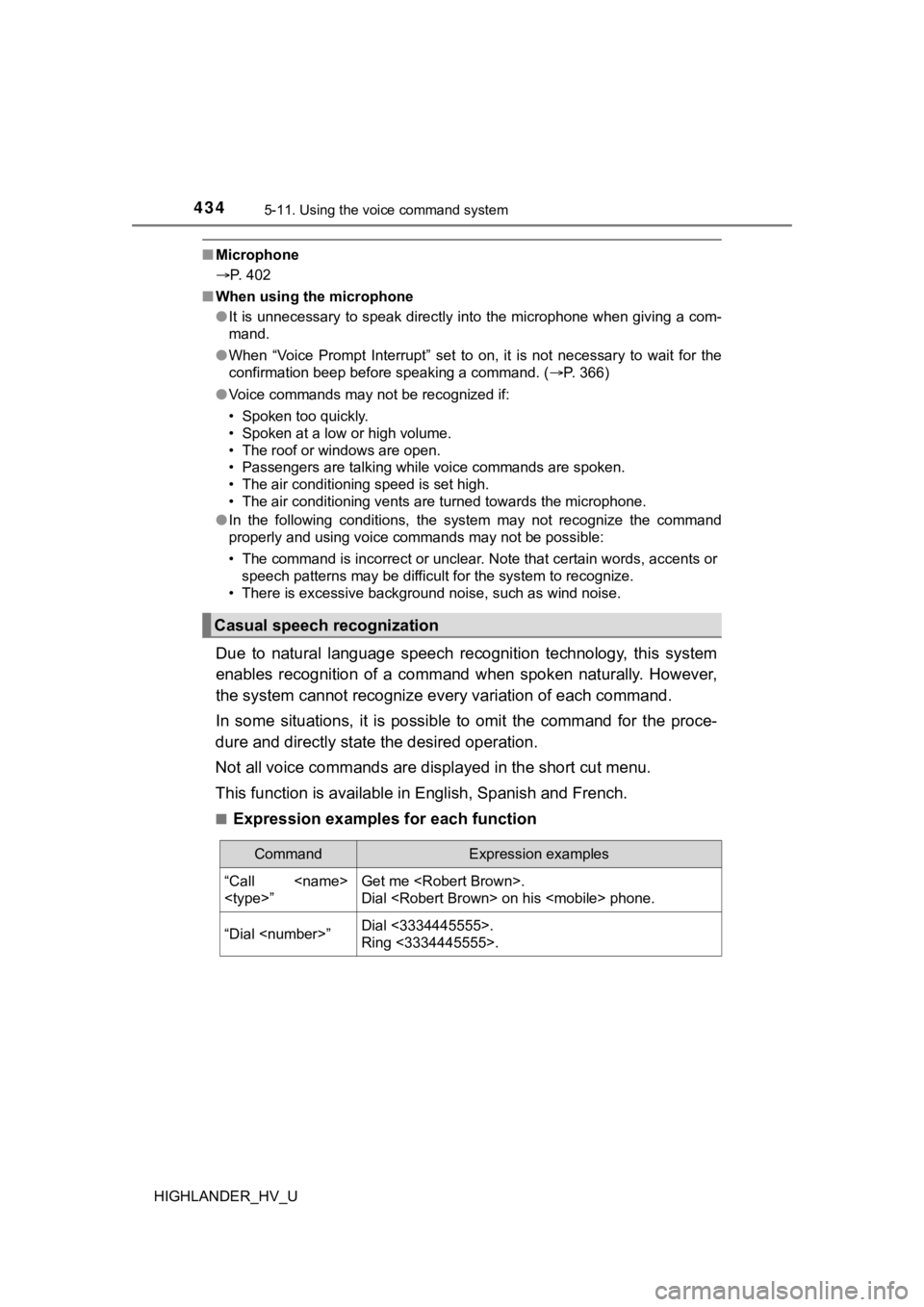
Due to natural language speech recognition technology, this sys tem
enables recognition of a command when spoken naturally. However ,
the system cannot recognize ever y variation of each command.
In some situations, it is possi ble to omit the command for the proce-
dure and directly state the desired operation.
Not all voice commands are displayed in the short cut menu.
This function is available in English, Spanish and French.
■Expression examples for each function
Casual speech recognization
CommandExpression examples
“Call
Dial
“Dial
Ring <3334445555>.
Page 439 of 716

439
6Interior features
HIGHLANDER_HV_U6-1. Using the air
conditioning system
and defogger
Front automatic air conditioning system ........ 440
Rear automatic air conditioning system ........ 447
Heated steering wheel/ seat heaters/
seat ventilators ................ 450
6-2. Using the interior lights Interior lights list ................ 453
• Interior lights ................. 454
• Personal lights .............. 454
6-3. Using the storage features
List of storage features ..... 455
• Glove box...................... 456
• Console box .................. 456
• Bottle holders ................ 457
• Cup holders .................. 458
• Auxiliary boxes.............. 460
• Open tray ...................... 461
Luggage compartment features ........................... 462 6-4. Using the other
interior features
Other interior features ....... 467
• Sun visors ..................... 467
• Vanity mirrors................ 467
• Conversation mirror ...... 468
• Clock ............................. 468
• Outside temperature display........................... 469
• Power outlets ................ 470
• USB charging ports....... 472
• Rear sunshades............ 474
• Armrest ......................... 475
• Coat hooks.................... 476
• Assist grips ................... 476
• Side table ...................... 477
Garage door opener.......... 478
Compass ........................... 485
Page 440 of 716
440
HIGHLANDER_HV_U
6-1. Using the air conditioning system and defogger
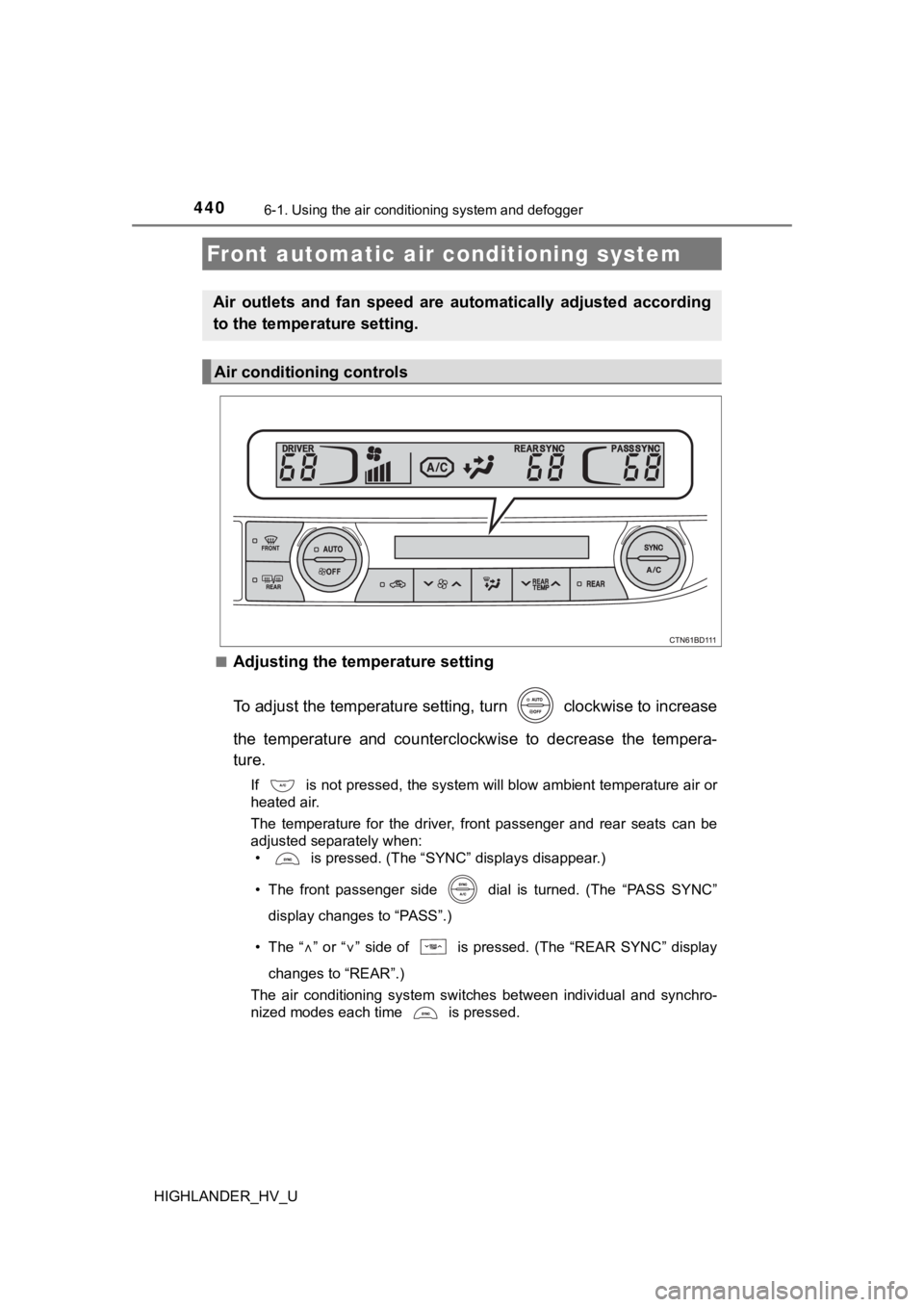
■Adjusting the temperature setting
To adjust the temperature setting, turn clockwise to increase
the temperature and counterclockwise to decrease the tempera-
ture.
If is not pressed, the system will blow ambient temperature air or
heated air.
The temperature for the driver, front passenger and rear seats can be
adjusted separately when:
• is pressed. (The “SYNC” displays disappear.)
• The front passenger side dial is turned. (The “PASS SYNC”
display changes to “PASS”.)
• The “
” or “” side of is pressed. (The “REAR SYNC” display
changes to “REAR”.)
The air conditioning system switches between individual and syn chro-
nized modes each time is pressed.
Front automatic air conditioning system
Air outlets and fan speed are automatically adjusted according
to the temperature setting.
Air conditioning controls
Page 441 of 716
4416-1. Using the air conditioning system and defogger
6
Interior features
HIGHLANDER_HV_U■
Fan speed setting
To adjust the fan speed, press
“” on to increase the fan
speed and “
” to decrease the fan speed.
Press to turn the fan off.
■
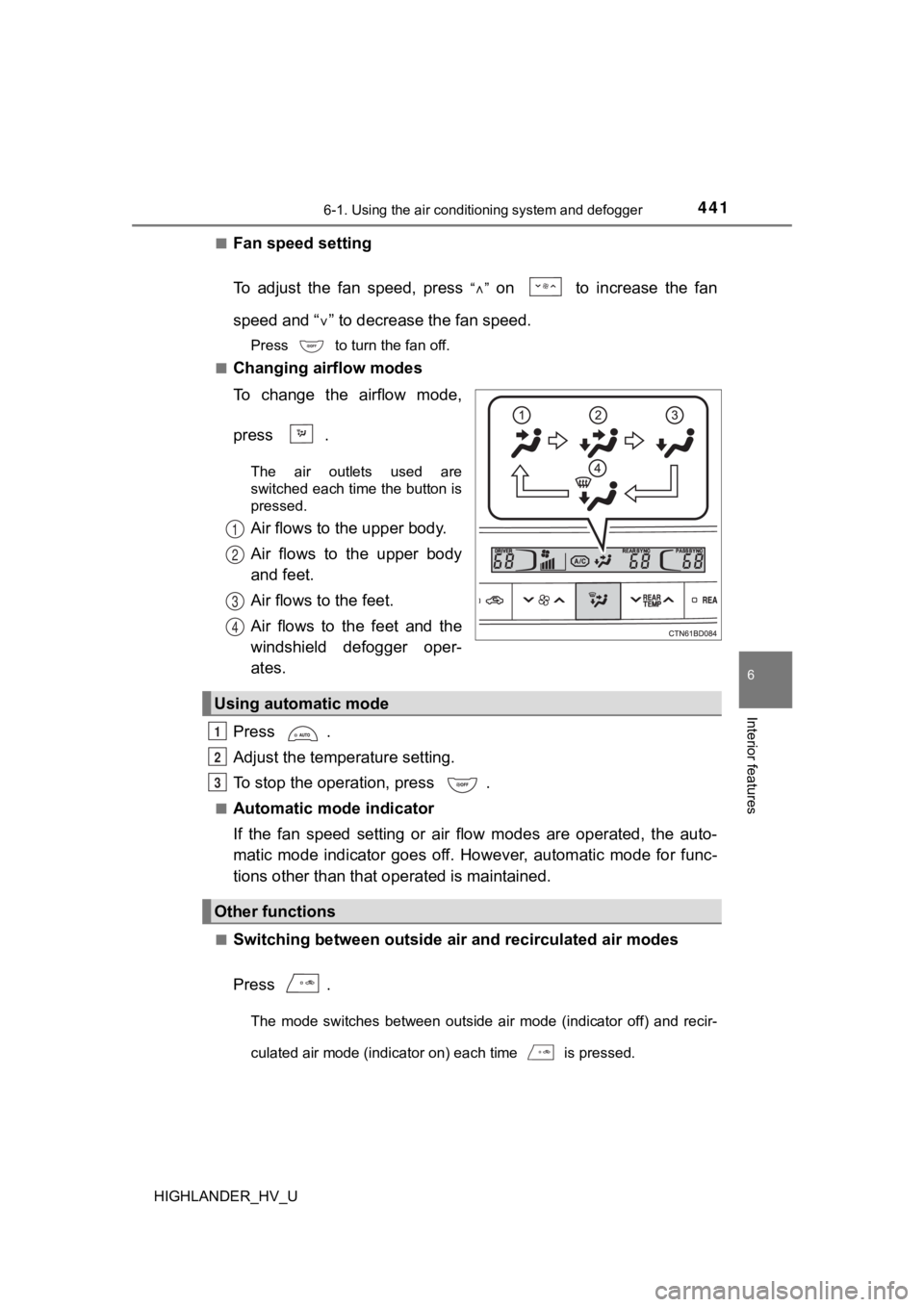
Changing airflow modes
To change the airflow mode,
press .
The air outlets used are
switched each time the button is
pressed.
Air flows to the upper body.
Air flows to the upper body
and feet.
Air flows to the feet.
Air flows to the feet and the
windshield defogger oper-
ates.
Press .
Adjust the temperature setting.
To stop the operation, press .
■Automatic mode indicator
If the fan speed setting or air flow modes are operated, the au to-
matic mode indicator goes off. However, automatic mode for func -
tions other than that o perated is maintained.
■Switching between outside air and recirculated air modes
Press .
The mode switches between outside air mode (indicator off) and recir-
culated air mode (indicator on) each time is pressed.
1
2
3
4
Using automatic mode
Other functions
1
2
3
Page 442 of 716
4426-1. Using the air conditioning system and defogger
HIGHLANDER_HV_U■
Defogging the windshield
Defoggers are used to defog the windshield and front side win-
dows.
Press .
Set the outside/recirculated air mode button to outside air mod
e if the
recirculated air mode is used. (It may switch automatically.)
To defog the windshield and the side windows early, turn the ai r flow and
temperature up.
To return to the previous mode, press again when the windshiel d
is defogged.
■
Defogging the rear window and outside rear view mirrors
Defoggers are used to defog the rear window, and to remove rain -
drops, dew and frost from the outside rear view mirrors.
Press .
The defoggers will automatically turn off after a period of tim e.
■
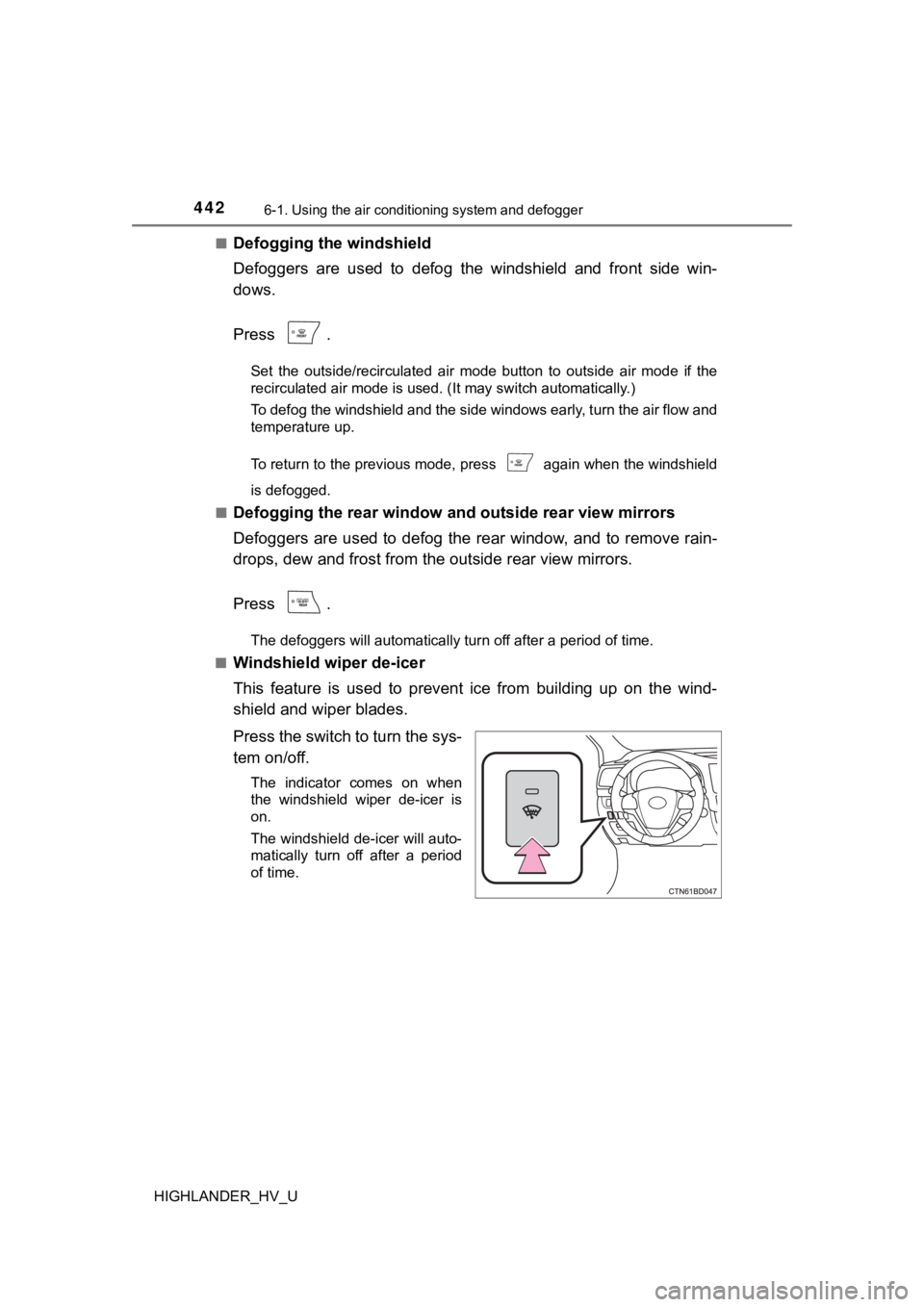
Windshield wiper de-icer
This feature is used to prevent ice from building up on the win d-
shield and wiper blades.
Press the switch to turn the sys-
tem on/off.
The indicator comes on when
the windshield wiper de-icer is
on.
The windshield de-icer will auto-
matically turn off after a period
of time.
Page 443 of 716
4436-1. Using the air conditioning system and defogger
6
Interior features
HIGHLANDER_HV_U■
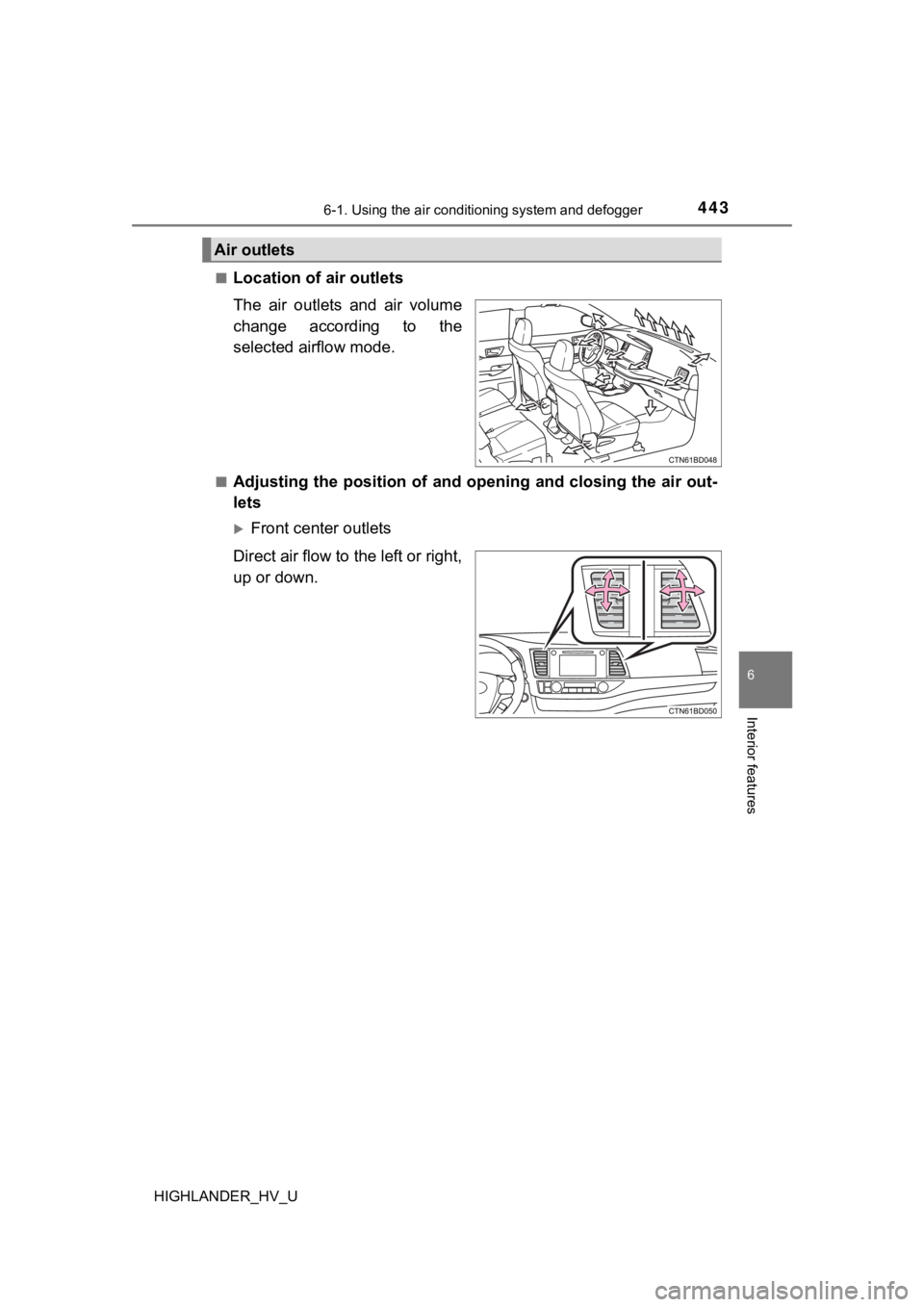
Location of a
ir outlets
The air outlets and air volume
change according to the
selected airflow mode.
■Adjusting the position of and opening and closing the air out-
lets
Front center outlets
Direct air flow to the left or right,
up or down.
Air outlets
Page 444 of 716
4446-1. Using the air conditioning system and defogger
HIGHLANDER_HV_U
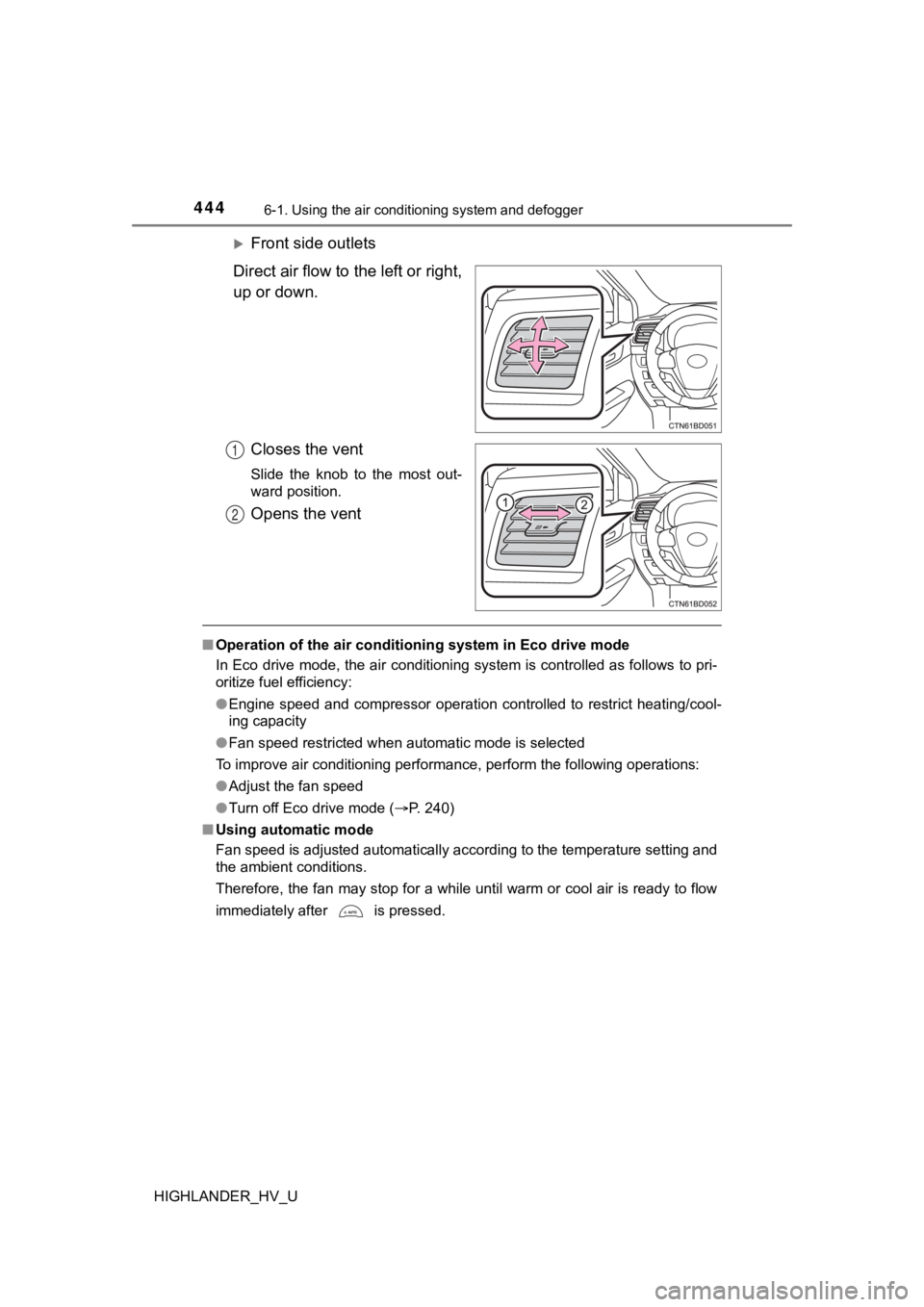
Front side outlets
Direct air flow to the left or right,
up or down.
Closes the vent
Slide the knob to the most out-
ward position.
Opens the vent
■Operation of the air conditioning system in Eco drive mode
In Eco drive mode, the air conditioning system is controlled as follows to pri-
oritize fuel efficiency:
● Engine speed and compressor operation controlled to restrict heating/cool-
ing capacity
● Fan speed restricted when automatic mode is selected
To improve air conditioning perf ormance, perform the following operations:
● Adjust the fan speed
● Turn off Eco drive mode ( P. 240)
■ Using automatic mode
Fan speed is adjusted automatically according to the temperatur e setting and
the ambient conditions.
Therefore, the fan may stop for a while until warm or cool air is ready to flow
immediately after is pressed.
1
2
Page 445 of 716

4456-1. Using the air conditioning system and defogger
6
Interior features
HIGHLANDER_HV_U■
Fogging up of the windows
●The windows will easily fog up when the humidity in the vehicle is high.
Turning on will dehumidify the air from the outlets and defog the wind-
shield effectively.
● If you turn off, the windows may fog up more easily.
● The windows may fog up if the recirculated air mode is used.
■ Windshield fog detection function
When automatic mode is set, the humidity sensor (P. 446) detects fog on
the windshield and controls the air conditioning system to prev ent fog.
■ Outside/recirculated air mode
●When driving on dusty roads such as tunnels or in heavy traffic, set the out-
side/recirculated air mode button to the recirculated air mode. This is effec-
tive in preventing outside air from entering the vehicle interi or. During
cooling operation, setting the recirculated air mode will also cool the vehicle
interior effectively.
● Outside/recirculated air mode may automatically switch dependin g on the
temperature setting or the inside temperature.
■ When the outside temperature exceeds 75°F (24°C) and the air co ndition-
ing system is on
● In order to reduce the air conditioning power consumption, the air condition-
ing system may switch to recirculated air mode automatically. This may also
reduce fuel consumption.
● Recirculated air mode is selected as a default mode when the power switch
is turned to ON mode.
● It is possible to switch to outside air mode at any time by pre ssing .
■ Ventilation and air conditioning odors
●To let fresh air in, set the air conditioning system to the out side air mode.
● During use, various odors from inside and outside the vehicle m ay enter into
and accumulate in the air conditioning system. This may then ca use odor to
be emitted from the vents.
● To reduce potential odors from occurring:
• It is recommended that the air conditioning system be set to o utside air
mode prior to turning the vehicle off.
• The start timing of the blower may be delayed for a short peri od of time
immediately after the air conditioning system is started in aut omatic
mode.
■ Air conditioning filter
P. 537
■ Customization
Settings (e.g. A/C auto switch operation) can be changed.
(Customizable features P. 666)
Page 446 of 716
4466-1. Using the air conditioning system and defogger
HIGHLANDER_HV_U
WARNING
■To prevent the windshield from fogging up
● Do not use during cool air operation in extremely humid weathe r.
The difference between the temperature of the outside air and t hat of the
windshield can cause the outer surface of the windshield to fog up, block-
ing your vision.
■ To prevent burns
● Do not touch the rear view mirror surfaces when the outside rear view mir-
ror defoggers are on.
● Do not touch the glass at lower part of the windshield or to the side of the
front pillars when the windshield wiper de-icer is on.
NOTICE
■Humidity sensor
■ To prevent 12-volt b attery discharge
Do not leave the air conditioning system on longer than necessa ry when the
hybrid system is off.
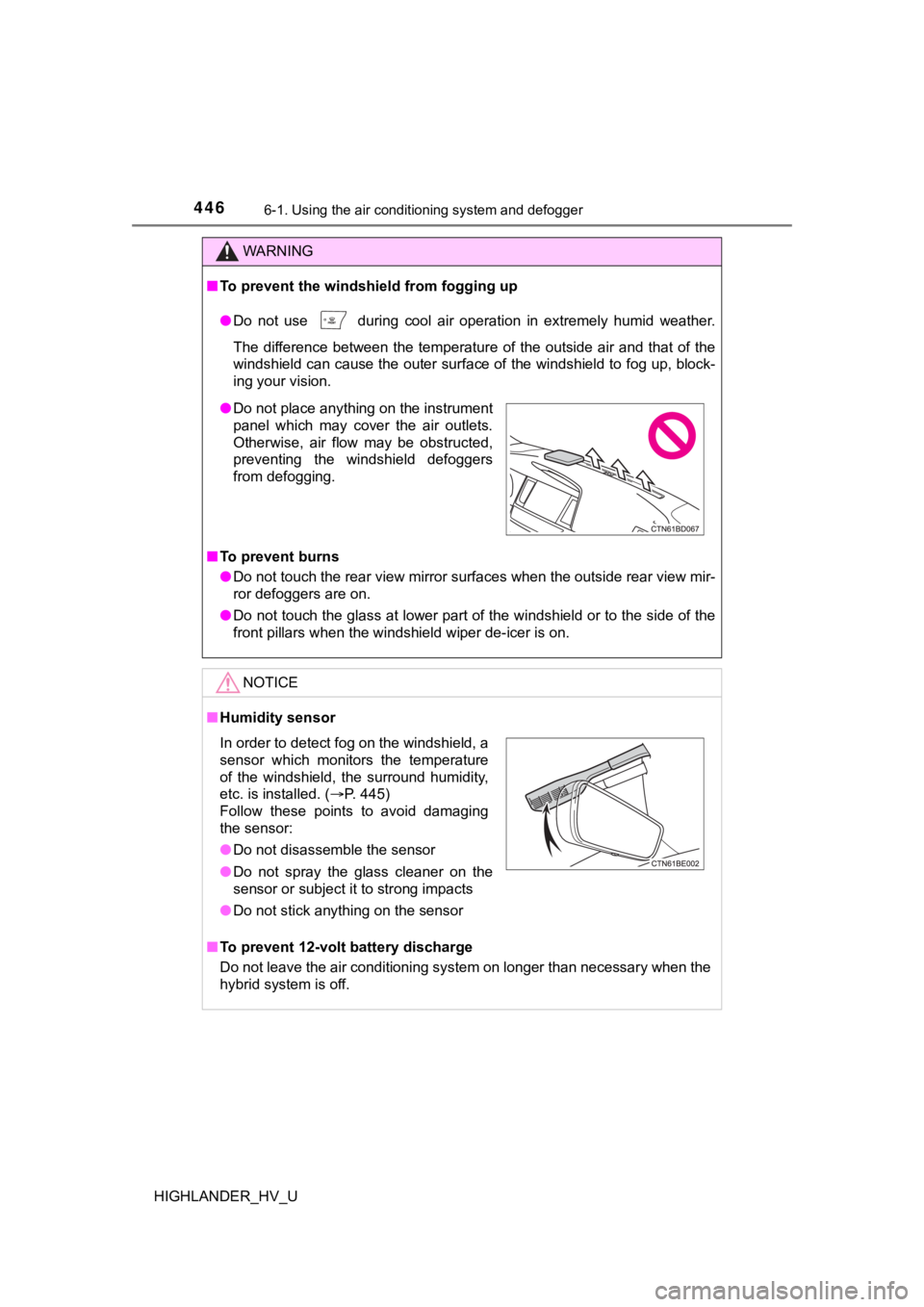
● Do not place anything on the instrument
panel which may cover the air outlets.
Otherwise, air flow may be obstructed,
preventing the windshield defoggers
from defogging.
In order to detect fog on the windshield, a
sensor which monitors the temperature
of the windshield, the surround humidity,
etc. is installed. ( P. 445)
Follow these points to avoid damaging
the sensor:
● Do not disassemble the sensor
● Do not spray the glass cleaner on the
sensor or subject it to strong impacts
● Do not stick anything on the sensor
Page 447 of 716
4476-1. Using the air conditioning system and defogger
6
Interior features
HIGHLANDER_HV_U■
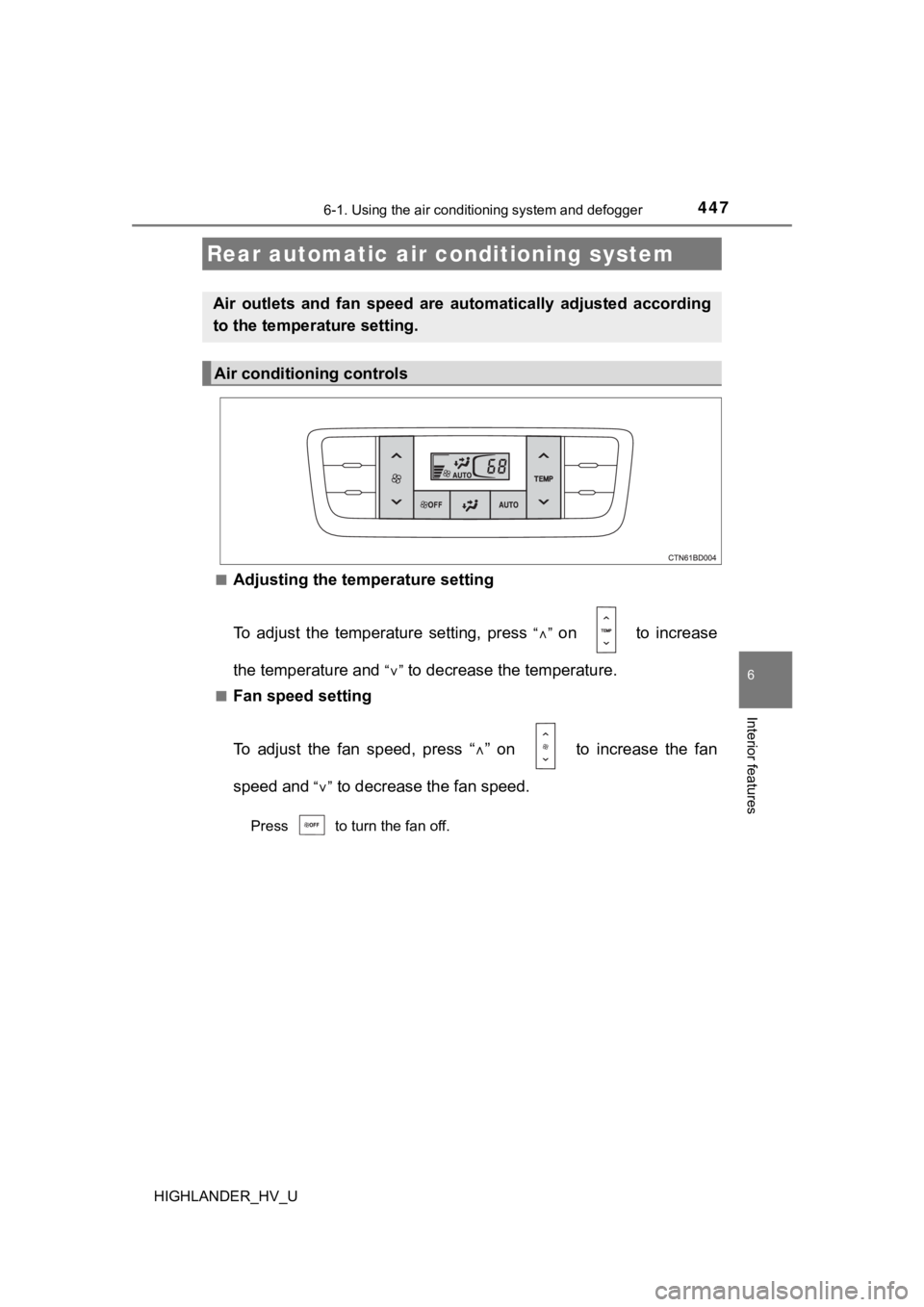
Adjusting the temperature setting
To adjust the temperature setting, press
“” on to increase
the temperature and
“” to decrease the temperature.
■Fan speed setting
To adjust the fan speed, press “ ” on to increase the fan
speed and
“” to decrease the fan speed.
Press to turn the fan off.
Rear automatic air conditioning system
Air outlets and fan speed are automatically adjusted according
to the temperature setting.
Air conditioning controls