change time TOYOTA HIGHLANDER HYBRID 2019 Owners Manual (in English)
[x] Cancel search | Manufacturer: TOYOTA, Model Year: 2019, Model line: HIGHLANDER HYBRID, Model: TOYOTA HIGHLANDER HYBRID 2019Pages: 716, PDF Size: 14.31 MB
Page 8 of 716
8
HIGHLANDER_HV_UPlease note that this manual applies to all models and all equi
pment, includ-
ing options. Therefore, you may find some explanations for equi pment not
installed on your vehicle.
All specifications provided in this manual are current at the t ime of printing.
However, because of the Toyota policy of continual product impr ovement, we
reserve the right to make changes at any time without notice.
Depending on specifications, the vehicle shown in the illustrat ions may differ
from your vehicle in terms of color and equipment.
Approximately five hours after the hybrid system is turned off, you may hear
sound coming from under the vehicle for several minutes. This i s the sound of
a fuel evaporation leakage check and, it does not indicate a ma lfunction.
A wide variety of non-genuine spare parts and accessories for T oyota vehi-
cles are currently available in the market. You should know tha t Toyota does
not warrant these products and is not responsible for their per formance,
repair, or replacement, or for any damage they may cause to, or adverse
effect they may have on, your Toyota vehicle.
This vehicle should not be modified with non-genuine Toyota pro ducts. Modi-
fication with non-genuine Toyota products could affect its perf ormance, safety
or durability, and may even violate governmental regulations. In addition,
damage or performance problems resulting from the modification may not be
covered under warranty.
For your infor mation
Main Owner’s Manual
Noise from under vehicle after turning off the hybrid system
Accessories, spare parts and m odification of your Toyota
Page 89 of 716
891-3. Hybrid system
1
For safety and security
HIGHLANDER_HV_U
■Regenerative braking
In the following situations, kinetic energy is converted to electric energy and
deceleration force can be obtained in conjunction with the rech arging of the
hybrid battery (traction battery).
● The accelerator pedal is released while driving with the shift lever in D or S.
● The brake pedal is depressed while driving with the shift lever in D or S.
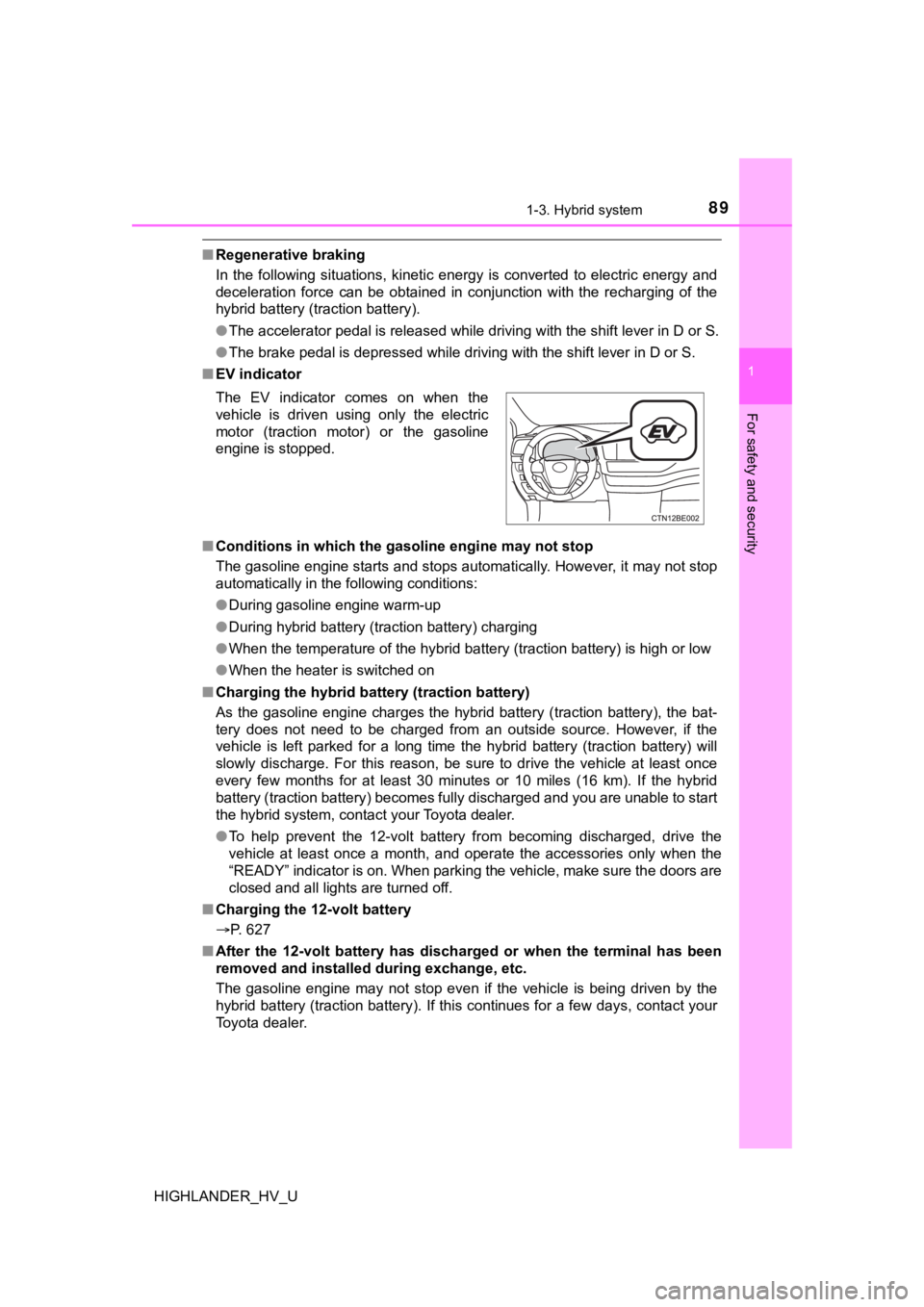
■ EV indicator
■ Conditions in which the gasoline engine may not stop
The gasoline engine starts and stops automatically. However, it may not stop
automatically in the following conditions:
● During gasoline engine warm-up
● During hybrid battery (traction battery) charging
● When the temperature of the hybrid battery (traction battery) is high or low
● When the heater is switched on
■ Charging the hybrid batt ery (traction battery)
As the gasoline engine charges the hybrid battery (traction bat tery), the bat-
tery does not need to be charged from an outside source. Howeve r, i f t h e
vehicle is left parked for a long time the hybrid battery (trac tion battery) will
slowly discharge. For this reason, be sure to drive the vehicle at least once
every few months for at least 30 minutes or 10 miles (16 km). I f the hybrid
battery (traction battery) becomes fully discharged and you are unable to start
the hybrid system, contact your Toyota dealer.
● To help prevent the 12-volt battery from becoming discharged, d rive the
vehicle at least once a month, and operate the accessories only when the
“READY” indicator is on. When parking the vehicle, make sure th e doors are
closed and all lights are turned off.
■ Charging the 12-volt battery
P. 627
■ After the 12-volt battery has discharged or when the terminal h as been
removed and installed during exchange, etc.
The gasoline engine may not stop even if the vehicle is being driven by the
hybrid battery (traction battery). If this continues for a few days, contact your
Toyota dealer. The EV indicator comes on when the
vehicle is driven using only the electric
motor (traction motor) or the gasoline
engine is stopped.
Page 111 of 716
1112. Instrument cluster
2
Instrument cluster
HIGHLANDER_HV_U
■The meters and display illuminate when
The power switch is in ON mode.
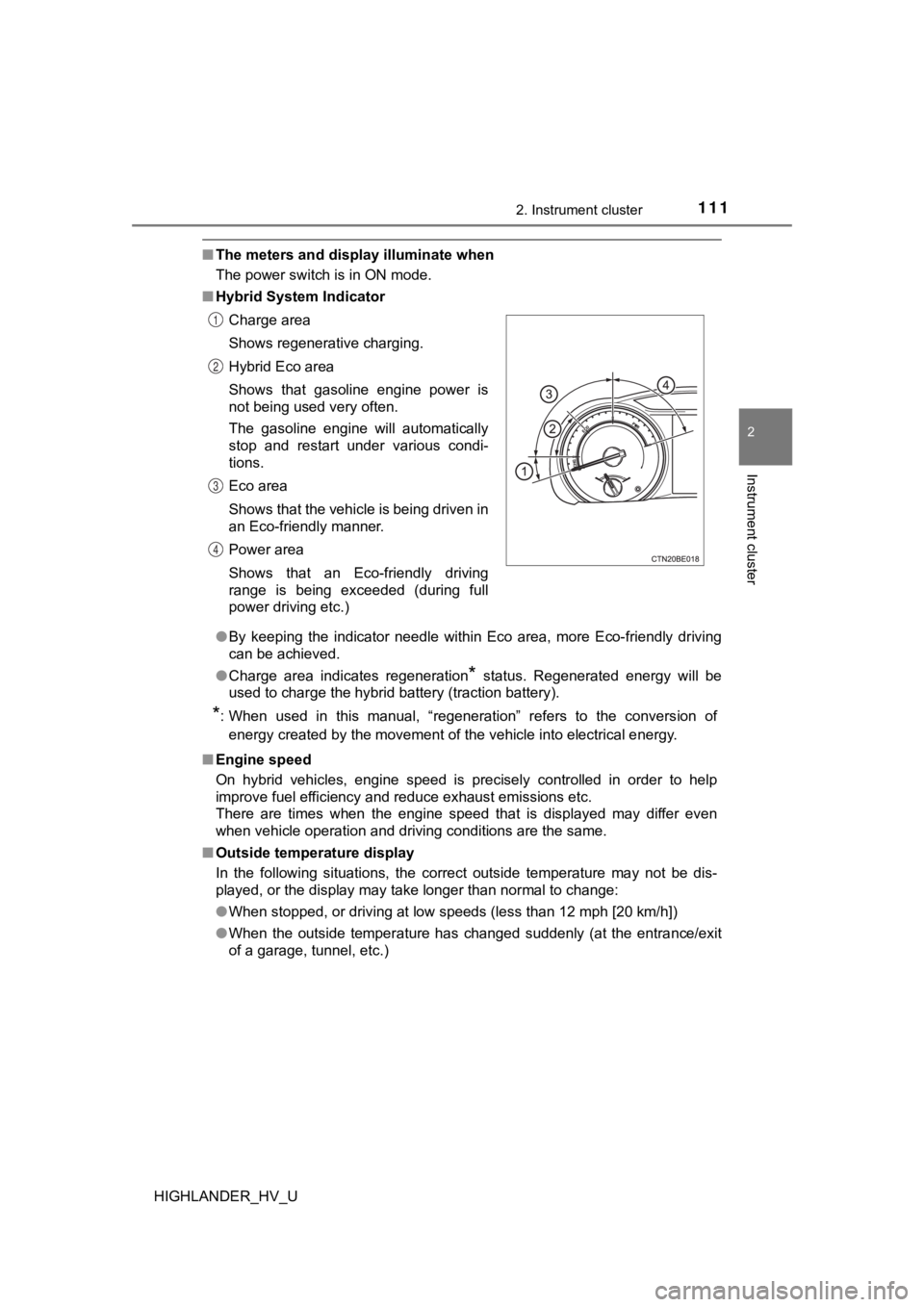
■ Hybrid System Indicator
●By keeping the indicator needle within Eco area, more Eco-friendly driving
can be achieved.
● Charge area indicates regeneration
* status. Regenerated energy will be
used to charge the hybrid battery (traction battery).
*: When used in this manual, “regeneration” refers to the convers ion of
energy created by the movement of the vehicle into electrical e nergy.
■ Engine speed
On hybrid vehicles, engine speed is precisely controlled in ord er to help
improve fuel efficiency and reduce exhaust emissions etc.
There are times when the engine speed that is displayed may dif fer even
when vehicle operation and driving conditions are the same.
■ Outside temperature display
In the following situations, the correct outside temperature ma y not be dis-
played, or the display may take longer than normal to change:
● When stopped, or driving at low speeds (less than 12 mph [20 km/h])
● When the outside temperature has changed suddenly (at the entra nce/exit
of a garage, tunnel, etc.) Charge area
Shows regenerative charging.
Hybrid Eco area
Shows that gasoline engine power is
not being used very often.
The gasoline engine will automatically
stop and restart under various condi-
tions.
Eco area
Shows that the vehicle is being driven in
an Eco-friendly manner.
Power area
Shows that an Eco-friendly driving
range is being exceeded (during full
power driving etc.)
1
2
3
4
Page 134 of 716
1343-2. Opening, closing and locking the doors
HIGHLANDER_HV_U
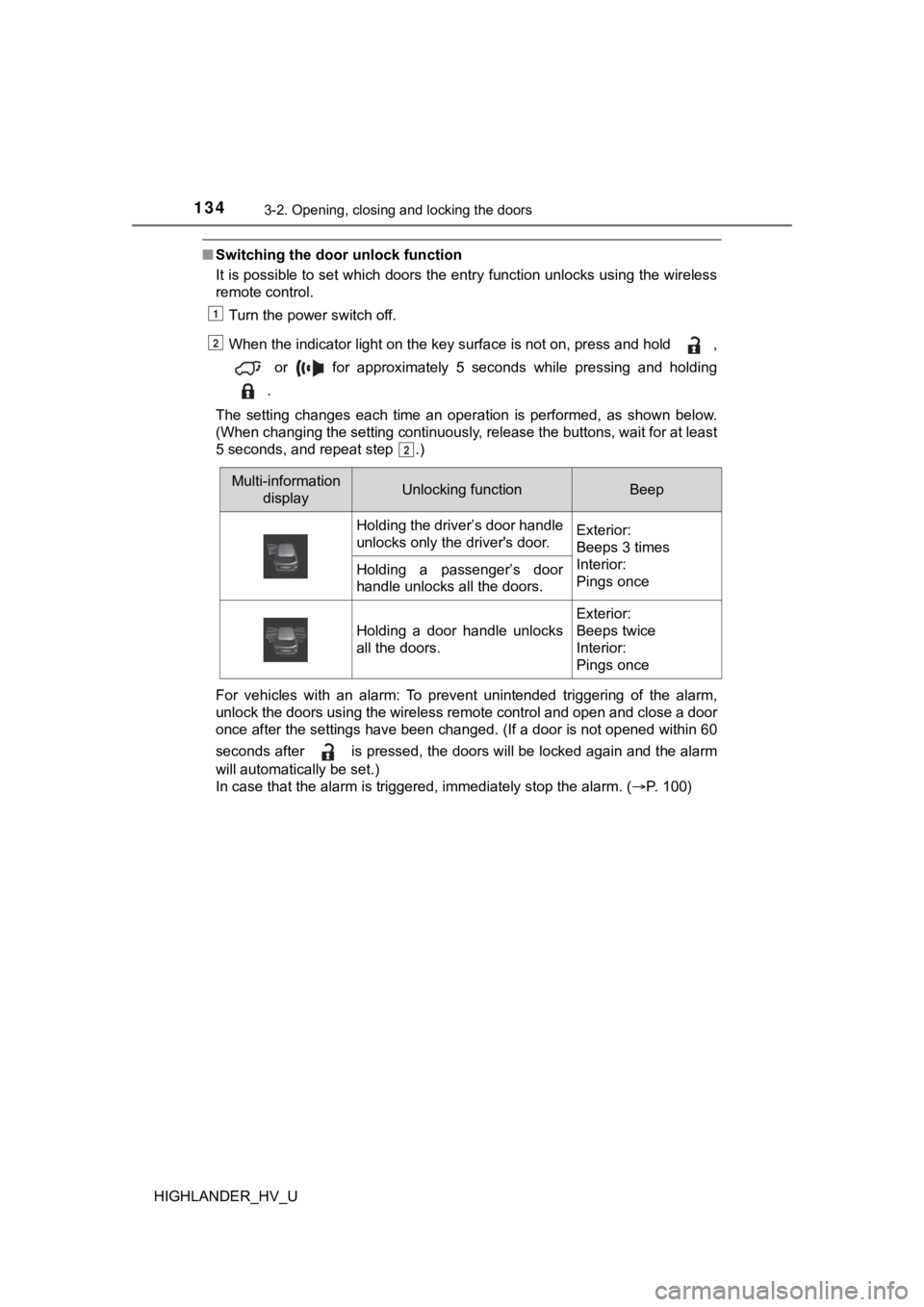
■Switching the door unlock function
It is possible to set which doors the entry function unlocks using the wireless
remote control.
Turn the power switch off.
When the indicator light on the key surface is not on, press and hold , or for approximately 5 seconds while pressing and holding
.
The setting changes each time an operation is performed, as sho wn below.
(When changing the setting continuously, release the buttons, w ait for at least
5 seconds, and repeat step .)
For vehicles with an alarm: To prevent unintended triggering of the alarm,
unlock the doors using the wireless remote control and open and close a door
once after the settings have been changed. (If a door is not op ened within 60
seconds after is pressed, the doors will be locked again and t he alarm
will automatically be set.)
In case that the alarm is triggered, immediately stop the alarm . ( P. 1 0 0 )
1
2
2
Multi-information
displayUnlocking functionBeep
Holding the driver’s door handle
unlocks only the driver's door.Exterior:
Beeps 3 times
Interior:
Pings once
Holding a passenger’s door
handle unlocks all the doors.
Holding a door handle unlocks
all the doors.
Exterior:
Beeps twice
Interior:
Pings once
Page 156 of 716

1563-2. Opening, closing and locking the doors
HIGHLANDER_HV_U■
Note for the entry function
●Even when the electronic key is within the effective range (det ection areas),
the system may not operate properly in the following cases:
• The electronic key is too close to the window or outside door handle, near
the ground, or in a high place when the doors are locked or unl ocked.
• The electronic key is near the ground or in a high place, or t oo close to
the rear bumper center when the back door is opened.
• The electronic key is on the instrument panel or floor, or in the auxiliary
box of the driver's side instrument panel, door pockets or glove box when
the hybrid system is started or power switch modes are changed.
● Do not leave the electronic key on top of the instrument panel or near the
door pockets when exiting the vehicle. Depending on the radio w ave recep-
tion conditions, it may be detected by the antenna outside the cabin and the
door will become lockable from the outside, possibly trapping the electronic
key inside the vehicle.
● As long as the electronic key is within the effective range, th e doors may be
locked or unlocked by anyone. However, only the doors detecting the elec-
tronic key can be used to unlock the vehicle.
● Even if the electronic key is not inside the vehicle, it may be possible to start
the hybrid system if the electronic key is near the window.
● The doors may unlock or lock if a large amount of water splashe s on the
door handle, such as in the rain or in a car wash when the elec tronic key is
within the effective range. (The doors will automatically be lo cked after
approximately 60 seconds if the doors are not opened and closed.)
● If the wireless remote control is used to lock the doors when t he electronic
key is near the vehicle, there is a possibility that the door m ay not be
unlocked by the entry function. (Use the wireless remote contro l to unlock
the doors.)
● Touching the door lock or unlock sensor while wearing gloves ma y prevent
lock or unlock operation. Remove the gloves and touch the lock or unlock
sensor again.
● When the lock operation is performed using the lock sensor, rec ognition sig-
nals will be shown up to two consecutive times. After this, no recognition
signals will be given.
● If the door handle becomes wet while the electronic key is with in the effec-
tive range, the door may lock and unlock repeatedly. In that ca se, follow the
following correction procedures to wash the vehicle:
• Place the electronic key in a location 6 ft. (2 m) or more awa y from the
vehicle. (Take care to ensure that the key is not stolen.)
• Set the electronic key to battery-saving mode to disable the s mart key
system. ( P. 154)
Page 157 of 716

1573-2. Opening, closing and locking the doors
3
Operation of each component
HIGHLANDER_HV_U●
If the electronic key is inside the vehicle and a door handle b ecomes wet
during a car wash, a message may be shown on the multi-informat ion dis-
play and a buzzer will sound outside the vehicle. To turn off t he alarm, lock
all the doors.
● The lock sensor may not work properly if it comes into contact with ice,
snow, mud, etc. Clean the lock sensor and attempt to operate it again, or
use the lock sensor on the lower part of the door handle.
● A sudden handle operation or a handle operation immediately aft er entering
the effective range may prevent the doors from being unlocked. Touch the
door unlock sensor and check that the doors are unlocked before pulling the
door handle again.
● Unlocking the vehicle may take more time if another electronic key is within
the effective range.
■ When the vehicle is not driven for extended periods
●To prevent theft of the vehicle, do not leave the electronic ke y within 6 ft. (2
m) of the vehicle.
● The smart key system can be deactivated in advance. ( P. 671)
■ To operate the system properly
Make sure to carry the electronic key when operating the system. Do not get
the electronic key too close to the vehicle when operating the system from the
outside of the vehicle.
Depending on the position and holding condition of the electron ic key, the key
may not be detected correctly and the system may not operate pr operly. (The
alarm may go off accidentally, or the door lock prevention func tion may not
operate.)
■ If the smart key system does not operate properly
●Locking and unlocking the doors: Use the mechanical key. ( P. 622)
● Starting the hybrid system: P. 623
■ Customization
Settings (e. g. smart key system) can be changed.
(Customizable features: P. 666)
■ If the smart key system has been d eactivated in a customized setting
● Locking and unlocking the doors:
Use the wireless remote control or mechanical key. ( P. 131, 622)
● Starting the hybrid system and changing power switch modes: P. 623
● Stopping the hybrid system: P. 232
Page 189 of 716

1893-5. Opening and closing the windows
3
Operation of each component
HIGHLANDER_HV_U■
When the moon roof does not close normally
Perform the following procedure:
●If the moon roof closes but then re-opens slightly
Stop the vehicle.
Press and hold the “CLOSE” switch.
*1
The moon roof will close, reopen and pause for approximately 10 sec-
onds.
*2 Then it will close again, tilt up and pause for approximately 1 sec-
ond. Finally, it will tilt down, open and close.
Check to make sure that the moon roof is completely closed and then
release the switch.
● If the moon roof tilts down but then tilts back up
Stop the vehicle.
Press and hold the “UP” switch
*1 until the moon roof moves into the tilt
up position and stops.
Release the “UP” switch once and then press and hold the “UP” s witch
again.
*1
The moon roof will pause for approximately 10 seconds in the tilt up posi-
tion.
*2 Then it will adjust slightly and pause for approximately 1 second.
Finally, it will tilt down, open and close.
Check to make sure that the moon roof is completely closed and then
release the switch.
*1: If the switch is released at the incorrect time, the procedure will have to
be performed again from the beginning.
*2: If the switch is released after the above mentioned 10 second pause, automatic operation will be disabled. In that case, press and h old the
open/close switch in the close position or press and hold the “ UP” switch.
The moon roof will tilt up and pause for approximately 1 second . Then it
will tilt down, open and close. Check to make sure that the moon roof is
completely closed and then release the switch.
If the moon roof does not fully close even after performing the above proce-
dure correctly, have the vehicle inspected by your Toyota deale r.
■ Moon roof open warning buzzer
A buzzer sounds and a message is shown on the multi-information display in
the instrument cluster when the power switch is turned off and the driver’s
door is opened with the moon roof open.
■ Customization
Settings (e.g. linked door lock operation) can be changed.
(Customizable features: P. 666)
1
2
3
1
2
3
4
Page 207 of 716
2074-1. Before driving
4
Driving
HIGHLANDER_HV_U
NOTICE
■When parking the vehicle
Always set the parking brake and shift the shift lever to P. Failure to do so
may cause the vehicle to move or the vehicle may accelerate sud denly if
the accelerator pedal is accidentally depressed.
■ Avoiding damage to vehicle parts
● Do not turn the steering wheel fully in either direction and ho ld it there for
an extended period of time.
Doing so may damage the power steering motor.
● When driving over bumps on the road, drive as slowly as possible to avoid
damaging the wheels, underside of the vehicle, etc.
■ If you get a flat tire while driving
A flat or damaged tire may cause the following situations. Hold the steering
wheel firmly and gradually depress the brake pedal to slow down the vehi-
cle.
● It may be difficult to control your vehicle.
● The vehicle will make abnormal sounds or vibrations.
● The vehicle will lean abnormally.
Information on what to do in case of a flat tire ( P. 596)
■ When encountering flooded roads
Do not drive on a road that has flooded after heavy rain etc. D oing so may
cause the following serious damage to the vehicle:
● Engine stalling
● Short in electrical components
● Engine damage caused by water immersion
In the event that you drive on a flooded road and the vehicle i s flooded, be
sure to have your Toyota dealer check the following:
● Brake function
● Changes in quantity and quality of oil and fluid used for the e ngine, hybrid
transmission, rear electric motor (traction motor), etc.
● Lubricant condition for the bearings and suspension joints (whe re possi-
ble), and the function of all joints, bearings, etc.
Page 232 of 716
2324-2. Driving procedures
HIGHLANDER_HV_U
Stop the vehicle completely.
Set the parking brake ( P. 246), and shift the shift lever to P.
Press the power switch.
Release the brake pedal and check that “ACCESSORY” or
“IGNITION ON” on the multi-i nformation display is off.
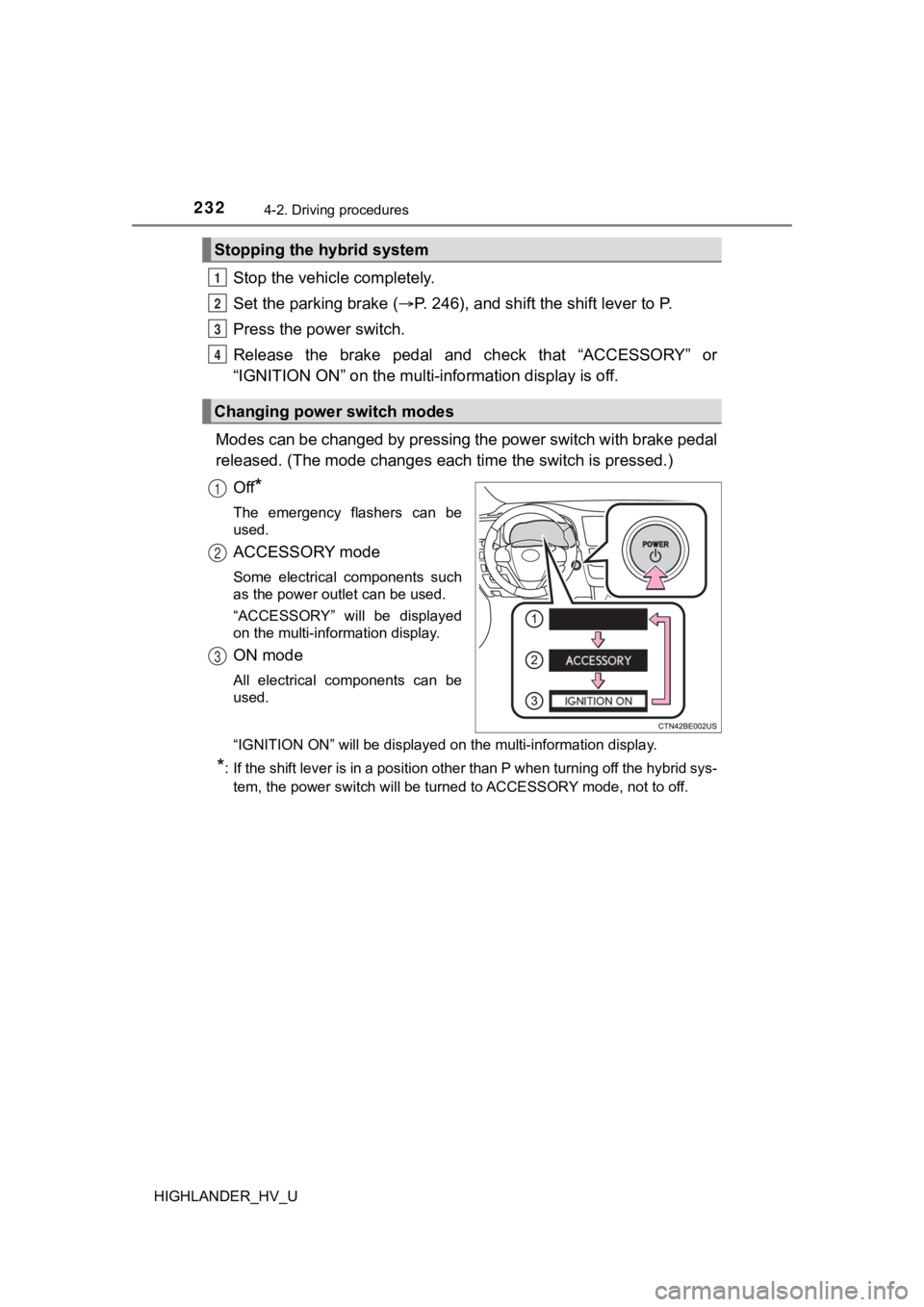
Modes can be changed by pressing the power switch with brake pe dal
released. (The mode changes each time the switch is pressed.)
Off
*
The emergency flashers can be
used.
ACCESSORY mode
Some electrical components such
as the power outlet can be used.
“ACCESSORY” will be displayed
on the multi-information display.
ON mode
All electrical components can be
used.
“IGNITION ON” will be displayed on the multi-information displa y.
*: If the shift lever is in a position other than P when turning off the hybrid sys-
tem, the power switch will be turned to ACCESSORY mode, not to off.
Stopping the hybrid system
Changing power switch modes
1
2
3
4
1
2
3
Page 235 of 716

2354-2. Driving procedures
4
Driving
HIGHLANDER_HV_U■
Operation of the power switch
●If the switch is not pressed shortly and firmly, the power switch mode may
not change or the hybrid system may not start.
● If attempting to restart the hybrid system immediately after tu rning the power
switch off, the hybrid system may not start in some cases. After turning the
power switch off, please wait a few seconds before restarting t he hybrid sys-
tem.
■ If the smart key system has been d eactivated in a customized setting
P. 622
WARNING
■ When starting the hybrid system
Always start the hybrid system while sitting in the driver’s se at. Do not
depress the accelerator pedal while starting the hybrid system under any
circumstances.
Doing so may cause an accident resulting in death or serious in jury.
■ Caution while driving
If hybrid system failure occurs while the vehicle is moving, do not lock or
open the doors until the vehicle reaches a safe and complete st op. Activa-
tion of the steering lock in this circumstance may lead to an a ccident, result-
ing in death or serious injury.
■ Stopping the hybrid system in an emergency
If you want to stop the hybrid system in an emergency while dri ving the
vehicle, press and hold the power switch for more than 2 second s, or press
it briefly 3 times or more in succession. ( P. 561)
However, do not touch the power switch while driving except in an emer-
gency. Turning the hybrid system off while driving will not cau se loss of
steering or braking control, however, power assist to the steer ing will be
lost. This will make it more difficult to steer smoothly, so yo u should pull over
and stop the vehicle as soon as it is safe to do so.