change time TOYOTA HIGHLANDER HYBRID 2019 (in English) Owner's Manual
[x] Cancel search | Manufacturer: TOYOTA, Model Year: 2019, Model line: HIGHLANDER HYBRID, Model: TOYOTA HIGHLANDER HYBRID 2019Pages: 716, PDF Size: 14.31 MB
Page 380 of 716

3805-6. Using an external device
HIGHLANDER_HV_U
■About iPod
●“Made for iPod”, “Made for iPhone” and “Made for iPad” mean that an elec-
tronic accessory has been designed to connect specifically to i Pod or
iPhone, or iPad, respectively, and has been certified by the de veloper to
meet Apple performance standards.
● Apple is not responsible for the operation of this device or it s compliance
with safety and regulatory standards. Please note that the use of this acces-
sory with iPod, iPhone or iPad may affect wireless performance.
● iPad, iPhone, iPod, iPod classic, iPod nano, and iPod touch are trademarks
of Apple Inc., registered in the U.S. and other countries. Lightning is a trade-
mark of Apple Inc.
■ iPod cover art
●Depending on the iPod and songs in the iPod, iPod cover art may be dis-
played.
● This function can be changed to on/off. ( P. 364)
● It may take time to display iPod cover art, and the iPod may no t be operated
while the cover art display is in process.
● Only iPod cover art that is saved in JPEG format can be display ed.
■ iPod functions
●When an iPod is connected and the audio source is changed to iP od mode,
the iPod will resume play from the same point in which it was last used.
● Depending on the iPod that is connected to the system, certain functions
may not be available. If a function is unavailable due to a mal function (as
opposed to a system specification), disconnecting the device and recon-
necting it may resolve the problem.
● While connected to the system, the iPod cannot be operated with its own
controls. It is necessary to use the controls of the vehicle's Entune Audio
instead.
● When the battery level of an iPod is very low, the iPod may not operate. If
so, charge the iPod before use.
● Compatible models ( P. 3 8 2 )
Page 440 of 716
440
HIGHLANDER_HV_U
6-1. Using the air conditioning system and defogger
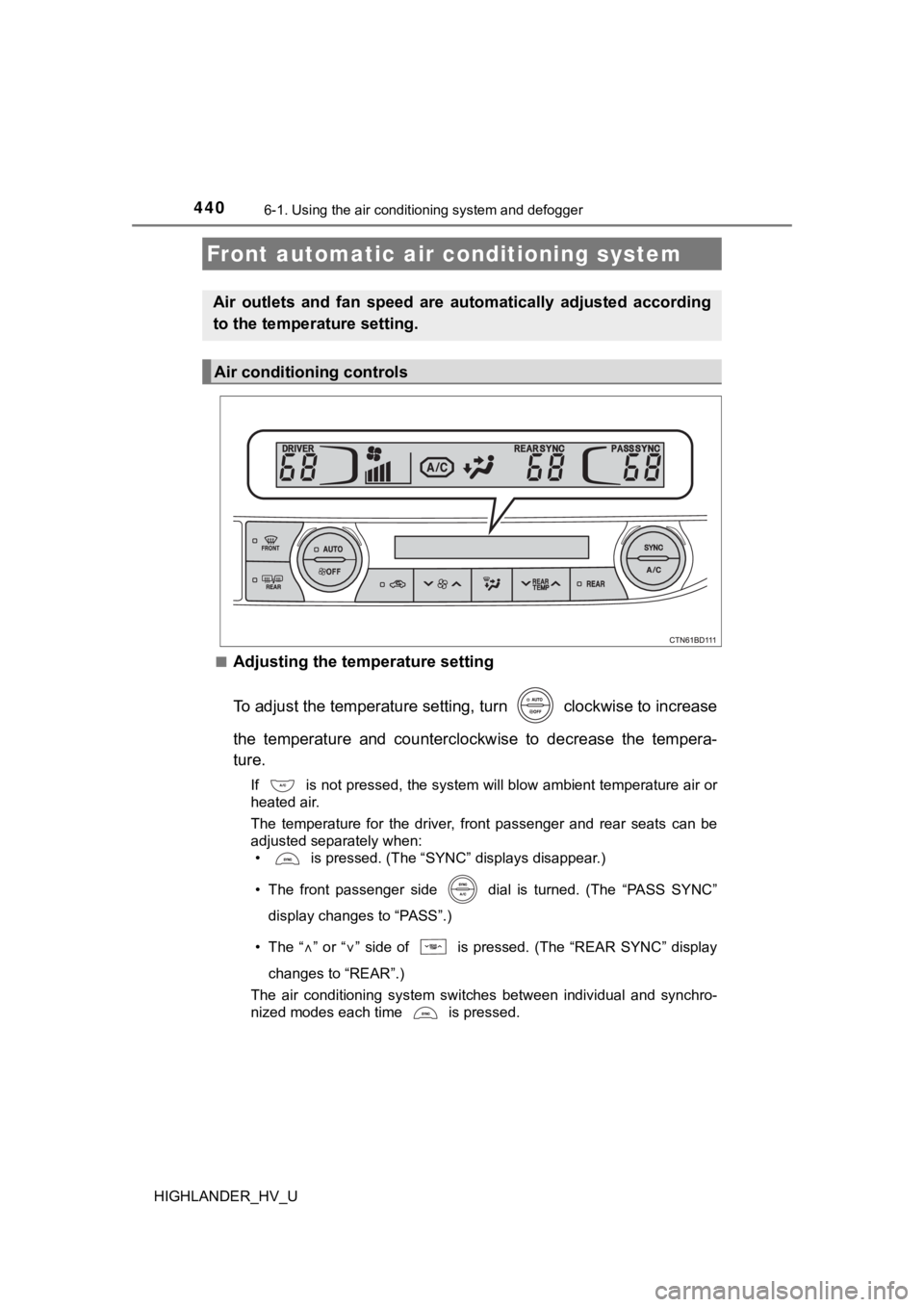
■Adjusting the temperature setting
To adjust the temperature setting, turn clockwise to increase
the temperature and counterclockwise to decrease the tempera-
ture.
If is not pressed, the system will blow ambient temperature air or
heated air.
The temperature for the driver, front passenger and rear seats can be
adjusted separately when:
• is pressed. (The “SYNC” displays disappear.)
• The front passenger side dial is turned. (The “PASS SYNC”
display changes to “PASS”.)
• The “
” or “” side of is pressed. (The “REAR SYNC” display
changes to “REAR”.)
The air conditioning system switches between individual and syn chro-
nized modes each time is pressed.
Front automatic air conditioning system
Air outlets and fan speed are automatically adjusted according
to the temperature setting.
Air conditioning controls
Page 441 of 716
4416-1. Using the air conditioning system and defogger
6
Interior features
HIGHLANDER_HV_U■
Fan speed setting
To adjust the fan speed, press
“” on to increase the fan
speed and “
” to decrease the fan speed.
Press to turn the fan off.
■
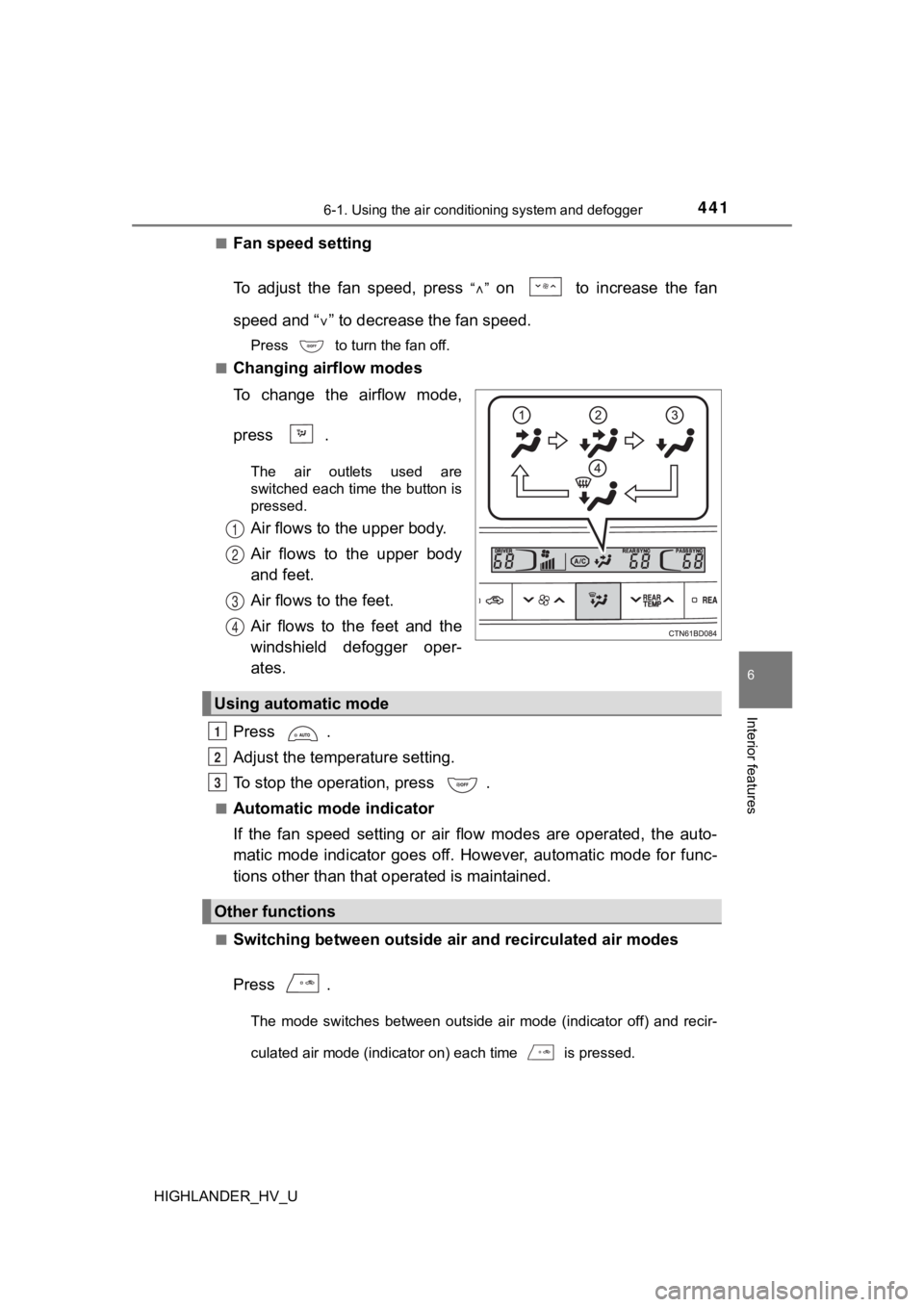
Changing airflow modes
To change the airflow mode,
press .
The air outlets used are
switched each time the button is
pressed.
Air flows to the upper body.
Air flows to the upper body
and feet.
Air flows to the feet.
Air flows to the feet and the
windshield defogger oper-
ates.
Press .
Adjust the temperature setting.
To stop the operation, press .
■Automatic mode indicator
If the fan speed setting or air flow modes are operated, the au to-
matic mode indicator goes off. However, automatic mode for func -
tions other than that o perated is maintained.
■Switching between outside air and recirculated air modes
Press .
The mode switches between outside air mode (indicator off) and recir-
culated air mode (indicator on) each time is pressed.
1
2
3
4
Using automatic mode
Other functions
1
2
3
Page 445 of 716
4456-1. Using the air conditioning system and defogger
6
Interior features
HIGHLANDER_HV_U■
Fogging up of the windows
●The windows will easily fog up when the humidity in the vehicle is high.
Turning on will dehumidify the air from the outlets and defog the wind-
shield effectively.
● If you turn off, the windows may fog up more easily.
● The windows may fog up if the recirculated air mode is used.
■ Windshield fog detection function
When automatic mode is set, the humidity sensor (P. 446) detects fog on
the windshield and controls the air conditioning system to prev ent fog.
■ Outside/recirculated air mode
●When driving on dusty roads such as tunnels or in heavy traffic, set the out-
side/recirculated air mode button to the recirculated air mode. This is effec-
tive in preventing outside air from entering the vehicle interi or. During
cooling operation, setting the recirculated air mode will also cool the vehicle
interior effectively.
● Outside/recirculated air mode may automatically switch dependin g on the
temperature setting or the inside temperature.
■ When the outside temperature exceeds 75°F (24°C) and the air co ndition-
ing system is on
● In order to reduce the air conditioning power consumption, the air condition-
ing system may switch to recirculated air mode automatically. This may also
reduce fuel consumption.
● Recirculated air mode is selected as a default mode when the power switch
is turned to ON mode.
● It is possible to switch to outside air mode at any time by pre ssing .
■ Ventilation and air conditioning odors
●To let fresh air in, set the air conditioning system to the out side air mode.
● During use, various odors from inside and outside the vehicle m ay enter into
and accumulate in the air conditioning system. This may then ca use odor to
be emitted from the vents.
● To reduce potential odors from occurring:
• It is recommended that the air conditioning system be set to o utside air
mode prior to turning the vehicle off.
• The start timing of the blower may be delayed for a short peri od of time
immediately after the air conditioning system is started in aut omatic
mode.
■ Air conditioning filter
P. 537
■ Customization
Settings (e.g. A/C auto switch operation) can be changed.
(Customizable features P. 666)
Page 448 of 716
4486-1. Using the air conditioning system and defogger
HIGHLANDER_HV_U■
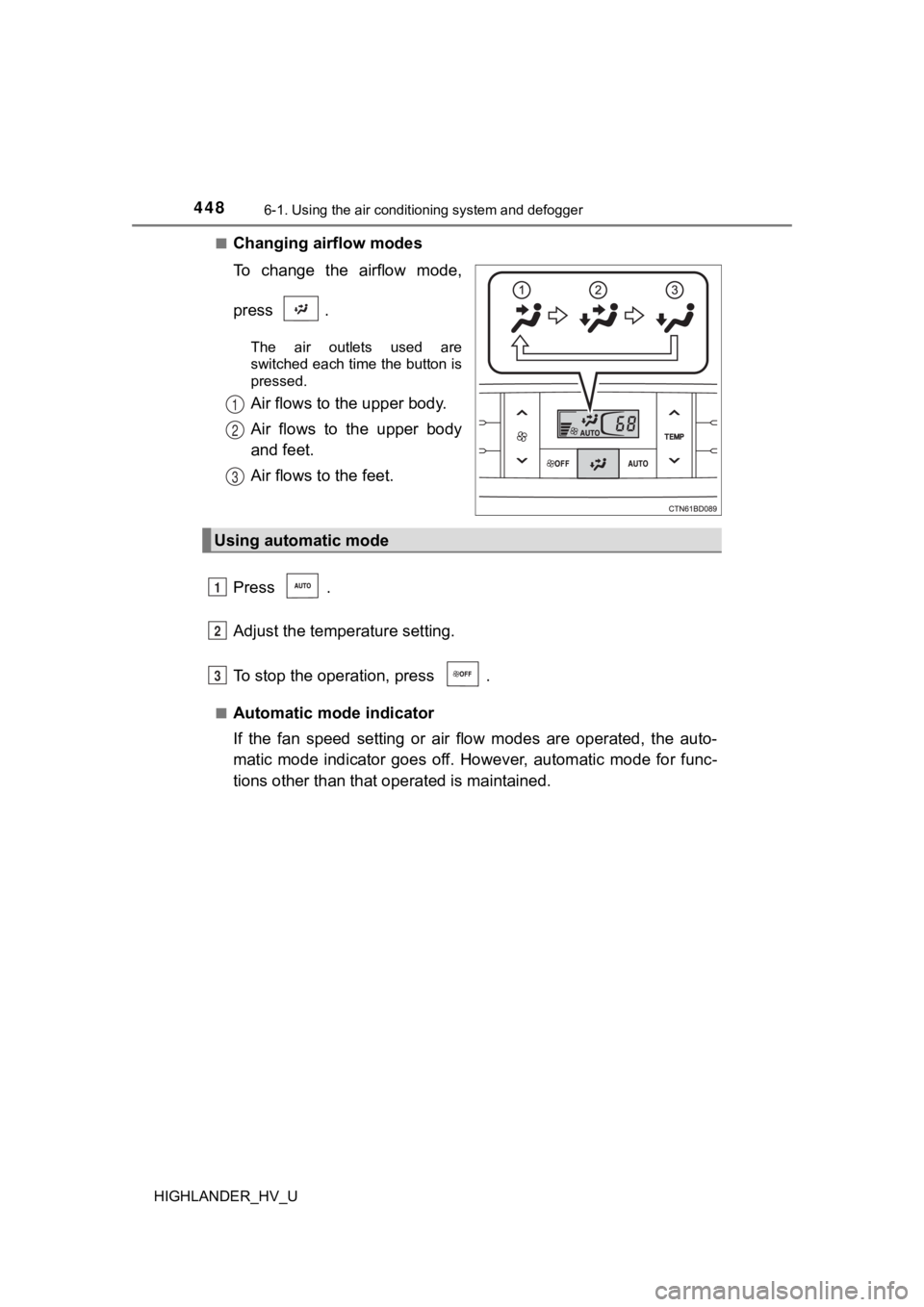
Changing airflow modes
To change the airflow mode,
press .
The air outlets used are
switched each time the button is
pressed.
Air flows to the upper body.
Air flows to the upper body
and feet.
Air flows to the feet.
Press .
Adjust the temperature setting.
To stop the operation, press .
■Automatic mode indicator
If the fan speed setting or air flow modes are operated, the au to-
matic mode indicator goes off. However, automatic mode for func -
tions other than that o perated is maintained.
1
2
3
Using automatic mode
1
2
3
Page 454 of 716
4546-2. Using the interior lights
HIGHLANDER_HV_U
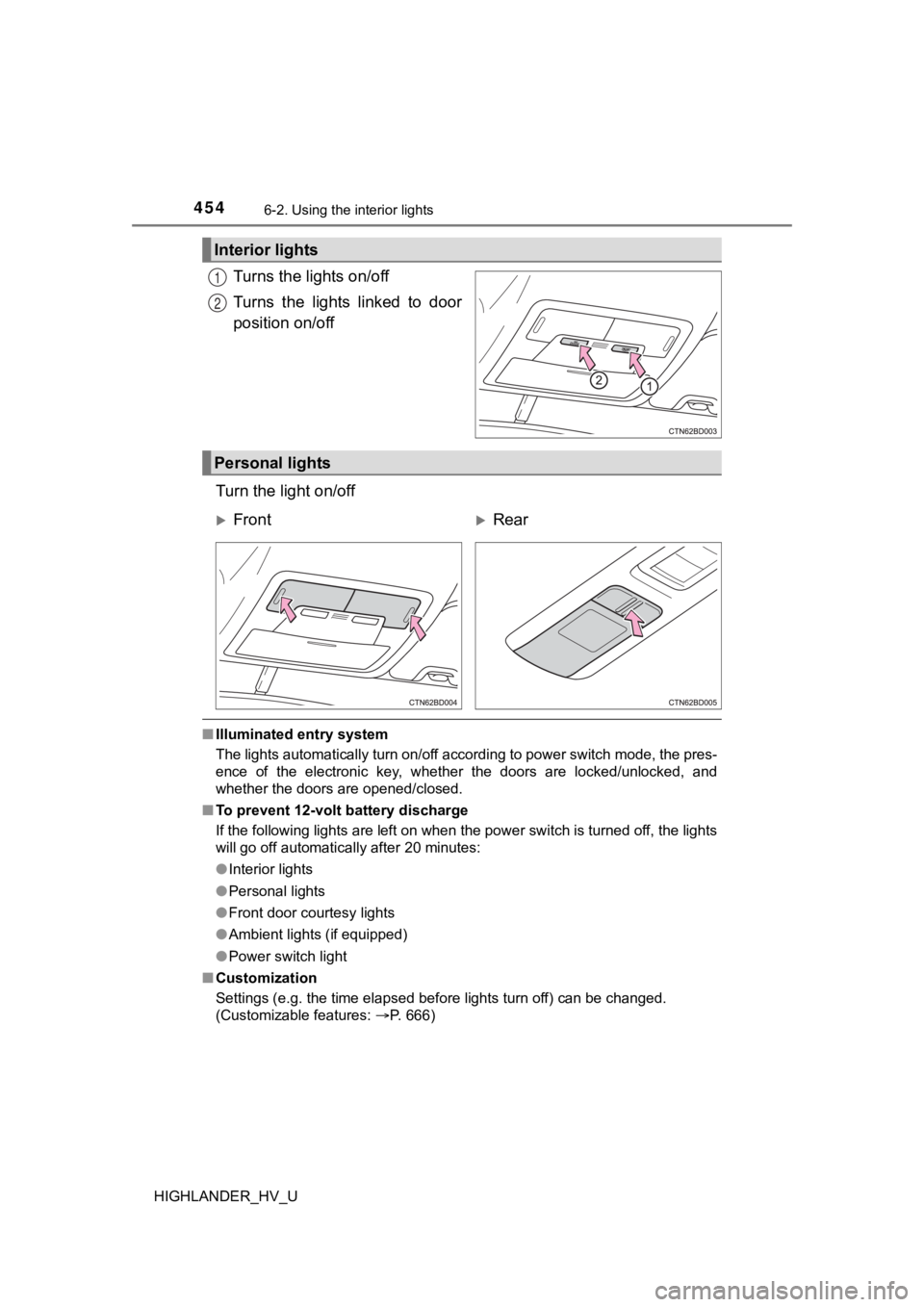
Turns the lights on/off
Turns the lights linked to door
position on/off
Turn the light on/off
■ Illuminated entry system
The lights automatically turn on/off according to power switch mode, the pres-
ence of the electronic key, whether the doors are locked/unlocked, and
whether the doors are opened/closed.
■ To prevent 12-volt battery discharge
If the following lights are left on when the power switch is tu rned off, the lights
will go off automatically after 20 minutes:
● Interior lights
● Personal lights
● Front door courtesy lights
● Ambient lights (if equipped)
● Power switch light
■ Customization
Settings (e.g. the time elapsed before lights turn off) can be changed.
(Customizable features: P. 666)
Interior lights
1
2
Personal lights
FrontRear
Page 469 of 716
4696-4. Using the other interior features
6
Interior features
HIGHLANDER_HV_U
■The clock is displayed when
The power switch is in ACCESSORY or ON mode.
■ When the 12-volt battery is disconnected
The time display will automatically be set to 1:00.
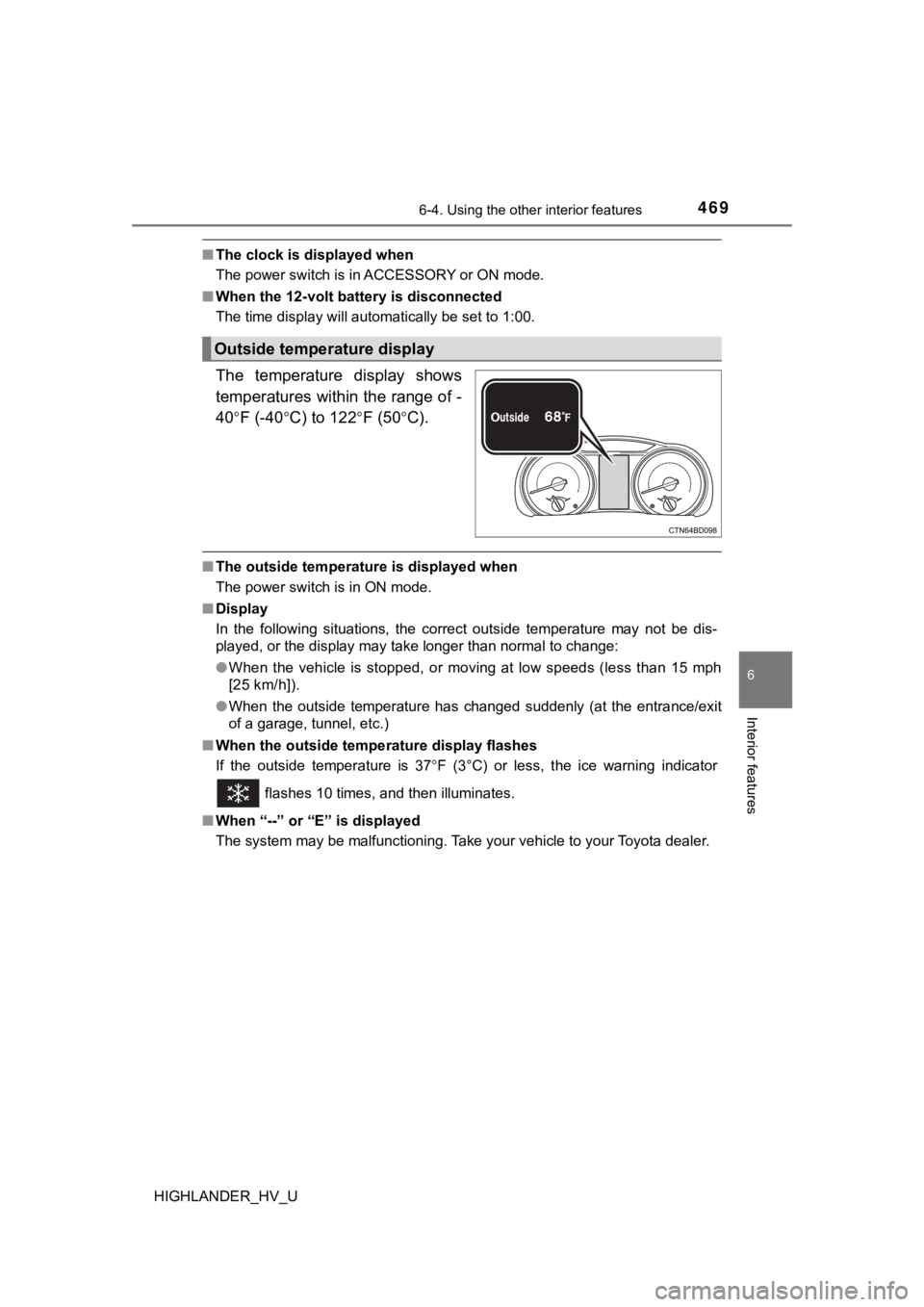
The temperature display shows
temperatures within the range of -
40
F (-40C) to 122F (50C).
■The outside temperature is displayed when
The power switch is in ON mode.
■ Display
In the following situations, the correct outside temperature ma y not be dis-
played, or the display may take longer than normal to change:
● When the vehicle is stopped, or moving at low speeds (less than 15 mph
[25 km/h]).
● When the outside temperature has changed suddenly (at the entra nce/exit
of a garage, tunnel, etc.)
■ When the outside tempe rature display flashes
If the outside temperature is 37 F (3°C) or less, the ice warning indicator
flashes 10 times, and then illuminates.
■ When “--” or “E” is displayed
The system may be malfunctioning. Take your vehicle to your Toyota dealer.
Outside temperature display
Page 624 of 716

6248-2. Steps to take in an emergency
HIGHLANDER_HV_U
■Stopping the hybrid system
Shift the shift lever to P and press the power switch as you normally do when
stopping the hybrid system.
■ Replacing the key battery
As the above procedure is a temporary measure, it is recommende d that the
electronic key battery be replaced immediately when the battery is depleted.
( P. 539)
■ Changing power switch modes
Release the brake pedal and press the power switch in step abo ve.
The hybrid system does not start and modes will be changed each time the
switch is pressed. ( P. 232)
■ When the electronic key does not work properly
●Make sure that the smart key system has not been deactivated in the cus-
tomization setting. If it is off, turn the function on.
(Customizable features P. 666)
● Check if battery-saving mode is set. If it is set, cancel the f unction.
( P. 154)
WARNING
■ When using the mechanical key and operating the power windows o r
moon roof
Operate the power window or moon roof after checking to make su re that
there is no possibility of any passenger having any of their body parts
caught in the window or moon roof.
Also, do not allow children to operate the mechanical key. It is possible for
children and other passengers to get caught in the power window or moon
roof.
3
Page 673 of 716
6739-2. Customization
9
Vehicle specifications
HIGHLANDER_HV_U■
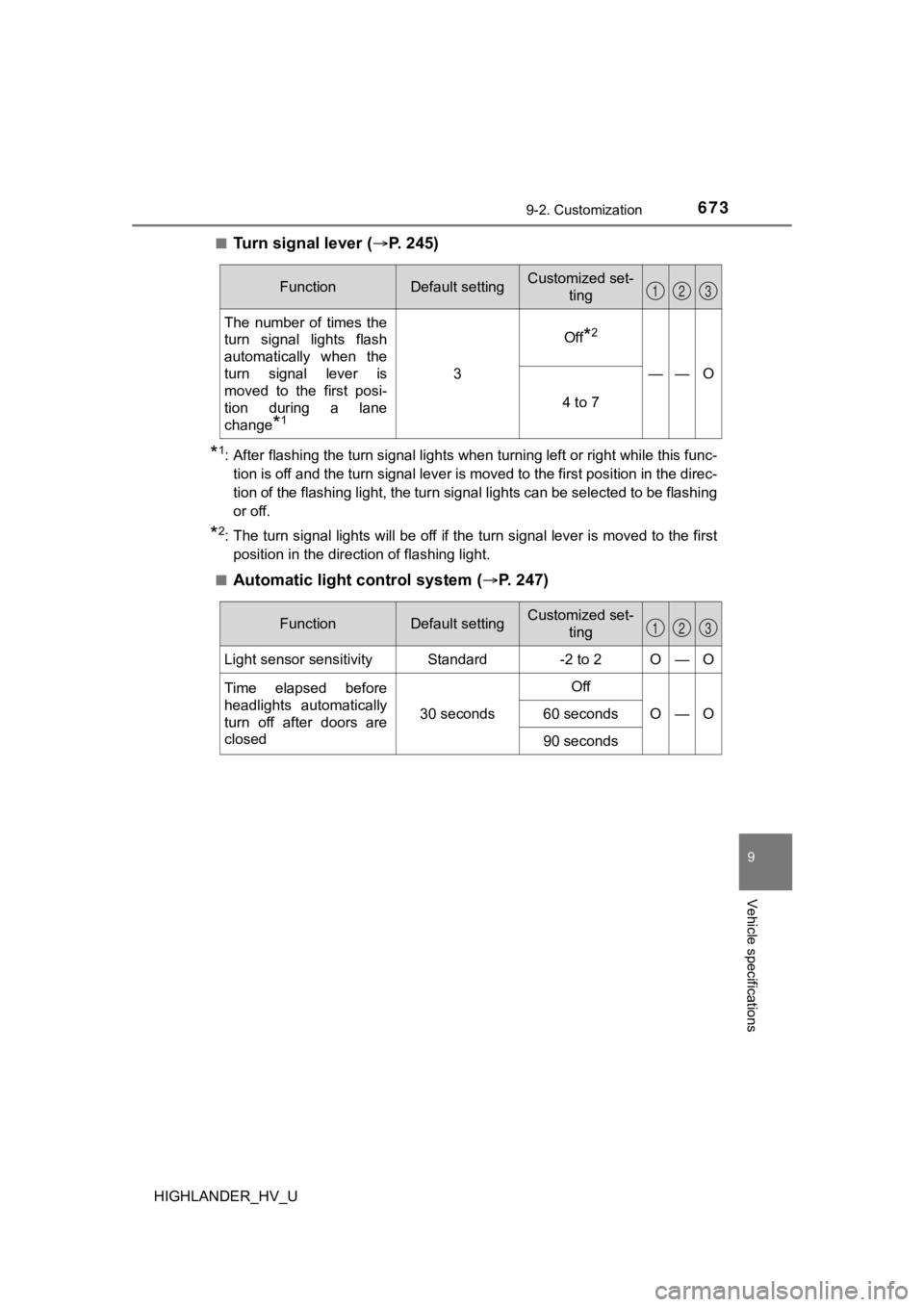
Turn signal lever (
P. 245)
*1: After flashing the turn signal lights when turning left or rig ht while this func-
tion is off and the turn signal lever is moved to the first pos ition in the direc-
tion of the flashing light, the turn signal lights can be selected to be flashing
or off.
*2: The turn signal lights will be off if the turn signal lever is moved to the first position in the direction of flashing light.
■
Automatic light control system ( P. 247)
FunctionDefault settingCustomized set-
ting
The number of times the
turn signal lights flash
automatically when the
turn signal lever is
moved to the first posi-
tion during a lane
change
*1
3
Off*2
——O
4 to 7
123
FunctionDefault settingCustomized set-
ting
Light sensor sensitivityStandard-2 to 2O—O
Time elapsed before
headlights automatically
turn off after doors are
closed
30 seconds
Off
O—O60 seconds
90 seconds
123
Page 676 of 716

6769-2. Customization
HIGHLANDER_HV_U
■Vehicle customization
●When the smart key system is off, the entry unlock function cannot be cus-
tomized.
● When the doors remain closed after unlocking the doors and the timer acti-
vated automatic door lock function activates, signals will be g enerated in
accordance with the operation buzzer volume and operational sig nal (Emer-
gency flashers) function settings.
■ Changing of the power back door opening angle (if equipped)
The opening angle setting can be changed through operation of e ither the
power back door switch or the audio system screen.
However, if the power switch is on and the power back door swit ch is used to
change the opening angle setting, the changed opening angle wil l not be
reflected on the audio system screen until the power switch is turned off and
then on again.
■ When customizing on the audio system screen
Stop the vehicle in a safe place, apply the parking brake, and shift the shift
lever to P. Also, to prevent 12-volt battery discharge, leave t he hybrid system
operating while customizing the features.
WARNING
■ During customization
As the hybrid system needs to be operating during customization, ensure
that the vehicle is parked in a place with adequate ventilation. In a closed
area such as a garage, exhaust gases including harmful carbon monoxide
(CO) may collect and enter the vehicle. This may lead to death or a serious
health hazard.
NOTICE
■ During customization
To prevent 12-volt battery discharge, ensure that the hybrid sy stem is oper-
ating while customizing features.