wipers TOYOTA HIGHLANDER HYBRID 2019 Owners Manual (in English)
[x] Cancel search | Manufacturer: TOYOTA, Model Year: 2019, Model line: HIGHLANDER HYBRID, Model: TOYOTA HIGHLANDER HYBRID 2019Pages: 716, PDF Size: 14.31 MB
Page 3 of 716

3
1
9 8 6 5
4
3
2
HIGHLANDER_HV_U
10
7
4-1. Before drivingDriving the vehicle ............. 198
Cargo and luggage............ 208
Vehicle load limits ............. 213
Trailer towing..................... 214
Dinghy towing.................... 230
4-2. Driving procedures Power (ignition) switch ...... 231
EV drive mode................... 237
Hybrid transmission........... 239
Turn signal lever................ 245
Parking brake .................... 246
4-3. Operating the lights and wipers
Headlight switch ................ 247
Automatic High Beam ....... 251
Fog light switch ................. 255
Windshield wipers and washer ..................... 256
Rear window wiper and washer ..................... 260
4-4. Refueling Opening the fuel tank cap .......................... 262 4-5. Using the driving
support systems
Toyota Safety Sense P ...... 267
PCS (Pre-Collision System)..... 274
LDA (Lane Departure Alert with steering
control) ............................ 288
Dynamic radar cruise control.............................. 298
Rear view monitor system ............................. 311
BSM (Blind Spot Monitor)......... 320
• BSM function ................. 325
• RCTA function ............... 329
Driving assist systems ....... 335
4-6. Driving tips Hybrid vehicle driving tips ....................... 341
Winter driving tips .............. 344
Utility vehicle precautions ...................... 348
4Driving
Page 16 of 716
16
HIGHLANDER_HV_U
Pictorial index
Pictorial index
■
Exterior
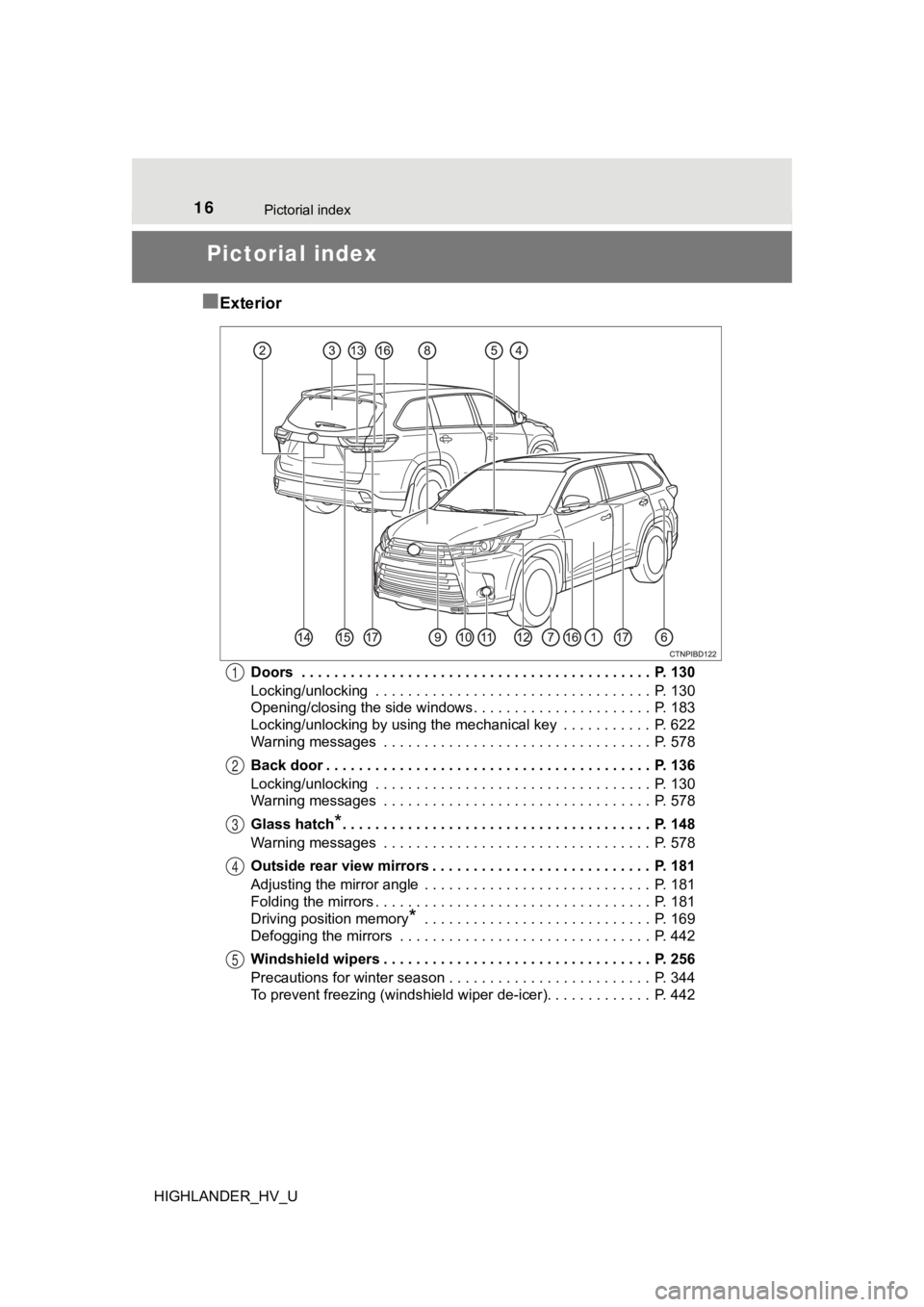
Doors . . . . . . . . . . . . . . . . . . . . . . . . . . . . . . . . . . . . . . . . . . . P. 130
Locking/unlocking . . . . . . . . . . . . . . . . . . . . . . . . . . . . . . . . . . P. 130
Opening/closing the side windows. . . . . . . . . . . . . . . . . . . . . . P. 183
Locking/unlocking by using the mechanical key . . . . . . . . . . . P. 622
Warning messages . . . . . . . . . . . . . . . . . . . . . . . . . . . . . . . . . P. 578
Back door . . . . . . . . . . . . . . . . . . . . . . . . . . . . . . . . . . . . . . . . P. 136
Locking/unlocking . . . . . . . . . . . . . . . . . . . . . . . . . . . . . . . . . . P. 130
Warning messages . . . . . . . . . . . . . . . . . . . . . . . . . . . . . . . . . P. 578
Glass hatch
*. . . . . . . . . . . . . . . . . . . . . . . . . . . . . . . . . . . . . . P. 148
Warning messages . . . . . . . . . . . . . . . . . . . . . . . . . . . . . . . . . P. 578
Outside rear view mirrors . . . . . . . . . . . . . . . . . . . . . . . . . . . P. 181
Adjusting the mirror angle . . . . . . . . . . . . . . . . . . . . . . . . . . . . P. 181
Folding the mirrors . . . . . . . . . . . . . . . . . . . . . . . . . . . . . . . . . . P. 181
Driving position memory
* . . . . . . . . . . . . . . . . . . . . . . . . . . . . P. 169
Defogging the mirrors . . . . . . . . . . . . . . . . . . . . . . . . . . . . . . . P. 442
Windshield wipers . . . . . . . . . . . . . . . . . . . . . . . . . . . . . . . . . P. 256
Precautions for winter season . . . . . . . . . . . . . . . . . . . . . . . . . P. 344
To prevent freezing (windshield wiper de-icer). . . . . . . . . . . . . P. 442
1
2
3
4
5
Page 197 of 716
197
4Driving
HIGHLANDER_HV_U4-1. Before driving
Driving the vehicle ............. 198
Cargo and luggage ........... 208
Vehicle load limits ............. 213
Trailer towing..................... 214
Dinghy towing ................... 230
4-2. Driving procedures Power (ignition) switch ...... 231
EV drive mode .................. 237
Hybrid transmission........... 239
Turn signal lever................ 245
Parking brake .................... 246
4-3. Operating the lights and wipers
Headlight switch ................ 247
Automatic High Beam ....... 251
Fog light switch ................. 255
Windshield wipers and washer ..................... 256
Rear window wiper and washer ..................... 260
4-4. Refueling Opening the fuel tank cap .......................... 262 4-5. Using the driving
support systems
Toyota Safety Sense P ..... 267
PCS (Pre-Collision System) .... 274
LDA (Lane Departure Alert with steering
control) ............................ 288
Dynamic radar cruise control ............................. 298
Rear view monitor system ............................ 311
BSM (Blind Spot Monitor) ........ 320
• BSM function ................ 325
• RCTA function .............. 329
Driving assist systems ...... 335
4-6. Driving tips Hybrid vehicle driving tips ....................... 341
Winter driving tips ............. 344
Utility vehicle precautions ..................... 348
Page 247 of 716
247
4
Driving
HIGHLANDER_HV_U
4-3. Operating the lights and wipers
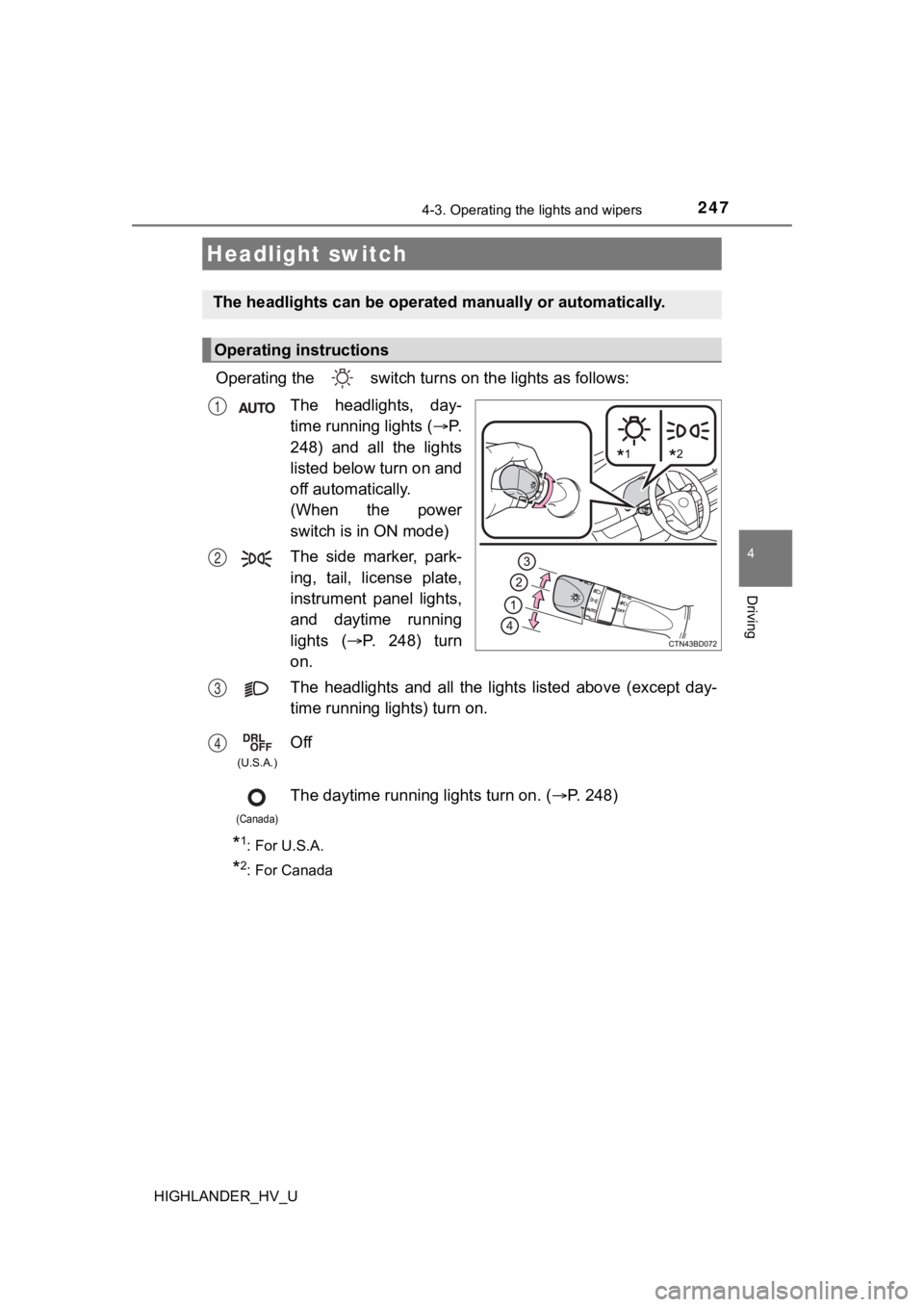
Operating the switch turn s on the lights as follows:
The headlights, day-
time running lights ( P.
248) and all the lights
listed below turn on and
off automatically.
(When the power
switch is in ON mode)
The side marker, park-
ing, tail, license plate,
instrument panel lights,
and daytime running
lights ( P. 2 4 8 ) t u r n
on.
The headlights and all the li ghts listed above (except day-
time running lights) turn on.
Off
The daytime running lights turn on. ( P. 248)
*1: For U.S.A.
*2: For Canada
Headlight switch
The headlights can be operated manually or automatically.
Operating instructions
*1*2
1
2
3
4
(U.S.A.)
(Canada)
Page 248 of 716
2484-3. Operating the lights and wipers
HIGHLANDER_HV_U
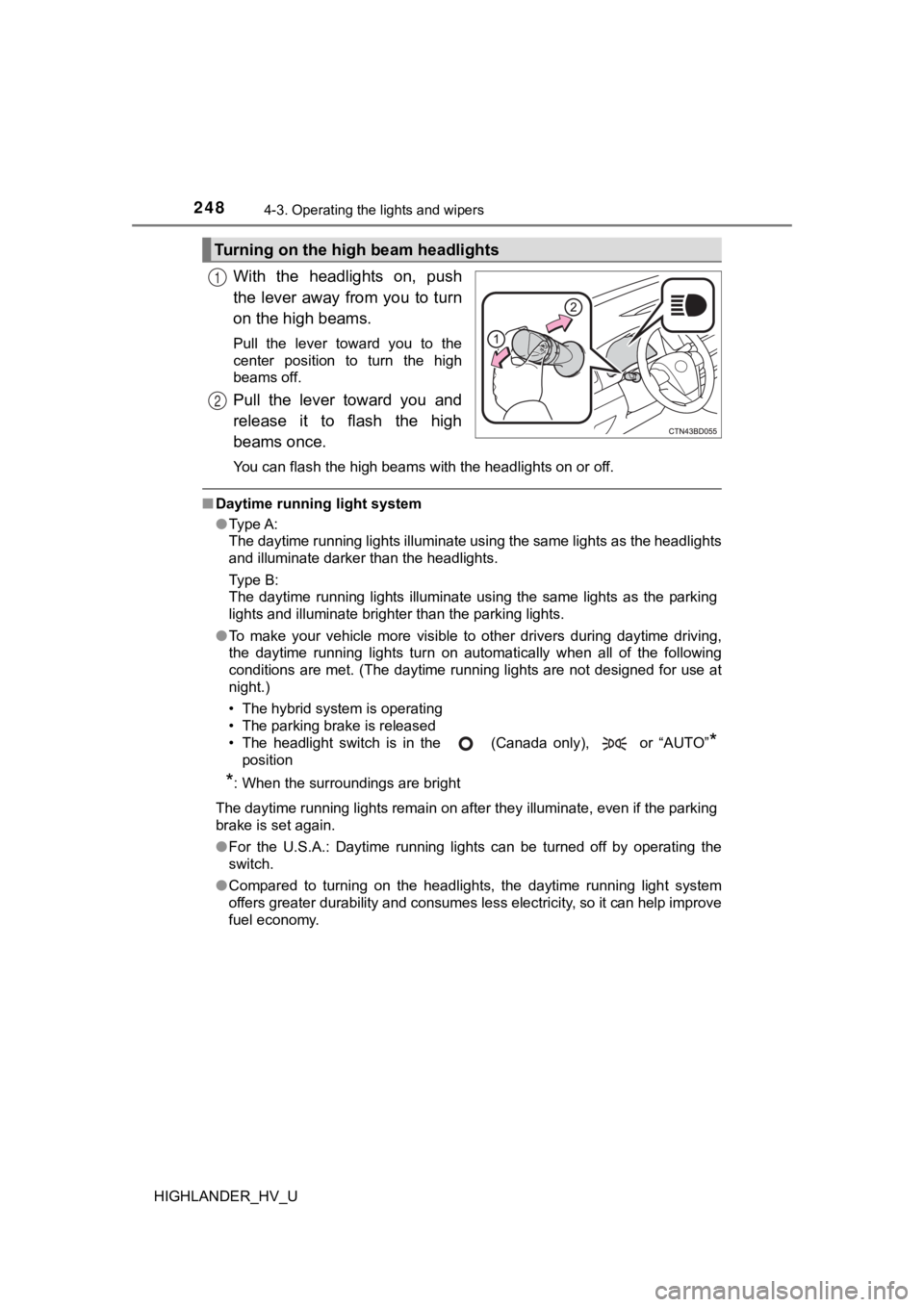
With the headlights on, push
the lever away from you to turn
on the high beams.
Pull the lever toward you to the
center position to turn the high
beams off.
Pull the lever toward you and
release it to flash the high
beams once.
You can flash the high beams with the headlights on or off.
■Daytime running light system
●Type A:
The daytime running lights illuminate using the same lights as the headlights
and illuminate darker than the headlights.
Type B:
The daytime running lights illuminate using the same lights as the parking
lights and illuminate brighter than the parking lights.
● To make your vehicle more visible to other drivers during dayti me driving,
the daytime running lights turn on automatically when all of the following
conditions are met. (The daytime running lights are not designe d for use at
night.)
• The hybrid system is operating
• The parking brake is released
• The headlight switch is in the (Canada only), or “AUTO”
*
position
*: When the surroundings are bright
The daytime running lights remain on after they illuminate, even if the parking
brake is set again.
● For the U.S.A.: Daytime running lights can be turned off by ope rating the
switch.
● Compared to turning on the headlights, the daytime running ligh t system
offers greater durability and consumes less electricity, so it can help improve
fuel economy.
Turning on the high beam headlights
1
2
Page 249 of 716
2494-3. Operating the lights and wipers
4
Driving
HIGHLANDER_HV_U■
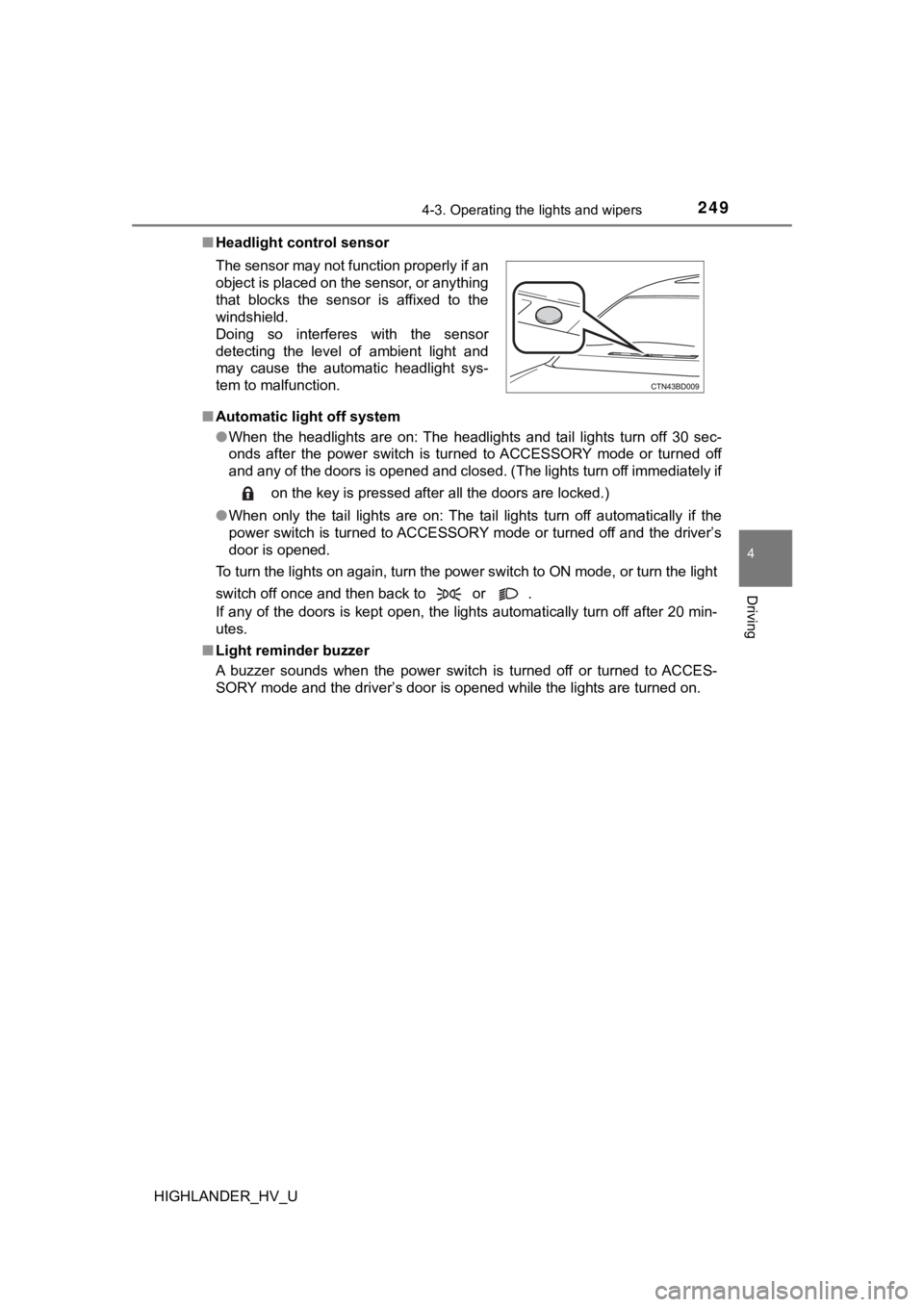
Headlight control sensor
■ Automatic light off system
●When the headlights are on: The headlights and tail lights turn off 30 sec-
onds after the power switch is turned to ACCESSORY mode or turn ed off
and any of the doors is opened and closed. (The lights turn off immediately if
on the key is pressed after all the doors are locked.)
● When only the tail lights are on: The tail lights turn off automatically if the
power switch is turned to ACCESSORY mode or turned off and the driver’s
door is opened.
To turn the lights on again, turn the power switch to ON mode, or turn the light
switch off once and then back to or .
If any of the doors is kept open, the lights automatically turn off after 20 min-
utes.
■ Light reminder buzzer
A buzzer sounds when the power switch is turned off or turned t o ACCES-
SORY mode and the driver’s door is opened while the lights are turned on.
The sensor may not function properly if an
object is placed on the sensor, or anything
that blocks the sensor is affixed to the
windshield.
Doing so interferes with the sensor
detecting the level of ambient light and
may cause the automatic headlight sys-
tem to malfunction.
Page 250 of 716

2504-3. Operating the lights and wipers
HIGHLANDER_HV_U■
Battery-saving function
In the following conditions, the remaining lights will go off automatically after
20 minutes in order to prevent the vehicle battery from being d ischarged:
● The headlights and/or tail lights are on.
● The power switch is turned to ACCESSORY mode or turned off.
This function will be canceled in any of the following situatio ns:
● When the power switch is turned to ON mode.
● When the light switch is operated.
● When any of the doors is opened or closed.
■ Customization
Settings (e.g. light sensor sensitivity) can be changed.
(Customizable features: P. 673)
NOTICE
■To prevent 12-volt b attery discharge
Do not leave the lights on longer than necessary when the hybri d system is
off.
Page 251 of 716
2514-3. Operating the lights and wipers
4
Driving
HIGHLANDER_HV_U
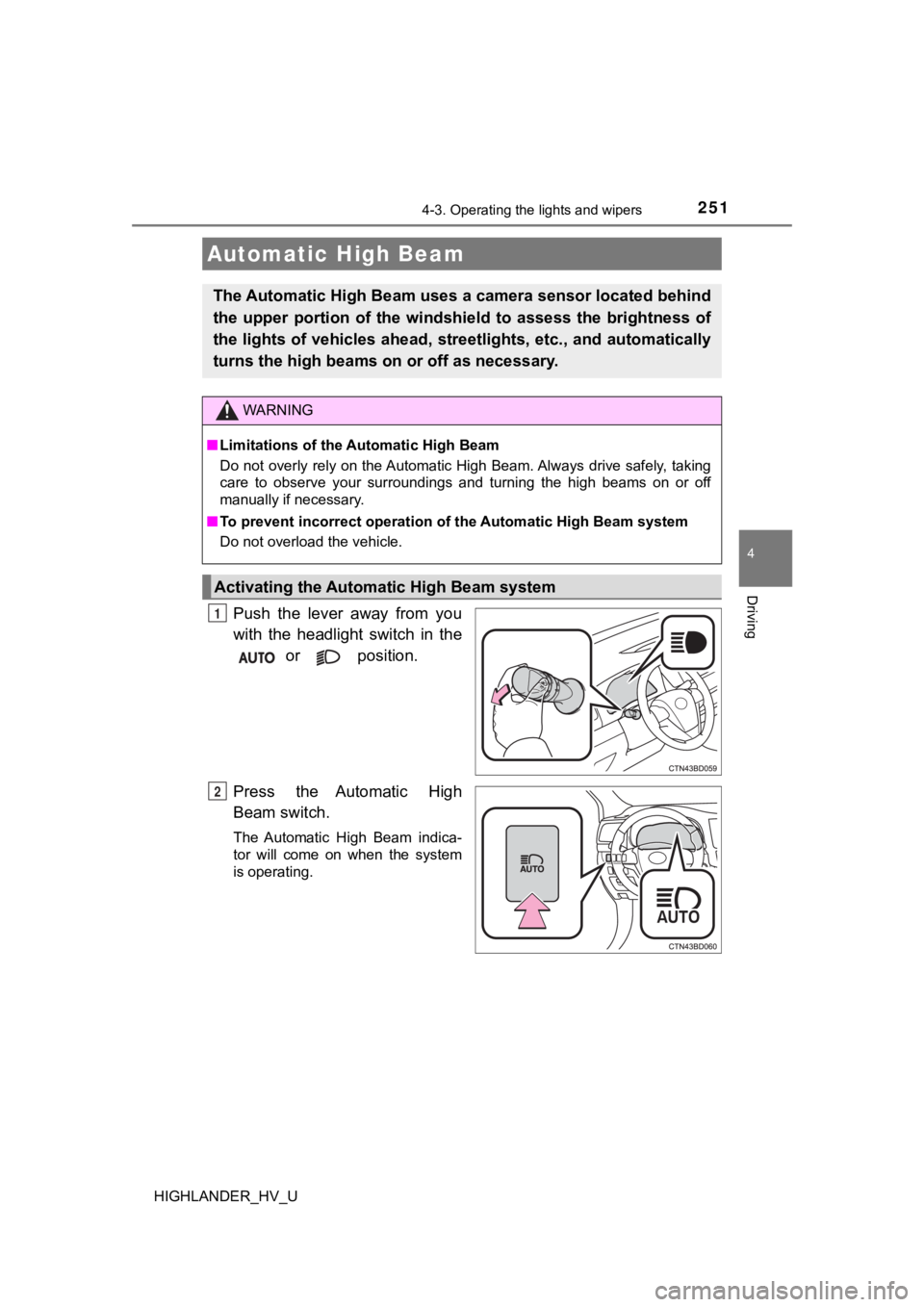
Push the lever away from you
with the headlight switch in the
or position.
Press the Automatic High
Beam switch.
The Automatic High Beam indica-
tor will come on when the system
is operating.
Automatic High Beam
The Automatic High Beam uses a camera sensor located behind
the upper portion of the windshi eld to assess the brightness of
the lights of vehicles ahead, streetlights, etc., and automatic ally
turns the high beams on or off as necessary.
WARNING
■Limitations of the Automatic High Beam
Do not overly rely on the Automatic High Beam. Always drive saf ely, taking
care to observe your surroundings and turning the high beams on or off
manually if necessary.
■ To prevent incorrect operation o f the Automatic High Beam syste m
Do not overload the vehicle.
Activating the Automatic High Beam system
1
2
Page 252 of 716
2524-3. Operating the lights and wipers
HIGHLANDER_HV_U■
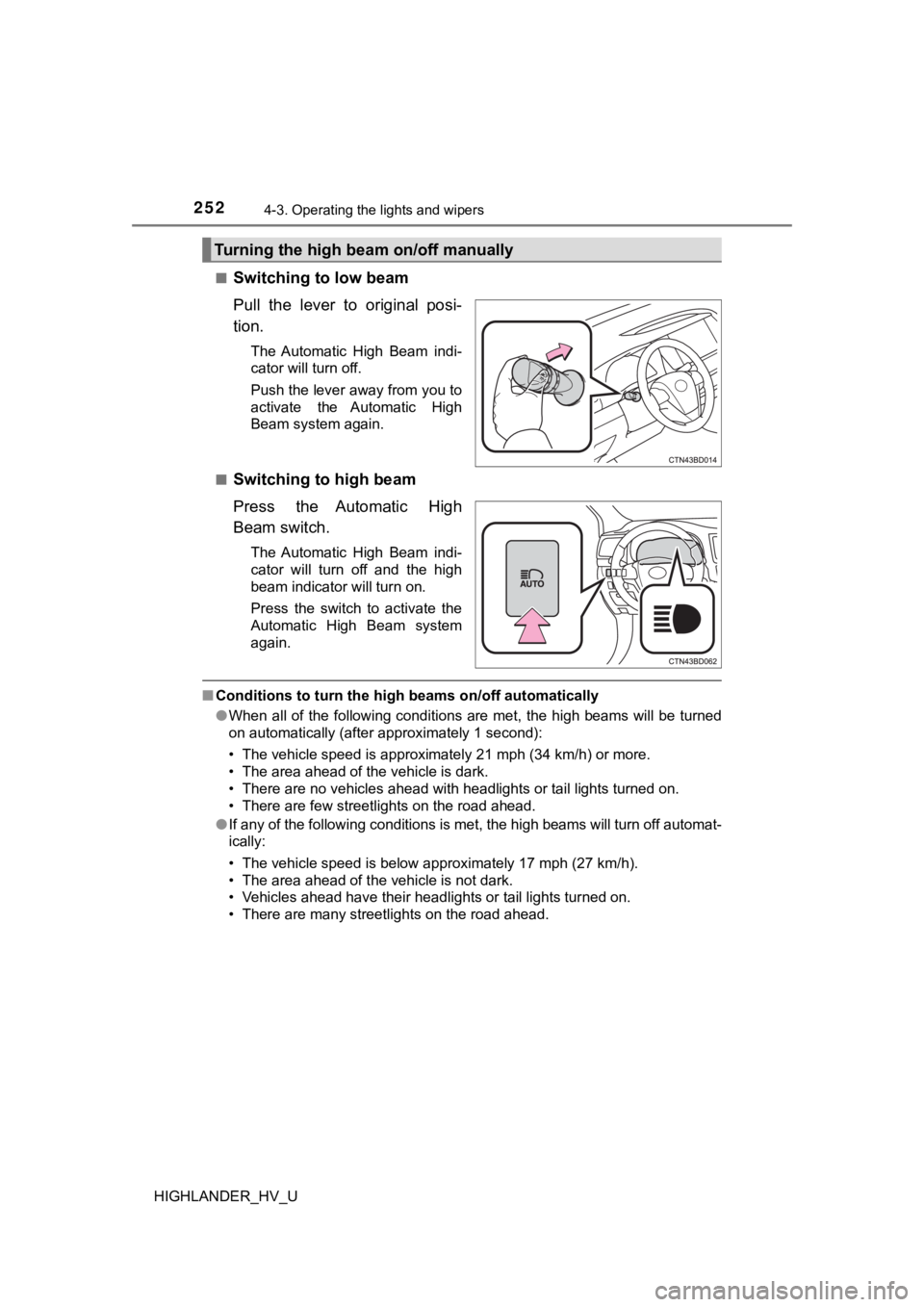
Switching to low beam
Pull the lever to original posi-
tion.
The Automatic High Beam indi-
cator will turn off.
Push the lever away from you to
activate the Automatic High
Beam system again.
■
Switching to high beam
Press the Automatic High
Beam switch.
The Automatic High Beam indi-
cator will turn off and the high
beam indicator will turn on.
Press the switch to activate the
Automatic High Beam system
again.
■ Conditions to turn the high beams on/off automatically
●When all of the following conditions are met, the high beams will be turned
on automatically (after approximately 1 second):
• The vehicle speed is approximately 21 mph (34 km/h) or more.
• The area ahead of the vehicle is dark.
• There are no vehicles ahead with headlights or tail lights turned on.
• There are few streetlights on the road ahead.
● If any of the following conditions is met, the high beams will turn off automat-
ically:
• The vehicle speed is below approximately 17 mph (27 km/h).
• The area ahead of the vehicle is not dark.
• Vehicles ahead have their headlights or tail lights turned on.
• There are many streetlights on the road ahead.
Turning the high beam on/off manually
Page 253 of 716
2534-3. Operating the lights and wipers
4
Driving
HIGHLANDER_HV_U■
Camera sensor detection information
●The high beams may not be automatically turned off in the follo wing situa-
tions:
• When a vehicle suddenly appears from around a curve
• When the vehicle is cut in front of by another vehicle
• When vehicles ahead cannot be detected due to repeated curves, road
dividers or roadside trees
• When vehicles ahead appear in a faraway lane on a wide road
• When the lights of vehicles ahead are not on
● The high beams may be turned off if a vehicle ahead that is usi ng fog lights
without its headlights turned on is detected.
● House lights, street lights, traffic signals, and illuminated billboards or signs
and other reflective objects may cause the high beams to change to the low
beams, or the low beams to remain on.
● The following factors may affect the amount of time taken for t he high
beams to turn on or off:
• The brightness of the headlights, fog lights, and tail lights of vehicles
ahead
• The movement and direction of vehicles ahead
• When a vehicle ahead only has operational lights on one side
• When a vehicle ahead is a two-wheeled vehicle
• The condition of the road (gradient, curve, condition of the r oad surface,
etc.)
• The number of passengers and amount of luggage in the vehicle
● The high beams may turn on or off unexpectedly.
● Bicycles or similar vehicles may not be detected.
● In the following situations the system may not be able to correctly detect the
surrounding brightness level. This may cause the low beams to r emain on
or the high beams to flash or dazzle pedestrians or vehicles ah ead. In such
a case, it is necessary to manually switch between the high and low beams.
• When driving in inclement weather (heavy rain, snow, fog, sand storms,
etc.)
• When the windshield is obscured by fog, mist, ice, dirt, etc.
• When the windshield is cracked or damaged
• When the camera sensor is deformed or dirty
• When the temperature of the camera sensor is extremely high
• When the surrounding brightness level is equal to that of head lights, tail
lights or fog lights
• When headlights or tail lights of vehicles ahead are turned off, dirty, changing color, or not aimed properly
• When the vehicle is hit by water, snow, dust, etc. from a prec eding vehi-
cle
• When driving through an area of intermittently changing brightness and
darkness
• When frequently and repeatedly driving ascending/descending roads, or roads with rough, bumpy or uneven surfaces (such as stone-paved
roads, gravel roads, etc.)