ECO mode TOYOTA HILUX 2017 (in English) Workshop Manual
[x] Cancel search | Manufacturer: TOYOTA, Model Year: 2017, Model line: HILUX, Model: TOYOTA HILUX 2017Pages: 720, PDF Size: 112.19 MB
Page 448 of 720
4485-5. Using an external device
HILUX_OM_OM0K322E_(EE)
● File names
The only files that can be recognized as MP3/WMA and played are those
with the extension .mp3 or .wma.
● ID3 and WMA tags
ID3 tags can be added to MP3 files, making it possible to record the track
title, artist name, etc.
The system is compatible with ID3 Ver. 1.0, 1.1, and Ver. 2.2, 2.3, 2.4 ID3
tags. (The number of characters is based on ID3 Ver. 1.0 and 1.1.)
WMA tags can be added to WMA files, making it possible to record the
track title and artist name in the same way as with ID3 tags.
● MP3 and WMA playback
• When a device containing MP3 or WMA files is connected, all files in the
USB memory device are checked. Once the file check is finished, the first
MP3 or WMA file is played. To make the file check finish more quickly, we
recommend that you do not include any files other than MP3 or WMA
files or create any unnecessary folders.
• When the USB device is connected and the audio source is changed to
USB memory mode, the USB device will start playing the first file in the
first folder. If the same device is removed and reinserted (and the con-
tents have not been changed), the USB memory will resume play from
the same point in which it was last used.
● Extensions
If the file extensions .mp3 and .wma are used for files other than MP3 and
WMA files, they will be skipped (not played).
Page 479 of 720
4795-10. Bluetooth®
5
Audio system
HILUX_OM_OM0K322E_(EE)
■ Compatible models
● Bluetooth® specifications:
Ver. 1.1, or higher (Recommended: Ver. 2.1 + EDR or higher)
● Following Profiles:
• A2DP (Advanced Audio Distribution Profile) Ver. 1.0 or higher (recom-
mended: Ver. 1.2 or higher)
• AVRCP (Audio/Video Remote Control Profile) Ver. 1.0 or higher (recom-
mended: Ver. 1.3 or higher)
Portable players must correspond to the above specifications in order to be
connected to the Bluetooth® audio/phone. However, please note that some
functions may be limited depending on the type of portable player.
● Cellular phone
• HFP (Hands Free Profile) Ver. 1.0 or higher (Recommended: Ver. 1.5)
• OPP (Object Push Profile) Ver. 1.1
• PBAP (Phone Book Access Profile) Ver. 1.0
Page 496 of 720
4966-1. Using the air conditioning system and defogger
HILUX_OM_OM0K322E_(EE)
■Fogging up of the windows
● The windows will easily fog up when the humidity in the vehicle is high.
Turning (if equipped) on will dehumidify the air from the outlets and
defog the windshield effectively.
● If you turn (if equipped) off, the windows may fog up more easily.
● The windows may fog up if the recirculated air mode is used.
■ Outside/recirculated air mode
When driving on dusty roads such as tunnels or in heavy traffic, set the out-
side/recirculated air mode lever to . This is effective in preventing outside
air from entering the vehicle interior . During cooling operation, setting the
recirculated air mode will also cool the vehicle interior effectively.
■ When the outside temperature falls to nearly 0°C (32°F) (vehicles with
)
The dehumidification function may not operate even when is pressed.
■ Ventilation and air conditioning odors
● To let fresh air in, set the air conditioning system to the outside air mode.
● During use, various odors from inside and outside the vehicle may enter into
and accumulate in the air conditioning system. This may then cause odor to
be emitted from the vents.
● To reduce potential odors from occurring:
It is recommended that the air conditioning system be set to outside air
mode prior to turning the vehicle off.
Page 505 of 720
5056-1. Using the air conditioning system and defogger
6
Interior features
HILUX_OM_OM0K322E_(EE)
■Using automatic mode
Fan speed is adjusted automatically according to the temperature setting and
the ambient conditions.
Therefore, the fan may stop for a while until warm or cool air is ready to flow
immediately after is pressed.
■ Fogging up of the windows
● The windows will easily fog up when the humidity in the vehicle is high.
Turning on will dehumidify the air from the outlets and defog the wind-
shield effectively.
● If you turn off, the windows may fog up more easily.
● The windows may fog up if the recirculated air mode is used.
■ Outside/recirculated air mode
● When driving on dusty roads such as tunnels or in heavy traffic, press .
This is effective in preventing outside air from entering the vehicle interior.
During cooling operation, setting the reci rculated air mode will also cool the
vehicle interior effectively.
● Outside/recirculated air mode may automatically switch depending on the
temperature setting or the inside temperature.
■ Operation of the air conditioning system in Eco drive mode
● In Eco drive mode, the air conditioning system is controlled as follows to pri-
oritize fuel efficiency:
• Engine speed and compressor operation controlled to restrict heating/
cooling capacity
• Fan speed restricted when automatic mode is selected
● To improve air conditioning performance, perform the following operations.
• Adjust the fan speed
• Turn off Eco drive mode
• Adjust the temperature setting
■ When the outside temperature falls to nearly 0°C (32°F)
The dehumidification function may not operate even when is pressed.
Page 506 of 720
5066-1. Using the air conditioning system and defogger
HILUX_OM_OM0K322E_(EE)
■ Ventilation and air conditioning odors
● To let fresh air in, set the air conditioning system to the outside air mode.
● During use, various odors from inside and outside the vehicle may enter into
and accumulate in the air conditioning system. This may then cause odor to
be emitted from the vents.
● To reduce potential odors from occurring:
• It is recommended that the air conditioning system be set to outside air
mode prior to turning the vehicle off.
• For some models: The start timing of the blower may be delayed for a
short period of time immediately after the air conditioning system is
started in automatic mode.
■ Air conditioning system operations when the engine is stopped due to
the Stop & Start system (vehicles with Stop & Start system)
When the engine is stopped due to Stop & Start system operations, the
automatic air conditioning cooling, heating and dehumidification functions
turn off and the fan speed is decreased according to the outside tempera-
ture etc. or air blowing stops. To stop the air conditioning system from turn-
ing off, press the Stop & Start cancel switch and refrain from using the Stop
& Start system.
■ An odor comes from the air conditioning system due to the Stop & Start
system operation (vehicles with Stop & Start system)
When the engine is stopped due to Stop & Start system operations, an odor
caused by moisture may be detected. This does not indicate a malfunction.
■ Air conditioning filter
P. 573
Page 523 of 720
5236-4. Using the other interior features
HILUX_OM_OM0K322E_(EE)
6
Interior features
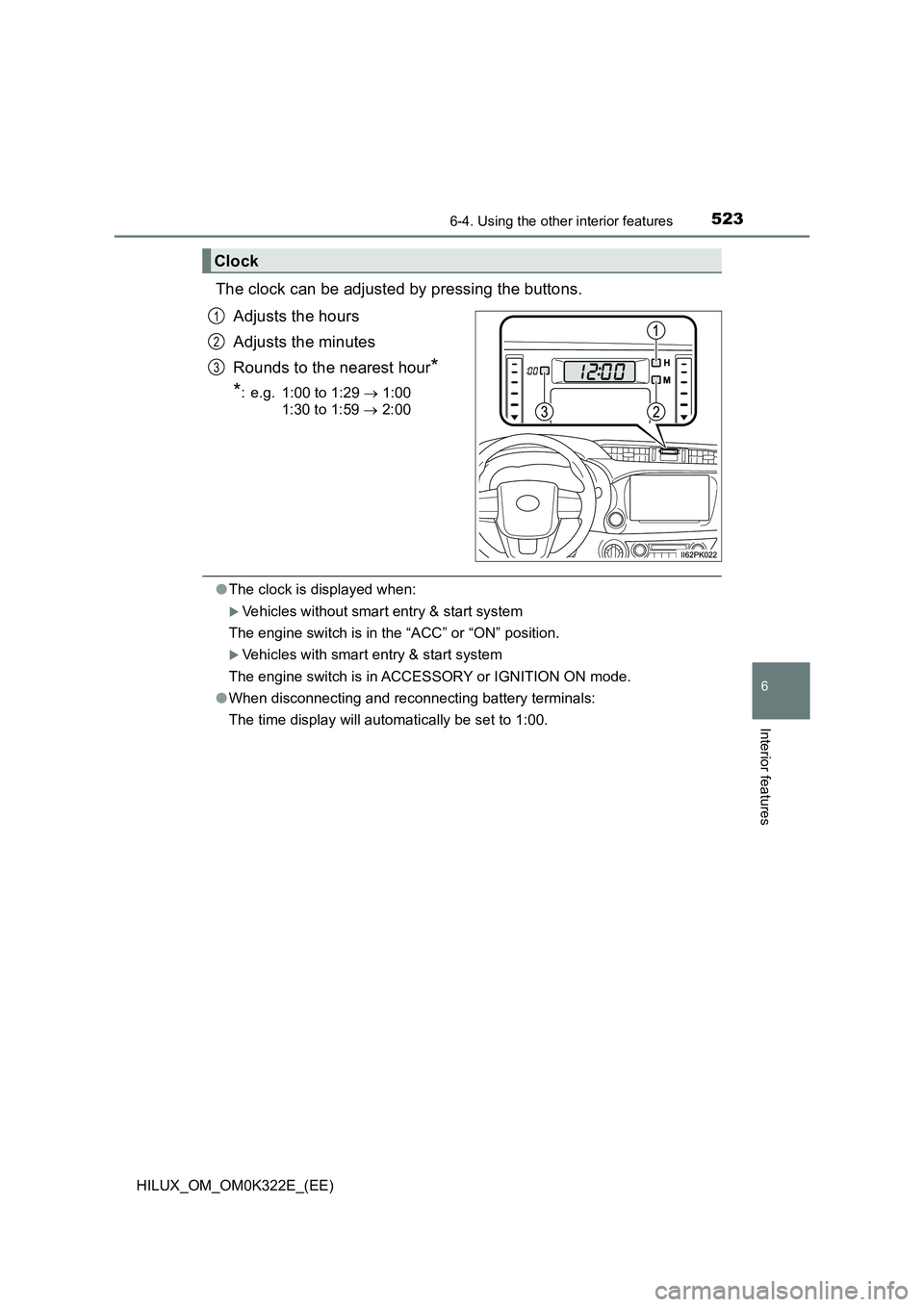
The clock can be adjusted by pressing the buttons.
Adjusts the hours
Adjusts the minutes
Rounds to the nearest hour*
*: e.g. 1:00 to 1:29 1:00
1:30 to 1:59 2:00
●The clock is displayed when:
Vehicles without smart entry & start system
The engine switch is in the “ACC” or “ON” position.
Vehicles with smart entry & start system
The engine switch is in ACCESSORY or IGNITION ON mode.
● When disconnecting and reconnecting battery terminals:
The time display will automatically be set to 1:00.
Clock
1
2
3
Page 530 of 720
5306-4. Using the other interior features
HILUX_OM_OM0K322E_(EE)
When the engine switch is turned to the “ON” position (vehicles with-
out smart entry & start system) or IGNITION ON mode (vehicles with
smart entry & start system), the red indicator light will illuminate for 10
seconds and then the green indicator light will illuminate, indicating
that the system is enabled. The indicator lights indicate the following:
●If the green indicator light illuminates and stays on, the system is
enabled.
●If the green indicator light flashes twice per second, an automatic or
manual Emergency Call is being made.
●If no indicator lights illuminate, the system is not enabled.
●If the red indicator light illuminates at any time other than immedi-
ately after the engine switch is turned to the “ON” position (vehicles
without smart entry & start system) or IGNITION ON mode (vehi-
cles with smart entry & start system), the system may be malfunc-
tioning or the backup battery may be depleted.
●If the red indicator light blinks for approximately 30 seconds during
an Emergency Call, the call has been disconnected or the cellular
network signal is weak.
The service life of the backup battery does not exceed 3 years.
A test mode is provided for to check the performance of the Emer-
gency Call system. To test the device, contact any authorized Toyota
retailer or Toyota authorized repairer, or any reliable repairer.
Indicator lights
Device test mode
Page 552 of 720
5527-3. Do-it-yourself maintenance
HILUX_OM_OM0K322E_(EE)
■ After changing the engine oil (models for model code destination W*)
The engine oil maintenance data should be reset. Perform the following pro-
cedures:
Switch the display to the trip meter A ( P. 134) when the engine switch is
in the “ON” position (vehicles without smart entry & start system) or IGNI-
TION ON mode (vehicles with smart entry & start system).
Turn the engine switch to the “LOCK” position (vehicles without smart entry
& start system) or off (vehicles with smart entry & start system).
While pressing the odometer/trip meter display change button ( P. 134),
turn the engine switch to the “ON” position (vehicles without smart entry &
start system) or IGNITION ON mode (vehicles with smart entry & start sys-
tem). (Do not start the engine because reset mode will be canceled.) Con-
tinue to press and hold the button for more than one second after the trip
meter displays “000000”.
*: See “Checking your vehicle’s model” if you are not sure of which model
your vehicle is. ( P. 1 1 )
WARNING
■Used engine oil
● Used engine oil contains potentially harmful contaminants which may
cause skin disorders such as inflammation and skin cancer, so care
should be taken to avoid prolonged and repeated contact. To remove used
engine oil from your skin, wash thoroughly with soap and water.
● Dispose of used oil and filters only in a safe and acceptable manner. Do
not dispose of used oil and filters in household trash, in sewers or onto the
ground. Call any authorized Toyota reta iler or Toyota authorized repairer,
or any reliable repairer, service station or auto parts store for information
concerning recycling or disposal.
● Do not leave used engine oil within the reach of children.
NOTICE
■To prevent serious engine damage
Check the oil level on a regular basis.
■ When replacing the engine oil
● Be careful not to spill engine oil on the vehicle components.
● Avoid overfilling, or the engine could be damaged.
● Check the oil level on the dipstick every time you refill the vehicle.
● Be sure the engine oil filler cap is properly tightened.
1
2
3
Page 557 of 720
5577-3. Do-it-yourself maintenance
HILUX_OM_OM0K322E_(EE)
7
Maintenance and care
■Before recharging
When recharging, the battery produces hydrogen gas which is flammable and
explosive. Therefore, observe the following before recharging:
● If recharging with the battery installed on the vehicle, be sure to disconnect
the ground cable.
● Make sure the power switch on the charger is off when connecting and dis-
connecting the charger cables to the battery.
■ After recharging/reconnecting the battery (vehicles with smart entry &
start system)
The engine may not start. Follow the procedure below to initialize the system.
Shift the shift lever to P (automat ic transmission) or depress the brake
pedal with the shift lever in N (manual transmission).
Open and close any of the doors.
Restart the engine.
● Unlocking the doors using the smart entry & start system may not be possi-
ble immediately after reconnecting the battery. If this happens, use the wire-
less remote control or the mechanical key to lock/unlock the doors.
● Start the engine with the engine switch in ACCESSORY mode. The engine
may not start with the engine switch turned off. However, the engine will
operate normally from the second attempt.
● The engine switch mode is recorded by the vehicle. If the battery is recon-
nected, the vehicle will return the engine switch mode to the status it was in
before the battery was disconnected. Make sure to turn off the engine
before disconnect the battery. Take extra care when connecting the battery
if the engine switch mode prior to discharge is unknown.
If the system will not start even after multiple attempts, contact any authorized
Toyota retailer or Toyota authorized repairer, or any reliable repairer.
■ If a symbol of a battery is shown on the multi-information display (if
equipped)
There is a malfunction in the vehicle’s charging system.
Immediately stop the vehicle in a safe place and contact any authorized
Toyota retailer or Toyota authorized repai rer, or any reliable repairer. Continu-
ing to drive the vehicle may be dangerous.
1
2
3
Page 560 of 720
5607-3. Do-it-yourself maintenance
HILUX_OM_OM0K322E_(EE)
You may drain the fuel filter yourself. However, as the operation is dif-
ficult, we recommend having it drained by any authorized Toyota
retailer or Toyota authorized repairer, or any reliable repairer. Even if
you decide to drain it yourself, contact any authorized Toyota retailer
or Toyota authorized repairer, or any reliable repairer.
The water in the fuel filter needs to be drained if one of the following
symptoms occurs:
Vehicles without multi-information display
When the fuel system warning light flashes and a buzzer sounds.
( P. 612)
Vehicles with multi-information display
When “WATER ACCUMULATION IN FUEL FILTER SEE
OWNER’S MANUAL”/“Water accumulation in fuel filter See owner’s
manual” is shown on the multi-information display and a buzzer
sounds*1.
Vehicles without smart entry & start system: Turn the engine switch
to the “LOCK” position.
Vehicles with smart entry & start system: Turn the engine switch off.
Place a small tray under the drain plug or drain hose to catch the
water and any fuel that comes out.
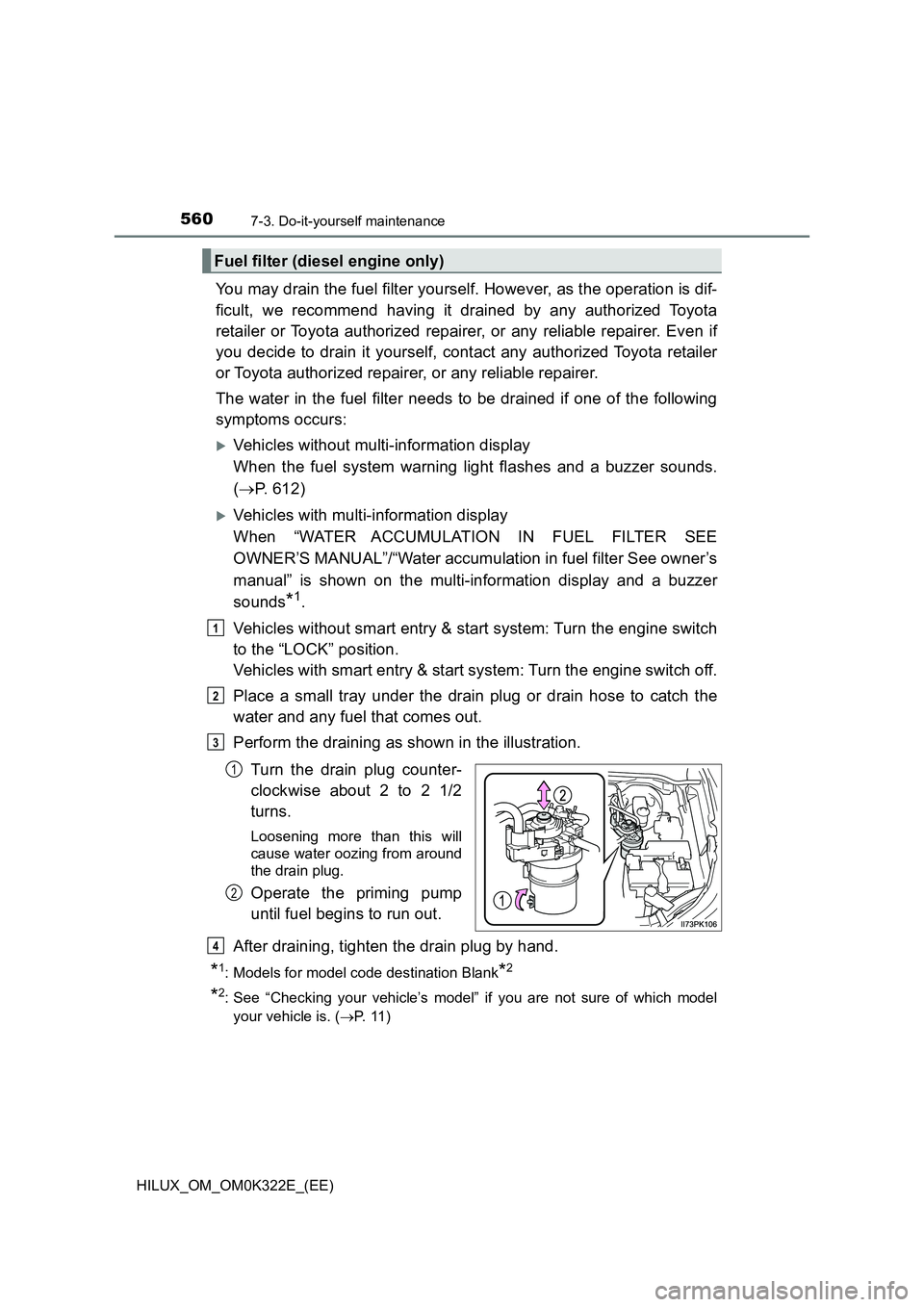
Perform the draining as shown in the illustration.
Turn the drain plug counter-
clockwise about 2 to 2 1/2
turns.
Loosening more than this will
cause water oozing from around
the drain plug.
Operate the priming pump
until fuel begins to run out.
After draining, tighten the drain plug by hand.
*1: Models for model code destination Blank*2
*2: See “Checking your vehicle’s model” if you are not sure of which model
your vehicle is. ( P. 1 1 )
Fuel filter (diesel engine only)
1
2
3
1
2
4