control TOYOTA HILUX 2018 Owners Manual
[x] Cancel search | Manufacturer: TOYOTA, Model Year: 2018, Model line: HILUX, Model: TOYOTA HILUX 2018Pages: 708, PDF Size: 95.31 MB
Page 484 of 708
4846-1. Using the air conditioning system and defogger
HILUX_OM_OM0K375E_(EE)
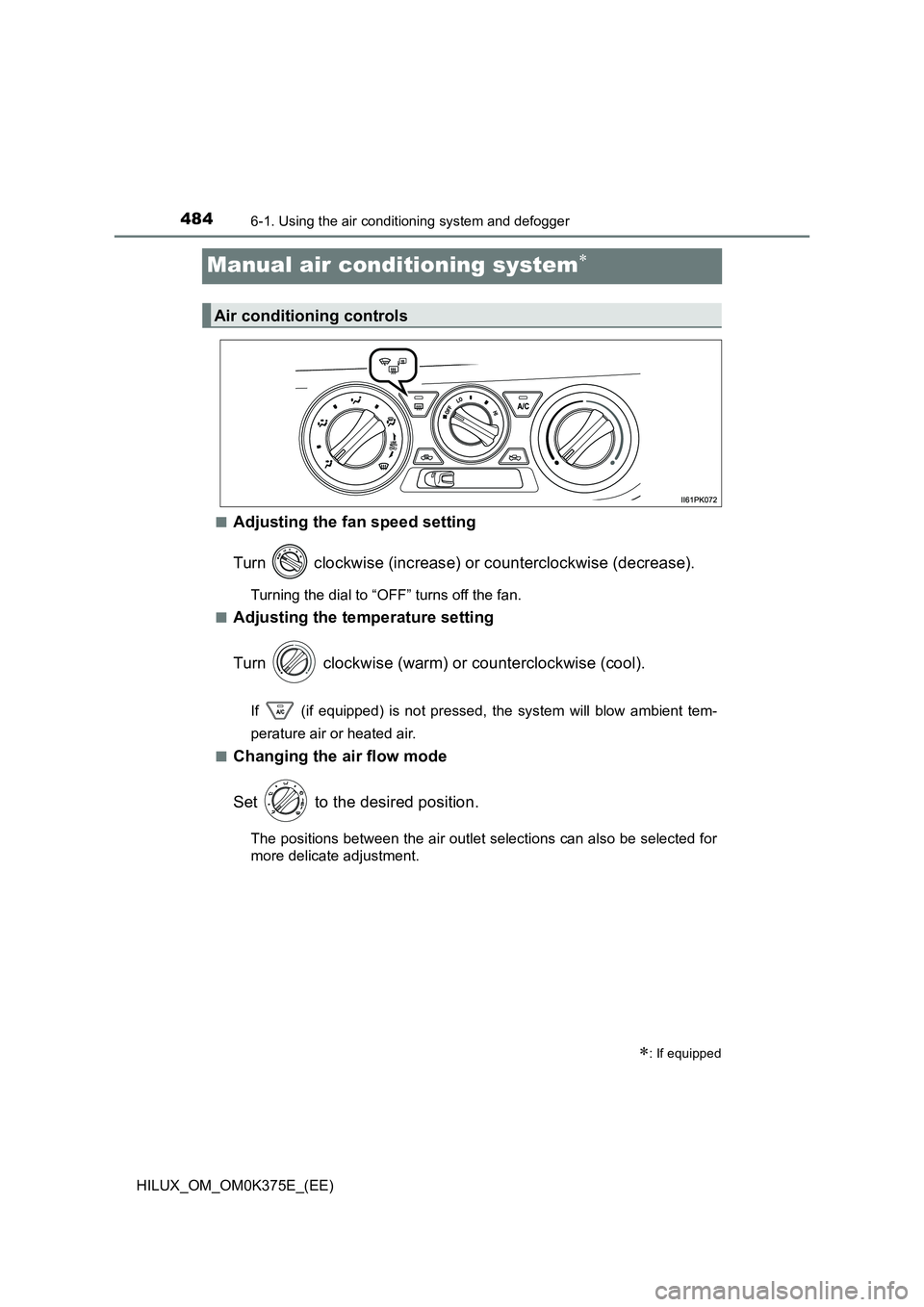
Manual air conditioning system
■Adjusting the fan speed setting
Turn clockwise (increase) or counterclockwise (decrease).
Turning the dial to “OFF” turns off the fan.
■Adjusting the temperature setting
Turn clockwise (warm) or counterclockwise (cool).
If (if equipped) is not pressed, the system will blow ambient tem-
perature air or heated air.
■Changing the air flow mode
Set to the desired position.
The positions between the air outlet selections can also be selected for
more delicate adjustment.
: If equipped
Air conditioning controls
Page 492 of 708
4926-1. Using the air conditioning system and defogger
HILUX_OM_OM0K375E_(EE)
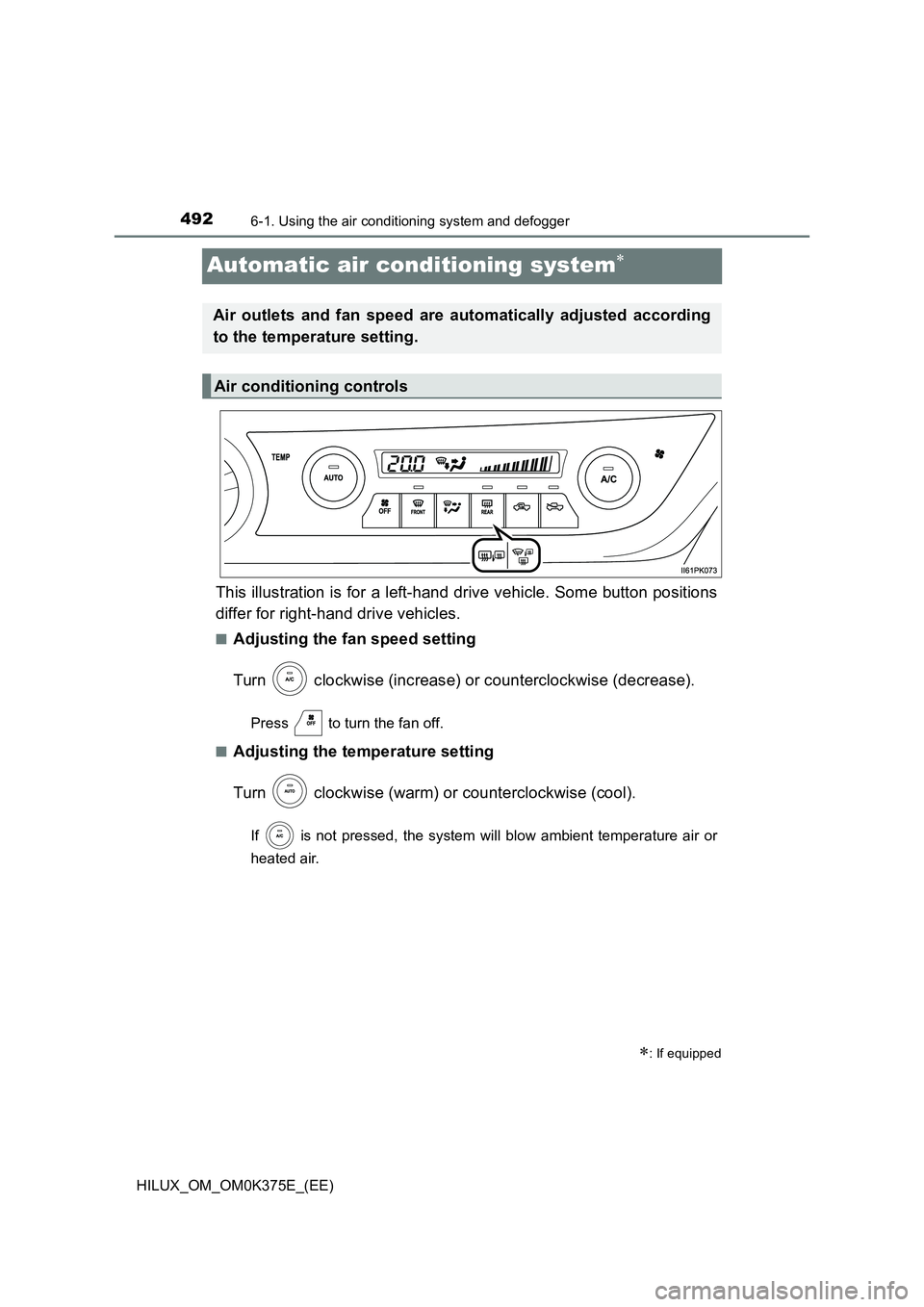
Automatic air conditioning system
This illustration is for a left-hand drive vehicle. Some button positions
differ for right-hand drive vehicles.
■Adjusting the fan speed setting
Turn clockwise (increase) or counterclockwise (decrease).
Press to turn the fan off.
■Adjusting the temperature setting
Turn clockwise (warm) or counterclockwise (cool).
If is not pressed, the system will blow ambient temperature air or
heated air.
: If equipped
Air outlets and fan speed are automatically adjusted according
to the temperature setting.
Air conditioning controls
Page 497 of 708
4976-1. Using the air conditioning system and defogger
6
Interior features
HILUX_OM_OM0K375E_(EE)
■Using automatic mode
Fan speed is adjusted automatically according to the temperature setting and
the ambient conditions.
Therefore, the fan may stop for a while until warm or cool air is ready to flow
immediately after is pressed.
■ Fogging up of the windows
● The windows will easily fog up when the humidity in the vehicle is high.
Turning on will dehumidify the air from the outlets and defog the wind-
shield effectively.
● If you turn off, the windows may fog up more easily.
● The windows may fog up if the recirculated air mode is used.
■ Outside/recirculated air mode
● When driving on dusty roads such as tunnels or in heavy traffic, press .
This is effective in preventing outside air from entering the vehicle interior.
During cooling operation, setting the reci rculated air mode will also cool the
vehicle interior effectively.
● Outside/recirculated air mode may automatically switch depending on the
temperature setting or the inside temperature.
■ Operation of the air conditioning system in Eco drive mode (if equipped)
● In Eco drive mode, the air conditioning system is controlled as follows to pri-
oritize fuel efficiency:
• Engine speed and compressor operation controlled to restrict heating/
cooling capacity
• Fan speed restricted when automatic mode is selected
● To improve air conditioning performance, perform the following operations.
• Adjust the fan speed
• Turn off Eco drive mode
• Adjust the temperature setting
■ When the outside temperature falls to nearly 0°C (32°F)
The dehumidification function may not operate even when is pressed.
Page 520 of 708
5206-4. Using the other interior features
HILUX_OM_OM0K375E_(EE)
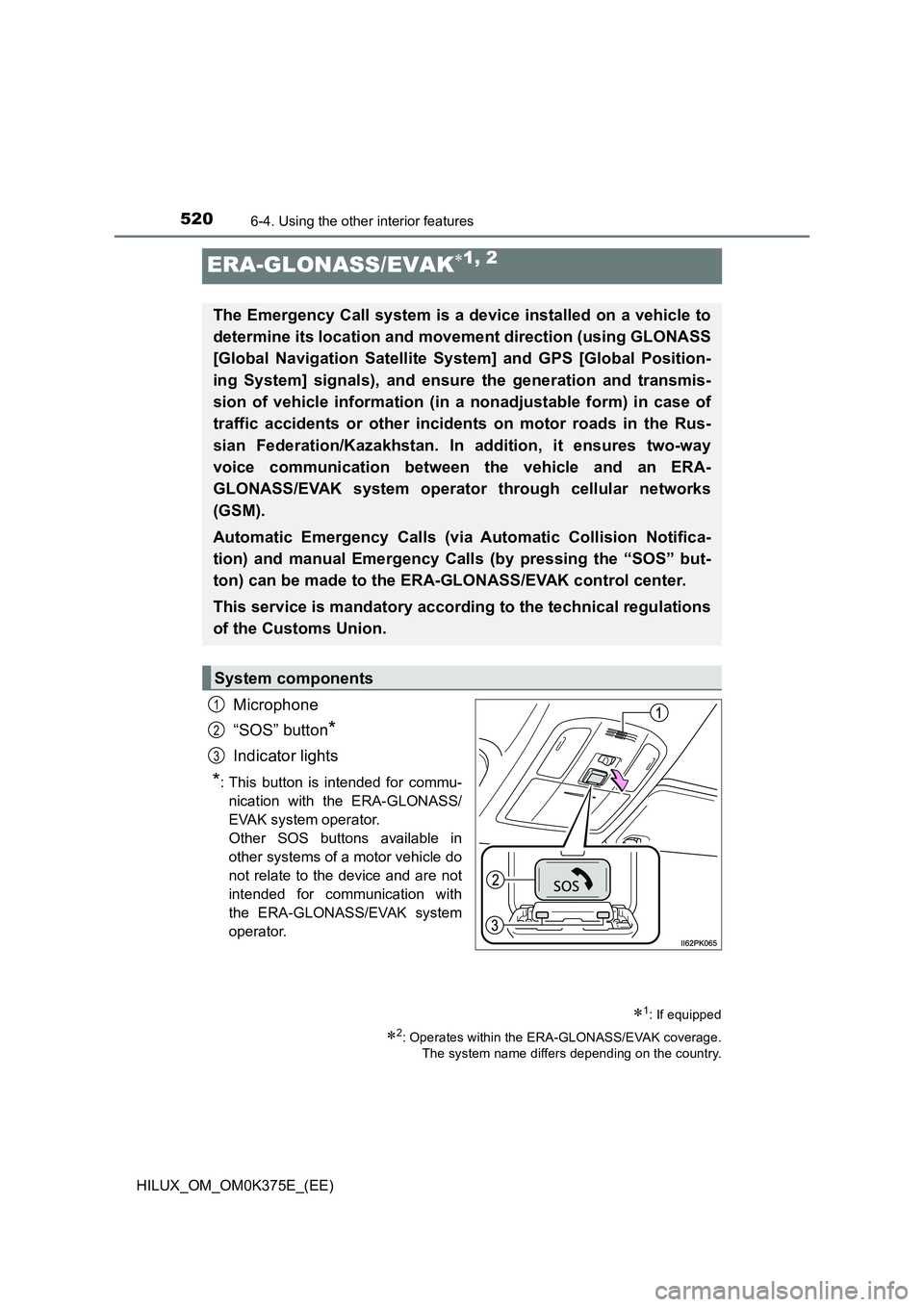
ERA-GLONASS/EVAK1, 2
Microphone
“SOS” button*
Indicator lights
*: This button is intended for commu-
nication with the ERA-GLONASS/
EVAK system operator.
Other SOS buttons available in
other systems of a motor vehicle do
not relate to the device and are not
intended for communication with
the ERA-GLONASS/EVAK system
operator.
1: If equipped
2: Operates within the ERA-GLONASS/EVAK coverage.
The system name differs depending on the country.
The Emergency Call system is a device installed on a vehicle to
determine its location and movement direction (using GLONASS
[Global Navigation Satellite System] and GPS [Global Position-
ing System] signals), and ensure the generation and transmis-
sion of vehicle information (in a nonadjustable form) in case of
traffic accidents or other incidents on motor roads in the Rus-
sian Federation/Kazakhstan. In addition, it ensures two-way
voice communication between the vehicle and an ERA-
GLONASS/EVAK system operator through cellular networks
(GSM).
Automatic Emergency Calls (via Automatic Collision Notifica-
tion) and manual Emergency Calls (by pressing the “SOS” but-
ton) can be made to the ERA-GLONASS/EVAK control center.
This service is mandatory according to the technical regulations
of the Customs Union.
System components
1
2
3
Page 521 of 708
5216-4. Using the other interior features
HILUX_OM_OM0K375E_(EE)
6
Interior features
■Automatic Emergency Calls
If any airbag deploys, the system is designed to automatically call
the ERA-GLONASS/EVAK control center.* The answering operator
receives the vehicle’s location, the time of the incident and the vehi-
cle VIN, and attempts to speak with the vehicle occupants to
assess the situation. If the occupants are unable to communicate,
the operator automatically treats the call as an emergency and con-
tacts the nearest emergency services provider (112 system etc.) to
describe the situation and request that assistance be sent to the
location.
*: In some cases, the call cannot be made. ( P. 523)
■Manual Emergency Calls
In the event of an emergency, press the “SOS” button to call the
ERA-GLONASS/EVAK control center.* The answering operator will
determine your vehicle’s location, assess the situation, and dis-
patch the necessary assistance required.
If you accidentally press the “SOS” button, tell the operator that you are
not experiencing an emergency.
*: In some cases, the call cannot be made. ( P. 523)
Emergency Notification Services
Page 523 of 708
5236-4. Using the other interior features
HILUX_OM_OM0K375E_(EE)
6
Interior features
WARNING
■When the Emergency Call may not be made
● It may not be possible to make Emergency Calls in any of the following sit-
uations. In such cases, report to emergency services provider (112 system
etc.) by other means such as nearby public phones.
• Even when the vehicle is in the cellular phone service area, it may be
difficult to connect to the ERA-GLONASS/EVAK control center if the
reception is poor or the line is busy. In such cases, even though the sys-
tem attempts to connect to the ERA-GLONASS/EVAK control center,
you may not be able to connect to the ERA-GLONASS/EVAK control
center to make Emergency Calls and contact emergency services.
• When the vehicle is out of the cellular phone service area, the Emer-
gency Calls cannot be made.
• When any related equipment (such as the “SOS” button panel, indicator
lights, microphone, speaker, DCM, antenna, or any wires connecting
the equipment) is malfunctioning, damaged or broken, the Emergency
Call cannot be made.
• During an Emergency Call, the system makes repeated attempts to
connect to the ERA-GLONASS/EVAK control center. However, if it can-
not connect to the ERA-GLONASS/EVAK control center due to poor
radio wave reception, the system may not be able to connect to the cel-
lular network and the call may finish without connecting. The red indica-
tor light will blink for approximately 30 seconds to indicate this
disconnection.
• This device may not function if a shock is applied to it.
● If the battery’s voltage decreases or there is a disconnection, the system
may not be able to connect to the ERA-GLONASS/EVAK control center.
■ When the Emergency Call system is replaced with a new one
The Emergency Call system should be registered. Contact any authorized
Toyota retailer or Toyota authorized repairer, or any reliable repairer.
Page 524 of 708
5246-4. Using the other interior features
HILUX_OM_OM0K375E_(EE)
WARNING
■For your safety
● Please drive safely.
The function of this system is to assist you in making the Emergency Call
in case of accidents such as traffic accidents or sudden medical emergen-
cies, and it does not protect the driver or passengers in any way. Please
drive safely and fasten your seatbelts at all times for your safety.
● In case of an emergency, make lives the top priority.
● If you smell anything burning or other unusual smells, leave the vehicle
and evacuate to a safe area immediately.
● Since the system detects shocks, the automatic reporting may not always
occur synchronized with the operation of the airbag system. (If the vehicle
is struck from behind, etc.)
● For safety, do not make the Emergency Call while driving.
Making calls during driving may caus e mishandling of the steering wheel,
which may lead to unexpected accidents.
Stop the vehicle and confirm the safety of your surroundings before mak-
ing the Emergency Call.
● When changing fuses, please use the specified fuses. Using other fuses
may cause ignition or smoke in the circuit and lead to a fire.
● Using the system while there is smoke or an unusual smell may cause a
fire. Stop using the system immediately and consult any authorized Toyota
retailer or Toyota authorized repairer, or any reliable repairer.
NOTICE
■ To prevent damage
Do not pour any liquids onto the “SOS” button panel, etc. and do not impact
it.
■ If the “SOS” button panel, speaker or microphone malfunctions during
an Emergency Call or manual maintenance check
It may not be possible to make Emergency Calls, confirm the system status,
or communicate with the ERA-GLONASS/EVAK control center operator. If
any of the above equipment is damaged, please consult any authorized
Toyota retailer, Toyota authorized repairer, or any reliable repairer.
Page 525 of 708
525
7Maintenance and care
HILUX_OM_OM0K375E_(EE)
7-1. Maintenance and care
Cleaning and protecting
the vehicle exterior .......... 526
Cleaning and protecting
the vehicle interior ........... 529
7-2. Maintenance
Maintenance
requirements.................... 532
7-3. Do-it-yourself maintenance
Do-it-yourself service
precautions ...................... 535
Hood .................................. 537
Engine compartment.......... 539
Tires ................................... 558
Tire inflation pressure ........ 561
Wheels ............................... 563
Air conditioning filter .......... 565
Wireless remote control/
electronic key battery....... 567
Checking and
replacing fuses ................ 570
Light bulbs ......................... 575
Page 548 of 708
5487-3. Do-it-yourself maintenance
HILUX_OM_OM0K375E_(EE)
■Before recharging
When recharging, the battery produces hydrogen gas which is flammable and
explosive. Therefore, observe the following before recharging:
● If recharging with the battery installed on the vehicle, be sure to disconnect
the ground cable.
● Make sure the power switch on the charger is off when connecting and dis-
connecting the charger cables to the battery.
■ After recharging/reconnecting the battery (vehicles with smart entry &
start system)
The engine may not start. Follow the procedure below to initialize the system.
Shift the shift lever to P (automat ic transmission) or depress the brake
pedal with the shift lever in N (manual transmission).
Open and close any of the doors.
Restart the engine.
● Unlocking the doors using the smart entry & start system may not be possi-
ble immediately after reconnecting the battery. If this happens, use the wire-
less remote control or the mechanical key to lock/unlock the doors.
● Start the engine with the engine switch in ACCESSORY mode. The engine
may not start with the engine switch turned off. However, the engine will
operate normally from the second attempt.
● The engine switch mode is recorded by the vehicle. If the battery is recon-
nected, the vehicle will return the engine switch mode to the status it was in
before the battery was disconnected. Make sure to turn off the engine
before disconnect the battery. Take extra care when connecting the battery
if the engine switch mode prior to discharge is unknown.
If the system will not start even after multiple attempts, contact any authorized
Toyota retailer or Toyota authorized repairer, or any reliable repairer.
■ If a symbol of a battery is shown on the multi-information display (if
equipped)
There is a malfunction in the vehicle’s charging system.
Immediately stop the vehicle in a safe place and contact any authorized
Toyota retailer or Toyota authorized repai rer, or any reliable repairer. Continu-
ing to drive the vehicle may be dangerous.
1
2
3
Page 563 of 708
5637-3. Do-it-yourself maintenance
HILUX_OM_OM0K375E_(EE)
7
Maintenance and care
Wheels
When replacing wheels, care should be taken to ensure that they are
equivalent to those removed in load capacity, diameter, rim width and
inset*.
Replacement wheels are available at any authorized Toyota retailer or
Toyota authorized repairer, or any reliable repairer.
*: Conventionally referred to as “offset”.
Toyota does not recommend using the following:
● Wheels of different sizes or types
● Used wheels
● Bent wheels that have been straightened
● Use only Toyota wheel nuts and wrenches designed for use with
your aluminum wheels.
● When rotating, repairing or changing your tires, check that the
wheel nuts are still tight after driving 1600 km (1000 miles).
● Be careful not to damage the aluminum wheels when using tire
chains.
● Use only Toyota genuine balance weights or equivalent and a plas-
tic or rubber hammer when balancing your wheels.
If a wheel is bent, cracked or heavily corroded, it should be
replaced. Otherwise, the tire may separate from the wheel or
cause a loss of handling control.
Wheel selection
Aluminum wheel precautions (if equipped)