control TOYOTA HILUX 2018 Repair Manual
[x] Cancel search | Manufacturer: TOYOTA, Model Year: 2018, Model line: HILUX, Model: TOYOTA HILUX 2018Pages: 708, PDF Size: 95.31 MB
Page 348 of 708
3484-5. Using the driving support systems
HILUX_OM_OM0K375E_(EE)
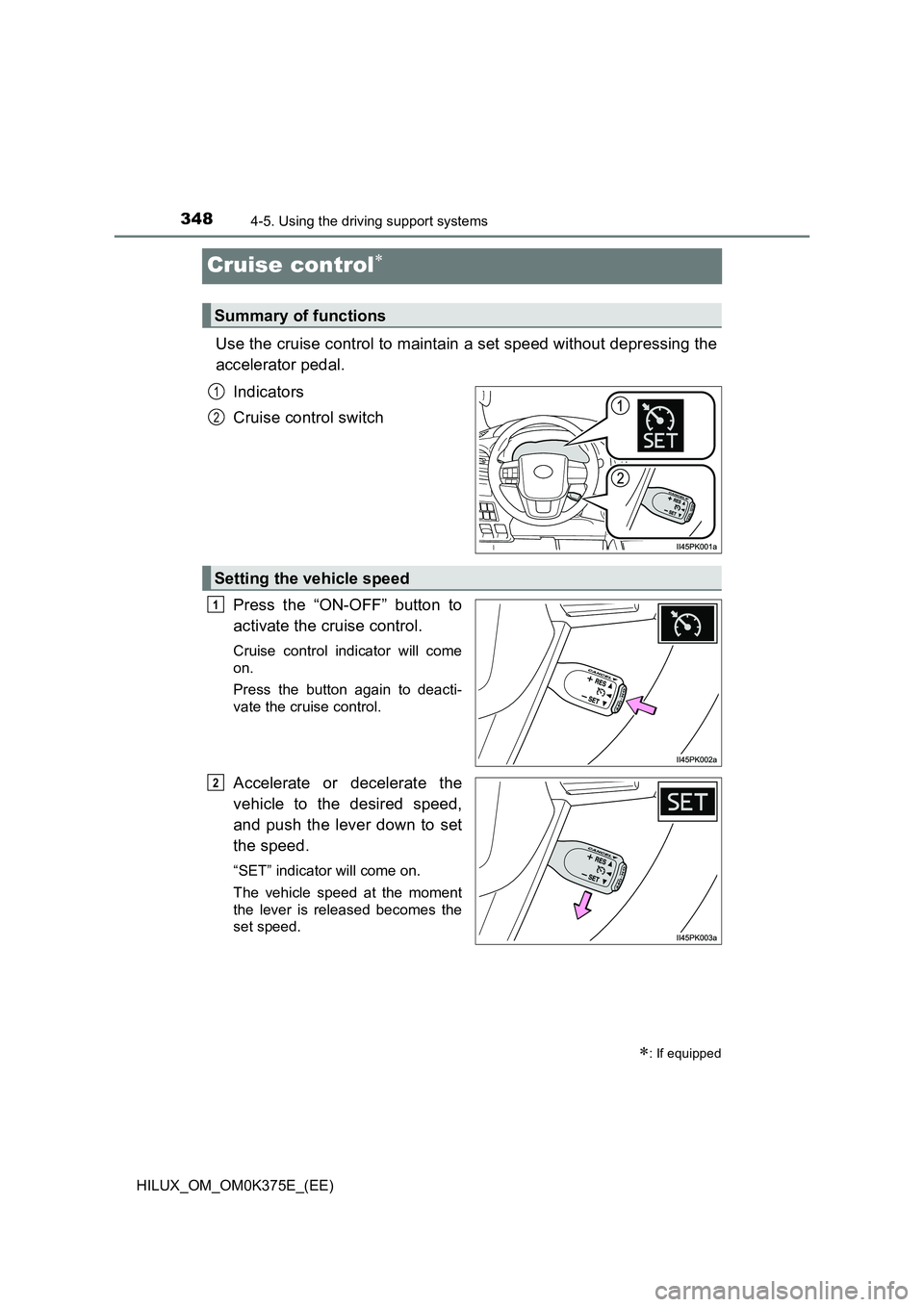
Cruise control
Use the cruise control to maintain a set speed without depressing the
accelerator pedal.
Indicators
Cruise control switch
Press the “ON-OFF” button to
activate the cruise control.
Cruise control indicator will come
on.
Press the button again to deacti-
vate the cruise control.
Accelerate or decelerate the
vehicle to the desired speed,
and push the lever down to set
the speed.
“SET” indicator will come on.
The vehicle speed at the moment
the lever is released becomes the
set speed.
: If equipped
Summary of functions
1
2
Setting the vehicle speed
1
2
Page 349 of 708
3494-5. Using the driving support systems
4
Driving
HILUX_OM_OM0K375E_(EE)
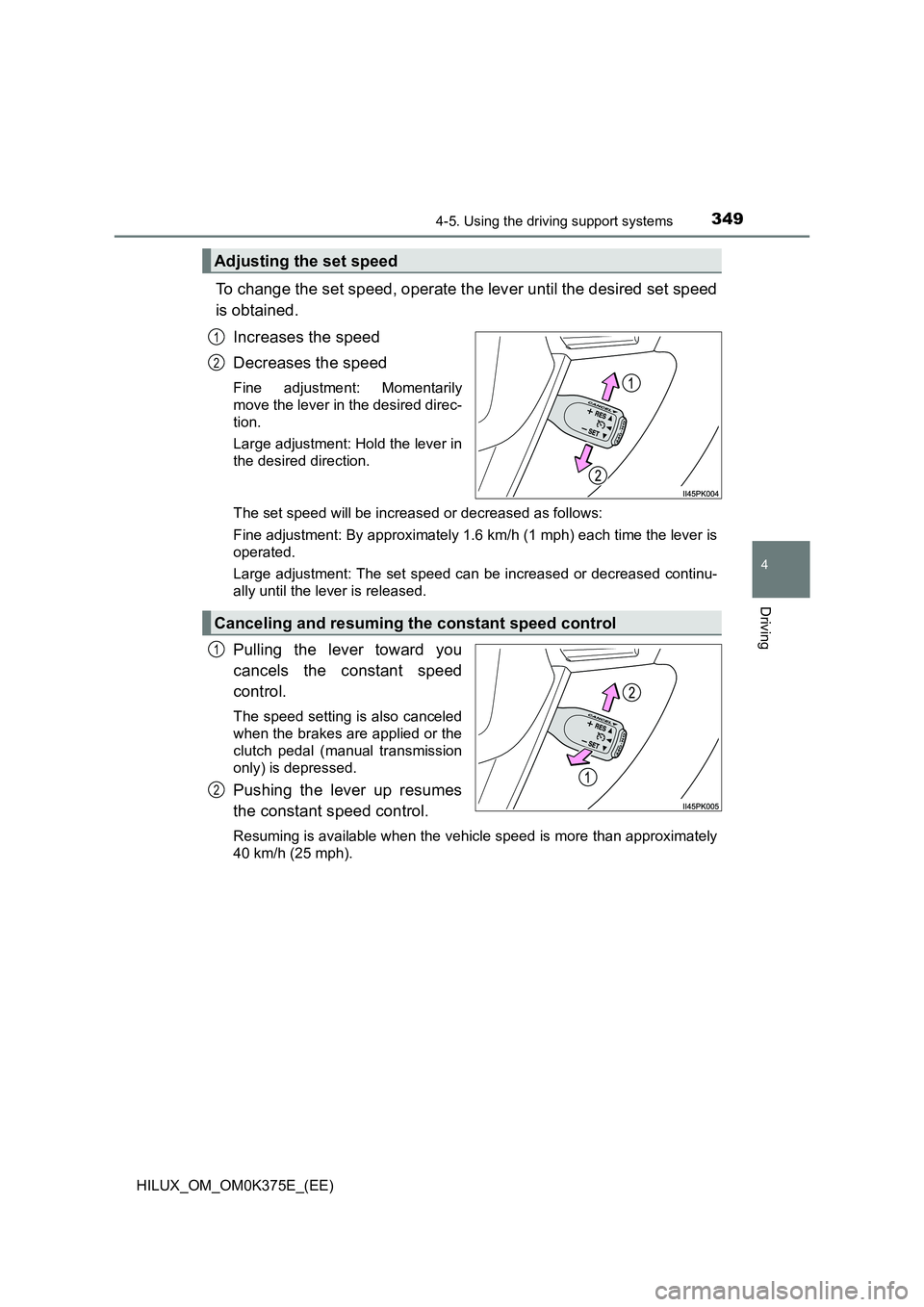
To change the set speed, operate the lever until the desired set speed
is obtained.
Increases the speed
Decreases the speed
Fine adjustment: Momentarily
move the lever in the desired direc-
tion.
Large adjustment: Hold the lever in
the desired direction.
The set speed will be increased or decreased as follows:
Fine adjustment: By approximately 1.6 km/h (1 mph) each time the lever is
operated.
Large adjustment: The set speed can be increased or decreased continu-
ally until the lever is released.
Pulling the lever toward you
cancels the constant speed
control.
The speed setting is also canceled
when the brakes are applied or the
clutch pedal (manual transmission
only) is depressed.
Pushing the lever up resumes
the constant speed control.
Resuming is available when the vehicle speed is more than approximately
40 km/h (25 mph).
Adjusting the set speed
1
2
Canceling and resuming the constant speed control
1
2
Page 350 of 708
3504-5. Using the driving support systems
HILUX_OM_OM0K375E_(EE)
■Cruise control can be set when
● The shift lever is in the D or range 4 or higher of S has been selected. (vehi-
cles with automatic transmission)
● Vehicle speed is above approximately 40 km/h (25 mph).
■ Accelerating after setting the vehicle speed
● The vehicle can be accelerated normally. After acceleration, the set speed
resumes.
● Even without canceling the cruise control, the set speed can be increased
by first accelerating the vehicle to the desired speed and then pushing the
lever down to set the new speed.
■ Automatic cruise control cancelation
Cruise control will stop maintaining the vehicle speed in any of the following
situations:
● Actual vehicle speed falls more than approximately 16 km/h (10 mph) below
the preset vehicle speed.
At this time, the memorized set speed is not retained.
● Actual vehicle speed is below approximately 40 km/h (25 mph).
● VSC is activated. (if equipped)
● 4WD models: The front-wheel drive control switch is switched between H2
and H4.
● TRC or A-TRC is activated for a period of time.
● When the VSC, TRC or A-TRC system is turned off. (if equipped)
■ If the warning message for the cruise control is shown on the multi-
information display
Press the “ON-OFF” button once to deactivate the system, and then press
the button again to reactivate the system.
If the cruise control speed cannot be set or if the cruise control cancels imme-
diately after being activated, there may be a malfunction in the cruise control
system. Have the vehicle inspected by any authorized Toyota retailer or
Toyota authorized repairer, or any reliable repairer.
Page 351 of 708
3514-5. Using the driving support systems
4
Driving
HILUX_OM_OM0K375E_(EE)
WARNING
■To avoid operating the cruise control by mistake
Switch the cruise control off using the “ON-OFF” button when not in use.
■ Situations unsuitable for cruise control
Do not use cruise control in any of the following situations.
Doing so may result in loss of control and could cause an accident resulting
in death or serious injury.
● In heavy traffic
● On roads with sharp bends
● On winding roads
● On slippery roads, such as those covered with rain, ice or snow
● On steep hills
Vehicle speed may exceed the set speed when driving down a steep hill.
● When your vehicle is towing a trailer (models for model code destination
W*) or during emergency towing
*: See “Checking your vehicle’s model” if you are not sure of which model
your vehicle is. ( P. 1 1 )
Page 361 of 708
3614-5. Using the driving support systems
4
Driving
HILUX_OM_OM0K375E_(EE)
WARNING
■When using the rear view monitor system
The rear view monitor system is a supplemental device intended to assist
the driver when backing up. When backing up, be sure to visually check all
around the vehicle both directly and using the mirrors before proceeding.
Observe the following precautions to avoid an accident that could result in
death or serious injuries.
● Never depend on the rear view monitor system entirely when backing up.
The image and the position of the guide lines displayed on the screen may
differ from the actual state.
Use caution, just as you would when backing up any vehicle.
● Be sure to back up slowly, depressing the brake pedal to control vehicle
speed.
● The instructions given are only guide lines.
When and how much to turn the steering wheel will vary according to traf-
fic conditions, road surface conditions , vehicle condition, etc. when park-
ing. It is necessary to be fully aware of this before using the rear view
monitor system.
● When parking, be sure to check that the parking space will accommodate
your vehicle before maneuvering into it.
● Do not use the rear view monitor system in the following cases:
• On icy or slick road surfaces, or in snow
• When using tire chains
• When the tailgate is not closed completely
• On roads that are not flat or straight, such as curves or slopes.
● In low temperatures, the screen may darken or the image may become
faint. The image could distort when the vehicle is moving, or you may
become unable to see the image on the screen. Be sure to visually check
all around the vehicle both directly and using the mirrors before proceed-
ing.
● If the tire sizes are changed, the position of the fixed guide lines displayed
on the screen may change.
● The camera uses a special lens. The distances between objects and
pedestrians that appear in the image displayed on the screen will differ
from the actual distances.
Page 363 of 708
363
4
4-5. Using the driving support systems
Driving
HILUX_OM_OM0K375E_(EE)
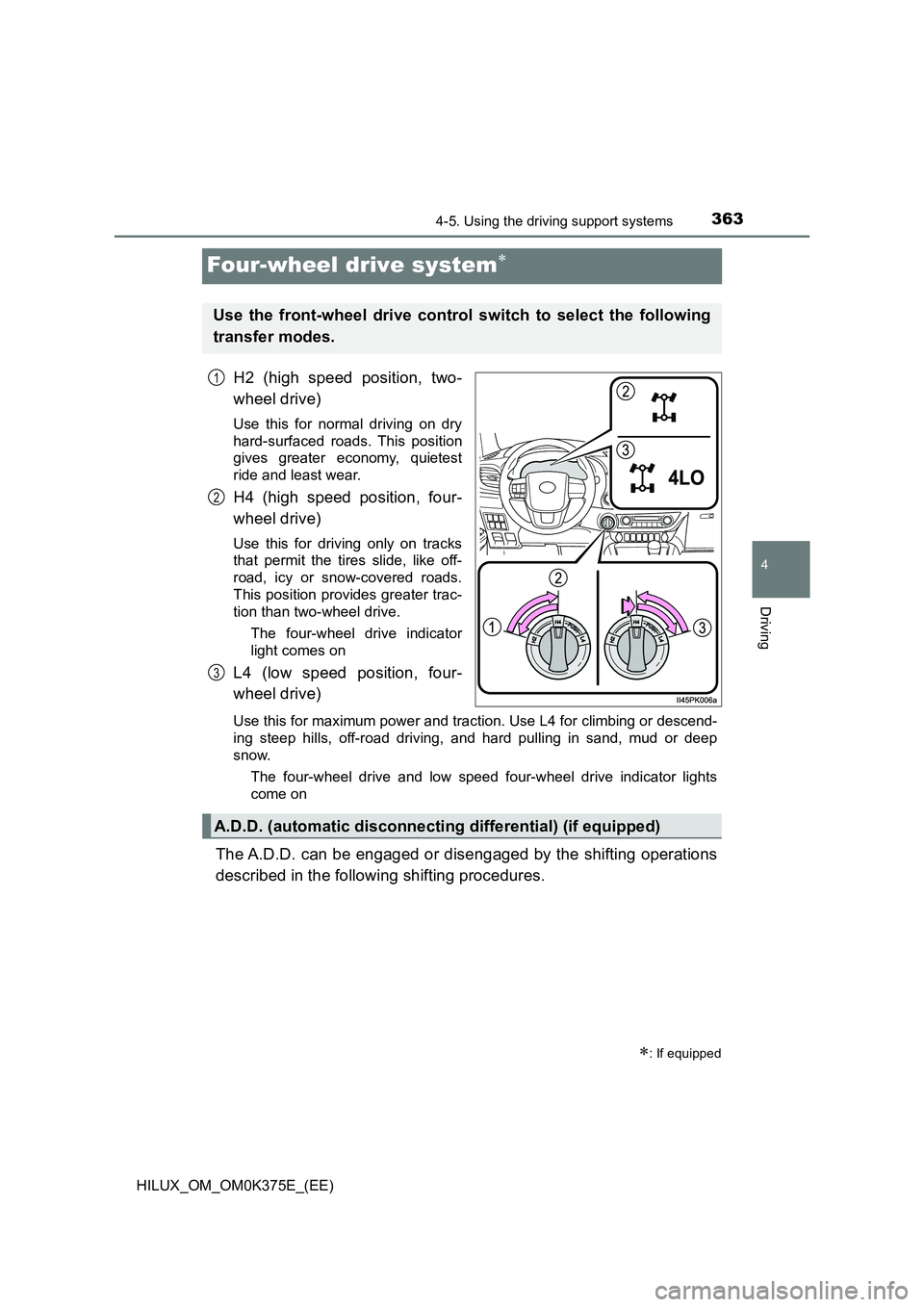
Four-wheel drive system
H2 (high speed position, two-
wheel drive)
Use this for normal driving on dry
hard-surfaced roads. This position
gives greater economy, quietest
ride and least wear.
H4 (high speed position, four-
wheel drive)
Use this for driving only on tracks
that permit the tires slide, like off-
road, icy or snow-covered roads.
This position provides greater trac-
tion than two-wheel drive.
The four-wheel drive indicator
light comes on
L4 (low speed position, four-
wheel drive)
Use this for maximum power and traction. Use L4 for climbing or descend-
ing steep hills, off-road driving, and hard pulling in sand, mud or deep
snow.
The four-wheel drive and low speed four-wheel drive indicator lights
come on
The A.D.D. can be engaged or disengaged by the shifting operations
described in the following shifting procedures.
: If equipped
Use the front-wheel drive control switch to select the following
transfer modes.
1
2
3
A.D.D. (automatic disconnecting differential) (if equipped)
Page 364 of 708
3644-5. Using the driving support systems
HILUX_OM_OM0K375E_(EE)
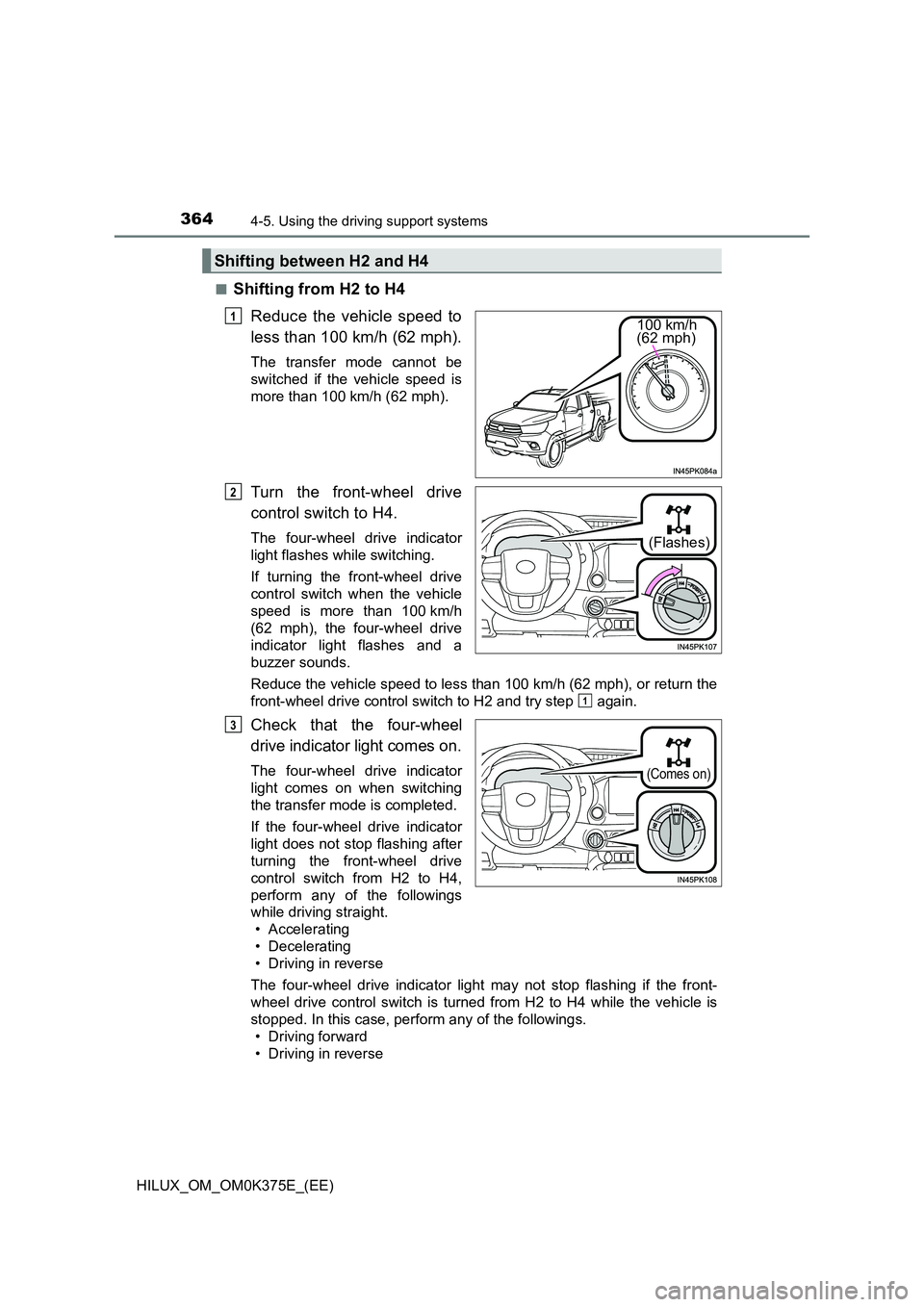
■Shifting from H2 to H4
Reduce the vehicle speed to
less than 100 km/h (62 mph).
The transfer mode cannot be
switched if the vehicle speed is
more than 100 km/h (62 mph).
Turn the front-wheel drive
control switch to H4.
The four-wheel drive indicator
light flashes while switching.
If turning the front-wheel drive
control switch when the vehicle
speed is more than 100 km/h
(62 mph), the four-wheel drive
indicator light flashes and a
buzzer sounds.
Reduce the vehicle speed to less than 100 km/h (62 mph), or return the
front-wheel drive control switch to H2 and try step again.
Check that the four-wheel
drive indicator light comes on.
The four-wheel drive indicator
light comes on when switching
the transfer mode is completed.
If the four-wheel drive indicator
light does not stop flashing after
turning the front-wheel drive
control switch from H2 to H4,
perform any of the followings
while driving straight.
• Accelerating
• Decelerating
• Driving in reverse
The four-wheel drive indicator light may not stop flashing if the front-
wheel drive control switch is turned from H2 to H4 while the vehicle is
stopped. In this case, perform any of the followings.
• Driving forward
• Driving in reverse
Shifting between H2 and H4
100 km/h (62 mph)
1
(Flashes)
2
1
(Comes on)
3
Page 365 of 708
3654-5. Using the driving support systems
4
Driving
HILUX_OM_OM0K375E_(EE)
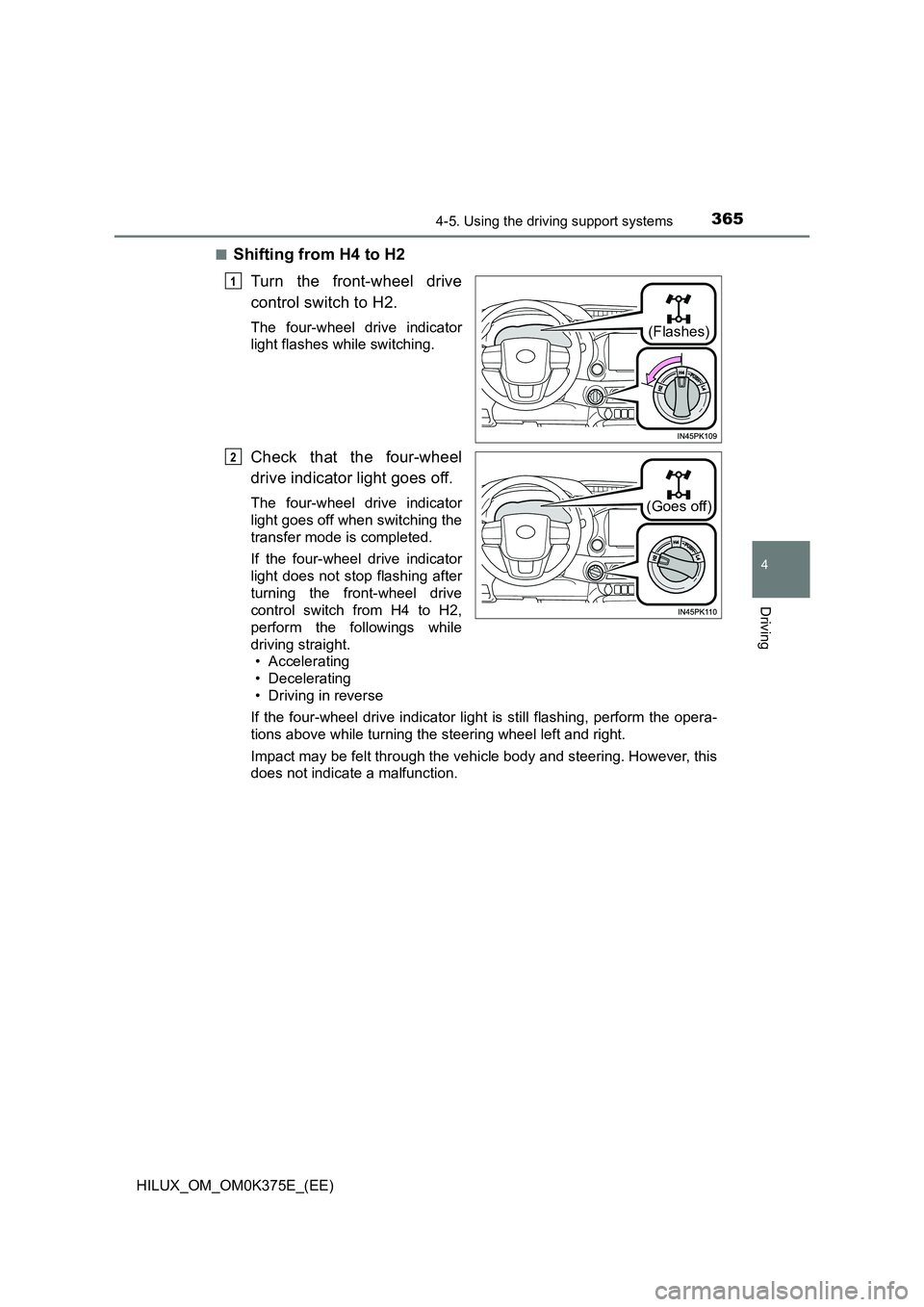
■Shifting from H4 to H2
Turn the front-wheel drive
control switch to H2.
The four-wheel drive indicator
light flashes while switching.
Check that the four-wheel
drive indicator light goes off.
The four-wheel drive indicator
light goes off when switching the
transfer mode is completed.
If the four-wheel drive indicator
light does not stop flashing after
turning the front-wheel drive
control switch from H4 to H2,
perform the followings while
driving straight.
• Accelerating
• Decelerating
• Driving in reverse
If the four-wheel drive indicator light is still flashing, perform the opera-
tions above while turning the steering wheel left and right.
Impact may be felt through the vehicle body and steering. However, this
does not indicate a malfunction.
(Flashes)
1
(Goes off)
2
Page 366 of 708
3664-5. Using the driving support systems
HILUX_OM_OM0K375E_(EE)
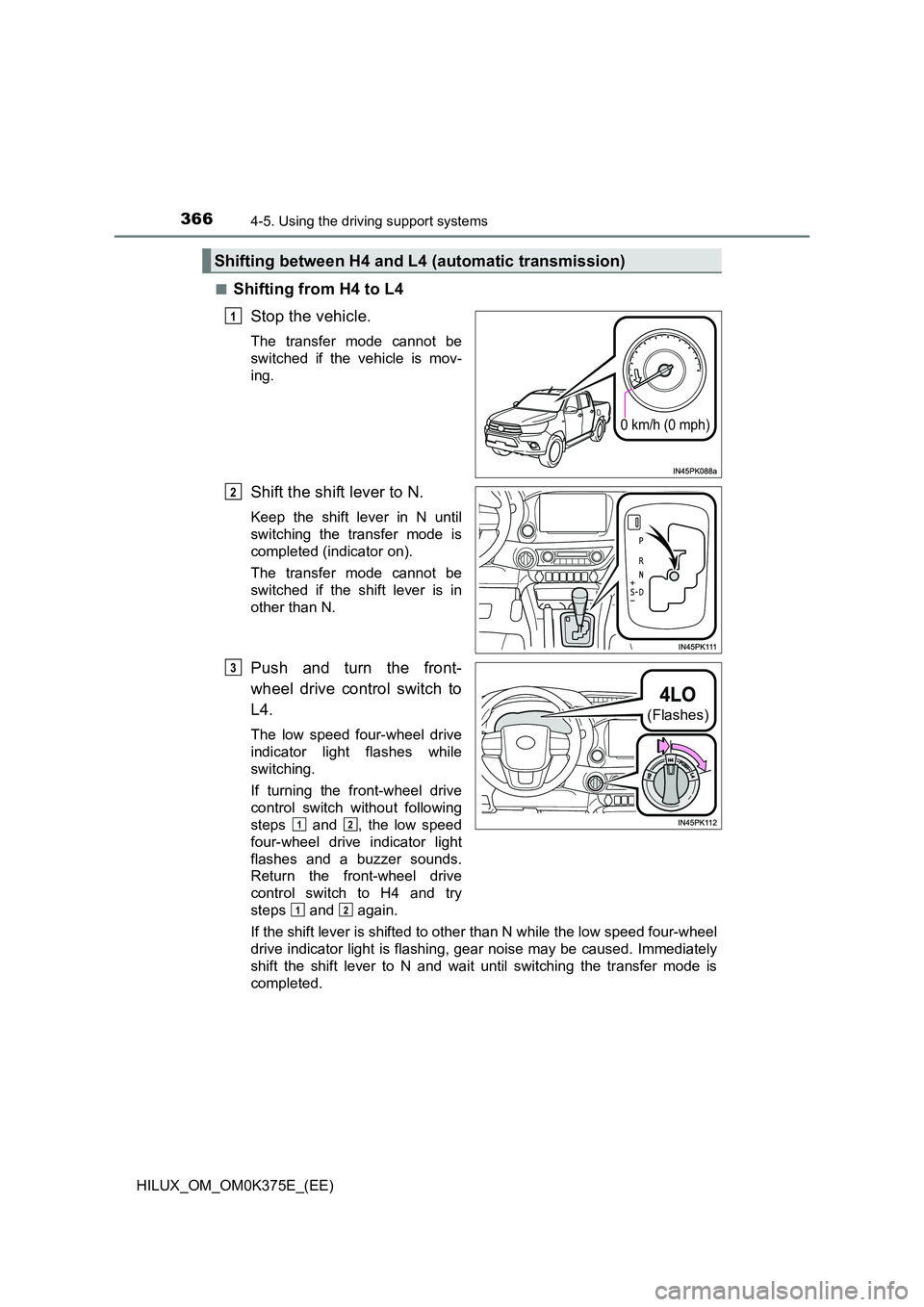
■Shifting from H4 to L4
Stop the vehicle.
The transfer mode cannot be
switched if the vehicle is mov-
ing.
Shift the shift lever to N.
Keep the shift lever in N until
switching the transfer mode is
completed (indicator on).
The transfer mode cannot be
switched if the shift lever is in
other than N.
Push and turn the front-
wheel drive control switch to
L4.
The low speed four-wheel drive
indicator light flashes while
switching.
If turning the front-wheel drive
control switch without following
steps and , the low speed
four-wheel drive indicator light
flashes and a buzzer sounds.
Return the front-wheel drive
control switch to H4 and try
steps and again.
If the shift lever is shifted to other than N while the low speed four-wheel
drive indicator light is flashing, gear noise may be caused. Immediately
shift the shift lever to N and wait until switching the transfer mode is
completed.
Shifting between H4 and L4 (automatic transmission)
0 km/h (0 mph)
1
2
(Flashes)
3
12
12
Page 368 of 708
3684-5. Using the driving support systems
HILUX_OM_OM0K375E_(EE)
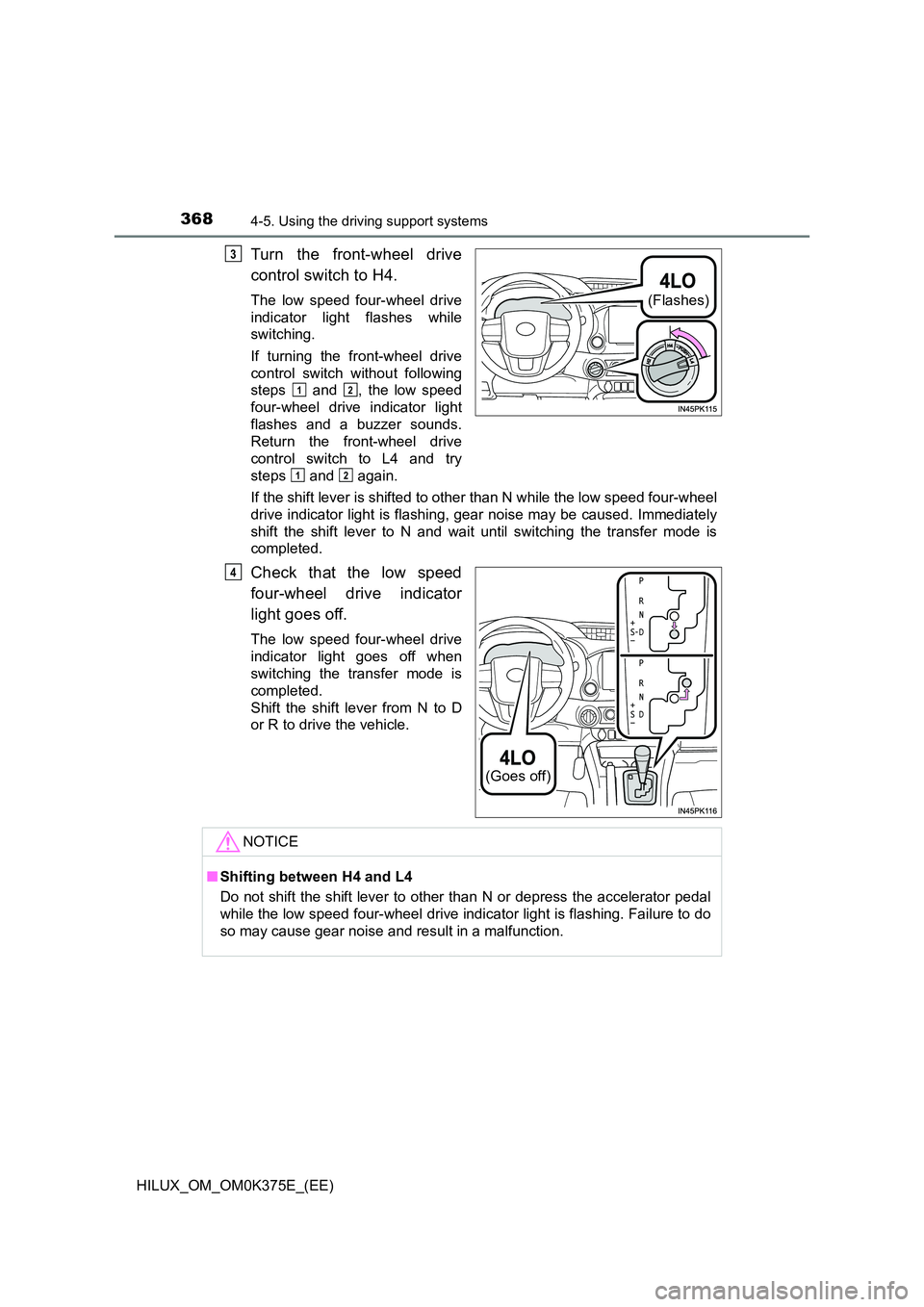
Turn the front-wheel drive
control switch to H4.
The low speed four-wheel drive
indicator light flashes while
switching.
If turning the front-wheel drive
control switch without following
steps and , the low speed
four-wheel drive indicator light
flashes and a buzzer sounds.
Return the front-wheel drive
control switch to L4 and try
steps and again.
If the shift lever is shifted to other than N while the low speed four-wheel
drive indicator light is flashing, gear noise may be caused. Immediately
shift the shift lever to N and wait until switching the transfer mode is
completed.
Check that the low speed
four-wheel drive indicator
light goes off.
The low speed four-wheel drive
indicator light goes off when
switching the transfer mode is
completed.
Shift the shift lever from N to D
or R to drive the vehicle.
(Flashes)
3
12
12
(Goes off)
4
NOTICE
■ Shifting between H4 and L4
Do not shift the shift lever to other than N or depress the accelerator pedal
while the low speed four-wheel drive indicator light is flashing. Failure to do
so may cause gear noise and result in a malfunction.