control TOYOTA HILUX 2018 Owner's Manual
[x] Cancel search | Manufacturer: TOYOTA, Model Year: 2018, Model line: HILUX, Model: TOYOTA HILUX 2018Pages: 708, PDF Size: 95.31 MB
Page 144 of 708
1442. Instrument cluster
HILUX_OM_OM0K375E_(EE)
●Idling stop (if equipped)
Displays the total idling stop time (engine stop time via the Stop &
Start system) since the function was reset and the engine was
started respectively. ( P. 382)
● Eco Driving Indicator Zone Display
Displays Zone of Eco driving with current Eco driving ratio based on
acceleration. ( P. 130)
● Eco Score
Displays the eco-driving total count to help improve the customer’s
eco driving techniques. ( P. 146)
● Eco Saving
Displays the fuel consumption comparison, the average fuel con-
sumption after reset, and the cost of the consumed fuel. ( P. 147)
● Vehicle sway warning (if equipped)
Detects the sway of the vehicle within a lane, which is often associ-
ated with a decrease in the driver’s attention level, and displays the
decrease in attention using a bar display.
The longer the bar length, the more the driver may need to rest.
This display is a part of the LDA ( Lane Departure Alert) system. The dis-
play is enabled when the operating conditions of the vehicle sway warn-
ing function are met. ( P. 334)
●Display off
A blank screen is displayed.
*1: Can be registered to drive information 1 and 2. ( P. 145)
*2: Use the displayed fuel consumption as a reference.
*3: Resetting procedures:
• Select a function to be reset using the meter control switches and then
press and hold to reset.
• If there is more than one function that can be reset, check boxes will be
displayed next to those functions.
Page 147 of 708
1472. Instrument cluster
2
Instrument cluster
HILUX_OM_OM0K375E_(EE)
If the accelerator pedal is not depressed, such as when the vehicle is driven
using cruise control (if equipped), the driven distance is not included in the
Eco Score.
The Eco Score evaluation differs depending on the driving conditions and
environmental factors. The Eco Score may not be linked to fuel consumption.
The Eco Score will not operate in the following conditions:
● The vehicle speed is approximately 130 km/h (80 mph) or higher.
● The shift lever is in a position other than D. (vehicles with automatic trans-
mission)
● Front-wheel drive control switch is in L4. (if equipped)
● Downhill assist control system is operating. (if equipped)
● The vehicle is in the power mode. (if equipped)
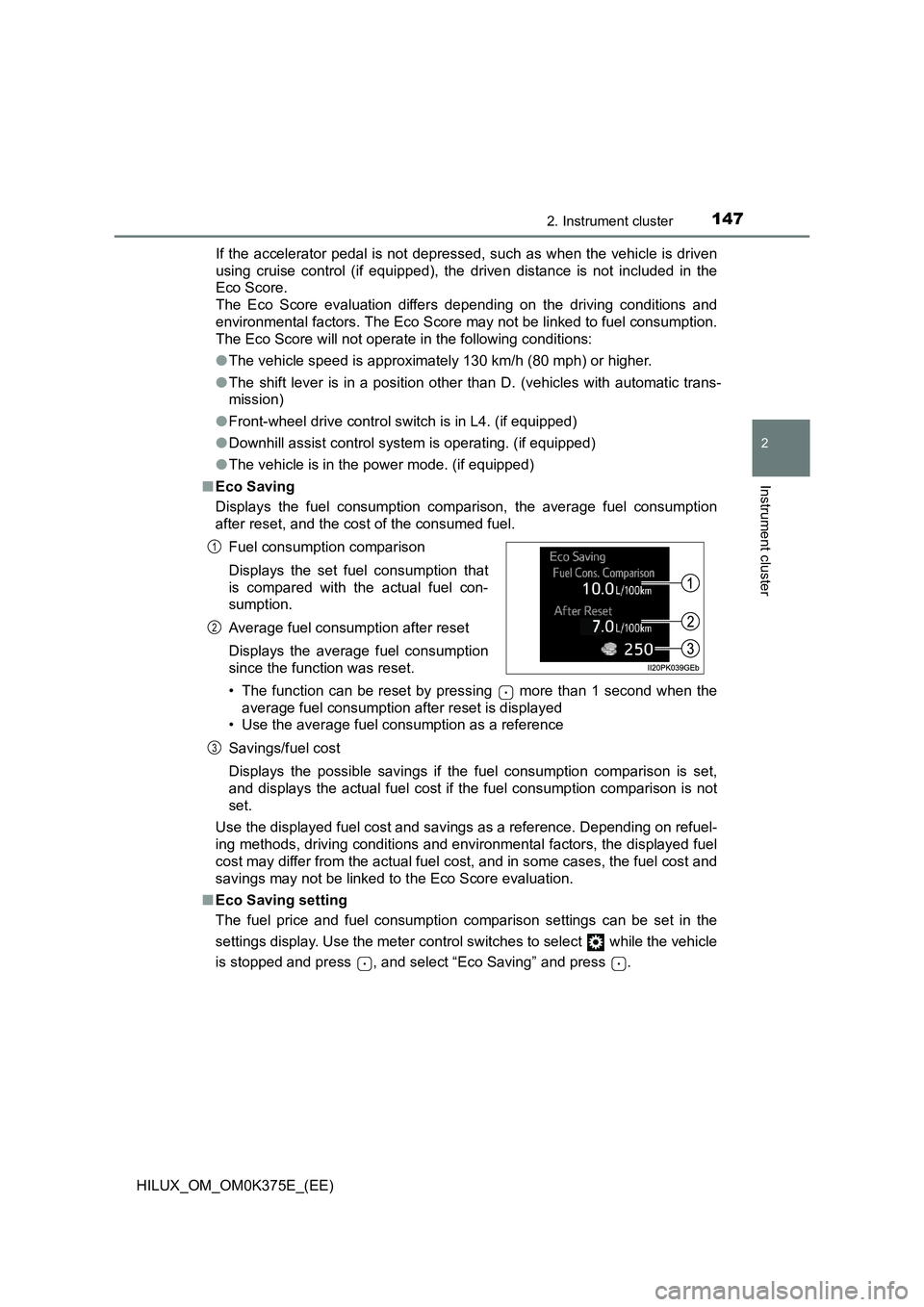
■ Eco Saving
Displays the fuel consumption comparison, the average fuel consumption
after reset, and the cost of the consumed fuel.
• The function can be reset by pressing more than 1 second when the
average fuel consumption after reset is displayed
• Use the average fuel consumption as a reference
Savings/fuel cost
Displays the possible savings if the fuel consumption comparison is set,
and displays the actual fuel cost if the fuel consumption comparison is not
set.
Use the displayed fuel cost and savings as a reference. Depending on refuel-
ing methods, driving conditions and environmental factors, the displayed fuel
cost may differ from the actual fuel cost, and in some cases, the fuel cost and
savings may not be linked to the Eco Score evaluation.
■ Eco Saving setting
The fuel price and fuel consumption comparison settings can be set in the
settings display. Use the meter control switches to select while the vehicle
is stopped and press , and select “Eco Saving” and press .
Fuel consumption comparison
Displays the set fuel consumption that
is compared with the actual fuel con-
sumption.
Average fuel consumption after reset
Displays the average fuel consumption
since the function was reset.
1
2
3
Page 148 of 708
1482. Instrument cluster
HILUX_OM_OM0K375E_(EE)
■ Setting display automatic cancelation
In the following situations, setting display in which the settings can be
changed through the meter control switches will automatically be turned off.
● If a warning message appears while the setting display is displayed
● When the vehicle begins to move while the setting display is displayed
■ When disconnecting and reconnecting battery terminals
The drive information data and settings will be reset.
■ Liquid crystal display
Small spots or light spots may appear on the display. This phenomenon is
characteristic of liquid crystal displays, and there is no problem continuing to
use the display.
WARNING
■ Caution for use while driving
● When operating the multi-information display while driving, pay extra
attention to the safety of the area around the vehicle.
● Do not look continuously at the multi-information display while driving as
you may fail to see pedestrians, objects on the road, etc. ahead of the
vehicle.
■ Eco Score
Use the Eco Score as a reference. Always drive safely in accordance with
road and traffic conditions.
Page 153 of 708
1533-1. Key information
3
Operation of each component
HILUX_OM_OM0K375E_(EE)
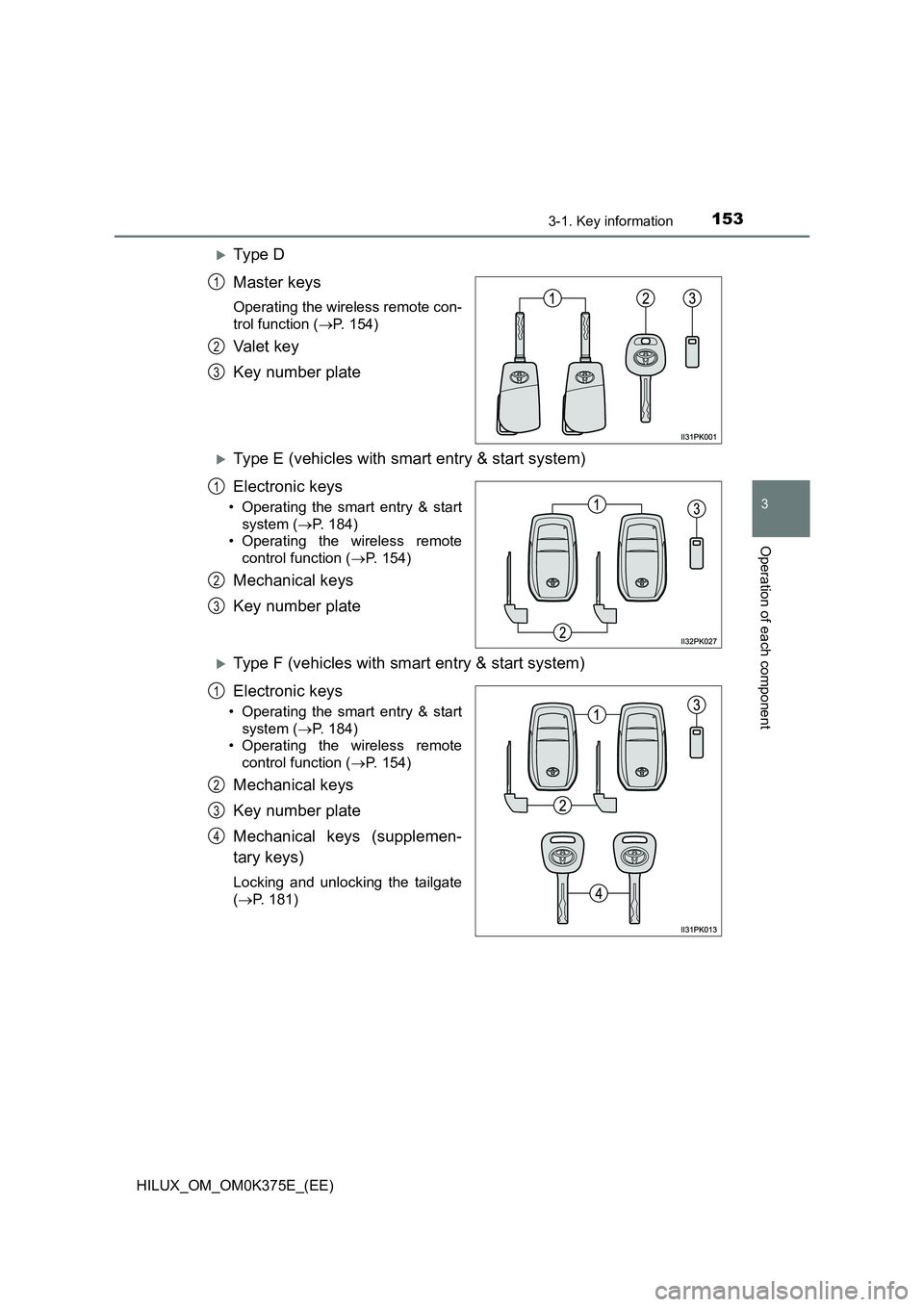
Ty pe D
Master keys
Operating the wireless remote con-
trol function ( P. 154)
Va l e t k e y
Key number plate
Type E (vehicles with smart entry & start system)
Electronic keys
• Operating the smart entry & start
system ( P. 184)
• Operating the wireless remote
control function ( P. 154)
Mechanical keys
Key number plate
Type F (vehicles with smart entry & start system)
Electronic keys
• Operating the smart entry & start
system ( P. 184)
• Operating the wireless remote
control function ( P. 154)
Mechanical keys
Key number plate
Mechanical keys (supplemen-
tary keys)
Locking and unlocking the tailgate
( P. 181)
1
2
3
1
2
3
1
2
3
4
Page 154 of 708
1543-1. Key information
HILUX_OM_OM0K375E_(EE)
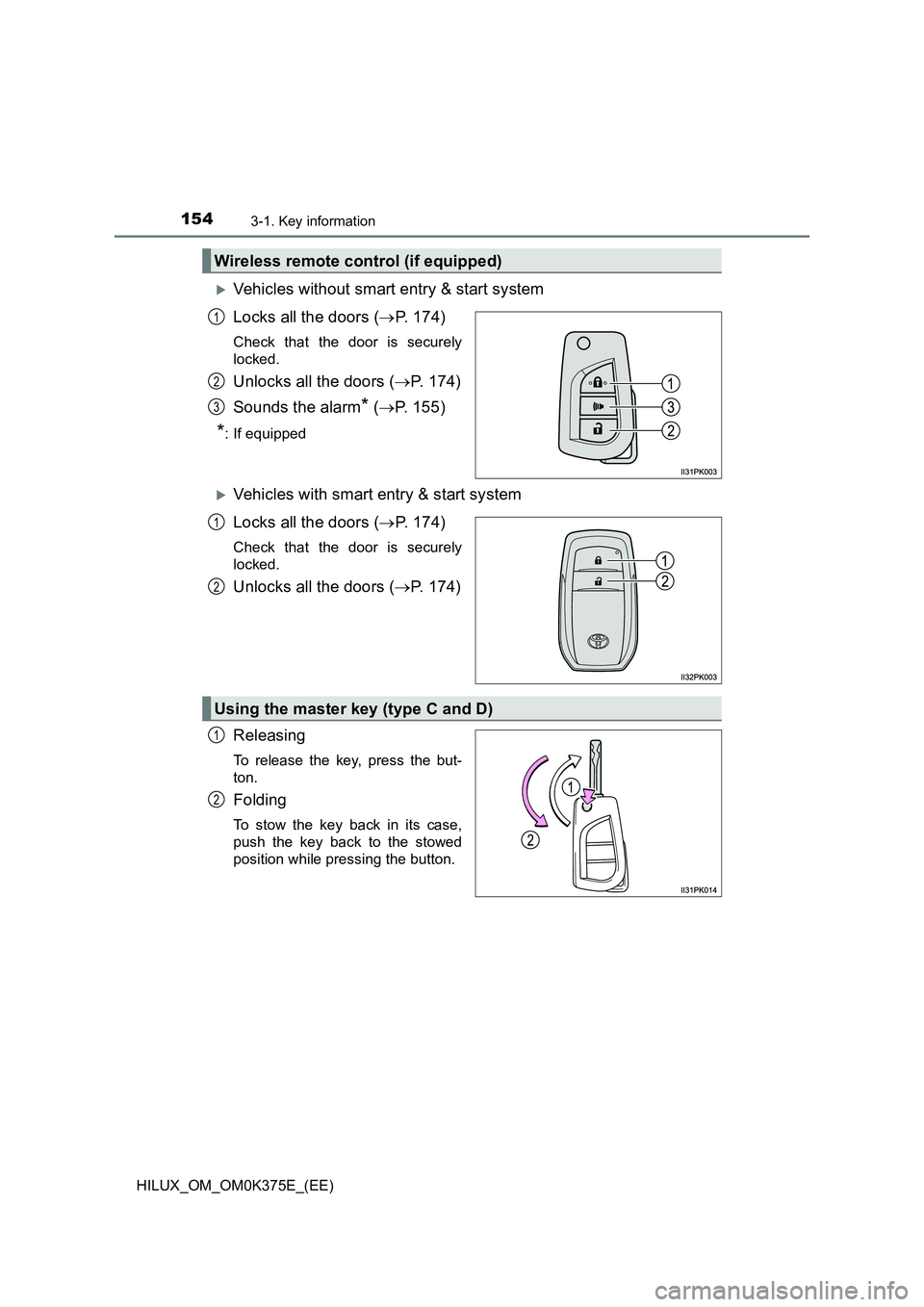
Vehicles without smart entry & start system
Locks all the doors ( P. 174)
Check that the door is securely
locked.
Unlocks all the doors ( P. 174)
Sounds the alarm* ( P. 155)
*: If equipped
Vehicles with smart entry & start system
Locks all the doors ( P. 174)
Check that the door is securely
locked.
Unlocks all the doors ( P. 174)
Releasing
To release the key, press the but-
ton.
Folding
To stow the key back in its case,
push the key back to the stowed
position while pressing the button.
Wireless remote control (if equipped)
1
2
3
1
2
Using the master key (type C and D)
1
2
Page 155 of 708
1553-1. Key information
3
Operation of each component
HILUX_OM_OM0K375E_(EE)
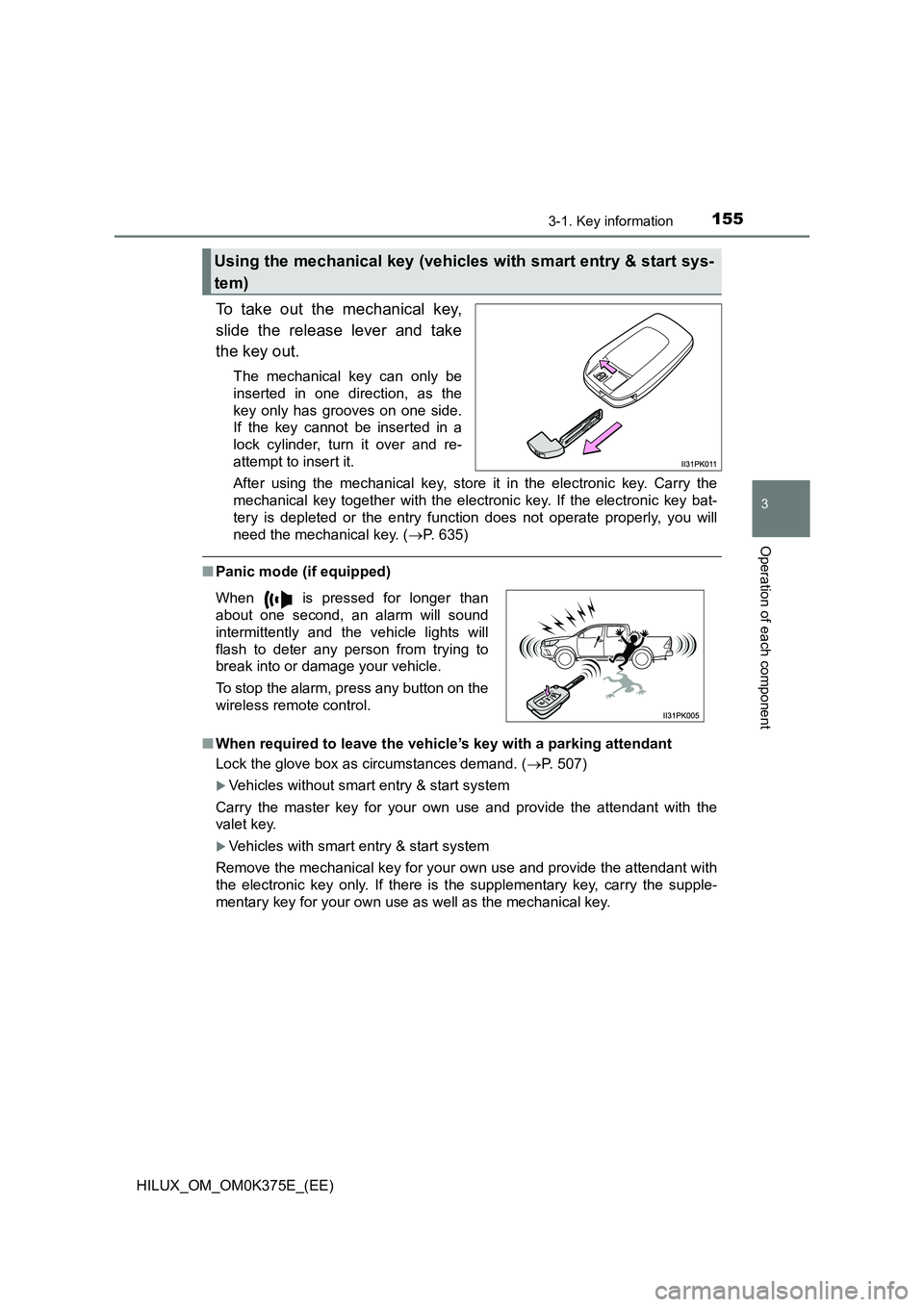
To take out the mechanical key,
slide the release lever and take
the key out.
The mechanical key can only be
inserted in one direction, as the
key only has grooves on one side.
If the key cannot be inserted in a
lock cylinder, turn it over and re-
attempt to insert it.
After using the mechanical key, store it in the electronic key. Carry the
mechanical key together with the electronic key. If the electronic key bat-
tery is depleted or the entry func tion does not operate properly, you will
need the mechanical key. ( P. 635)
■Panic mode (if equipped)
■ When required to leave the vehicle’s key with a parking attendant
Lock the glove box as circumstances demand. ( P. 507)
Vehicles without smart entry & start system
Carry the master key for your own use and provide the attendant with the
valet key.
Vehicles with smart entry & start system
Remove the mechanical key for your own use and provide the attendant with
the electronic key only. If there is the supplementary key, carry the supple-
mentary key for your own use as well as the mechanical key.
Using the mechanical key (vehicles with smart entry & start sys-
tem)
When is pressed for longer than
about one second, an alarm will sound
intermittently and the vehicle lights will
flash to deter any person from trying to
break into or damage your vehicle.
To stop the alarm, press any button on the
wireless remote control.
Page 156 of 708
1563-1. Key information
HILUX_OM_OM0K375E_(EE)
■ If you lose your keys
New genuine keys can be made by any authorized Toyota retailer or Toyota
authorized repairer, or any reliable repairer using a master key (vehicles with-
out smart entry & start system) or the other key of the same type (vehicles
with smart entry & start system), and the key number stamped on your key
number plate. Keep the plate in a safe place such as your wallet, not in the
vehicle.
■ When riding in an aircraft (type C, D, E and F)
When bringing a key with wireless remote control function onto an aircraft,
make sure you do not press any buttons on the key while inside the aircraft
cabin. If you are carrying the key in your bag etc., ensure that the buttons are
not likely to be pressed accidentally. Pressing a button may cause the key to
emit radio waves that could interfere with the operation of the aircraft.
■ Key battery depletion
Vehicles without smart entry & start system
If the wireless remote control function does not operate, the battery may be
depleted. Replace the battery when necessary. ( P. 567)
Vehicles with smart entry & start system
P. 189
■ If a message regarding the state of the electronic key or engine switch
mode, etc. is shown
To prevent trapping the electronic key in side the vehicle, leaving the vehicle
without turning off the engine switch or other passengers from unintentionally
taking the key out of the vehicle, etc., a message that prompts the user to
confirm the state of the electronic key or engine switch mode may be shown
on the multi-information display. In those cases, follow the instructions on the
display immediately.
■ If “KEY BATTERY LOW”/“Key battery low” is shown on the multi-infor-
mation display (if equipped)
The electronic key has a low battery. Replace the electronic key battery.
■ Replacing the electronic key battery
P. 567
■ Confirmation of the registered key number
The number of keys already registered to the vehicle can be confirmed. Ask
any authorized Toyota retailer or Toyota authorized repairer, or any reliable
repairer for details.
Page 157 of 708
1573-1. Key information
3
Operation of each component
HILUX_OM_OM0K375E_(EE)
■ Certification for wireless remote control
Page 174 of 708
1743-2. Opening, closing and locking the doors
HILUX_OM_OM0K375E_(EE)
Side doors
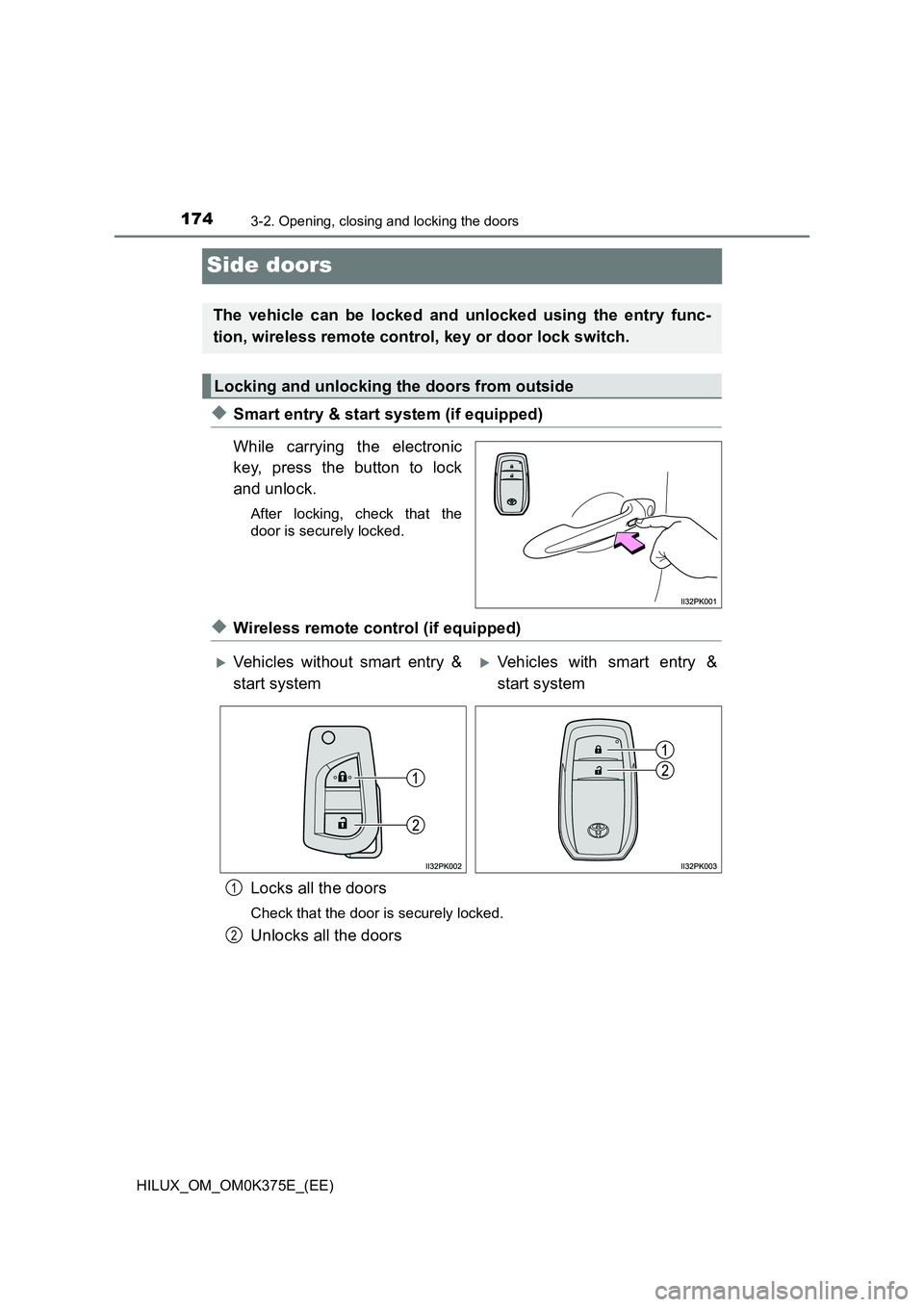
◆Smart entry & start system (if equipped)
While carrying the electronic
key, press the button to lock
and unlock.
After locking, check that the
door is securely locked.
◆Wireless remote control (if equipped)
Locks all the doors
Check that the door is securely locked.
Unlocks all the doors
The vehicle can be locked and unlocked using the entry func-
tion, wireless remote control, key or door lock switch.
Locking and unlocking the doors from outside
Vehicles without smart entry &
start system
Vehicles with smart entry &
start system
1
2
Page 175 of 708
1753-2. Opening, closing and locking the doors
3
Operation of each component
HILUX_OM_OM0K375E_(EE)
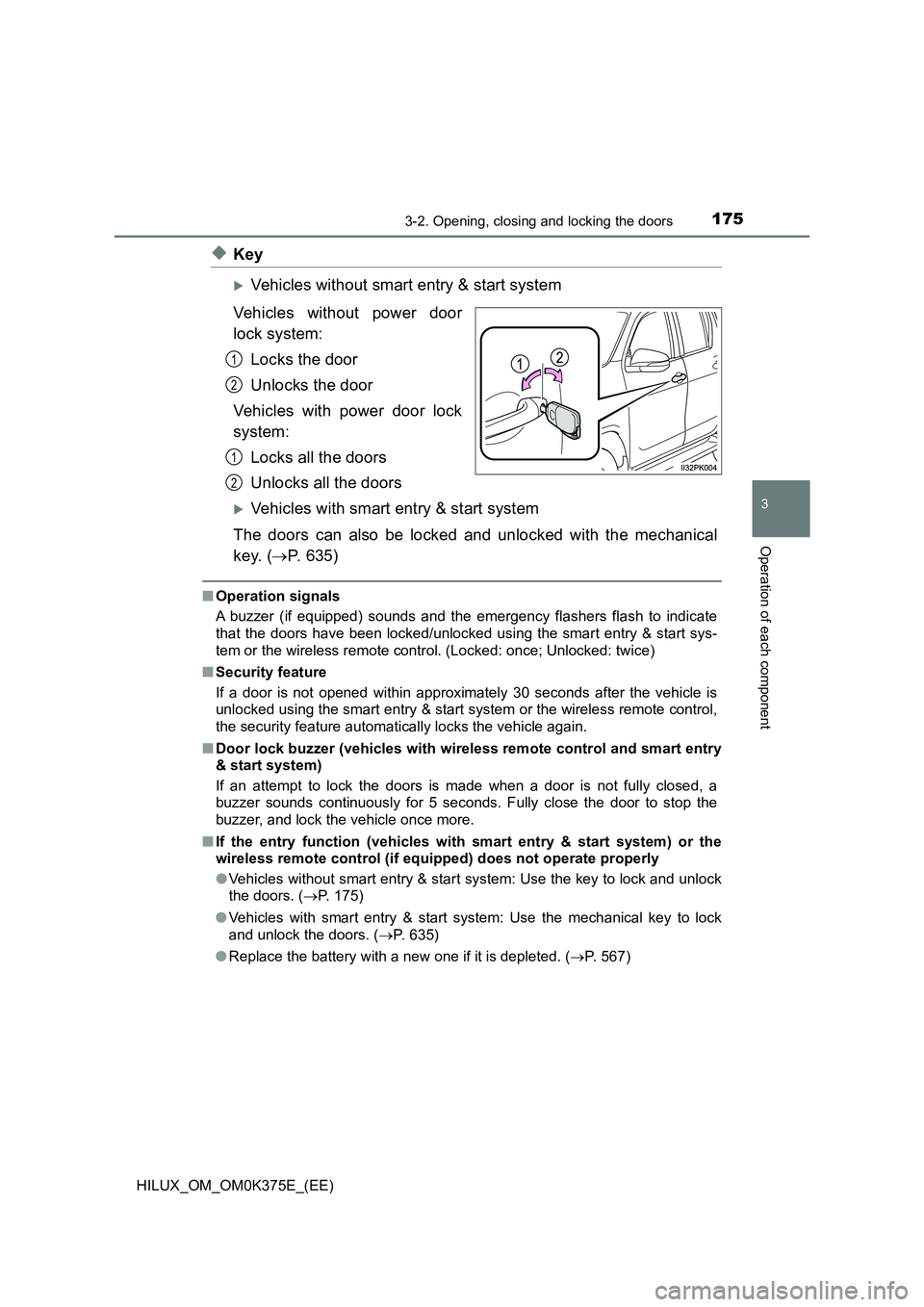
◆Key
Vehicles without smart entry & start system
Vehicles without power door
lock system:
Locks the door
Unlocks the door
Vehicles with power door lock
system:
Locks all the doors
Unlocks all the doors
Vehicles with smart entry & start system
The doors can also be locked and unlocked with the mechanical
key. ( P. 635)
■Operation signals
A buzzer (if equipped) sounds and the em ergency flashers flash to indicate
that the doors have been locked/unlocked using the smart entry & start sys-
tem or the wireless remote control. (Locked: once; Unlocked: twice)
■ Security feature
If a door is not opened within approximately 30 seconds after the vehicle is
unlocked using the smart entry & start system or the wireless remote control,
the security feature automatically locks the vehicle again.
■ Door lock buzzer (vehicles with wireless remote control and smart entry
& start system)
If an attempt to lock the doors is made when a door is not fully closed, a
buzzer sounds continuously for 5 seconds. Fully close the door to stop the
buzzer, and lock the vehicle once more.
■ If the entry function (vehicles with smart entry & start system) or the
wireless remote control (if equipped) does not operate properly
● Vehicles without smart entry & start system: Use the key to lock and unlock
the doors. ( P. 175)
● Vehicles with smart entry & start system: Use the mechanical key to lock
and unlock the doors. ( P. 635)
● Replace the battery with a new one if it is depleted. (P. 567)
1
2
1
2