headlight TOYOTA HILUX 2019 User Guide
[x] Cancel search | Manufacturer: TOYOTA, Model Year: 2019, Model line: HILUX, Model: TOYOTA HILUX 2019Pages: 708, PDF Size: 95.31 MB
Page 237 of 708
237
4Driving
HILUX_OM_OM0K375E_(EE)
4-1. Before driving
Driving the vehicle ............. 238
Cargo and luggage ............ 251
Trailer towing (except
models for model code
destination W).................. 252
Trailer towing (models for
model code destination
W) .................................... 253
4-2. Driving procedures
Engine (ignition) switch
(vehicles without smart
entry & start system)........ 266
Engine (ignition) switch
(vehicles with smart
entry & start system)........ 269
Automatic transmission ..... 277
Manual transmission.......... 284
Turn signal lever ................ 290
Parking brake .................... 291
4-3. Operating the lights
and wipers
Headlight switch ................ 292
Fog light switch .................. 299
Windshield wipers and
washer ............................. 302
4-4. Refueling
Opening the fuel tank
cap ................................... 304
4-5. Using the driving support
systems
Toyota Safety Sense ......... 309
PCS (Pre-Collision
System) ........................... 321
LDA (Lane Departure
Alert) ................................ 334
RSA (Road Sign Assist)..... 343
Cruise control..................... 348
Rear view monitor
system ............................. 352
Four-wheel drive
system ............................. 363
Rear differential
lock system ...................... 373
Stop & Start system
(Smart Stop) .................... 377
Driving assist systems ....... 387
Downhill assist control
system ............................. 395
DPF (Diesel Particulate
Filter) system ................... 398
4-6. Driving tips
Winter driving tips .............. 403
Page 292 of 708
2924-3. Operating the lights and wipers
HILUX_OM_OM0K375E_(EE)
Headlight switch
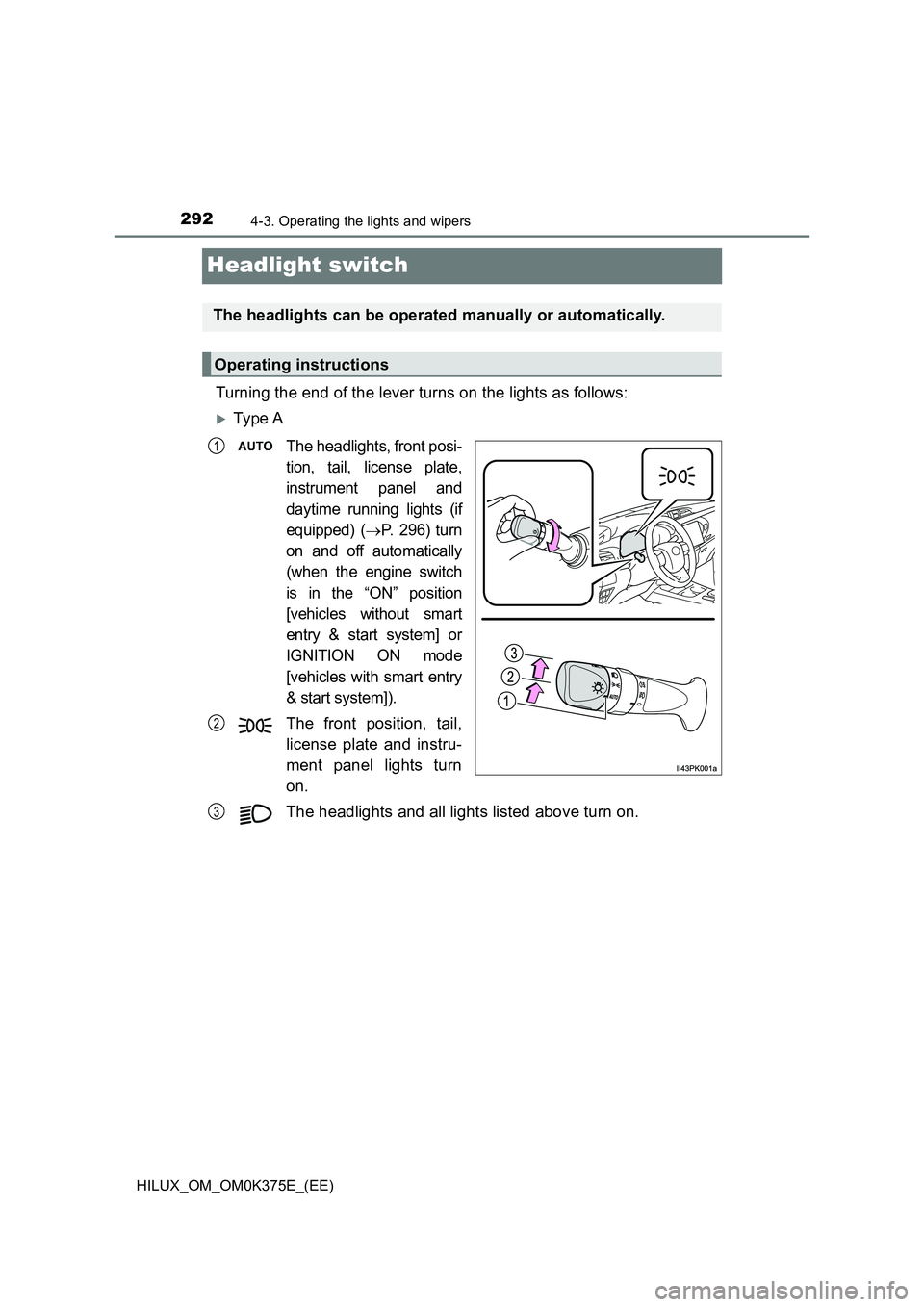
Turning the end of the lever turns on the lights as follows:
Ty pe A
The headlights, front posi-
tion, tail, license plate,
instrument panel and
daytime running lights (if
equipped) (P. 296) turn
on and off automatically
(when the engine switch
is in the “ON” position
[vehicles without smart
entry & start system] or
IGNITION ON mode
[vehicles with smart entry
& start system]).
The front position, tail,
license plate and instru-
ment panel lights turn
on.
The headlights and all lights listed above turn on.
The headlights can be operated manually or automatically.
Operating instructions
1
2
3
Page 293 of 708
2934-3. Operating the lights and wipers
4
Driving
HILUX_OM_OM0K375E_(EE)
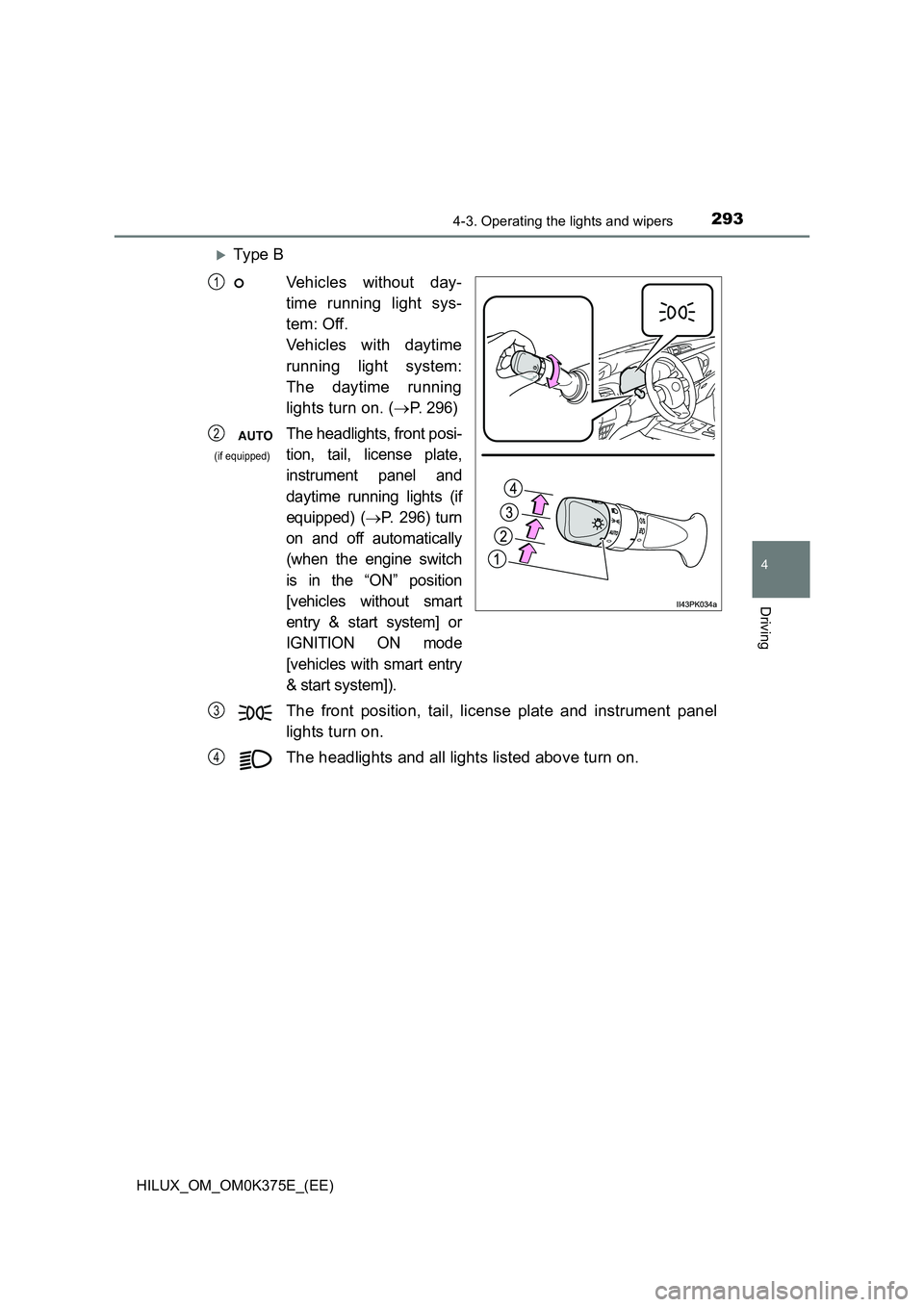
Ty pe B
Vehicles without day-
time running light sys-
tem: Off.
Vehicles with daytime
running light system:
The daytime running
lights turn on. ( P. 2 9 6)
The headlights, front posi-
tion, tail, license plate,
instrument panel and
daytime running lights (if
equipped) (P. 296) turn
on and off automatically
(when the engine switch
is in the “ON” position
[vehicles without smart
entry & start system] or
IGNITION ON mode
[vehicles with smart entry
& start system]).
The front position, tail, license plate and instrument panel
lights turn on.
The headlights and all lights listed above turn on.
1
2
(if equipped)
3
4
Page 294 of 708
2944-3. Operating the lights and wipers
HILUX_OM_OM0K375E_(EE)
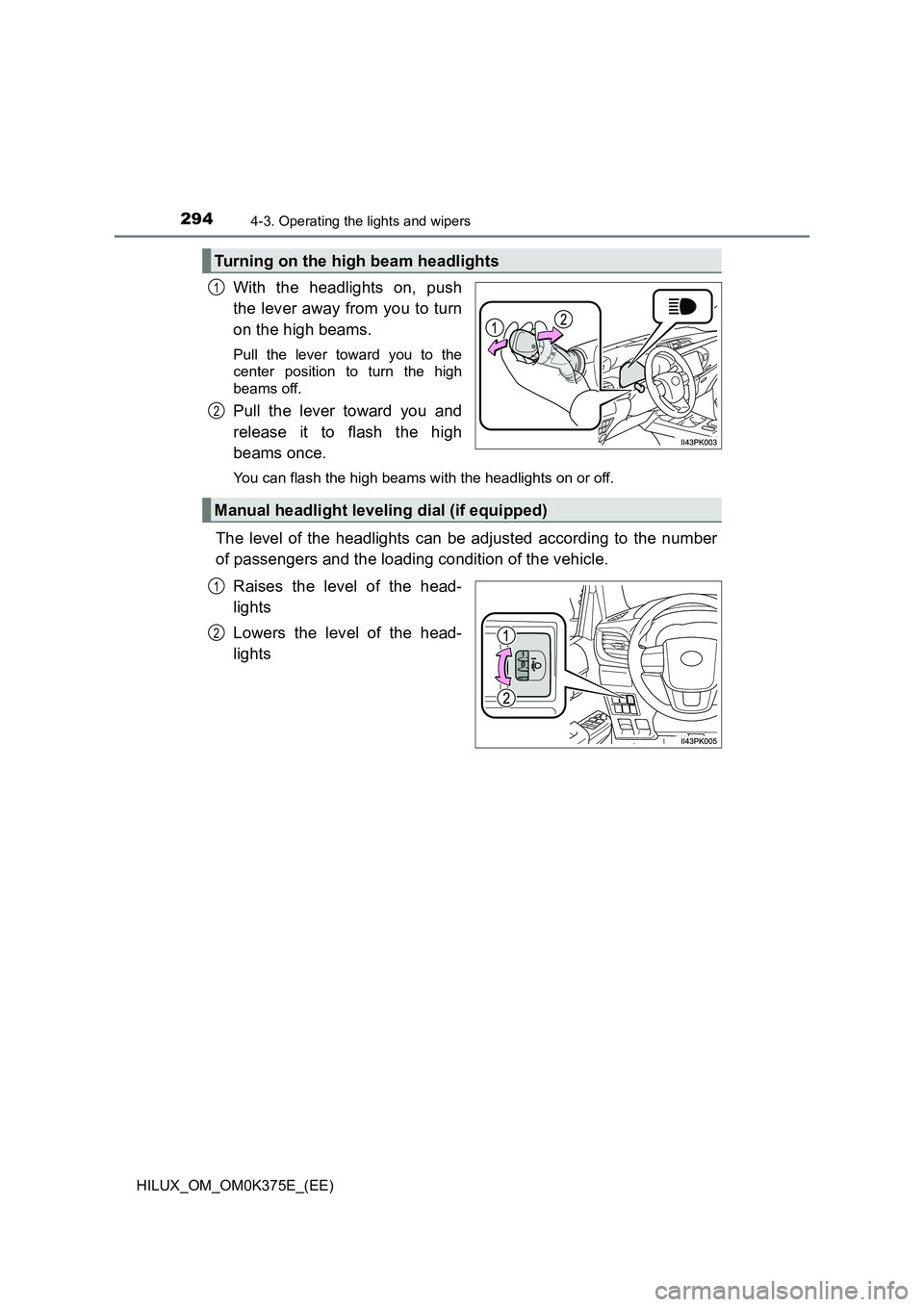
With the headlights on, push
the lever away from you to turn
on the high beams.
Pull the lever toward you to the
center position to turn the high
beams off.
Pull the lever toward you and
release it to flash the high
beams once.
You can flash the high beams wi th the headlights on or off.
The level of the headlights can be adjusted according to the number
of passengers and the loading condition of the vehicle.
Raises the level of the head-
lights
Lowers the level of the head-
lights
Turning on the high beam headlights
1
2
Manual headlight leveling dial (if equipped)
1
2
Page 296 of 708
2964-3. Operating the lights and wipers
HILUX_OM_OM0K375E_(EE)
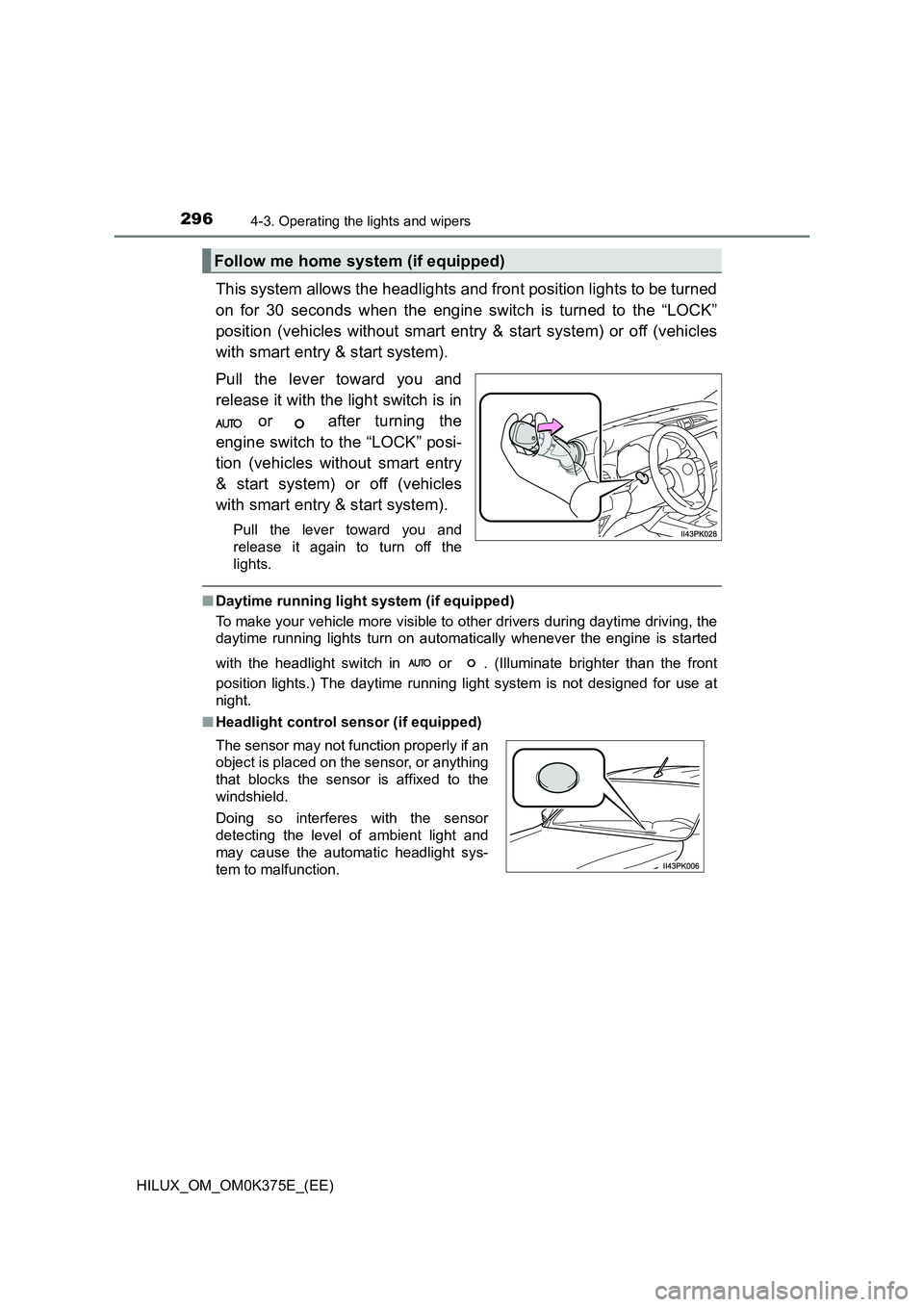
This system allows the headlights and front position lights to be turned
on for 30 seconds when the engine switch is turned to the “LOCK”
position (vehicles without smart entry & start system) or off (vehicles
with smart entry & start system).
Pull the lever toward you and
release it with the light switch is in
or after turning the
engine switch to the “LOCK” posi-
tion (vehicles without smart entry
& start system) or off (vehicles
with smart entry & start system).
Pull the lever toward you and
release it again to turn off the
lights.
■ Daytime running light system (if equipped)
To make your vehicle more visible to other drivers during daytime driving, the
daytime running lights turn on automatically whenever the engine is started
with the headlight switch in or . (Illuminate brighter than the front
position lights.) The daytime running light system is not designed for use at
night.
■ Headlight control sensor (if equipped)
Follow me home system (if equipped)
The sensor may not function properly if an
object is placed on the sensor, or anything
that blocks the sensor is affixed to the
windshield.
Doing so interferes with the sensor
detecting the level of ambient light and
may cause the automatic headlight sys-
tem to malfunction.
Page 297 of 708
2974-3. Operating the lights and wipers
4
Driving
HILUX_OM_OM0K375E_(EE)
■ Automatic light off system (if equipped)
Models for model code destination Blank* (except for Kazakhstan and
Morocco)
The lights turn off after the engine switch is turned to the “LOCK” position
(vehicles without smart entry & start system) or off (vehicles with smart entry
& start system) and the driver’s door is opened.
To turn the lights on again, turn the engine switch to the “ON” position (vehi-
cles without smart entry & start system) or to IGNITION ON mode (vehicles
with smart entry & start system), or turn the light switch to or once
and then back to or .
Models for model code destination W*, Kazakhstan and Morocco
When the light switch is in or :
The headlights and front fog lights turn off after the engine switch is turned to
the “LOCK” position (vehicles without smart entry & start system) or off (vehi-
cles with smart entry & start system).
When the light switch is in AUTO:
The lights turn off after the engine switch is turned to the “LOCK” position
(vehicles without smart entry & start system) or off (vehicles with smart entry
& start system).
To turn the lights on again, turn the engine switch to the “ON” position (vehi-
cles without smart entry & start system) or to IGNITION ON mode (vehicles
with smart entry & start system), or turn the light switch to or once
and then back to or .
*: See “Checking your vehicle’s model” if you are not sure of which model
your vehicle is. ( P. 11 )
■ Light reminder buzzer (if equipped)
Vehicles without smart entry & start system
A buzzer sounds when the engine switch is turned to the “LOCK” position, the
key is removed and the driver’s door is opened while the lights are turned on.
Vehicles with smart entry & start system
A buzzer sounds when the engine switch is turned off and the driver’s door is
opened while the lights are turned on.
Page 298 of 708
2984-3. Operating the lights and wipers
HILUX_OM_OM0K375E_(EE)
■ Battery-saving function
Models for model code destination Blank* (except for Kazakhstan and
Morocco)
In order to prevent the battery of the vehicle from discharging, if the head-
lights and/or tail lights are on when the engine switch is turned to the “LOCK”
position (vehicles without smart entry & start system) or off (vehicles with
smart entry & start system), the battery-saving function will operate and auto-
matically turn off all the lights after approximately 20 minutes.
Models for model code destination W*, Kazakhstan and Morocco
In order to prevent the battery of the vehicle from discharging, if the light
switch is in or position when the engine switch is turned to the
“LOCK” position (vehicles without smart entry & start system) or off (vehicles
with smart entry & start system), the battery-saving function will operate and
automatically turn off all the lights after approximately 20 minutes.
When any of the following are performed, the battery-saving function is can-
celed once and then reactivated. All the lights will turn off automatically 20
minutes after the battery-saving function has been reactivated:
● When the headlight switch is operated
● When a door is closed once and then opened
*: See “Checking your vehicle’s model” if you are not sure of which model
your vehicle is. ( P. 11 )
■ Automatic headlight leveling system (if equipped)
The level of the headlights is automatically adjusted according to the number
of passengers and the loading condition of the vehicle to ensure that the
headlights do not interfere with other road users.
■ Customization
Settings (e.g. light sensor sensitivity) can be changed.
(Customizable features: P. 683)
NOTICE
■To prevent battery discharge
Do not leave the lights on longer than necessary when the engine is not
running.
Page 301 of 708
3014-3. Operating the lights and wipers
4
Driving
HILUX_OM_OM0K375E_(EE)
■Fog lights can be used when
Vehicles with front and rear fog lights
Front fog lights: The headlights or front position lights are turned on.
Rear fog light: The front fog lights are turned on.
Vehicles with rear fog light only
The headlights are turned on.
Page 303 of 708
3034-3. Operating the lights and wipers
4
Driving
HILUX_OM_OM0K375E_(EE)
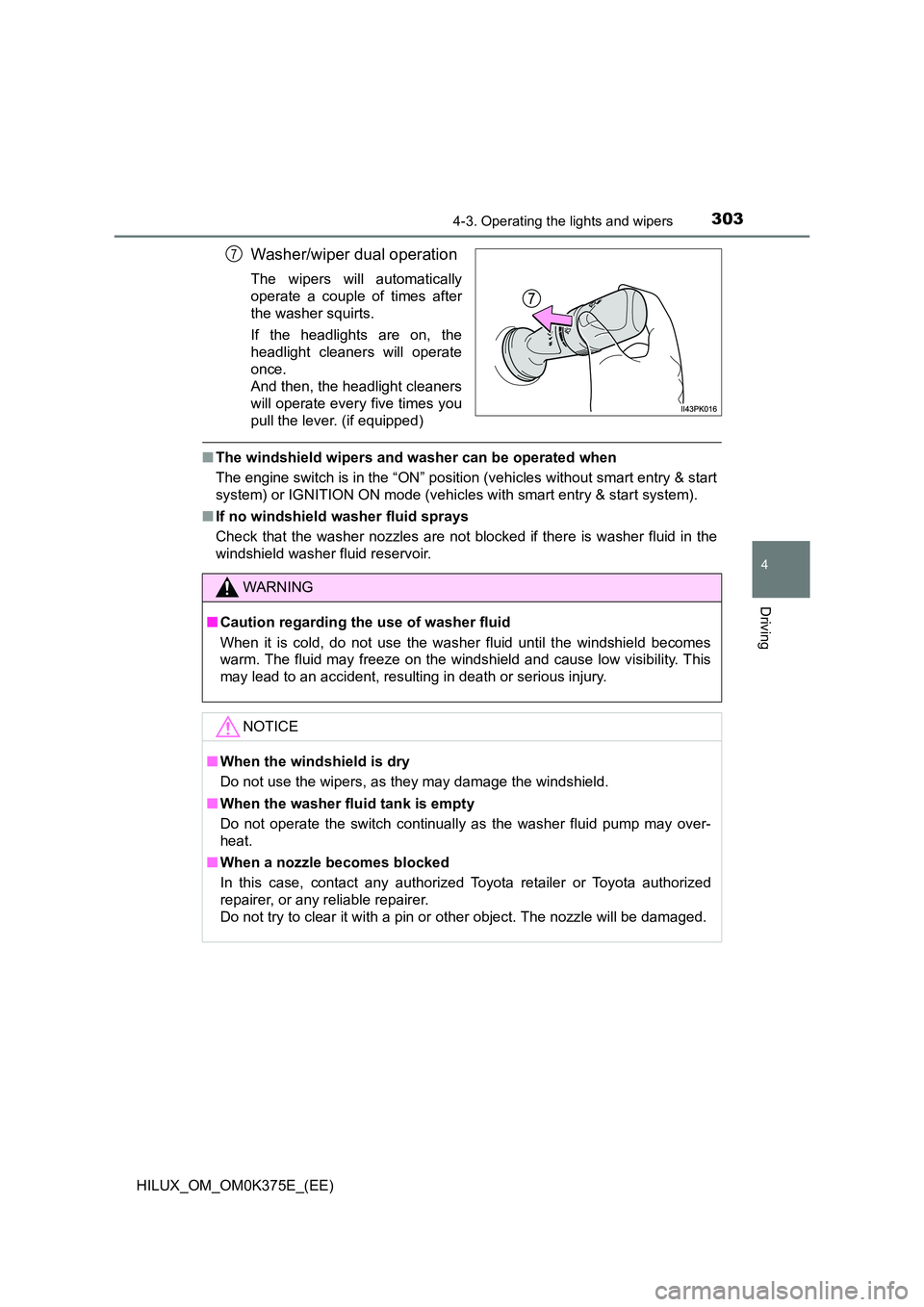
Washer/wiper dual operation
The wipers will automatically
operate a couple of times after
the washer squirts.
If the headlights are on, the
headlight cleaners will operate
once.
And then, the headlight cleaners
will operate every five times you
pull the lever. (if equipped)
■ The windshield wipers and washer can be operated when
The engine switch is in the “ON” position (vehicles without smart entry & start
system) or IGNITION ON mode (vehicles with smart entry & start system).
■ If no windshield washer fluid sprays
Check that the washer nozzles are not blocked if there is washer fluid in the
windshield washer fluid reservoir.
7
WARNING
■ Caution regarding the use of washer fluid
When it is cold, do not use the washer fluid until the windshield becomes
warm. The fluid may freeze on the windshield and cause low visibility. This
may lead to an accident, resulting in death or serious injury.
NOTICE
■ When the windshield is dry
Do not use the wipers, as they may damage the windshield.
■ When the washer fluid tank is empty
Do not operate the switch continually as the washer fluid pump may over-
heat.
■ When a nozzle becomes blocked
In this case, contact any authorized Toyota retailer or Toyota authorized
repairer, or any reliable repairer.
Do not try to clear it with a pin or other object. The nozzle will be damaged.
Page 314 of 708
3144-5. Using the driving support systems
HILUX_OM_OM0K375E_(EE)
WARNING
●Replace the windshield if it is damaged or cracked.
If the windshield needs to be replaced, contact any authorized Toyota
retailer or Toyota authorized repairer, or any reliable repairer.
● Do not get the camera sensor wet.
● Do not allow bright lights to shine into the camera sensor.
● Do not dirty or damage the camera sensor.
When cleaning the inside of the windshi eld, do not allow glass cleaner to
contact the lens. Also, do not touch the lens.
If the lens is dirty or damaged, contact any authorized Toyota retailer or
Toyota authorized repairer, or any reliable repairer.
● Do not subject the camera sensor to a strong impact.
● Do not change the installation position or direction of the camera sensor or
remove it.
● Do not disassemble the camera sensor.
● Do not modify any components of the vehicle around the camera sensor
(inside rear view mirror, etc.) or ceiling.
● Do not attach any accessories that may obstruct the camera sensor to the
hood, front grille or front bumper. C ontact any authorized Toyota retailer or
Toyota authorized repairer, or any reliable repairer for details.
● If a surfboard or other long object is to be mounted on the roof, make sure
that it will not obstruct the camera sensor.
● Do not modify the headlights or other lights.