change time TOYOTA HILUX 2020 (in English) User Guide
[x] Cancel search | Manufacturer: TOYOTA, Model Year: 2020, Model line: HILUX, Model: TOYOTA HILUX 2020Pages: 744, PDF Size: 108.13 MB
Page 343 of 744
3434-5. Using the driving support systems
4
Driving
HILUX_OM_OM0K321E_(EE)
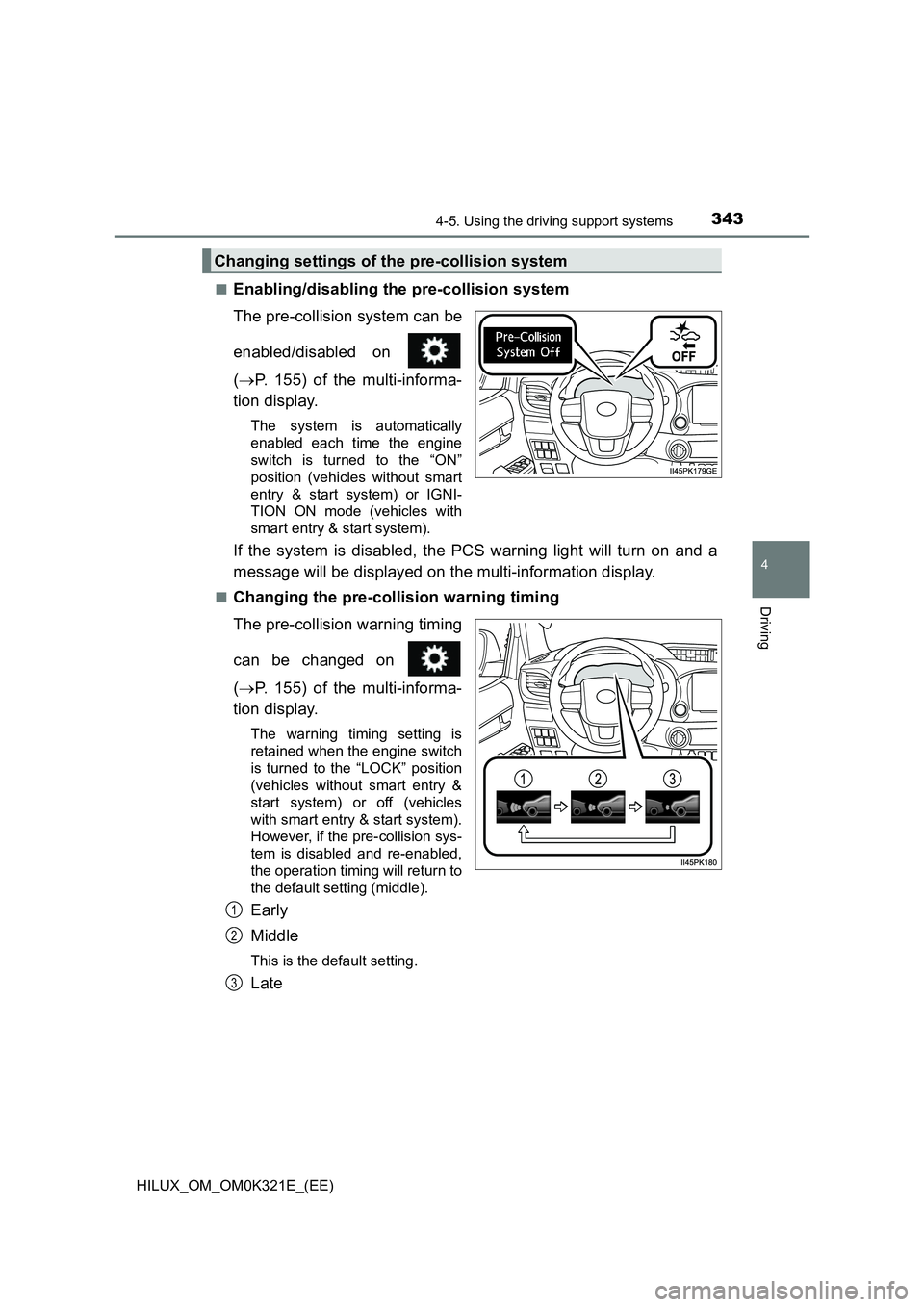
■Enabling/disabling the pre-collision system
The pre-collision system can be
enabled/disabled on
( P. 155) of the multi-informa-
tion display.
The system is automatically
enabled each time the engine
switch is turned to the “ON”
position (vehicles without smart
entry & start system) or IGNI-
TION ON mode (vehicles with
smart entry & start system).
If the system is disabled, the PCS warning light will turn on and a
message will be displayed on the multi-information display.
■Changing the pre-collision warning timing
The pre-collision warning timing
can be changed on
( P. 155) of the multi-informa-
tion display.
The warning timing setting is
retained when the engine switch
is turned to the “LOCK” position
(vehicles without smart entry &
start system) or off (vehicles
with smart entry & start system).
However, if the pre-collision sys-
tem is disabled and re-enabled,
the operation timing will return to
the default setting (middle).
Early
Middle
This is the default setting.
Late
Changing settings of the pre-collision system
1
2
3
Page 348 of 744
3484-5. Using the driving support systems
HILUX_OM_OM0K321E_(EE)
• If a vehicle ahead is a motorcycle
• If a vehicle ahead is narrow, such as a personal mobility vehicle
• If a preceding vehicle has a small rear end, such as an unloaded truck
• If a vehicle ahead is carrying a load which protrudes past its rear bumper
• If a vehicle ahead is irregularly shaped, such as a tractor or side car
• If a vehicle ahead is a child sized bicycle, a bicycle that is carrying a large
load, a bicycle ridden by more than one person, or a uniquely shaped
bicycle (bicycle with a child seat, tandem bicycle, etc.)
• If a pedestrian/or the riding height of a bicyclist ahead is shorter than
approximately 3.2 ft. (1 m) or taller than approximately 6.5 ft. (2 m)
• If a pedestrian/bicyclist is wearing oversized clothing (a rain coat, long
skirt, etc.), making their silhouette obscure
• If a pedestrian is bending forward or squatting or bicyclist is bending for-
ward
• If a pedestrian/bicyclist is moving fast
• If a pedestrian is pushing a stroller, wheelchair, bicycle or other vehicle
• When driving in inclement weather such as heavy rain, fog, snow or a
sandstorm
• When driving through steam or smoke
• When the surrounding area is dim, such as at dawn or dusk, or while at
night or in a tunnel, making a detectable object appear to be nearly the
same color as its surroundings
• When driving in a place where the surrounding brightness changes sud-
denly, such as at the entrance or exit of a tunnel
• After the engine has started the vehicle has not been driven for a certain
amount of time
• While making a left/right turn and for a few seconds after making a left/
right turn
• While driving on a curve and for a few seconds after driving on a curve
• If your vehicle is skidding
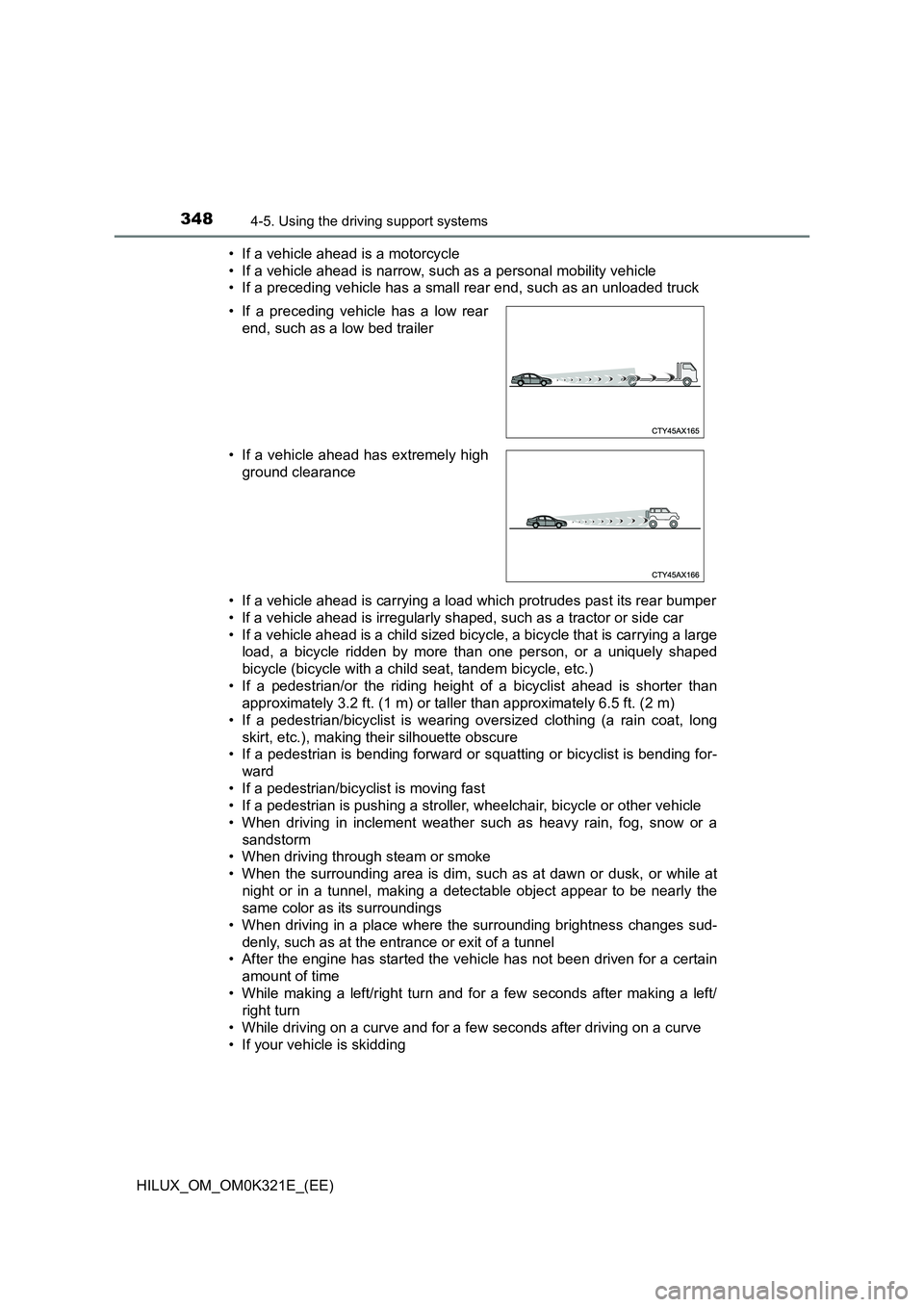
• If a preceding vehicle has a low rear
end, such as a low bed trailer
• If a vehicle ahead has extremely high
ground clearance
Page 360 of 744
3604-5. Using the driving support systems
HILUX_OM_OM0K321E_(EE)
■ Warning message
If the following warning message is displayed on the multi-information dis-
play, and the LDA indicator illuminates in yellow, follow the appropriate trou-
bleshooting procedure. Also, if a different warning message is displayed,
follow the instructions displayed on the screen.
● “LDA Malfunction Visit Your Dealer”
The system may not be operating properly. Have the vehicle inspected by
any authorized Toyota retailer or Toyota authorized repairer, or any reliable
repairer.
● “Lane Departure Alert Unavailable”
• The system is temporarily canceled due to a malfunction in a sensor
other than the front camera. Turn the LDA system off, wait for a little
while, and then turn the LDA system back on.
• The system is temporarily unavaila ble as the vehicle repeatedly departs
from its lane or course* in a short period of time. Turn the engine switch
to the “LOCK” position (vehicles without smart entry & start system) or off
(vehicles with smart entry & start system), and then turn it to the “ON”
position (vehicles without smart entry & start system) or IGNITION ON
mode (vehicles with smart entry & start system) again.
● “LDA Unavailable at Current Speed”
The function cannot be used as the vehicle speed exceeds the LDA opera-
tion range. Drive slower.
*: Boundary between asphalt and the side of the road, such as grass, soil, or
a curb
■ Customization
Function settings can be changed.
( P. 722)
Page 365 of 744
3654-5. Using the driving support systems
4
Driving
HILUX_OM_OM0K321E_(EE)
In the following situations, the RSA system will alert the driver.
● When the vehicle speed exceeds the speed warning threshold of
the speed limit sign displayed, the sign display will be emphasized
and a buzzer will sound.
● When the RSA system recognizes a no-entry sign and detects that
the vehicle has entered a no-entry area based on the map informa-
tion of the navigation system, the no-entry sign flashes and a
buzzer will sound. (For vehicles with navigation system)
● If it is detected that your vehicle is overtaking when a no overtaking
sign is displayed on the multi-information display, the displayed sign
will flash and a buzzer will sound.
Depending on the situation, traffic environment (traffic direction,
speed unit) may be detected incorrectly and a warning indication may
not operate properly.
■ Setting procedure
Setting for “RSA” in of the multi-information display is set to “On”
( P. 151)
■ Automatic turn-off of RSA sign display
One or more signs automatically turn off in the following situations.
● A new sign is not recognized for a certain distance.
● The road changes due to a left or right turn, etc.
■ Conditions in which the function may not operate or detect correctly
In the following situations, RSA does not operate normally and may not rec-
ognize signs, display the incorrect sign, etc. However, this does not indicate a
malfunction.
● The front camera is misaligned due to a strong impact being applied to the
sensor, etc.
● Dirt, snow, stickers, etc. are on the windshield near the front camera.
● In inclement weather such as heavy rain, fog, snow or sand storms
● Light from an oncoming vehicle, the sun, etc. enters the front camera.
● The sign is dirty, faded, tilted or bent, and if an electronic sign, the contrast
is poor.
● All or part of the sign is hidden by the leaves of a tree, a pole, etc.
● The sign is only visible to the front camera for a short amount of time.
● The driving scene (turning, lane change, etc.) is judged incorrectly.
Warning indication
Page 372 of 744
3724-5. Using the driving support systems
HILUX_OM_OM0K321E_(EE)
Example of constant speed cruising
When there are no vehicles ahead
The vehicle travels at the speed set by the driver.
Example of deceleration cruising and follow-up cruising
When a preceding vehicle driving slower than the set speed
appears
When a vehicle is detected running ahead of you, the system automatically
decelerates your vehicle. When a greater reduction in vehicle speed is
necessary, the system applies the brakes (the stop lights will come on at
this time). The system will respond to changes in the speed of the vehicle
ahead in order to maintain the vehicle-to-vehicle distance set by the driver.
Approach warning warns you when the system cannot decelerate suffi-
ciently to prevent your vehicle from closing in on the vehicle ahead.
When the turn signal lever is operated and your vehicle moves to a right
lane*1 or left lane*2 while driving at 80 km/h (50 mph) or more, the vehicle
will quickly accelerate to help to overtake a passing vehicle.
*1: Right-hand drive vehicles
*2: Left-hand drive vehicles
Example of acceleration
When there are no longer any preceding vehicles driving slower
than the set speed
The system accelerates until the set speed is reached. The system then
returns to constant speed cruising.
1
2
3
Page 374 of 744
3744-5. Using the driving support systems
HILUX_OM_OM0K321E_(EE)
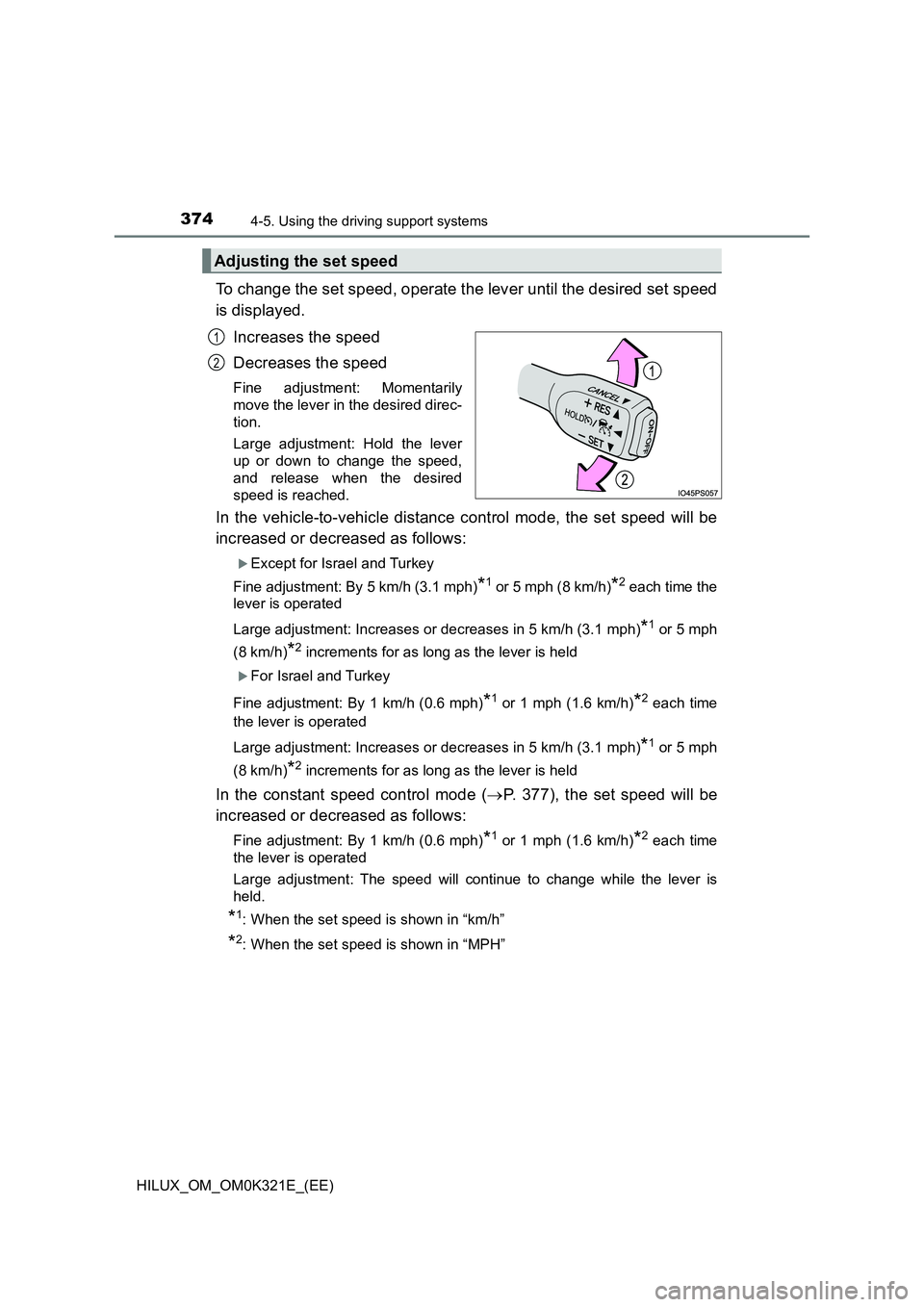
To change the set speed, operate the lever until the desired set speed
is displayed.
Increases the speed
Decreases the speed
Fine adjustment: Momentarily
move the lever in the desired direc-
tion.
Large adjustment: Hold the lever
up or down to change the speed,
and release when the desired
speed is reached.
In the vehicle-to-vehicle distance control mode, the set speed will be
increased or decreased as follows:
Except for Israel and Turkey
Fine adjustment: By 5 km/h (3.1 mph)*1 or 5 mph (8 km/h)*2 each time the
lever is operated
Large adjustment: Increases or decreases in 5 km/h (3.1 mph)*1 or 5 mph
(8 km/h)*2 increments for as long as the lever is held
For Israel and Turkey
Fine adjustment: By 1 km/h (0.6 mph)*1 or 1 mph (1.6 km/h)*2 each time
the lever is operated
Large adjustment: Increases or decreases in 5 km/h (3.1 mph)*1 or 5 mph
(8 km/h)*2 increments for as long as the lever is held
In the constant speed control mode ( P. 377), the set speed will be
increased or decreased as follows:
Fine adjustment: By 1 km/h (0.6 mph)*1 or 1 mph (1.6 km/h)*2 each time
the lever is operated
Large adjustment: The speed will continue to change while the lever is
held.
*1: When the set speed is shown in “km/h”
*2: When the set speed is shown in “MPH”
Adjusting the set speed
1
2
Page 380 of 744
3804-5. Using the driving support systems
HILUX_OM_OM0K321E_(EE)
■ Automatic cancelation of constant speed control mode
Constant speed control mode is automatically canceled in the following situa-
tions:
● Actual vehicle speed is more than approximately 16 km/h (10 mph) below
the set vehicle speed.
● Actual vehicle speed falls below approximately 30 km/h (20 mph).
● VSC is activated.
● TRC/A-TRC is activated for a period of time.
● When the VSC, TRC/A-TRC system is turned off.
● Pre-collision braking is activated.
● When the shift lever is in N or the clutch pedal is depressed for a certain
amount of time or more. (Vehicles with manual transmission)
● 4WD models: Switching the transfer mode is not completed within 5 sec-
onds while the cruise control system is on.
If constant speed control mode is automatically canceled for any reasons
other than the above, there may be a malfunction in the system. Contact any
authorized Toyota retailer or Toyota authorized repairer, or any reliable
repairer.
■ The Dynamic Radar Cruise Control with Road Sign Assist may not oper-
ate properly when
As the Dynamic Radar Cruise Control with Road Sign Assist may not oper-
ate properly in conditions in which RSA may not operate or detect correctly
( P. 365), when using this function, make sure to check the speed limit
sign displayed.
In the following situations, the set speed may not be changed to the recog-
nized speed limit by pushing the lever up or down.
● If speed limit information is not available
● When the recognized speed limit is the same as the set speed
● When the recognized speed limit is outside of the speed range that the
dynamic radar cruise control system can operate
■ Brake operation
A brake operation sound may be heard and the brake pedal response may
change, but these are not malfunctions.
■ Warning messages and buzzers for dynamic radar cruise control
Warning messages and buzzers are used to indicate a system malfunction or
to inform the driver of the need for caution while driving. If a warning message
is shown on the multi-information display, read the message and follow the
instructions. ( P. 337, 643)
Page 384 of 744
3844-5. Using the driving support systems
HILUX_OM_OM0K321E_(EE)
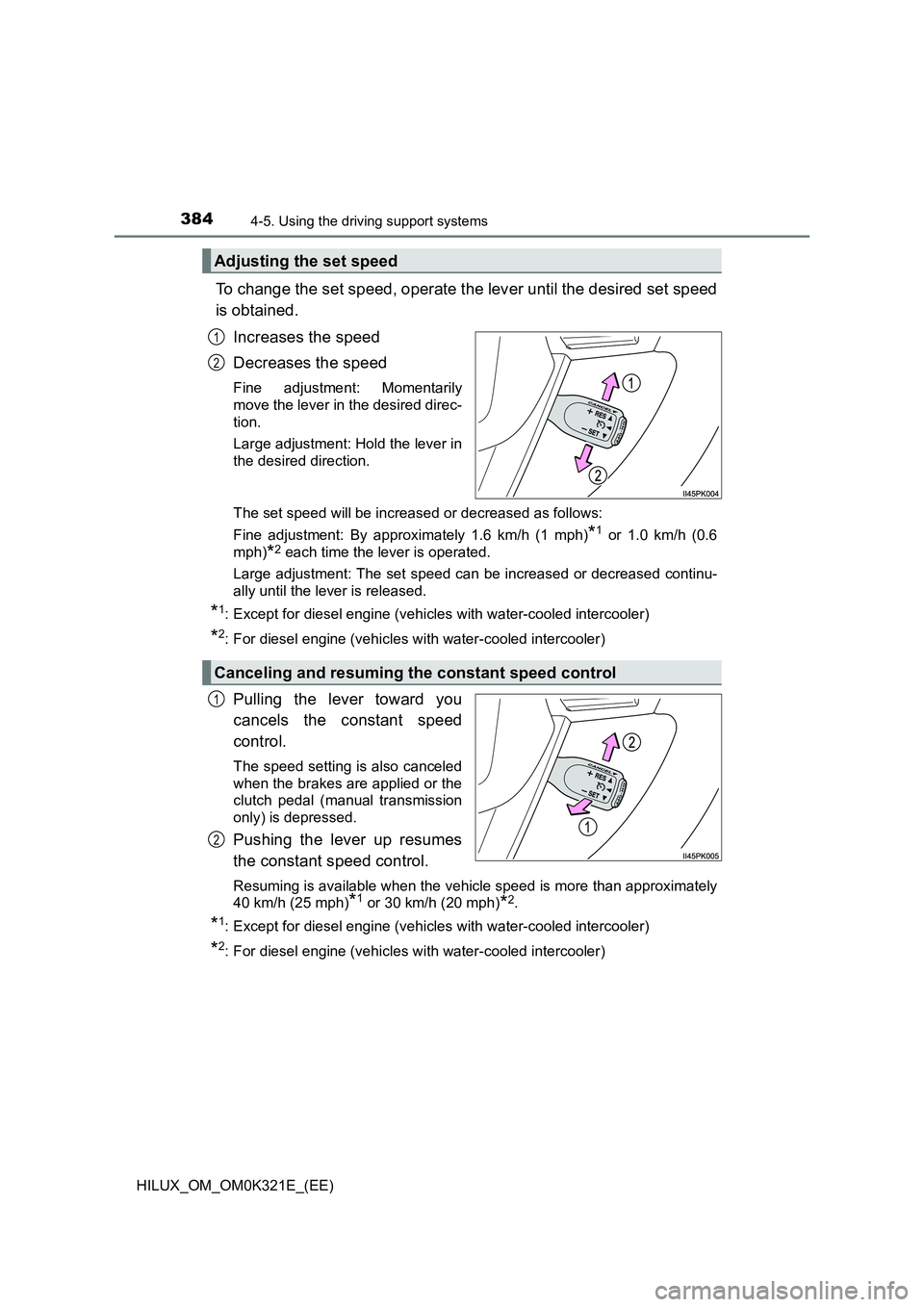
To change the set speed, operate the lever until the desired set speed
is obtained.
Increases the speed
Decreases the speed
Fine adjustment: Momentarily
move the lever in the desired direc-
tion.
Large adjustment: Hold the lever in
the desired direction.
The set speed will be increased or decreased as follows:
Fine adjustment: By approximately 1.6 km/h (1 mph)*1 or 1.0 km/h (0.6
mph)*2 each time the lever is operated.
Large adjustment: The set speed can be increased or decreased continu-
ally until the lever is released.
*1: Except for diesel engine (vehicles with water-cooled intercooler)
*2: For diesel engine (vehicles wi th water-cooled intercooler)
Pulling the lever toward you
cancels the constant speed
control.
The speed setting is also canceled
when the brakes are applied or the
clutch pedal (manual transmission
only) is depressed.
Pushing the lever up resumes
the constant speed control.
Resuming is available when the vehicle speed is more than approximately
40 km/h (25 mph)*1 or 30 km/h (20 mph)*2.
*1: Except for diesel engine (vehicles with water-cooled intercooler)
*2: For diesel engine (vehicles wi th water-cooled intercooler)
Adjusting the set speed
1
2
Canceling and resuming the constant speed control
1
2
Page 413 of 744
4134-5. Using the driving support systems
4
Driving
HILUX_OM_OM0K321E_(EE)
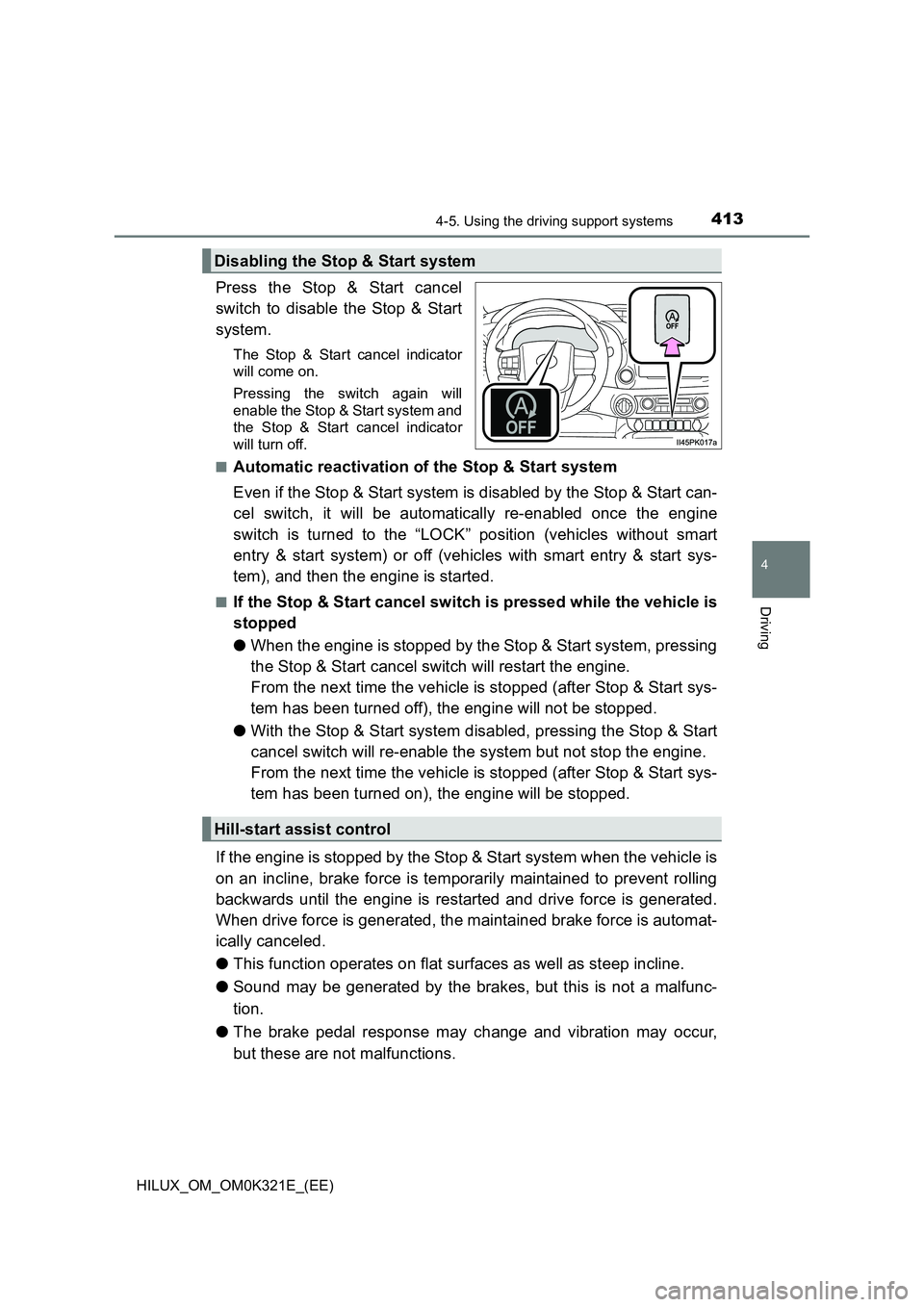
Press the Stop & Start cancel
switch to disable the Stop & Start
system.
The Stop & Start cancel indicator
will come on.
Pressing the switch again will
enable the Stop & Start system and
the Stop & Start cancel indicator
will turn off.
■Automatic reactivation of the Stop & Start system
Even if the Stop & Start system is disabled by the Stop & Start can-
cel switch, it will be automatically re-enabled once the engine
switch is turned to the “LOCK” position (vehicles without smart
entry & start system) or off (vehicles with smart entry & start sys-
tem), and then the engine is started.
■If the Stop & Start cancel switch is pressed while the vehicle is
stopped
● When the engine is stopped by the Stop & Start system, pressing
the Stop & Start cancel switch will restart the engine.
From the next time the vehicle is stopped (after Stop & Start sys-
tem has been turned off), the engine will not be stopped.
● With the Stop & Start system disabled, pressing the Stop & Start
cancel switch will re-enable the system but not stop the engine.
From the next time the vehicle is stopped (after Stop & Start sys-
tem has been turned on), the engine will be stopped.
If the engine is stopped by the Stop & Start system when the vehicle is
on an incline, brake force is temporarily maintained to prevent rolling
backwards until the engine is restarted and drive force is generated.
When drive force is generated, the maintained brake force is automat-
ically canceled.
● This function operates on flat surfaces as well as steep incline.
● Sound may be generated by the brakes, but this is not a malfunc-
tion.
● The brake pedal response may change and vibration may occur,
but these are not malfunctions.
Disabling the Stop & Start system
Hill-start assist control
Page 416 of 744
4164-5. Using the driving support systems
HILUX_OM_OM0K321E_(EE)
■ When to use the Stop & Start system
● When stopping the vehicle for a longer period of time, stop the engine com-
pletely.
● When the system cannot operate, is canceled, or is malfunctioning, warning
messages and a warning buzzer are used to inform the driver. ( P. 418)
● If the engine switch is pressed when the engine is stopped by the Stop &
Start system, the engine will stall and will not be able to be restarted by the
automatic engine start function. In this case, restart the engine using the
normal engine starting procedure. ( P. 282, 285)
● When the engine is restarted by the Stop & Start system, the power outlets
may be temporarily unusable, but this is not a malfunction.
● Installation and removal of electrical components and wireless devices may
affect the Stop & Start system. Contact any authorized Toyota retailer or
Toyota authorized repairer, or any reliable repairer for details.
■ If the windshield is fogged up while the engine is stopped by the Stop &
Start system
Vehicles with manual air conditioning system:
Restart the engine by pressing the Stop & Start cancel switch, and then set
the air outlet selection dial to . ( P. 519)
Vehicles with automatic air conditioning system:
Turn on. (The engine will start due to the automatic engine start func-
tion.) ( P. 528)
If the windshield fogs up frequently, press the Stop & Start cancel switch to
disable the system.
■ Air conditioning system operation while the engine is stopped by the
Stop & Start system
● If the air conditioning system is being used in automatic mode, the fan
speed may be reduced or the fan may be stopped while the engine is
stopped by the Stop & Start system in order to reduce changes in the cabin
temperature.
● To ensure air conditioning system performance when the vehicle is stopped,
disable the Stop & Start system by pressing the Stop & Start cancel switch.