change time TOYOTA HILUX 2020 (in English) Owner's Manual
[x] Cancel search | Manufacturer: TOYOTA, Model Year: 2020, Model line: HILUX, Model: TOYOTA HILUX 2020Pages: 744, PDF Size: 108.13 MB
Page 417 of 744
4174-5. Using the driving support systems
4
Driving
HILUX_OM_OM0K321E_(EE)
■ If an odor comes from the air conditioning system while the engine is
stopped by the Stop & Start system
Vehicles with manual air conditioning system:
If the idling stop time is set to “Long”, change the setting to “Normal”. If an
odor occurs even when “Normal” is selected, press the Stop & Start cancel
switch to deactivate the Stop & Start system.
Vehicles with automatic air conditioning system:
Press the Stop & Start cancel switch to deactivate the Stop & Start system.
■ Changing the idling stop time with the air conditioning system on
The length of time the Stop & Start system will operate when the air condition-
ing system is on can be changed by performing the following operation. (The
length of time the Stop & Start system will operate when the air conditioning
system is off cannot be changed.)
Use the meter control switches to select while the vehicle is stopped
and press , and select and press .
Select “Normal” or “Long”, and then press .
■ The Stop & Start system protection function
● When an excessively loud sound is being projected by the audio system,
the audio system may be automatically cut off in order to reduce battery
consumption. If this occurs, turn the engine switch to the “LOCK” position
(vehicles without smart entry & start sy stem) or off (vehicles with smart entry
& start system), wait for 3 seconds or longer and then turn it to the “ACC” or
“ON” position (vehicles without smart entry & start system), or ACCES-
SORY mode or IGNITION ON mode (vehicles with smart entry & start sys-
tem) to re-enable the audio system.
● The audio system may not be activated when the battery terminals are dis-
connected and then reconnected. If this occurs, turn the engine switch to
the “LOCK” position (vehicles without smart entry & start system) or off
(vehicles with smart entry & start system), and then repeat the following
operation twice to activate the audio system normally.
• Turn the engine switch to the “ON” position (vehicles without smart entry
& start system), or IGNITION ON mode (vehicles with smart entry & start
system), and then to the “LOCK” position (vehicles without smart entry &
start system) or off (vehicles with smart entry & start system).
■ When exchanging the battery
P. 675
1
2
Page 434 of 744
4344-5. Using the driving support systems
HILUX_OM_OM0K321E_(EE)
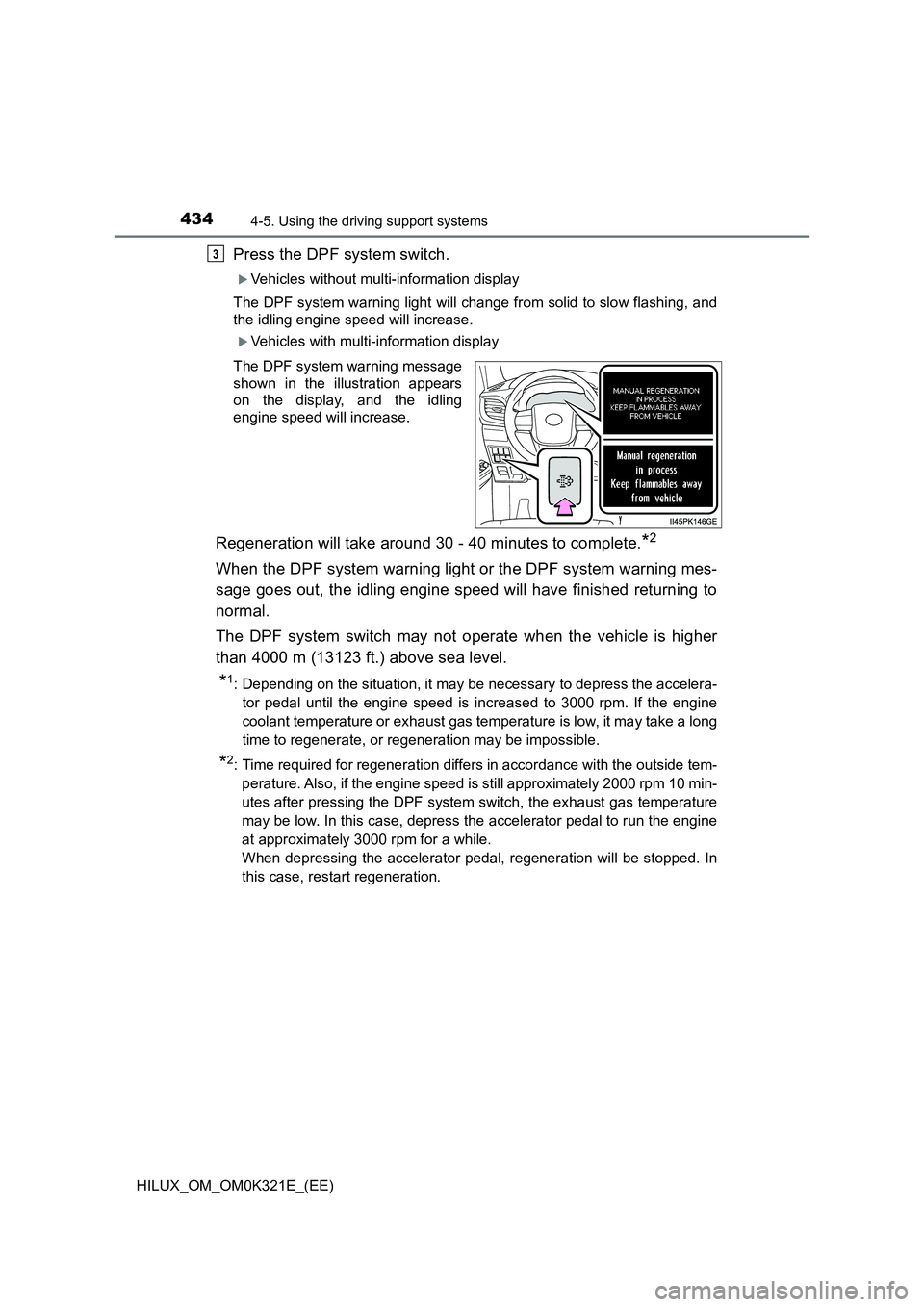
Press the DPF system switch.
Vehicles without multi-information display
The DPF system warning light will change from solid to slow flashing, and
the idling engine speed will increase.
Vehicles with multi-information display
The DPF system warning message
shown in the illustration appears
on the display, and the idling
engine speed will increase.
Regeneration will take around 30 - 40 minutes to complete.*2
When the DPF system warning light or the DPF system warning mes-
sage goes out, the idling engine speed will have finished returning to
normal.
The DPF system switch may not operate when the vehicle is higher
than 4000 m (13123 ft.) above sea level.
*1: Depending on the situation, it may be necessary to depress the accelera-
tor pedal until the engine speed is increased to 3000 rpm. If the engine
coolant temperature or exhaust gas tem perature is low, it may take a long
time to regenerate, or regeneration may be impossible.
*2: Time required for regeneration differs in accordance with the outside tem-
perature. Also, if the engine speed is still approximately 2000 rpm 10 min-
utes after pressing the DPF system switch, the exhaust gas temperature
may be low. In this case, depress the accelerator pedal to run the engine
at approximately 3000 rpm for a while.
When depressing the accelerator pedal, regeneration will be stopped. In
this case, restart regeneration.
3
Page 445 of 744
4455-1. Basic Operations
5
Audio system
HILUX_OM_OM0K321E_(EE)
Press the “MODE” switch when the audio system is turned off.
Press the “MODE” switch when the audio system is turned on. The
audio source changes as follows each time the button is pressed. If a
mode cannot be used, it will be skipped.
AM FM1FM2*CD modeiPod or USB memory
Bluetooth® audio* AUX
*: If equipped
Press the “+” switch to increase the volume and the “-” switch to
decrease the volume.
Hold down the switch to continue increasing or decreasing the volume.
Press and hold the “MODE” switch.
To cancel, press and hold the switch again.
Press the “MODE” switch to select the radio mode.
Press the “ ” or “” switch to select a preset station.
To scan for receivable stations, press and hold the switch until you hear a
beep.
Turning on the power
Changing the audio source
Adjusting the volume
Silencing a sound
Selecting a radio station
1
2
Page 458 of 744
4585-4. Playing an audio CD and MP3/WMA discs
HILUX_OM_OM0K321E_(EE)
■Selecting folders one at a time
Press (
folder.
■Selecting a folder and file from folder list
Press (LIST).
The folder list will be displayed.
Press the “TUNE >” or “< SELECT” button to select a folder and
file, and press the “SETUP ENTER” button.
To return to the previous display, press (BACK).
■Returning to the first folder
Press and hold (
Press the “SEEK >” or “< TRACK” button to select the desired file.
■Fast-forwarding and rewinding files
Press and hold the “SEEK >” or “< TRACK” button.
■Random play
Pressing (RDM) changes modes in the following order:
Folder random Disc randomOff
■Repeat play
Pressing (RPT) changes modes in the following order:
File repeat Folder repeat*Off
*: Available except when RDM (random play) is selected
■Switching the display
Press (TEXT) to display or hide the album title.
If there are continuing texts, is displayed.
Press and hold (TEXT) to display the remaining texts.
Playing back MP3 and WMA discs
1
2
Page 475 of 744
4755-5. Using an external device
5
Audio system
HILUX_OM_OM0K321E_(EE)
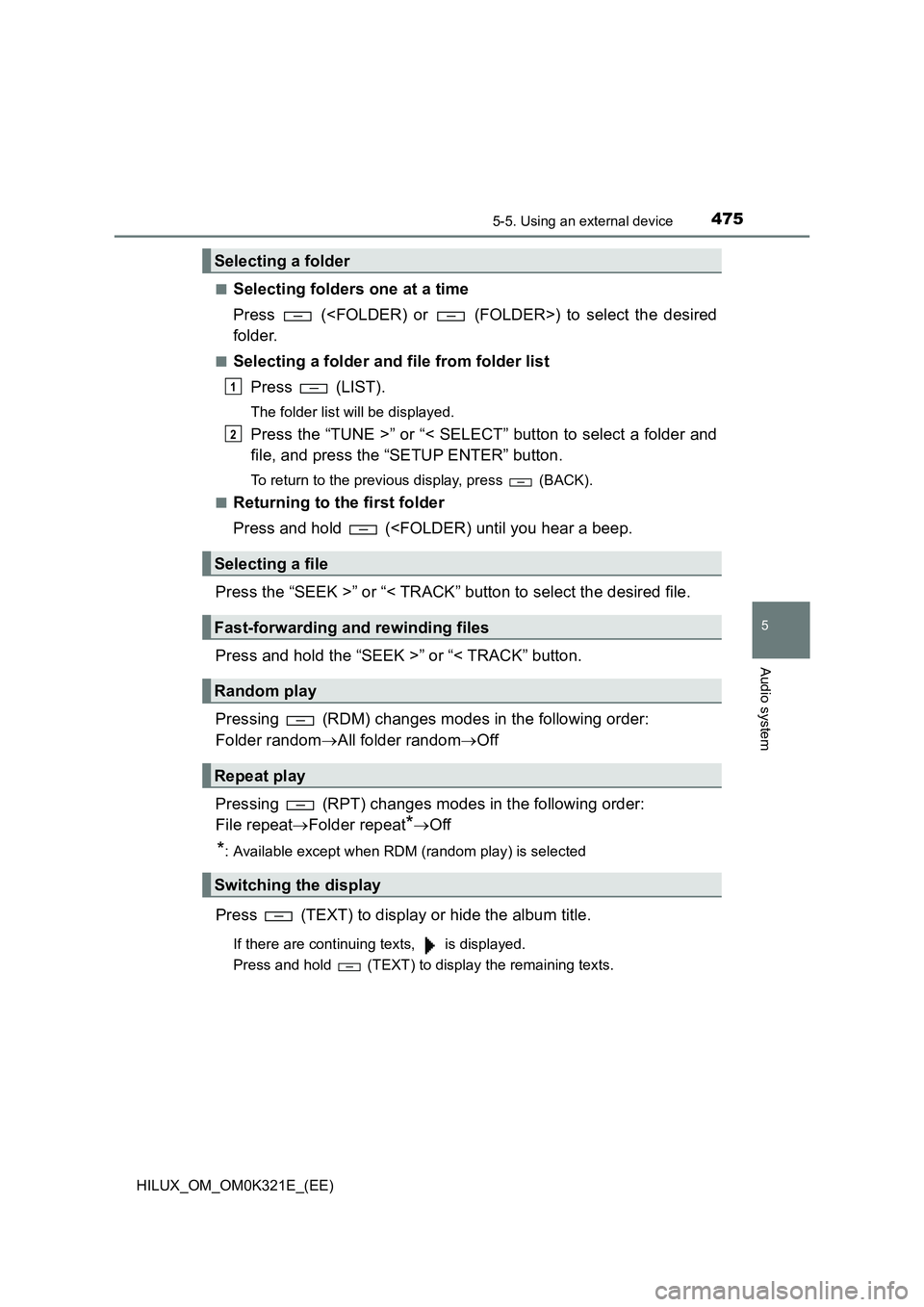
■Selecting folders one at a time
Press (
folder.
■Selecting a folder and file from folder list
Press (LIST).
The folder list will be displayed.
Press the “TUNE >” or “< SELECT” button to select a folder and
file, and press the “SETUP ENTER” button.
To return to the previous display, press (BACK).
■Returning to the first folder
Press and hold (
Press and hold the “SEEK >” or “< TRACK” button.
Pressing (RDM) changes modes in the following order:
Folder random All folder randomOff
Pressing (RPT) changes modes in the following order:
File repeat Folder repeat*Off
*: Available except when RDM (random play) is selected
Press (TEXT) to display or hide the album title.
If there are continuing texts, is displayed.
Press and hold (TEXT) to display the remaining texts.
Selecting a folder
Selecting a file
Fast-forwarding and rewinding files
Random play
Repeat play
Switching the display
1
2
Page 527 of 744
5276-1. Using the air conditioning system and defogger
6
Interior features
HILUX_OM_OM0K321E_(EE)
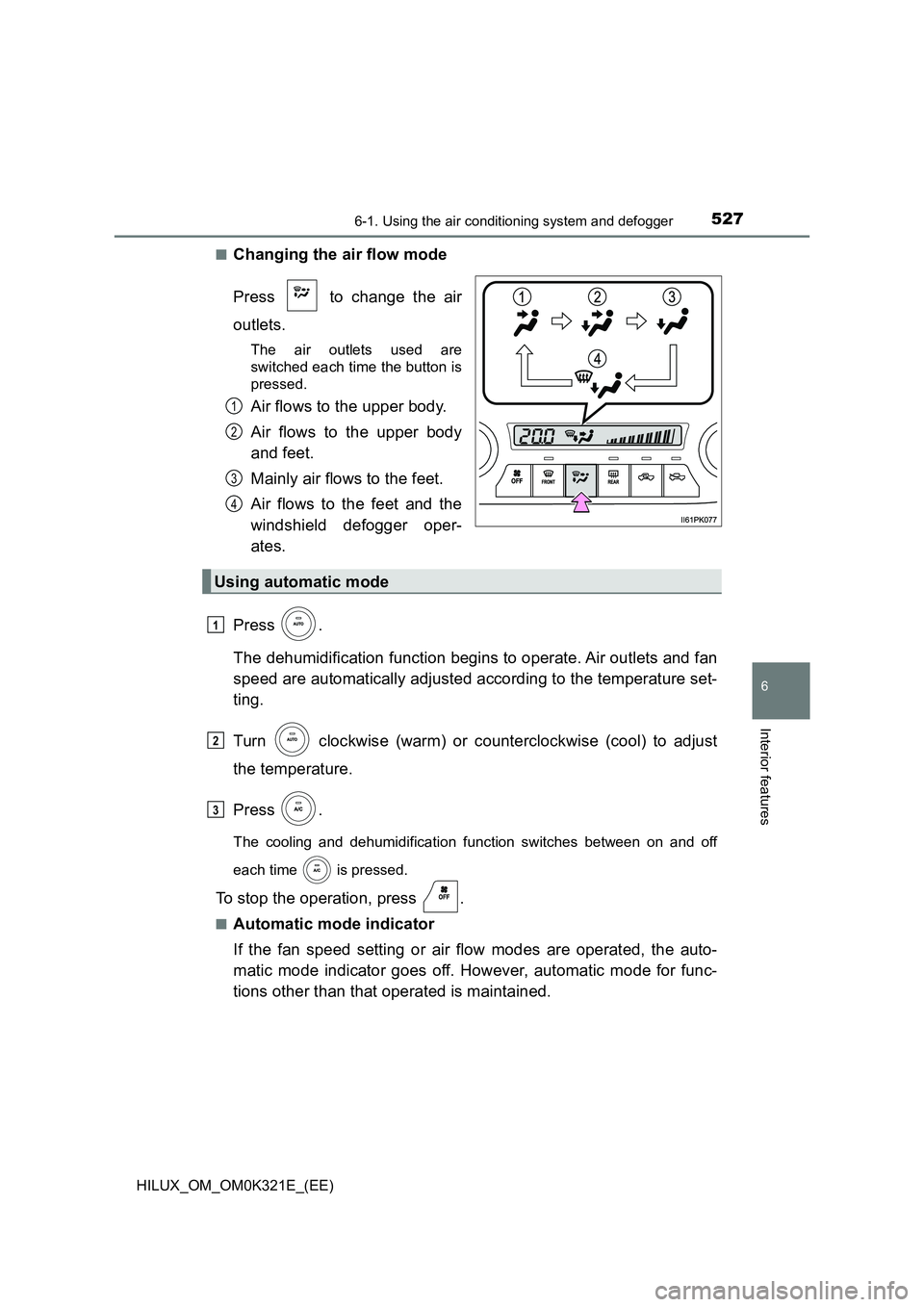
■Changing the air flow mode
Press to change the air
outlets.
The air outlets used are
switched each time the button is
pressed.
Air flows to the upper body.
Air flows to the upper body
and feet.
Mainly air flows to the feet.
Air flows to the feet and the
windshield defogger oper-
ates.
Press .
The dehumidification function begins to operate. Air outlets and fan
speed are automatically adjusted according to the temperature set-
ting.
Turn clockwise (warm) or counterclockwise (cool) to adjust
the temperature.
Press .
The cooling and dehumidification function switches between on and off
each time is pressed.
To stop the operation, press .
■Automatic mode indicator
If the fan speed setting or air flow modes are operated, the auto-
matic mode indicator goes off. However, automatic mode for func-
tions other than that operated is maintained.
1
2
3
4
Using automatic mode
1
2
3
Page 575 of 744
5757-3. Do-it-yourself maintenance
HILUX_OM_OM0K321E_(EE)
7
Maintenance and care
■After changing the engine oil (models for model code destination W*)
The engine oil maintenance data should be reset. Perform the following pro-
cedures:
Switch the display to the trip meter A ( P. 144) when the engine switch is
in the “ON” position (vehicles without smart entry & start system) or IGNI-
TION ON mode (vehicles with smart entry & start system).
Turn the engine switch to the “LOCK” position (vehicles without smart entry
& start system) or off (vehicles with smart entry & start system).
While pressing the odometer/trip meter display change button ( P. 144),
turn the engine switch to the “ON” position (vehicles without smart entry &
start system) or IGNITION ON mode (vehicles with smart entry & start sys-
tem). (Do not start the engine because reset mode will be canceled.) Con-
tinue to press and hold the button for more than one second after the trip
meter displays “000000”.
*: See “Checking your vehicle’s model” if you are not sure of which model
your vehicle is. ( P. 1 2 )
WARNING
■Used engine oil
● Used engine oil contains potentially harmful contaminants which may
cause skin disorders such as inflammation and skin cancer, so care
should be taken to avoid prolonged and repeated contact. To remove used
engine oil from your skin, wash thoroughly with soap and water.
● Dispose of used oil and filters only in a safe and acceptable manner. Do
not dispose of used oil and filters in household trash, in sewers or onto the
ground. Call any authorized Toyota reta iler or Toyota authorized repairer,
or any reliable repairer, service station or auto parts store for information
concerning recycling or disposal.
● Do not leave used engine oil within the reach of children.
NOTICE
■To prevent serious engine damage
Check the oil level on a regular basis.
■ When replacing the engine oil
● Be careful not to spill engine oil on the vehicle components.
● Avoid overfilling, or the engine could be damaged.
● Check the oil level on the dipstick every time you refill the vehicle.
● Be sure the engine oil filler cap is properly tightened.
1
2
3
Page 671 of 744
6718-2. Steps to take in an emergency
HILUX_OM_OM0K321E_(EE)
8
When trouble arises
■Stopping the engine
Shift the shift lever to P (automatic transmission) or N (manual transmission)
and press the engine switch as you normally do when stopping the engine.
■ Replacing the key battery
As the above procedure is a temporary measure, it is recommended that the
electronic key battery be replaced immediately when the battery is depleted.
( P. 599)
■ Alarm (vehicles with alarm for Kazakhstan, Armenia and Morocco)
Using the mechanical key to lock the doors will not set the alarm system.
If a door is unlocked using the mechanical key when the alarm system is set,
the alarm may be triggered.
■ Changing engine switch modes
Release the brake pedal (automatic transmission) or clutch pedal (manual
transmission) and press the engine switch in step above.
The engine does not start and modes will be changed each time the switch is
pressed. ( P. 288)
■ When the electronic key does not work properly
● Make sure that the smart entry & start system has not been deactivated in
the customization setting. If it is off, turn the function on.
(Customizable features: P. 718)
● Check if battery-saving mode is set. If it is set, cancel the function.
( P. 199)
3
Page 721 of 744
7219-2. Customization
HILUX_OM_OM0K321E_(EE)
9
Vehicle specifications
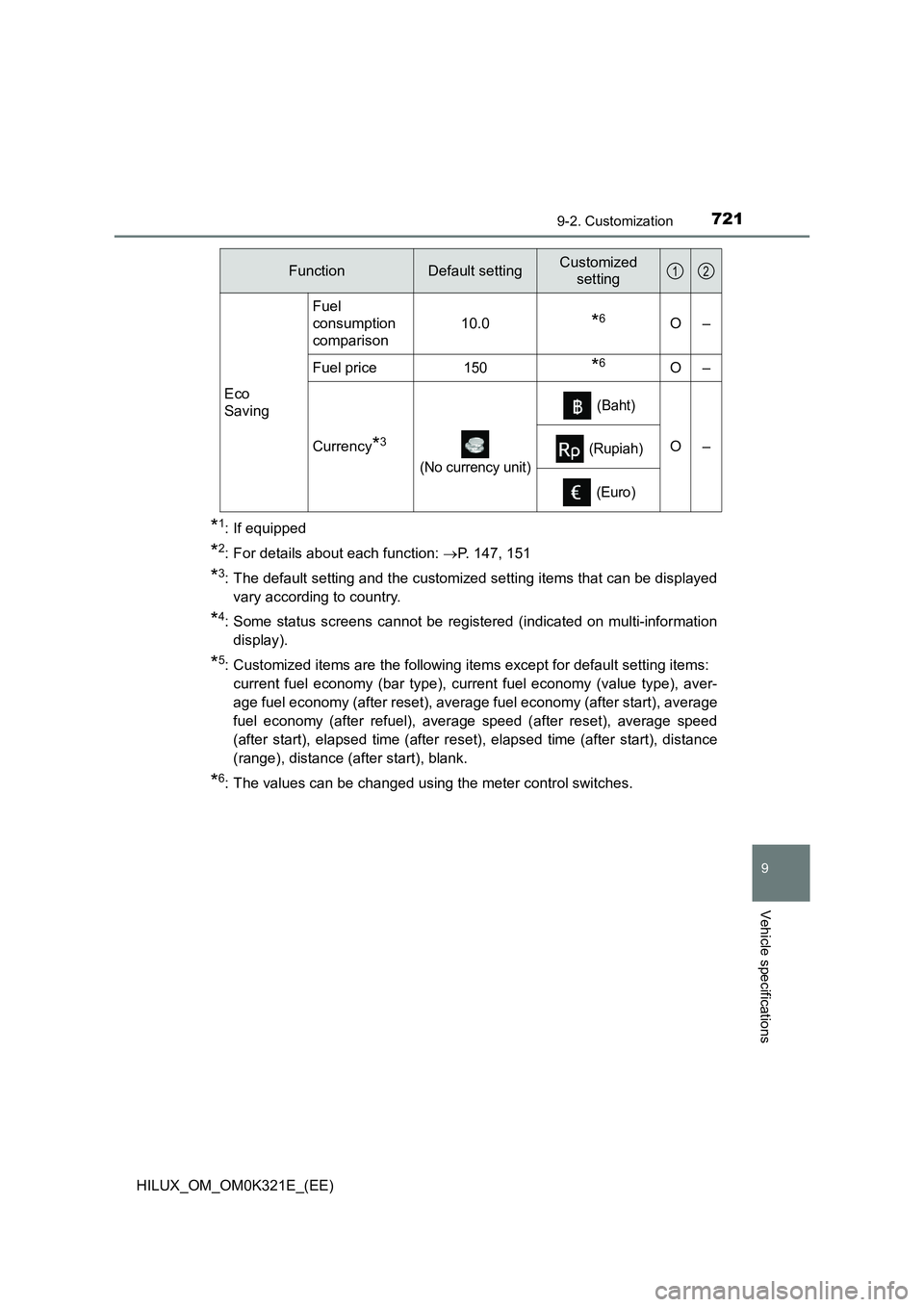
*1: If equipped
*2: For details about each function: P. 147, 151
*3: The default setting and the customized setting items that can be displayed
vary according to country.
*4: Some status screens cannot be registered (indicated on multi-information
display).
*5: Customized items are the following items except for default setting items:
current fuel economy (bar type), curr ent fuel economy (value type), aver-
age fuel economy (after reset), average fuel economy (after start), average
fuel economy (after refuel), average speed (after reset), average speed
(after start), elapsed time (after reset), elapsed time (after start), distance
(range), distance (after start), blank.
*6: The values can be changed using the meter control switches.
FunctionDefault settingCustomized
setting
Eco
Saving
Fuel
consumption
comparison
10.0*6O–
Fuel price150*6O–
Currency*3
(No currency unit)
(Baht)
O– (Rupiah)
(Euro)
12
Page 725 of 744
7259-2. Customization
HILUX_OM_OM0K321E_(EE)
9
Vehicle specifications
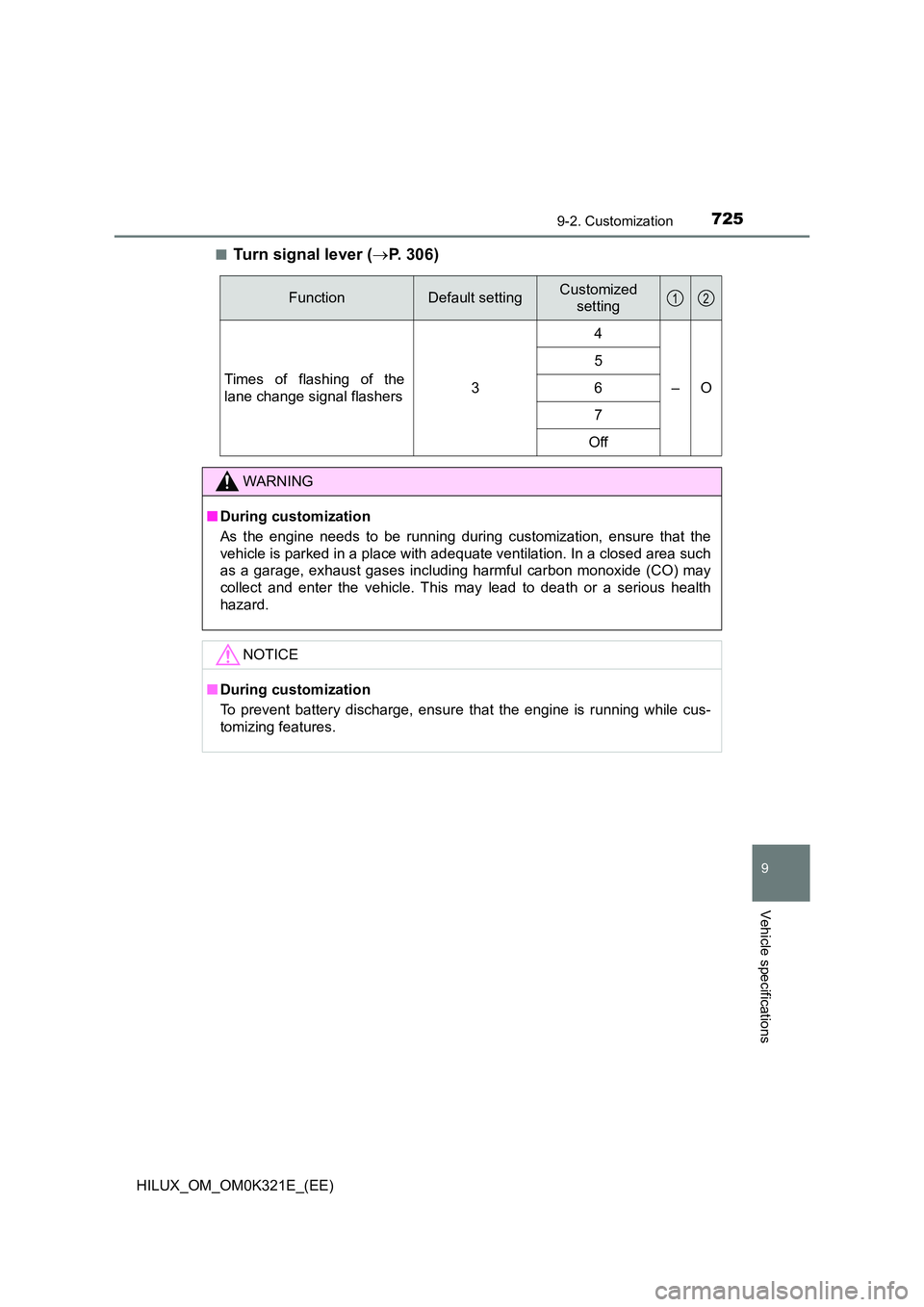
■Turn signal lever (P. 306)
FunctionDefault settingCustomized
setting
Times of flashing of the
lane change signal flashers3
4
–O
5
6
7
Off
WARNING
■ During customization
As the engine needs to be running during customization, ensure that the
vehicle is parked in a place with adequate ventilation. In a closed area such
as a garage, exhaust gases including harmful carbon monoxide (CO) may
collect and enter the vehicle. This may lead to death or a serious health
hazard.
NOTICE
■ During customization
To prevent battery discharge, ensure that the engine is running while cus-
tomizing features.
12