start TOYOTA HILUX 2023 Manual PDF
[x] Cancel search | Manufacturer: TOYOTA, Model Year: 2023, Model line: HILUX, Model: TOYOTA HILUX 2023Pages: 810, PDF Size: 131.54 MB
Page 231 of 810
2294-2. Driving procedures
4
Driving
HILUX_OM_OM0K789E_(EE)
NOTICE
■To prevent battery discharge
● Do not leave the engine switch in ACCESSORY or IGNITION ON mode
for long periods of time without the engine running.
● If “ACCESSORY” or “IGNITION ON” is displayed on the multi-information
display while the engine is not running, the engine switch is not off. Exit the
vehicle after turning the engine switch off.
● On vehicles with automatic transmission, do not stop the engine when the
shift lever is in a position other than P. If the engine is stopped in another
shift lever position, the engine switch will not be turned off but instead be
turned to ACCESSORY mode. If the vehicle is left in ACCESSORY mode,
battery discharge may occur.
■ When starting the engine
● Do not race a cold engine.
● If the engine becomes difficult to start or stalls frequently, have your vehi-
cle checked by any authorized Toyota retailer or Toyota authorized
repairer, or any reliable repairer immediately.
■ Symptoms indicating a malfunction with the engine switch
If the engine switch seems to be operating somewhat differently than usual,
such as the switch sticking slightly, there may be a malfunction. Contact any
authorized Toyota retailer or Toyota authorized repairer, or any reliable
repairer immediately.
Page 232 of 810
2304-2. Driving procedures
HILUX_OM_OM0K789E_(EE)
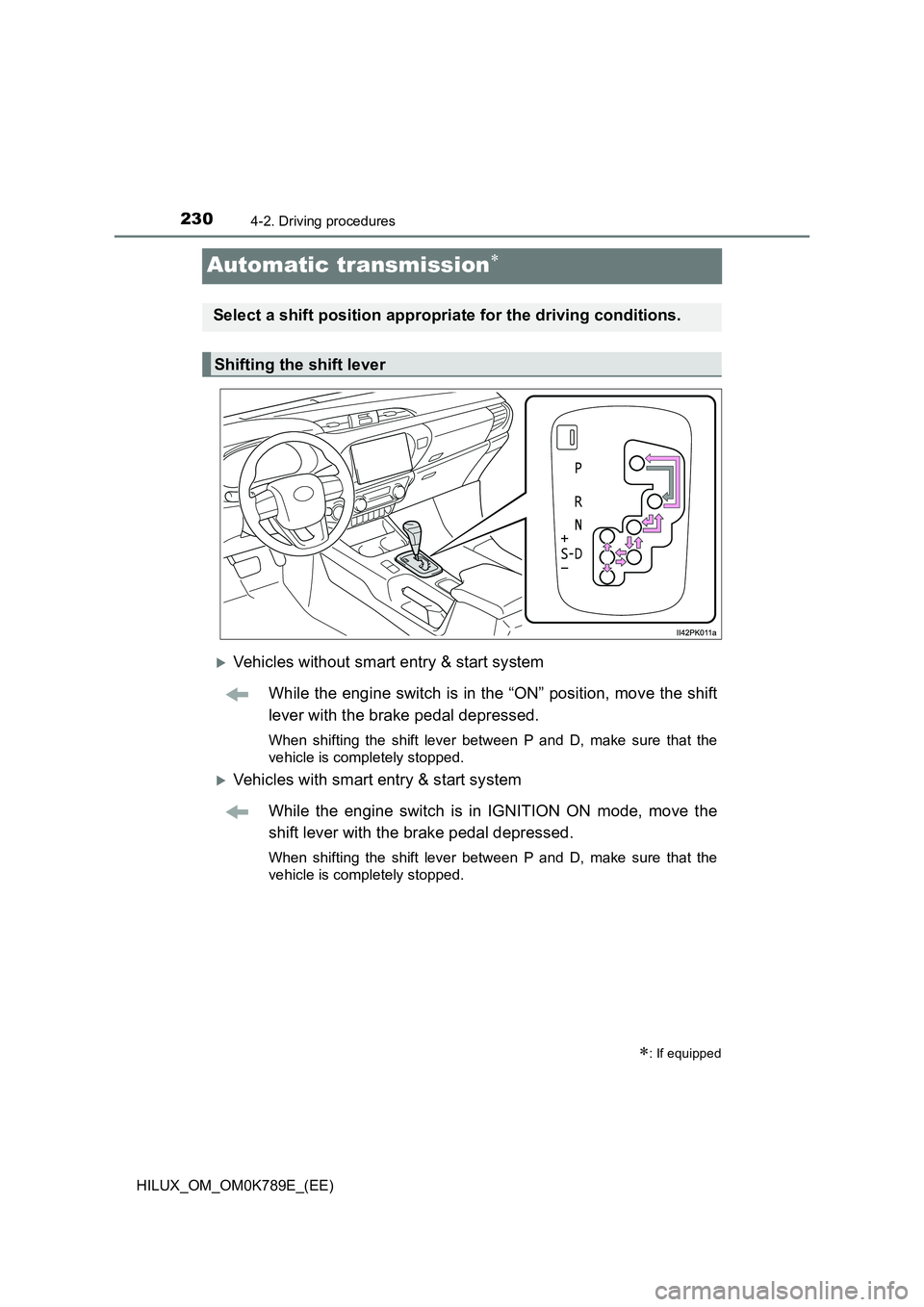
Automatic transmission
Vehicles without smart entry & start system
While the engine switch is in the “ON” position, move the shift
lever with the brake pedal depressed.
When shifting the shift lever between P and D, make sure that the
vehicle is completely stopped.
Vehicles with smart entry & start system
While the engine switch is in IGNITION ON mode, move the
shift lever with the brake pedal depressed.
When shifting the shift lever between P and D, make sure that the
vehicle is completely stopped.
: If equipped
Select a shift position appropriate for the driving conditions.
Shifting the shift lever
Page 233 of 810
2314-2. Driving procedures
4
Driving
HILUX_OM_OM0K789E_(EE)
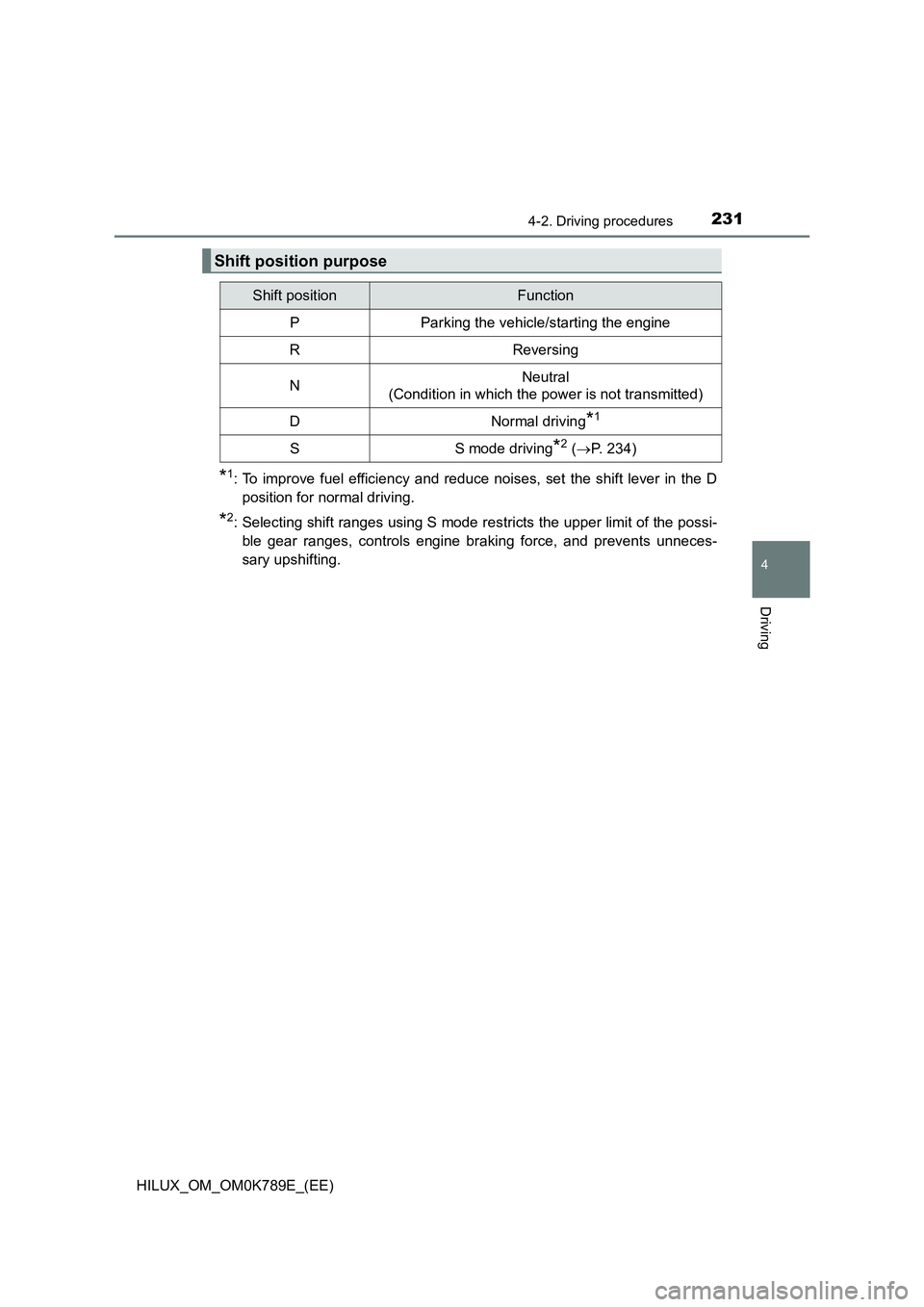
*1: To improve fuel efficiency and reduce noises, set the shift lever in the D
position for normal driving.
*2: Selecting shift ranges using S mode restricts the upper limit of the possi-
ble gear ranges, controls engine braking force, and prevents unneces-
sary upshifting.
Shift position purpose
Shift positionFunction
PParking the vehicle/starting the engine
RReversing
NNeutral
(Condition in which the power is not transmitted)
DNormal driving*1
SS mode driving*2 ( P. 234)
Page 237 of 810
2354-2. Driving procedures
4
Driving
HILUX_OM_OM0K789E_(EE)
■ S mode
When the shift range is 4 or lower, holding the shift lever toward “+” sets the
shift range to 6.
■ Downshifting restrictions warning buzzer
To help ensure safety and driving per formance, downshifting operation may
sometimes be restricted. In some circumstances, downshifting may not be
possible even when the shift lever is operated. (A buzzer will sound twice.)
■ Operation of the air conditioning system in Eco drive mode (vehicles
with automatic air conditioning system)
Eco drive mode controls the heating/cooling operations and fan speed of the
air conditioning system to enhance fuel efficiency ( P. 446). To improve air
conditioning performance, adjust the fan speed or turn off Eco drive mode.
■ Deactivation of the driving mode
● Eco drive mode will not be canceled until the “ECO” switch is pressed, even
if the engine is turned off after driving in Eco drive mode.
● Power mode will be canceled if the engine is turned off after driving in power
mode.
● Driving mode will be canceled if the transfer mode is shifted to L4 while the
driving mode is in other than normal mode. (if equipped)
■ When driving with cruise control or dynamic radar cruise control acti-
vated (if equipped)
Even when performing the following actions with the intent of enabling engine
braking, engine braking will not activate because cruise control or dynamic
radar cruise control will not be canceled.
● While driving in S mode, downshifting to 5 or 4. (P. 234)
● When switching the driving mode to power mode while driving in D.
( P. 232)
■ Restraining sudden start (Drive-Start Control) (vehicles with VSC sys-
tem)
P. 193
■ Shift lock system
The shift lock system is a system to prevent accidental operation of the shift
lever in starting.
The shift lever can be shifted from P only when the engine switch is in the
“ON” position (vehicles without smart entry & start system) or IGNITION ON
mode (vehicles with smart entry & start system) and the brake pedal is being
depressed.
Page 238 of 810
2364-2. Driving procedures
HILUX_OM_OM0K789E_(EE)
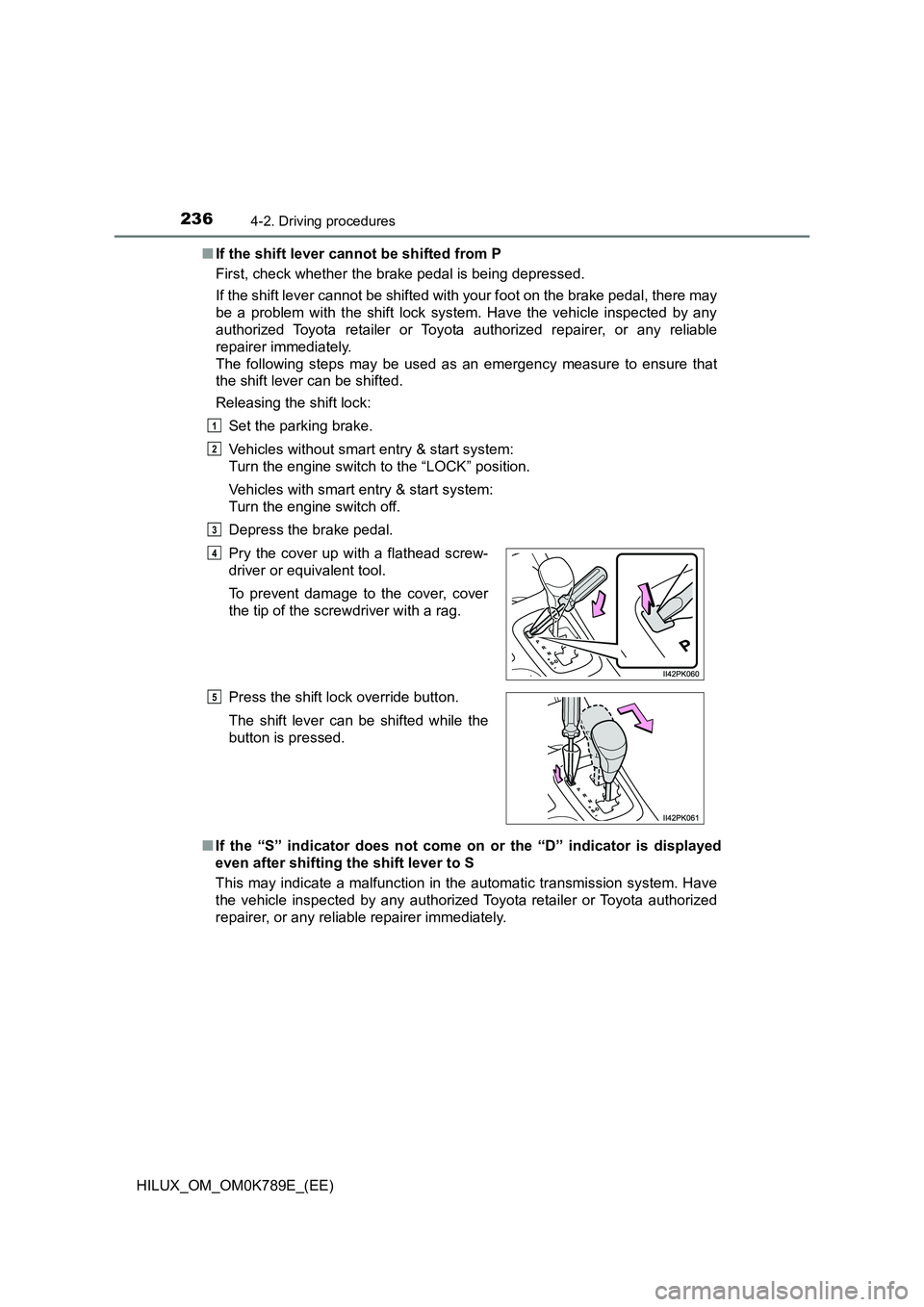
■ If the shift lever cannot be shifted from P
First, check whether the brake pedal is being depressed.
If the shift lever cannot be shifted with your foot on the brake pedal, there may
be a problem with the shift lock system. Have the vehicle inspected by any
authorized Toyota retailer or Toyota authorized repairer, or any reliable
repairer immediately.
The following steps may be used as an emergency measure to ensure that
the shift lever can be shifted.
Releasing the shift lock:
Set the parking brake.
Vehicles without smart entry & start system:
Turn the engine switch to the “LOCK” position.
Vehicles with smart entry & start system:
Turn the engine switch off.
Depress the brake pedal.
■ If the “S” indicator does not come on or the “D” indicator is displayed
even after shifting the shift lever to S
This may indicate a malfunction in the automatic transmission system. Have
the vehicle inspected by any authorized Toyota retailer or Toyota authorized
repairer, or any reliabl e repairer immediately.
Pry the cover up with a flathead screw-
driver or equivalent tool.
To prevent damage to the cover, cover
the tip of the screwdriver with a rag.
Press the shift lock override button.
The shift lever can be shifted while the
button is pressed.
1
2
3
4
5
Page 239 of 810
2374-2. Driving procedures
4
Driving
HILUX_OM_OM0K789E_(EE)
■ Transmission protection function
If the tires spin continually when the vehicle becomes stuck in mud, dirt or
snow, or if the accelerator pedal is depressed and released repeatedly while
driving, the automatic transmission temperature may become too high and
the automatic transmission may be damaged.
To avoid damaging the automatic transmission, the system may temporarily
lock the gear.
If the automatic transmission temperature falls, the gear locking is canceled
and the automatic transmission is returned to the normal operation.
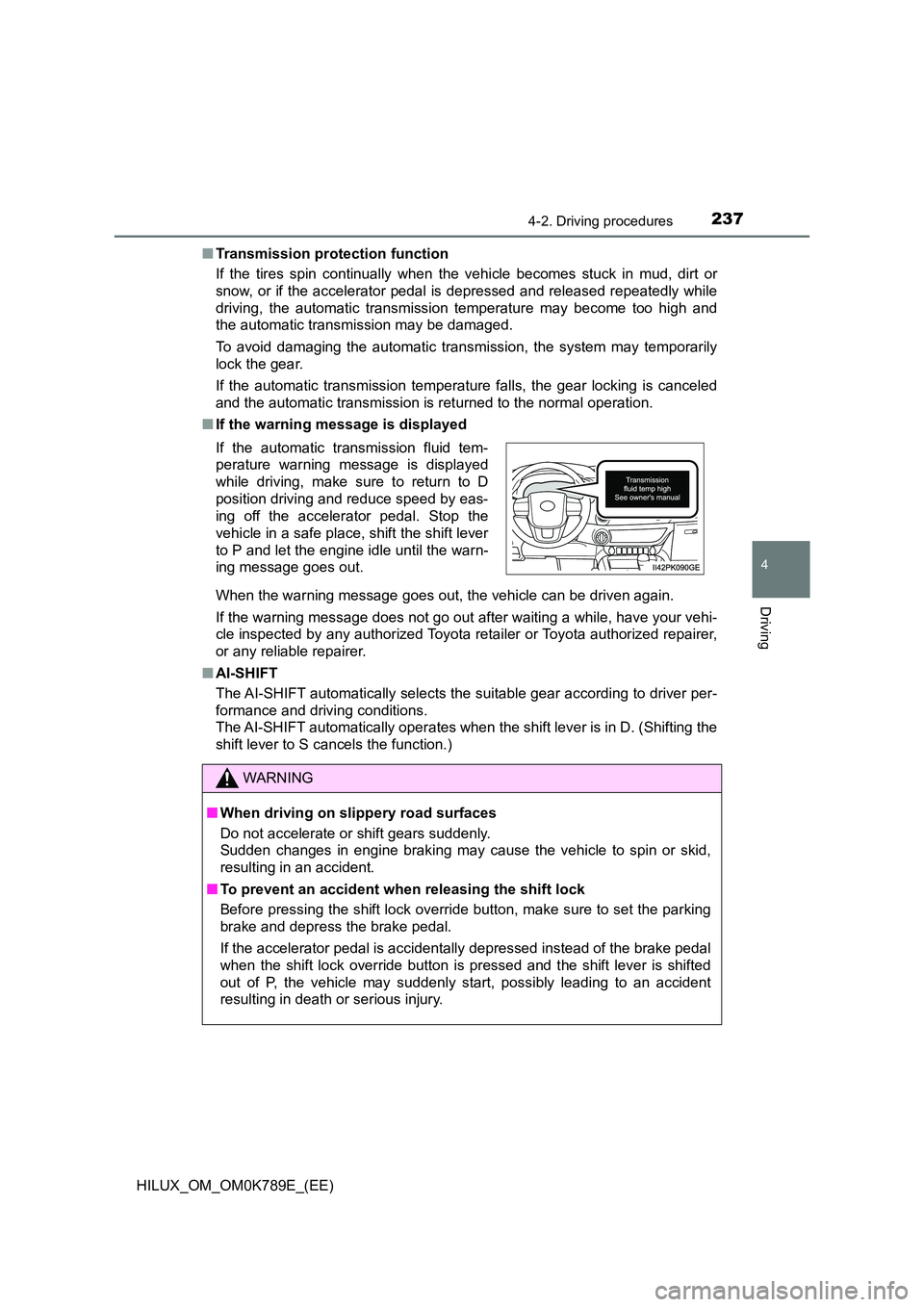
■ If the warning message is displayed
When the warning message goes out, the vehicle can be driven again.
If the warning message does not go out after waiting a while, have your vehi-
cle inspected by any authorized Toyota retailer or Toyota authorized repairer,
or any reliable repairer.
■ AI-SHIFT
The AI-SHIFT automatically selects the suitable gear according to driver per-
formance and driving conditions.
The AI-SHIFT automatically operates when the shift lever is in D. (Shifting the
shift lever to S cancels the function.)
If the automatic transmission fluid tem-
perature warning message is displayed
while driving, make sure to return to D
position driving and reduce speed by eas-
ing off the accelerator pedal. Stop the
vehicle in a safe place, shift the shift lever
to P and let the engine idle until the warn-
ing message goes out.
WARNING
■ When driving on slippery road surfaces
Do not accelerate or shift gears suddenly.
Sudden changes in engine braking may cause the vehicle to spin or skid,
resulting in an accident.
■ To prevent an accident when releasing the shift lock
Before pressing the shift lock override button, make sure to set the parking
brake and depress the brake pedal.
If the accelerator pedal is accidentally depressed instead of the brake pedal
when the shift lock override button is pressed and the shift lever is shifted
out of P, the vehicle may suddenly start, possibly leading to an accident
resulting in death or serious injury.
Page 247 of 810
245
4
4-2. Driving procedures
Driving
HILUX_OM_OM0K789E_(EE)
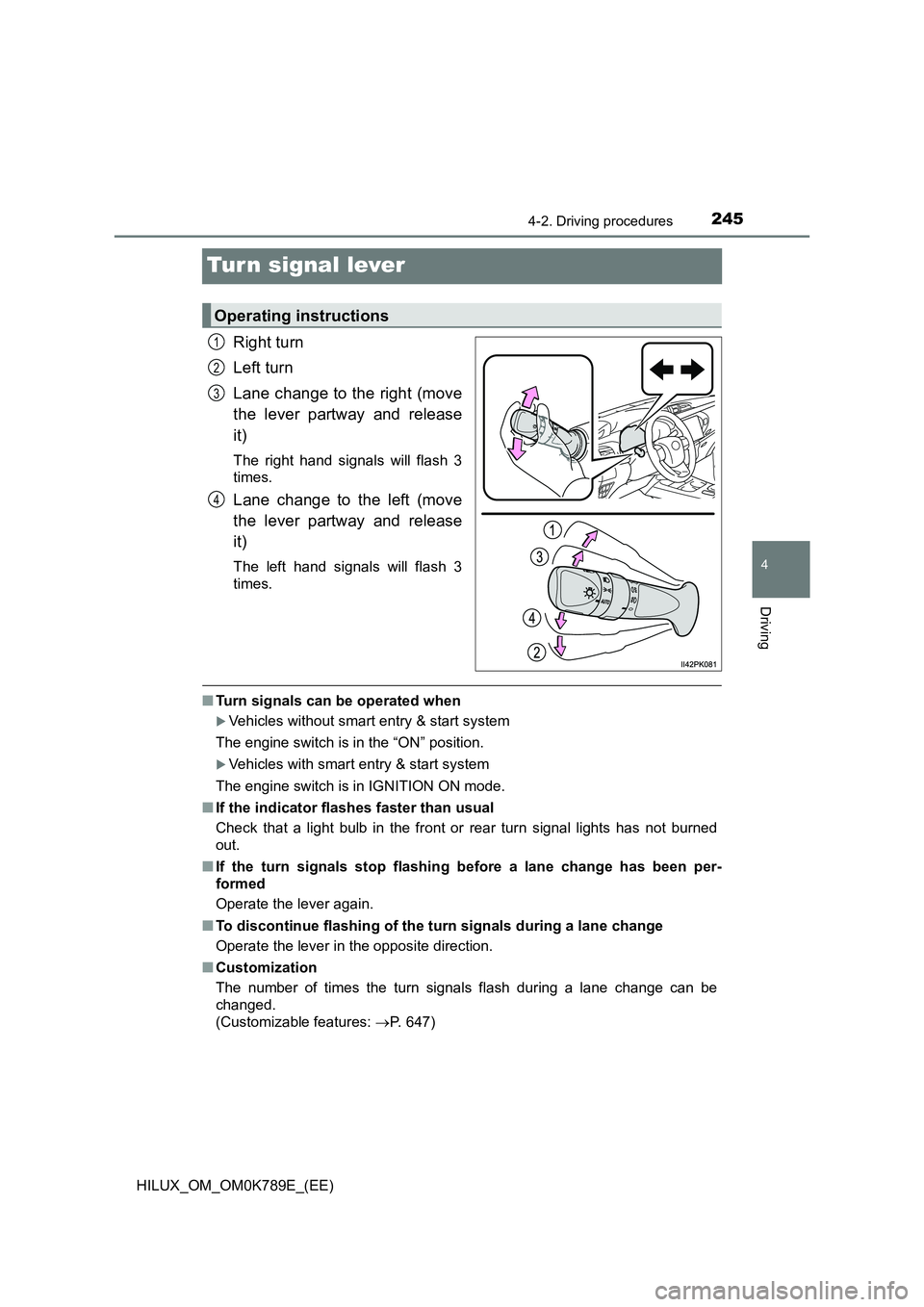
Turn signal lever
Right turn
Left turn
Lane change to the right (move
the lever partway and release
it)
The right hand signals will flash 3
times.
Lane change to the left (move
the lever partway and release
it)
The left hand signals will flash 3
times.
■ Turn signals can be operated when
Vehicles without smart entry & start system
The engine switch is in the “ON” position.
Vehicles with smart entry & start system
The engine switch is in IGNITION ON mode.
■ If the indicator flashes faster than usual
Check that a light bulb in the front or rear turn signal lights has not burned
out.
■ If the turn signals stop flashing before a lane change has been per-
formed
Operate the lever again.
■ To discontinue flashing of the turn signals during a lane change
Operate the lever in the opposite direction.
■ Customization
The number of times the turn signals flash during a lane change can be
changed.
(Customizable features: P. 647)
Operating instructions
1
2
3
4
Page 249 of 810
247
4
4-3. Operating the lights and wipers
Driving
HILUX_OM_OM0K789E_(EE)
Headlight switch
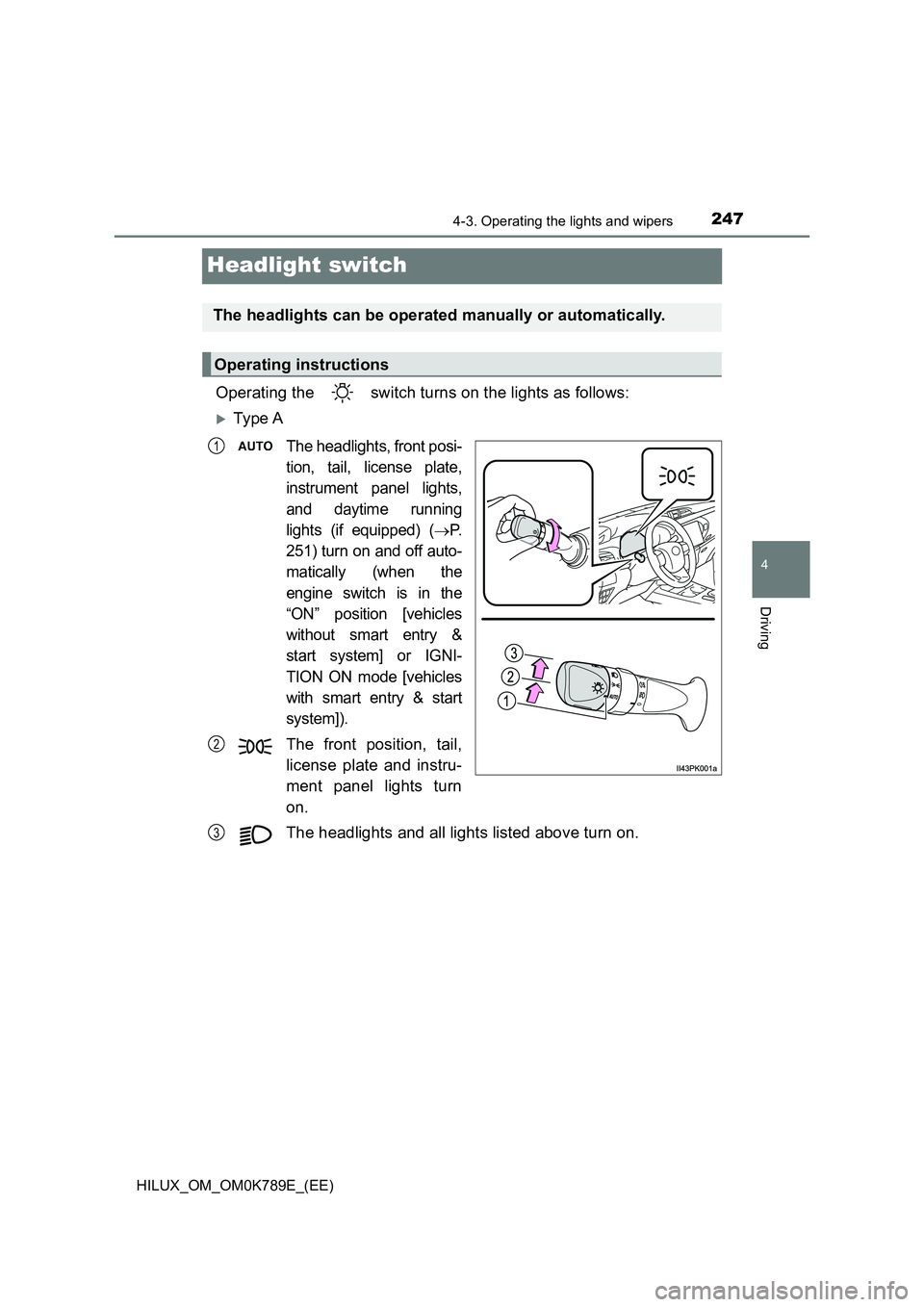
Operating the switch turns on the lights as follows:
Ty pe A
The headlights, front posi-
tion, tail, license plate,
instrument panel lights,
and daytime running
lights (if equipped) (P.
251) turn on and off auto-
matically (when the
engine switch is in the
“ON” position [vehicles
without smart entry &
start system] or IGNI-
TION ON mode [vehicles
with smart entry & start
system]).
The front position, tail,
license plate and instru-
ment panel lights turn
on.
The headlights and all lights listed above turn on.
The headlights can be operated manually or automatically.
Operating instructions
1
2
3
Page 250 of 810
2484-3. Operating the lights and wipers
HILUX_OM_OM0K789E_(EE)
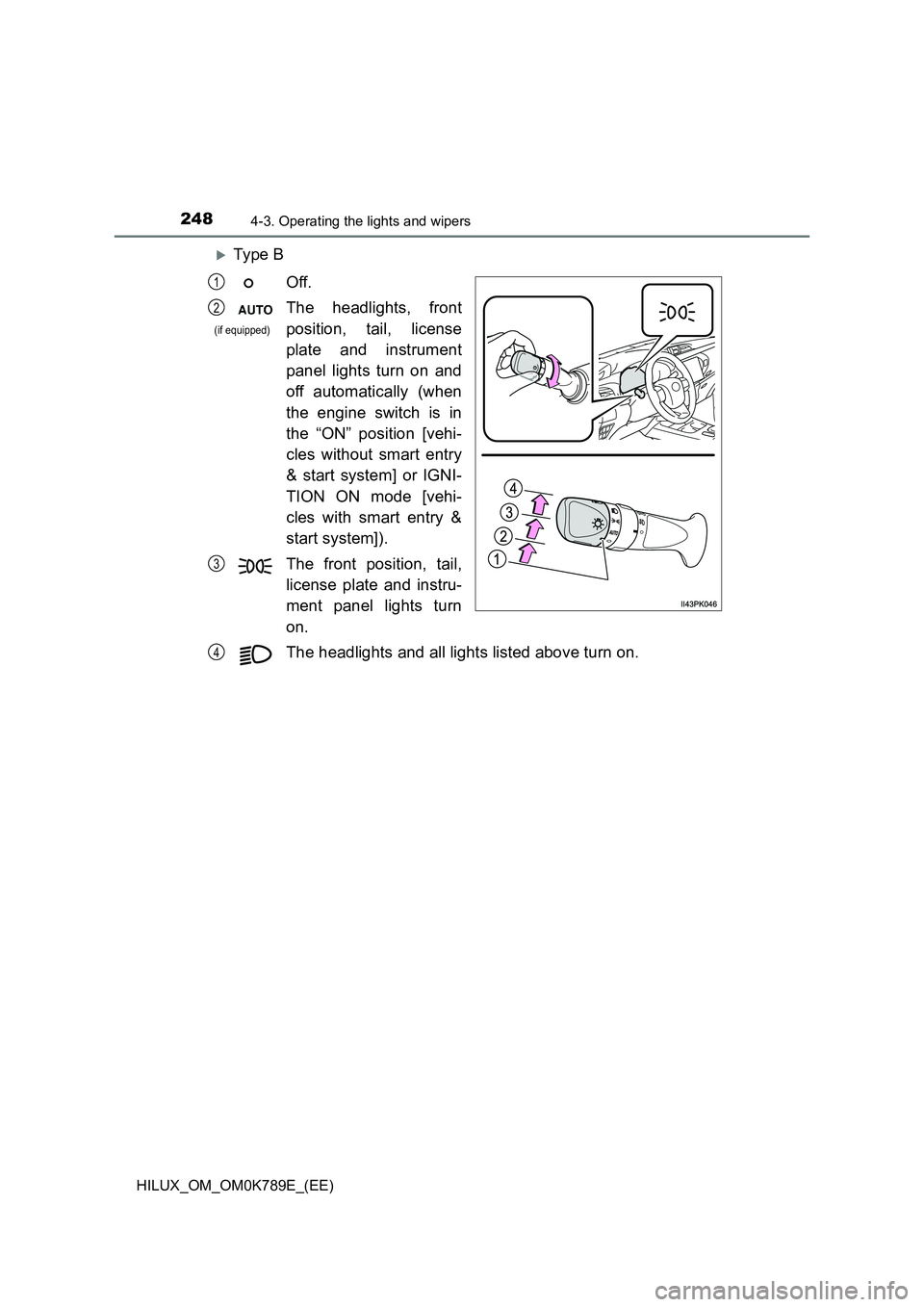
Ty pe B
Off.
The headlights, front
position, tail, license
plate and instrument
panel lights turn on and
off automatically (when
the engine switch is in
the “ON” position [vehi-
cles without smart entry
& start system] or IGNI-
TION ON mode [vehi-
cles with smart entry &
start system]).
The front position, tail,
license plate and instru-
ment panel lights turn
on.
The headlights and all lights listed above turn on.
1
2
(if equipped)
3
4
Page 253 of 810
2514-3. Operating the lights and wipers
4
Driving
HILUX_OM_OM0K789E_(EE)
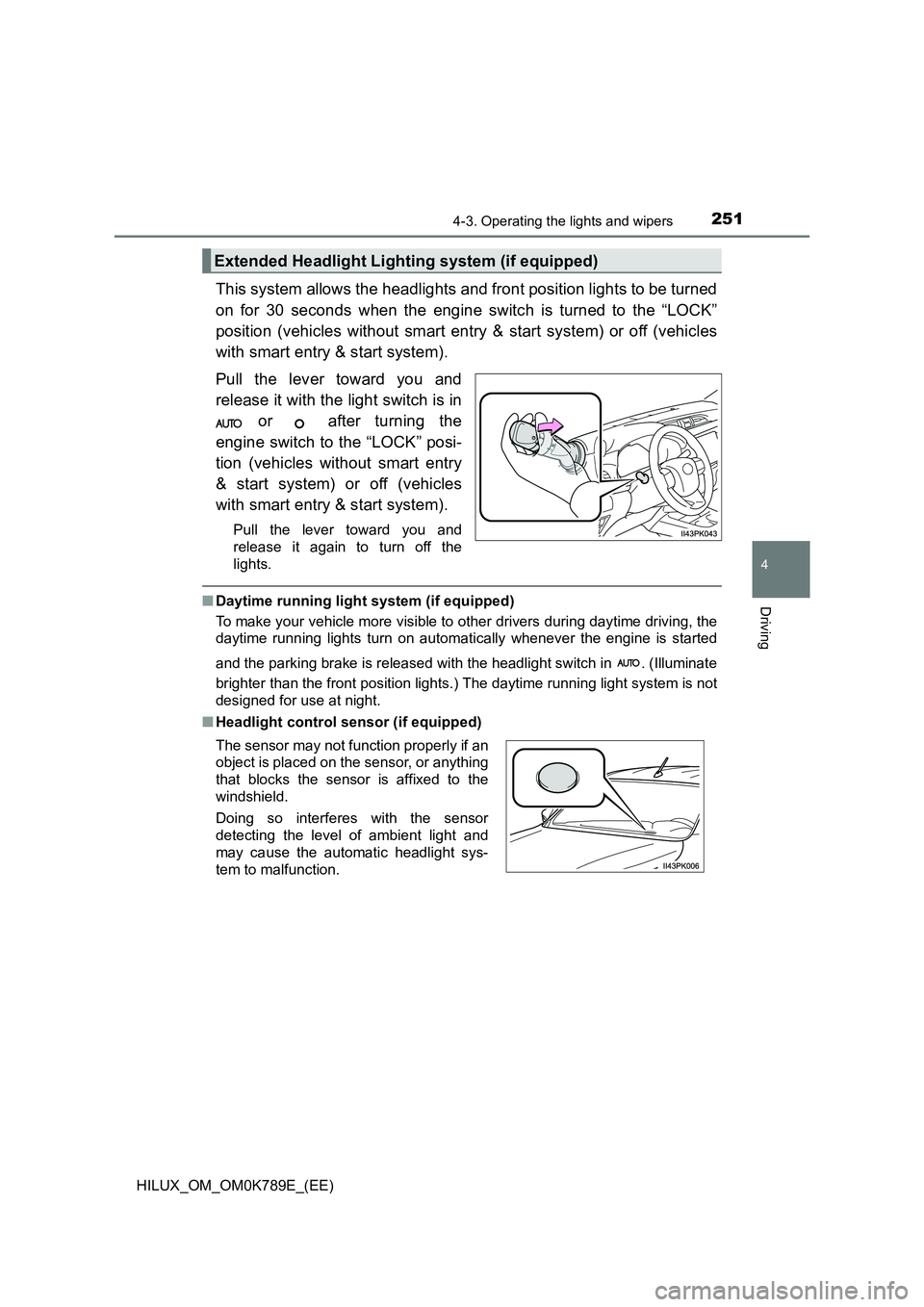
This system allows the headlights and front position lights to be turned
on for 30 seconds when the engine switch is turned to the “LOCK”
position (vehicles without smart entry & start system) or off (vehicles
with smart entry & start system).
Pull the lever toward you and
release it with the light switch is in
or after turning the
engine switch to the “LOCK” posi-
tion (vehicles without smart entry
& start system) or off (vehicles
with smart entry & start system).
Pull the lever toward you and
release it again to turn off the
lights.
■ Daytime running light system (if equipped)
To make your vehicle more visible to other drivers during daytime driving, the
daytime running lights turn on automatically whenever the engine is started
and the parking brake is released with the headlight switch in . (Illuminate
brighter than the front position lights.) The daytime running light system is not
designed for use at night.
■ Headlight control sensor (if equipped)
Extended Headlight Lighting system (if equipped)
The sensor may not function properly if an
object is placed on the sensor, or anything
that blocks the sensor is affixed to the
windshield.
Doing so interferes with the sensor
detecting the level of ambient light and
may cause the automatic headlight sys-
tem to malfunction.