change wheel TOYOTA HILUX 2023 Owners Manual
[x] Cancel search | Manufacturer: TOYOTA, Model Year: 2023, Model line: HILUX, Model: TOYOTA HILUX 2023Pages: 810, PDF Size: 131.54 MB
Page 49 of 810
471-1. For safe use
1
HILUX_OM_OM0K789E_(EE)
For safety and security
The main SRS airbag system components are shown above. The
SRS airbag system is controlled by the airbag sensor assembly. As
the airbags deploy, a chemical reaction in the inflators quickly fills the
airbags with non-toxic gas to help restrain the motion of the occu-
pants.
WARNING
■ SRS airbag precautions
Observe the following precautions regarding the SRS airbags.
Failure to do so may cause death or serious injury.
● The driver and all passengers in the vehicle must wear their seat belts
properly.
The SRS airbags are supplemental devic es to be used with the seat belts.
● The SRS driver airbag deploys with considerable force, and can cause
death or serious injury especially if the driver is very close to the airbag.
Since the risk zone for the driver’s airbag is the first 50 - 75 mm (2 - 3 in.)
of inflation, placing yourself 250 mm ( 10 in.) from your driver airbag pro-
vides you with a clear margin of safety. This distance is measured from
the center of the steering wheel to your breastbone. If you sit less than
250 mm (10 in.) away now, you can change your driving position in sev-
eral ways:
• Move your seat to the rear as far as you can while still reaching the ped-
als comfortably.
• Slightly recline the back of the seat. Although vehicle designs vary,
many drivers can achieve the 250 mm (10 in.) distance, even with the
driver seat all the way forward, simply by reclining the back of the seat
somewhat. If reclining the back of your seat makes it hard to see the
road, raise yourself by using a firm, non-slippery cushion, or raise the
seat if your vehicle has that feature.
• If your steering wheel is adjustable, tilt it downward. This points the air-
bag toward your chest instead of your head and neck.
The seat should be adjusted as recommended above, while still maintain-
ing control of the foot pedals, steering wheel, and your view of the instru-
ment panel controls.
Page 198 of 810
1964-1. Before driving
HILUX_OM_OM0K789E_(EE)
WARNING
Observe the following precautions.
Failure to do so may result in death or serious injury.
■ When driving the vehicle
● Use engine braking (downshift) to maintain a safe speed when driving
down a steep hill.
Using the brakes continuously may cause the brakes to overheat and lose
effectiveness. ( P. 2 3 1 )
● Do not adjust the positions of the steering wheel, the seat, or the inside or
outside rear view mirrors while driving.
Doing so may result in a loss of vehicle control.
● Always check that all passengers’ arms, heads or other parts of their body
are not outside the vehicle.
● On vehicles with manual transmission, observe the following to prevent
the clutch from being damaged.
• Do not operate the clutch halfway for a long period of time unless it is
necessary.
• Do not operate the clutch half or partial engaged to control the vehicle
speed, such as to drive the vehicle at a low speed, to hold the vehicle
on a slope, etc.
• Do not depress the brake pedal during operating the clutch half or par-
tial engaged.
Doing so could not only speed up the clutch wear, but also damage the
clutch or even cause a fatal accident such as vehicle fire.
■ When driving on slippery road surfaces
● Sudden braking, acceleration and steering may cause tire slippage and
reduce your ability to control the vehicle.
● Sudden acceleration, engine braking due to shifting, or changes in engine
speed could cause the vehicle to skid.
● After driving through a puddle, lightly depress the brake pedal to make
sure that the brakes are functioning properly. Wet brake pads may prevent
the brakes from functioning properly. If the brakes on only one side are wet
and not functioning properly, steering control may be affected.
Page 204 of 810
2024-1. Before driving
HILUX_OM_OM0K789E_(EE)
NOTICE
■When encountering flooded roads or waterlogged roads
Do not drive on a road that has flooded after heavy rain etc. Doing so may
cause the following serious damage to the vehicle:
● Engine stalling
● Short in electrical components
● Engine damage caused by water immersion
● Rubber or mechanical part damage or poor lubrication due to grease
being washed away, or grease becoming contaminated with mud or dirt
In the event that you drive on a flooded road and the vehicle is flooded, or
on a sandy road, be sure to have any authorized Toyota retailer or Toyota
authorized repairer, or any reliable repairer check the following:
● Brake function
● Changes in quantity and quality of oil and fluid used for the engine, trans-
mission, transfer (4WD models), clutch, differential, etc.
● Lubricant condition for the propeller shaft, clutch fork, bearings and sus-
pension joints (where possible), and the function of all joints, bearings, etc.
■ Off-road driving (vehicles with type A wheel ornaments [P. 588])
When driving on muddy roads, rocky terrain or sand, or crossing rivers,
remove the wheel ornaments. Driving with the wheel ornaments installed
may cause the wheel ornaments to be damaged or even fall off.
After off-road driving with the wheel ornaments removed, remove dirt or for-
eign objects from the wheel before reinstalling the wheel ornaments.
Page 211 of 810
2094-1. Before driving
4
Driving
HILUX_OM_OM0K789E_(EE)
■Important points regarding stability
Vehicle movement resulting from uneven road surfaces and strong
crosswinds will affect handling. The vehicle may also be rocked by
passing buses or large trucks. Frequently check behind when mov-
ing alongside such vehicles. As soon as such vehicle movement
occurs, immediately start to decelerate smoothly by slowly applying
the brakes. Always steer the vehicle straight ahead while braking.
■Passing other vehicles
Consider the total combined length of your vehicle and trailer and
ensure that the vehicle-to-vehicle distance is sufficient before exe-
cuting lane changes.
■Transmission information
Vehicles with manual transmission: To maintain engine braking effi-
ciency when using engine braking, do not use 5th gear and 6th
gear.
Vehicles with automatic transmission: To maintain engine braking
efficiency when using engine braking, do not use the transmission
in D. Transmission shift range position must be in 4 or lower, in S
mode.
■If the engine overheats
Towing a loaded trailer up a long, steep incline in temperatures
exceeding 30 C (85F) may result in the engine overheating. If the
engine coolant temperature gauge indicates that the engine is over-
heating, turn the air conditioning off immediately, leave the road and
stop the vehicle in a safe place. ( P. 610)
■When parking the vehicle
Always place wheel chocks under the wheels of both the vehicle
and trailer. Firmly set the parking brake and shift the shift lever to P
for automatic transmissions, and 1 or R for manual transmissions.
Page 234 of 810
2324-2. Driving procedures
HILUX_OM_OM0K789E_(EE)
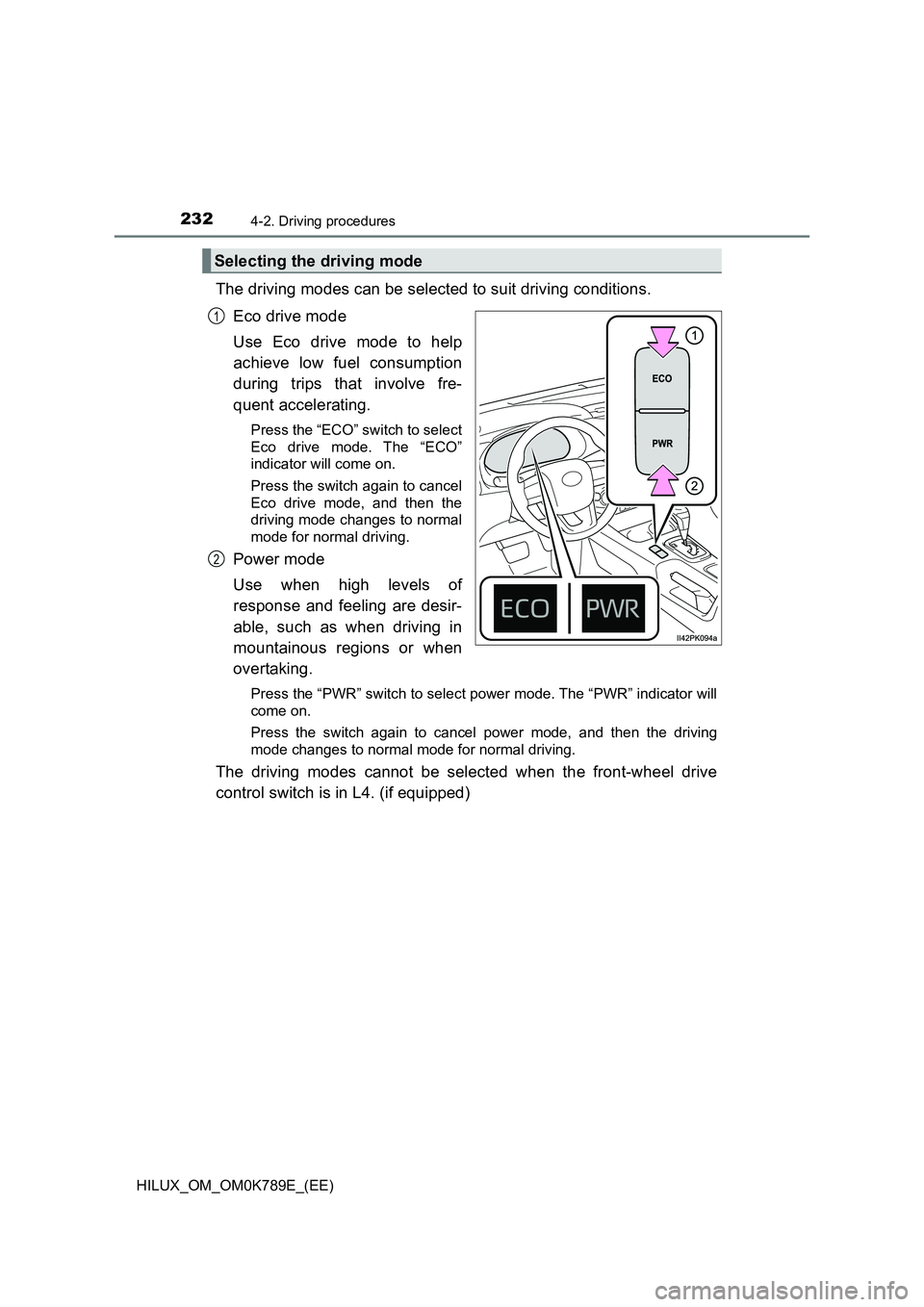
The driving modes can be selected to suit driving conditions.
Eco drive mode
Use Eco drive mode to help
achieve low fuel consumption
during trips that involve fre-
quent accelerating.
Press the “ECO” switch to select
Eco drive mode. The “ECO”
indicator will come on.
Press the switch again to cancel
Eco drive mode, and then the
driving mode changes to normal
mode for normal driving.
Power mode
Use when high levels of
response and feeling are desir-
able, such as when driving in
mountainous regions or when
overtaking.
Press the “PWR” switch to select power mode. The “PWR” indicator will
come on.
Press the switch again to cancel power mode, and then the driving
mode changes to normal mode for normal driving.
The driving modes cannot be selected when the front-wheel drive
control switch is in L4. (if equipped)
Selecting the driving mode
1
2
Page 241 of 810
2394-2. Driving procedures
4
Driving
HILUX_OM_OM0K789E_(EE)
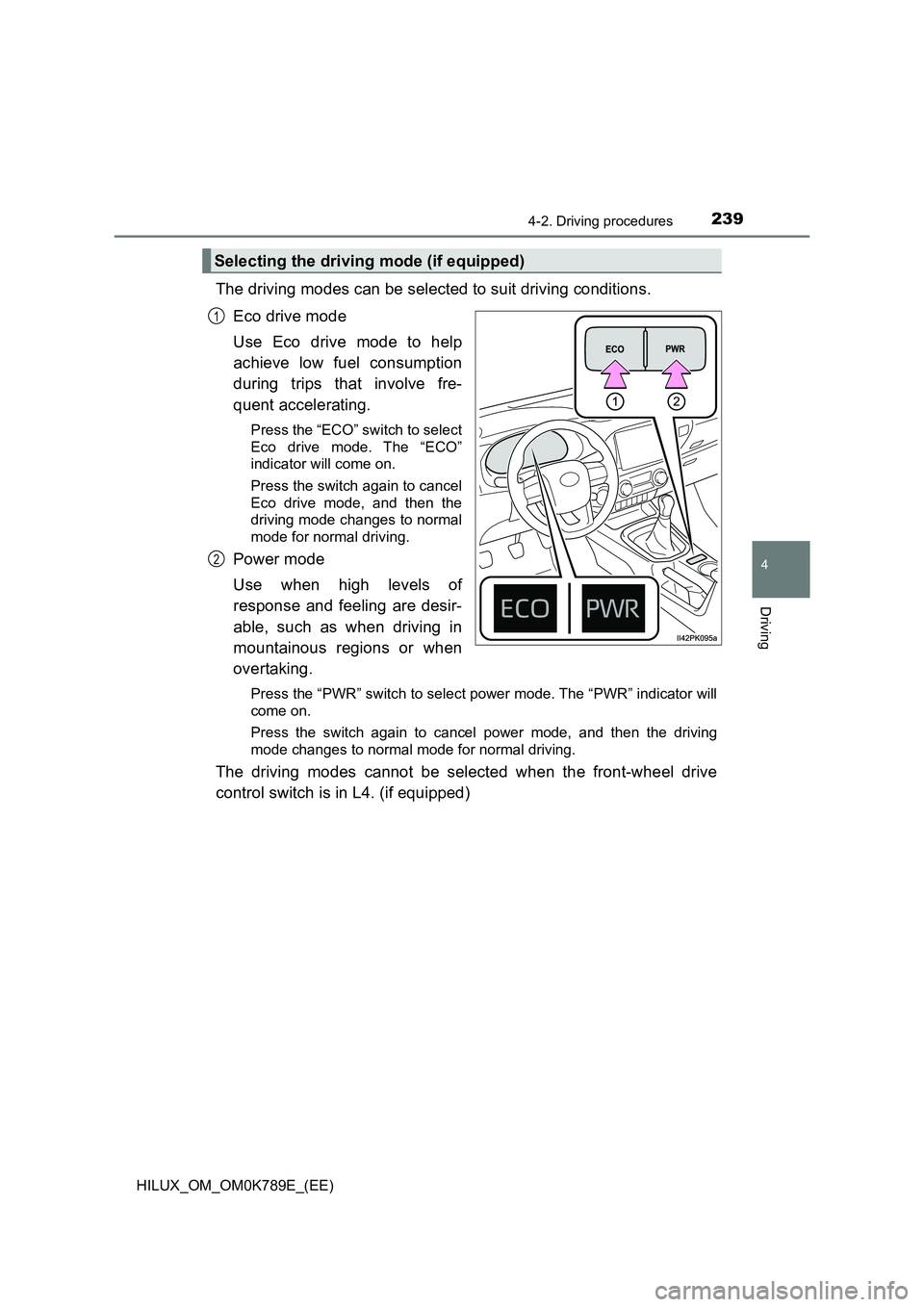
The driving modes can be selected to suit driving conditions.
Eco drive mode
Use Eco drive mode to help
achieve low fuel consumption
during trips that involve fre-
quent accelerating.
Press the “ECO” switch to select
Eco drive mode. The “ECO”
indicator will come on.
Press the switch again to cancel
Eco drive mode, and then the
driving mode changes to normal
mode for normal driving.
Power mode
Use when high levels of
response and feeling are desir-
able, such as when driving in
mountainous regions or when
overtaking.
Press the “PWR” switch to select power mode. The “PWR” indicator will
come on.
Press the switch again to cancel power mode, and then the driving
mode changes to normal mode for normal driving.
The driving modes cannot be selected when the front-wheel drive
control switch is in L4. (if equipped)
Selecting the driving mode (if equipped)
1
2
Page 276 of 810
2744-5. Using the driving support systems
HILUX_OM_OM0K789E_(EE)
WARNING
■Limitations of the pre-collision system
● The driver is solely responsible for safe driving. Always drive safely, taking
care to observe your surroundings.
Do not use the pre-collision system instead of normal braking operations
under any circumstances. This system will not prevent collisions or lessen
collision damage or injury in every situation. Do not overly rely on this sys-
tem. Failure to do so may lead to an accident, resulting in death or serious
injury.
● Although this system is designed to help avoid a collision or help reduce
the impact of the collision, its effectiveness may change according to vari-
ous conditions, therefore the system may not always be able to achieve
the same level of performance.
Read the following conditions carefully. Do not overly rely on this system
and always drive carefully.
• Conditions under which the system may operate even if there is no pos-
sibility of a collision: P. 278
• Conditions under which the system may not operate properly: P. 2 8 0
● Do not attempt to test the operation of the pre-collision system yourself.
Depending on the objects used for testing (dummies, cardboard objects
imitating detectable objects, etc.), the system may not operate properly,
possibly leading to an accident.
■ Pre-collision braking
● When the pre-collision braking function is operating, a large amount of
braking force will be applied.
● If the vehicle is stopped by the operation of the pre-collision braking func-
tion, the pre-collision braking func tion operation will be canceled after
approximately 2 seconds. Depress the brake pedal as necessary.
● The pre-collision braking function may not operate if certain operations are
performed by the driver. If the accelerator pedal is being depressed
strongly or the steering wheel is bei ng turned, the system may determine
that the driver is taking evasive action and possibly prevent the pre-colli-
sion braking function from operating.
● In some situations, while the pre-collision braking function is operating,
operation of the function may be canceled if the accelerator pedal is
depressed strongly or the steering wheel is turned and the system deter-
mines that the driver is taking evasive action.
● If the brake pedal is being depressed, the system may determine that the
driver is taking evasive action and possibly delay the operation timing of
the pre-collision braking function.
Page 283 of 810
2814-5. Using the driving support systems
4
Driving
HILUX_OM_OM0K789E_(EE)
• If a vehicle ahead is a motorcycle
• If a vehicle ahead is narrow, such as a personal mobility vehicle
• If a preceding vehicle has a small rear end, such as an unloaded truck
• If a vehicle ahead is carrying a load which protrudes past its rear bumper
• If a vehicle ahead is irregularly shaped, such as a tractor or side car
• If a vehicle ahead is a child sized bicycle, a bicycle that is carrying a large
load, a bicycle ridden by more than one person, or a uniquely shaped
bicycle (bicycle with a child seat, tandem bicycle, etc.)
• If a pedestrian/or the riding height of a bicyclist ahead is shorter than
approximately 1 m (3.2 ft.) or taller than approximately 2 m (6.5 ft.)
• If a pedestrian/bicyclist is wearing oversized clothing (a rain coat, long
skirt, etc.), making their silhouette obscure
• If a pedestrian is bending forward or squatting or bicyclist is bending for-
ward
• If a pedestrian/bicyclist is moving fast
• If a pedestrian is pushing a stroller, wheelchair, bicycle or other vehicle
• When driving in inclement weather such as heavy rain, fog, snow or a
sandstorm
• When driving through steam or smoke
• When the surrounding area is dim, such as at dawn or dusk, or while at
night or in a tunnel, making a detectable object appear to be nearly the
same color as its surroundings
• When driving in a place where the surrounding brightness changes sud-
denly, such as at the entrance or exit of a tunnel
• After the engine has started the vehicle has not been driven for a certain
amount of time
• While making a left/right turn and for a few seconds after making a left/
right turn
• While driving on a curve and for a few seconds after driving on a curve
• If your vehicle is skidding
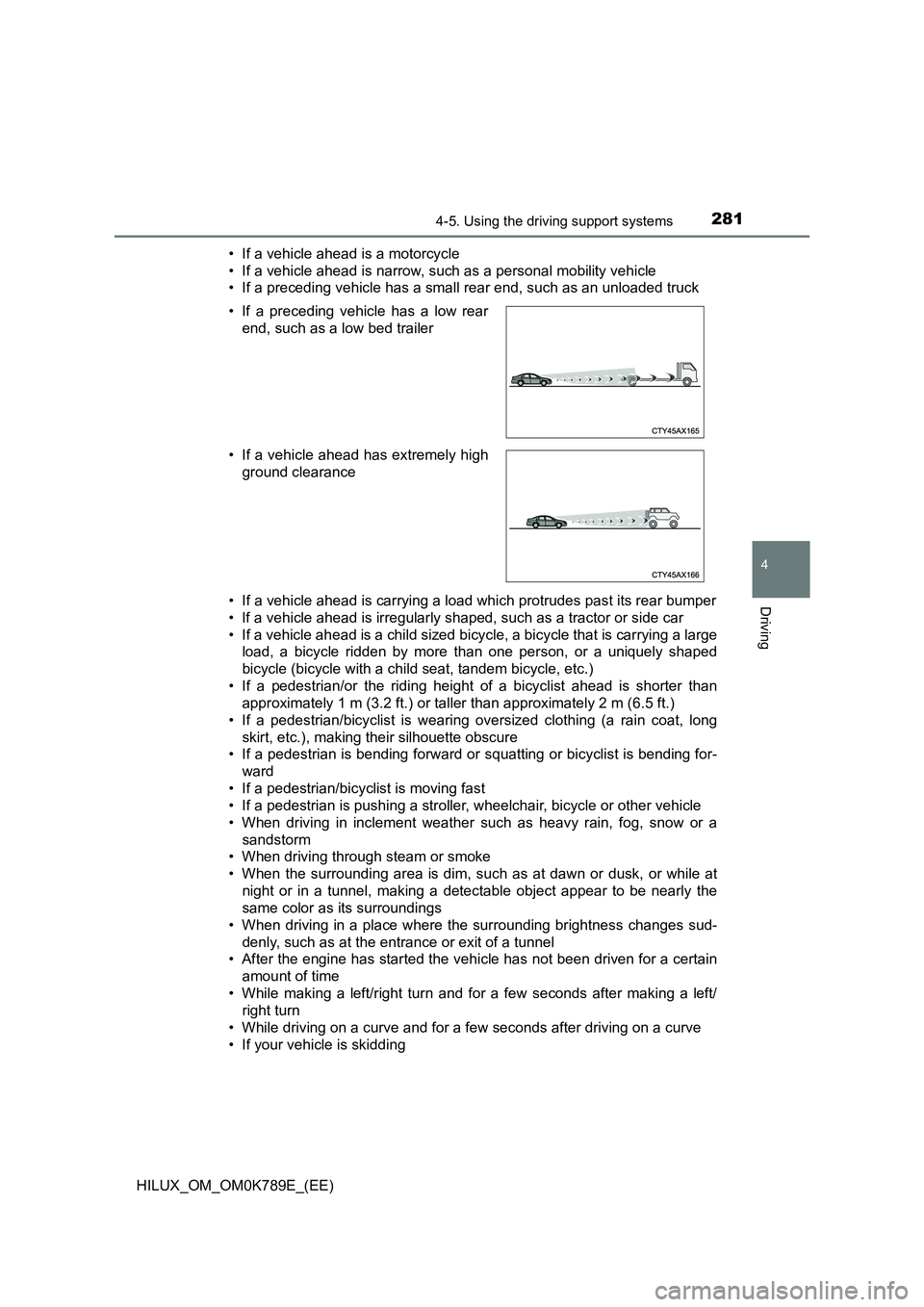
• If a preceding vehicle has a low rear
end, such as a low bed trailer
• If a vehicle ahead has extremely high
ground clearance
Page 307 of 810
3054-5. Using the driving support systems
4
Driving
HILUX_OM_OM0K789E_(EE)
Example of constant speed cruising
When there are no vehicles ahead
The vehicle travels at the speed set by the driver.
Example of deceleration cruising and follow-up cruising
When a preceding vehicle driving slower than the set speed
appears
When a vehicle is detected running ahead of you, the system automatically
decelerates your vehicle. When a greater reduction in vehicle speed is
necessary, the system applies the brakes (the stop lights will come on at
this time). The system will respond to changes in the speed of the vehicle
ahead in order to maintain the vehicle-to-vehicle distance set by the driver.
Approach warning warns you when the system cannot decelerate suffi-
ciently to prevent your vehicle from closing in on the vehicle ahead.
When the turn signal lever is operated and your vehicle moves to an over-
taking lane while driving at 80 km/h (50 mph) or more, the vehicle will
accelerate to help to overtake a passing vehicle.
The system’s identification of what is an overtaking lane may be deter-
mined solely based on the location of the steering wheel in the vehicle (left
side driver position versus right side driver position.) If the vehicle is driven
to a region where the overtaking lane is on a different side from where the
vehicle is normally driven, the vehicle may accelerate when the turn signal
lever is operated in the opposite direction to the overtaking lane (e.g., if the
driver normally operates the vehicle in a region where the overtaking lane
is to the right but then drives to a region where the overtaking lane is to the
left, the vehicle may accelerate when the right turn signal is activated).
Example of acceleration
When there are no longer any preceding vehicles driving slower
than the set speed
The system accelerates until the set speed is reached. The system then
returns to constant speed cruising.
1
2
3
Page 348 of 810
3464-5. Using the driving support systems
HILUX_OM_OM0K789E_(EE)
When the engine is stopped by the Stop & Start system when the
vehicle is on an incline, when the brake pedal is released, brake force
is temporarily maintained to prevent the vehicle from rolling back-
wards before the engine is restarted and drive force is generated.
When drive force is generated, the maintained brake force is automat-
ically canceled.
● This function operates on flat surfaces as well as steep inclines.
● Sound may be generated from the brake system, but this does not
indicate a malfunction.
● Brake pedal response may change and vibration may occur, but
this does not indicate a malfunction.
■ Points for use
● If the engine switch is pressed when the engine is stopped by the Stop &
Start system, the engine will not be able to be restarted by the automatic
engine start function. In this case, restart the engine using the normal
engine starting procedure. ( P. 219, 222)
● When the engine is being restarted by the Stop & Start system, the power
outlets may be temporarily unusable, but this does not indicate a malfunc-
tion.
● Installation and removal of electrical components and wireless devices may
affect the Stop & Start system. Contact any authorized Toyota retailer or
Toyota authorized repairer, or any reliable repairer for details.
● When stopping the vehicle for a longer period of time, turn the engine switch
to the “LOCK” position*1 or off*2 to stop the engine completely.
● When the engine is restarted by the Stop & Start system, the steering wheel
may temporarily feel heavy.
● 4WD models only: While driving in L4 mode, it is recommended that the
Stop & Start system be canceled because the system may not operate prop-
erly.
*1: Vehicles without smart entry & start system
*2: Vehicles with smart entry & start system
Hill-start assist control (vehicles with automatic transmission)