light TOYOTA iM 2016 Owners Manual (in English)
[x] Cancel search | Manufacturer: TOYOTA, Model Year: 2016, Model line: iM, Model: TOYOTA iM 2016Pages: 28, PDF Size: 0.76 MB
Page 2 of 28
This Quick Reference Guide is a summary of basic vehicle operations.
It contains brief descriptions of fundamental operations so you can
locate and use the vehicle’s main equipment quickly and easily.
The Quick Reference Guide is not intended as a substitute for the
Owner’s Manual located in the vehicle’s glove box. We strongly
encourage you to review the Owner’s Manual and supplementary
manuals so you will have a better understanding of the vehicle’s
capabilities and limitations.
Your dealership and the entire staff of Toyota Motor Sales, U.S.A.,
Inc. wish you many years of satisfied driving in your new Scion iM.
A word about safe vehicle operations
This Quick Reference Guide is not a full description of Scion iM
operations. Every Scion iM owner should review the Owner’s
Manual that accompanies this vehicle.
Pay special attention to the boxed information highlighted in
color throughout the Owner’s Manual. Each box contains safe
operating instructions to help you avoid injury or equipment
malfunction.
All information in this Quick Reference Guide is current at the
time of printing. Toyota reserves the right to make changes at
any time without notice.
2016
Scion iM
Page 3 of 28
OVERVIEW
FEATURES/OPERATIONS
SAFETY AND EMERGENCY FEATURES
1
INDEX
OVERVIEW
FEATURES/OPERATIONS
SAFETY AND
EMERGENCY FEATURES
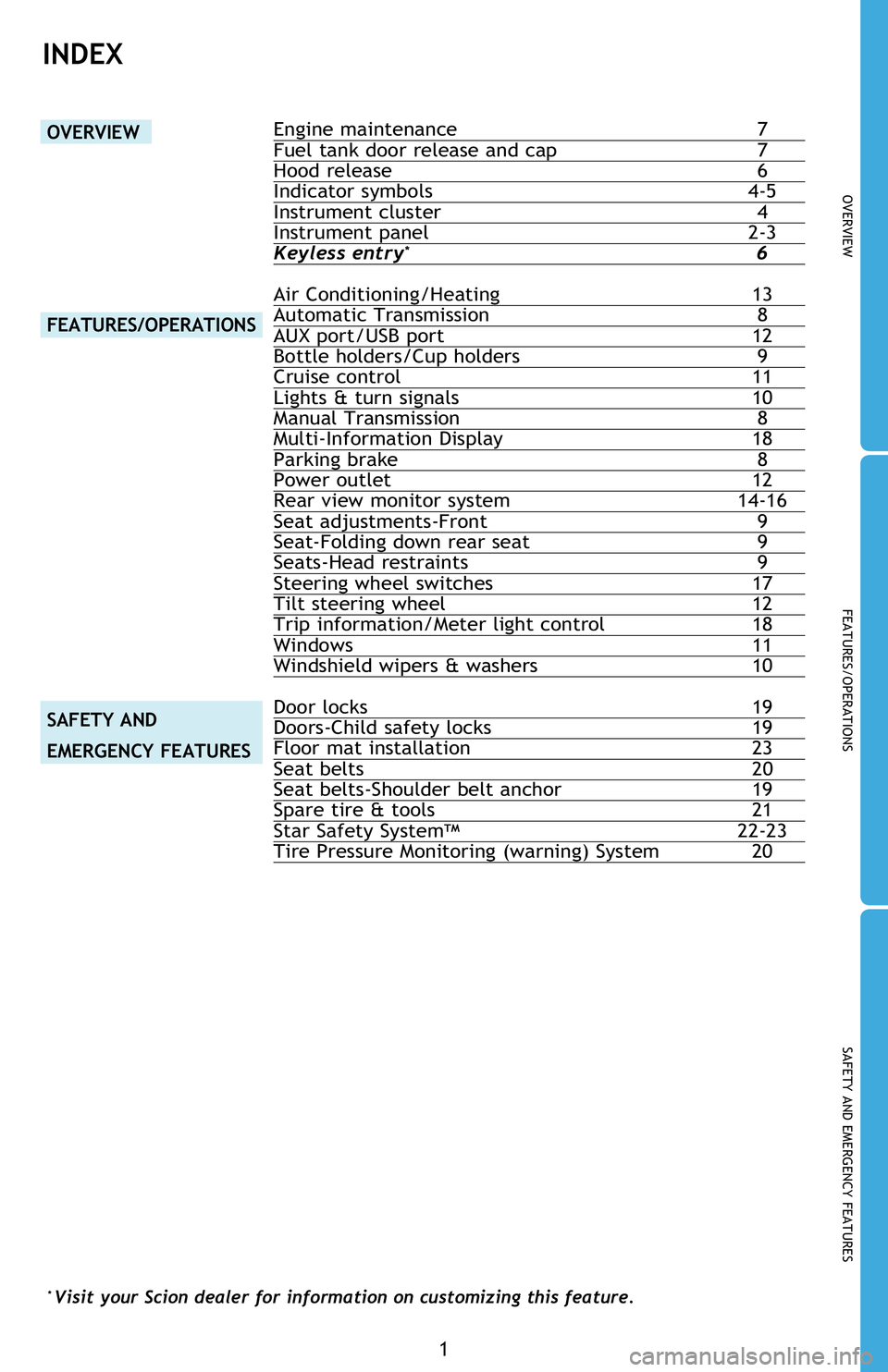
Engine maintenance 7
Fuel tank door release and cap 7
Hood release 6
Indicator symbols 4-5
Instrument cluster 4
Instrument panel 2-3
Keyless entry
* 6
Air Conditioning/Heating 13
Automatic Transmission 8
AUX port/USB port 12
Bottle holders/Cup holders 9
Cruise control 11
Lights & turn signals 10
Manual Transmission 8
Multi-Information Display 18
Parking brake 8
Power outlet 12
Rear view monitor system 14-16
Seat adjustments-Front 9
Seat-Folding down rear seat 9
Seats-Head restraints 9
Steering wheel switches 17
Tilt steering wheel 12
Trip information/Meter light control 18
Windows 11
Windshield wipers & washers 10
Door locks 19
Doors-Child safety locks 19
Floor mat installation 23
Seat belts 20
Seat belts-Shoulder belt anchor 19
Spare tire & tools 21
Star Safety System
TM 22-23
Tire Pressure Monitoring (warning) System 20
* Visit your Scion dealer for information on customizing this feature.
Page 4 of 28
2
OVERVIEW
Instrument panel
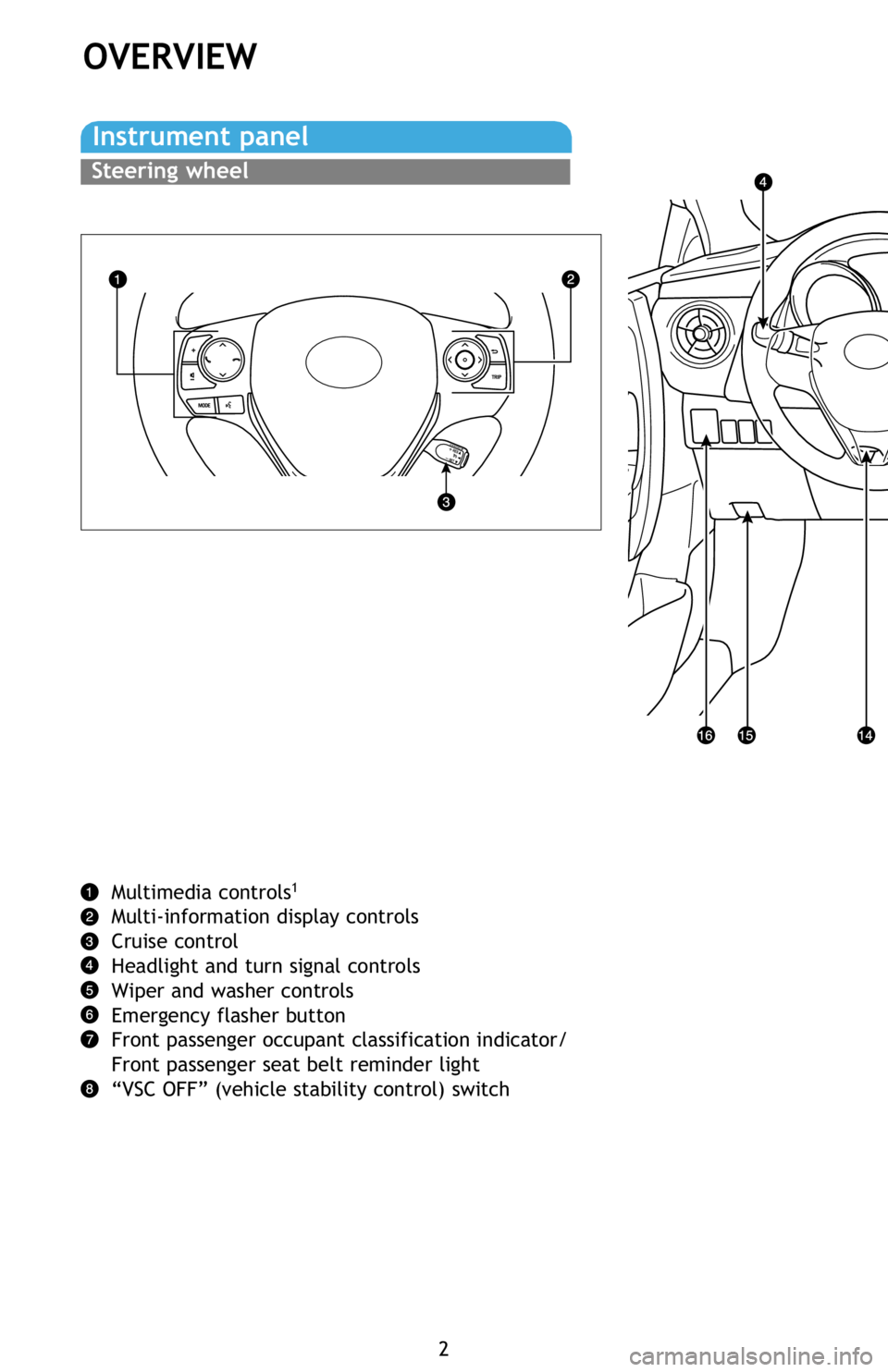
Multimedia controls1
Multi-information display controls
Cruise control
Headlight and turn signal controls
Wiper and washer controls
Emergency flasher button
Front passenger occupant classification indicator/
Front passenger seat belt reminder light
“VSC OFF” (vehicle stability control) switch
Steering wheel
Page 6 of 28
4
OVERVIEW
Instrument cluster
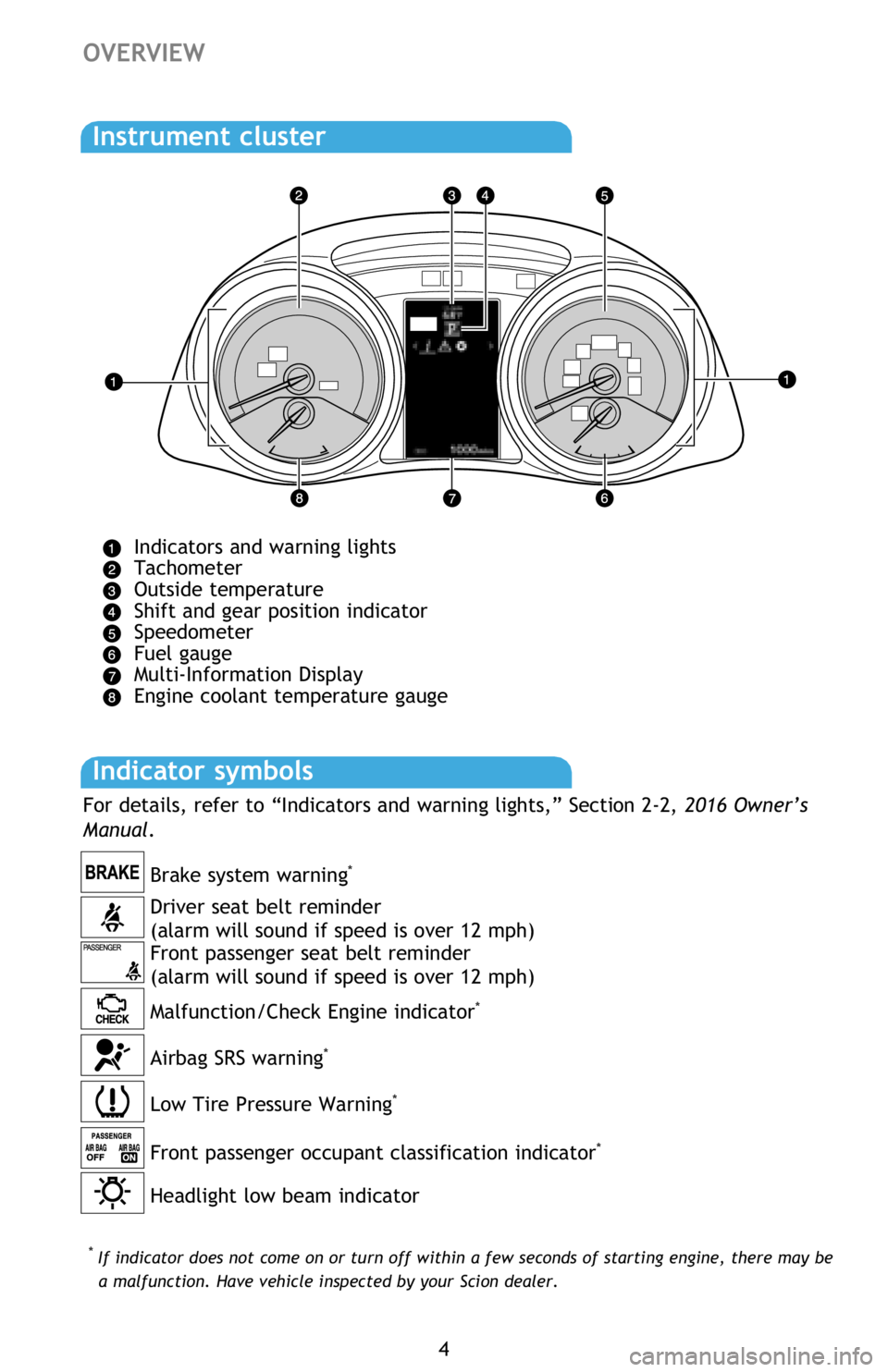
Indicators and warning lights
Tachometer
Outside temperature
Shift and gear position indicator
Speedometer
Fuel gauge
Multi-Information Display
Engine coolant temperature gauge
*
If indicator does not come on or turn off within a few seconds of starting engine, there may be
a malfunction. Have vehicle inspected by your Scion dealer.
Indicator symbols
For details, refer to “Indicators and warning lights,” Section 2-2, 2016 Owner’s
Manual.
Headlight low beam indicator Front passenger occupant classification indicator
*
Driver seat belt reminder
(alarm will sound if speed is over 12 mph)
Front passenger seat belt reminder
(alarm will sound if speed is over 12 mph) Brake system warning
*
Malfunction/Check Engine indicator*
Low Tire Pressure Warning*
Airbag SRS warning*
Page 7 of 28
OVERVIEW
FEATURES/OPERATIONS
SAFETY AND EMERGENCY FEATURES
5
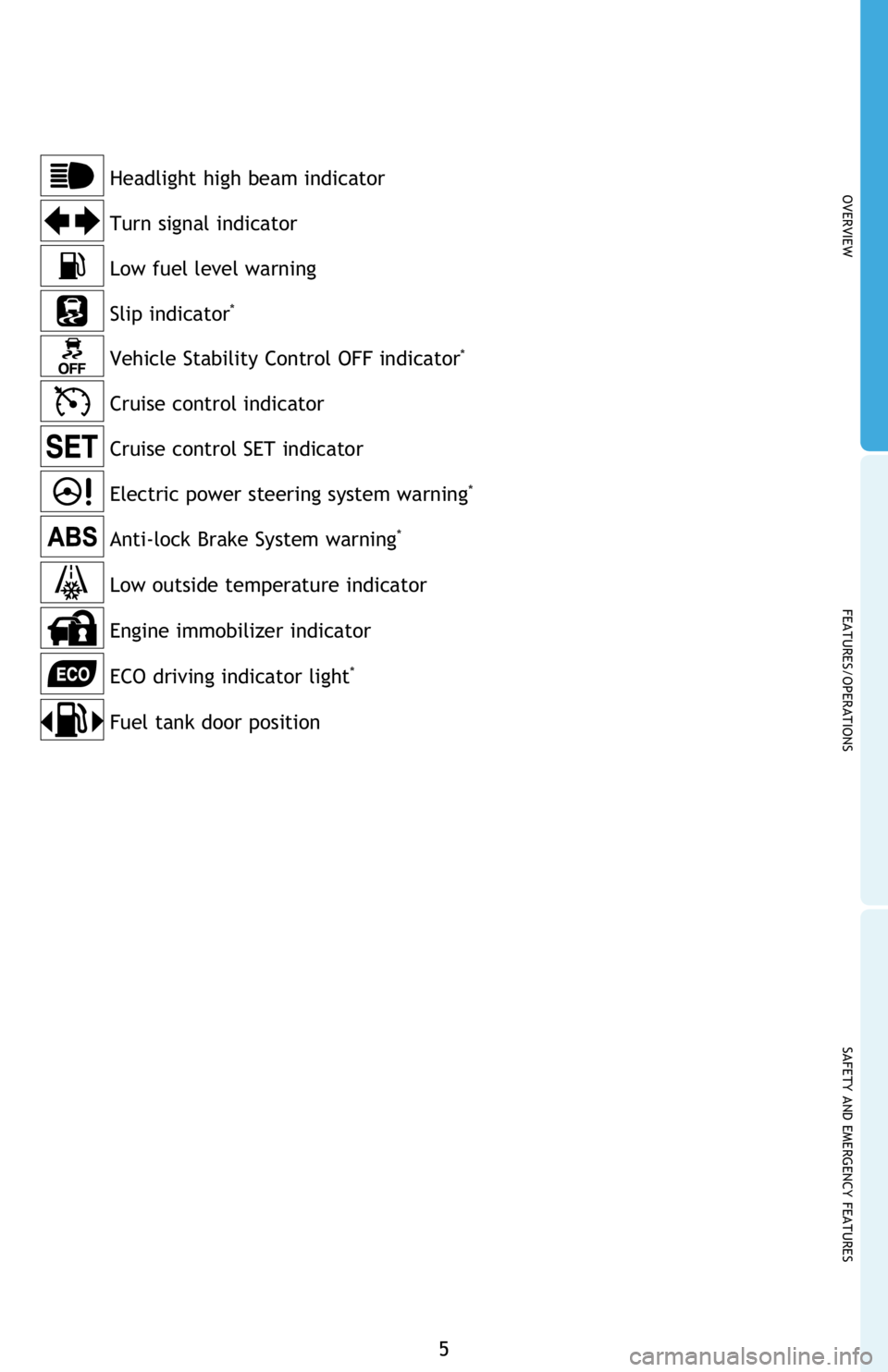
Anti-lock Brake System warning*
Turn signal indicator Headlight high beam indicator
Cruise control indicator
Electric power steering system warning
*
Slip indicator*
Vehicle Stability Control OFF indicator*
Low fuel level warning
Low outside temperature indicator
Engine immobilizer indicator
ECO driving indicator light
*
Cruise control SET indicator
Fuel tank door position
Page 10 of 28
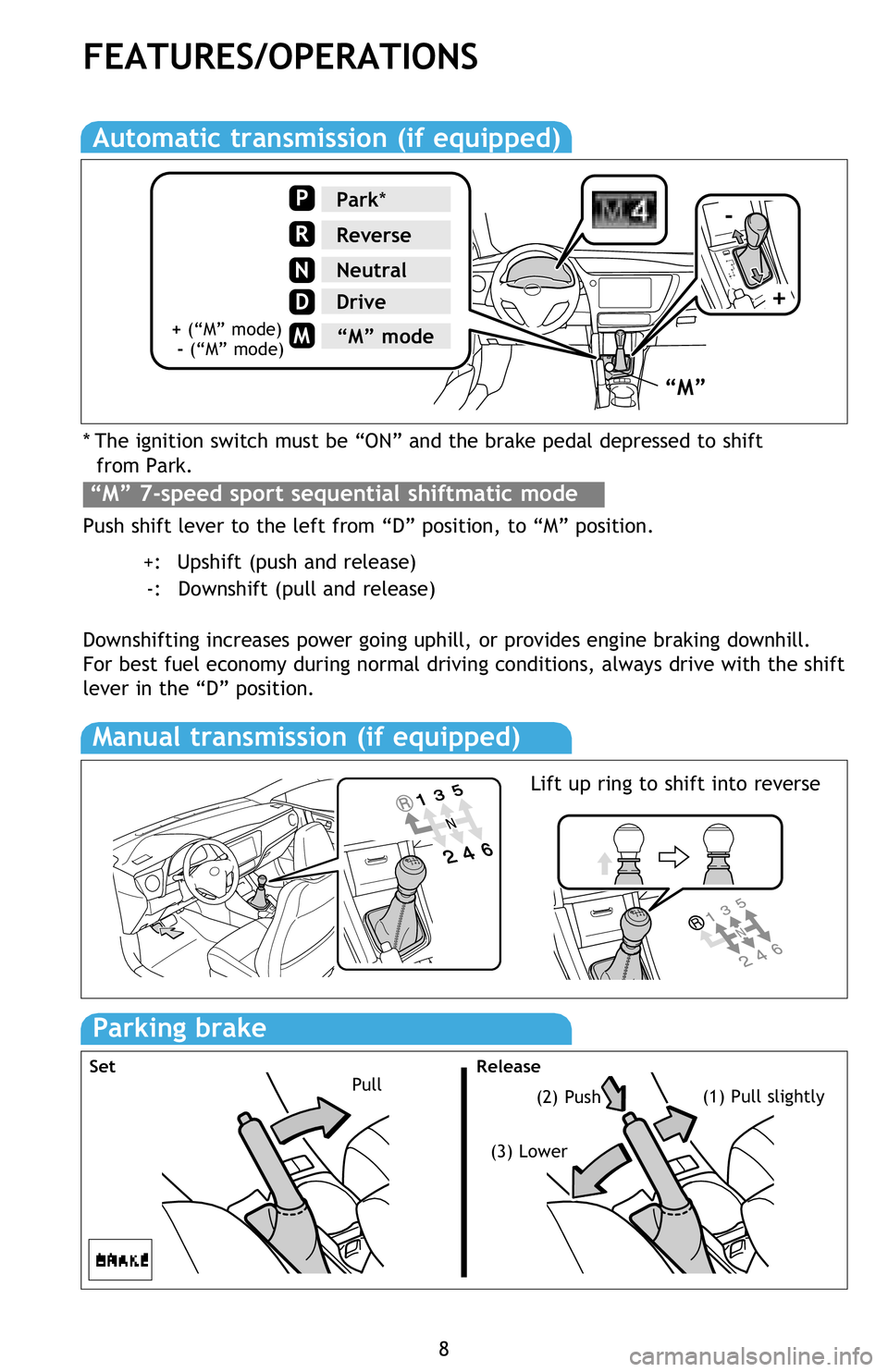
* The ignition switch must be “ON” and the brake pedal depressed to shift
from Park.
Push shift lever to the left from “D” position, to “M” position.
+: Upshift (push and release)
-: Downshift (pull and release)
Downshifting increases power going uphill, or provides engine braking downhill.
For best fuel economy during normal driving conditions, always drive with the shift
lever in the “D” position.
8
FEATURES/OPERATIONS
Automatic transmission (if equipped)
“M” 7-speed sport sequential shiftmatic mode
Manual transmission (if equipped)
Parking brake
Pull(2) Push(1) Pull slightly
(3) Lower
Set Release
“M”
-
+
Park*
Reverse
Neutral
Drive
P
R
N
D
M“M” mode+ (“M” mode)
- (“M” mode)
Lift up ring to shift into reverse
Page 12 of 28
10
FEATURES/OPERATIONS
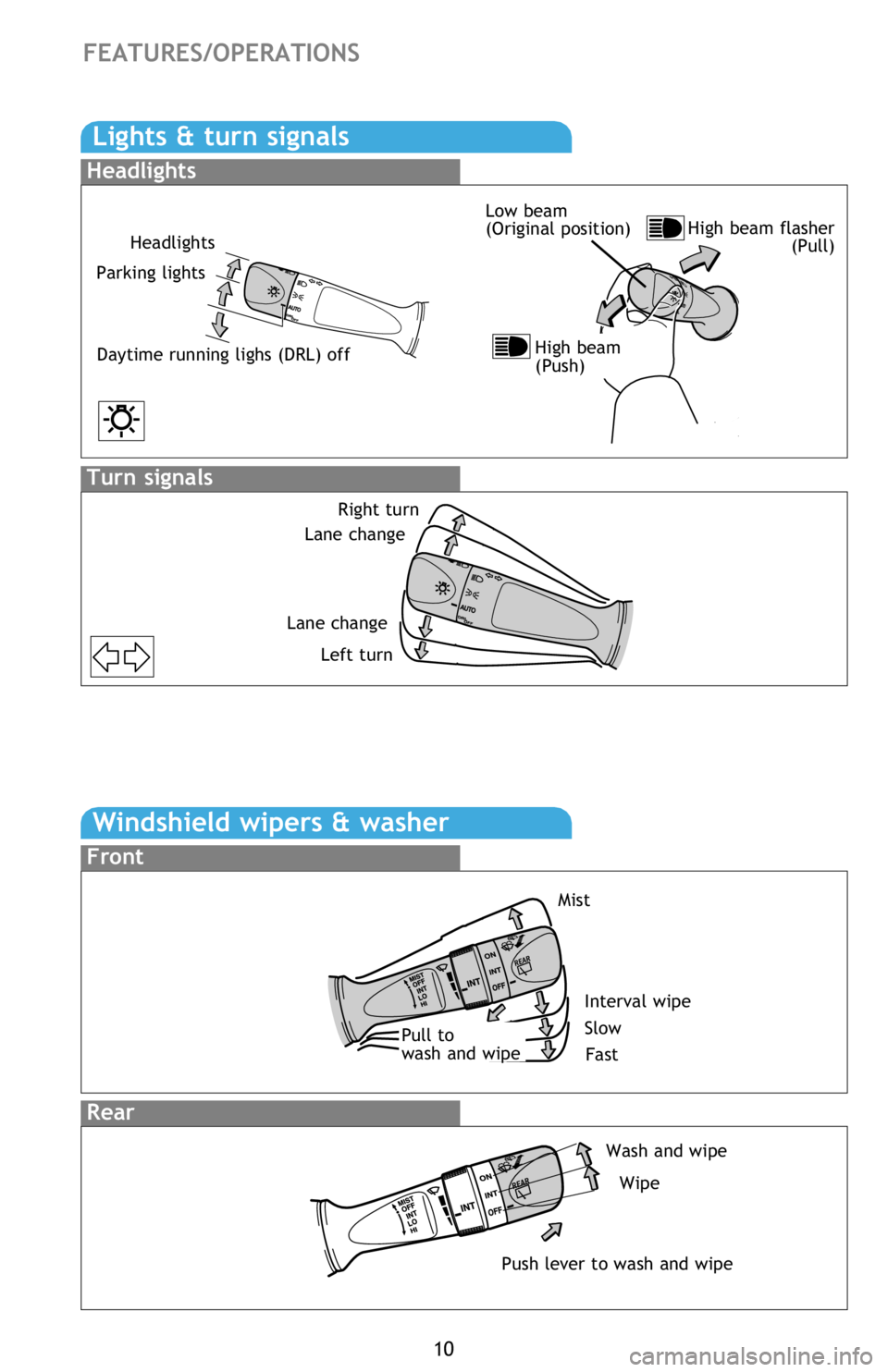
Windshield wipers & washer
Front
Rear
Lights & turn signals
Turn signals
Headlights
Headlights
Parking lights
Daytime running lighs (DRL) off
Right turn
Lane change
Lane change
Left turn
High beam flasher
(Pull) Low beam
(Original position)
High beam
(Push)
Interval wipe
Slow
FastPull to
wash and wipe
Push lever to wash and wipeMist
Wash and wipe
Wipe
Page 17 of 28
OVERVIEW
FEATURES/OPERATIONS
SAFETY AND EMERGENCY FEATURES
15
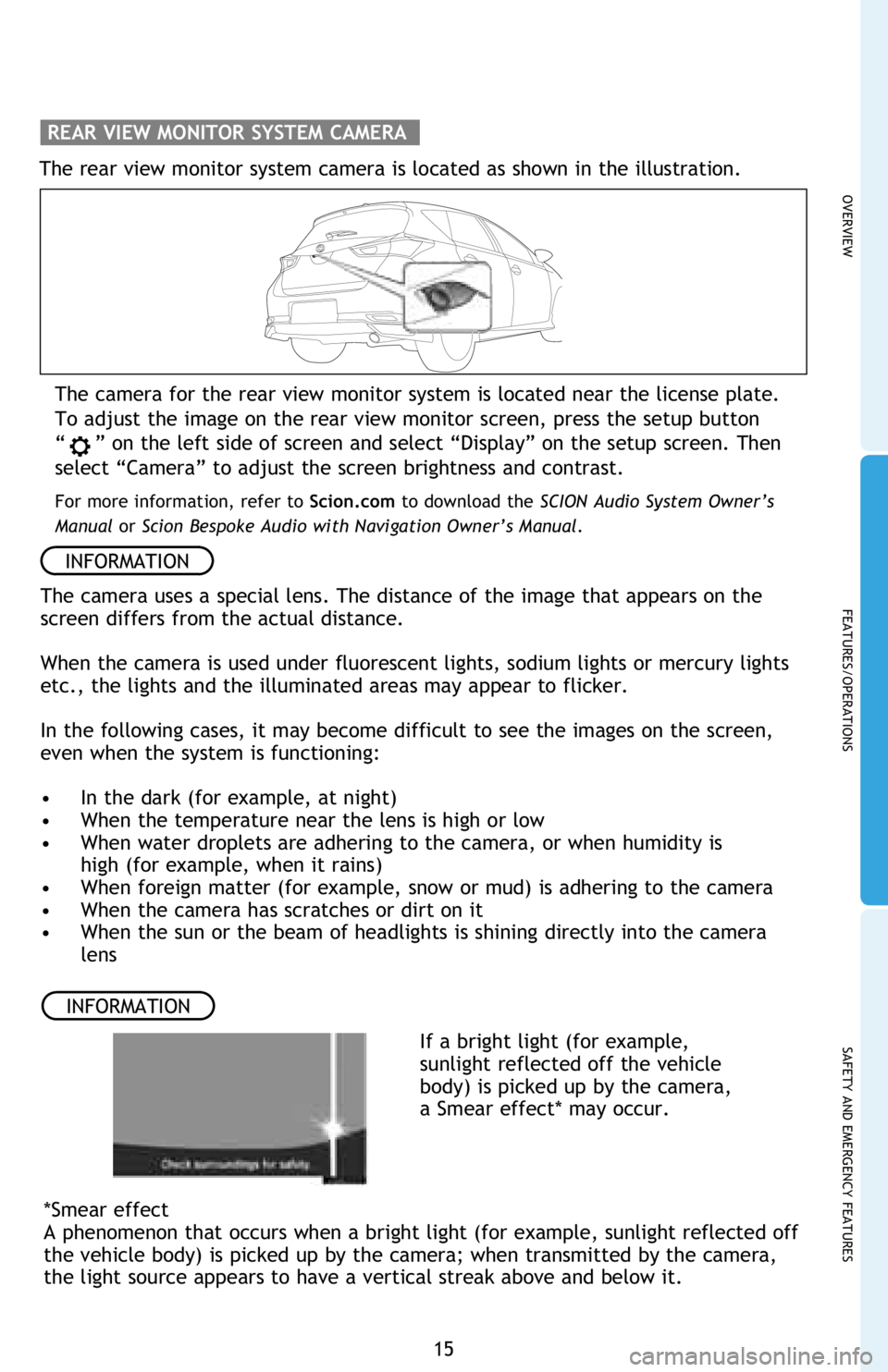
The camera for the rear view monitor system is located near the license plate.
To adjust the image on the rear view monitor screen, press the setup button
“
” on the left side of screen and select “Display” on the setup screen. Then
select “Camera” to adjust the screen brightness and contrast.
For more information, refer to Scion.com to download the SCION Audio System Owner’s
Manual or Scion Bespoke Audio with Navigation Owner’s Manual.
The rear view monitor system camera is located as shown in the illustration.
REAR VIEW MONITOR SYSTEM CAMERA
The camera uses a special lens. The distance of the image that appears on the
screen differs from the actual distance.
When the camera is used under fluorescent lights, sodium lights or mercury lights
etc., the lights and the illuminated areas may appear to flicker.
In the following cases, it may become difficult to see the images on the screen,
even when the system is functioning:
• In the dark (for example, at night)
• When the temperature near the lens is high or low
• When water droplets are adhering to the camera, or when humidity is
high (for example, when it rains)
• When foreign matter (for example, snow or mud) is adhering to the camera
• When the camera has scratches or dirt on it
• When the sun or the beam of headlights is shining directly into the camera
lens
INFORMATION
*Smear effect
A phenomenon that occurs when a bright light (for example, sunlight reflected off
the vehicle body) is picked up by the camera; when transmitted by the camera,
the light source appears to have a vertical streak above and below it.
If a bright light (for example,
sunlight reflected off the vehicle
body) is picked up by the camera,
a Smear effect* may occur.
INFORMATION
Page 20 of 28
18
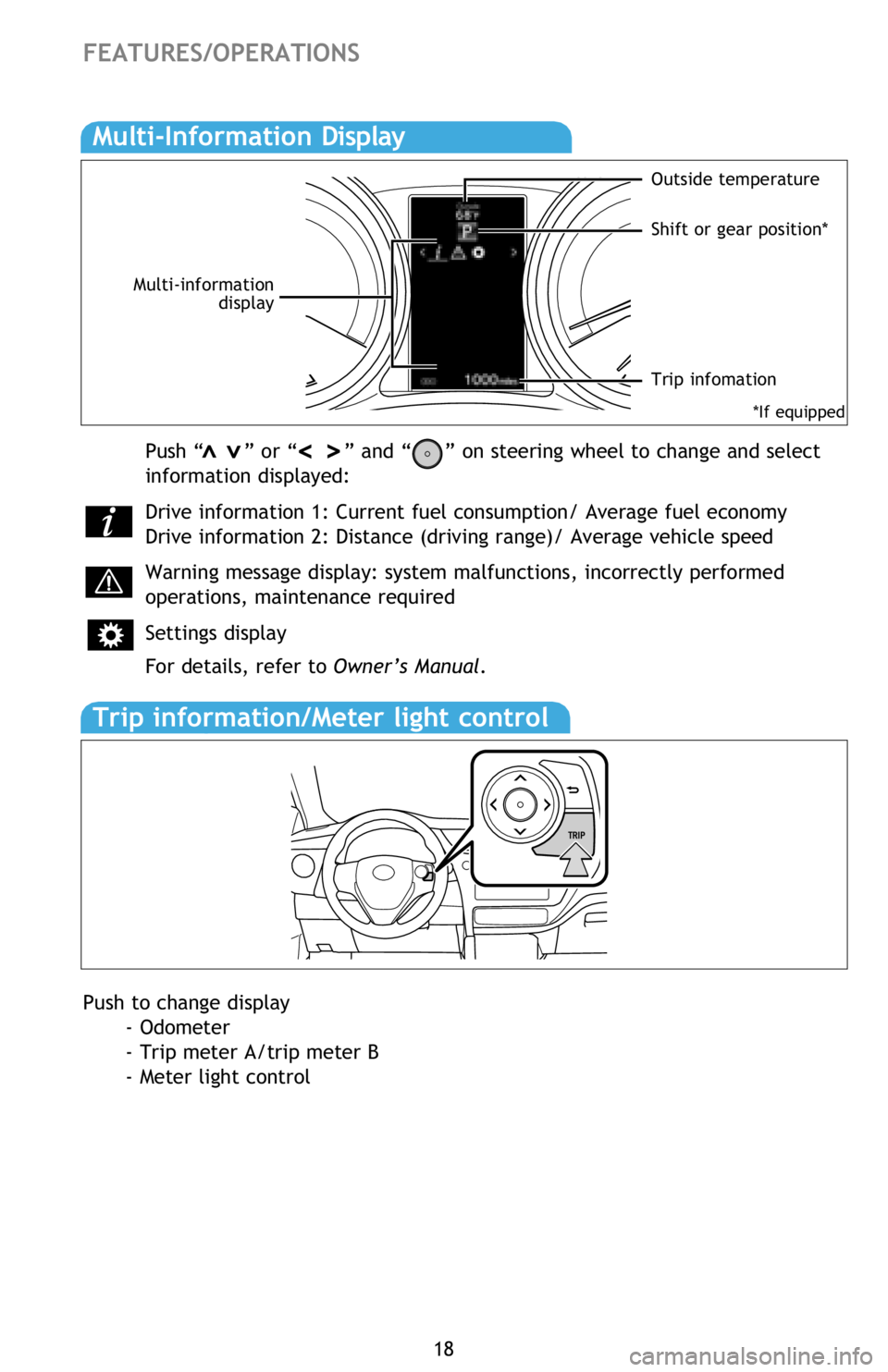
Multi-Information Display
FEATURES/OPERATIONS
Push “ ” or “ ” and “ ” on steering wheel to change and select
information displayed:
Drive information 1: Current fuel consumption/ Average fuel economy
Drive information 2: Distance (driving range)/ Average vehicle speed
Warning message display: system malfunctions, incorrectly performed
operations, maintenance required
Settings display
For details, refer to Owner’s Manual.>>>>
Push to change display
- Odometer
- Trip meter A/trip meter B
- Meter light control
Outside temperature
Shift or gear position*
Multi-information
display
Trip infomation
Trip information/Meter light control
*If equipped
Page 22 of 28
20
SAFETY AND EMERGENCY FEATURES
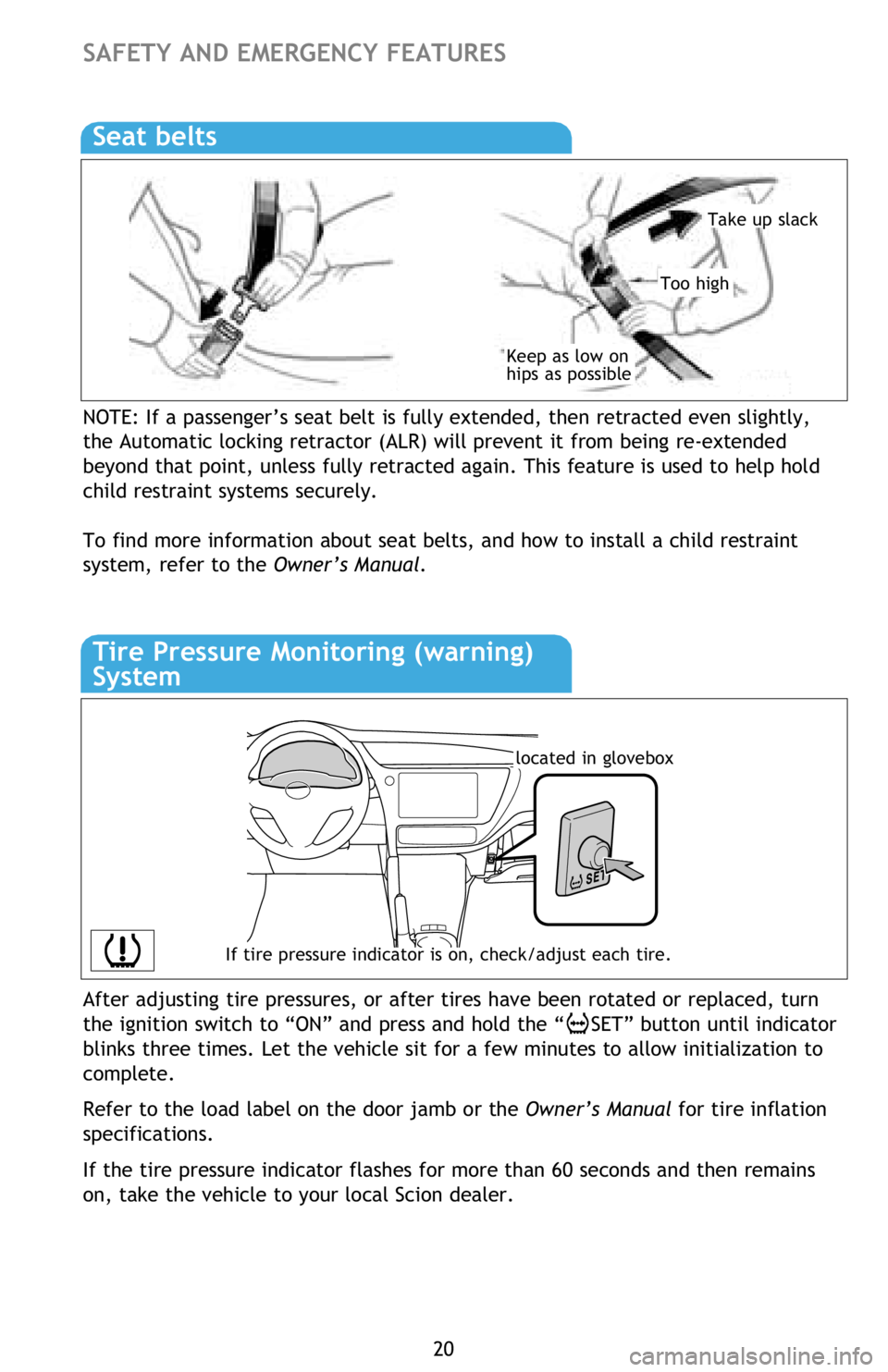
NOTE: If a passenger’s seat belt is fully extended, then retracted even slightly,
the Automatic locking retractor (ALR) will prevent it from being re-extended
beyond that point, unless fully retracted again. This feature is used to help hold
child restraint systems securely.
To find more information about seat belts, and how to install a child restraint
system, refer to the Owner’s Manual.
Keep as low on
hips as possible
Take up slack
Too high
Seat belts
If tire pressure indicator is on, check/adjust each tire.
located in glovebox
Tire Pressure Monitoring (warning)
System
After adjusting tire pressures, or after tires have been rotated or replaced, turn
the ignition switch to “ON” and press and hold the “
SET” button until indicator
blinks three times. Let the vehicle sit for a few minutes to allow initialization to
complete.
Refer to the load label on the door jamb or the Owner’s Manual for tire inflation
specifications.
If the tire pressure indicator flashes for more than 60 seconds and then remains
on, take the vehicle to your local Scion dealer.