light TOYOTA iQ EV 2013 Accessories, Audio & Navigation (in English)
[x] Cancel search | Manufacturer: TOYOTA, Model Year: 2013, Model line: iQ EV, Model: TOYOTA iQ EV 2013Pages: 321, PDF Size: 6.88 MB
Page 27 of 321
27
1. BASIC INFORMATION BEFORE OPERATION
2
BASIC FUNCTION
iQ_EV NAVI OM74061U
2. TOUCH SCREEN OPERATION
This system is operated mainly by the
buttons on the screen. (Referred to as
screen buttons in this manual.)
When a screen button is touched, a
beep sounds. (To set the beep sound,
see page 43.)
NOTICE
●To prevent damaging the screen, lightly
touch the screen buttons with your finger
pad.
● Do not operate or rub the screen with a
ballpoint pen, a mechanical pencil, fin-
ger nail, a pointy and/or hard object
because this will damage the screen.
● Do not use objects other than your finger
to touch the screen.
● When wiping the touch screen, it is
advisable to wipe with a soft and dry
cloth wrapped around the finger. Do not
use chemical cleaners to clean the
touch screen. Also, be careful not to
apply excessive force on the screen.
INFORMATION
● If the system does not respond to touch-
ing a screen button, move your finger
away from the screen and then touch it
again.
● Dimmed screen buttons cannot be oper-
ated.
● To operate the touch screen, press
touch screen buttons properly with finger
pad.
● When dew condensation occurs inside
the touch screen, it is sometimes difficult
to operate the display properly. In such
case, please leave the screen
untouched and do not operate the touch
screen until dew condensation disap-
pears.
● The displayed image may become
darker and moving images may be
slightly distorted when the screen is
cold.
● In extremely cold conditions, the map
may not be displayed and the data input
by a user may be deleted. Also, the
screen buttons may be harder than
usual to depress.
● When the screen is viewed through
polarized sunglasses, a rainbow pattern
may appear on the screen due to optical
characteristics of the screen. If this is
disturbing, please operate the screen
without polarized sunglasses.
Page 32 of 321
32
1. BASIC INFORMATION BEFORE OPERATION
iQ_EV NAVI OM74061U
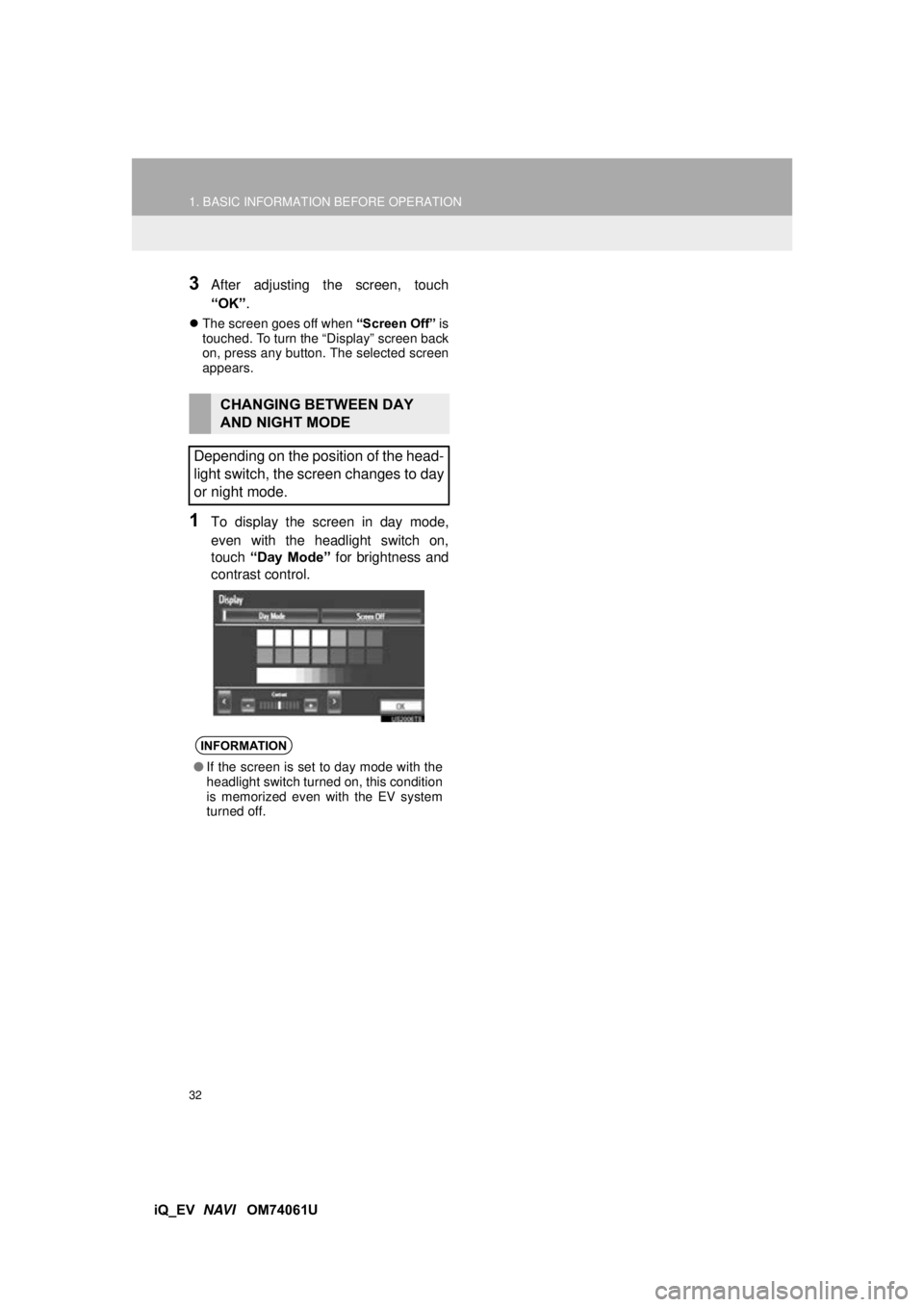
3After adjusting the screen, touch
“OK”.
The screen goes off when “Screen Off” is
touched. To turn the “Display” screen back
on, press any button. The selected screen
appears.
1To display the screen in day mode,
even with the headlight switch on,
touch “Day Mode” for brightness and
contrast control.
CHANGING BETWEEN DAY
AND NIGHT MODE
Depending on the position of the head-
light switch, the screen changes to day
or night mode.
INFORMATION
● If the screen is set to day mode with the
headlight switch turned on, this condition
is memorized even with the EV system
turned off.
Page 44 of 321
44
2. SETUP
iQ_EV NAVI OM74061U
No.Function
Touch to change the time zone and
select “On” or “Off” for daylight sav-
ing time. (See “SYSTEM TIME SET-
TINGS” on page 45.)
Touch to change the language. (See
“SELECTING A LANGUAGE” on
page 46.)
Touch to change the distance unit.
(See “UNIT OF MEASUREMENT” on
page 46.)
Touch to turn the sound beeps “On”
or “Off” .
Touch to change the screen button
color. (See “SELECTING A BUTTON
COLOR” on page 47.)
Touch to change the keyboard lay-
out. (See “SELECTING A KEY-
BOARD LAYOUT” on page 47.)
Touch to customize the startup im-
age. (See “CHANGING THE START-
UP IMAGE” on page 48.)
Touch to customize the screen off
image. (See “CHANGING THE
SCREEN OFF IMAGE” on page 50.)
Touch to select “On” or “Off” for au-
tomatic screen changes from the au-
dio screen to the previous screen. If
“On” is selected, the screen will au-
tomatically return to the previous
screen from the audio screen after 20
seconds.
Touch to delete personal data. (See
“DELETING PERSONAL DATA” on
page 51.)
Touch to update program versions.
For details, contact your Toyota deal-
er.
Touch to update gracenote database
versions. For details, contact your
Toyota dealer.
No.Function
Page 45 of 321
45
2. SETUP
2
BASIC FUNCTION
iQ_EV NAVI OM74061U
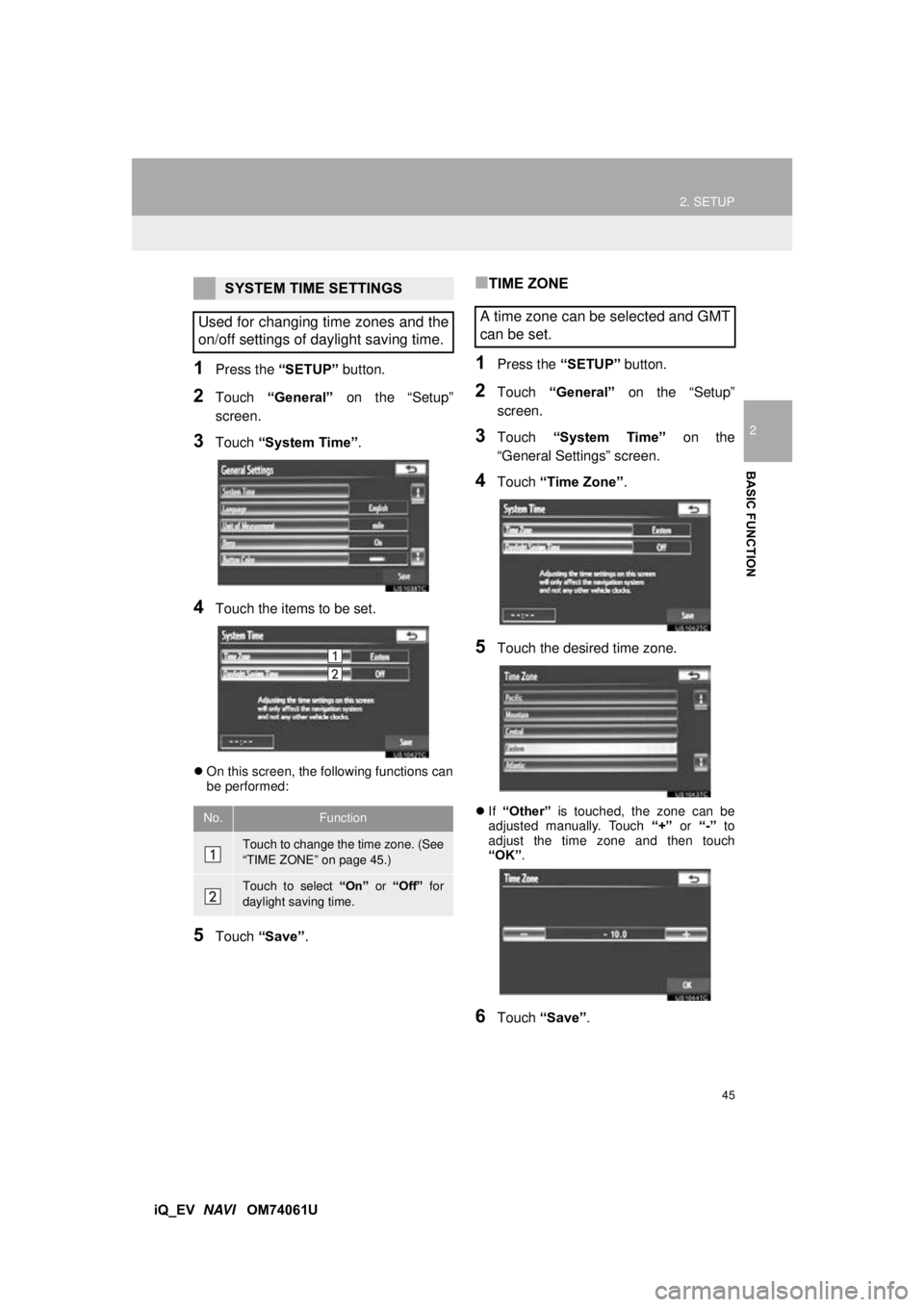
1Press the “SETUP” button.
2Touch “General” on the “Setup”
screen.
3Touch “System Time” .
4Touch the items to be set.
On this screen, the following functions can
be performed:
5Touch “Save” .
■TIME ZONE
1Press the “SETUP” button.
2Touch “General” on the “Setup”
screen.
3Touch “System Time” on the
“General Settings” screen.
4Touch “Time Zone” .
5Touch the desired time zone.
If “Other” is touched, the zone can be
adjusted manually. Touch “+” or “-” to
adjust the time zone and then touch
“OK” .
6Touch “Save” .
SYSTEM TIME SETTINGS
Used for changing time zones and the
on/off settings of daylight saving time.
No.Function
Touch to change the time zone. (See
“TIME ZONE” on page 45.)
Touch to select “On” or “Off” for
daylight saving time.
A time zone can be selected and GMT
can be set.
Page 82 of 321
82
2. ROUTE GUIDANCE
iQ_EV NAVI OM74061U
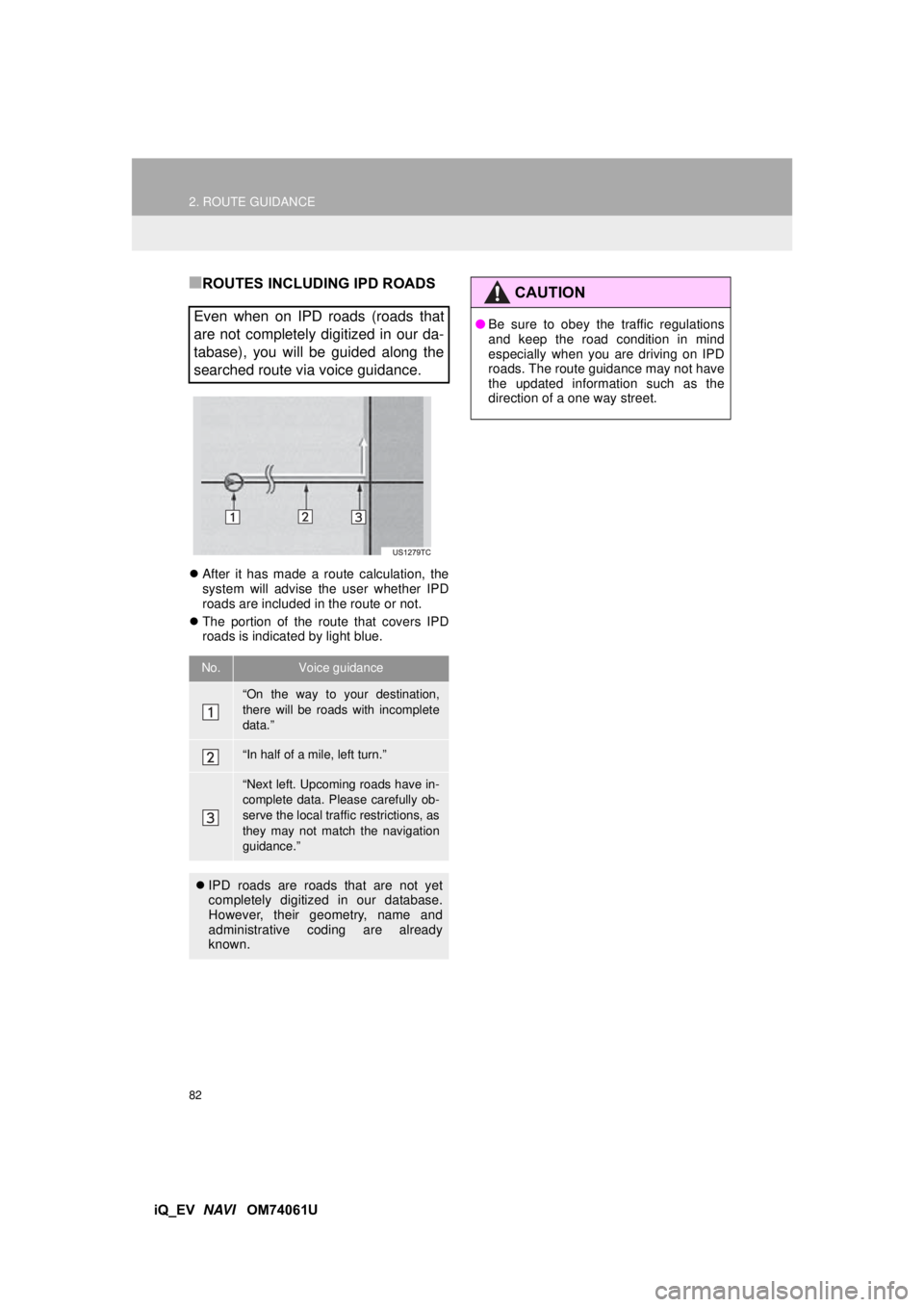
■ROUTES INCLUDING IPD ROADS
After it has made a route calculation, the
system will advise the user whether IPD
roads are included in the route or not.
The portion of the route that covers IPD
roads is indicated by light blue.
Even when on IPD roads (roads that
are not completely digitized in our da-
tabase), you will be guided along the
searched route via voice guidance.
No.Voice guidance
“On the way to your destination,
there will be roads with incomplete
data.”
“In half of a mile, left turn.”
“Next left. Upcoming roads have in-
complete data. Please carefully ob-
serve the local traffic restrictions, as
they may not match the navigation
guidance.”
IPD roads are roads that are not yet
completely digitized in our database.
However, their geometry, name and
administrative coding are already
known.
CAUTION
●Be sure to obey the traffic regulations
and keep the road condition in mind
especially when you are driving on IPD
roads. The route guidance may not have
the updated information such as the
direction of a one way street.
Page 94 of 321
94
2. ROUTE GUIDANCE
iQ_EV NAVI OM74061U
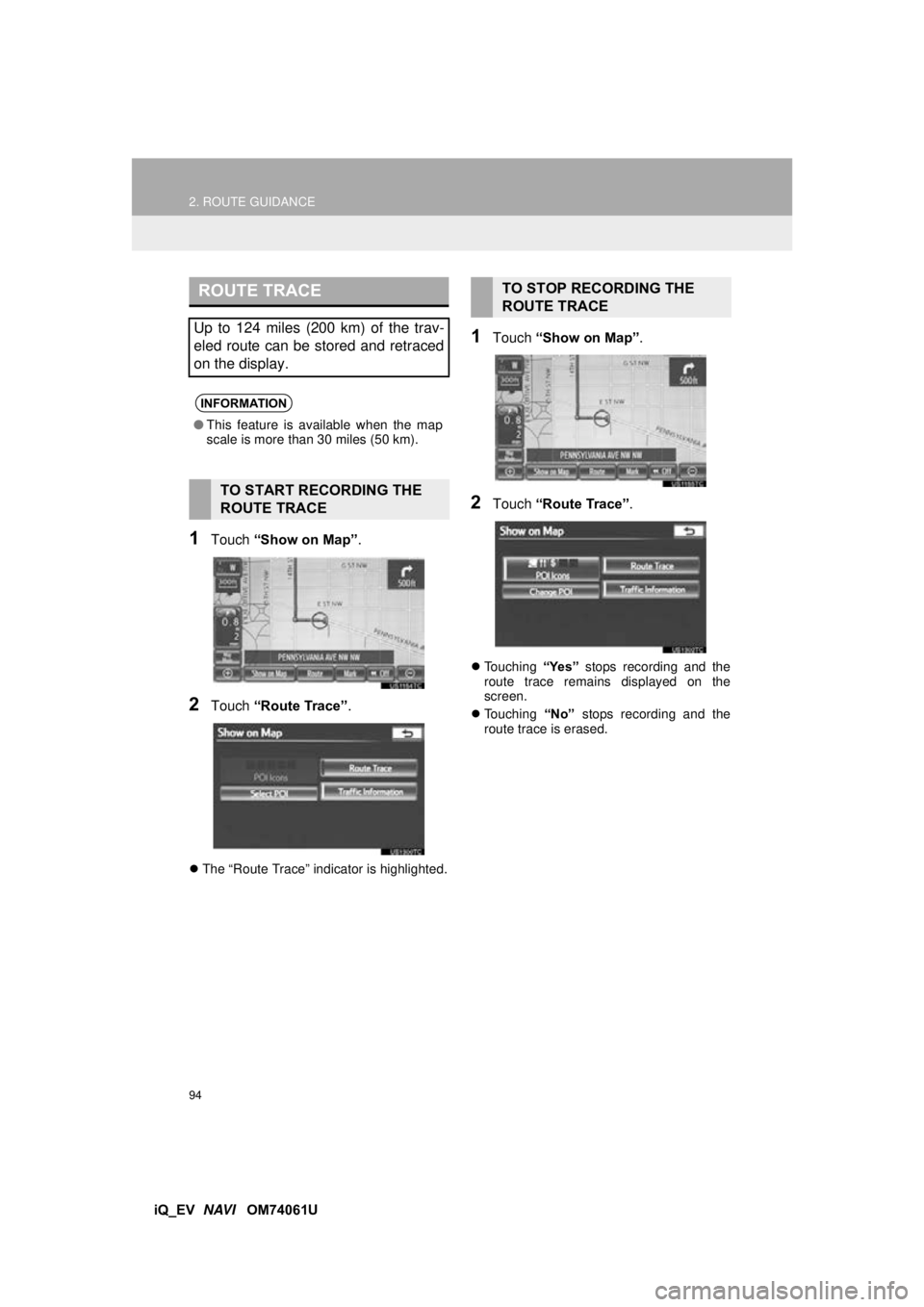
1Touch “Show on Map” .
2Touch “Route Trace” .
The “Route Trace” indicator is highlighted.
1Touch “Show on Map” .
2Touch “Route Trace” .
Touching “Yes” stops recording and the
route trace remains displayed on the
screen.
Touching “No” stops recording and the
route trace is erased.
ROUTE TRACE
Up to 124 miles (200 km) of the trav-
eled route can be stored and retraced
on the display.
INFORMATION
● This feature is available when the map
scale is more than 30 miles (50 km).
TO START RECORDING THE
ROUTE TRACE
TO STOP RECORDING THE
ROUTE TRACE
Page 197 of 321
197
1. AUDIO/VIDEO SYSTEM OPERATION
5
AUDIO/VIDEO SYSTEM
iQ_EV NAVI OM74061U
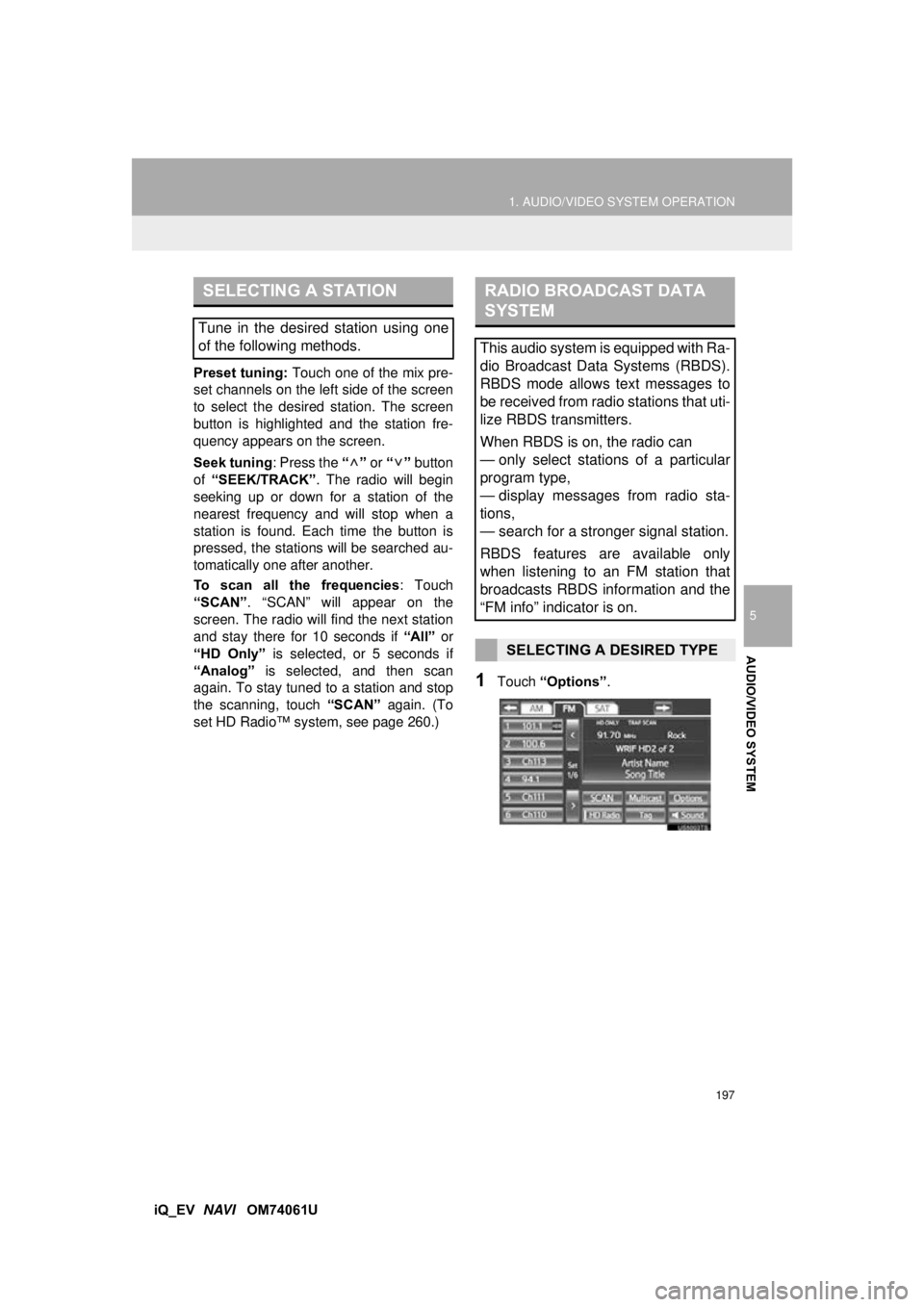
Preset tuning:
Touch one of the mix pre-
set channels on the left side of the screen
to select the desired station. The screen
button is highlighted and the station fre-
quency appears on the screen.
Seek tuning : Press the “” or “” button
of “SEEK/TRACK” . The radio will begin
seeking up or down for a station of the
nearest frequency and will stop when a
station is found. Ea ch time the button is
pressed, the stations will be searched au-
tomatically one after another.
To scan all the frequencies : Touch
“SCAN” . “SCAN” will appear on the
screen. The radio will find the next station
and stay there for 10 seconds if “All” or
“HD Only” is selected, or 5 seconds if
“Analog” is selected, and then scan
again. To stay tuned to a station and stop
the scanning, touch “SCAN” again. (To
set HD Radio™ system, see page 260.)
1Touch “Options”.
SELECTING A STATION
Tune in the desired station using one
of the following methods.
RADIO BROADCAST DATA
SYSTEM
This audio system is equipped with Ra-
dio Broadcast Data Systems (RBDS).
RBDS mode allows text messages to
be received from radio stations that uti-
lize RBDS transmitters.
When RBDS is on, the radio can
— only select stations of a particular
program type,
— display messages from radio sta-
tions,
— search for a stronger signal station.
RBDS features are available only
when listening to an FM station that
broadcasts RBDS information and the
“FM info” indicator is on.
SELECTING A DESIRED TYPE
Page 205 of 321
205
1. AUDIO/VIDEO SYSTEM OPERATION
5
AUDIO/VIDEO SYSTEM
iQ_EV NAVI OM74061U
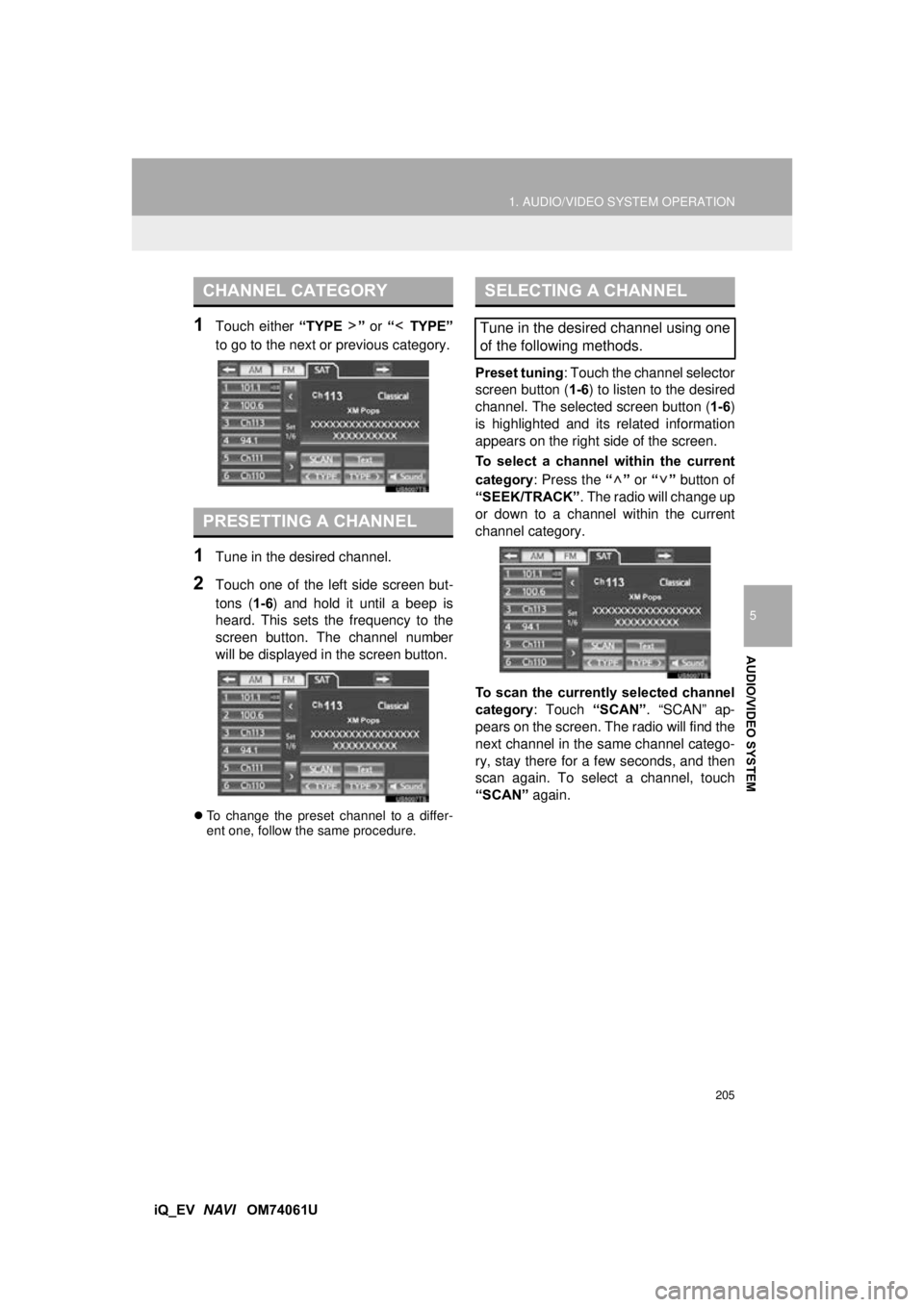
1Touch either “TYPE ” or “ TYPE”
to go to the next or previous category.
1Tune in the desired channel.
2Touch one of the left side screen but-
tons ( 1-6) and hold it until a beep is
heard. This sets the frequency to the
screen button. The channel number
will be displayed in the screen button.
To change the preset channel to a differ-
ent one, follow the same procedure.
Preset tuning : Touch the channel selector
screen button ( 1-6) to listen to the desired
channel. The selected screen button ( 1-6)
is highlighted and its related information
appears on the right side of the screen.
To select a channel within the current
category : Press the “” or “” button of
“SEEK/TRACK” . The radio will change up
or down to a channel within the current
channel category.
To scan the currently selected channel
category : Touch “SCAN”. “SCAN” ap-
pears on the screen. The radio will find the
next channel in the same channel catego-
ry, stay there for a few seconds, and then
scan again. To select a channel, touch
“SCAN” again.
CHANNEL CATEGORY
PRESETTING A CHANNEL
SELECTING A CHANNEL
Tune in the desired channel using one
of the following methods.
Page 251 of 321
251
1. AUDIO/VIDEO SYSTEM OPERATION
5
AUDIO/VIDEO SYSTEM
iQ_EV NAVI OM74061U
Fading: AM broadcasts are reflected by
the upper atmosphere — especially at
night. These reflected signals can interfere
with those received directly from the radio
station, causing the radio station to sound
alternately strong and weak.
Station interference: When a reflected sig-
nal and a signal received directly from a ra-
dio station are very nearly the same
frequency, they can interfere with each
other, making it difficult to hear the broad-
cast.
Static: AM is easily
affected by external
sources of electrical noise, such as high
tension power lines, lightening or electrical
motors. This results in static.
Cargo loaded on the roof luggage carrier,
especially metal objects, may adversely
affect the reception of XM Satellite Radio.
Alternation or modifications carried out
without appropriate authorization may
invalidate the user’s right to operate the
equipment.
“Made for iPod” and “Made for iPhone”
mean that an electronic accessory has
been designed to connect specifically to
iPod, or iPhone, respectively, and has
been certified by the developer to meet
Apple performance standards.
Apple is not responsible for the operation
of this device or its compliance with safety
and regulatory standards. Please note
that the use of this accessory with iPod or
iPhone may affect wireless performance.
iPhone, iPod, iPod classic, iPod nano and
iPod touch are trademarks of Apple Inc.,
registered in the U.S. and other countries.
AM
XM
iPod
Page 254 of 321
254
1. AUDIO/VIDEO SYSTEM OPERATION
iQ_EV NAVI OM74061U
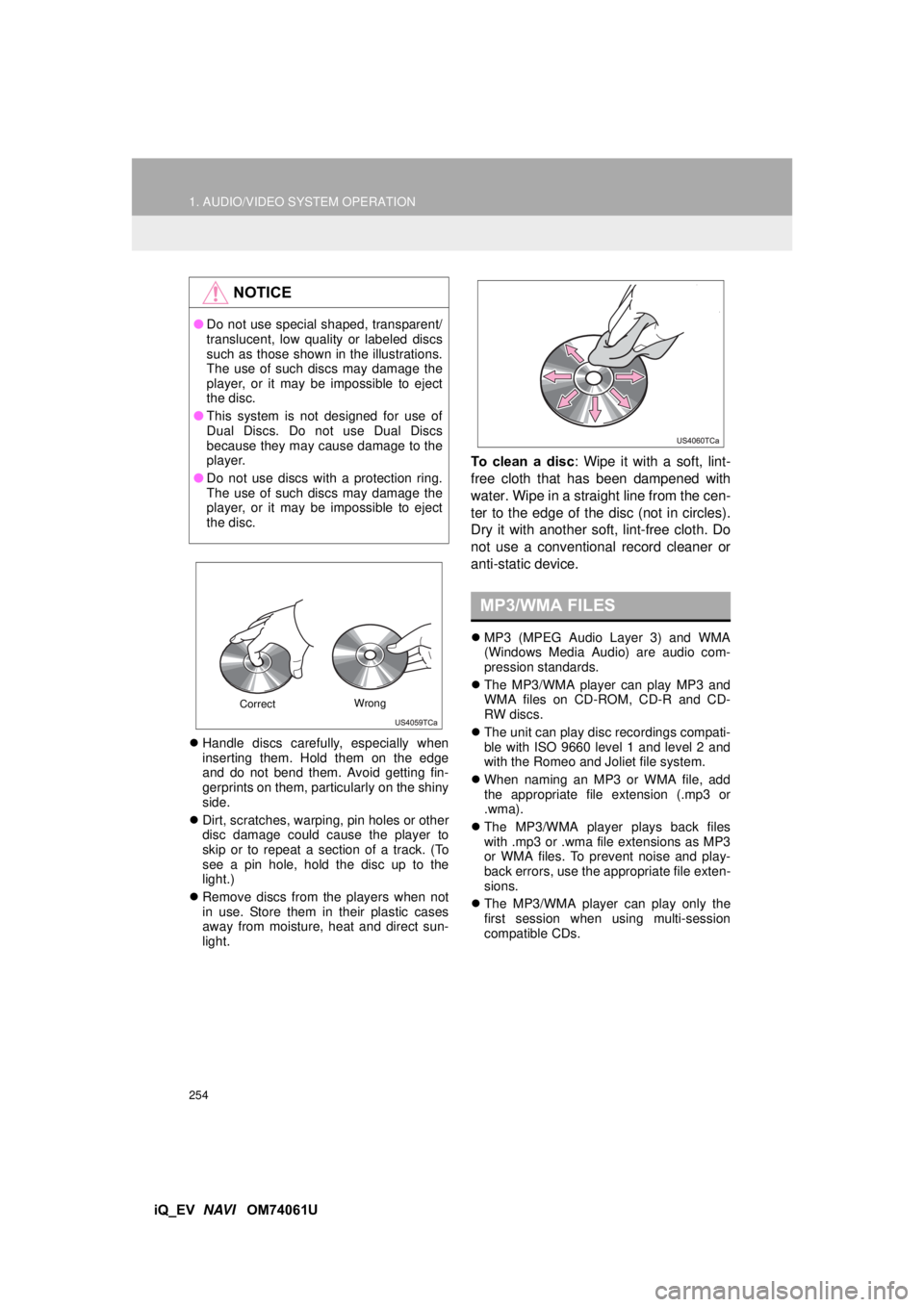
Handle discs carefully, especially when
inserting them. Hold them on the edge
and do not bend them. Avoid getting fin-
gerprints on them, particularly on the shiny
side.
Dirt, scratches, warping, pin holes or other
disc damage could cause the player to
skip or to repeat a section of a track. (To
see a pin hole, hold the disc up to the
light.)
Remove discs from the players when not
in use. Store them in their plastic cases
away from moisture, heat and direct sun-
light.
To clean a disc: Wipe it with a soft, lint-
free cloth that ha s been dampened with
water. Wipe in a straight line from the cen-
ter to the edge of the disc (not in circles).
Dry it with another soft, lint-free cloth. Do
not use a conventional record cleaner or
anti-static device.
MP3 (MPEG Audio Layer 3) and WMA
(Windows Media Audio) are audio com-
pression standards.
The MP3/WMA player can play MP3 and
WMA files on CD-ROM, CD-R and CD-
RW discs.
The unit can play disc recordings compati-
ble with ISO 9660 level 1 and level 2 and
with the Romeo and Joliet file system.
When naming an MP3 or WMA file, add
the appropriate file extension (.mp3 or
.wma).
The MP3/WMA player plays back files
with .mp3 or .wma file extensions as MP3
or WMA files. To prevent noise and play-
back errors, use the appropriate file exten-
sions.
The MP3/WMA player can play only the
first session when using multi-session
compatible CDs.
NOTICE
●Do not use special shaped, transparent/
translucent, low quality or labeled discs
such as those shown in the illustrations.
The use of such discs may damage the
player, or it may be impossible to eject
the disc.
● This system is not designed for use of
Dual Discs. Do not use Dual Discs
because they may cause damage to the
player.
● Do not use discs with a protection ring.
The use of such discs may damage the
player, or it may be impossible to eject
the disc.
Correct Wrong
MP3/WMA FILES