steering TOYOTA iQ EV 2013 Accessories, Audio & Navigation (in English)
[x] Cancel search | Manufacturer: TOYOTA, Model Year: 2013, Model line: iQ EV, Model: TOYOTA iQ EV 2013Pages: 321, PDF Size: 6.88 MB
Page 7 of 321

7
1
2
3
4
5
6
iQ_EV NAVI OM74061U
1. PHONE OPERATION .................... 130
QUICK REFERENCE .......................... 130
PHONE (HANDS-FREE SYSTEM
FOR CELLULAR PHONE) ................ 132
REGISTER A Bluetooth
® PHONE ....... 136
CALL ON THE Bluetooth® PHONE ..... 140
RECEIVE ON THE Bluetooth®
PHONE ............................................. 145
TALK ON THE Bluetooth
® PHONE ..... 146
Bluetooth® PHONE MESSAGE
FUNCTION........................................ 149
2. SETUP ........................................... 152
PHONE SETTINGS ............................. 152
Bluetooth® SETTINGS ........................ 174
1. AUDIO/VIDEO SYSTEM OPERATION ................................ 188
QUICK REFERENCE .......................... 188
SOME BASICS .................................... 190
RADIO OPERATION ........................... 196
HD Radio™ TECHNOLOGY
INFORMATION ................................. 199
RADIO OPERATION (XM Satellite Radio BROADCAST) ... 203
DVD PLAYER OPERATION................ 209
USB MEMORY OPERATION .............. 230
iPod OPERATION ............................... 235
Bluetooth
® AUDIO OPERATION ......... 239
AUDIO/VIDEO REMOTE CONTROLS (STEERING SWITCHES) ................. 248
AUDIO/VIDEO SYSTEM OPERATING HINTS ......................... 250
2. SETUP ........................................... 260
AUDIO SETTINGS .............................. 260
1. INFORMATION DISPLAY ............. 264
ENERGY MONITOR ............................ 264
MAP DATABASE VERSION AND COVERAGE AREA ........................... 266
RANGE MAP ....................................... 268
2. XM FUNCTION-O VERVIEW ......... 270
XM SERVICES .................................... 270
3. XM FUNCTION OPERATION ....... 271
XM Sports ............................................ 271
XM Stocks ............................................ 274
XM Fuel Prices..................................... 277
XM NavWeather™ ............................... 280
XM NavTraffic
®.................................... 283
4. SETUP ........................................... 286
XM SETTINGS..................................... 286
ALPHABETICAL INDEX .................... 288
4PHONE
5AUDIO/VIDEO SYSTEM
6INFORMATION
INDEX
Page 129 of 321
4
129
1
2
3
4
5
6
iQ_EV NAVI OM74061U
1. QUICK REFERENCE ................... 130
2. PHONE (HANDS-FREE SYSTEM
FOR CELLULAR PHONE) ........ 132
USING THE MICROPHONE ............... 133
USING THE
STEERING SWITCHES .................... 134
ABOUT THE PHONEBOOK IN THIS SYSTEM.............................. 134
WHEN SELLING OR DISPOSING OF THE VEHICLE........ 134
3. REGISTER A Bluetooth®
PHONE....................................... 136
CONNECTING
A Bluetooth® PHONE........................ 137
RECONNECTING THE Bluetooth
® PHONE ................... 139
4. CALL ON THE Bluetooth®
PHONE........................................140
BY DIAL ............................................... 140
BY PHONEBOOK................................ 140
BY SPEED DIAL.................................. 142
BY CALL HISTORY ............................. 142
CALLING USING AN SMS/MMS
MESSAGE ........................................ 143
BY POI CALL....................................... 144
5. RECEIVE ON THE Bluetooth®
PHONE....................................... 145 6. TALK ON THE Bluetooth
®
PHONE ...................................... 146
WHEN YOU SELECT “0-9”.................. 146
INCOMING CALL WAITING ................ 148
7. Bluetooth® PHONE MESSAGE
FUNCTION ...... ....................... ... 149
CHECKING MESSAGES ..................... 149
REPLYING (QUICK REPLY) ............... 150
NEW MESSAGE NOTIFICATION ....... 151
1. PHONE SETTINGS ..................... 152
PHONE SOUND SETTINGS ............... 152
PHONEBOOK ...................................... 154
MESSAGE SETTINGS ........................ 167
PHONE DISPLAY SETTINGS ............. 171
2. Bluetooth® SETTINGS ............... 174
REGISTERED DEVICES ..................... 174
SELECTING A Bluetooth® PHONE ..... 178
SELECTING PORTABLE PLAYER ..... 180
DETAILED Bluetooth
® SETTINGS ...... 181
*: Point of Interest
1PHONE OPERATION
2SETUP
PHONE
Page 132 of 321
132
1. PHONE OPERATION
iQ_EV NAVI OM74061U
2. PHONE (HANDS-FREE SYSTEM FOR CELLULAR PHONE)
The hands-free system enables calls
to be made and received without hav-
ing to take your hands off the steering
wheel.
This system supports Bluetooth
®.
Bluetooth
® is a wireless data system
that enables cellular phones to be used
without being connected by a cable or
placed in a cradle.
The operating procedure of the phone
is explained here.
For registering and setting of the phone,
see “PHONE SETTINGS” on page 152
and “Bluetooth
® SETTINGS” on page
174.
CAUTION
● While driving, do not use a cellular
phone or connect the Bluetooth® phone.
● Your audio unit is fitted with Bluetooth®
antennas. People with implanted pace-
makers or cardiac defibrillators should
maintain a reasonable distance between
themselves and the Bluetooth
® anten-
nas. The radio waves may affect the
operation of such devices.
● Before using Bluetooth
® devices, users
of any electrical medical device other
than implanted pacemakers and
implanted cardiac defibrillators should
consult the manufacturer of the device
for information about its operation under
the influence of radio waves. Radio
waves could have unexpected effects on
the operation of such medical devices.
NOTICE
● Do not leave your cellular phone in the
vehicle. The temperature inside may rise
to a level that could damage the phone.
INFORMATION
●If your cellular phone does not support
Bluetooth®, this system cannot function.
● In the following conditions, the system
may not function:
• The cellular phone is turned off.
• The current position is outside the
communication area.
• The cellular phone is not connected.
• The cellular phone has a low battery.
● When using Bluetooth
® audio and
hands-free at the same time, the follow-
ing problems may occur:
• The Bluetooth
® connection may be
cut.
• Noise may be heard on the Bluetooth
®
audio playback.
● This system supports the following ser-
vices:
•Bluetooth
® Specification
Ver.1.1 or higher
(Recommended: Ver.2.1 + EDR or
higher)
● Profiles
HFP (Hands Free Profile)
Ver.1.0 or higher
(Recommended: Ver.1.5 or higher)
OPP (Object Push Profile)
Ver.1.1 or higher
PBAP (Phone Book Access Profile)
Ver.1.0 or higher
MAP (Message Access Profile)
Ver.1.0 or higher
Page 134 of 321
134
1. PHONE OPERATION
iQ_EV NAVI OM74061U
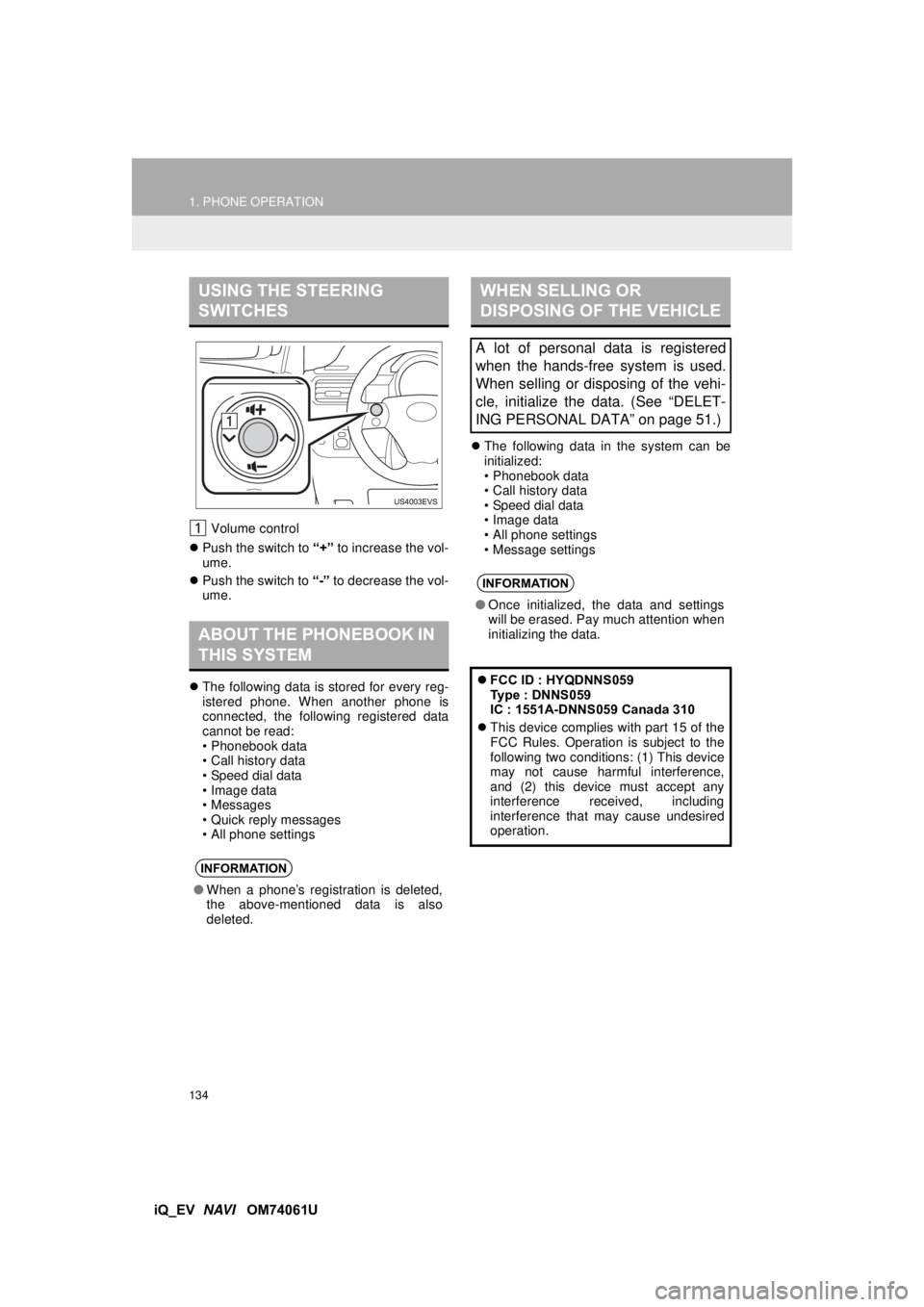
Volume control
Push the switch to “+” to increase the vol-
ume.
Push the switch to “-” to decrease the vol-
ume.
The following data is stored for every reg-
istered phone. When another phone is
connected, the following registered data
cannot be read:
• Phonebook data
• Call history data
• Speed dial data
• Image data
• Messages
• Quick reply messages
• All phone settings
The following data in the system can be
initialized:
• Phonebook data
• Call history data
• Speed dial data
• Image data
• All phone settings
• Message settings
USING THE STEERING
SWITCHES
ABOUT THE PHONEBOOK IN
THIS SYSTEM
INFORMATION
●When a phone’s registration is deleted,
the above-mentioned data is also
deleted.
WHEN SELLING OR
DISPOSING OF THE VEHICLE
A lot of personal data is registered
when the hands-free system is used.
When selling or disposing of the vehi-
cle, initialize the data. (See “DELET-
ING PERSONAL DATA” on page 51.)
INFORMATION
●Once initialized, the data and settings
will be erased. Pay much attention when
initializing the data.
FCC ID : HYQDNNS059
Type : DNNS059
IC : 1551A-DNNS059 Canada 310
This device complies with part 15 of the
FCC Rules. Operation is subject to the
following two conditions: (1) This device
may not cause harmful interference,
and (2) this device must accept any
interference received, including
interference that may cause undesired
operation.
Page 145 of 321
145
1. PHONE OPERATION
4
PHONE
iQ_EV NAVI OM74061U
5. RECEIVE ON THE Bluetooth® PHONE
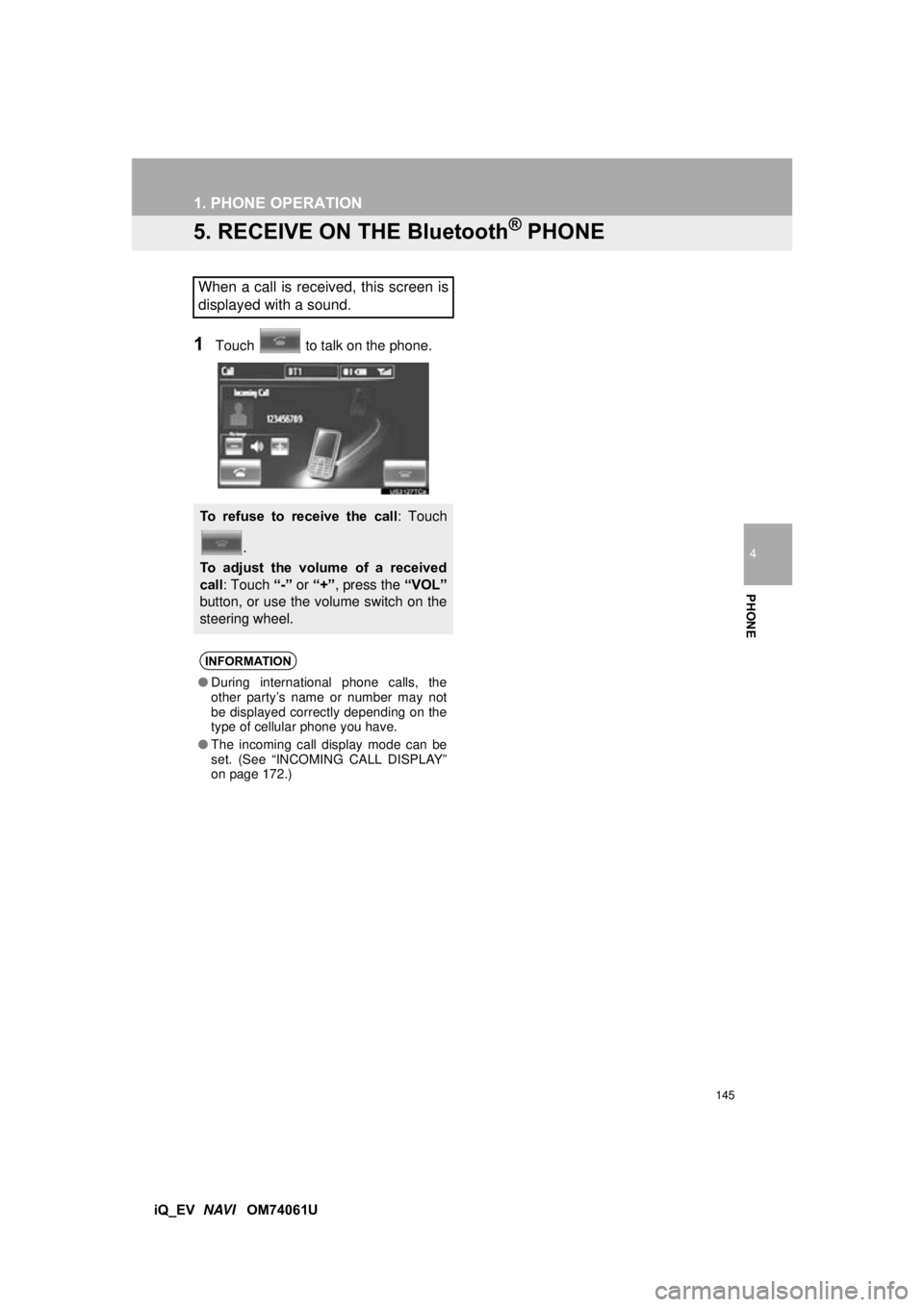
1Touch to talk on the phone.
When a call is received, this screen is
displayed with a sound.
To refuse to receive the call : Touch
.
To adjust the volume of a received
call : Touch “-” or “+”, press the “VOL”
button, or use the vo lume switch on the
steering wheel.
INFORMATION
● During international phone calls, the
other party’s name or number may not
be displayed correctly depending on the
type of cellular phone you have.
● The incoming call display mode can be
set. (See “INCOMING CALL DISPLAY”
on page 172.)
Page 146 of 321
146
1. PHONE OPERATION
iQ_EV NAVI OM74061U
6. TALK ON THE Bluetooth® PHONE
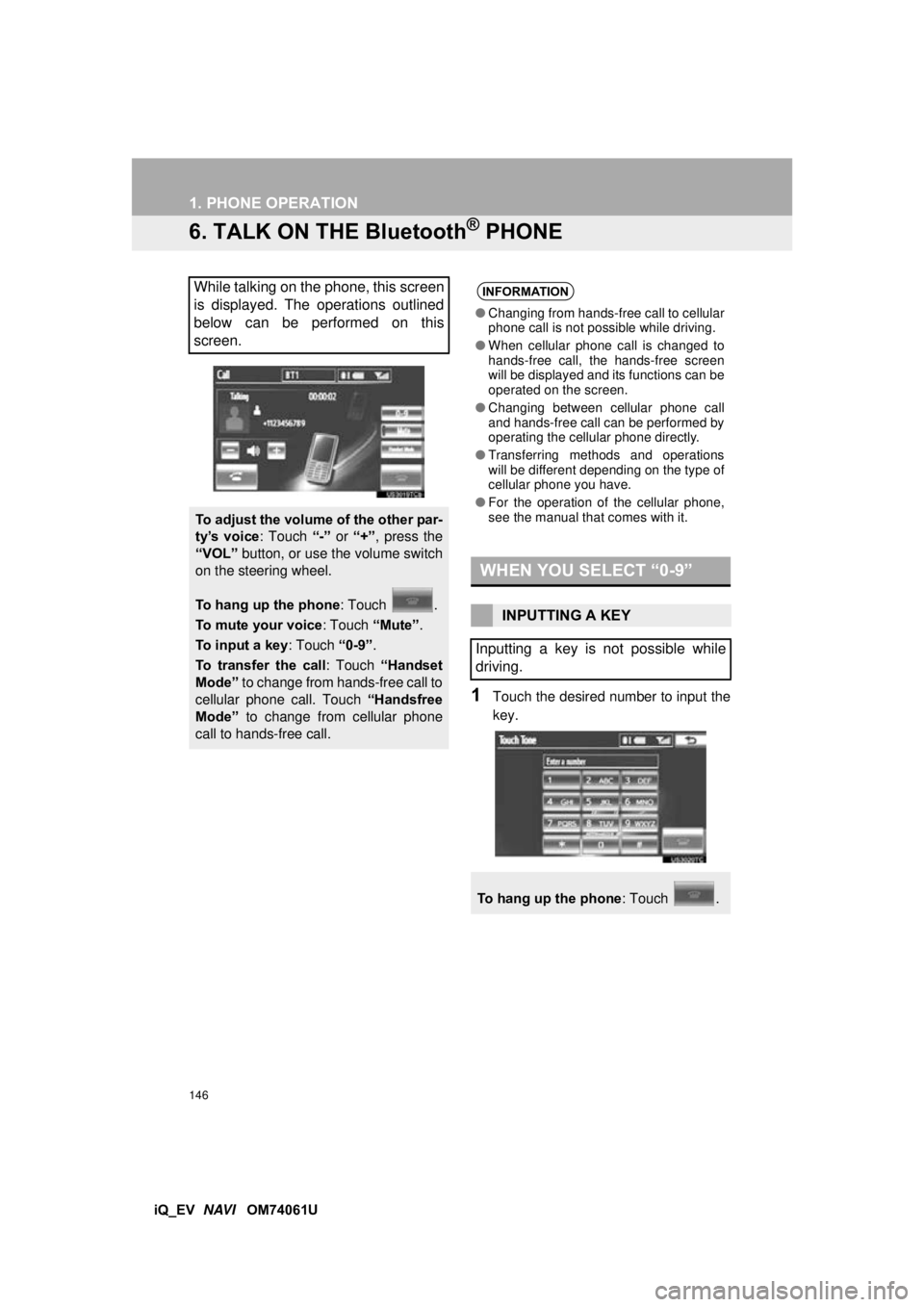
1Touch the desired number to input the
key.
While talking on the phone, this screen
is displayed. The operations outlined
below can be performed on this
screen.
To adjust the volume of the other par-
ty’s voice : Touch “-” or “+”, press the
“VOL” button, or use the volume switch
on the steering wheel.
To hang up the phone : Touch .
To mute your voice : Touch “Mute”.
To input a key : Touch “0-9”.
To transfer the call : Touch “Handset
Mode” to change from hands-free call to
cellular phone call. Touch “Handsfree
Mode” to change from cellular phone
call to hands-free call.
INFORMATION
● Changing from hands-free call to cellular
phone call is not possible while driving.
● When cellular phone call is changed to
hands-free call, the hands-free screen
will be displayed and its functions can be
operated on the screen.
● Changing between cellular phone call
and hands-free call can be performed by
operating the cellular phone directly.
● Transferring methods and operations
will be different depending on the type of
cellular phone you have.
● For the operation of the cellular phone,
see the manual that comes with it.
WHEN YOU SELECT “0-9”
INPUTTING A KEY
Inputting a key is not possible while
driving.
To hang up the phone : Touch .
Page 149 of 321
149
1. PHONE OPERATION
4
PHONE
iQ_EV NAVI OM74061U
7. Bluetooth® PHONE MESSAGE FUNCTION
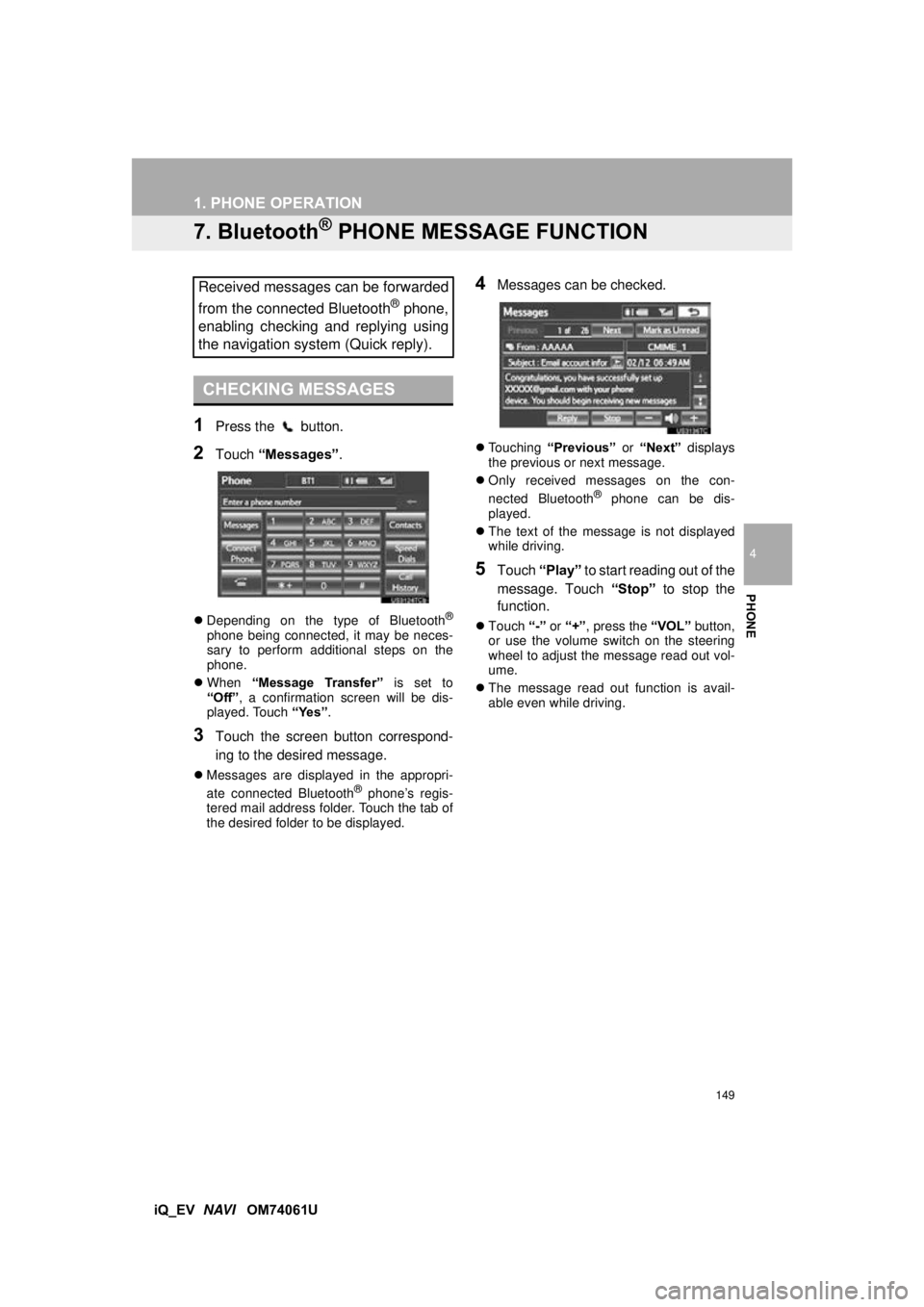
1Press the button.
2Touch “Messages” .
Depending on the type of Bluetooth®
phone being connected, it may be neces-
sary to perform additional steps on the
phone.
When “Message Transfer” is set to
“Off” , a confirmation screen will be dis-
played. Touch “Yes”.
3Touch the screen button correspond-
ing to the desired message.
Messages are displayed in the appropri-
ate connected Bluetooth® phone’s regis-
tered mail address folder. Touch the tab of
the desired folder to be displayed.
4Messages can be checked.
Touching “Previous” or “Next” displays
the previous or next message.
Only received messages on the con-
nected Bluetooth
® phone can be dis-
played.
The text of the message is not displayed
while driving.
5Touch “Play” to start reading out of the
message. Touch “Stop” to stop the
function.
Touch “-” or “+” , press the “VOL” button,
or use the volume switch on the steering
wheel to adjust the message read out vol-
ume.
The message read out function is avail-
able even while driving.
Received messages can be forwarded
from the connected Bluetooth
® phone,
enabling checking and replying using
the navigation system (Quick reply).
CHECKING MESSAGES
Page 187 of 321
5
187
1
2
3
4
5
6
iQ_EV NAVI OM74061U
5. RADIO OPERATION (XM Satellite
Radio BROADCAST) ................ 203
HOW TO SUBSCRIBE TO AN XM
Satellite Radio ................................... 203
DISPLAYING THE RADIO ID .............. 204
LISTENING TO SATELLITE RADIO ... 204
CHANNEL CATEGORY ...................... 205
PRESETTING A CHANNEL ................ 205
SELECTING A CHANNEL................... 205
DISPLAYING THE TITLE AND NAME .................... 206
IF THE SATELLITE RADIO TUNER MALFUNCTIONS .............................. 207
6. DVD PLAYER OPERATION ........ 209
INSERTING A DISC ............................ 209
EJECTING A DISC .............................. 209
PLAYING A DISC ................................ 210
PLAYING AN AUDIO DISC ................. 211
PLAYING AN MP3/WMA DISC ........... 213
OPERATING A DVD DISC .................. 216
PLAYING A DVD DISC ....................... 217
DVD OPTIONS .................................... 218
IF THE PLAYER MALFUNCTIONS..... 227
DVD PLAYER AND DVD VIDEO DISC INFORMATION ................................. 227
7. USB MEMORY OPERATION ...... 230
CONNECTING A USB MEMORY ....... 230
PLAYING A USB MEMORY ................ 231
8. iPod OPERATION ....................... 235
CONNECTING iPod ............................. 235
PLAYING iPod ..................................... 236
9. Bluetooth® AUDIO
OPERATION ............................. 239
CONNECTING A Bluetooth® AUDIO
PLAYER ............................................ 242
PLAYING Bluetooth
® AUDIO ............... 243
10. AUDIO/VIDEO REMOTE CONTROLS (STEERING
SWITCHES)............................... 248
11. AUDIO/VIDEO SYSTEM OPERATING HINTS.................. 250
RADIO RECEPTION ............................ 250
iPod ...................................................... 251
USB MEMORY .................................... 252
CARING FOR YOUR DVD PLAYER
AND DISC ......................................... 252
MP3/WMA FILES ................................. 254
CD-R AND CD-RW DISCS .................. 256
TERMS ................................................ 256
1. AUDIO SETTINGS ...................... 260
HD Radio™ SYSTEM SETTINGS ....... 260
iPod SETTINGS ................................... 261
2SETUP
AUDIO/VIDEO SYSTEM
Page 248 of 321
248
1. AUDIO/VIDEO SYSTEM OPERATION
iQ_EV NAVI OM74061U
10. AUDIO/VIDEO REMOTE CONTROLS (STEERING SWITCHES)
Volume control
Push the switch to “+” to increase the vol-
ume. The volume continues to increase
while the switch is being pushed.
Push the switch to “-” to decrease the vol-
ume. The volume continues to decrease
while the switch is being pushed. “ ”
Radio
To select a preset station/channel :
Quickly push the switch to “” or “” and
release. Repeat this to select the next pre-
set station/channel.
To seek a station/channel : Push and hold
the “” or “” switch until a beep is
heard. Repeat this to find the next station/
channel. If the switch is pushed during
seek mode, seeking will be canceled.
To seek up or down the frequency, push
and hold the switch until a beep is heard.
When you release the switch, the radio
will begin seeking up or down for a station/
channel. Repeat to find the next station/
channel.
DVD player
Push the switch to “” or “” to skip up
or down to a different track, file or chapter
in either direction.
To select a desired track, file or chapter :
Quickly push the switch to “” or “” and
release until the desired track, file or chap-
ter to play is selected. To return to the be-
ginning of the current track, file or chapter,
quickly push the switch to “” once.
To select a desired folder : Push and hold
the “” or “” switch until a beep is heard
to change to the next or the previous fold-
er. Repeat it until the desired folder is se-
lected.
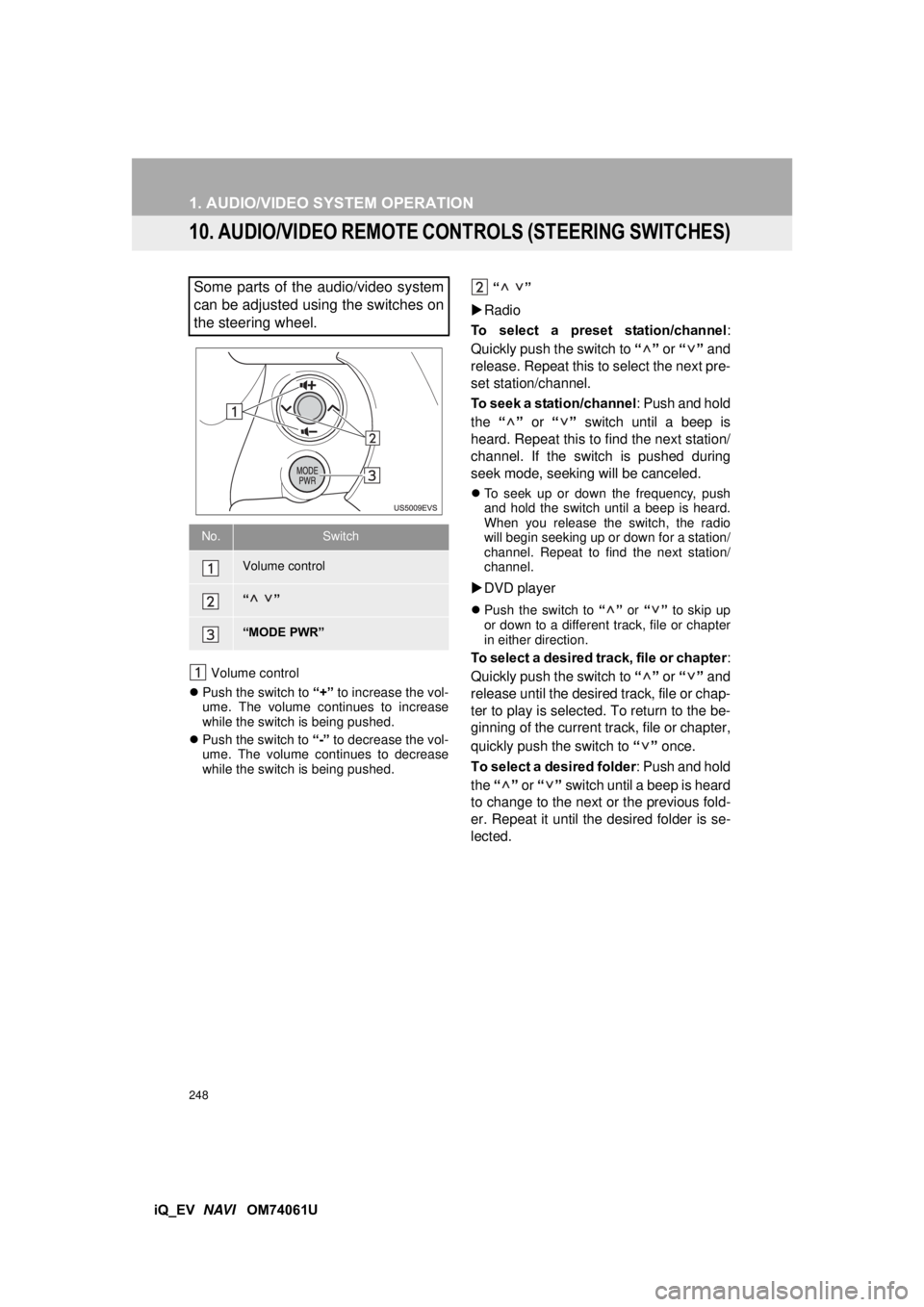
Some parts of the audio/video system
can be adjusted using the switches on
the steering wheel.
No.Switch
Volume control
“”
“MODE PWR”
Page 288 of 321

288
ALPHABETICAL INDEX
iQ_EV NAVI OM74061U
Symbols
button ................................................ 188
A
Adding destinations.................................. 84
Address book ......................................... 100
Address book entries ............................. 100
AM.......................................................... 196
Audio ...................................................... 188
Audio language code ............................. 224
Audio settings ........................................ 260
HD Radio™ system sett ings .............. 260
iPod settings ....................................... 261
Audio/video remote controls (Steering switches) ............................. 248
Audio/video system ......... ....................... 188
Audio/video system operating hints ....... 250 Caring for your DVD player and disc .......................................... 252
CD-R and CD-RW discs ..................... 256
iPod .................................................... 251
MP3/WMA files ................................... 254
Radio reception .................................. 250
Terms ................................................. 256
USB memory ...................................... 252
Automatic Sound Levelizer (ASL) .......... 192
AUX port ................................................ 194
B
Basic function ........................................... 26
Bluetooth®.............................................. 130
Bluetooth® audio .................................... 239
Connecting a Bluetooth® audio
player .............................................. 242
Playing Bluetooth
® audio.................... 243
Bluetooth® phone ................................... 136
Bluetooth® phone message function...... 149
Checking messages ........................... 149
New message notification................... 151
Replying (Quick reply) ........................ 150
Bluetooth
® settings ................................ 174
Detailed Bluetooth® settings............... 181
Registered devices ............................. 174
Selecting a Bluetooth
® phone ............ 178
Selecting portable player .................... 180
Brightness ........................................ 31, 220
C
Call on the Bluetooth® phone................. 140
By call history ..................................... 142
By dial ................................................. 140
By phonebook..................................... 140
By POI call .......................................... 144
By speed dial ...................................... 142
Calling using an SMS/MMS message ......................................... 143
CD .......................................................... 209
Color................................................. 47, 220
Contrast............................................ 31, 220
Current position calibration .................... 116
Current position display............................ 33
ALPHABETICAL INDEX