steering TOYOTA iQ EV 2013 (in English) Owner's Manual
[x] Cancel search | Manufacturer: TOYOTA, Model Year: 2013, Model line: iQ EV, Model: TOYOTA iQ EV 2013Pages: 444, PDF Size: 7.34 MB
Page 162 of 444
1625-1. Before driving
Vehicle load limits
◆Total load capacity (vehicle capacity weight): P. 3 9 6
Total load capacity means the combined weight of occupants, cargo
and luggage.
◆Seating capacity: 4 occupants (Front 2, Rear 2)
Seating capacity means the maxi mum number of occupants whose
estimated average weight is 150 lb. (68 kg) per person.
◆Towing capacity
Scion does not recommend towing a trailer with your vehicle.
◆Cargo capacity
Cargo capacity may increase or decrease depending on the weight
and the number of occupants.
■Total load capacity and seating capacity
These details are also described on the tire and loading information label.
( P. 292)
Vehicle load limits include total load capacity, seating capacity,
towing capacity and cargo capacity.
CAUTION
■Overloading the vehicle
Do not overload the vehicle.
It may not only cause damage to the tires, but also degrade steering
and braking ability, resu lting in an accident.
Page 168 of 444
1685-2. Driving procedures
■If the EV system does not start
●The charging cable may be attached to the vehicle. ( P. 188)
● The immobilizer system may not have been deactivated. ( P. 66)
Contact your Scion dealer.
● Check that the shift lever is securely set in P. The EV system may not start if
the shift lever is displaced out of P. “SHIFT TO P POSITION WHEN
STARTING” will be displayed on the multi-information display.
● The steering lock may not have been deactivated.
■ Steering lock
After turning the power switch off and opening and closing the doors, the
steering wheel will be locked due to the steering lock function. Operating the
power switch again automatically cancels the steering lock.
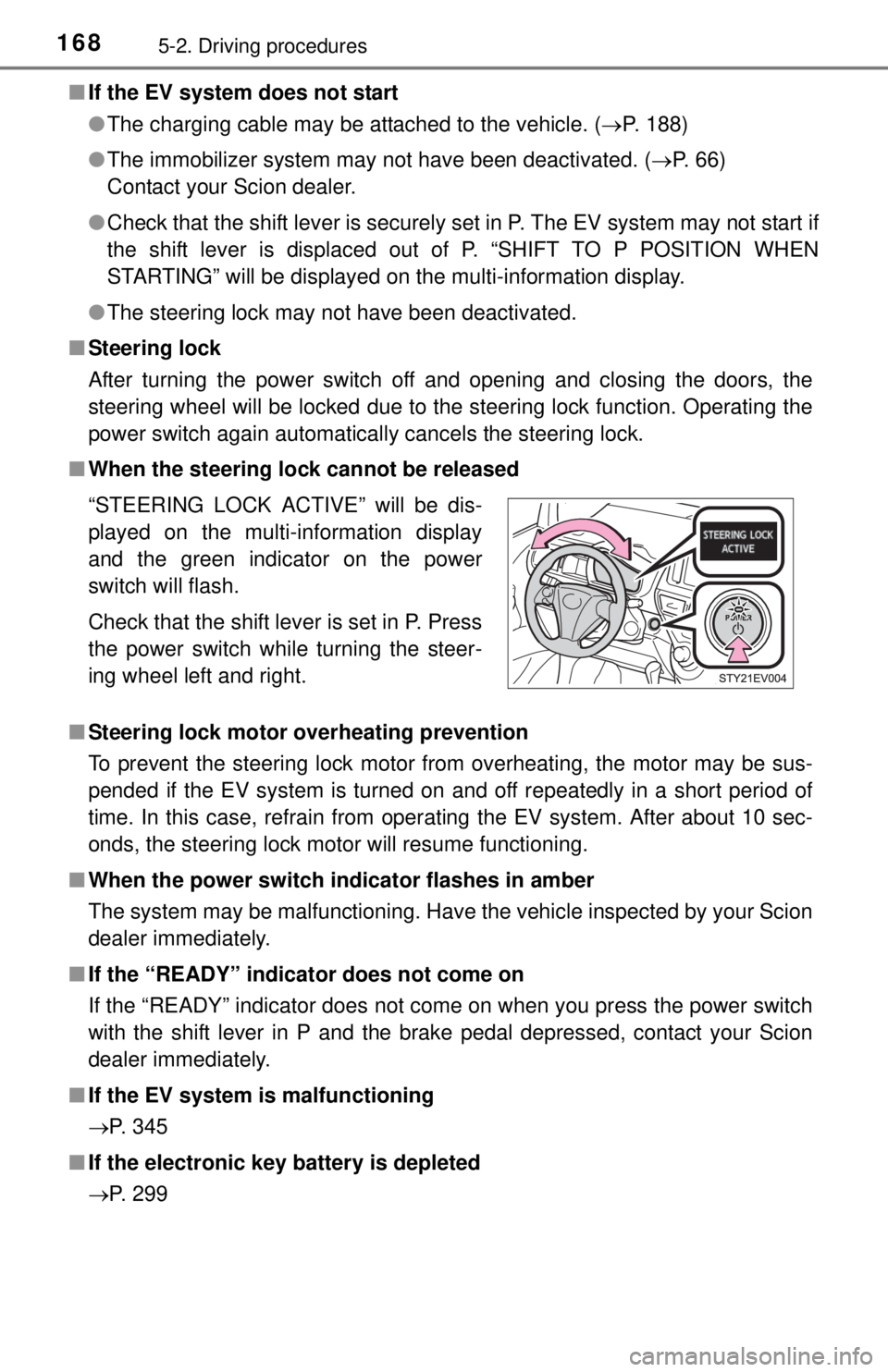
■ When the steering lock cannot be released
■ Steering lock motor overheating prevention
To prevent the steering lock motor from overheating, the motor may be sus-
pended if the EV system is turned on and off repeatedly in a short period of
time. In this case, refrain from operating the EV system. After about 10 sec-
onds, the steering lock motor will resume functioning.
■ When the power switch in dicator flashes in amber
The system may be malfunctioning. Have the vehicle inspected by your Scion
dealer immediately.
■ If the “READY” indicator does not come on
If the “READY” indicator does not come on when you press the power switch
with the shift lever in P and the brake pedal depressed, contact your Scion
dealer immediately.
■ If the EV system is malfunctioning
P. 345
■ If the electronic key battery is depleted
P. 299 “STEERING LOCK ACTIVE” will be dis-
played on the multi-information display
and the green indicator on the power
switch will flash.
Check that the shift lever is set in P. Press
the power switch while turning the steer-
ing wheel left and right.
Page 169 of 444

1695-2. Driving procedures
5
Driving
■Operation of the power switch
●When operating the power switch, one short, firm press is enough. If the
switch is pressed improperly, the EV system may not start or the power
switch mode may not change. It is not necessary to press and hold the
switch.
● If attempting to restart the EV system immediately after turning the power
switch off, the EV system may not start in some cases. After turning the
power switch off, please wait a few seconds before restarting the EV sys-
tem.
■ If the smart key system has been deactivated in a customized setting
P. 384
CAUTION
■When starting the EV system
Always start the EV system while sitting in the driver’s seat. Do not depress
the accelerator pedal while starting the EV system under any circum-
stances.
Doing so may cause an accident resulting in death or serious injury.
■ Caution while driving
If EV system failure occurs while the vehicle is moving, do not lock or open
the doors until the vehicle reaches a safe and complete stop. Activation of
the steering lock in this circumstance may lead to an accident, resulting in
death or serious injury.
■ Stopping the EV system in an emergency
If you want to stop the EV system in an emergency while driving the vehicle,
press and hold the power switch for more than 2 seconds, or press it briefly
3 times or more in succession. ( P. 329)
However, do not touch the power switch while driving except in an emer-
gency. Turning the EV system off while driving will not cause loss of steering
or braking control, but the power assist to these systems will be lost. This
will make it more difficult to steer and brake, so you should pull over and
stop the vehicle as soon as it is safe to do so.
Page 175 of 444
1755-2. Driving procedures
5
Driving
Hor n
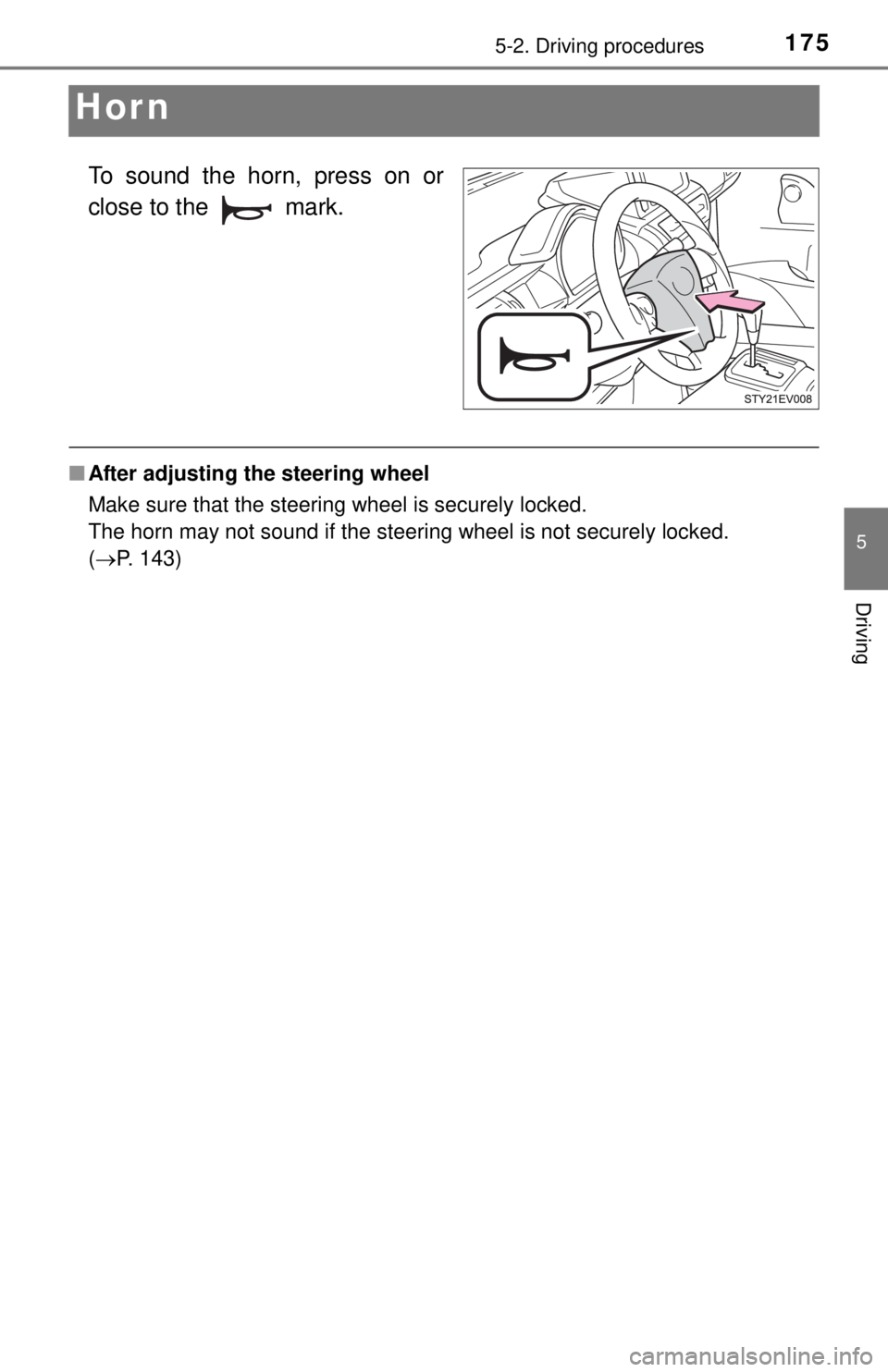
To sound the horn, press on or
close to the mark.
■After adjusting the steering wheel
Make sure that the steering wheel is securely locked.
The horn may not sound if the steering wheel is not securely locked.
(P. 143)
Page 210 of 444
2105-5. Using the driving support systems
Driving assist systems
◆ABS (Anti-lock Brake System)
Helps to prevent wheel lock when the brakes are applied suddenly,
or if the brakes are applied while driving on a slippery road surface
◆Brake assist
Generates an increased level of braking force after the brake pedal
is depressed when the system detects a panic stop situation
◆VSC (Vehicle Stability Control)
Helps the driver to control skidding when swerving suddenly or
turning on slippery road surfaces
◆Enhanced VSC (Enhanced Ve hicle Stability Control)
Provides cooperative control of the ABS, TRAC, VSC and EPS.
Helps to maintain directional st ability when swerving on slippery
road surfaces by controllin g steering performance.
◆TRAC (Traction Control)
Helps to maintain drive power and prevent the drive wheels from
spinning when starting the vehicle or accelerating on slippery roads
◆Hill-start assist control
P. 2 1 3
◆EPS (Electric Power Steering)
Employs an electric motor to redu ce the amount of effort needed to
turn the steering wheel
To help enhance driving safety and performance, the following
systems operate automatically in response to various driving
situations. Be aware, however, that these systems are supple-
mentary and should not be relied upon too heavily when operat-
ing the vehicle.
Page 211 of 444
2115-5. Using the driving support systems
5
Driving
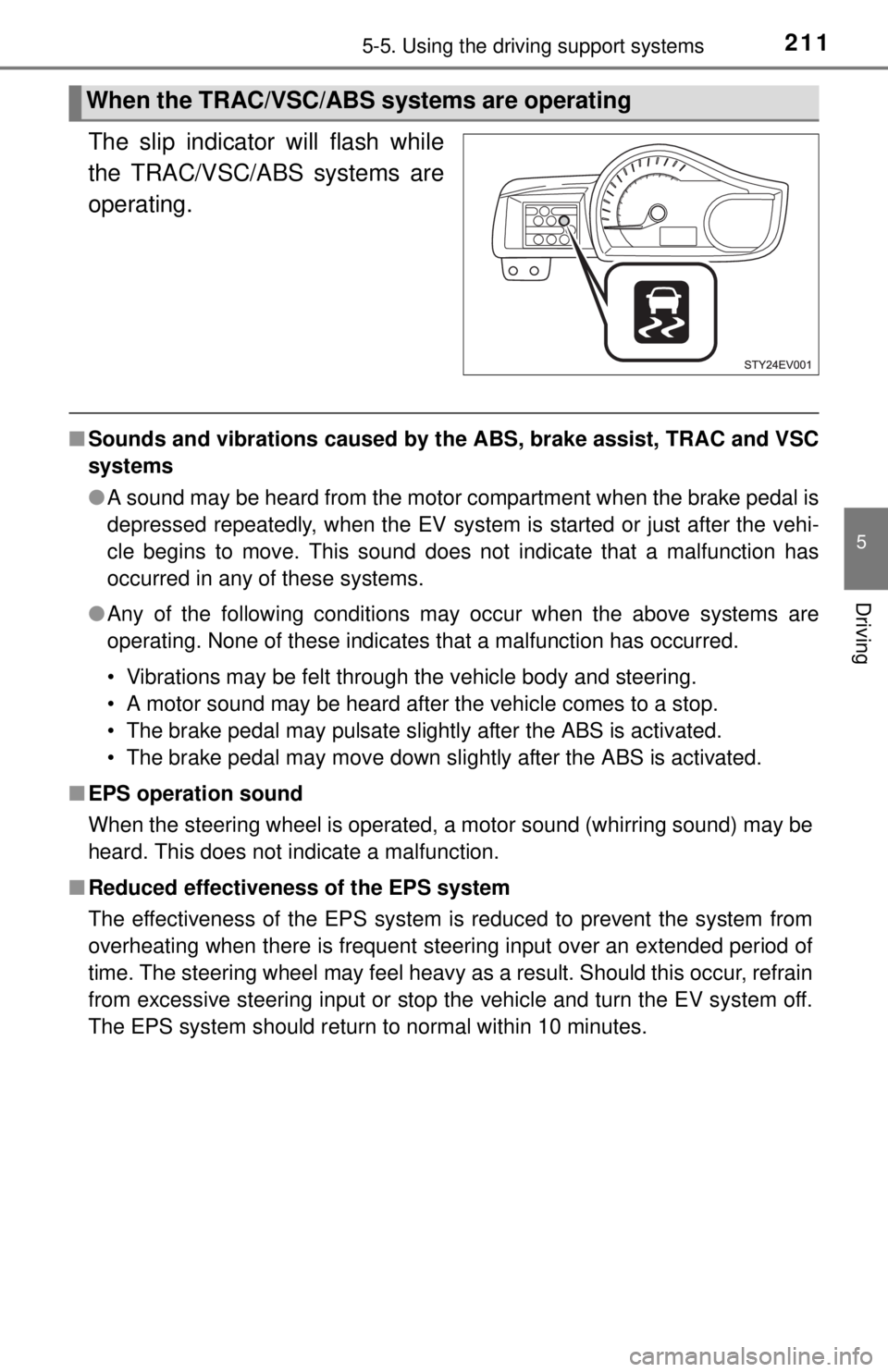
The slip indicator will flash while
the TRAC/VSC/ABS systems are
operating.
■Sounds and vibrations caused by the ABS, brake assist, TRAC and VSC
systems
●A sound may be heard from the motor compartment when the brake pedal is
depressed repeatedly, when the EV system is started or just after the vehi-
cle begins to move. This sound does not indicate that a malfunction has
occurred in any of these systems.
● Any of the following conditions may occur when the above systems are
operating. None of these indicates that a malfunction has occurred.
• Vibrations may be felt through the vehicle body and steering.
• A motor sound may be heard after the vehicle comes to a stop.
• The brake pedal may pulsate slightly after the ABS is activated.
• The brake pedal may move down slightly after the ABS is activated.
■ EPS operation sound
When the steering wheel is operated, a motor sound (whirring sound) may be
heard. This does not indicate a malfunction.
■ Reduced effectiveness of the EPS system
The effectiveness of the EPS system is reduced to prevent the system from
overheating when there is frequent steering input over an extended period of
time. The steering wheel may feel heavy as a result. Should this occur, refrain
from excessive steering input or stop the vehicle and turn the EV system off.
The EPS system should return to normal within 10 minutes.
When the TRAC/VSC/ABS systems are operating
Page 218 of 444
2185-6. Driving tips
CAUTION
■Driving with tire chains
Observe the following precautions to reduce the risk of accidents.
Failure to do so may result in the vehicle being unable to be driven safely,
and may cause death or serious injury.
● Do not drive in excess of the speed limit specified for the tire chains being
used, or 30 mph (50 km/h), whichever is lower.
● Avoid driving on bumpy road surfaces or over potholes.
● Avoid sudden acceleration, abrupt steering, sudden braking and shifting
operations that cause sudden regenerative braking.
● Slow down sufficiently before entering a curve to ensure that vehicle con-
trol is maintained.
■ When removing snow and ice from cooling fan
Please turn the power switch off. Also, if you are in the middle of charging
the vehicle, please stop charging. With the power switch in ACCESSORY or
ON mode, or charging, there is a possibility of the cooling fan suddenly
beginning to turn and the danger of hands, clothes, etc. being caught in the
fan, resulting in serious injury.
NOTICE
■Repairing or replacing snow tires
Request repairs or replacement of snow tires from Scion dealers or legiti-
mate tire retailers.
This is because the removal and attachment of snow tires affects the opera-
tion of the tire pressure warning valves and transmitters.
■ Fitting tire chains
The tire pressure warning valves and transmitters may not function correctly
when tire chains are fitted.
■ When the cooling fan freezes
Do not run the cooling for a long time in the frozen state.
The heating effect not only becomes weak, but there is a possibility of dam-
aging the cooling fan.
Page 258 of 444
2587-2. Maintenance
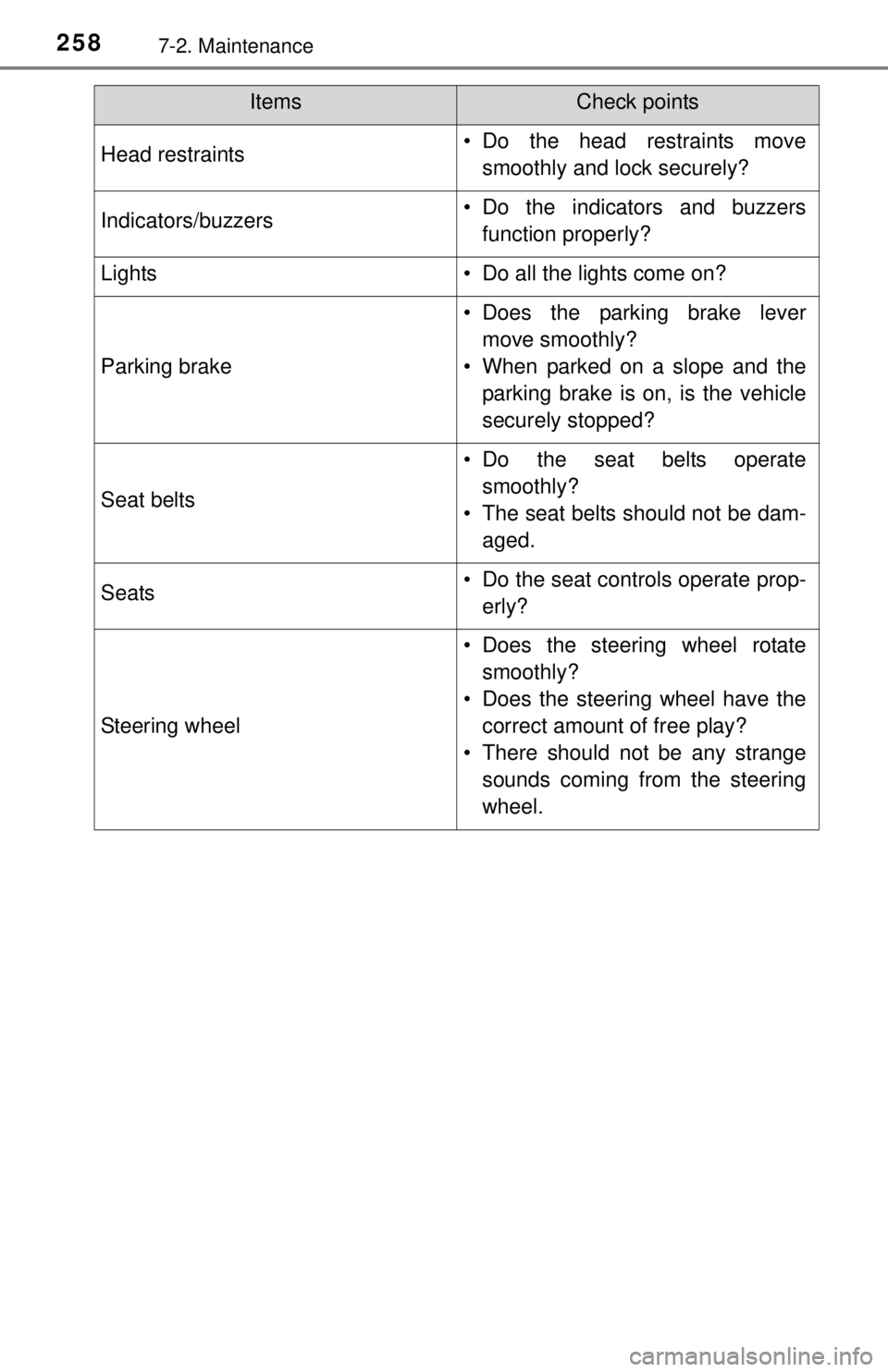
Head restraints• Do the head restraints movesmoothly and lock securely?
Indicators/buzzers• Do the indicators and buzzersfunction properly?
Lights• Do all the lights come on?
Parking brake
• Does the parking brake levermove smoothly?
• When parked on a slope and the parking brake is on, is the vehicle
securely stopped?
Seat belts
• Do the seat belts operatesmoothly?
• The seat belts should not be dam- aged.
Seats• Do the seat controls operate prop-erly?
Steering wheel
• Does the steering wheel rotatesmoothly?
• Does the steering wheel have the correct amount of free play?
• There should not be any strange sounds coming from the steering
wheel.
ItemsCheck points
Page 305 of 444
3057-3. Do-it-yourself maintenance
7
Maintenance and care
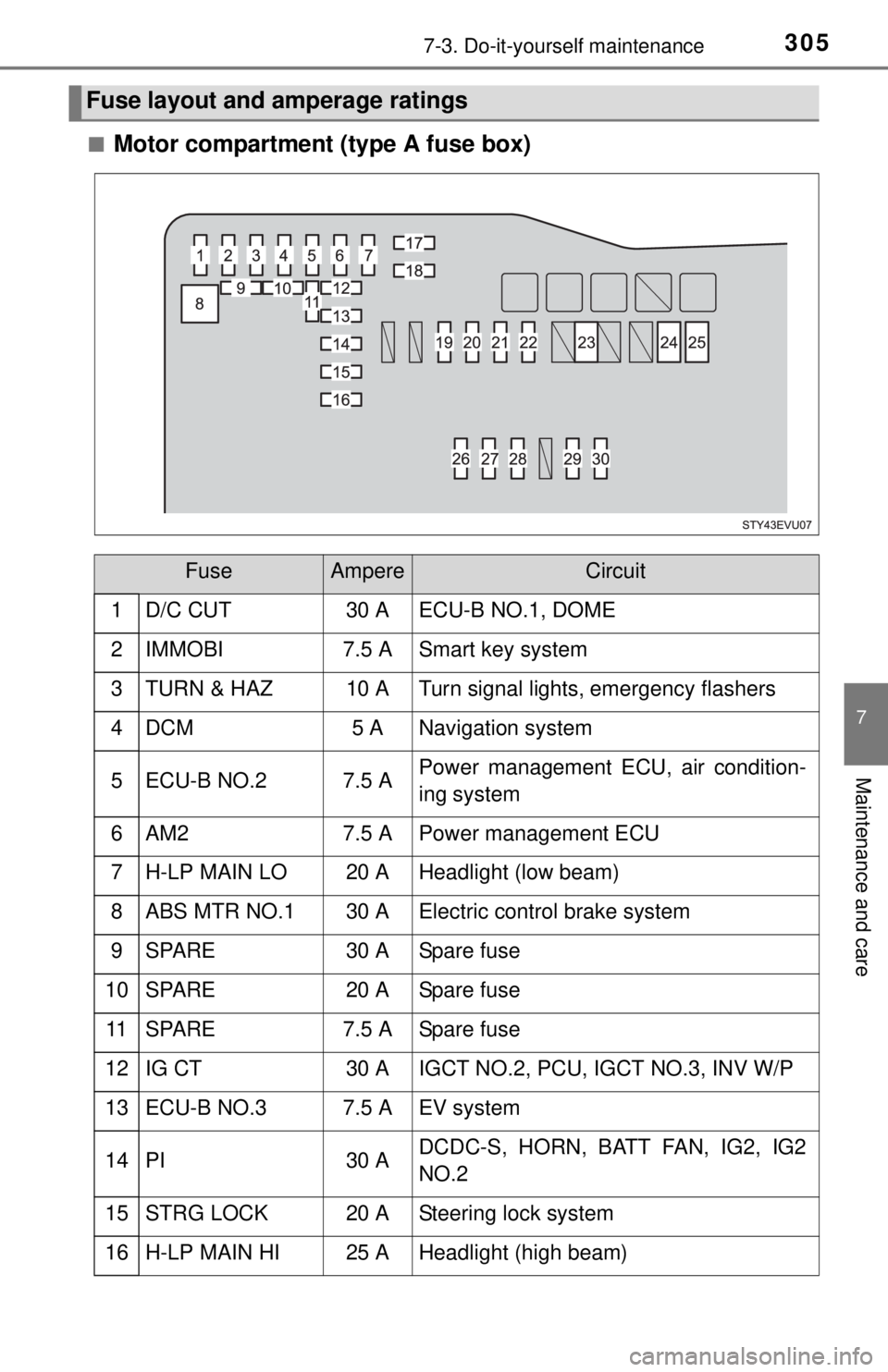
■Motor compartment (type A fuse box)
Fuse layout and amperage ratings
FuseAmpereCircuit
1 D/C CUT30 A ECU-B NO.1, DOME
2IMMOBI7.5 ASmart key system
3TURN & HAZ10 ATurn signal lights, emergency flashers
4DCM5 ANavigation system
5ECU-B NO.27.5 APower management ECU, air condition-
ing system
6AM27.5 APower management ECU
7H-LP MAIN LO20 AHeadlight (low beam)
8ABS MTR NO.130 AElectric control brake system
9SPARE30 ASpare fuse
10SPARE20 ASpare fuse
11SPARE7.5 ASpare fuse
12IG CT30 AIGCT NO.2, PCU, IGCT NO.3, INV W/P
13ECU-B NO.37.5 AEV system
14PI30 ADCDC-S, HORN, BATT FAN, IG2, IG2
NO.2
15STRG LOCK20 ASteering lock system
16H-LP MAIN HI25 AHeadlight (high beam)
Page 306 of 444
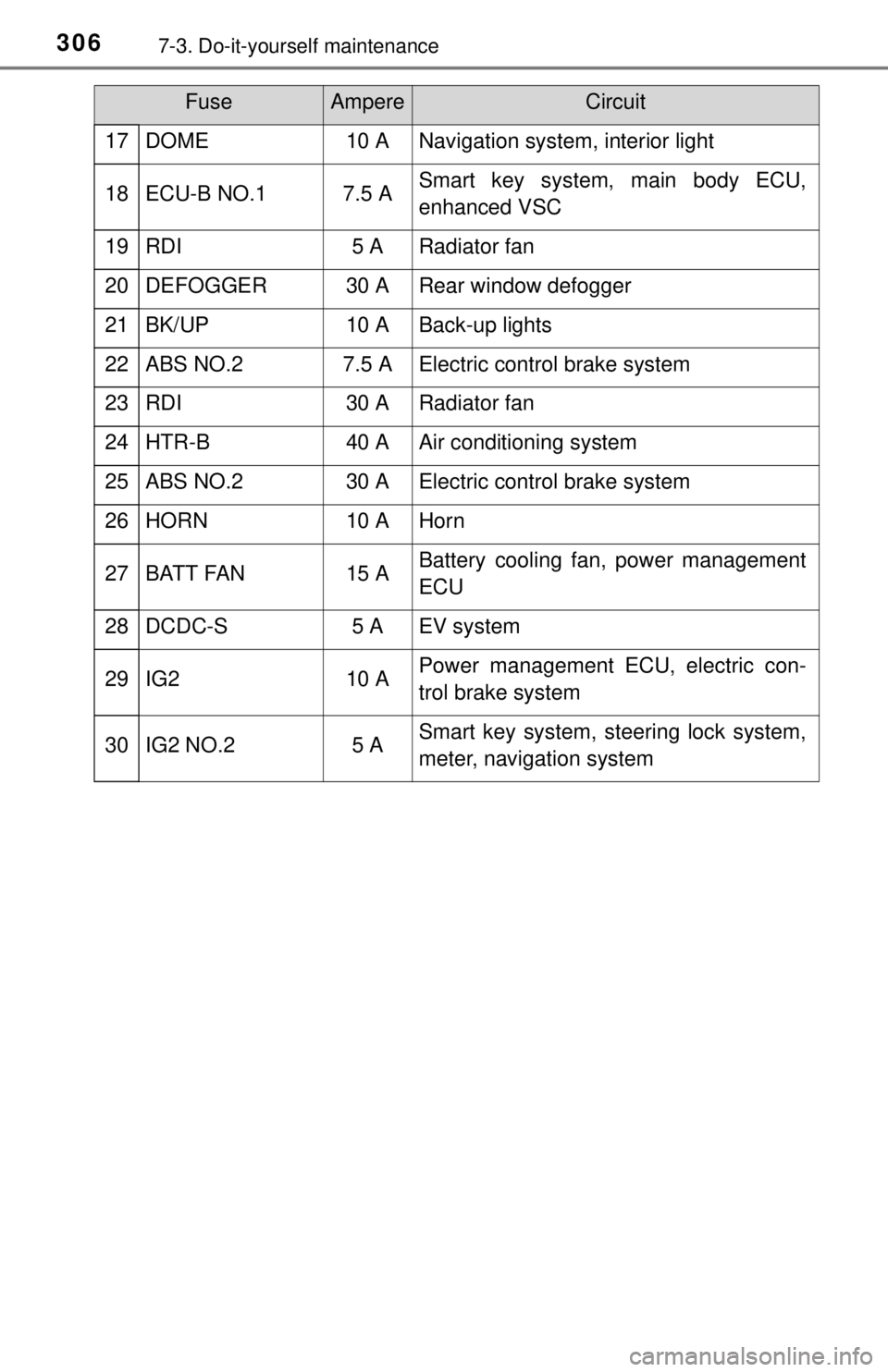
3067-3. Do-it-yourself maintenance
17DOME10 ANavigation system, interior light
18ECU-B NO.17.5 ASmart key system, main body ECU,
enhanced VSC
19RDI5 ARadiator fan
20DEFOGGER30 ARear window defogger
21BK/UP10 ABack-up lights
22ABS NO.27.5 AElectric control brake system
23RDI30 ARadiator fan
24HTR-B40 AAir conditioning system
25ABS NO.230 AElectric control brake system
26HORN10 AHorn
27BATT FAN15 ABattery cooling fan, power management
ECU
28DCDC-S5 AEV system
29IG210 APower management ECU, electric con-
trol brake system
30IG2 NO.25 ASmart key system, steering lock system,
meter, navigation system
FuseAmpereCircuit