stop start TOYOTA iQ EV 2013 Owners Manual (in English)
[x] Cancel search | Manufacturer: TOYOTA, Model Year: 2013, Model line: iQ EV, Model: TOYOTA iQ EV 2013Pages: 36, PDF Size: 2.62 MB
Page 12 of 36
121. EV system
By using the charging timer function, deterioration of the traction bat-
tery charge can be suppressed, and off-peak electricity
* can be used
effectively.
*: Since electricity rates change based on contractual coverage, please con-
firm with the contracted electric power company about off-peak rates.
●A charging time can be assigned by setting the charging start time
or finish time.
●Once the time has been set, timer charging can be scheduled with
the previously set time at the next time.
●The settings of the charging timer function schedule is automati-
cally turns off, when charge has started.
■Setting the charging timer function
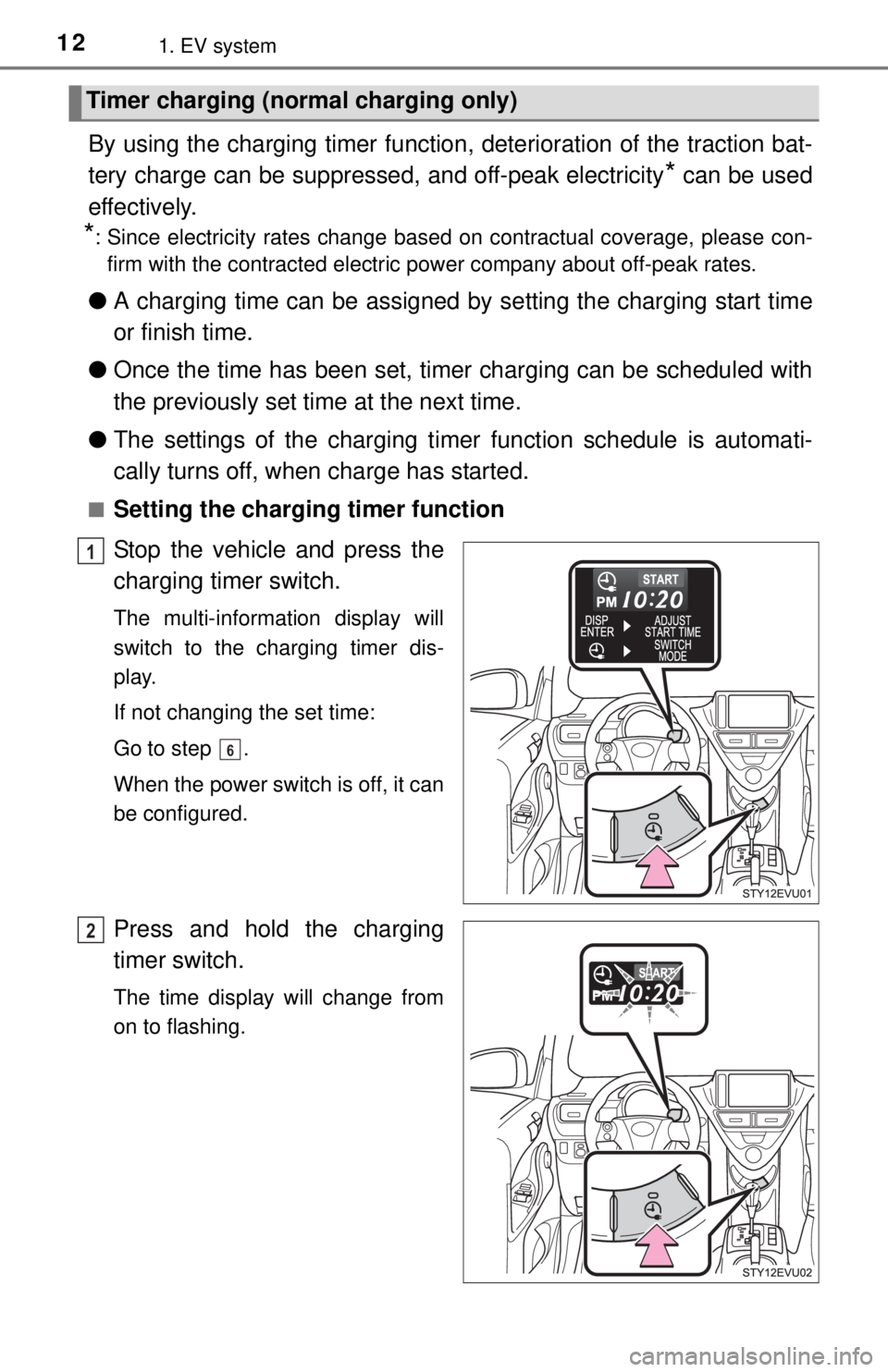
Stop the vehicle and press the
charging timer switch.
The multi-information display will
switch to the charging timer dis-
play.
If not changing the set time:
Go to step .
When the power switch is off, it can
be configured.
Press and hold the charging
timer switch.
The time display will change from
on to flashing.
Timer charging (normal charging only)
1
6
2
Page 28 of 36
284. What to do if...
If charging cannot be done
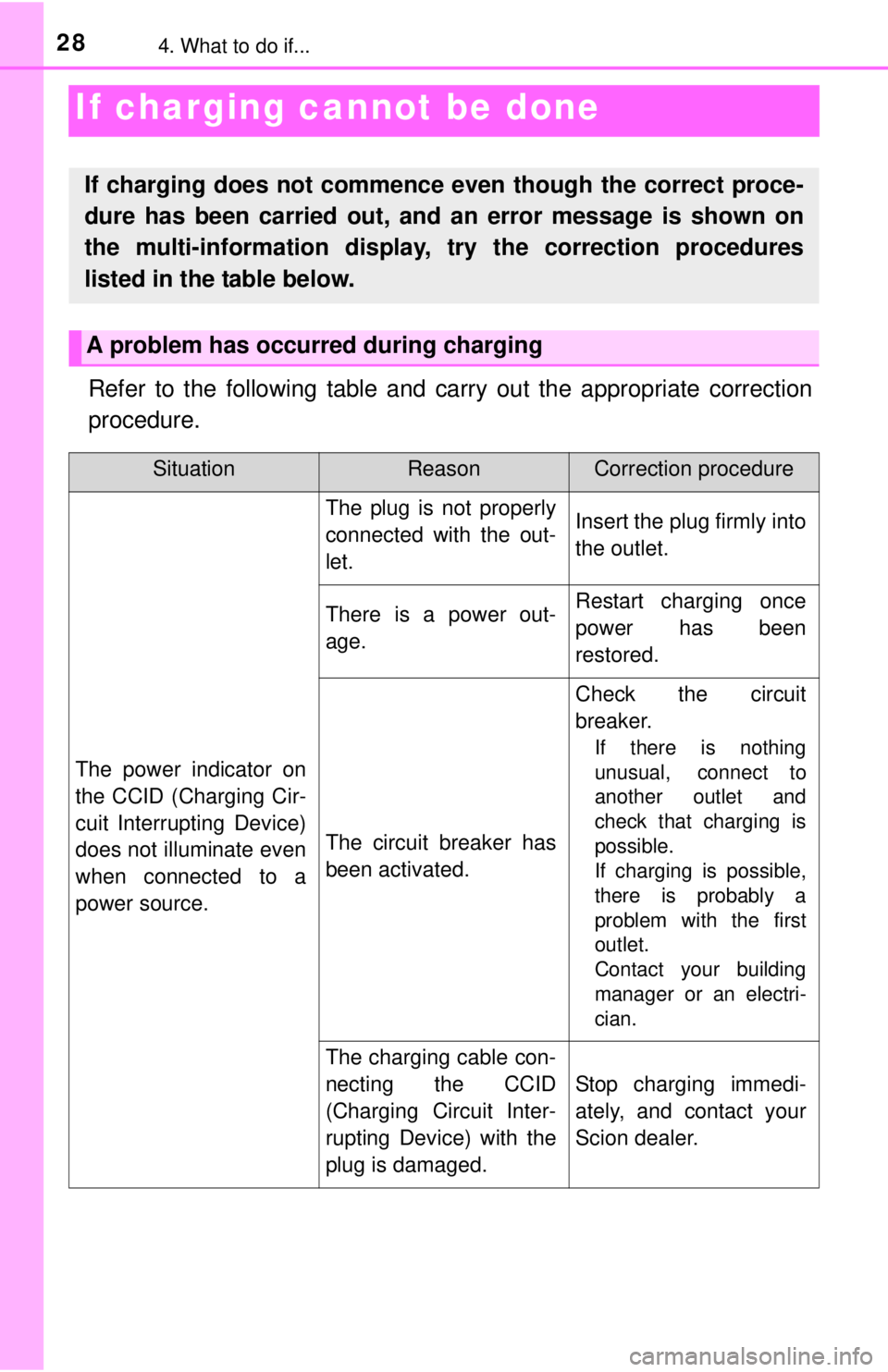
Refer to the following table and carry out the appropriate correction
procedure.
If charging does not commence even though the correct proce-
dure has been carried out, and an error message is shown on
the multi-information display, try the correction procedures
listed in the table below.
A problem has occurred during charging
SituationReasonCorrection procedure
The power indicator on
the CCID (Charging Cir-
cuit Interrupting Device)
does not illuminate even
when connected to a
power source.
The plug is not properly
connected with the out-
let.Insert the plug firmly into
the outlet.
There is a power out-
age.Restart charging once
power has been
restored.
The circuit breaker has
been activated.
Check the circuit
breaker.
If there is nothing
unusual, connect to
another outlet and
check that charging is
possible.
If charging is possible,
there is probably a
problem with the first
outlet.
Contact your building
manager or an electri-
cian.
The charging cable con-
necting the CCID
(Charging Circuit Inter-
rupting Device) with the
plug is damaged.
Stop charging immedi-
ately, and contact your
Scion dealer.
Page 29 of 36
294. What to do if...
4
What to do if...
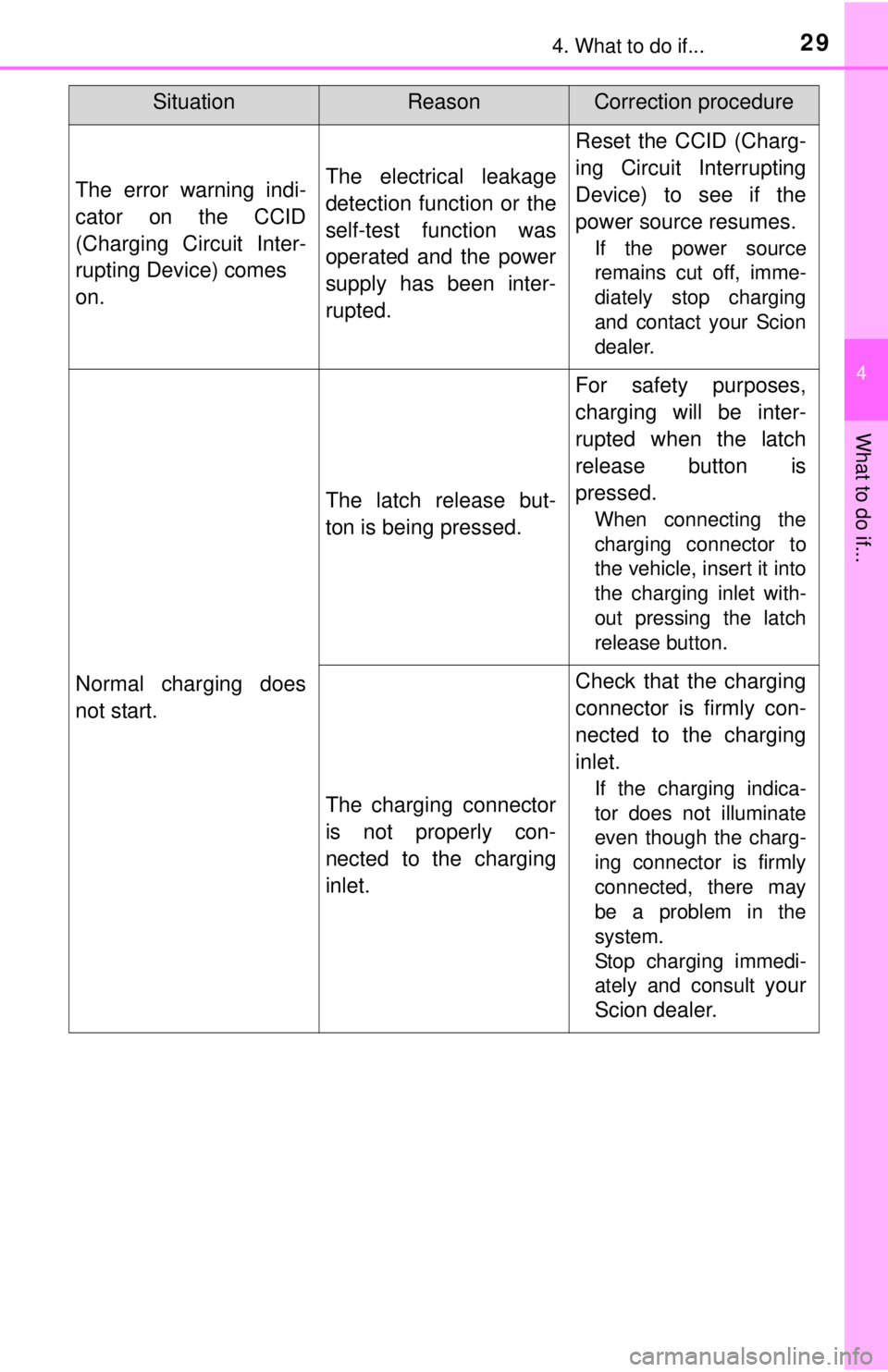
The error warning indi-
cator on the CCID
(Charging Circuit Inter-
rupting Device) comes
on.The electrical leakage
detection function or the
self-test function was
operated and the power
supply has been inter-
rupted.
Reset the CCID (Charg-
ing Circuit Interrupting
Device) to see if the
power source resumes.
If the power source
remains cut off, imme-
diately stop charging
and contact your Scion
dealer.
Normal charging does
not start.
The latch release but-
ton is being pressed.
For safety purposes,
charging will be inter-
rupted when the latch
release button is
pressed.
When connecting the
charging connector to
the vehicle, insert it into
the charging inlet with-
out pressing the latch
release button.
The charging connector
is not properly con-
nected to the charging
inlet.
Check that the charging
connector is firmly con-
nected to the charging
inlet.
If the charging indica-
tor does not illuminate
even though the charg-
ing connector is firmly
connected, there may
be a problem in the
system.
Stop charging immedi-
ately and consult
your
Scion dealer.
SituationReasonCorrection procedure
Page 30 of 36
304. What to do if...
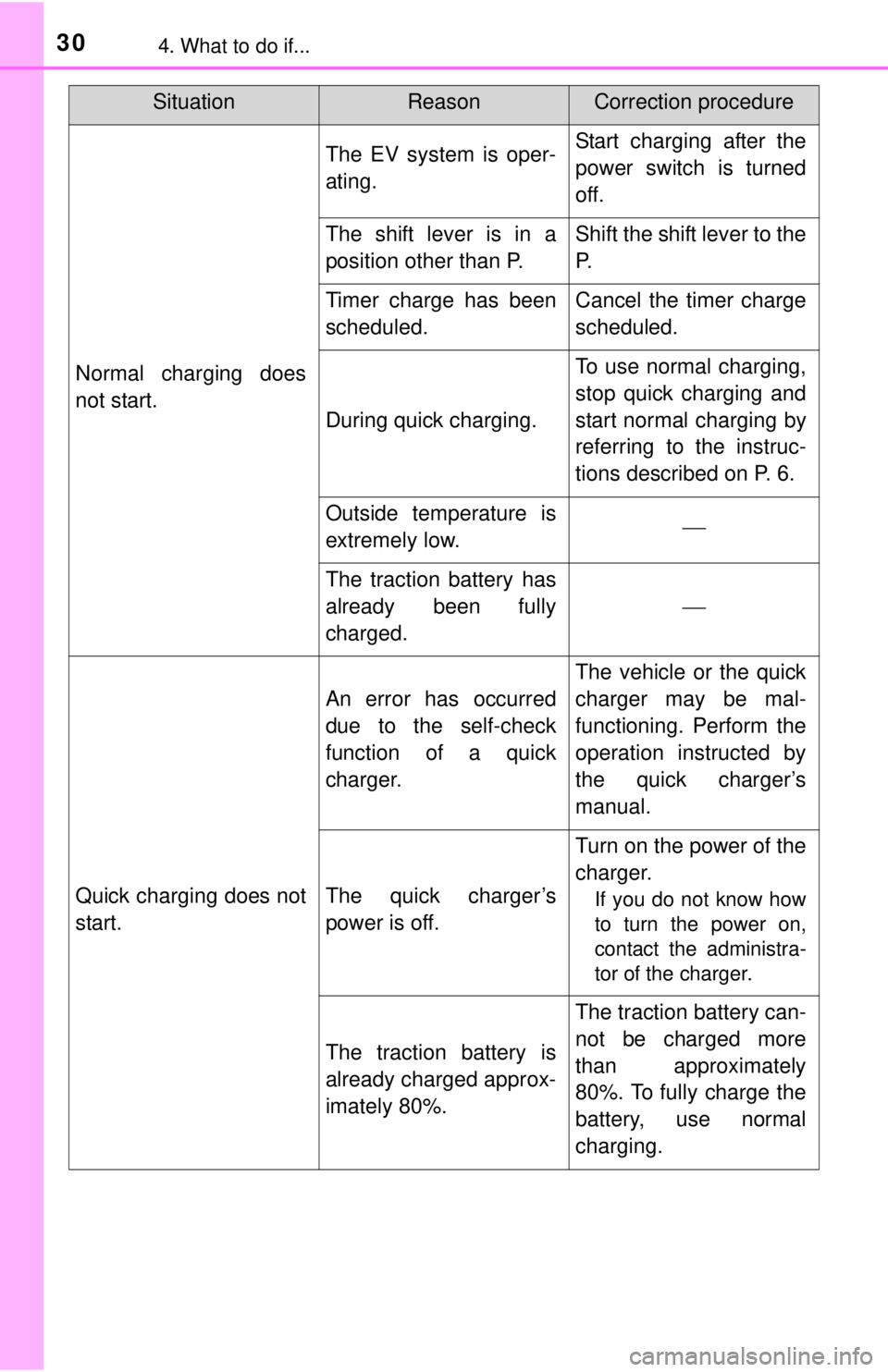
Normal charging does
not start.
The EV system is oper-
ating.Start charging after the
power switch is turned
off.
The shift lever is in a
position other than P.Shift the shift lever to the
P.
Timer charge has been
scheduled.Cancel the timer charge
scheduled.
During quick charging.
To use normal charging,
stop quick charging and
start normal charging by
referring to the instruc-
tions described on P. 6.
Outside temperature is
extremely low.
The traction battery has
already been fully
charged.
Quick charging does not
start.
An error has occurred
due to the self-check
function of a quick
charger.
The vehicle or the quick
charger may be mal-
functioning. Perform the
operation instructed by
the quick charger’s
manual.
The quick charger’s
power is off.
Turn on the power of the
charger.
If you do not know how
to turn the power on,
contact the administra-
tor of the charger.
The traction battery is
already charged approx-
imately 80%.
The traction battery can-
not be charged more
than approximately
80%. To fully charge the
battery, use normal
charging.
SituationReasonCorrection procedure
Page 31 of 36
314. What to do if...
4
What to do if...
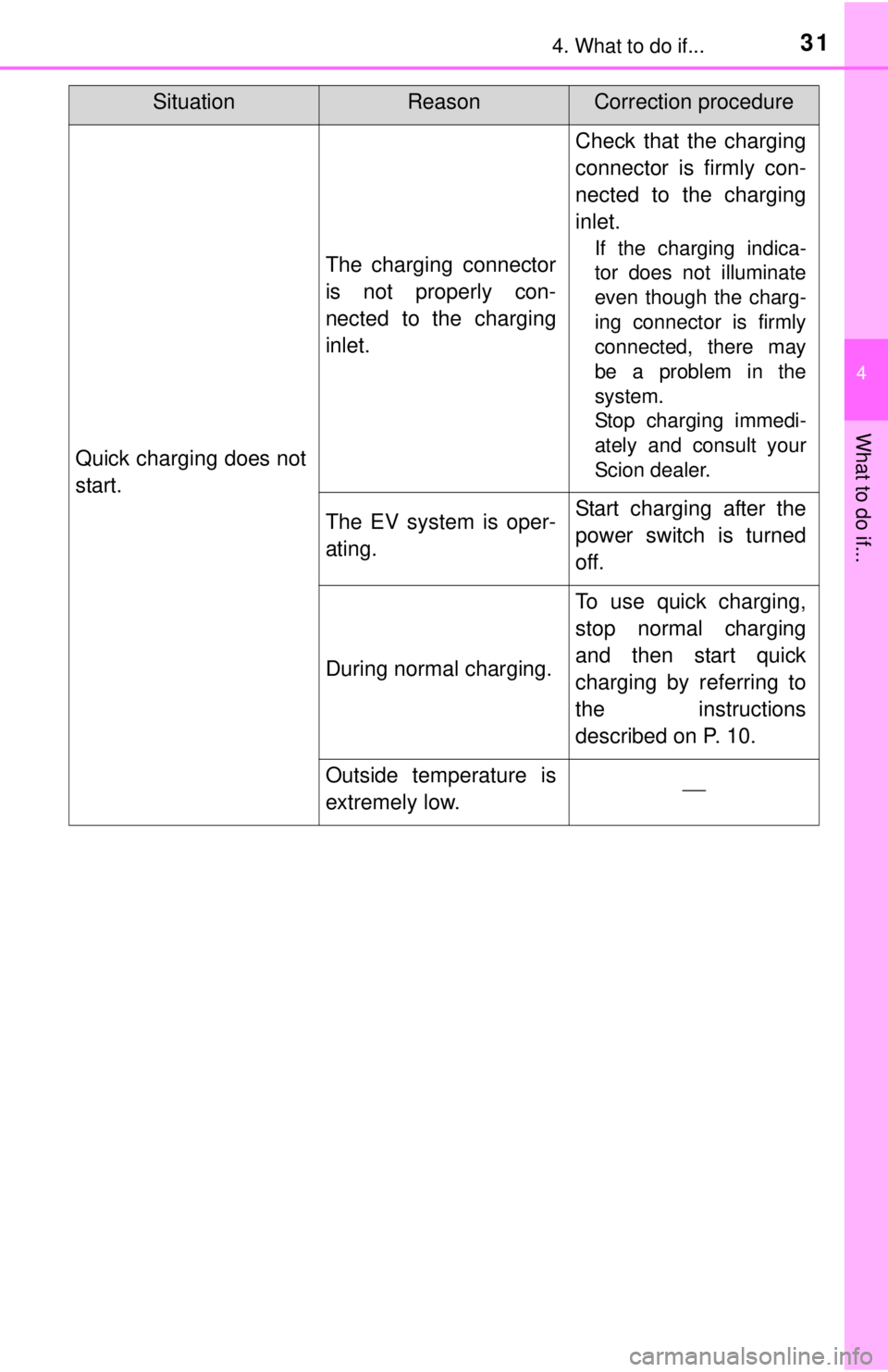
Quick charging does not
start.
The charging connector
is not properly con-
nected to the charging
inlet.
Check that the charging
connector is firmly con-
nected to the charging
inlet.
If the charging indica-
tor does not illuminate
even though the charg-
ing connector is firmly
connected, there may
be a problem in the
system.
Stop charging immedi-
ately and consult your
Scion dealer.
The EV system is oper-
ating.Start charging after the
power switch is turned
off.
During normal charging.
To use quick charging,
stop normal charging
and then start quick
charging by referring to
the instructions
described on P. 10.
Outside temperature is
extremely low.
SituationReasonCorrection procedure
Page 32 of 36
324. What to do if...
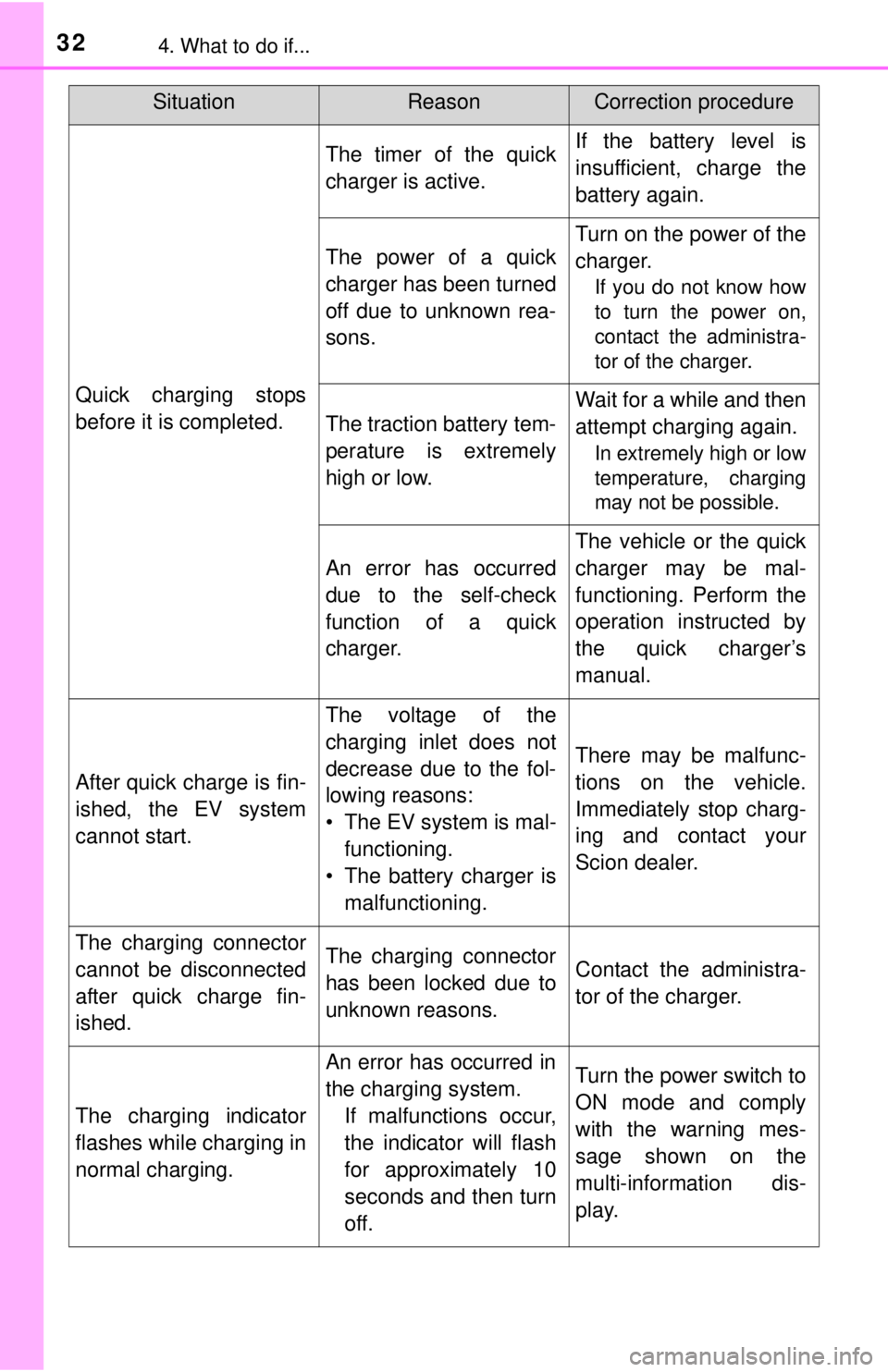
Quick charging stops
before it is completed.
The timer of the quick
charger is active.If the battery level is
insufficient, charge the
battery again.
The power of a quick
charger has been turned
off due to unknown rea-
sons.
Turn on the power of the
charger.
If you do not know how
to turn the power on,
contact the administra-
tor of the charger.
The traction battery tem-
perature is extremely
high or low.
Wait for a while and then
attempt charging again.
In extremely high or low
temperature, charging
may not be possible.
An error has occurred
due to the self-check
function of a quick
charger.
The vehicle or the quick
charger may be mal-
functioning. Perform the
operation instructed by
the quick charger’s
manual.
After quick charge is fin-
ished, the EV system
cannot start.
The voltage of the
charging inlet does not
decrease due to the fol-
lowing reasons:
• The EV system is mal-
functioning.
• The battery charger is
malfunctioning.
There may be malfunc-
tions on the vehicle.
Immediately stop charg-
ing and contact your
Scion dealer.
The charging connector
cannot be disconnected
after quick charge fin-
ished.The charging connector
has been locked due to
unknown reasons.Contact the administra-
tor of the charger.
The charging indicator
flashes while charging in
normal charging.
An error has occurred in
the charging system.
If malfunctions occur,
the indicator will flash
for approximately 10
seconds and then turn
off.Turn the power switch to
ON mode and comply
with the warning mes-
sage shown on the
multi-information dis-
play.
SituationReasonCorrection procedure
Page 35 of 36
354. What to do if...
4
What to do if...
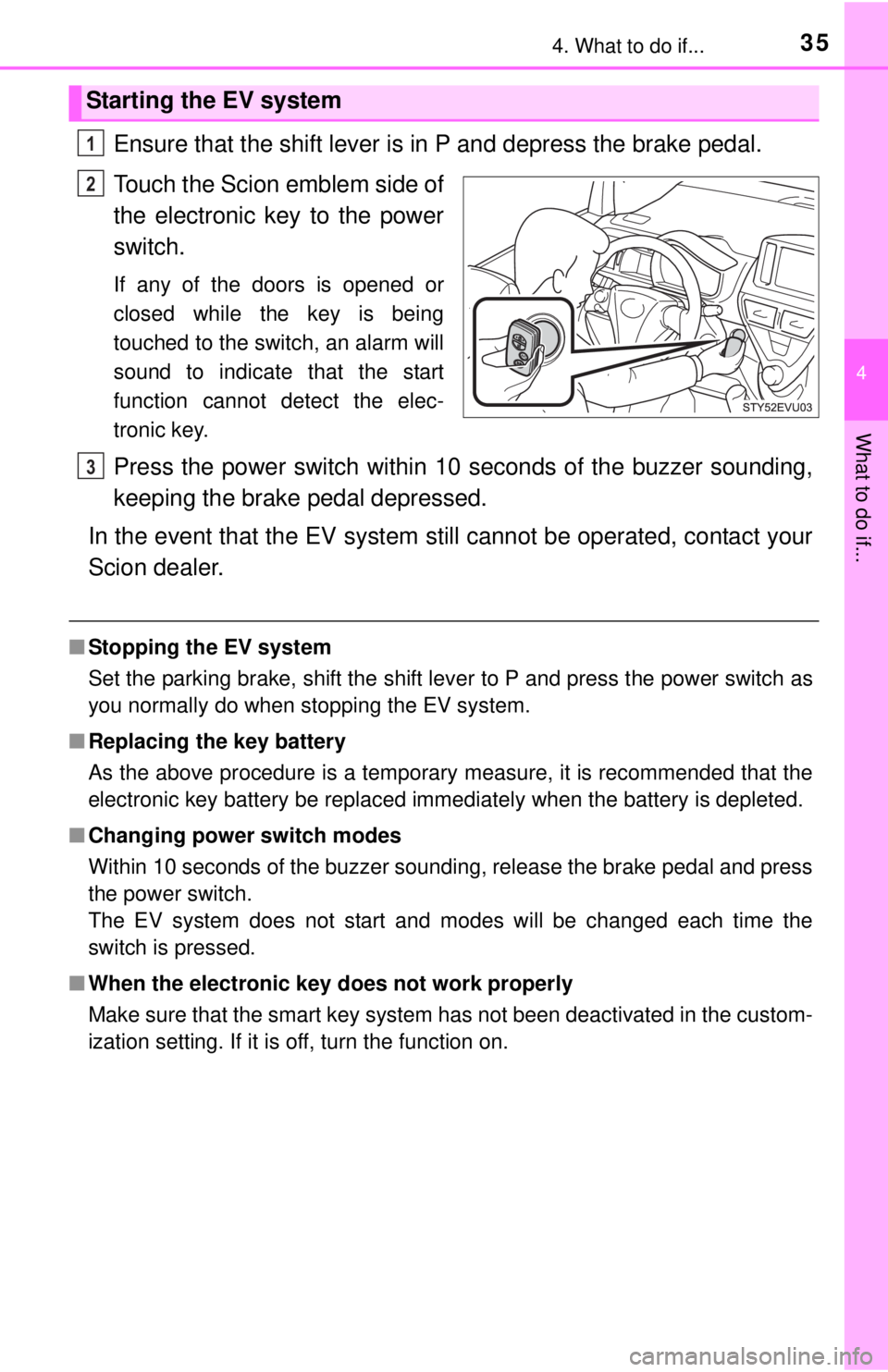
Ensure that the shift lever is in P and depress the brake pedal.
Touch the Scion emblem side of
the electronic key to the power
switch.
If any of the doors is opened or
closed while the key is being
touched to the switch, an alarm will
sound to indicate that the start
function cannot detect the elec-
tronic key.
Press the power switch within 10 seconds of the buzzer sounding,
keeping the brake pedal depressed.
In the event that the EV system still cannot be operated, contact your
Scion dealer.
■Stopping the EV system
Set the parking brake, shift the shift lever to P and press the power switch as
you normally do when stopping the EV system.
■Replacing the key battery
As the above procedure is a temporary measure, it is recommended that the
electronic key battery be replaced immediately when the battery is depleted.
■Changing power switch modes
Within 10 seconds of the buzzer sounding, release the brake pedal and press
the power switch.
The EV system does not start and modes will be changed each time the
switch is pressed.
■When the electronic key does not work properly
Make sure that the smart key system has not been deactivated in the custom-
ization setting. If it is off, turn the function on.
Starting the EV system
1
2
3